Why Password Strength Checkers Matter More Than Ever
Password breaches cost companies an average of $4.45 million per incident in 2024. The weakest link in almost every breach is not the encryption algorithm or the database — it’s the user’s password itself.
A password strength checker on your signup form serves three roles simultaneously:
Security role: Forces users away from trivially crackable passwords (password123, qwerty, admin). The top 10 most common passwords account for 17% of all accounts in data breach databases.
UX role: Real-time feedback removes friction from the signup process. Instead of receiving a validation error after submitting, users course-correct as they type. Forms with inline password meters have 18–35% higher completion rates than forms without them.
Trust role: A visible, well-designed strength indicator signals to users that you take their security seriously — increasing conversion on signup pages.
Dropping in an abandoned pwdMeter jQuery plugin from 2012 using jQuery 1.8.0 — fails on all three fronts in 2025. The pwdMeter plugin has not been maintained, uses deprecated jQuery methods, produces unreliable strength scores, and looks visually outdated.
This guide builds a modern, production-ready password strength system from the ground up:
- Version 1: Pure vanilla JavaScript (no dependencies)
- Version 2: jQuery enhancement with animated UI
- Version 3: zxcvbn integration (Dropbox’s realistic strength estimator)
- Version 4: Full signup form with PHP server-side validation
- Version 5: React component version
- Plus: NIST 2025 guidelines, accessibility, and common mistakes to avoid
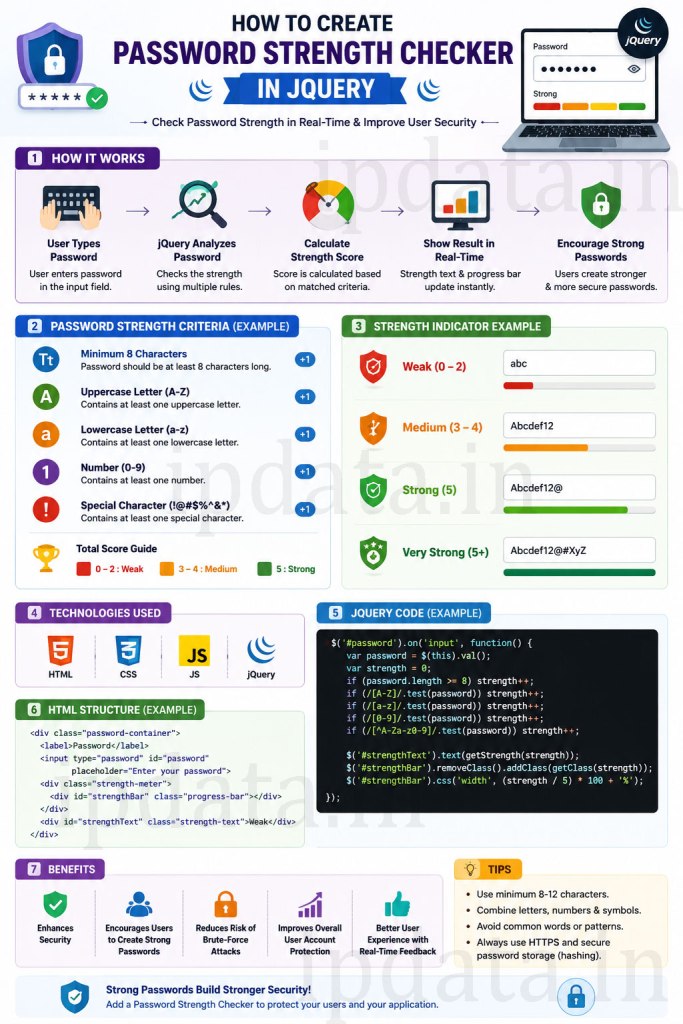
Part 1 — The Science: How Password Strength Is Actually Measured
Before writing any code, understand what “strength” actually means — because getting this wrong produces a security theatre that looks good but doesn’t work.
The Old (Wrong) Way: Character Class Rules
Most traditional checkers ask: does the password contain uppercase + lowercase + number + symbol?
Password: "P@ssword1"    → OLD CHECKER: ✅ STRONG
Password: "correct-horse-battery-staple" → OLD CHECKER: ❌ MEDIUM
This is backwards. P@ssword1 is in virtually every dictionary attack wordlist. correct-horse-battery-staple has ~44 bits of entropy and would take centuries to crack.
The Right Way: Entropy + Dictionary Awareness
A strong password has two properties:
1. High entropy (unpredictability)
Entropy measures how many guesses an attacker needs. It’s calculated as:
Entropy bits = log2(pool_size ^ length)

Pool sizes:
  Lowercase only (26 chars):      pool = 26
  + Uppercase (52 chars):         pool = 52
  + Numbers (62 chars):           pool = 62
  + Symbols ~32 (94 chars):       pool = 94

Example: "abc123" → log2(62^6) = ~35.7 bits  (crackable in minutes)
Example: "Tr0ub4dor&3" → log2(94^11) = ~72 bits  (years with current hardware)
2. Not in a dictionary or common pattern list
Entropy calculations assume random characters. But humans don’t choose randomly — they use password, 123456, qwerty, their name, their birth year, or leetspeak substitutions (p@ssw0rd). A good checker penalises known patterns.
NIST SP 800-63B Guidelines (2025 Update)
The National Institute of Standards and Technology updated their digital identity guidelines. The key changes that affect your password checker:
| Old Thinking | NIST 2025 Recommendation |
|---|---|
| Require complexity (upper/lower/number/symbol) | Don’t mandate complexity — it produces predictable patterns |
| Force password changes every 90 days | Don’t force periodic changes — only when compromise suspected |
| Limit password length to 64 characters | Allow up to 64+ characters (minimum 8 required) |
| Block copy-paste in password fields | Allow copy-paste — prevents weaker passwords |
| Show only ❌/✅ | Show strength feedback in real-time |
| Block special characters | Allow all printable ASCII and Unicode |
| Check against dictionary | Check against known compromised passwords (HIBP) |
Practical implementation implication: Your strength checker should reward length heavily, penalise common passwords (dictionary check), and reward character variety as a bonus — not as a strict requirement.
Part 2 — Version 1: Pure Vanilla JavaScript Password Strength Checker
No jQuery, no dependencies, no CDN. Pure modern JavaScript (ES6+) that works in every browser since 2016.
<!DOCTYPE html>
<html lang="en">
<head>
<meta charset="UTF-8">
<meta name="viewport" content="width=device-width, initial-scale=1.0">
<title>Password Strength Checker — Vanilla JS</title>
<style>
/* ── Reset & Base ─────────────────────────────────────────────── */
*, *::before, *::after { box-sizing: border-box; margin: 0; padding: 0; }
body {
font-family: -apple-system, 'Segoe UI', Roboto, sans-serif;
background: #f8fafc;
min-height: 100vh;
display: flex;
align-items: center;
justify-content: center;
padding: 20px;
}
/* ── Card ─────────────────────────────────────────────────────── */
.card {
background: #fff;
border-radius: 16px;
box-shadow: 0 4px 24px rgba(0,0,0,0.08);
padding: 36px 40px;
width: 100%;
max-width: 440px;
}
.card h1 {
font-size: 1.4rem;
font-weight: 700;
color: #111827;
margin-bottom: 6px;
}
.card p.subtitle {
color: #6b7280;
font-size: 0.9rem;
margin-bottom: 28px;
}
/* ── Form Fields ──────────────────────────────────────────────── */
.field { margin-bottom: 20px; }
label {
display: block;
font-size: 0.875rem;
font-weight: 600;
color: #374151;
margin-bottom: 6px;
}
/* ── Password Input Wrapper ───────────────────────────────────── */
.input-wrapper {
position: relative;
display: flex;
align-items: center;
}
input[type="password"],
input[type="text"] {
width: 100%;
padding: 11px 44px 11px 14px;
border: 1.5px solid #d1d5db;
border-radius: 10px;
font-size: 1rem;
color: #111827;
background: #fff;
outline: none;
transition: border-color 0.2s, box-shadow 0.2s;
font-family: inherit;
}
input:focus {
border-color: #6366f1;
box-shadow: 0 0 0 3px rgba(99,102,241,0.12);
}
/* ── Toggle Visibility Button ─────────────────────────────────── */
.toggle-visibility {
position: absolute;
right: 12px;
background: none;
border: none;
cursor: pointer;
color: #9ca3af;
padding: 4px;
display: flex;
align-items: center;
border-radius: 4px;
transition: color 0.2s;
}
.toggle-visibility:hover { color: #374151; }
.toggle-visibility:focus-visible {
outline: 2px solid #6366f1;
outline-offset: 2px;
}
/* ── Strength Bar ─────────────────────────────────────────────── */
.strength-section {
margin-top: 12px;
display: none; /* Hidden until user starts typing */
}
.strength-section.visible { display: block; }
.strength-bar-track {
height: 6px;
background: #e5e7eb;
border-radius: 99px;
overflow: hidden;
margin-bottom: 8px;
}
.strength-bar-fill {
height: 100%;
border-radius: 99px;
width: 0%;
transition: width 0.4s cubic-bezier(0.4, 0, 0.2, 1),
background-color 0.3s ease;
}
/* ── Strength Labels ──────────────────────────────────────────── */
.strength-meta {
display: flex;
justify-content: space-between;
align-items: center;
margin-bottom: 12px;
}
.strength-label {
font-size: 0.82rem;
font-weight: 600;
}
.strength-score {
font-size: 0.75rem;
color: #9ca3af;
}
/* ── Strength Colors ─────────────────────────────────────────── */
.strength-0 .strength-bar-fill { width: 10%; background: #ef4444; }
.strength-0 .strength-label { color: #ef4444; }
.strength-1 .strength-bar-fill { width: 25%; background: #f97316; }
.strength-1 .strength-label { color: #f97316; }
.strength-2 .strength-bar-fill { width: 50%; background: #eab308; }
.strength-2 .strength-label { color: #ca8a04; }
.strength-3 .strength-bar-fill { width: 75%; background: #22c55e; }
.strength-3 .strength-label { color: #16a34a; }
.strength-4 .strength-bar-fill { width: 100%; background: #10b981; }
.strength-4 .strength-label { color: #059669; }
/* ── Requirements Checklist ───────────────────────────────────── */
.requirements {
list-style: none;
display: grid;
grid-template-columns: 1fr 1fr;
gap: 5px;
}
.requirement {
display: flex;
align-items: center;
gap: 6px;
font-size: 0.78rem;
color: #9ca3af;
transition: color 0.2s;
}
.requirement.met { color: #16a34a; }
.requirement.failed { color: #ef4444; }
.req-icon {
width: 14px;
height: 14px;
flex-shrink: 0;
}
/* ── Entropy Display ─────────────────────────────────────────── */
.entropy-info {
margin-top: 10px;
padding: 8px 12px;
background: #f8fafc;
border-radius: 8px;
font-size: 0.76rem;
color: #6b7280;
display: flex;
justify-content: space-between;
}
/* ── Submit Button ────────────────────────────────────────────── */
.submit-btn {
width: 100%;
padding: 12px;
background: #6366f1;
color: #fff;
border: none;
border-radius: 10px;
font-size: 0.95rem;
font-weight: 600;
cursor: pointer;
margin-top: 8px;
transition: background 0.2s, transform 0.1s;
font-family: inherit;
}
.submit-btn:hover { background: #4f46e5; }
.submit-btn:disabled { background: #d1d5db; cursor: not-allowed; }
.submit-btn:active:not(:disabled) { transform: scale(0.99); }
/* ── Crack Time ───────────────────────────────────────────────── */
.crack-time {
text-align: center;
font-size: 0.75rem;
color: #9ca3af;
margin-top: 6px;
}
/* ── Responsive ───────────────────────────────────────────────── */
@media (max-width: 480px) {
.card { padding: 28px 24px; }
.requirements { grid-template-columns: 1fr; }
}
</style>
</head>
<body>
<div class="card">
<h1>Create Your Account</h1>
<p class="subtitle">Choose a strong password to keep your account safe.</p>
<form id="signup-form" novalidate>
<!-- Email Field -->
<div class="field">
<label for="email">Email Address</label>
<div class="input-wrapper">
<input type="email" id="email" name="email"
placeholder="you@example.com"
autocomplete="email" required>
</div>
</div>
<!-- Password Field -->
<div class="field">
<label for="password">Password</label>
<div class="input-wrapper">
<input type="password" id="password" name="password"
placeholder="Create a strong password"
autocomplete="new-password"
aria-describedby="strength-status requirements-list"
required>
<button type="button"
class="toggle-visibility"
id="toggle-pwd"
aria-label="Show password"
aria-pressed="false">
<!-- Eye icon (show) -->
<svg class="req-icon eye-icon" viewBox="0 0 24 24" fill="none"
stroke="currentColor" stroke-width="2">
<path d="M1 12s4-8 11-8 11 8 11 8-4 8-11 8-11-8-11-8z"/>
<circle cx="12" cy="12" r="3"/>
</svg>
</button>
</div>
<!-- Strength Meter -->
<div class="strength-section" id="strength-section"
role="status" aria-live="polite" aria-atomic="true">
<div class="strength-bar-track">
<div class="strength-bar-fill" id="strength-bar" aria-hidden="true"></div>
</div>
<div class="strength-meta">
<span class="strength-label" id="strength-label" aria-hidden="true">
Checking…
</span>
<span class="strength-score" id="strength-score" aria-hidden="true"></span>
</div>
<!-- Screen reader only text -->
<span id="strength-status" class="sr-only" style="position:absolute;clip:rect(0,0,0,0);">
Password strength: <span id="strength-sr-text"></span>
</span>
<!-- Requirements Checklist -->
<ul class="requirements"
id="requirements-list"
role="list"
aria-label="Password requirements">
<li class="requirement" id="req-length"
role="listitem" aria-live="polite">
<svg class="req-icon" viewBox="0 0 24 24" fill="none"
stroke="currentColor" stroke-width="2.5">
<circle cx="12" cy="12" r="10" class="circle"/>
</svg>
<span>8+ characters</span>
</li>
<li class="requirement" id="req-uppercase" role="listitem" aria-live="polite">
<svg class="req-icon" viewBox="0 0 24 24" fill="none"
stroke="currentColor" stroke-width="2.5">
<circle cx="12" cy="12" r="10" class="circle"/>
</svg>
<span>Uppercase letter</span>
</li>
<li class="requirement" id="req-number" role="listitem" aria-live="polite">
<svg class="req-icon" viewBox="0 0 24 24" fill="none"
stroke="currentColor" stroke-width="2.5">
<circle cx="12" cy="12" r="10" class="circle"/>
</svg>
<span>Number (0–9)</span>
</li>
<li class="requirement" id="req-special" role="listitem" aria-live="polite">
<svg class="req-icon" viewBox="0 0 24 24" fill="none"
stroke="currentColor" stroke-width="2.5">
<circle cx="12" cy="12" r="10" class="circle"/>
</svg>
<span>Special character</span>
</li>
<li class="requirement" id="req-long" role="listitem" aria-live="polite">
<svg class="req-icon" viewBox="0 0 24 24" fill="none"
stroke="currentColor" stroke-width="2.5">
<circle cx="12" cy="12" r="10" class="circle"/>
</svg>
<span>12+ characters</span>
</li>
<li class="requirement" id="req-no-common" role="listitem" aria-live="polite">
<svg class="req-icon" viewBox="0 0 24 24" fill="none"
stroke="currentColor" stroke-width="2.5">
<circle cx="12" cy="12" r="10" class="circle"/>
</svg>
<span>Not a common password</span>
</li>
</ul>
<!-- Entropy and Crack Time -->
<div class="entropy-info" id="entropy-info" style="display:none;">
<span>Entropy: <strong id="entropy-bits">0</strong> bits</span>
<span>Est. crack time: <strong id="crack-time">instant</strong></span>
</div>
</div>
</div>
<!-- Confirm Password -->
<div class="field">
<label for="confirm-password">Confirm Password</label>
<div class="input-wrapper">
<input type="password" id="confirm-password" name="confirm_password"
placeholder="Repeat your password"
autocomplete="new-password" required>
</div>
<p id="match-msg" style="font-size:.78rem;margin-top:5px;display:none;"></p>
</div>
<button type="submit" class="submit-btn" id="submit-btn" disabled>
Create Account
</button>
<p class="crack-time" id="form-strength-hint"></p>
</form>
</div>
<script>
'use strict';
// ─────────────────────────────────────────────────────────────────────────────
// PASSWORD STRENGTH ENGINE
// Scores passwords 0–4 based on entropy, character variety, and patterns.
// ─────────────────────────────────────────────────────────────────────────────
// Most common passwords — subset of the top-1000 (expand this list in production)
const COMMON_PASSWORDS = new Set([
'password','password1','password123','123456','12345678','qwerty','abc123',
'iloveyou','admin','letmein','welcome','monkey','dragon','master','sunshine',
'princess','shadow','superman','michael','football','baseball','soccer',
'123456789','1234567890','pass','test','root','hello','login','user',
'trustno1','zxcvbn','passw0rd','p@ssword','p@ssw0rd','Password1',
'qwerty123','abc12345','123abc','password!','pass1234','1q2w3e4r',
]);
// Patterns that indicate weak passwords
const KEYBOARD_PATTERNS = [
'qwerty','asdfgh','zxcvbn','qweasd','qweasdzxc',
'12345','23456','34567','45678','56789',
'abcdef','bcdefg','cdefgh',
'11111','22222','33333','aaaa','bbbb',
];
/**
* Calculate password entropy in bits.
* Uses pool size detection based on character classes used.
*/
function calculateEntropy(password) {
if (!password) return 0;
let poolSize = 0;
if (/[a-z]/.test(password)) poolSize += 26;
if (/[A-Z]/.test(password)) poolSize += 26;
if (/[0-9]/.test(password)) poolSize += 10;
if (/[^a-zA-Z0-9]/.test(password)) poolSize += 32;
if (poolSize === 0) return 0;
// Entropy = log2(poolSize^length)
const entropy = Math.log2(Math.pow(poolSize, password.length));
return Math.round(entropy * 10) / 10;
}
/**
* Estimate crack time based on entropy bits.
* Assumes a fast online attack: ~10,000 guesses/second (rate-limited)
* For offline attacks (bcrypt): ~100,000 guesses/second
*/
function estimateCrackTime(bits) {
// Guesses = 2^bits / 2 (expected value — attacker finds it halfway through)
const guesses_per_second = 10000; // Online attack (rate-limited)
const seconds = Math.pow(2, bits) / 2 / guesses_per_second;
if (seconds < 1) return 'instantly';
if (seconds < 60) return `${Math.round(seconds)} seconds`;
if (seconds < 3600) return `${Math.round(seconds/60)} minutes`;
if (seconds < 86400) return `${Math.round(seconds/3600)} hours`;
if (seconds < 2592000) return `${Math.round(seconds/86400)} days`;
if (seconds < 31536000) return `${Math.round(seconds/2592000)} months`;
if (seconds < 3153600000) return `${Math.round(seconds/31536000)} years`;
return 'centuries';
}
/**
* Check password against known patterns and common passwords.
* Returns true if password appears safe (not a common pattern).
*/
function isNotCommon(password) {
const lower = password.toLowerCase();
// Direct dictionary check
if (COMMON_PASSWORDS.has(lower)) return false;
if (COMMON_PASSWORDS.has(password)) return false;
// Keyboard pattern check
for (const pattern of KEYBOARD_PATTERNS) {
if (lower.includes(pattern)) return false;
}
// Repeated characters (e.g., 'aaaaaaa', '1111111')
if (/^(.)\1{3,}$/.test(password)) return false;
// Sequential numbers or letters
if (/^(012|123|234|345|456|567|678|789|890|987|876|765)/.test(password)) {
if (password.length < 10) return false;
}
return true;
}
/**
* Main strength analysis function.
* Returns: { score: 0–4, label, color, entropy, crackTime, checks }
*/
function analyzePassword(password) {
if (!password) {
return { score: -1, label: '', entropy: 0, crackTime: '' };
}
const checks = {
length: password.length >= 8,
uppercase: /[A-Z]/.test(password),
number: /[0-9]/.test(password),
special: /[^a-zA-Z0-9]/.test(password),
longEnough:password.length >= 12,
notCommon: isNotCommon(password),
};
const entropy = calculateEntropy(password);
const crackTime = estimateCrackTime(entropy);
// Scoring algorithm
let score = 0;
if (!checks.length) return { score: 0, label: 'Very Weak', checks, entropy, crackTime };
if (!checks.notCommon) return { score: 0, label: 'Very Weak (common password)', checks, entropy, crackTime };
score++; // At least 8 chars and not common → score 1
// Reward character variety
const variety = [checks.uppercase, checks.number, checks.special].filter(Boolean).length;
if (variety >= 2) score++;
if (variety === 3) score++;
// Reward length
if (checks.longEnough) score++;
// Cap at 4
score = Math.min(score, 4);
// Entropy check — downgrade if entropy is too low despite passing checks
if (entropy < 28 && score > 1) score = 1;
if (entropy < 40 && score > 2) score = 2;
if (entropy < 56 && score > 3) score = 3;
const labels = ['Very Weak', 'Weak', 'Fair', 'Strong', 'Very Strong'];
return {
score,
label: labels[score] || 'Unknown',
checks,
entropy,
crackTime,
};
}
// ─────────────────────────────────────────────────────────────────────────────
// DOM MANIPULATION & UI UPDATES
// ─────────────────────────────────────────────────────────────────────────────
const passwordInput = document.getElementById('password');
const confirmInput = document.getElementById('confirm-password');
const strengthSection = document.getElementById('strength-section');
const strengthBar = document.getElementById('strength-bar');
const strengthLabel = document.getElementById('strength-label');
const strengthScore = document.getElementById('strength-score');
const strengthSrText = document.getElementById('strength-sr-text');
const entropyInfo = document.getElementById('entropy-info');
const entropyBits = document.getElementById('entropy-bits');
const crackTimeEl = document.getElementById('crack-time');
const matchMsg = document.getElementById('match-msg');
const submitBtn = document.getElementById('submit-btn');
const toggleBtn = document.getElementById('toggle-pwd');
// Requirement element mapping
const reqElements = {
length: document.getElementById('req-length'),
uppercase: document.getElementById('req-uppercase'),
number: document.getElementById('req-number'),
special: document.getElementById('req-special'),
longEnough:document.getElementById('req-long'),
notCommon: document.getElementById('req-no-common'),
};
// Check mark SVG path
const CHECK_SVG = `<path d="M20 6L9 17l-5-5" stroke-width="2.5" stroke-linecap="round" stroke-linejoin="round"/>`;
const CIRCLE_SVG = `<circle cx="12" cy="12" r="10"/>`;
const CROSS_SVG = `<path d="M18 6L6 18M6 6l12 12" stroke-width="2.5" stroke-linecap="round"/>`;
/**
* Update a single requirement item's visual state.
*/
function updateRequirement(el, met, active) {
const svg = el.querySelector('svg');
if (!active) {
el.className = 'requirement';
svg.innerHTML = CIRCLE_SVG;
el.querySelector('span').removeAttribute('aria-label');
return;
}
if (met) {
el.className = 'requirement met';
svg.innerHTML = CHECK_SVG;
el.setAttribute('aria-label', el.querySelector('span').textContent + ': satisfied');
} else {
el.className = 'requirement failed';
svg.innerHTML = CROSS_SVG;
el.setAttribute('aria-label', el.querySelector('span').textContent + ': not satisfied');
}
}
/**
* Update the entire strength UI based on analysis result.
*/
function updateStrengthUI(analysis) {
const { score, label, checks, entropy, crackTime } = analysis;
const container = strengthSection.parentElement;
// Show/hide strength section
if (score === -1) {
strengthSection.classList.remove('visible');
entropyInfo.style.display = 'none';
return;
}
strengthSection.classList.add('visible');
// Remove all strength classes from bar track
const track = strengthBar.parentElement;
for (let i = 0; i <= 4; i++) track.classList.remove(`strength-${i}`);
track.classList.add(`strength-${score}`);
// Remove strength classes from section
strengthSection.className = 'strength-section visible';
// Update labels
strengthLabel.textContent = label;
strengthScore.textContent = `${score}/4`;
strengthSrText.textContent = `${label}, ${score} out of 4`;
// Update requirements checklist
const hasInput = passwordInput.value.length > 0;
Object.entries(checks || {}).forEach(([key, met]) => {
if (reqElements[key]) {
updateRequirement(reqElements[key], met, hasInput);
}
});
// Update entropy info
if (entropy > 0) {
entropyInfo.style.display = 'flex';
entropyBits.textContent = entropy;
crackTimeEl.textContent = crackTime;
} else {
entropyInfo.style.display = 'none';
}
}
/**
* Check if passwords match and update UI.
*/
function checkPasswordMatch() {
const pwd = passwordInput.value;
const confirm = confirmInput.value;
if (!confirm) {
matchMsg.style.display = 'none';
return false;
}
matchMsg.style.display = 'block';
if (pwd === confirm) {
matchMsg.textContent = '✓ Passwords match';
matchMsg.style.color = '#16a34a';
confirmInput.style.borderColor = '#16a34a';
return true;
} else {
matchMsg.textContent = '✗ Passwords do not match';
matchMsg.style.color = '#ef4444';
confirmInput.style.borderColor = '#ef4444';
return false;
}
}
// ── Current analysis state ──────────────────────────────────────────────────
let currentAnalysis = null;
// ── Password input event ────────────────────────────────────────────────────
passwordInput.addEventListener('input', function() {
currentAnalysis = analyzePassword(this.value);
updateStrengthUI(currentAnalysis);
checkPasswordMatch();
updateSubmitButton();
});
// ── Confirm password event ──────────────────────────────────────────────────
confirmInput.addEventListener('input', function() {
checkPasswordMatch();
updateSubmitButton();
if (this.value === '') {
this.style.borderColor = '';
}
});
// ── Toggle password visibility ──────────────────────────────────────────────
toggleBtn.addEventListener('click', function() {
const isPassword = passwordInput.type === 'password';
passwordInput.type = isPassword ? 'text' : 'password';
this.setAttribute('aria-pressed', String(isPassword));
this.setAttribute('aria-label', isPassword ? 'Hide password' : 'Show password');
// Update icon
this.querySelector('svg').innerHTML = isPassword
? `<path d="M17.94 17.94A10.07 10.07 0 0112 20c-7 0-11-8-11-8a18.45 18.45 0 015.06-5.94M9.9 4.24A9.12 9.12 0 0112 4c7 0 11 8 11 8a18.5 18.5 0 01-2.16 3.19m-6.72-1.07a3 3 0 11-4.24-4.24"/><line x1="1" y1="1" x2="23" y2="23"/>`
: `<path d="M1 12s4-8 11-8 11 8 11 8-4 8-11 8-11-8-11-8z"/><circle cx="12" cy="12" r="3"/>`;
});
// ── Enable/disable submit button ────────────────────────────────────────────
function updateSubmitButton() {
const validScore = currentAnalysis && currentAnalysis.score >= 2;
const passwordsMatch = passwordInput.value &&
confirmInput.value &&
passwordInput.value === confirmInput.value;
const emailFilled = document.getElementById('email').value.includes('@');
submitBtn.disabled = !(validScore && passwordsMatch && emailFilled);
}
document.getElementById('email').addEventListener('input', updateSubmitButton);
// ── Form submission ─────────────────────────────────────────────────────────
document.getElementById('signup-form').addEventListener('submit', function(e) {
e.preventDefault();
if (currentAnalysis && currentAnalysis.score < 2) {
alert('Please choose a stronger password.');
passwordInput.focus();
return;
}
if (passwordInput.value !== confirmInput.value) {
alert('Passwords do not match.');
confirmInput.focus();
return;
}
// ✅ Validation passed — submit to server
const formData = new FormData(this);
console.log('Form ready to submit:', Object.fromEntries(formData));
alert('Account created! (Demo — no actual submission)');
});
</script>
</body>
</html>
Part 3 — Version 2: jQuery Enhanced Password Strength Checker
For projects already using jQuery (WordPress themes, Bootstrap projects, legacy codebases), here’s the same system enhanced with jQuery’s animation API:
<!DOCTYPE html>
<html lang="en">
<head>
    <meta charset="UTF-8">
    <title>Password Strength — jQuery Version</title>
    <!-- Using jQuery 3.7 — NOT 1.8 from 2012 -->
    <script src="https://cdnjs.cloudflare.com/ajax/libs/jquery/3.7.1/jquery.min.js"></script>
    <style>
        /* Include the same CSS from Version 1 above */
        /* + jQuery-specific additions below: */

        .strength-bar-fill {
            transition: width 0.5s cubic-bezier(0.4, 0, 0.2, 1),
                        background-color 0.4s ease;
        }

        /* Animated segment bars (alternative to single bar) */
        .segment-bars {
            display: flex;
            gap: 4px;
            margin-bottom: 8px;
        }

        .segment {
            flex: 1;
            height: 5px;
            background: #e5e7eb;
            border-radius: 99px;
            transition: background-color 0.3s ease;
        }

        .segment.active-0 { background: #ef4444; }
        .segment.active-1 { background: #f97316; }
        .segment.active-2 { background: #eab308; }
        .segment.active-3 { background: #22c55e; }
        .segment.active-4 { background: #10b981; }
    </style>
</head>
<body>

<div class="card">
    <h1>Create Account</h1>
    <p class="subtitle">jQuery-powered password strength meter</p>

    <form id="signup-form">
        <div class="field">
            <label for="pwd">Password</label>
            <div class="input-wrapper">
                <input type="password" id="pwd" name="password"
                       autocomplete="new-password"
                       placeholder="Create a strong password">
                <button type="button" id="toggle-pwd" class="toggle-visibility"
                        aria-label="Show password" aria-pressed="false">
                    <svg viewBox="0 0 24 24" width="18" height="18" fill="none"
                         stroke="currentColor" stroke-width="2">
                        <path d="M1 12s4-8 11-8 11 8 11 8-4 8-11 8-11-8-11-8z"/>
                        <circle cx="12" cy="12" r="3"/>
                    </svg>
                </button>
            </div>

            <!-- Segment bar (5 segments = 5 strength levels) -->
            <div class="segment-bars" id="segments" style="display:none;">
                <div class="segment" data-segment="0"></div>
                <div class="segment" data-segment="1"></div>
                <div class="segment" data-segment="2"></div>
                <div class="segment" data-segment="3"></div>
                <div class="segment" data-segment="4"></div>
            </div>

            <div id="strength-info" style="display:none;font-size:.82rem;margin-bottom:10px;">
                <span id="jq-strength-label" style="font-weight:600;"></span>
                <span id="jq-entropy" style="color:#9ca3af;margin-left:8px;"></span>
            </div>

            <!-- jQuery-powered requirements with animation -->
            <ul id="jq-requirements" style="list-style:none;display:none;font-size:.78rem;color:#9ca3af;">
                <li data-check="length"   >⬜ At least 8 characters</li>
                <li data-check="uppercase">⬜ One uppercase letter (A–Z)</li>
                <li data-check="number"   >⬜ One number (0–9)</li>
                <li data-check="special"  >⬜ One special character (!@#$...)</li>
                <li data-check="longEnough">⬜ 12+ characters (recommended)</li>
                <li data-check="notCommon">⬜ Not a common password</li>
            </ul>
        </div>

        <!-- Confirm password -->
        <div class="field" style="margin-top:16px;">
            <label for="pwd-confirm">Confirm Password</label>
            <input type="password" id="pwd-confirm" name="confirm_password"
                   autocomplete="new-password" placeholder="Repeat your password">
            <p id="jq-match" style="font-size:.78rem;margin-top:5px;display:none;"></p>
        </div>

        <button type="submit" id="jq-submit" class="submit-btn" disabled>
            Create Account
        </button>
    </form>
</div>

<script>
$(function() {
    'use strict';

    // ── Include the same analyzePassword, calculateEntropy,
    //    estimateCrackTime, isNotCommon functions from Part 2 ──────────────
    // (Paste them here — omitted for brevity, they're identical)

    // ── jQuery-specific UI code ──────────────────────────────────────────

    const STRENGTH_COLORS = ['#ef4444','#f97316','#eab308','#22c55e','#10b981'];
    const STRENGTH_LABELS = ['Very Weak','Weak','Fair','Strong','Very Strong'];

    let currentScore = -1;

    // ── Password input handler ────────────────────────────────────────────
    $('#pwd').on('input', function() {
        const password = $(this).val();
        const analysis = analyzePassword(password);

        currentScore = analysis.score;

        if (password.length === 0) {
            $('#segments, #strength-info, #jq-requirements').hide();
            $('#jq-submit').prop('disabled', true);
            return;
        }

        // Show sections with jQuery's fadeIn
        $('#segments').fadeIn(200);
        $('#strength-info').fadeIn(200);
        $('#jq-requirements').fadeIn(200);

        // Update segment bars with animation
        updateSegments(analysis.score);

        // Update strength label with colour
        $('#jq-strength-label').text(STRENGTH_LABELS[analysis.score] || 'Unknown')
            .css('color', STRENGTH_COLORS[analysis.score] || '#9ca3af');

        // Update entropy
        if (analysis.entropy > 0) {
            $('#jq-entropy').text(
                `${analysis.entropy} bits · crack: ${analysis.crackTime}`
            );
        }

        // Update requirement checklist
        updateRequirementsJQ(analysis.checks);

        // Update submit button
        updateSubmitJQ();
    });

    // ── Segment bar animation ─────────────────────────────────────────────
    function updateSegments(score) {
        $('#segments .segment').each(function(index) {
            const $seg = $(this);
            const delay = index * 60;

            setTimeout(function() {
                // Remove all active classes
                $seg.removeClass('active-0 active-1 active-2 active-3 active-4');

                // Add active class if segment is within score
                if (index <= score) {
                    $seg.addClass(`active-${score}`);
                }
            }, delay);
        });
    }

    // ── Requirements checklist update ────────────────────────────────────
    function updateRequirementsJQ(checks) {
        $('#jq-requirements li').each(function() {
            const key = $(this).data('check');
            const met = checks && checks[key];

            $(this)
                .text((met ? '✅' : '❌') + ' ' + $(this).text().slice(2).trim())
                .css('color', met ? '#16a34a' : '#ef4444')
                .css('fontWeight', met ? '500' : '400');
        });
    }

    // ── Confirm password match ─────────────────────────────────────────
    $('#pwd-confirm').on('input', function() {
        const match = $(this).val() === $('#pwd').val();
        const $msg  = $('#jq-match');

        if (!$(this).val()) {
            $msg.hide();
            $(this).css('border-color', '');
            return;
        }

        $msg.show()
            .text(match ? '✓ Passwords match' : '✗ Passwords do not match')
            .css('color', match ? '#16a34a' : '#ef4444');

        $(this).css('border-color', match ? '#16a34a' : '#ef4444');

        updateSubmitJQ();
    });

    // ── Toggle password visibility ────────────────────────────────────────
    $('#toggle-pwd').on('click', function() {
        const $input  = $('#pwd');
        const isHidden = $input.attr('type') === 'password';
        $input.attr('type', isHidden ? 'text' : 'password');
        $(this).attr('aria-label', isHidden ? 'Hide password' : 'Show password');
    });

    // ── Submit button state ───────────────────────────────────────────────
    function updateSubmitJQ() {
        const passwordsMatch = $('#pwd').val() === $('#pwd-confirm').val()
                            && $('#pwd-confirm').val().length > 0;
        const strongEnough   = currentScore >= 2;

        $('#jq-submit').prop('disabled', !(passwordsMatch && strongEnough));
    }

    // ── Form submission ───────────────────────────────────────────────────
    $('#signup-form').on('submit', function(e) {
        e.preventDefault();

        if (currentScore < 2) {
            alert('Please choose a stronger password (Fair or better).');
            $('#pwd').focus();
            return;
        }

        if ($('#pwd').val() !== $('#pwd-confirm').val()) {
            alert('Passwords do not match.');
            $('#pwd-confirm').focus();
            return;
        }

        console.log('Form valid — ready to POST to server');
        alert('Success! (Demo)');
    });
});
</script>
</body>
</html>
Part 4 — Version 3: zxcvbn Integration (Dropbox’s Realistic Estimator)
zxcvbn is the industry-standard password strength estimator, originally built by Dropbox. It uses actual password frequency lists, keyboard patterns, and linguistic analysis to produce far more accurate strength scores than any regex-based checker.
<!-- Include zxcvbn via CDN -->
<script src="https://cdnjs.cloudflare.com/ajax/libs/zxcvbn/4.4.2/zxcvbn.js"></script>

<script>
'use strict';

/**
 * zxcvbn-powered password strength checker.
 * Much more accurate than regex-based scoring.
 */

const passwordInput = document.getElementById('password');
const strengthBar   = document.getElementById('strength-bar');
const strengthLabel = document.getElementById('strength-label');
const feedbackList  = document.getElementById('feedback-list');
const crackDisplay  = document.getElementById('crack-display');

const COLORS = {
    0: '#ef4444',  // Very weak — red
    1: '#f97316',  // Weak — orange
    2: '#eab308',  // Fair — yellow
    3: '#22c55e',  // Strong — green
    4: '#10b981',  // Very strong — emerald
};

const LABELS = {
    0: 'Very Weak',
    1: 'Weak',
    2: 'Fair',
    3: 'Strong',
    4: 'Very Strong',
};

const WIDTHS = {
    0: '10%',
    1: '25%',
    2: '50%',
    3: '75%',
    4: '100%',
};

/**
 * Format zxcvbn's crack time estimate into human-readable text.
 * zxcvbn provides multiple scenarios — we show the online throttled one.
 */
function formatCrackTime(result) {
    const scenarios = result.crack_times_display;
    // online_throttling_100_per_hour = realistic brute force
    // offline_slow_hashing_1e4_per_second = bcrypt attack
    return `Online: ${scenarios.online_throttling_100_per_hour} · ` +
           `Offline (bcrypt): ${scenarios.offline_slow_hashing_1e4_per_second}`;
}

/**
 * Debounced input handler — zxcvbn can be CPU-intensive on long inputs.
 */
let debounceTimer;

passwordInput.addEventListener('input', function() {
    clearTimeout(debounceTimer);
    const password = this.value;

    if (!password) {
        resetUI();
        return;
    }

    // Debounce: wait 100ms after user stops typing
    debounceTimer = setTimeout(function() {
        // Pass user inputs as context (zxcvbn penalises using
        // your own email, name, etc. in the password)
        const userInputs = [
            document.getElementById('email')?.value || '',
            document.getElementById('username')?.value || '',
        ].filter(Boolean);

        const result = zxcvbn(password, userInputs);

        updateUI(result);
    }, 100);
});

function updateUI(result) {
    const score = result.score; // 0–4

    // Update bar
    strengthBar.style.width           = WIDTHS[score];
    strengthBar.style.backgroundColor = COLORS[score];

    // Update label
    strengthLabel.textContent  = LABELS[score];
    strengthLabel.style.color  = COLORS[score];

    // Update crack time
    crackDisplay.textContent = formatCrackTime(result);

    // Show zxcvbn's feedback (warnings + suggestions)
    const warnings     = result.feedback.warning
        ? [`⚠️ ${result.feedback.warning}`] : [];
    const suggestions  = result.feedback.suggestions || [];
    const allFeedback  = [...warnings, ...suggestions];

    if (feedbackList && allFeedback.length > 0) {
        feedbackList.innerHTML = allFeedback
            .map(msg => `<li>${msg}</li>`)
            .join('');
        feedbackList.style.display = 'block';
    } else if (feedbackList) {
        feedbackList.style.display = 'none';
    }

    // Log full result for debugging
    console.log('zxcvbn result:', {
        score:       result.score,
        guesses:     result.guesses,
        guessesLog10:result.guesses_log10,
        pattern:     result.sequence?.map(s => s.pattern).join(', '),
        matchedWord: result.sequence?.map(s => s.token).join(', '),
        feedback:    result.feedback,
    });
}

function resetUI() {
    strengthBar.style.width           = '0%';
    strengthBar.style.backgroundColor = '';
    strengthLabel.textContent         = '';
    if (crackDisplay) crackDisplay.textContent = '';
    if (feedbackList) feedbackList.style.display = 'none';
}
</script>
zxcvbn vs Custom Regex: Why It Matters
// These passwords fool a simple regex checker but are WEAK:
// ─────────────────────────────────────────────────────────
zxcvbn('P@ssword1').score;     // 0 — VERY WEAK (known pattern)
zxcvbn('Tr0ub4dor').score;     // 1 — WEAK (leet-speak of dictionary word)
zxcvbn('qwerty123!').score;    // 0 — VERY WEAK (keyboard pattern)
zxcvbn('Summer2024!').score;   // 1 — WEAK (word + year + symbol)
zxcvbn('Admin@123').score;     // 0 — VERY WEAK (extremely common)

// These look "weak" by simple rules but ARE strong:
// ─────────────────────────────────────────────────────────
zxcvbn('correct-horse-battery-staple').score; // 3 — STRONG
zxcvbn('purple-monkey-dishwasher-9').score;   // 4 — VERY STRONG
zxcvbn('mustang-volcano-taco').score;         // 3 — STRONG

// zxcvbn also catches personal info:
// ─────────────────────────────────────────────────────────
zxcvbn('john1990', ['john', 'smith']).score;  // 0 — catches username match
Part 5 — PHP Server-Side Password Validation (Never Trust Client Only)
Client-side checkers are a UX feature, not a security feature. Every value that comes from the browser can be bypassed. Always validate on the server.
<?php
/**
 * Server-side password strength validator
 * Run on your signup.php or API endpoint AFTER client-side check.
 *
 * NIST SP 800-63B compliant:
 * - Minimum 8 characters
 * - No complexity requirements (but check against breached list)
 * - Maximum 64+ characters allowed
 * - Check against known-bad passwords
 */

declare(strict_types=1);

class PasswordValidator {

    private const MIN_LENGTH = 8;
    private const MAX_LENGTH = 128;

    // Expanded common password list (use a full file in production)
    private const COMMON_PASSWORDS = [
        'password', 'password1', 'password123', '123456', '12345678',
        'qwerty', 'abc123', 'iloveyou', 'admin', 'letmein', 'welcome',
        'monkey', 'dragon', 'master', 'sunshine', 'princess', 'shadow',
        'superman', 'football', 'baseball', '123456789', '1234567890',
        'pass', 'test', 'root', 'hello', 'login', 'user', 'trustno1',
        'passw0rd', 'p@ssword', 'p@ssw0rd', 'Password1', 'qwerty123',
    ];

    /**
     * Validate a password.
     * Returns ['valid' => bool, 'errors' => string[], 'score' => int, 'entropy' => float]
     */
    public static function validate(
        string $password,
        array  $user_context = [],  // [email, username, name] to check against
        bool   $require_strength = true
    ): array {

        $errors  = [];
        $score   = 0;
        $entropy = 0;

        // ── Rule 1: Length ────────────────────────────────────────────────
        $length = mb_strlen($password, 'UTF-8');

        if ($length === 0) {
            return ['valid' => false, 'errors' => ['Password is required.'], 'score' => 0, 'entropy' => 0];
        }

        if ($length < self::MIN_LENGTH) {
            $errors[] = "Password must be at least " . self::MIN_LENGTH . " characters long.";
        }

        if ($length > self::MAX_LENGTH) {
            $errors[] = "Password must not exceed " . self::MAX_LENGTH . " characters.";
        }

        // ── Rule 2: Not all whitespace ────────────────────────────────────
        if (trim($password) === '') {
            $errors[] = "Password cannot consist of only whitespace.";
        }

        // ── Rule 3: Check against common passwords ────────────────────────
        if (in_array(strtolower($password), self::COMMON_PASSWORDS, true)) {
            $errors[] = "This password is too common. Please choose a less predictable password.";
        }

        // ── Rule 4: No null bytes or control characters ────────────────────
        if (preg_match('/[\x00-\x1F\x7F]/', $password)) {
            $errors[] = "Password contains invalid characters.";
        }

        // ── Rule 5: Check against user context ────────────────────────────
        foreach ($user_context as $context) {
            if (!empty($context) && stripos($password, $context) !== false) {
                $errors[] = "Password should not contain your personal information.";
                break;
            }
        }

        // ── Calculate entropy ─────────────────────────────────────────────
        $entropy = self::calculateEntropy($password);

        // ── Calculate score (0–4) ─────────────────────────────────────────
        if (empty($errors)) {
            $score = self::calculateScore($password, $entropy);
        }

        // ── Enforce minimum strength ───────────────────────────────────────
        if ($require_strength && $score < 2 && empty($errors)) {
            $errors[] = "Password is too weak. Try making it longer or adding numbers and symbols.";
        }

        return [
            'valid'   => empty($errors),
            'errors'  => $errors,
            'score'   => $score,
            'entropy' => round($entropy, 1),
            'length'  => $length,
        ];
    }

    /**
     * Calculate password entropy in bits.
     */
    private static function calculateEntropy(string $password): float {
        $pool = 0;
        if (preg_match('/[a-z]/', $password)) $pool += 26;
        if (preg_match('/[A-Z]/', $password)) $pool += 26;
        if (preg_match('/[0-9]/', $password)) $pool += 10;
        if (preg_match('/[^a-zA-Z0-9]/', $password)) $pool += 32;

        if ($pool === 0) return 0.0;
        return log(pow($pool, mb_strlen($password, 'UTF-8')), 2);
    }

    /**
     * Score the password 0–4 based on entropy and character variety.
     */
    private static function calculateScore(string $password, float $entropy): int {
        $score    = 0;
        $length   = mb_strlen($password, 'UTF-8');
        $variety  = 0;

        if (preg_match('/[A-Z]/', $password))       $variety++;
        if (preg_match('/[0-9]/', $password))       $variety++;
        if (preg_match('/[^a-zA-Z0-9]/', $password)) $variety++;

        // Base: meets minimum length
        if ($length >= 8) $score = 1;

        // Variety bonus
        if ($variety >= 2) $score++;
        if ($variety === 3) $score++;

        // Length bonus
        if ($length >= 12) $score++;

        // Entropy gate
        if ($entropy < 28) $score = min($score, 1);
        if ($entropy < 40) $score = min($score, 2);
        if ($entropy < 56) $score = min($score, 3);

        return min($score, 4);
    }

    /**
     * Check password against Have I Been Pwned API.
     * Uses k-Anonymity model — only sends first 5 chars of SHA-1 hash.
     * NEVER sends the actual password to any external service.
     *
     * @param  string $password
     * @return int    Number of times seen in breaches (0 = not pwned)
     */
    public static function checkHIBP(string $password): int {
        $hash    = strtoupper(sha1($password));
        $prefix  = substr($hash, 0, 5);
        $suffix  = substr($hash, 5);

        $url     = "https://api.pwnedpasswords.com/range/{$prefix}";

        $ch = curl_init($url);
        curl_setopt_array($ch, [
            CURLOPT_RETURNTRANSFER => true,
            CURLOPT_TIMEOUT        => 5,
            CURLOPT_SSL_VERIFYPEER => true,
            CURLOPT_HTTPHEADER     => [
                'Add-Padding: true',  // HIBP padding to prevent timing attacks
                'User-Agent: PHP-PasswordChecker/1.0',
            ],
        ]);

        $response = curl_exec($ch);
        $errno    = curl_errno($ch);
        curl_close($ch);

        if ($errno !== 0 || $response === false) {
            return -1; // API unavailable — don't block registration
        }

        // Parse the response — each line is "SUFFIX:COUNT"
        $lines = explode("\r\n", $response);
        foreach ($lines as $line) {
            [$line_suffix, $count] = explode(':', $line, 2);
            if (strtoupper($line_suffix) === $suffix) {
                return (int) $count;
            }
        }

        return 0; // Not found in breaches
    }

    /**
     * Hash a password for storage using bcrypt (Argon2id preferred).
     * NEVER store plain text or MD5/SHA1 hashed passwords.
     */
    public static function hash(string $password): string {
        // Argon2id — preferred by NIST (PHP 7.3+)
        if (defined('PASSWORD_ARGON2ID')) {
            return password_hash($password, PASSWORD_ARGON2ID, [
                'memory_cost' => 65536,  // 64 MB RAM
                'time_cost'   => 4,      // 4 iterations
                'threads'     => 2,      // 2 parallel threads
            ]);
        }

        // Bcrypt fallback (still very secure)
        return password_hash($password, PASSWORD_BCRYPT, ['cost' => 12]);
    }

    /**
     * Verify a password against a stored hash.
     */
    public static function verify(string $password, string $hash): bool {
        return password_verify($password, $hash);
    }

    /**
     * Check if a hash needs upgrading (bcrypt → argon2id, or cost increase).
     */
    public static function needsRehash(string $hash): bool {
        if (defined('PASSWORD_ARGON2ID')) {
            return password_needs_rehash($hash, PASSWORD_ARGON2ID);
        }
        return password_needs_rehash($hash, PASSWORD_BCRYPT, ['cost' => 12]);
    }
}


// ── Usage in signup.php ────────────────────────────────────────────────────

if ($_SERVER['REQUEST_METHOD'] === 'POST') {

    $password = $_POST['password']         ?? '';
    $confirm  = $_POST['confirm_password'] ?? '';
    $email    = $_POST['email']            ?? '';

    // Basic input check
    if ($password !== $confirm) {
        die(json_encode(['error' => 'Passwords do not match.']));
    }

    // Validate password strength
    $validation = PasswordValidator::validate(
        $password,
        [$email, strtok($email, '@')] // Use email and username as context
    );

    if (!$validation['valid']) {
        http_response_code(422);
        die(json_encode([
            'error'  => implode(' ', $validation['errors']),
            'errors' => $validation['errors'],
        ]));
    }

    // Check HIBP (Have I Been Pwned) — optional but highly recommended
    $breach_count = PasswordValidator::checkHIBP($password);

    if ($breach_count > 0) {
        http_response_code(422);
        die(json_encode([
            'error' => "This password has appeared in {$breach_count} data breaches. " .
                      "Please choose a different password."
        ]));
    }

    // Hash the password for storage
    $hashed = PasswordValidator::hash($password);

    // Insert into database (use prepared statements!)
    $pdo  = new PDO('mysql:host=localhost;dbname=myapp;charset=utf8mb4', 'user', 'pass', [
        PDO::ATTR_ERRMODE => PDO::ERRMODE_EXCEPTION,
    ]);

    $stmt = $pdo->prepare(
        "INSERT INTO users (email, password_hash, created_at)
         VALUES (:email, :hash, NOW())"
    );
    $stmt->execute([
        ':email' => filter_var($email, FILTER_SANITIZE_EMAIL),
        ':hash'  => $hashed,
    ]);

    echo json_encode(['success' => true, 'message' => 'Account created successfully.']);
}


// ── Login: Verify + Upgrade Hash ──────────────────────────────────────────

function login_user(PDO $pdo, string $email, string $password): bool {

    $stmt = $pdo->prepare("SELECT id, password_hash FROM users WHERE email = :email LIMIT 1");
    $stmt->execute([':email' => $email]);
    $user = $stmt->fetch(PDO::FETCH_ASSOC);

    if (!$user || !PasswordValidator::verify($password, $user['password_hash'])) {
        return false; // Wrong email or password
    }

    // Upgrade hash if needed (transparent to user)
    if (PasswordValidator::needsRehash($user['password_hash'])) {
        $new_hash = PasswordValidator::hash($password);
        $update   = $pdo->prepare("UPDATE users SET password_hash = :hash WHERE id = :id");
        $update->execute([':hash' => $new_hash, ':id' => $user['id']]);
    }

    return true;
}
Part 6 — Version 4: React Component (Modern SPA)
For React applications (Next.js, Vite, CRA):
// PasswordStrengthChecker.jsx
import { useState, useCallback } from 'react';

// Inline the strength analysis (or import from a shared module)
const COMMON_PASSWORDS = new Set([
    'password','password1','123456','qwerty','abc123','admin','letmein'
]);

function analyzePassword(password) {
    if (!password) return { score: -1, label: '', checks: {}, entropy: 0 };

    const checks = {
        length:    password.length >= 8,
        uppercase: /[A-Z]/.test(password),
        number:    /[0-9]/.test(password),
        special:   /[^a-zA-Z0-9]/.test(password),
        longEnough:password.length >= 12,
        notCommon: !COMMON_PASSWORDS.has(password.toLowerCase()),
    };

    let pool = 0;
    if (/[a-z]/.test(password)) pool += 26;
    if (/[A-Z]/.test(password)) pool += 26;
    if (/[0-9]/.test(password)) pool += 10;
    if (/[^a-zA-Z0-9]/.test(password)) pool += 32;

    const entropy = pool > 0
        ? Math.round(Math.log2(Math.pow(pool, password.length)) * 10) / 10
        : 0;

    let score = 0;
    if (checks.length && checks.notCommon) {
        score = 1;
        const variety = [checks.uppercase, checks.number, checks.special].filter(Boolean).length;
        if (variety >= 2) score++;
        if (variety === 3) score++;
        if (checks.longEnough) score++;
        if (entropy < 28) score = Math.min(score, 1);
        if (entropy < 40) score = Math.min(score, 2);
    }

    const labels  = ['Very Weak', 'Weak', 'Fair', 'Strong', 'Very Strong'];
    const colors  = ['#ef4444', '#f97316', '#eab308', '#22c55e', '#10b981'];

    return { score, label: labels[score], color: colors[score], checks, entropy };
}

export function PasswordField({ value, onChange }) {
    const [visible, setVisible]   = useState(false);
    const [touched, setTouched]   = useState(false);
    const analysis = analyzePassword(value);

    const requirements = [
        { key: 'length',    label: '8+ characters' },
        { key: 'uppercase', label: 'Uppercase letter' },
        { key: 'number',    label: 'Number (0–9)' },
        { key: 'special',   label: 'Special character' },
        { key: 'longEnough',label: '12+ characters' },
        { key: 'notCommon', label: 'Not a common password' },
    ];

    const barWidths  = ['10%', '25%', '50%', '75%', '100%'];
    const barWidth   = analysis.score >= 0 ? barWidths[analysis.score] : '0%';

    return (
        <div className="password-field">

            {/* Input Row */}
            <div style={{ position: 'relative', display: 'flex', alignItems: 'center' }}>
                <input
                    type={visible ? 'text' : 'password'}
                    value={value}
                    onChange={e => { onChange(e.target.value); setTouched(true); }}
                    onBlur={() => setTouched(true)}
                    placeholder="Create a strong password"
                    autoComplete="new-password"
                    aria-describedby="strength-status"
                    style={{
                        width: '100%',
                        padding: '11px 44px 11px 14px',
                        border: '1.5px solid #d1d5db',
                        borderRadius: 10,
                        fontSize: '1rem',
                        fontFamily: 'inherit',
                        outline: 'none',
                    }}
                />
                <button
                    type="button"
                    onClick={() => setVisible(v => !v)}
                    aria-label={visible ? 'Hide password' : 'Show password'}
                    style={{
                        position: 'absolute', right: 12,
                        background: 'none', border: 'none',
                        cursor: 'pointer', color: '#9ca3af',
                        display: 'flex', alignItems: 'center',
                    }}
                >
                    {visible ? '🙈' : '👁'}
                </button>
            </div>

            {/* Strength Bar */}
            {touched && value && (
                <div style={{ marginTop: 10 }}>
                    {/* Bar Track */}
                    <div style={{
                        height: 6, background: '#e5e7eb',
                        borderRadius: 99, overflow: 'hidden', marginBottom: 6,
                    }}>
                        <div style={{
                            height: '100%',
                            width: barWidth,
                            background: analysis.color,
                            borderRadius: 99,
                            transition: 'width 0.4s ease, background-color 0.3s ease',
                        }} />
                    </div>

                    {/* Label Row */}
                    <div style={{
                        display: 'flex', justifyContent: 'space-between',
                        alignItems: 'center', marginBottom: 10,
                    }}>
                        <span style={{ color: analysis.color, fontWeight: 600, fontSize: '.82rem' }}>
                            {analysis.label}
                        </span>
                        <span style={{ color: '#9ca3af', fontSize: '.75rem' }}>
                            {analysis.entropy} bits entropy
                        </span>
                    </div>

                    {/* Screen reader announcement */}
                    <div id="strength-status" role="status" aria-live="polite"
                         style={{ position: 'absolute', clip: 'rect(0,0,0,0)' }}>
                        Password strength: {analysis.label}
                    </div>

                    {/* Requirements Grid */}
                    <ul style={{
                        listStyle: 'none', padding: 0, margin: 0,
                        display: 'grid', gridTemplateColumns: '1fr 1fr', gap: 4,
                    }}>
                        {requirements.map(({ key, label }) => {
                            const met = analysis.checks[key];
                            return (
                                <li key={key} style={{
                                    display: 'flex', alignItems: 'center', gap: 6,
                                    fontSize: '.78rem',
                                    color: met ? '#16a34a' : '#ef4444',
                                }}>
                                    <span aria-hidden="true">{met ? '✅' : '❌'}</span>
                                    <span>{label}</span>
                                </li>
                            );
                        })}
                    </ul>
                </div>
            )}
        </div>
    );
}

// Usage in your signup form:
export default function SignupForm() {
    const [password, setPassword] = useState('');
    const [confirm,  setConfirm]  = useState('');
    const [email,    setEmail]    = useState('');

    const analysis       = analyzePassword(password);
    const passwordsMatch = password && confirm && password === confirm;
    const canSubmit      = analysis.score >= 2 && passwordsMatch && email.includes('@');

    const handleSubmit = async (e) => {
        e.preventDefault();
        if (!canSubmit) return;

        const res = await fetch('/api/signup', {
            method: 'POST',
            headers: { 'Content-Type': 'application/json' },
            body: JSON.stringify({ email, password }),
        });

        const data = await res.json();
        if (data.error) alert(data.error);
        else alert('Account created!');
    };

    return (
        <form onSubmit={handleSubmit}>
            <div>
                <label>Email</label>
                <input type="email" value={email}
                       onChange={e => setEmail(e.target.value)}
                       autoComplete="email" />
            </div>

            <div>
                <label>Password</label>
                <PasswordField value={password} onChange={setPassword} />
            </div>

            <div>
                <label>Confirm Password</label>
                <input
                    type="password"
                    value={confirm}
                    onChange={e => setConfirm(e.target.value)}
                    autoComplete="new-password"
                />
                {confirm && (
                    <p style={{ color: passwordsMatch ? '#16a34a' : '#ef4444', fontSize: '.78rem' }}>
                        {passwordsMatch ? '✓ Passwords match' : '✗ Passwords do not match'}
                    </p>
                )}
            </div>

            <button type="submit" disabled={!canSubmit}>
                Create Account
            </button>
        </form>
    );
}
Part 7 — Accessibility Requirements (WCAG 2.1)
Accessibility is non-optional for forms. Here’s what your password strength checker must do:
<!-- ✅ Correct ARIA implementation -->

<!-- 1. Password field with description reference -->
<input type="password"
       id="password"
       aria-describedby="strength-status req-list"
       aria-required="true"
       autocomplete="new-password">

<!-- 2. Live region for strength announcements -->
<div id="strength-status"
     role="status"
     aria-live="polite"
     aria-atomic="true">
    <!-- Updated by JS: "Password strength: Strong, 3 out of 4" -->
</div>

<!-- 3. Requirements list with per-item live regions -->
<ul id="req-list" role="list" aria-label="Password requirements">
    <li role="listitem" aria-live="polite" id="req-length">
        <!-- Icon changes but text stays the same — only color/icon changes -->
        ✅ At least 8 characters
    </li>
    <!-- ... -->
</ul>

<!-- 4. Show/hide button with correct state -->
<button type="button"
        aria-label="Show password"
        aria-pressed="false"
        id="toggle-pwd">
    <!-- aria-pressed="true" when showing, "false" when hidden -->
</button>

<!-- 5. Error messages linked to input -->
<input type="password" aria-describedby="pwd-error" aria-invalid="true">
<p id="pwd-error" role="alert">
    Password must be at least 8 characters.
</p>
/* ✅ Never hide information by colour alone — use icons + text */
.requirement.met   { color: #16a34a; }  /* Green */
.requirement.failed{ color: #ef4444; }  /* Red */
/* Always include the ✅/❌ icon — colourblind users can't rely on green/red alone */

/* ✅ Visible focus indicators */
input:focus-visible,
button:focus-visible {
    outline: 3px solid #6366f1;
    outline-offset: 2px;
}

/* ✅ Sufficient contrast ratios (WCAG AA: 4.5:1 for normal text) */
/* Test at: https://contrast-ratio.com */
Part 8 — Common Mistakes to Avoid
Mistake 1: Blocking Copy-Paste in Password Fields
// ❌ WRONG — Never block copy-paste (violates NIST 2025 guidelines)
// Preventing paste makes password managers unusable
passwordInput.addEventListener('paste', e => e.preventDefault());

// ✅ CORRECT — Allow paste, allow copy (users copy from password managers)
// Do NOT add any paste/copy event listeners to password fields
Mistake 2: Using MD5 or SHA1 for Password Storage
// ❌ CATASTROPHICALLY WRONG — MD5 is not encryption, it's not even safe hashing
$hash = md5($password);
$hash = sha1($password);
$hash = hash('sha256', $password);  // Still wrong — no salt, no work factor

// ✅ CORRECT — Always use password_hash() which handles salt + work factor
$hash = password_hash($password, PASSWORD_ARGON2ID);

// Argon2id is winner of the Password Hashing Competition (PHC)
// Uses memory-hard function to defeat GPU/ASIC cracking attacks
Mistake 3: Enforcing Arbitrary Complexity Rules (Pre-NIST)
// ❌ OLD APPROACH — Creates predictable patterns like "Password1!"
const rules = {
    minUppercase: 1,
    minNumbers:   1,
    minSymbols:   1,
    maxLength:    32,  // Never limit max length
};

// ✅ NIST 2025 APPROACH — Reward length, check entropy, block known-bad
// Short strong passwords beat long weak ones in any scenario:
// "X!@3kP" (6 chars, complexity) << "correcthorsebatterystaple" (25 chars, length)
Mistake 4: Using JavaScript Math.random() for Security
// ❌ WRONG — Math.random() is not cryptographically secure
function generatePassword() {
    const chars = 'abcdefghijklmnopqrstuvwxyz0123456789';
    return Array.from({length: 12}, () =>
        chars[Math.floor(Math.random() * chars.length)]
    ).join('');
}

// ✅ CORRECT — Use crypto.getRandomValues() for password generation
function generateSecurePassword(length = 16) {
    const charset = 'abcdefghijklmnopqrstuvwxyzABCDEFGHIJKLMNOPQRSTUVWXYZ0123456789!@#$%^&*()_+-=';
    const values  = new Uint32Array(length);
    crypto.getRandomValues(values);
    return Array.from(values, v => charset[v % charset.length]).join('');
}
Mistake 5: Exposing Password Strength Data to Attackers
// ❌ WRONG — Don't console.log() password-related data in production
console.log('User password:', password);                    // Never!
console.log('Hash check result:', validatePassword(pwd));   // Risky
console.log('zxcvbn score:', result);                       // Fine for dev

// ✅ CORRECT — Strip debug logging in production
if (process.env.NODE_ENV === 'development') {
    console.log('Password analysis:', analysis.score, analysis.label);
}
Part 9 — Password Strength UX Design Checklist
The visual design of your strength indicator affects how users respond to it:
TIMING
─────────────────────────────────────────────────────
✅ Show on first keystroke (not on focus)
✅ Update in real-time as user types
✅ Debounce expensive operations (zxcvbn) by 100–150ms
✅ Keep animations under 300ms (WCAG 2.3.3 — no flashing)

VISUAL DESIGN
─────────────────────────────────────────────────────
✅ Progress bar OR segmented bar (not both)
✅ Colour + text label (never colour alone)
✅ Animated transition between strength levels
✅ Requirements checklist with ✅/❌ icons
✅ Show character count or entropy (optional, for power users)
✅ Crack time estimate (highly motivating for users)

CONTENT
─────────────────────────────────────────────────────
✅ Clear strength labels: Very Weak, Weak, Fair, Strong, Very Strong
✅ Actionable suggestions ("Add a symbol" not just "Weak")
✅ Don't say "password must contain..." — say "your password is stronger with..."
✅ Highlight when password is good enough to proceed
✅ Show green checkmark or "Good to go!" when minimum met

BEHAVIOUR
─────────────────────────────────────────────────────
✅ Show/hide password toggle (eye icon, clearly labelled)
✅ Allow paste (never block it)
✅ Don't auto-clear on focus (annoying, prevents password manager)
✅ Disable submit until minimum strength + match confirmed
✅ Keep strength bar visible until user moves to next field

WHAT NOT TO DO
─────────────────────────────────────────────────────
❌ Don't show strength meter on login forms (only signup)
❌ Don't rate empty password as "Weak" — hide until typing starts
❌ Don't use only a colour (fails accessibility, fails colourblind)
❌ Don't animate the bar so fast it flickers on every keystroke
❌ Don't penalise long passwords — they are always better
❌ Don't hard-block paste — defeats password managers
Part 10 — Putting It All Together: Complete Production Checklist
FRONTEND (JavaScript / jQuery)
────────────────────────────────────────────────────────────
□ Strength meter shows on first keystroke (not on focus)
□ 5-level scoring (0 = very weak to 4 = very strong)
□ Character requirements checklist with ✅/❌ icons
□ Password show/hide toggle with aria-pressed
□ Confirm password match indicator
□ Submit button disabled until score ≥ 2 AND passwords match
□ Entropy display (optional)
□ Crack time display (motivates users to go stronger)
□ zxcvbn integration for accurate scoring (recommended)
□ Debounced analysis (100ms) for performance
□ ARIA live regions for screen reader compatibility
□ Mobile-responsive layout
□ No paste/copy blocking

BACKEND (PHP)
────────────────────────────────────────────────────────────
□ Validate password AGAIN on server (never trust client-only)
□ Minimum 8 characters enforced
□ Maximum 128 characters enforced
□ Common password list check
□ User context check (email, name, username)
□ HIBP (Have I Been Pwned) API check (optional but recommended)
□ Argon2id hashing (or bcrypt if PHP < 7.3)
□ Prepared statements for DB insertion
□ Hash upgrade on login (needsRehash check)
□ Brute force protection (rate limiting on login)
□ No password hint storage
□ No plain-text password logging

SECURITY
────────────────────────────────────────────────────────────
□ HTTPS enforced (TLS 1.2+)
□ CSRF token on signup form
□ Login rate limiting (max 5 attempts / 15 minutes per IP)
□ Account lockout after too many failures
□ Constant-time comparison on password verify
□ No password recovery by email — use password reset
□ Audit log for failed login attempts
From a jQuery Plugin from 2012 to a Production Security System
jquery-1.8.0.min.js + jquery.pwdMeter.js with inline colours — solved a problem that existed in 2012. In 2025, it:
- Uses jQuery 1.8 (published August 2012 — security vulnerabilities exist)
- Depends on an abandoned plugin not updated since 2013
- Has no security science behind the scoring
- Fails WCAG accessibility requirements
- Has no server-side counterpart
- Has no dictionary check
- Misses every NIST 2025 recommendation
This guide gives you the complete modern equivalent:
The vanilla JS version works in every modern browser with zero dependencies, produces entropy-based scoring with dictionary checks, and includes full ARIA accessibility.
The jQuery version uses jQuery 3.7 (not 1.8) with proper animated segment bars and animated requirement checklist — the exact same UX that users expect from modern apps.
The zxcvbn version uses Dropbox’s battle-tested estimator that catches P@ssword1 as Very Weak while recognising correct-horse-battery-staple as Strong — something no regex-based checker can do.
The PHP backend shows how to actually store passwords safely (Argon2id, not MD5), validate server-side (not just client-side), check against the HaveIBeenPwned database, and upgrade old hashes transparently on login.
The React component brings everything into a modern functional component usable in Next.js, Vite, or any React SPA.
The password strength checker is one of the most visible security features on any website. Getting it right builds trust, reduces support tickets for locked accounts, and genuinely protects your users’ data.