Why MultiCell Tables Are the Hardest Part of FPDF
Building a basic PDF in FPDF is straightforward. Adding an image, setting a font, drawing a title — all trivial. But the moment you need a data table where cells contain variable-length text, everything gets complicated fast.
The core challenge: PDF is not HTML. There is no <td> that stretches automatically. There is no overflow: hidden. There is no flexbox. Every millimetre is your responsibility.
Specifically, FPDF’s Cell() function — the natural first attempt at table cells — does not wrap text. It clips, overflows, or truncates. The moment a product description, a customer name, or an address is longer than expected, your table layout breaks.
The solution is MultiCell(). But MultiCell() introduces a new problem: it moves the Y cursor after drawing, which means you can’t simply draw the next column to the right. You have to save positions, restore them, calculate row heights in advance, and handle page breaks manually.
This guide solves every piece of that puzzle. By the end you’ll have:
- A deep understanding of Cell() vs MultiCell() with real examples
- A complete PDF_MC_Table class with every method explained line by line
- Five production-ready table styles (invoice, data grid, schedule, comparison, summary)
- Dynamic row height calculation using the NbLines() algorithm explained in full
- Manual page break detection that keeps rows from splitting across pages
- Column width strategies: equal, weighted, pixel-perfect, and content-adaptive
- Styling: zebra rows, colored headers, status badges, alignment control
- Real-world integration: MySQL/PDO data, arrays, WooCommerce, CSV import
- A complete error reference for every FPDF table mistake
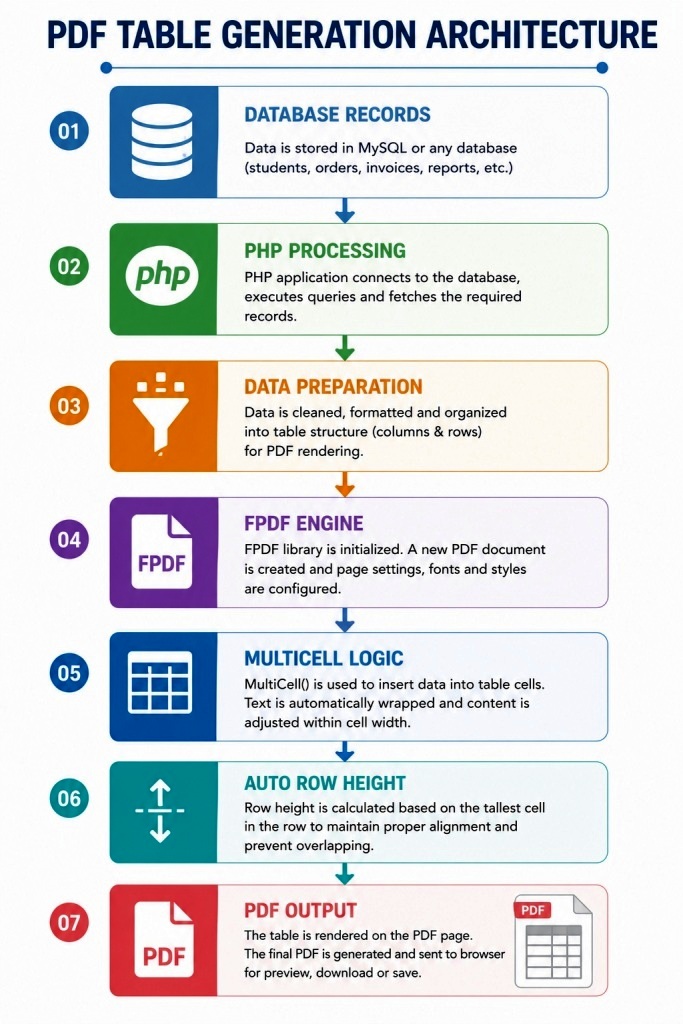
Part 1 — Foundation: Cell() vs MultiCell() vs Rect()
Before writing a single table, you need to understand the three drawing primitives FPDF gives you and when each is appropriate.
Cell($w, $h, $txt, $border, $ln, $align, $fill)
Draws a single-line rectangle containing text.
Parameters:
  $w      → Width in mm (0 = to right margin)
  $h      → Height in mm
  $txt    → Text to display
  $border → 0=none, 1=all, or string: 'LRTB'
  $ln     → 0=right, 1=next line, 2=below
  $align  → 'L', 'C', 'R'
  $fill   → true/false — fill background with SetFillColor()
Behaviour: If text is wider than the cell, it overflows silently. There is no wrap. Text is never clipped — it bleeds into the next cell or off the page.
Use when: Column headers, numeric values, dates, status labels, short codes — anything guaranteed to fit in one line.
// Good use of Cell() — short, predictable content
$pdf->SetFont('Arial', 'B', 9);
$pdf->Cell(30,  8, 'Invoice #',  1, 0, 'C', true);
$pdf->Cell(25,  8, 'Date',       1, 0, 'C', true);
$pdf->Cell(80,  8, 'Description',1, 0, 'C', true);
$pdf->Cell(25,  8, 'Amount',     1, 1, 'C', true); // $ln=1 → next line
MultiCell($w, $h, $txt, $border, $align, $fill)
Draws a multi-line rectangle that wraps text automatically.
Parameters:
  $w      → Width in mm (0 = to right margin)
  $h      → Height per line in mm (NOT total height)
  $txt    → Text to display (can contain \n for forced breaks)
  $border → 0=none, 1=all, or string: 'LRTB'
  $align  → 'L', 'C', 'R', 'J' (justified)
  $fill   → true/false
Behaviour: Text wraps at word boundaries when it exceeds $w. Each wrapped line adds $h mm to the total cell height. After drawing, the cursor moves below the cell (always — you cannot control this with $ln).
The cursor movement problem: After MultiCell() draws, you cannot draw the next column to the right — the cursor has moved down. You must save $x and $y before drawing, then use SetXY($x + $w, $y) to position for the next column.
// ❌ WRONG — this draws column B below column A, not beside it
$pdf->MultiCell(80, 6, $long_description, 1, 'L');
$pdf->MultiCell(25, 6, '₹1,200', 1, 'R');  // This appears below, not beside!

// ✅ CORRECT — save position, restore for each column
$x = $pdf->GetX();
$y = $pdf->GetY();

$pdf->MultiCell(80, 6, $long_description, 1, 'L');

$pdf->SetXY($x + 80, $y);  // ← Restore to right of first column
$pdf->MultiCell(25, 6, '₹1,200', 1, 'R');
Rect($x, $y, $w, $h, $style)
Draws a plain rectangle. No text.
$style → 'D' = border only | 'F' = fill only | 'FD' or 'DF' = both
Use when: Drawing the border around a MultiCell independently (to control border appearance separately from text), or filling background colours at a fixed height.
// Draw a fixed-height border around a MultiCell
// (useful when you need all cells in a row to be the same height)
$pdf->Rect($x, $y, $col_width, $row_height, 'D');     // Border
$pdf->SetXY($x + 2, $y + 1);                          // Padding
$pdf->MultiCell($col_width - 4, 5, $text, 0, 'L');    // Text, no border
Side-by-Side Comparison
| Feature | Cell() | MultiCell() | Rect() |
|---|---|---|---|
| Text rendering | Single line | Multi-line, wrapping | None |
| Text overflow | Silent overflow | Wraps correctly | N/A |
| Cursor after draw | Right / below (controlled by $ln) | Always below | Unchanged |
| Border support | Yes | Yes | Border only |
| Fill support | Yes | Yes | Yes |
| Height control | Fixed $h | Per-line $h × lines | Fixed $h |
| Best for | Headers, numbers, dates | Descriptions, notes, addresses | Backgrounds, borders |
Part 2 — The NbLines() Algorithm: Calculating Row Height Before Drawing
The single most important technique for FPDF tables is calculating a row’s height before you draw it. Without this, you cannot:
- Detect whether a row will overflow onto the next page
- Synchronize the height of multiple MultiCell columns in the same row
- Draw a Rect() border at exactly the right height
The NbLines() method — from the classic FPDF script by Olivier Plathey — computes how many lines a MultiCell of a given width will occupy for a given string, using the current font’s character widths.
Here is the full implementation with every line annotated:
/**
 * Calculate the number of lines a MultiCell($w, ..., $txt) will occupy.
 *
 * This replicates FPDF's internal word-wrapping logic but only counts lines
 * instead of drawing anything. The result × line_height = total cell height.
 *
 * @param  float  $w    Cell width in mm (same value you'll pass to MultiCell)
 * @param  string $txt  The text content (same value you'll pass to MultiCell)
 * @return int          Number of lines the MultiCell will occupy
 */
function NbLines(float $w, string $txt): int
{
    // ── Guard: font must be set before character widths are available ────────
    if (!isset($this->CurrentFont)) {
        $this->Error('No font has been set');
    }

    // ── Step 1: Get character width table for current font ───────────────────
    // $cw is an array mapping each ASCII character to its width in 1/1000 units
    // e.g. $cw['A'] = 722, $cw['i'] = 278, $cw[' '] = 278
    $cw = $this->CurrentFont['cw'];

    // ── Step 2: Calculate maximum line width in font units ───────────────────
    // $this->cMargin = cell margin (internal padding), default ~1mm
    // $this->FontSize = current font size in points
    // Formula: convert mm width → font units, subtract cell margins
    if ($w == 0) {
        // Width 0 = auto: stretch to right margin from current X position
        $w = $this->w - $this->rMargin - $this->x;
    }
    $wmax = ($w - 2 * $this->cMargin) * 1000 / $this->FontSize;

    // ── Step 3: Normalize the string ────────────────────────────────────────
    // Remove carriage returns (\r) — only \n is used for line breaks
    $s  = str_replace("\r", '', (string)$txt);
    $nb = strlen($s);

    // Trim trailing newline (it won't add a visible line)
    if ($nb > 0 && $s[$nb - 1] == "\n") {
        $nb--;
    }

    // ── Step 4: Simulate word-wrap character by character ───────────────────
    $sep = -1;  // Position of last seen space (word boundary)
    $i   = 0;   // Current character index
    $j   = 0;   // Start of current line
    $l   = 0;   // Accumulated line width in font units
    $nl  = 1;   // Line count (starts at 1 — even empty text = 1 line)

    while ($i < $nb) {
        $c = $s[$i];

        // Forced line break (\n in the text)
        if ($c == "\n") {
            $i++;
            $sep = -1;
            $j   = $i;
            $l   = 0;
            $nl++;
            continue;
        }

        // Track the last word-break opportunity (space character)
        if ($c == ' ') {
            $sep = $i;
        }

        // Add current character's width to accumulated line width
        $l += $cw[$c];

        if ($l > $wmax) {
            // Line is full — need to wrap
            if ($sep == -1) {
                // No space found — break mid-word (very long word or narrow column)
                if ($i == $j) {
                    $i++; // Advance past this character to prevent infinite loop
                }
            } else {
                // Wrap at the last space
                $i = $sep + 1;
            }
            $sep = -1;
            $j   = $i;
            $l   = 0;
            $nl++;
        } else {
            $i++;
        }
    }

    return $nl;
}
Using NbLines() to Calculate Row Height
// Given 4 columns with these widths and this row data:
$widths = [30, 80, 30, 40];
$data   = ['INV-0042', 'Premium WordPress Theme with 12 months support included', '3', '₹8,500'];

$line_height = 6; // mm per line
$max_lines   = 0;

foreach ($data as $i => $cell_text) {
    $lines     = $this->NbLines($widths[$i], $cell_text);
    $max_lines = max($max_lines, $lines);
}

$row_height = $line_height * $max_lines;
// If column 1 needs 1 line and column 2 needs 3 lines,
// $row_height = 6 × 3 = 18mm for the entire row
Part 3 — The Complete PDF_MC_Table Class (Production Version)
This is a comprehensive, production-ready upgrade of the original FPDF script, with full styling, column weight support, zebra rows, colored headers, status cell rendering, and robust page break handling.
<?php
require('fpdf.php');

/**
 * PDF_MC_Table — Production-grade FPDF table engine with MultiCell support.
 *
 * Features:
 *   - Proportional or fixed column widths
 *   - Automatic row height from NbLines()
 *   - Manual page break detection (keeps rows intact)
 *   - Header repeat on new pages
 *   - Zebra striping
 *   - Colored styled headers
 *   - Per-column alignment
 *   - Status badge rendering
 *   - Full-width summary/total rows
 *   - UTF-8 via utf8_decode()
 */
class PDF_MC_Table extends FPDF
{
    // ── Configuration ─────────────────────────────────────────────────────────
    protected array  $col_widths   = [];
    protected array  $col_aligns   = [];
    protected array  $col_headers  = [];
    protected float  $line_height  = 6;      // mm per text line
    protected float  $page_bottom  = 20;     // mm from bottom before page break
    protected bool   $repeat_header = true;  // Re-draw headers on page break
    protected int    $row_count    = 0;      // Tracks for zebra striping

    // ── Brand Colors (RGB) ────────────────────────────────────────────────────
    protected array $color_header   = [30,  64,  175]; // Blue-700
    protected array $color_row_even = [248, 250, 252]; // Slate-50
    protected array $color_row_odd  = [255, 255, 255]; // White
    protected array $color_border   = [203, 213, 225]; // Slate-300
    protected array $color_text     = [30,  30,  30];  // Near-black
    protected array $color_total    = [241, 245, 249]; // Slate-100

    // ─────────────────────────────────────────────────────────────────────────
    //  CONFIGURATION METHODS
    // ─────────────────────────────────────────────────────────────────────────

    /**
     * Set fixed column widths in mm.
     * Total should equal page content width (GetPageWidth - margins).
     */
    public function SetWidths(array $widths): void
    {
        $this->col_widths = $widths;
    }

    /**
     * Set proportional column weights that auto-calculate actual widths.
     * Example: SetWeights([2, 1, 0.8, 1]) on A4 with 15mm margins
     * → widths calculated from 180mm printable width in those proportions.
     */
    public function SetWeights(array $weights): void
    {
        $printable   = $this->GetPageWidth() - $this->lMargin - $this->rMargin;
        $total_weight = array_sum($weights);
        $this->col_widths = array_map(
            fn($w) => ($w / $total_weight) * $printable,
            $weights
        );
    }

    /**
     * Set column alignments. 'L' = left (default), 'C' = center, 'R' = right.
     */
    public function SetAligns(array $aligns): void
    {
        $this->col_aligns = $aligns;
    }

    /**
     * Set column header labels (used when repeat_header = true).
     */
    public function SetHeaders(array $headers): void
    {
        $this->col_headers = $headers;
    }

    /**
     * Set the line height (mm per text line) for MultiCell rows.
     */
    public function SetLineHeight(float $height): void
    {
        $this->line_height = $height;
    }

    /**
     * Set brand color scheme.
     */
    public function SetColors(array $header, array $even, array $odd, array $border): void
    {
        $this->color_header   = $header;
        $this->color_row_even = $even;
        $this->color_row_odd  = $odd;
        $this->color_border   = $border;
    }

    // ─────────────────────────────────────────────────────────────────────────
    //  CORE TABLE METHODS
    // ─────────────────────────────────────────────────────────────────────────

    /**
     * Draw the styled header row.
     */
    public function TableHeader(): void
    {
        if (empty($this->col_headers)) return;

        $this->SetFont('Arial', 'B', 9);
        $this->SetFillColor(...$this->color_header);
        $this->SetTextColor(255, 255, 255);
        $this->SetDrawColor(...$this->color_header);

        foreach ($this->col_headers as $i => $label) {
            $align = $this->col_aligns[$i] ?? 'C';
            $this->Cell(
                $this->col_widths[$i],
                $this->line_height + 2,
                utf8_decode($label),
                1, 0, $align, true
            );
        }

        $this->Ln();
        $this->SetTextColor(...$this->color_text);
        $this->SetDrawColor(...$this->color_border);
        $this->SetFont('Arial', '', 9);
        $this->row_count = 0; // Reset zebra counter after header
    }

    /**
     * Draw a standard data row with automatic height and zebra striping.
     *
     * @param array $data   Cell values — one per column
     */
    public function Row(array $data): void
    {
        // ── Calculate row height ─────────────────────────────────────────────
        $row_height = $this->CalculateRowHeight($data);

        // ── Check page break BEFORE drawing ─────────────────────────────────
        $this->CheckPageBreak($row_height);

        // ── Zebra fill color ─────────────────────────────────────────────────
        $fill_color = ($this->row_count % 2 === 0)
            ? $this->color_row_even
            : $this->color_row_odd;

        // ── Draw all cells ───────────────────────────────────────────────────
        $start_x = $this->GetX();
        $start_y = $this->GetY();

        $this->SetFillColor(...$fill_color);

        foreach ($data as $i => $cell_text) {
            $col_w = $this->col_widths[$i] ?? 30;
            $align = $this->col_aligns[$i] ?? 'L';

            // Step A: Draw border rectangle at exact row height
            $this->Rect($start_x, $start_y, $col_w, $row_height, 'FD');

            // Step B: Print text inside (no border — Rect handles it)
            $this->SetXY($start_x + 1, $start_y + 1); // +1mm inner padding
            $this->MultiCell(
                $col_w - 2,          // Subtract padding from both sides
                $this->line_height,
                utf8_decode((string)$cell_text),
                0,                   // No border — handled by Rect above
                $align,
                false
            );

            $start_x += $col_w;
        }

        // ── Advance cursor below the row ─────────────────────────────────────
        $this->SetXY($this->lMargin, $start_y + $row_height);
        $this->row_count++;
    }

    /**
     * Draw a full-width summary/total row (e.g., invoice totals).
     *
     * @param string $label  Left-side label (spans first N-1 columns)
     * @param string $value  Right-side value (last column)
     * @param bool   $bold   Make text bold?
     * @param array  $color  Background RGB (defaults to $color_total)
     */
    public function TotalRow(
        string $label,
        string $value,
        bool   $bold  = false,
        array  $color = []
    ): void {
        $fill_color = $color ?: $this->color_total;
        $font_style = $bold ? 'B' : '';

        $total_width  = array_sum($this->col_widths);
        $last_width   = end($this->col_widths);
        $label_width  = $total_width - $last_width;

        $this->SetFont('Arial', $font_style, 9);
        $this->SetFillColor(...$fill_color);
        $this->SetTextColor(...$this->color_text);

        $this->Cell($label_width, $this->line_height + 1, utf8_decode($label), 1, 0, 'R', true);
        $this->Cell($last_width,  $this->line_height + 1, utf8_decode($value), 1, 1, 'R', true);

        $this->SetFont('Arial', '', 9);
    }

    /**
     * Draw a full-width section divider row (colored banner inside table).
     *
     * @param string $label  Text to display across the full table width
     * @param array  $color  Background RGB
     */
    public function SectionRow(string $label, array $color = [100, 116, 139]): void
    {
        $total_width = array_sum($this->col_widths);
        $this->SetFont('Arial', 'B', 9);
        $this->SetFillColor(...$color);
        $this->SetTextColor(255, 255, 255);
        $this->Cell($total_width, $this->line_height, utf8_decode('  ' . $label), 1, 1, 'L', true);
        $this->SetTextColor(...$this->color_text);
        $this->SetFont('Arial', '', 9);
    }

    // ─────────────────────────────────────────────────────────────────────────
    //  PAGE BREAK + HEIGHT CALCULATION
    // ─────────────────────────────────────────────────────────────────────────

    /**
     * Calculate the total height a row will occupy in mm.
     * Uses NbLines() to find the tallest cell, then multiplies by line_height.
     */
    protected function CalculateRowHeight(array $data): float
    {
        $max_lines = 1;
        foreach ($data as $i => $text) {
            $w     = $this->col_widths[$i] ?? 30;
            $lines = $this->NbLines($w - 2, (string)$text); // -2 for padding
            $max_lines = max($max_lines, $lines);
        }
        return $this->line_height * $max_lines + 2; // +2mm for top+bottom padding
    }

    /**
     * Trigger a manual page break if $h mm won't fit on the current page.
     * After the break, re-draw headers if $repeat_header is true.
     */
    protected function CheckPageBreak(float $h): void
    {
        $bottom_limit = $this->GetPageHeight() - $this->bMargin - $this->page_bottom;
        if ($this->GetY() + $h > $bottom_limit) {
            $this->AddPage($this->CurOrientation);
            if ($this->repeat_header) {
                $this->TableHeader();
            }
        }
    }

    /**
     * Calculate the number of lines a MultiCell will occupy.
     * Replicates FPDF's internal word-wrap logic without drawing anything.
     */
    public function NbLines(float $w, string $txt): int
    {
        if (!isset($this->CurrentFont)) {
            $this->Error('No font has been set');
        }
        $cw   = $this->CurrentFont['cw'];
        $wmax = ($w - 2 * $this->cMargin) * 1000 / $this->FontSize;
        $s    = str_replace("\r", '', $txt);
        $nb   = strlen($s);
        if ($nb > 0 && $s[$nb - 1] == "\n") $nb--;

        $sep = -1; $i = 0; $j = 0; $l = 0; $nl = 1;

        while ($i < $nb) {
            $c = $s[$i];
            if ($c == "\n") { $i++; $sep = -1; $j = $i; $l = 0; $nl++; continue; }
            if ($c == ' ')  $sep = $i;
            $l += $cw[$c] ?? 0;
            if ($l > $wmax) {
                if ($sep == -1) { if ($i == $j) $i++; }
                else            { $i = $sep + 1; }
                $sep = -1; $j = $i; $l = 0; $nl++;
            } else {
                $i++;
            }
        }
        return $nl;
    }
}
Part 4 — Five Complete Real-World Table Examples
Example 1: Professional Invoice Table
<?php
require('fpdf.php');
require('PDF_MC_Table.php'); // The class above

$pdf = new PDF_MC_Table('P', 'mm', 'A4');
$pdf->SetMargins(15, 15, 15);
$pdf->SetAutoPageBreak(true, 20);
$pdf->AliasNbPages();
$pdf->AddPage();

// ── Invoice Header ────────────────────────────────────────────────────────
$pdf->SetFont('Arial', 'B', 18);
$pdf->SetTextColor(30, 64, 175);
$pdf->Cell(0, 12, 'INVOICE', 0, 1, 'R');

$pdf->SetFont('Arial', '', 9);
$pdf->SetTextColor(80, 80, 80);
$pdf->Cell(0, 6, 'Invoice #: INV-2025-0089', 0, 1, 'R');
$pdf->Cell(0, 6, 'Date: 15 July 2025', 0, 1, 'R');
$pdf->Cell(0, 6, 'Due: 29 July 2025', 0, 1, 'R');
$pdf->Ln(6);

// ── Bill To ───────────────────────────────────────────────────────────────
$pdf->SetFont('Arial', 'B', 9);
$pdf->SetTextColor(30, 30, 30);
$pdf->Cell(0, 6, 'Bill To:', 0, 1);
$pdf->SetFont('Arial', '', 9);
$pdf->Cell(0, 5, 'Acme Corporation Pvt. Ltd.', 0, 1);
$pdf->Cell(0, 5, '14, Business Park, Sector 62, Noida, UP - 201301', 0, 1);
$pdf->Cell(0, 5, 'GSTIN: 09ABCDE1234F1Z5', 0, 1);
$pdf->Ln(8);

// ── Line Items Table ──────────────────────────────────────────────────────
$pdf->SetFont('Arial', '', 9);
$pdf->SetHeaders(['#', 'Description', 'HSN', 'Qty', 'Rate (₹)', 'Amount (₹)']);
$pdf->SetWeights([0.4, 3.5, 0.8, 0.5, 1, 1]);
$pdf->SetAligns(['C', 'L', 'C', 'C', 'R', 'R']);
$pdf->SetLineHeight(6);
$pdf->TableHeader();

$items = [
    ['1', 'WordPress Custom Theme Development — Responsive design with 5 page templates, mobile-first layout', '998314', '1',  '45,000', '45,000'],
    ['2', 'WooCommerce Store Setup — Product catalog, payment gateway (Razorpay), shipping configuration',      '998314', '1',  '30,000', '30,000'],
    ['3', 'SEO Optimization Package — On-page SEO for 20 pages, schema markup, sitemap, robots.txt',           '998313', '1',  '18,000', '18,000'],
    ['4', 'Annual Hosting & Maintenance Plan — SSD hosting, daily backups, SSL, uptime monitoring',            '997331', '12', '2,000',  '24,000'],
    ['5', 'Domain Registration — .com domain for 2 years',                                                     '997331', '2',  '900',    '1,800'],
];

foreach ($items as $item) {
    $pdf->Row($item);
}

// ── Totals ────────────────────────────────────────────────────────────────
$pdf->Ln(2);
$pdf->TotalRow('Subtotal',        '₹1,18,800', false);
$pdf->TotalRow('CGST @ 9%',      '₹10,692',   false);
$pdf->TotalRow('SGST @ 9%',      '₹10,692',   false);
$pdf->TotalRow('TOTAL PAYABLE',   '₹1,40,184', true, [30, 64, 175]);

// Override text color for total row (white on blue)
// Note: Do this before TotalRow() call for the final row if needed

$pdf->Output('D', 'invoice-INV-2025-0089.pdf');
Example 2: Employee Attendance Sheet (Multi-Page with Header Repeat)
$pdf = new PDF_MC_Table('L', 'mm', 'A4'); // Landscape
$pdf->SetMargins(10, 10, 10);
$pdf->SetAutoPageBreak(true, 15);
$pdf->AliasNbPages();
$pdf->AddPage();

$pdf->SetFont('Arial', 'B', 14);
$pdf->Cell(0, 10, 'Monthly Attendance Report — July 2025', 0, 1, 'C');
$pdf->SetFont('Arial', '', 9);
$pdf->Cell(0, 6, 'Department: Engineering | Total Working Days: 23', 0, 1, 'C');
$pdf->Ln(4);

$pdf->SetHeaders(['EMP ID', 'Employee Name', 'Designation', 'Present', 'Absent', 'Leave', 'OT Hrs', 'Status']);
$pdf->SetWeights([0.8, 2, 1.8, 0.7, 0.7, 0.7, 0.7, 1]);
$pdf->SetAligns(['C', 'L', 'L', 'C', 'C', 'C', 'C', 'C']);
$pdf->SetLineHeight(6);
$pdf->TableHeader();

// Simulating 35 rows to demonstrate multi-page header repeat
$employees = [
    ['EMP001', 'Rajesh Kumar Sharma',     'Senior PHP Developer',       '22', '0', '1', '8',  'Regular'],
    ['EMP002', 'Priya Nair',              'UI/UX Designer',             '20', '2', '1', '0',  'Regular'],
    ['EMP003', 'Mohammed Arif Khan',      'DevOps Engineer',            '23', '0', '0', '12', 'Regular'],
    ['EMP004', 'Sunita Devi Raghuwanshi', 'QA Test Lead',               '18', '3', '2', '0',  'Warning'],
    ['EMP005', 'Aakash Verma',            'Junior WordPress Developer',  '21', '1', '1', '4',  'Regular'],
    ['EMP006', 'Lalitha Subramaniam',     'Project Manager',            '22', '0', '1', '0',  'Regular'],
    ['EMP007', 'Deepak Singh Tomar',      'Backend Developer (Laravel)', '19', '4', '0', '0',  'Warning'],
    // ... (repeat or loop for a large dataset)
];

// Repeat rows to fill multiple pages for demonstration
$all_employees = array_merge($employees, $employees, $employees, $employees);
foreach ($all_employees as $emp) {
    $pdf->Row($emp);
}

$pdf->Output('D', 'attendance-july-2025.pdf');
Example 3: Product Catalog Table from MySQL/PDO
// ── Fetch from database ───────────────────────────────────────────────────
$pdo  = new PDO('mysql:host=localhost;dbname=shop;charset=utf8', 'user', 'pass');
$stmt = $pdo->prepare("
    SELECT
        p.sku,
        p.name,
        c.name        AS category,
        p.description,
        p.price,
        p.stock_qty,
        p.status
    FROM products p
    JOIN categories c ON c.id = p.category_id
    WHERE p.active = 1
    ORDER BY c.name, p.name
    LIMIT 200
");
$stmt->execute();
$products = $stmt->fetchAll(PDO::FETCH_ASSOC);

// ── Build PDF ─────────────────────────────────────────────────────────────
$pdf = new PDF_MC_Table('L', 'mm', 'A4');
$pdf->SetMargins(10, 10, 10);
$pdf->SetAutoPageBreak(true, 15);
$pdf->AliasNbPages();
$pdf->AddPage();

$pdf->SetFont('Arial', 'B', 14);
$pdf->Cell(0, 10, 'Product Catalog — ' . date('F Y'), 0, 1, 'C');
$pdf->SetFont('Arial', '', 9);
$pdf->Cell(0, 5, 'Total Products: ' . count($products), 0, 1, 'C');
$pdf->Ln(4);

$pdf->SetHeaders(['SKU', 'Product Name', 'Category', 'Description', 'Price (₹)', 'Stock', 'Status']);
$pdf->SetWeights([0.8, 2, 1.2, 3.5, 1, 0.7, 0.8]);
$pdf->SetAligns(['C', 'L', 'L', 'L', 'R', 'C', 'C']);
$pdf->SetLineHeight(5);

// Group by category with section rows
$current_category = '';
$pdf->TableHeader();

foreach ($products as $p) {
    // Insert section divider when category changes
    if ($p['category'] !== $current_category) {
        $current_category = $p['category'];
        $pdf->SectionRow($current_category, [71, 85, 105]); // Slate-600
    }

    $pdf->Row([
        $p['sku'],
        $p['name'],
        $p['category'],
        $p['description'],
        number_format($p['price'], 2),
        $p['stock_qty'],
        $p['status'],
    ]);
}

$pdf->Output('D', 'product-catalog-' . date('Y-m') . '.pdf');
Example 4: Project Schedule / Gantt Summary Table
$pdf = new PDF_MC_Table('L', 'mm', 'A4');
$pdf->SetMargins(10, 10, 10);
$pdf->SetAutoPageBreak(true, 15);
$pdf->AddPage();

$pdf->SetFont('Arial', 'B', 13);
$pdf->Cell(0, 10, 'Project Schedule — Website Redesign Initiative', 0, 1, 'C');
$pdf->SetFont('Arial', '', 9);
$pdf->Cell(0, 5, 'Project Duration: 01 Jul 2025 – 30 Sep 2025 | Total Milestones: 6', 0, 1, 'C');
$pdf->Ln(5);

$pdf->SetHeaders(['Phase', 'Task / Milestone', 'Owner', 'Start', 'End', 'Duration', '% Done', 'Blocker?']);
$pdf->SetWeights([0.8, 3, 1.5, 0.9, 0.9, 0.7, 0.7, 0.8]);
$pdf->SetAligns(['C', 'L', 'L', 'C', 'C', 'C', 'C', 'C']);
$pdf->SetLineHeight(6);

$milestones = [
    ['1', 'Discovery & Requirements Gathering — stakeholder interviews, scope document, user stories', 'PM Office',   '01 Jul', '07 Jul', '7 days',  '100%', 'No'],
    ['1', 'Wireframes & UI Mockups (All 12 page types)',                                               'UX Team',     '08 Jul', '18 Jul', '11 days', '100%', 'No'],
    ['2', 'Frontend Development — HTML/CSS/JS for all approved mockups, responsive implementation',    'Dev: Alice',  '19 Jul', '05 Aug', '18 days', '85%',  'No'],
    ['2', 'WordPress Theme Development — ACF integration, custom post types, REST API endpoints',      'Dev: Bob',    '22 Jul', '10 Aug', '20 days', '70%',  'No'],
    ['3', 'WooCommerce Setup — products, payment, shipping, tax rules, order emails customisation',    'Dev: Carol',  '01 Aug', '15 Aug', '15 days', '45%',  'Yes'],
    ['3', 'Third-party Integrations — Razorpay, Mailchimp, Google Analytics 4, Facebook Pixel',       'Dev Team',    '10 Aug', '20 Aug', '11 days', '20%',  'No'],
    ['4', 'QA Testing — cross-browser, mobile, performance audit, accessibility (WCAG 2.1 AA)',        'QA: Dev',     '20 Aug', '02 Sep', '14 days', '0%',   'No'],
    ['4', 'Staging → Production Migration, DNS cutover, SSL, CDN configuration',                      'DevOps',      '03 Sep', '07 Sep', '5 days',  '0%',   'No'],
    ['5', 'UAT Sign-off by Client',                                                                    'PM Office',   '08 Sep', '12 Sep', '5 days',  '0%',   'No'],
    ['6', 'Go-Live & Post-Launch Support Window (2 weeks)',                                            'Full Team',   '15 Sep', '30 Sep', '16 days', '0%',   'No'],
];

$pdf->TableHeader();
foreach ($milestones as $row) {
    $pdf->Row($row);
}

$pdf->Output('D', 'project-schedule-q3-2025.pdf');
Example 5: Comparison / Feature Matrix Table
$pdf = new PDF_MC_Table('P', 'mm', 'A4');
$pdf->SetMargins(15, 15, 15);
$pdf->SetAutoPageBreak(true, 20);
$pdf->AddPage();

$pdf->SetFont('Arial', 'B', 13);
$pdf->SetTextColor(30, 64, 175);
$pdf->Cell(0, 10, 'PHP PDF Library Comparison Matrix — 2025', 0, 1, 'C');
$pdf->SetTextColor(30, 30, 30);
$pdf->Ln(4);

$pdf->SetHeaders(['Feature', 'FPDF', 'TCPDF', 'mPDF', 'Dompdf']);
$pdf->SetWeights([3, 1, 1, 1, 1]);
$pdf->SetAligns(['L', 'C', 'C', 'C', 'C']);
$pdf->SetLineHeight(6);

$comparison = [
    ['Pure PHP (no extensions needed)',         '✔', '✔', '✔', '✔'],
    ['HTML → PDF conversion',                   '✖', '~', '✔', '✔'],
    ['CSS support',                             '✖', '~', '✔', '✔'],
    ['Unicode / multibyte text',                '~', '✔', '✔', '✔'],
    ['Indic scripts (Hindi, Tamil, Telugu)',    '✖', '✔', '✔', '✖'],
    ['RTL text (Arabic, Hebrew)',               '✖', '✔', '✔', '~'],
    ['Image support (PNG, JPG, GIF)',           '✔', '✔', '✔', '✔'],
    ['Barcode / QR code generation',            '✖', '✔', '~', '✖'],
    ['Digital signatures',                      '✖', '✔', '✖', '✖'],
    ['Custom headers & footers',                '✔', '✔', '✔', '✖'],
    ['Multi-column layouts',                    '✔', '✔', '✔', '✔'],
    ['Page numbering',                          '✔', '✔', '✔', '✔'],
    ['File size (library only)',                '~150KB', '~20MB', '~30MB', '~5MB'],
    ['Composer installable',                    '✔', '✔', '✔', '✔'],
    ['Active maintenance (2025)',               '✔', '✔', '✔', '✔'],
    ['Learning curve',                          'Low', 'High', 'Medium', 'Low'],
    ['Best for',                                'Tables, invoices, reports', 'Complex docs', 'HTML → PDF', 'HTML → PDF'],
];

$pdf->TableHeader();
foreach ($comparison as $row) {
    $pdf->Row($row);
}

$pdf->Output('D', 'php-pdf-comparison-2025.pdf');
Part 5 — Column Width Strategies: A Complete Reference
Column width is the first layout decision in every table. Get it wrong and the entire PDF looks broken. Here are all four strategies:
Strategy 1: Fixed Widths (Manual)
// You measure the columns and hardcode them.
// Best when you know exactly what content each column holds.
$pdf->SetWidths([20, 90, 25, 25]);
// Sum = 160mm = 190mm page width - 15mm left margin - 15mm right margin
Pros: Precise control. Cons: Breaks if margins change or you add a column.
Strategy 2: Proportional Weights (Recommended)
// Weights express relative importance.
// [2, 5, 1.5, 1.5] = description gets 5/10 = 50% of printable width
$pdf->SetWeights([2, 5, 1.5, 1.5]);
// Automatically calculates correct widths for any margin/page-size combination
Pros: Responds to margin changes. Readable. Cons: You still need to tune the ratios.
Strategy 3: Content-Adaptive (Dynamic)
// Measure the longest content in each column, then set widths accordingly.
// Useful when generating PDFs from database content of unknown length.

$col_count = count($headers);
$max_widths = array_fill(0, $col_count, 0);

foreach ($rows as $row) {
    foreach ($row as $i => $cell) {
        $pdf->SetFont('Arial', '', 9);
        $text_width = $pdf->GetStringWidth(utf8_decode($cell)) + 4; // +4mm padding
        $max_widths[$i] = max($max_widths[$i], $text_width);
    }
}

// Also measure headers
foreach ($headers as $i => $hdr) {
    $pdf->SetFont('Arial', 'B', 9);
    $max_widths[$i] = max($max_widths[$i], $pdf->GetStringWidth($hdr) + 6);
}

// Cap total at printable width
$total         = array_sum($max_widths);
$printable     = $pdf->GetPageWidth() - $pdf->lMargin - $pdf->rMargin;
$scale_factor  = min(1, $printable / $total);
$final_widths  = array_map(fn($w) => $w * $scale_factor, $max_widths);

$pdf->SetWidths($final_widths);
Strategy 4: Mixed (Fixed + Proportional)
// Sometimes you know exact widths for some columns (like an ID or date)
// but need the rest to share remaining space proportionally.

$printable   = $pdf->GetPageWidth() - 30; // 30mm margins total
$fixed_id    = 15;
$fixed_date  = 25;
$fixed_amt   = 28;
$remaining   = $printable - $fixed_id - $fixed_date - $fixed_amt;

$pdf->SetWidths([
    $fixed_id,
    $remaining * 0.55,  // Description: 55% of remaining
    $remaining * 0.45,  // Notes: 45% of remaining
    $fixed_date,
    $fixed_amt,
]);
Part 6 — Alignment Patterns Explained
// All alignment values FPDF understands:
// 'L' = Left  (default for most data)
// 'C' = Center (good for IDs, dates, status, numbers)
// 'R' = Right  (always for currency, quantities, percentages)
// 'J' = Justified (only in MultiCell — both edges aligned)

// Typical invoice alignment:
$pdf->SetAligns(['C', 'L', 'C', 'C', 'R', 'R']);
//               #   Desc  HSN  Qty  Rate  Amount

// Typical attendance sheet alignment:
$pdf->SetAligns(['C', 'L', 'L', 'C', 'C', 'C', 'C', 'C']);
//               ID   Name  Dept  P    A    L    OT   Status

// Right-aligning numbers makes vertical scanning much easier:
// ✅ Good:         ❌ Bad:
//   1,200.00          1,200.00
//      45.50        45.50
//  12,880.00      12,880.00
//  ─────────      ─────────
//  14,125.50      14,125.50
Part 7 — Common Errors and Complete Fixes
Error 1: Columns Appear Stacked (Not Side by Side)
Cause: You called multiple MultiCell() without resetting SetXY() between them.
// ❌ Wrong — second cell appears BELOW the first
$pdf->MultiCell(80, 6, $desc,   1, 'L');
$pdf->MultiCell(30, 6, $amount, 1, 'R'); // This goes below!

// ✅ Correct — use Rect for border + MultiCell for text
$x = $pdf->GetX();
$y = $pdf->GetY();

$pdf->Rect($x,      $y, 80, $row_h, 'FD');
$pdf->SetXY($x + 1, $y + 1);
$pdf->MultiCell(78, 6, $desc, 0, 'L');

$pdf->Rect($x + 80, $y, 30, $row_h, 'FD');
$pdf->SetXY($x + 81, $y + 1);
$pdf->MultiCell(28, 6, $amount, 0, 'R');

$pdf->SetXY($pdf->lMargin, $y + $row_h);
Error 2: Row Splits Across a Page Break
Cause: FPDF’s auto page break fires mid-row, splitting cells across two pages.
// ❌ Wrong — no manual check
foreach ($rows as $row) {
    $pdf->Row($row); // FPDF may split this row across pages
}

// ✅ Correct — CheckPageBreak() before every row
$height = $this->CalculateRowHeight($row);
$this->CheckPageBreak($height);
// Then draw the row
Error 3: Text Overflow on Single-Line Cells
Cause: Using Cell() for long/variable-length text.
// ❌ Wrong — description overflows
$pdf->Cell(80, 6, 'This is a very long product description that will overflow', 1);

// ✅ Correct — MultiCell wraps automatically
// (but you must use the Rect+MultiCell pattern for multi-column rows)
Error 4: Inconsistent Row Heights (Ragged Table)
Cause: Each column’s MultiCell is drawn at its own natural height instead of the row maximum.
// ❌ Wrong — each cell gets its own height
$pdf->MultiCell(80, 6, $long_text,  1); // 3 lines = 18mm tall
$pdf->SetXY(...);
$pdf->MultiCell(30, 6, $short_text, 1); // 1 line = 6mm tall — mismatched!

// ✅ Correct — calculate $row_height first, then use Rect for the border
$row_height = $this->CalculateRowHeight($data);
// Use $row_height for all Rect() calls in this row
Error 5: NbLines() Returns Wrong Count
Cause: Font not set before calling NbLines(), or calling it before AddPage().
// ❌ Wrong — no font set yet
$lines = $pdf->NbLines(80, $text);

// ✅ Correct — always set font first
$pdf->SetFont('Arial', '', 9);
$pdf->AddPage(); // Must add a page before NbLines() can access font metrics
$lines = $pdf->NbLines(80, $text);
Error 6: Special Characters Show as “?”
// ❌ Wrong — UTF-8 passed directly to FPDF built-in fonts
$pdf->Cell(80, 6, 'Réservé & Société');

// ✅ Correct — decode UTF-8 to Latin-1 for built-in fonts
$pdf->Cell(80, 6, utf8_decode('Réservé & Société'));

// For Indic scripts (Hindi etc.) — switch to mPDF with TTF fonts
// FPDF built-in fonts do not support Unicode beyond Latin-1
Error 7: Table Appears on Wrong Page / Disappears
Cause: AddPage() not called before drawing, or drawing before setting font.
// ✅ Always follow this order:
$pdf = new PDF_MC_Table();
$pdf->AliasNbPages();      // 1. Alias before any page
$pdf->SetMargins(15,15,15);// 2. Set margins
$pdf->SetAutoPageBreak(true, 20); // 3. Auto page break
$pdf->AddPage();           // 4. Add first page
$pdf->SetFont('Arial','',9);// 5. Set font
// 6. Now configure and draw table
$pdf->SetHeaders([...]);
$pdf->SetWeights([...]);
$pdf->TableHeader();
foreach ($rows as $row) {
    $pdf->Row($row);
}
$pdf->Output('D', 'file.pdf');
Part 8 — Performance Tips for Large Datasets
When generating PDFs from 500+ rows of database data, performance matters:
Tip 1: Pre-Decode UTF-8 in Batch
// Decode all strings once before the loop, not inside Row() on every call
$rows = array_map(function($row) {
    return array_map('utf8_decode', $row);
}, $rows);
Tip 2: Pre-Calculate All Row Heights
// Calculate heights in one pass, then draw in a second pass
$heights = [];
foreach ($rows as $row) {
    $heights[] = $pdf->CalculateRowHeight($row);
}
// Now draw with pre-calculated heights (avoids redundant NbLines() calls)
Tip 3: Increase PHP Memory Limit for Large PDFs
// At the top of your PDF generation script
ini_set('memory_limit', '256M');
ini_set('max_execution_time', '120');
Tip 4: Buffer Output — Don’t Stream Prematurely
// Generate the full PDF in memory, then output
// Use Output('S') to get as a string for email attachments
$pdf_string = $pdf->Output('S'); // S = return as string
// Attach $pdf_string to PHPMailer or WordPress wp_mail()
Tip 5: Save to File for Caching
$path = __DIR__ . '/cache/report-' . date('Ymd') . '.pdf';
if (!file_exists($path)) {
    $pdf->Output('F', $path); // Generate once
}
// Serve the cached file on subsequent requests
readfile($path);
Part 9 — Complete Error Reference Table
| Error / Symptom | Root Cause | Fix |
|---|---|---|
| Columns stacked vertically | MultiCell moves cursor down; no SetXY reset | Use Rect for border + SetXY($x+w, $y) before each column |
| Row split across pages | No manual page break check | Call CheckPageBreak($height) before every Row() |
| Text overflow (not wrapping) | Using Cell() for variable-length text | Switch to MultiCell() with Rect() border pattern |
| Ragged/uneven row heights | Each column drawn at its own natural height | Pre-calculate $row_height = line_height × max(NbLines) |
| NbLines() crashes | No font set / no page added | Call SetFont() and AddPage() before any NbLines() |
| Special chars show as ? | UTF-8 passed to Latin-1 font | Wrap all strings with utf8_decode() |
| Table disappears or is empty | AddPage() not called; wrong method order | Follow: AliasNbPages → SetMargins → AddPage → SetFont → Table |
| Headers not repeated on page 2 | $repeat_header false or not calling TableHeader() in CheckPageBreak() | Set $this->repeat_header = true; call TableHeader() in CheckPageBreak() |
| Border color bleeds into next row | SetDrawColor not reset after header | Reset SetDrawColor to border color after TableHeader() |
| Total width wider than page | Column widths don’t account for margins | Use SetWeights() or verify sum = GetPageWidth() – lMargin – rMargin |
| Memory exhausted on large data | Default 128MB not enough | ini_set(‘memory_limit’, ‘256M’) |
| {nb} appears as literal text | AliasNbPages() not called | Call $pdf->AliasNbPages() before first AddPage() |
The goal of this script is to show how to build a table from MultiCells. As MultiCells go to the next line after being output, the base idea consists in saving the current position, printing the MultiCell and resetting the position to its right.
There is a difficulty, however, if the table is too long: page breaks. Before outputting a row, it is necessary to know whether it will cause a break or not. If it does overflow, a manual page break must be done first.
To do so, the height of the row must be known in advance; it is the maximum of the heights of the MultiCells it is made up of. To know the height of a MultiCell, the NbLines() method is used: it returns the number of lines a MultiCell will occupy.
<?php
require('fpdf.php');

class PDF_MC_Table extends FPDF
{
    protected $widths;
    protected $aligns;

    function SetWidths($w)
    {
        // Set the array of column widths
        $this->widths = $w;
    }

    function SetAligns($a)
    {
        // Set the array of column alignments
        $this->aligns = $a;
    }

    function Row($data)
    {
        // Calculate the height of the row
        $nb = 0;
        for($i=0;$i<count($data);$i++)
            $nb = max($nb,$this->NbLines($this->widths[$i],$data[$i]));
        $h = 5*$nb;
        // Issue a page break first if needed
        $this->CheckPageBreak($h);
        // Draw the cells of the row
        for($i=0;$i<count($data);$i++)
        {
            $w = $this->widths[$i];
            $a = isset($this->aligns[$i]) ? $this->aligns[$i] : 'L';
            // Save the current position
            $x = $this->GetX();
            $y = $this->GetY();
            // Draw the border
            $this->Rect($x,$y,$w,$h);
            // Print the text
            $this->MultiCell($w,5,$data[$i],0,$a);
            // Put the position to the right of the cell
            $this->SetXY($x+$w,$y);
        }
        // Go to the next line
        $this->Ln($h);
    }

    function CheckPageBreak($h)
    {
        // If the height h would cause an overflow, add a new page immediately
        if($this->GetY()+$h>$this->PageBreakTrigger)
            $this->AddPage($this->CurOrientation);
    }

    function NbLines($w, $txt)
    {
        // Compute the number of lines a MultiCell of width w will take
        if(!isset($this->CurrentFont))
            $this->Error('No font has been set');
        $cw = $this->CurrentFont['cw'];
        if($w==0)
            $w = $this->w-$this->rMargin-$this->x;
        $wmax = ($w-2*$this->cMargin)*1000/$this->FontSize;
        $s = str_replace("\r",'',(string)$txt);
        $nb = strlen($s);
        if($nb>0 && $s[$nb-1]=="\n")
            $nb--;
        $sep = -1;
        $i = 0;
        $j = 0;
        $l = 0;
        $nl = 1;
        while($i<$nb)
        {
            $c = $s[$i];
            if($c=="\n")
            {
                $i++;
                $sep = -1;
                $j = $i;
                $l = 0;
                $nl++;
                continue;
            }
            if($c==' ')
                $sep = $i;
            $l += $cw[$c];
            if($l>$wmax)
            {
                if($sep==-1)
                {
                    if($i==$j)
                        $i++;
                }
                else
                    $i = $sep+1;
                $sep = -1;
                $j = $i;
                $l = 0;
                $nl++;
            }
            else
                $i++;
        }
        return $nl;
    }
}
?>
Example
Here’s an example of multi-page table with random content:
<?php
require('mc_table.php');

function GenerateWord()
{
    // Get a random word
    $nb = rand(3, 10);
    $w = '';
    for($i=1;$i<=$nb;$i++)
        $w .= chr(rand(ord('a'), ord('z')));
    return $w;
}

function GenerateSentence()
{
    // Get a random sentence
    $nb = rand(1, 10);
    $s = '';
    for($i=1;$i<=$nb;$i++)
        $s .= GenerateWord().' ';
    return substr($s, 0, -1);
}

$pdf = new PDF_MC_Table();
$pdf->AddPage();
$pdf->SetFont('Arial', '', 14);
// Table with 20 rows and 4 columns
$pdf->SetWidths(array(30, 50, 30, 40));
for($i=0;$i<20;$i++)
    $pdf->Row(array(GenerateSentence(), GenerateSentence(), GenerateSentence(), GenerateSentence()));
$pdf->Output();
?>
Benefits of Using MultiCell in FPDF Tables
- Automatic Text Wrapping: Long content automatically wraps into multiple lines without breaking the table layout.
- Professional PDF Layouts: Creates clean and structured PDF reports suitable for business documents.
- Dynamic Content Support: Handles variable-length data from forms, databases, APIs, and user-generated content.
- Better Readability: Ensures all text remains visible inside table cells without truncation.
- Flexible Row Heights: Rows automatically expand based on content length.
- Ideal for Large Reports: Useful when generating invoices, reports, certificates, and LMS documents.
- Improved User Experience: Users receive properly formatted PDFs regardless of content size.
- Easy Integration with PHP Applications: Works seamlessly with WordPress, Laravel, CodeIgniter, and custom PHP projects.
- Supports Multiple Languages:Can be extended to handle multilingual content and UTF-8 compatible fonts.
- Open-Source and Lightweight:FPDF is free, fast, and easy to implement.
Why Use MultiCell Instead of Cell()?
| Feature | Cell() | MultiCell() |
|---|---|---|
| Single Line Text | Yes | Yes |
| Auto Text Wrapping | No | Yes |
| Dynamic Height | No | Yes |
| Long Paragraph Support | No | Yes |
| Table Report Generation | Limited | Excellent |
| Professional Layout | Basic | Advanced |
What You Can Build Now
The NbLines() algorithm and the Rect() + MultiCell() pattern are the two cornerstones of every well-built FPDF table. Together they solve the three hardest FPDF table problems:
1. Dynamic row height — NbLines() tells you exactly how tall a row will be before you draw it, letting you synchronize all columns in a row to the same height.
2. Page break control — CheckPageBreak() using the pre-calculated height ensures no row ever splits across two pages, and headers repeat automatically on continuation pages.
3. Multi-column alignment — The Rect() border + SetXY($x, $y) reset pattern lets you place any number of MultiCell columns side by side with perfect alignment, regardless of how many lines each one wraps to.
With the PDF_MC_Table class from this guide, you have a drop-in engine for:
- Invoices and billing documents
- Employee and attendance reports
- Product catalogs from databases
- Project schedules and milestone trackers
- Feature comparison matrices
- Compliance and audit documents
The class is designed to be extended — add your own StatusRow(), ImageCell(), or SignatureRow() methods using the same Rect() + SetXY() foundation.
Note*:
Orignal Source: https://www.fpdf.org/en/script/script3.php
Author: Olivier