
If you`ve ever tried generating a PDF in WordPress and ended up with misaligned cells, broken borders, or rows that don`t stretch edge-to-edge across the page – you already know the pain this article is here to solve.
Full-width rows are one of the most frequently needed PDF layout patterns, and one of the least well-documented. They appear in:
- Session summaries and meeting notes (each agenda point in its own bordered row)
- Invoice line items with descriptions that span the full content width
- Report sections where a heading stretches the entire printable area
- Compliance documents where every entry must be clearly bordered and readable
- Certificate details laid out as stacked labeled rows
The tricky part is not getting FPDF to draw a row. It`s getting FPDF to draw a row that respects the page margins, handles text wrapping correctly, doesn’t bleed off the edge, and repeats cleanly down the page — all inside WordPress where the output buffer is a minefield.
This guide takes you from zero to a production-grade full-width row PDF system in WordPress, with real code, real layout math, and zero hand-waving.
What is a “Full-Width Row” in FPDF – and Why is it Harder Than It Looks?
In FPDF, there are two cell drawing methods:
- Cell() – draws a single-line cell with fixed width and height. Does not wrap text.
- MultiCell() – draws a cell that wraps text across multiple lines automatically.
A full-width row means a cell (or multi-line cell) that spans the entire printable width of the page — from the left margin to the right margin — with a visible border on all four sides.
The formula sounds simple:
full_width = page_width - left_margin - right_margin
But here’s where developers run into trouble:
| Mistake | What Goes Wrong |
|---|---|
| Using hardcoded 190 as width | Breaks if margins change or page is A5/Letter |
| Using $pdf->lMargin outside the class | Property is protected — throws a fatal error |
| Using Cell() instead of MultiCell() | Long text overflows outside the border |
| Not resetting Ln() after each row | Rows stack on top of each other |
| Setting $pdf->Output() without ob_end_clean() | WordPress throws “headers already sent” error |
| Forgetting utf8_decode() | Special characters appear as question marks |
This guide solves every single one of these.
Understanding FPDF’s Coordinate System
Before writing a single line of layout code, you need to understand how FPDF thinks about space on a page.
┌──────────────────────────────────────────┐  ← Top of physical page
│            Top Margin (tMargin)          │
├──────────────────────────────────────────┤  ← Y=0 content area starts here
│  Left   │                      │  Right  │
│  Margin │   PRINTABLE AREA     │  Margin │
│ (lMargin│                      │(rMargin)│
│         │  ← full_width = →    │         │
│         │  GetPageWidth()      │         │
│         │  - lMargin - rMargin │         │
├──────────────────────────────────────────┤
│           Bottom Margin (bMargin)        │
│           Auto page break triggers here  │
└──────────────────────────────────────────┘
Default FPDF values for A4 (210mm × 297mm):
| Property | Default Value | How to Read It |
|---|---|---|
| GetPageWidth() | 210 mm | Full physical page width |
| lMargin | 10 mm | Left margin |
| rMargin | 10 mm | Right margin |
| Printable width | 190 mm | 210 – 10 – 10 = 190 |
| GetPageHeight() | 297 mm | Full physical page height |
| tMargin | 10 mm | Top margin |
| Auto page break | 270 mm | Triggers at 297 – 15 – 12 (footer) |
You can change these with $pdf->SetMargins(left, top, right).
The critical insight: always calculate printable width dynamically, never hardcode it.
// ✅ Correct — works with any margin or page size
$printable_width = $pdf->GetPageWidth() - $pdf->lMargin - $pdf->rMargin;

// ❌ Wrong — breaks when margins change
$printable_width = 190;
But wait — $pdf->lMargin is a protected property. You can only access it from within a class that extends FPDF. This is why wrapping FPDF in a custom class is not optional — it`s architecturally necessary.
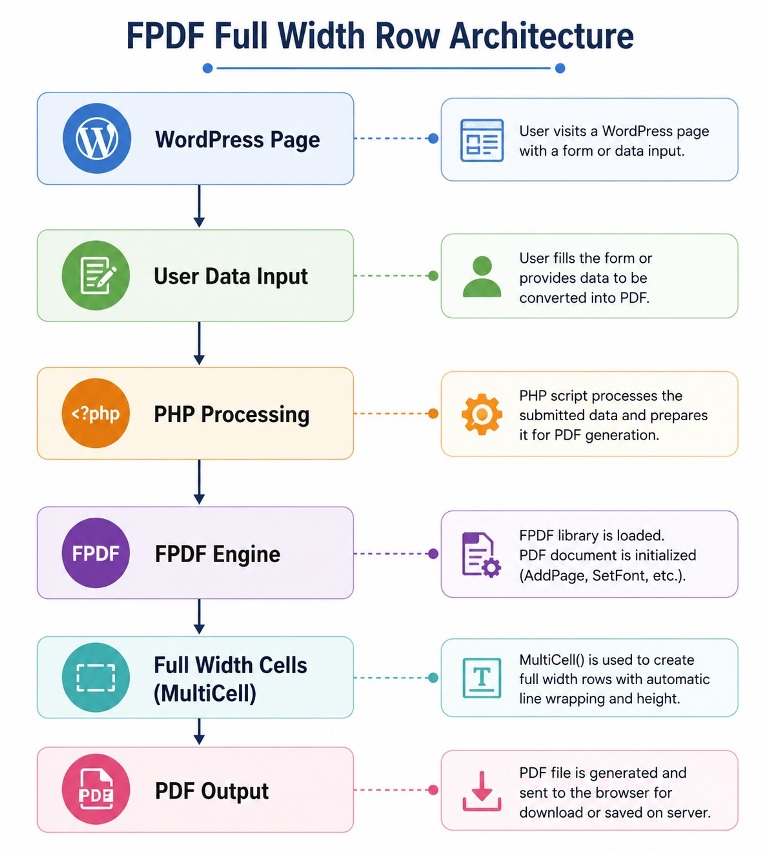
Step 1: Plugin Setup and Directory Structure
Create a dedicated WordPress plugin. Never put PDF generation logic inside your theme’s functions.php.
/wp-content/plugins/fpdf-fullwidth-pdf/
├── fpdf-fullwidth-pdf.php        ← Plugin entry point
├── fpdf/
│   └── fpdf.php                  ← FPDF library (download from fpdf.org)
├── includes/
│   ├── class-custom-pdf.php      ← Extended FPDF class
│   ├── pdf-layouts.php           ← Reusable layout functions
│   └── pdf-shortcode.php         ← [fullwidth_pdf] shortcode
└── assets/
    └── style.css                 ← Download button styles
Main plugin file:
<?php
/**
 * Plugin Name:  FPDF Full-Width PDF Generator
 * Description:  Generate bordered full-width row PDFs from WordPress using FPDF.
 * Version:      1.0.0
 * Author:       Tabir Ahmad [ipdata.in]
 * License:      GPL2
 */

if ( ! defined( 'ABSPATH' ) ) exit;

define( 'FWPDF_DIR', plugin_dir_path( __FILE__ ) );
define( 'FWPDF_URL', plugin_dir_url( __FILE__ ) );

require_once FWPDF_DIR . 'fpdf/fpdf.php';
require_once FWPDF_DIR . 'includes/class-custom-pdf.php';
require_once FWPDF_DIR . 'includes/pdf-layouts.php';
require_once FWPDF_DIR . 'includes/pdf-shortcode.php';

add_action( 'wp_enqueue_scripts', function() {
    wp_enqueue_style( 'fwpdf-style', FWPDF_URL . 'assets/style.css', [], '1.0.0' );
});
Step 2: Build the Custom PDF Class
This class extends FPDF and unlocks access to protected margin properties while adding a branded header and footer.
/includes/class-custom-pdf.php
<?php
if ( ! defined( 'ABSPATH' ) ) exit;

class CustomPDF extends FPDF {

    // Store document metadata
    protected string $doc_title    = '';
    protected string $doc_subtitle = '';
    protected array  $brand_color  = [ 30, 64, 175 ];   // Blue-700
    protected array  $accent_color = [ 239, 246, 255 ];  // Blue-50

    public function __construct(
        string $title    = 'Document',
        string $subtitle = '',
        string $orientation = 'P',
        string $unit        = 'mm',
        string $format      = 'A4'
    ) {
        parent::__construct( $orientation, $unit, $format );
        $this->doc_title    = $title;
        $this->doc_subtitle = $subtitle;
    }

    /**
     * Branded header — auto-runs on every page.
     */
    public function Header(): void {
        // Full-width colored header bar
        $this->SetFillColor( ...$this->brand_color );
        $this->Rect( 0, 0, $this->GetPageWidth(), 20, 'F' );

        // Document title
        $this->SetFont( 'Arial', 'B', 14 );
        $this->SetTextColor( 255, 255, 255 );
        $this->SetXY( 0, 3 );
        $this->Cell( $this->GetPageWidth(), 8, utf8_decode( $this->doc_title ), 0, 1, 'C' );

        // Subtitle (if set)
        if ( $this->doc_subtitle ) {
            $this->SetFont( 'Arial', 'I', 9 );
            $this->SetXY( 0, 11 );
            $this->Cell( $this->GetPageWidth(), 6, utf8_decode( $this->doc_subtitle ), 0, 1, 'C' );
        }

        // Reset and add top padding
        $this->SetTextColor( 30, 30, 30 );
        $this->SetY( 26 );
    }

    /**
     * Page footer — auto-runs on every page.
     */
    public function Footer(): void {
        $this->SetY( -14 );
        $this->SetFont( 'Arial', 'I', 8 );
        $this->SetTextColor( 150, 150, 150 );
        $this->SetFillColor( 248, 250, 252 );
        $this->Cell( $this->GetPageWidth(), 10, '', 'T', 0, 'C', true );
        $this->SetY( -12 );
        $this->Cell(
            $this->GetPageWidth() / 2, 8,
            get_bloginfo('name') . ' | ' . date('d M Y'),
            0, 0, 'L'
        );
        $this->Cell(
            $this->GetPageWidth() / 2, 8,
            'Page ' . $this->PageNo() . ' of {nb}',
            0, 0, 'R'
        );
    }

    /**
     * Returns the printable content width (page - left margin - right margin).
     * This is why we extend FPDF — to access protected lMargin and rMargin.
     */
    public function get_content_width(): float {
        return $this->GetPageWidth() - $this->lMargin - $this->rMargin;
    }

    /**
     * Returns left margin — needed by external layout functions.
     */
    public function get_left_margin(): float {
        return $this->lMargin;
    }
}
Why extend FPDF? The properties `this−>lMargin‘and‘this->lMargin` and ` this− > lMargin‘and‘this->rMargin` are protected in FPDF. External functions cannot access them directly — you’ll get a fatal PHP error: “Cannot access protected property FPDF::$lMargin”. By extending FPDF into CustomPDF and adding get_content_width(), you create a clean public accessor that works everywhere.
Step 3: The Core Full-Width Row Engine
This is the technical centrepiece of the entire guide. Every layout pattern builds on this foundational function.
/includes/pdf-layouts.php
<?php
if ( ! defined( 'ABSPATH' ) ) exit;

// ═══════════════════════════════════════════════════════════
//  SECTION 1 — CORE FULL-WIDTH ROW FUNCTIONS
// ═══════════════════════════════════════════════════════════

/**
 * Draw a single full-width row with a border.
 * Text wraps automatically if it exceeds the row width.
 *
 * @param CustomPDF $pdf
 * @param string    $text        Row content
 * @param float     $row_height  Line height per row (default: 7mm)
 * @param string    $align       Text alignment: 'L', 'C', 'R' (default: 'L')
 * @param bool      $fill        Fill row background? (default: false)
 * @param array     $fill_color  RGB fill color (default: white)
 * @param string    $border      Border string: '1', '0', 'LRTB' etc.
 */
function fwpdf_full_width_row(
    CustomPDF $pdf,
    string    $text,
    float     $row_height  = 7,
    string    $align       = 'L',
    bool      $fill        = false,
    array     $fill_color  = [ 255, 255, 255 ],
    string    $border      = '1'
): void {
    $width = $pdf->get_content_width();

    $pdf->SetFillColor( ...$fill_color );
    $pdf->MultiCell( $width, $row_height, utf8_decode( $text ), $border, $align, $fill );
}

/**
 * Draw a zebra-striped list of full-width rows.
 * Alternating rows get a light gray background.
 *
 * @param CustomPDF $pdf
 * @param array     $items       Array of strings, each becomes one row
 * @param float     $row_height
 * @param string    $border
 */
function fwpdf_zebra_rows(
    CustomPDF $pdf,
    array     $items,
    float     $row_height = 7,
    string    $border     = '1'
): void {
    $even_color = [ 248, 250, 252 ]; // Slate-50
    $odd_color  = [ 255, 255, 255 ]; // White

    foreach ( $items as $index => $text ) {
        $fill_color = ( $index % 2 === 0 ) ? $even_color : $odd_color;
        fwpdf_full_width_row( $pdf, $text, $row_height, 'L', true, $fill_color, $border );
        $pdf->Ln( 1 ); // 1mm gap between rows — remove if you want flush borders
    }
}

/**
 * Draw a full-width "label + value" paired row.
 * Left half = label (bold), right half = value.
 *
 * @param CustomPDF $pdf
 * @param string    $label
 * @param string    $value
 * @param float     $row_height
 */
function fwpdf_label_value_row(
    CustomPDF $pdf,
    string    $label,
    string    $value,
    float     $row_height = 7
): void {
    $full_width  = $pdf->get_content_width();
    $label_width = $full_width * 0.35; // 35% for label
    $value_width = $full_width * 0.65; // 65% for value

    // Calculate max height needed for both columns
    $label_lines = max( 1, ceil( $pdf->GetStringWidth( utf8_decode($label) ) / $label_width ) );
    $value_lines = max( 1, ceil( $pdf->GetStringWidth( utf8_decode($value) ) / $value_width ) );
    $lines       = max( $label_lines, $value_lines );
    $cell_height = $row_height * $lines;

    $x = $pdf->get_left_margin();
    $y = $pdf->GetY();

    // Label cell (bold, light background)
    $pdf->SetFont( 'Arial', 'B', 9 );
    $pdf->SetFillColor( 241, 245, 249 ); // Slate-100
    $pdf->SetXY( $x, $y );
    $pdf->MultiCell( $label_width, $row_height, utf8_decode( $label ), 1, 'L', true );

    // Value cell (normal, white background)
    $pdf->SetFont( 'Arial', '', 9 );
    $pdf->SetFillColor( 255, 255, 255 );
    $pdf->SetXY( $x + $label_width, $y );
    $pdf->MultiCell( $value_width, $row_height, utf8_decode( $value ), 1, 'L', true );

    // Move cursor below both cells
    $pdf->SetXY( $x, $y + $cell_height );
}


// ═══════════════════════════════════════════════════════════
//  SECTION 2 — SECTION HEADINGS
// ═══════════════════════════════════════════════════════════

/**
 * Draw a styled full-width section heading row.
 *
 * @param CustomPDF $pdf
 * @param string    $title
 * @param string    $style  'primary' | 'secondary' | 'warning' | 'success'
 */
function fwpdf_section_heading(
    CustomPDF $pdf,
    string    $title,
    string    $style = 'primary'
): void {
    $styles = [
        'primary'   => [ 'fill' => [30,64,175],   'text' => [255,255,255], 'border' => [30,64,175]   ],
        'secondary' => [ 'fill' => [100,116,139],  'text' => [255,255,255], 'border' => [100,116,139] ],
        'warning'   => [ 'fill' => [180,83,9],     'text' => [255,255,255], 'border' => [180,83,9]    ],
        'success'   => [ 'fill' => [22,101,52],    'text' => [255,255,255], 'border' => [22,101,52]   ],
        'light'     => [ 'fill' => [239,246,255],  'text' => [30,64,175],   'border' => [147,197,253] ],
    ];

    $s = $styles[ $style ] ?? $styles['primary'];

    $pdf->SetFont( 'Arial', 'B', 10 );
    $pdf->SetFillColor( ...$s['fill'] );
    $pdf->SetTextColor( ...$s['text'] );
    $pdf->SetDrawColor( ...$s['border'] );

    fwpdf_full_width_row( $pdf, '  ' . $title, 8, 'L', true, $s['fill'] );

    $pdf->SetTextColor( 30, 30, 30 );
    $pdf->SetDrawColor( 0, 0, 0 );
    $pdf->SetFont( 'Arial', '', 9 );
    $pdf->Ln( 2 );
}


// ═══════════════════════════════════════════════════════════
//  SECTION 3 — FULL-WIDTH TABLE WITH COLUMN HEADERS
// ═══════════════════════════════════════════════════════════

/**
 * Draw a full-width data table with configurable column widths.
 *
 * @param CustomPDF  $pdf
 * @param array      $headers      ['Label', 'Label', ...]
 * @param array      $rows         [['cell','cell',...], ...]
 * @param array|null $col_weights  Relative widths e.g. [2,1,1,1] (null = equal)
 * @param float      $row_height
 */
function fwpdf_data_table(
    CustomPDF $pdf,
    array     $headers,
    array     $rows,
    ?array    $col_weights = null,
    float     $row_height  = 7
): void {
    $full_width  = $pdf->get_content_width();
    $col_count   = count( $headers );

    // Calculate column widths from weights
    if ( $col_weights && count($col_weights) === $col_count ) {
        $total_weight = array_sum( $col_weights );
        $col_widths   = array_map(
            fn($w) => ( $w / $total_weight ) * $full_width,
            $col_weights
        );
    } else {
        $col_widths = array_fill( 0, $col_count, $full_width / $col_count );
    }

    // ── Header Row ────────────────────────────────────────────
    $pdf->SetFont( 'Arial', 'B', 9 );
    $pdf->SetFillColor( 30, 64, 175 );
    $pdf->SetTextColor( 255, 255, 255 );
    $pdf->SetDrawColor( 30, 64, 175 );

    foreach ( $headers as $i => $header ) {
        $pdf->Cell( $col_widths[$i], $row_height + 1, utf8_decode($header), 1, 0, 'C', true );
    }
    $pdf->Ln();

    // ── Data Rows ─────────────────────────────────────────────
    $pdf->SetFont( 'Arial', '', 9 );
    $pdf->SetTextColor( 40, 40, 40 );
    $pdf->SetDrawColor( 200, 210, 220 );

    $even_fill = [ 248, 250, 252 ];
    $odd_fill  = [ 255, 255, 255 ];

    foreach ( $rows as $row_idx => $row ) {
        $fill_color = ( $row_idx % 2 === 0 ) ? $even_fill : $odd_fill;

        // Measure the tallest cell in this row
        $max_lines = 1;
        foreach ( $row as $ci => $cell ) {
            $str_w     = $pdf->GetStringWidth( utf8_decode($cell) );
            $cell_lines = max( 1, ceil( $str_w / ( $col_widths[$ci] - 2 ) ) );
            $max_lines  = max( $max_lines, $cell_lines );
        }
        $actual_height = $row_height * $max_lines;

        // Check page break manually to avoid splitting rows mid-content
        if ( $pdf->GetY() + $actual_height > $pdf->GetPageHeight() - 20 ) {
            $pdf->AddPage();
            // Re-draw headers on new page
            $pdf->SetFont( 'Arial', 'B', 9 );
            $pdf->SetFillColor( 30, 64, 175 );
            $pdf->SetTextColor( 255, 255, 255 );
            foreach ( $headers as $i => $header ) {
                $pdf->Cell( $col_widths[$i], $row_height + 1, utf8_decode($header), 1, 0, 'C', true );
            }
            $pdf->Ln();
            $pdf->SetFont( 'Arial', '', 9 );
            $pdf->SetTextColor( 40, 40, 40 );
        }

        // Draw each cell in the row
        $x = $pdf->get_left_margin();
        $y = $pdf->GetY();

        foreach ( $row as $ci => $cell ) {
            $pdf->SetFillColor( ...$fill_color );
            $pdf->SetXY( $x, $y );
            $pdf->MultiCell( $col_widths[$ci], $row_height, utf8_decode($cell), 1, 'L', true );
            $x += $col_widths[$ci];
        }

        // Move cursor below the tallest cell in this row
        $pdf->SetXY( $pdf->get_left_margin(), $y + $actual_height );
    }

    $pdf->SetDrawColor( 0, 0, 0 );
    $pdf->SetTextColor( 30, 30, 30 );
}


// ═══════════════════════════════════════════════════════════
//  SECTION 4 — NUMBERED LIST ROWS
// ═══════════════════════════════════════════════════════════

/**
 * Render a numbered list as full-width bordered rows.
 *
 * @param CustomPDF $pdf
 * @param array     $items   Array of strings
 */
function fwpdf_numbered_rows( CustomPDF $pdf, array $items ): void {
    $full_width    = $pdf->get_content_width();
    $number_width  = 12;
    $text_width    = $full_width - $number_width;

    $pdf->SetFont( 'Arial', '', 9 );

    foreach ( $items as $i => $text ) {
        $x = $pdf->get_left_margin();
        $y = $pdf->GetY();

        $fill = ( $i % 2 === 0 ) ? [248,250,252] : [255,255,255];

        // Number cell
        $pdf->SetFillColor( 30, 64, 175 );
        $pdf->SetTextColor( 255, 255, 255 );
        $pdf->SetFont( 'Arial', 'B', 9 );
        $pdf->SetXY( $x, $y );
        $pdf->Cell( $number_width, 8, (string)($i + 1), 1, 0, 'C', true );

        // Text cell
        $pdf->SetFillColor( ...$fill );
        $pdf->SetTextColor( 40, 40, 40 );
        $pdf->SetFont( 'Arial', '', 9 );
        $pdf->SetXY( $x + $number_width, $y );
        $pdf->MultiCell( $text_width, 8, utf8_decode($text), 1, 'L', true );

        // Advance Y position
        $pdf->SetXY( $x, $pdf->GetY() );
    }

    $pdf->SetTextColor( 30, 30, 30 );
}


// ═══════════════════════════════════════════════════════════
//  SECTION 5 — VISUAL DIVIDERS
// ═══════════════════════════════════════════════════════════

/**
 * Draw a horizontal rule across the full printable width.
 */
function fwpdf_divider( CustomPDF $pdf, float $space_before = 3, float $space_after = 3 ): void {
    $pdf->Ln( $space_before );
    $pdf->SetDrawColor( 203, 213, 225 ); // Slate-300
    $pdf->Line(
        $pdf->get_left_margin(),
        $pdf->GetY(),
        $pdf->get_left_margin() + $pdf->get_content_width(),
        $pdf->GetY()
    );
    $pdf->SetDrawColor( 0, 0, 0 );
    $pdf->Ln( $space_after );
}


// ═══════════════════════════════════════════════════════════
//  SECTION 6 — MAIN PDF BUILDER
// ═══════════════════════════════════════════════════════════

/**
 * Assemble and output a full demo PDF showing all row types.
 *
 * @param array $data  Optional dynamic data (post meta, $wpdb results, etc.)
 */
function fwpdf_build_and_output( array $data = [] ): void {

    // Clear WordPress output buffers (prevents "headers already sent" error)
    while ( ob_get_level() ) {
        ob_end_clean();
    }

    $pdf = new CustomPDF(
        $data['title']    ?? 'Project Report — Q3 2025',
        $data['subtitle'] ?? 'Prepared by ' . get_bloginfo('name')
    );

    $pdf->AliasNbPages(); // Enables {nb} total page count in footer
    $pdf->SetMargins( 15, 10, 15 );
    $pdf->SetAutoPageBreak( true, 20 );
    $pdf->SetFont( 'Arial', '', 9 );
    $pdf->AddPage();

    // ── 1. Document Info Row ──────────────────────────────────
    fwpdf_section_heading( $pdf, 'Document Information', 'light' );

    $meta = $data['meta'] ?? [
        'Project Name'  => 'Website Redesign Initiative',
        'Client'        => 'Acme Corporation Pvt. Ltd.',
        'Report Period' => 'July 1 – September 30, 2025',
        'Prepared By'   => 'Project Management Office',
        'Status'        => 'In Progress',
    ];

    foreach ( $meta as $label => $value ) {
        fwpdf_label_value_row( $pdf, $label, $value );
    }

    fwpdf_divider( $pdf );

    // ── 2. Session Summary — Full-Width Zebra Rows ────────────
    fwpdf_section_heading( $pdf, 'Session Summary', 'primary' );

    $session_points = $data['session_points'] ?? [
        'Opening remarks and review of previous meeting minutes',
        'Q3 milestone review — Website redesign progress at 68% completion',
        'Budget variance analysis — 12% under budget due to deferred hosting upgrade',
        'Stakeholder feedback on new UI mockups — generally positive, 3 revision requests',
        'Risk register update — new risk logged for third-party API deprecation',
        'Action items assigned for the next sprint cycle',
        'Next session scheduled for Monday, October 6, 2025 at 10:00 AM IST',
    ];

    $pdf->SetFont( 'Arial', '', 9 );
    fwpdf_zebra_rows( $pdf, $session_points, 7 );

    fwpdf_divider( $pdf );

    // ── 3. Action Items — Numbered Rows ───────────────────────
    fwpdf_section_heading( $pdf, 'Action Items', 'secondary' );

    $action_items = $data['action_items'] ?? [
        'Alice — Finalize revised homepage wireframes by October 3',
        'Bob — Fix mobile navigation bug on staging site by September 28',
        'Carol — Send updated content brief to copywriting team by September 26',
        'Dev Team — Migrate staging environment to new server by October 1',
        'PM — Update project timeline in Basecamp and notify all stakeholders',
    ];

    $pdf->SetFont( 'Arial', '', 9 );
    fwpdf_numbered_rows( $pdf, $action_items );

    fwpdf_divider( $pdf );

    // ── 4. Budget Table — Full-Width Data Table ───────────────
    fwpdf_section_heading( $pdf, 'Budget Breakdown', 'success' );

    fwpdf_data_table(
        $pdf,
        [ 'Category', 'Budgeted (₹)', 'Actual (₹)', 'Variance', 'Status' ],
        [
            [ 'UI/UX Design',        '1,20,000', '98,500',   '-21,500',  'Under Budget'   ],
            [ 'Frontend Development','2,40,000', '2,51,000', '+11,000',  'Slight Overrun' ],
            [ 'Backend Development', '1,80,000', '1,65,000', '-15,000',  'Under Budget'   ],
            [ 'QA & Testing',        '60,000',   '44,000',   '-16,000',  'Under Budget'   ],
            [ 'Project Management',  '80,000',   '82,500',   '+2,500',   'On Track'       ],
            [ 'Total',               '6,80,000', '6,41,000', '-39,000',  'Under Budget'   ],
        ],
        [ 2.5, 1, 1, 1, 1.2 ], // Column weight ratios
        6
    );

    fwpdf_divider( $pdf );

    // ── 5. Risks — Warning Style ──────────────────────────────
    fwpdf_section_heading( $pdf, 'Identified Risks', 'warning' );

    $risks = $data['risks'] ?? [
        'HIGH — Third-party payment API may be deprecated in Q4; migration plan required.',
        'MEDIUM — Key frontend developer on leave in October; may delay final delivery.',
        'LOW — Client stakeholder availability limited during festival season.',
    ];

    $pdf->SetFont( 'Arial', '', 9 );
    foreach ( $risks as $risk ) {
        fwpdf_full_width_row( $pdf, '  ⚠  ' . $risk, 8, 'L', true, [255,251,235] );
        $pdf->Ln( 1 );
    }

    // ── Output PDF ────────────────────────────────────────────
    $filename = sanitize_title( $data['title'] ?? 'project-report' ) . '-' . date('Ymd') . '.pdf';
    $pdf->Output( 'D', $filename );
    exit;
}
Step 4: Register the Shortcode
/includes/pdf-shortcode.php
<?php
if ( ! defined( 'ABSPATH' ) ) exit;

add_shortcode( 'fullwidth_pdf', 'fwpdf_shortcode_handler' );

function fwpdf_shortcode_handler( $atts ): string {

    $atts = shortcode_atts([
        'label'   => '⬇ Download Full Report PDF',
        'post_id' => get_the_ID(),
    ], $atts, 'fullwidth_pdf' );

    // ── Handle the PDF download request ──
    if (
        isset( $_GET['fwpdf_download'] ) &&
        $_GET['fwpdf_download'] === '1' &&
        isset( $_GET['fwpdf_nonce'] ) &&
        wp_verify_nonce( $_GET['fwpdf_nonce'], 'fwpdf_generate' )
    ) {
        $post_id = absint( $_GET['post_id'] ?? get_the_ID() );

        // Pull data from WordPress post meta (works with ACF or native meta)
        $data = [
            'title'    => get_the_title( $post_id ) ?: 'Project Report',
            'subtitle' => 'Generated from ' . get_bloginfo('name') . ' on ' . date('d M Y'),
            'meta'     => [
                'Report For'    => get_post_meta( $post_id, 'report_client',  true ) ?: 'General Report',
                'Period'        => get_post_meta( $post_id, 'report_period',  true ) ?: date('F Y'),
                'Prepared By'   => get_post_meta( $post_id, 'report_author',  true ) ?: wp_get_current_user()->display_name,
                'Post Reference'=> '#' . $post_id,
                'Generated'     => date('d M Y, H:i') . ' IST',
            ],
            // Pull session points from an ACF repeater or serialized meta
            'session_points' => get_post_meta( $post_id, 'session_points', true ) ?: [],
            'action_items'   => get_post_meta( $post_id, 'action_items',   true ) ?: [],
        ];

        fwpdf_build_and_output( $data );
        // exits inside fwpdf_build_and_output()
    }

    // ── Build the download URL with security nonce ──
    $download_url = add_query_arg([
        'fwpdf_download' => '1',
        'post_id'        => get_the_ID(),
        'fwpdf_nonce'    => wp_create_nonce( 'fwpdf_generate' ),
    ]);

    ob_start();
    ?>
    <div class="fwpdf-wrapper">
        <a href="<?php echo esc_url( $download_url ); ?>" class="fwpdf-btn">
            <span class="fwpdf-icon">
                <svg xmlns="http://www.w3.org/2000/svg" width="18" height="18" viewBox="0 0 24 24" fill="none" stroke="currentColor" stroke-width="2" stroke-linecap="round" stroke-linejoin="round">
                    <path d="M21 15v4a2 2 0 0 1-2 2H5a2 2 0 0 1-2-2v-4"/>
                    <polyline points="7 10 12 15 17 10"/>
                    <line x1="12" y1="15" x2="12" y2="3"/>
                </svg>
            </span>
            <?php echo esc_html( $atts['label'] ); ?>
        </a>
        <span class="fwpdf-meta">PDF · Real-time · Secured</span>
    </div>
    <?php
    return ob_get_clean();
}
Step 5: Styled Download Button
/assets/style.css
.fwpdf-wrapper {
    display: flex;
    align-items: center;
    gap: 14px;
    margin: 28px 0;
    flex-wrap: wrap;
}

.fwpdf-btn {
    display: inline-flex;
    align-items: center;
    gap: 8px;
    background: linear-gradient(135deg, #1e40af 0%, #2563eb 100%);
    color: #ffffff !important;
    text-decoration: none !important;
    padding: 13px 28px;
    border-radius: 10px;
    font-weight: 700;
    font-size: 0.92rem;
    letter-spacing: 0.01em;
    box-shadow: 0 4px 14px rgba(37, 99, 235, 0.35);
    transition: transform 0.15s ease, box-shadow 0.15s ease, background 0.2s ease;
}

.fwpdf-btn:hover {
    background: linear-gradient(135deg, #1d4ed8 0%, #1e40af 100%);
    box-shadow: 0 6px 20px rgba(37, 99, 235, 0.45);
    transform: translateY(-2px);
}

.fwpdf-btn:active {
    transform: translateY(0);
    box-shadow: 0 2px 8px rgba(37, 99, 235, 0.3);
}

.fwpdf-icon {
    display: flex;
    align-items: center;
}

.fwpdf-meta {
    font-size: 0.75rem;
    color: #94a3b8;
    font-style: italic;
}
Step 6: How to Use the Shortcode
Place this anywhere in a WordPress post or page:
[fullwidth_pdf]
Custom label:
[fullwidth_pdf label="Download Q3 Project Report"]
For a specific post/record by ID:
[fullwidth_pdf label="Download Invoice #1042" post_id="1042"]
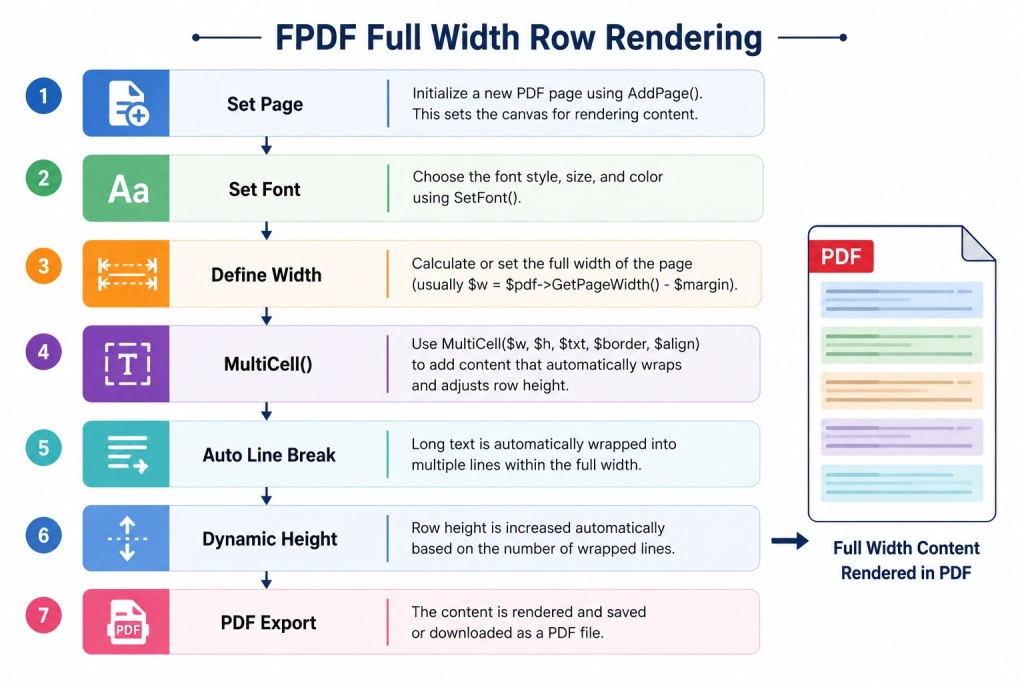
Deep Dive — The MultiCell vs Cell Decision
Understanding when to use MultiCell() vs Cell() is the single most important FPDF layout decision.
Cell() — Use for fixed, single-line content
$pdf->Cell($width, $height, $text, $border, $ln, $align, $fill);
- Text is never wrapped — overflows if too long
- Row height is always exactly $height
- Best for: column headers, short labels, numbers, dates, status badges
MultiCell() — Use for wrapping/full-width content
$pdf->MultiCell($width, $line_height, $text, $border, $align, $fill);
- Text wraps automatically – row grows taller as needed
- $line_height is per-line, not total height
- Best for: descriptions, notes, agenda items, anything that may be long
- The correct tool for full-width rows that contain variable-length text
Height Synchronization Across a Multi-Column Row
When you have two columns side by side (like label + value), you must synchronize their heights. The approach in fwpdf_label_value_row() above saves $y = $pdf->GetY(), draws both columns starting from that Y, then moves the cursor to $y + max_height afterwards.
$x = $pdf->get_left_margin();
$y = $pdf->GetY();

// Draw column A
$pdf->SetXY( $x, $y );
$pdf->MultiCell( $width_a, $line_h, $text_a, 1, 'L' );

// Draw column B — starting from the SAME Y
$pdf->SetXY( $x + $width_a, $y );
$pdf->MultiCell( $width_b, $line_h, $text_b, 1, 'L' );

// Advance cursor to below both columns
$pdf->SetXY( $x, $y + $calculated_max_height );
This is the fundamental pattern for multi-column rows in FPDF — saving and restoring Y position.
Solving Every Common FPDF Full-Width Row Error
Error 1: “Cannot access protected property FPDF::$lMargin”
Fatal error: Cannot access protected property FPDF::$lMargin
Cause: You’re accessing $pdf->lMargin from outside the FPDF class hierarchy.
Fix: Use the get_content_width() and get_left_margin() accessor methods on your CustomPDF class as shown in this guide.
Error 2: “Headers already sent by…”
Warning: Cannot modify header information - headers already sent by (output started at .../wp-settings.php:...)
Cause: WordPress (or a plugin) has already echoed HTML before your $pdf->Output() call.
Fix:
// Add this immediately before $pdf->Output()
while ( ob_get_level() ) {
    ob_end_clean();
}
$pdf->Output( 'D', 'file.pdf' );
exit;
Error 3: Rows Overlapping or Stacking Incorrectly
Cause: After MultiCell(), FPDF moves the cursor to the next line automatically. But when you use SetXY() for multi-column layouts and then switch columns, the Y cursor can be in an unexpected position.
Fix: Always save $y = $pdf->GetY() before drawing multi-column rows and reset $pdf->SetXY( $x, $y ) before each column.
Error 4: Last Column Border Missing
Cause: When cells in a row have different heights due to text wrapping, the shorter cells appear to have missing bottom borders.
Fix: Use the Y-save technique above and pre-calculate the maximum height. Draw phantom “background fill” rectangles to pad shorter cells to the row height.
// Draw a rectangle to fill the remaining space in shorter columns
$pdf->Rect( $x, $y + $actual_cell_height, $col_width, $max_row_height - $actual_cell_height, 'FD' );
Error 5: Special Characters Appear as “?”
Cause: FPDF’s built-in Arial/Helvetica/Times fonts use Latin-1 encoding, not UTF-8.
Fix: Wrap all string output in utf8_decode().
$pdf->Cell( $w, $h, utf8_decode('Résumé & Société') ); // ✅
$pdf->Cell( $w, $h, 'Résumé & Société' );              // ❌
For Hindi, Tamil, or other Indic scripts, use mPDF with appropriate font files instead.
Pulling Real WordPress Data Into Full-Width Rows
From Native Post Meta
$items = get_post_meta( $post_id, 'agenda_items', true );
// Returns array if stored with update_post_meta($id, $key, $array)
fwpdf_zebra_rows( $pdf, $items );
From an ACF Repeater Field
$rows = get_field( 'meeting_agenda', $post_id );
// $rows = [['point' => 'Discuss Q3 budget'], ['point' => 'Review roadmap'], ...]

$items = array_column( $rows, 'point' );
fwpdf_zebra_rows( $pdf, $items );
From $wpdb — Custom Table
global $wpdb;

$records = $wpdb->get_results( $wpdb->prepare(
    "SELECT task, assignee, due_date, status
     FROM {$wpdb->prefix}project_tasks
     WHERE project_id = %d
     ORDER BY due_date ASC",
    $project_id
), ARRAY_A );

$table_rows = array_map(
    fn($r) => [ $r['task'], $r['assignee'], $r['due_date'], $r['status'] ],
    $records
);

fwpdf_data_table( $pdf, ['Task','Assigned To','Due Date','Status'], $table_rows );
From WooCommerce Order Line Items
$order = wc_get_order( $order_id );
$rows  = [];

foreach ( $order->get_items() as $item ) {
    $rows[] = [
        $item->get_name(),
        (string) $item->get_quantity(),
        wc_price( $item->get_subtotal() ),
        wc_price( $item->get_total() ),
    ];
}

fwpdf_data_table( $pdf, ['Product','Qty','Subtotal','Total'], $rows, [3,0.5,1,1] );
Page Break Handling for Long Lists
FPDF handles auto page breaks for single MultiCell() calls, but it does not know about multi-column row groups — it may break a page in the middle of a row. Here’s how to handle it manually:
// Before drawing any row group, check if there's enough space
$estimated_height = 10; // mm — height of one row

if ( $pdf->GetY() + $estimated_height > $pdf->GetPageHeight() - 22 ) {
    $pdf->AddPage();
    // Re-draw section heading on new page if needed
    fwpdf_section_heading( $pdf, 'Continued — Action Items', 'secondary' );
}
For large tables, the fwpdf_data_table() function in this guide already handles this — it checks available space before each row and adds a new page with repeated headers if needed.
Complete Error Reference
| Error | Root Cause | Fix |
|---|---|---|
| Cannot access protected property | lMargin called from outside class | Use get_content_width() accessor |
| Headers already sent | WordPress output before Output() | while(ob_get_level()) ob_end_clean() |
| Text overflow (no wrap) | Used Cell() for long text | Switch to MultiCell() |
| Rows overlapping | SetXY Y position not reset between columns | Save $y, reset with SetXY($x, $y) per column |
| Missing border on short column | Height mismatch in multi-column rows | Pre-calculate $max_height, pad with Rect() |
| UTF-8 characters show as ? | Font encoding mismatch | Use utf8_decode() on all strings |
| PDF opens blank | Buffer not cleared | ob_end_clean() loop before Output() |
| Page breaks mid-row | Auto-break inside multi-column group | Manual check: GetY() + height > pageHeight – margin |
| Last page footer wrong | {nb} not replaced | Call $pdf->AliasNbPages() before first AddPage() |
| PDF doesn’t download (opens in browser) | Wrong output mode | Use ‘D’ for download, ‘I’ for inline |
Production Checklist Before Going Live
Before you ship your PDF feature to real users, verify all of these:
- Nonce on every download URL — wp_create_nonce() + wp_verify_nonce()
- Sanitize all GET/POST input — use absint() for IDs, sanitize_text_field() for strings
- exit after Output() — prevents residual HTML from corrupting the PDF
- utf8_decode() on every string — or switch to mPDF for Unicode content
- AliasNbPages() called before AddPage() — for accurate “Page X of Y” footer
- Test on mobile — PDFs should be readable on small screens
- Test long content — verify page breaks don’t split rows mid-content
- Set SetAutoPageBreak(true, 20) — 20mm bottom margin before break triggers
- Logged-in only (if sensitive) — check is_user_logged_in() before generating
- Rate limiting — use set_transient() to limit requests per user per minute
Benefits of Using Full Width Rows in FPDF
- Better readability
- Professional PDF layouts
- Dynamic content support
- Automatic text wrapping
- Suitable for reports and certificates
- Improved document formatting
Real-World Applications
- LMS Certificates
- Student Reports
- Training Completion Records
- Course Enrollment Summaries
- Invoice Generation
- Attendance Reports
- HR Documents
- Audit Reports
The full-width row pattern is deceptively simple on paper — just $width = pageWidth – margins — but in practice it requires understanding FPDF’s class architecture, output buffering in WordPress, text encoding, and page break management to get right.
What this guide gives you is not just the formula, but the full engineering foundation:
- proper CustomPDF class that safely exposes margin properties
- Reusable layout functions for every row pattern you’ll encounter
- Multi-column synchronized height handling
- A table engine with dynamic column weights and automatic page continuation
- Security-hardened WordPress shortcode integration
- A complete error reference for every failure mode
The code above is production-ready. Clone the plugin structure, replace the sample data with your $wpdb or ACF fields, and you’ll have a professional custom PDF system inside WordPress — with no paid plugins, no external APIs, and no data leaving your server.