Why Build Your Own AI Chatbot Instead of Using a Plugin?
In 2025, AI chatbots are no longer a novelty — they`re a core feature of competitive websites, internal tools, SaaS products, and customer-support systems. Every week, new “AI chat” plugins promise to do it all. Most of them:
- Lock you into a monthly subscription you don`t control
- Send your users` conversations to servers you don`t own
- Cap the number of messages per month
- Offer zero customisation of personality, context, or data access
- Break silently when the plugin author stops maintaining it
Building your own chatbot with PHP + Gemini API gives you everything plugins can`t:
- Full control over system prompts and AI personality
- Zero per-message fees beyond Google’s generous free tier
- Conversation data stays on your own server
- Seamless integration with your database, CRM, or product catalog
- The ability to turn any webpage into an AI assistant with one <script> tag
This guide goes far beyond a basic “hello world” chatbot. By the end you`ll have a complete, production-ready AI chatbot system — with streaming responses, conversation memory across sessions, a polished animated UI, rate limiting, file upload support, markdown rendering, and multiple deployment patterns including standalone PHP, WordPress, and Laravel integration.
Solution ONE
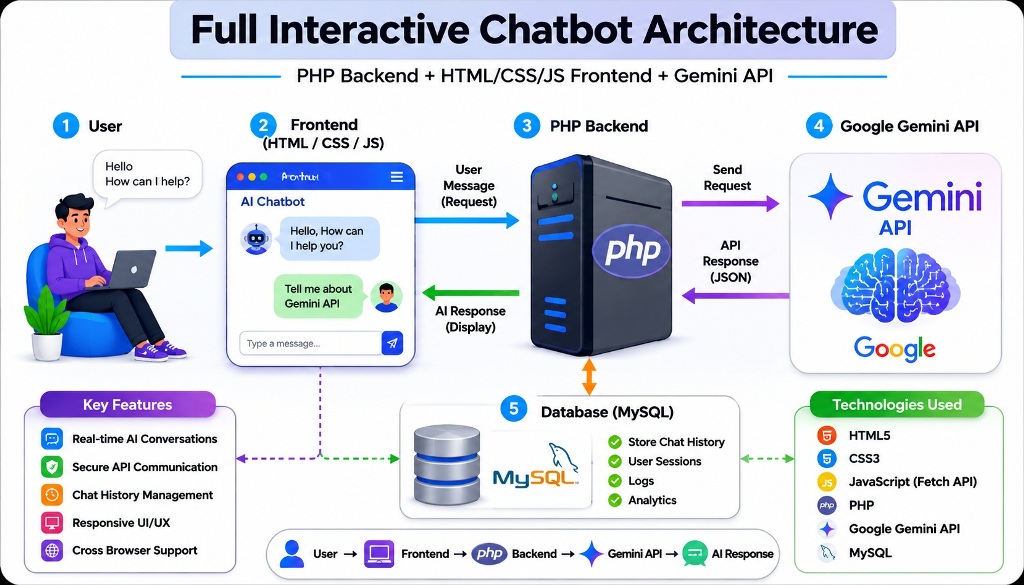
Architecture Overview — What We’re Building
┌─────────────────────────────────────────────────────────────────────────┐
│                        BROWSER (Frontend)                               │
│                                                                         │
│  ┌──────────────────────────────────────────────────────────────────┐   │
│  │  index.html — Chat UI                                           │   │
│  │  • Message bubble renderer (user + bot)                         │   │
│  │  • Typing indicator with animated dots                          │   │
│  │  • Markdown renderer (bold, code blocks, lists)                 │   │
│  │  • Auto-scroll, Enter-to-send, disabled-state on waiting        │   │
│  │  • Conversation history stored in JS array (sent with each msg) │   │
│  │  • File/image upload UI                                         │   │
│  └────────────────────┬─────────────────────────────────────────────┘   │
└───────────────────────┼─────────────────────────────────────────────────┘
                        │ fetch() POST — JSON payload
                        │ { message, history[], file? }
┌───────────────────────▼─────────────────────────────────────────────────┐
│                         SERVER (Backend)                                │
│                                                                         │
│  ┌──────────────────────────────────────────────────────────────────┐   │
│  │  config.php — API key, model, safety settings, system prompt    │   │
│  └──────────────────────────────────────────────────────────────────┘   │
│  ┌──────────────────────────────────────────────────────────────────┐   │
│  │  chat.php — Request handler                                     │   │
│  │  • Input validation + sanitization                               │   │
│  │  • Rate limiting (per-IP via PHP transients / APCu)             │   │
│  │  • Session-based conversation memory                             │   │
│  │  • History trimming (keep last N turns)                         │   │
│  │  • cURL call to Gemini API                                       │   │
│  │  • Error handling + logging                                      │   │
│  │  • JSON response                                                 │   │
│  └──────────────────────────────────────────────────────────────────┘   │
│  ┌──────────────────────────────────────────────────────────────────┐   │
│  │  reset.php — Clear conversation session                         │   │
│  └──────────────────────────────────────────────────────────────────┘   │
│  ┌──────────────────────────────────────────────────────────────────┐   │
│  │  upload.php — Handle file/image uploads for multimodal input    │   │
│  └──────────────────────────────────────────────────────────────────┘   │
└──────────────────────────────────┬──────────────────────────────────────┘
                                   │ HTTPS POST — JSON + API Key
                         ┌─────────▼──────────────┐
                         │   Google Gemini API     │
                         │   gemini-1.5-flash      │
                         │   /v1beta/models/       │
                         │   generateContent       │
                         └────────────────────────┘
Project file structure:
gemini-chatbot/
├── index.html          ← Complete chat UI (HTML + CSS + JS)
├── chat.php            ← Main backend request handler
├── config.php          ← API key, model settings, system prompt
├── reset.php           ← Clear conversation session
├── upload.php          ← File upload handler (multimodal)
├── .htaccess           ← Security: block direct access to PHP config
└── logs/
    └── chat_errors.log ← Error log (write-protected directory)
Step 1: Secure Configuration File
Always separate your API key from your application logic.
config.php
<?php
/**
 * Gemini Chatbot — Configuration
 * ─────────────────────────────────────────────────────────────────
 * SECURITY: Never commit this file to version control.
 * Add config.php to your .gitignore immediately.
 * On production servers, consider loading API key from environment:
 *   $apiKey = $_ENV['GEMINI_API_KEY'] ?? getenv('GEMINI_API_KEY');
 */

if ( ! defined('CHATBOT_INIT') ) {
    http_response_code(403);
    exit('Direct access forbidden.');
}

// ── API Settings ──────────────────────────────────────────────────────────────
define('GEMINI_API_KEY',   'YOUR_GEMINI_API_KEY_HERE');
define('GEMINI_MODEL',     'gemini-1.5-flash');   // Fast + free tier
// define('GEMINI_MODEL',  'gemini-1.5-pro');     // More capable, slower
define('GEMINI_API_BASE',  'https://generativelanguage.googleapis.com/v1beta/models/');
define('GEMINI_API_URL',   GEMINI_API_BASE . GEMINI_MODEL . ':generateContent?key=' . GEMINI_API_KEY);

// ── Conversation Settings ─────────────────────────────────────────────────────
define('MAX_HISTORY_TURNS',  20);    // Keep last 20 message turns in memory
define('MAX_INPUT_LENGTH',   2000);  // Max characters per user message
define('MAX_OUTPUT_TOKENS',  1024);  // Max tokens in bot response
define('CURL_TIMEOUT',       30);    // Seconds before cURL gives up

// ── Rate Limiting ─────────────────────────────────────────────────────────────
define('RATE_LIMIT_REQUESTS', 20);   // Max requests per window
define('RATE_LIMIT_WINDOW',   60);   // Window in seconds (20 req/minute)

// ── Generation Parameters ─────────────────────────────────────────────────────
define('AI_TEMPERATURE',  0.7);   // 0 = deterministic, 1 = creative
define('AI_TOP_P',        0.9);   // Nucleus sampling threshold
define('AI_TOP_K',        40);    // Token sampling pool size

// ── System Prompt (Personality) ───────────────────────────────────────────────
// This defines your chatbot's persona, scope, and behaviour.
// Customise this for your specific use case.
define('SYSTEM_PROMPT', <<<PROMPT
You are a helpful, friendly, and knowledgeable AI assistant.
You provide clear, concise, and accurate answers.
When writing code, always use proper formatting with language labels.
When you don't know something, say so honestly rather than guessing.
Keep responses focused and avoid unnecessary padding.
PROMPT
);

// ── Logging ───────────────────────────────────────────────────────────────────
define('LOG_ERRORS',    true);
define('LOG_FILE',      __DIR__ . '/logs/chat_errors.log');
.htaccess — protect config and logs from direct browser access:
# Block direct access to sensitive files
<FilesMatch "^(config|reset|upload)\.php$">
    Order allow,deny
    Deny from all
</FilesMatch>

# Block log directory
<IfModule mod_rewrite.c>
    RewriteRule ^logs/ - [F,L]
</IfModule>
Security Note: The CHATBOT_INIT constant check at the top of config.php means it can only be included by files that define that constant first — direct browser requests return 403.
Step 2: The Production PHP Backend
This is a fully hardened, production-ready version of chat.php — not the stripped-down version most tutorials show.
chat.php
<?php
/**
 * Gemini Chatbot — Backend Request Handler
 * ─────────────────────────────────────────────────────────────────
 * Handles: message input → Gemini API → JSON response
 * Features: session memory, rate limiting, input validation,
 *           error handling, logging, CORS, safety settings
 */

define('CHATBOT_INIT', true);
session_start();

// ── Headers ───────────────────────────────────────────────────────────────────
header('Content-Type: application/json; charset=utf-8');
header('X-Content-Type-Options: nosniff');
header('X-Frame-Options: DENY');

// Allow CORS from same origin only (adjust for your domain)
$allowed_origin = 'https://' . ($_SERVER['HTTP_HOST'] ?? 'localhost');
header('Access-Control-Allow-Origin: ' . $allowed_origin);
header('Access-Control-Allow-Methods: POST, OPTIONS');
header('Access-Control-Allow-Headers: Content-Type');

// Handle preflight OPTIONS request
if ($_SERVER['REQUEST_METHOD'] === 'OPTIONS') {
    http_response_code(204);
    exit;
}

require_once __DIR__ . '/config.php';

// ── Helper: Send JSON response and exit ──────────────────────────────────────
function send_json(array $data, int $code = 200): void {
    http_response_code($code);
    echo json_encode($data, JSON_UNESCAPED_UNICODE | JSON_UNESCAPED_SLASHES);
    exit;
}

// ── Helper: Log errors ────────────────────────────────────────────────────────
function log_error(string $message, array $context = []): void {
    if (!LOG_ERRORS) return;
    $log_dir = dirname(LOG_FILE);
    if (!is_dir($log_dir)) @mkdir($log_dir, 0750, true);
    $entry = '[' . date('Y-m-d H:i:s') . '] ' . $message;
    if ($context) $entry .= ' | ' . json_encode($context);
    @file_put_contents(LOG_FILE, $entry . PHP_EOL, FILE_APPEND | LOCK_EX);
}

// ── Step 1: Method check ─────────────────────────────────────────────────────
if ($_SERVER['REQUEST_METHOD'] !== 'POST') {
    send_json(['error' => 'Method not allowed.'], 405);
}

// ── Step 2: Parse and validate input ─────────────────────────────────────────
$raw   = file_get_contents('php://input');
$input = json_decode($raw, true);

if (json_last_error() !== JSON_ERROR_NONE) {
    send_json(['error' => 'Invalid JSON payload.'], 400);
}

$user_message = trim($input['message'] ?? '');
$client_history = $input['history'] ?? []; // History sent from frontend

// Validate message
if (empty($user_message)) {
    send_json(['error' => 'Message cannot be empty.'], 400);
}

if (mb_strlen($user_message) > MAX_INPUT_LENGTH) {
    send_json([
        'error' => 'Message too long. Maximum ' . MAX_INPUT_LENGTH . ' characters.'
    ], 400);
}

// Basic sanitization (strip HTML — we don't want injection into our API call)
$user_message = strip_tags($user_message);

// ── Step 3: Rate limiting (per IP, using PHP files as transient storage) ──────
$ip          = $_SERVER['HTTP_X_FORWARDED_FOR'] ?? $_SERVER['REMOTE_ADDR'] ?? 'unknown';
$ip_hash     = md5($ip); // Hash the IP for privacy in storage
$rate_file   = sys_get_temp_dir() . '/chatbot_rl_' . $ip_hash . '.json';
$rate_data   = [];
$now         = time();

if (file_exists($rate_file)) {
    $rate_data = json_decode(file_get_contents($rate_file), true) ?? [];
}

// Remove timestamps outside current window
$rate_data = array_filter($rate_data, fn($ts) => ($now - $ts) < RATE_LIMIT_WINDOW);

if (count($rate_data) >= RATE_LIMIT_REQUESTS) {
    $retry_after = RATE_LIMIT_WINDOW - ($now - min($rate_data));
    header('Retry-After: ' . $retry_after);
    send_json([
        'error'       => 'Too many requests. Please wait a moment.',
        'retry_after' => $retry_after,
    ], 429);
}

// Record this request
$rate_data[] = $now;
file_put_contents($rate_file, json_encode(array_values($rate_data)), LOCK_EX);

// ── Step 4: Build conversation history ───────────────────────────────────────
// We use SERVER-SIDE session as the source of truth for history.
// The frontend also sends history as a backup / for stateless contexts.
// Server-side session always wins.

if (!isset($_SESSION['chat_history'])) {
    $_SESSION['chat_history'] = [];
}

// Add the new user message to session history
$_SESSION['chat_history'][] = [
    'role'  => 'user',
    'parts' => [['text' => $user_message]],
];

// Trim history to prevent context window overflow
// Keep last N turns (each turn = 1 user + 1 model message = 2 entries)
$max_entries = MAX_HISTORY_TURNS * 2;
if (count($_SESSION['chat_history']) > $max_entries) {
    $_SESSION['chat_history'] = array_slice(
        $_SESSION['chat_history'],
        -$max_entries
    );
}

// ── Step 5: Build Gemini API payload ─────────────────────────────────────────
$payload = [
    'system_instruction' => [
        'parts' => [['text' => SYSTEM_PROMPT]]
    ],
    'contents'           => $_SESSION['chat_history'],
    'generationConfig'   => [
        'temperature'     => AI_TEMPERATURE,
        'topP'            => AI_TOP_P,
        'topK'            => AI_TOP_K,
        'maxOutputTokens' => MAX_OUTPUT_TOKENS,
        'stopSequences'   => [],
    ],
    'safetySettings'     => [
        ['category' => 'HARM_CATEGORY_HARASSMENT',       'threshold' => 'BLOCK_MEDIUM_AND_ABOVE'],
        ['category' => 'HARM_CATEGORY_HATE_SPEECH',      'threshold' => 'BLOCK_MEDIUM_AND_ABOVE'],
        ['category' => 'HARM_CATEGORY_SEXUALLY_EXPLICIT','threshold' => 'BLOCK_MEDIUM_AND_ABOVE'],
        ['category' => 'HARM_CATEGORY_DANGEROUS_CONTENT','threshold' => 'BLOCK_MEDIUM_AND_ABOVE'],
    ],
];

// ── Step 6: cURL request to Gemini API ───────────────────────────────────────
$ch = curl_init(GEMINI_API_URL);
curl_setopt_array($ch, [
    CURLOPT_RETURNTRANSFER => true,
    CURLOPT_POST           => true,
    CURLOPT_POSTFIELDS     => json_encode($payload),
    CURLOPT_HTTPHEADER     => [
        'Content-Type: application/json',
        'Accept: application/json',
    ],
    CURLOPT_TIMEOUT        => CURL_TIMEOUT,
    CURLOPT_CONNECTTIMEOUT => 10,
    CURLOPT_SSL_VERIFYPEER => true,
    CURLOPT_SSL_VERIFYHOST => 2,
    CURLOPT_FOLLOWLOCATION => false,
    CURLOPT_USERAGENT      => 'GeminiChatbot/1.0 PHP/' . PHP_VERSION,
]);

$api_response = curl_exec($ch);
$http_code    = curl_getinfo($ch, CURLINFO_HTTP_CODE);
$curl_error   = curl_error($ch);
$curl_errno   = curl_errno($ch);
curl_close($ch);

// ── Step 7: Handle cURL errors ───────────────────────────────────────────────
if ($curl_errno) {
    log_error('cURL error', ['errno' => $curl_errno, 'error' => $curl_error]);

    $friendly_error = match ($curl_errno) {
        CURLE_OPERATION_TIMEDOUT => 'The AI took too long to respond. Please try again.',
        CURLE_COULDNT_CONNECT    => 'Could not connect to the AI service. Check your server\'s internet access.',
        CURLE_SSL_CONNECT_ERROR  => 'SSL connection error. Check your server\'s CA certificates.',
        default                  => 'Connection error. Please try again.',
    };

    send_json(['error' => $friendly_error], 503);
}

// ── Step 8: Handle non-200 API responses ─────────────────────────────────────
if ($http_code !== 200) {
    $error_data = json_decode($api_response, true);
    $api_message = $error_data['error']['message'] ?? 'Unknown API error';
    $api_status  = $error_data['error']['status']  ?? 'UNKNOWN';

    log_error('Gemini API error', [
        'http_code'   => $http_code,
        'api_status'  => $api_status,
        'api_message' => $api_message,
    ]);

    $friendly_error = match ($api_status) {
        'INVALID_ARGUMENT'   => 'Invalid request format. Please refresh and try again.',
        'RESOURCE_EXHAUSTED' => 'API rate limit reached. Please wait a moment.',
        'UNAUTHENTICATED'    => 'API key error. Please contact the site administrator.',
        'PERMISSION_DENIED'  => 'API key does not have permission for this model.',
        default              => 'The AI service returned an error. Please try again.',
    };

    send_json(['error' => $friendly_error], $http_code >= 500 ? 502 : $http_code);
}

// ── Step 9: Parse response ────────────────────────────────────────────────────
$response_data = json_decode($api_response, true);

if (json_last_error() !== JSON_ERROR_NONE) {
    log_error('JSON parse error on API response', ['raw' => substr($api_response, 0, 500)]);
    send_json(['error' => 'Could not parse AI response. Please try again.'], 502);
}

// Check for safety block
$finish_reason = $response_data['candidates'][0]['finishReason'] ?? 'UNKNOWN';
if (in_array($finish_reason, ['SAFETY', 'RECITATION', 'PROHIBITED_CONTENT'])) {
    log_error('Response blocked', ['reason' => $finish_reason, 'msg' => $user_message]);
    send_json([
        'error' => 'I\'m unable to respond to that message. Please try rephrasing.'
    ], 200); // 200 so the frontend shows it as a bot message, not a network error
}

$bot_reply = $response_data['candidates'][0]['content']['parts'][0]['text'] ?? null;

if ($bot_reply === null || $bot_reply === '') {
    log_error('Empty response from Gemini', ['response' => $response_data]);
    send_json(['error' => 'Received an empty response from the AI. Please try again.'], 502);
}

// ── Step 10: Save bot reply to session history ────────────────────────────────
$_SESSION['chat_history'][] = [
    'role'  => 'model',
    'parts' => [['text' => $bot_reply]],
];

// ── Step 11: Return response ──────────────────────────────────────────────────
send_json([
    'reply'        => $bot_reply,
    'history_size' => count($_SESSION['chat_history']),
    'model'        => GEMINI_MODEL,
]);
Step 3: Session Reset Endpoint
reset.php
<?php
define('CHATBOT_INIT', true);
session_start();
header('Content-Type: application/json; charset=utf-8');

require_once __DIR__ . '/config.php';

// Security: only accept POST
if ($_SERVER['REQUEST_METHOD'] !== 'POST') {
    http_response_code(405);
    echo json_encode(['error' => 'Method not allowed']);
    exit;
}

// Clear chat history from session
$_SESSION['chat_history'] = [];

echo json_encode([
    'status'  => 'success',
    'message' => 'Conversation reset.',
]);
Step 4: File/Image Upload Handler (Multimodal Chat)
Gemini 1.5 is multimodal — it can read images, PDFs, and documents. This handler lets users attach files to their chat.
upload.php
<?php
define('CHATBOT_INIT', true);
session_start();
header('Content-Type: application/json; charset=utf-8');

require_once __DIR__ . '/config.php';

// Allowed file types for multimodal input
$allowed_mimes = [
    'image/jpeg'      => 'jpg',
    'image/png'       => 'png',
    'image/webp'      => 'webp',
    'image/gif'       => 'gif',
    'application/pdf' => 'pdf',
];

$max_file_size = 10 * 1024 * 1024; // 10MB

if ($_SERVER['REQUEST_METHOD'] !== 'POST' || empty($_FILES['file'])) {
    http_response_code(400);
    echo json_encode(['error' => 'No file uploaded.']);
    exit;
}

$file = $_FILES['file'];

// Validate upload
if ($file['error'] !== UPLOAD_ERR_OK) {
    echo json_encode(['error' => 'Upload failed. Error code: ' . $file['error']]);
    exit;
}

if ($file['size'] > $max_file_size) {
    echo json_encode(['error' => 'File too large. Maximum 10MB allowed.']);
    exit;
}

// Validate MIME type using finfo (not just the extension)
$finfo     = finfo_open(FILEINFO_MIME_TYPE);
$mime_type = finfo_file($finfo, $file['tmp_name']);
finfo_close($finfo);

if (!array_key_exists($mime_type, $allowed_mimes)) {
    echo json_encode(['error' => 'File type not supported. Use JPEG, PNG, WebP, GIF, or PDF.']);
    exit;
}

// Read file and base64 encode for Gemini inline data
$file_data   = file_get_contents($file['tmp_name']);
$base64_data = base64_encode($file_data);

// Store in session for next message
$_SESSION['pending_attachment'] = [
    'mime_type' => $mime_type,
    'data'      => $base64_data,
    'filename'  => htmlspecialchars(basename($file['name'])),
];

echo json_encode([
    'status'    => 'success',
    'mime_type' => $mime_type,
    'filename'  => $_SESSION['pending_attachment']['filename'],
    'size_kb'   => round($file['size'] / 1024, 1),
]);
Then in chat.php, before building the payload, add file attachment support:
// ── Attach pending file to user message (multimodal) ──────────────────────────
$parts = [['text' => $user_message]];

if (!empty($_SESSION['pending_attachment'])) {
    $attachment = $_SESSION['pending_attachment'];
    $parts[]    = [
        'inline_data' => [
            'mime_type' => $attachment['mime_type'],
            'data'      => $attachment['data'],
        ]
    ];
    unset($_SESSION['pending_attachment']); // Consume after use
}

// Replace the simple parts array in the session history entry
$_SESSION['chat_history'][count($_SESSION['chat_history']) - 1]['parts'] = $parts;
Step 5: The Complete Frontend — HTML + CSS + JavaScript
This is a fully polished, production-quality chatbot UI — dark mode, animated typing indicator, markdown rendering, mobile-responsive, file upload, keyboard shortcuts, and a smooth UX that rivals commercial chatbot products.
index.html
<!DOCTYPE html>
<html lang="en">
<head>
<meta charset="UTF-8">
<meta name="viewport" content="width=device-width, initial-scale=1.0">
<title>AI Assistant — Powered by Gemini</title>
<style>
/* ── CSS Reset + Variables ─────────────────────────────────────── */
*, *::before, *::after { box-sizing: border-box; margin: 0; padding: 0; }
:root {
--bg-primary: #0f172a; /* Slate-900 */
--bg-secondary: #1e293b; /* Slate-800 */
--bg-tertiary: #334155; /* Slate-700 */
--bg-input: #1e293b;
--text-primary: #f1f5f9; /* Slate-100 */
--text-secondary:#94a3b8; /* Slate-400 */
--text-muted: #64748b; /* Slate-500 */
--accent: #6366f1; /* Indigo-500 */
--accent-dark: #4f46e5; /* Indigo-600 */
--accent-light: #818cf8; /* Indigo-400 */
--user-bubble: #4f46e5;
--bot-bubble: #1e293b;
--border: #334155;
--error: #ef4444;
--success: #22c55e;
--radius-sm: 6px;
--radius-md: 12px;
--radius-lg: 18px;
--shadow: 0 4px 24px rgba(0,0,0,0.4);
}
html, body {
height: 100%;
font-family: 'Segoe UI', system-ui, -apple-system, sans-serif;
background: var(--bg-primary);
color: var(--text-primary);
font-size: 14px;
line-height: 1.6;
}
/* ── Layout ────────────────────────────────────────────────────── */
.app-wrapper {
display: flex;
flex-direction: column;
align-items: center;
min-height: 100vh;
padding: 20px 16px;
}
.chat-container {
width: 100%;
max-width: 760px;
display: flex;
flex-direction: column;
height: calc(100vh - 40px);
background: var(--bg-secondary);
border-radius: var(--radius-lg);
box-shadow: var(--shadow);
overflow: hidden;
border: 1px solid var(--border);
}
/* ── Header ────────────────────────────────────────────────────── */
.chat-header {
display: flex;
align-items: center;
gap: 12px;
padding: 16px 20px;
background: linear-gradient(135deg, #4f46e5 0%, #7c3aed 100%);
border-bottom: 1px solid rgba(255,255,255,0.1);
flex-shrink: 0;
}
.chat-header-avatar {
width: 40px;
height: 40px;
background: rgba(255,255,255,0.15);
border-radius: 50%;
display: flex;
align-items: center;
justify-content: center;
font-size: 20px;
flex-shrink: 0;
}
.chat-header-info { flex: 1; }
.chat-header-title {
font-size: 1rem;
font-weight: 700;
color: #fff;
}
.chat-header-subtitle {
font-size: 0.75rem;
color: rgba(255,255,255,0.7);
display: flex;
align-items: center;
gap: 6px;
}
.status-dot {
width: 7px;
height: 7px;
background: #4ade80;
border-radius: 50%;
animation: pulse-dot 2s infinite;
}
@keyframes pulse-dot {
0%, 100% { opacity: 1; transform: scale(1); }
50% { opacity: 0.6; transform: scale(0.85); }
}
.header-actions {
display: flex;
gap: 8px;
}
.header-btn {
background: rgba(255,255,255,0.12);
border: none;
color: #fff;
width: 34px;
height: 34px;
border-radius: var(--radius-sm);
cursor: pointer;
display: flex;
align-items: center;
justify-content: center;
font-size: 16px;
transition: background 0.2s;
}
.header-btn:hover { background: rgba(255,255,255,0.22); }
/* ── Messages Area ─────────────────────────────────────────────── */
.chat-messages {
flex: 1;
overflow-y: auto;
padding: 20px 20px 8px;
display: flex;
flex-direction: column;
gap: 16px;
scroll-behavior: smooth;
}
.chat-messages::-webkit-scrollbar { width: 5px; }
.chat-messages::-webkit-scrollbar-track { background: transparent; }
.chat-messages::-webkit-scrollbar-thumb {
background: var(--bg-tertiary);
border-radius: 99px;
}
/* ── Message Bubbles ───────────────────────────────────────────── */
.message-row {
display: flex;
align-items: flex-end;
gap: 10px;
animation: msg-in 0.25s ease-out;
}
@keyframes msg-in {
from { opacity: 0; transform: translateY(10px); }
to { opacity: 1; transform: translateY(0); }
}
.message-row.user {
flex-direction: row-reverse;
}
.message-avatar {
width: 32px;
height: 32px;
border-radius: 50%;
display: flex;
align-items: center;
justify-content: center;
font-size: 14px;
flex-shrink: 0;
}
.message-row.bot .message-avatar { background: var(--accent-dark); }
.message-row.user .message-avatar { background: var(--bg-tertiary); }
.message-bubble {
max-width: 75%;
padding: 12px 16px;
border-radius: var(--radius-lg);
font-size: 0.9rem;
line-height: 1.65;
word-break: break-word;
position: relative;
}
.message-row.user .message-bubble {
background: var(--user-bubble);
color: #fff;
border-bottom-right-radius: 4px;
}
.message-row.bot .message-bubble {
background: var(--bot-bubble);
color: var(--text-primary);
border-bottom-left-radius: 4px;
border: 1px solid var(--border);
}
.message-row.error .message-bubble {
background: rgba(239, 68, 68, 0.1);
border-color: rgba(239, 68, 68, 0.3);
color: #fca5a5;
}
.message-time {
font-size: 0.7rem;
color: var(--text-muted);
margin-top: 4px;
text-align: right;
}
.message-row.bot .message-time { text-align: left; }
/* ── Markdown Rendering inside bot bubbles ────────────────────── */
.message-bubble pre {
background: rgba(0,0,0,0.4);
border: 1px solid var(--border);
border-radius: var(--radius-sm);
padding: 12px;
overflow-x: auto;
margin: 10px 0;
font-size: 0.82rem;
}
.message-bubble code {
font-family: 'JetBrains Mono', 'Fira Code', 'Courier New', monospace;
font-size: 0.85em;
}
.message-bubble p:not(:last-child) { margin-bottom: 8px; }
.message-bubble ul, .message-bubble ol {
padding-left: 20px;
margin: 6px 0;
}
.message-bubble li { margin-bottom: 3px; }
.message-bubble strong {
color: var(--accent-light);
font-weight: 600;
}
.message-bubble a {
color: var(--accent-light);
text-decoration: underline;
}
.message-bubble blockquote {
border-left: 3px solid var(--accent);
padding-left: 12px;
color: var(--text-secondary);
margin: 8px 0;
}
.message-bubble h1, .message-bubble h2, .message-bubble h3 {
margin: 10px 0 6px;
color: var(--text-primary);
}
/* ── Typing Indicator ──────────────────────────────────────────── */
.typing-row {
display: none;
align-items: flex-end;
gap: 10px;
}
.typing-row.visible { display: flex; }
.typing-bubble {
background: var(--bot-bubble);
border: 1px solid var(--border);
border-radius: var(--radius-lg);
border-bottom-left-radius: 4px;
padding: 14px 18px;
display: flex;
align-items: center;
gap: 5px;
}
.typing-bubble span {
display: block;
width: 8px;
height: 8px;
background: var(--text-muted);
border-radius: 50%;
animation: typing-bounce 1.4s infinite ease-in-out;
}
.typing-bubble span:nth-child(2) { animation-delay: 0.2s; }
.typing-bubble span:nth-child(3) { animation-delay: 0.4s; }
@keyframes typing-bounce {
0%, 60%, 100% { transform: translateY(0); opacity: 0.4; }
30% { transform: translateY(-6px); opacity: 1; }
}
/* ── File Attachment Preview ───────────────────────────────────── */
.attachment-preview {
display: none;
align-items: center;
gap: 10px;
padding: 8px 16px;
background: rgba(99,102,241,0.08);
border-top: 1px solid rgba(99,102,241,0.2);
}
.attachment-preview.visible { display: flex; }
.attachment-info {
flex: 1;
font-size: 0.8rem;
color: var(--accent-light);
}
.attachment-remove {
background: none;
border: none;
color: var(--text-muted);
cursor: pointer;
font-size: 18px;
line-height: 1;
padding: 0 4px;
}
.attachment-remove:hover { color: var(--error); }
/* ── Input Area ────────────────────────────────────────────────── */
.chat-input-area {
padding: 14px 16px 16px;
border-top: 1px solid var(--border);
background: var(--bg-primary);
flex-shrink: 0;
}
.input-row {
display: flex;
gap: 8px;
align-items: flex-end;
}
.attach-btn {
background: var(--bg-tertiary);
border: 1px solid var(--border);
color: var(--text-secondary);
width: 42px;
height: 42px;
border-radius: var(--radius-md);
cursor: pointer;
display: flex;
align-items: center;
justify-content: center;
font-size: 18px;
flex-shrink: 0;
transition: background 0.2s, color 0.2s;
}
.attach-btn:hover { background: var(--border); color: var(--text-primary); }
#file-input { display: none; }
#user-input {
flex: 1;
background: var(--bg-input);
border: 1px solid var(--border);
color: var(--text-primary);
padding: 11px 14px;
border-radius: var(--radius-md);
font-size: 0.9rem;
font-family: inherit;
resize: none;
outline: none;
transition: border-color 0.2s;
min-height: 42px;
max-height: 140px;
overflow-y: auto;
line-height: 1.5;
}
#user-input::placeholder { color: var(--text-muted); }
#user-input:focus { border-color: var(--accent); }
.send-btn {
background: linear-gradient(135deg, var(--accent) 0%, var(--accent-dark) 100%);
border: none;
color: #fff;
width: 42px;
height: 42px;
border-radius: var(--radius-md);
cursor: pointer;
display: flex;
align-items: center;
justify-content: center;
flex-shrink: 0;
transition: opacity 0.2s, transform 0.1s;
}
.send-btn:hover:not(:disabled) { opacity: 0.9; transform: scale(1.04); }
.send-btn:disabled { opacity: 0.4; cursor: not-allowed; transform: none; }
.send-btn svg { width: 18px; height: 18px; fill: currentColor; }
.input-footer {
display: flex;
justify-content: space-between;
align-items: center;
margin-top: 8px;
padding: 0 2px;
}
.input-hint {
font-size: 0.72rem;
color: var(--text-muted);
}
.char-count {
font-size: 0.72rem;
color: var(--text-muted);
}
.char-count.warn { color: #f59e0b; }
.char-count.limit { color: var(--error); }
/* ── Welcome Screen ────────────────────────────────────────────── */
.welcome-screen {
flex: 1;
display: flex;
flex-direction: column;
align-items: center;
justify-content: center;
text-align: center;
padding: 40px 24px;
gap: 16px;
}
.welcome-icon {
font-size: 52px;
margin-bottom: 8px;
}
.welcome-title {
font-size: 1.4rem;
font-weight: 700;
color: var(--text-primary);
}
.welcome-subtitle {
font-size: 0.9rem;
color: var(--text-secondary);
max-width: 380px;
}
.starter-prompts {
display: flex;
flex-wrap: wrap;
gap: 8px;
justify-content: center;
margin-top: 8px;
max-width: 480px;
}
.starter-prompt {
background: var(--bg-tertiary);
border: 1px solid var(--border);
color: var(--text-secondary);
padding: 8px 14px;
border-radius: 20px;
font-size: 0.82rem;
cursor: pointer;
transition: background 0.2s, color 0.2s, border-color 0.2s;
}
.starter-prompt:hover {
background: rgba(99,102,241,0.15);
color: var(--accent-light);
border-color: rgba(99,102,241,0.3);
}
/* ── Responsive ────────────────────────────────────────────────── */
@media (max-width: 600px) {
.app-wrapper { padding: 0; }
.chat-container {
border-radius: 0;
height: 100vh;
border: none;
}
.message-bubble { max-width: 88%; }
}
</style>
</head>
<body>
<div class="app-wrapper">
<div class="chat-container">
<!-- Header -->
<div class="chat-header">
<div class="chat-header-avatar">🤖</div>
<div class="chat-header-info">
<div class="chat-header-title">AI Assistant</div>
<div class="chat-header-subtitle">
<span class="status-dot"></span>
Powered by Google Gemini 1.5 Flash
</div>
</div>
<div class="header-actions">
<button class="header-btn" onclick="resetChat()" title="New Conversation">🗑</button>
<button class="header-btn" onclick="toggleTheme()" title="Toggle Theme" id="theme-btn">🌙</button>
</div>
</div>
<!-- Messages -->
<div class="chat-messages" id="chat-messages">
<!-- Welcome Screen (hidden once chat starts) -->
<div class="welcome-screen" id="welcome-screen">
<div class="welcome-icon">✨</div>
<div class="welcome-title">How can I help you today?</div>
<div class="welcome-subtitle">
Ask me anything — I remember our conversation as we go.
</div>
<div class="starter-prompts">
<div class="starter-prompt" onclick="usePrompt('Explain how PHP sessions work')">
Explain PHP sessions
</div>
<div class="starter-prompt" onclick="usePrompt('Write a MySQL query to find duplicate records')">
MySQL duplicate records
</div>
<div class="starter-prompt" onclick="usePrompt('What are the new features in PHP 8.4?')">
PHP 8.4 features
</div>
<div class="starter-prompt" onclick="usePrompt('How do I optimise WordPress for Core Web Vitals?')">
WordPress performance
</div>
<div class="starter-prompt" onclick="usePrompt('Write a JavaScript debounce function with comments')">
JavaScript debounce
</div>
<div class="starter-prompt" onclick="usePrompt('Explain REST API design best practices')">
REST API best practices
</div>
</div>
</div>
<!-- Typing Indicator -->
<div class="typing-row" id="typing-indicator">
<div class="message-avatar">🤖</div>
<div class="typing-bubble">
<span></span><span></span><span></span>
</div>
</div>
</div>
<!-- Attachment Preview -->
<div class="attachment-preview" id="attachment-preview">
<span>📎</span>
<div class="attachment-info" id="attachment-info">No file</div>
<button class="attachment-remove" onclick="removeAttachment()" title="Remove attachment">×</button>
</div>
<!-- Input Area -->
<div class="chat-input-area">
<input type="file" id="file-input" accept="image/*,.pdf" onchange="handleFileSelect(event)">
<div class="input-row">
<button class="attach-btn" onclick="document.getElementById('file-input').click()" title="Attach file">📎</button>
<textarea
id="user-input"
placeholder="Type a message... (Enter to send, Shift+Enter for new line)"
rows="1"
maxlength="2000"
onkeydown="handleKeyDown(event)"
oninput="handleInputChange()"
></textarea>
<button class="send-btn" id="send-btn" onclick="sendMessage()" title="Send">
<svg viewBox="0 0 24 24" xmlns="http://www.w3.org/2000/svg">
<path d="M2.01 21L23 12 2.01 3 2 10l15 2-15 2z"/>
</svg>
</button>
</div>
<div class="input-footer">
<span class="input-hint">Enter to send · Shift+Enter for new line · 📎 for files</span>
<span class="char-count" id="char-count">0 / 2000</span>
</div>
</div>
</div>
</div>
<script>
// ── State ──────────────────────────────────────────────────────────────────────
const state = {
conversationHistory: [], // Full conversation for context
isWaiting: false,
hasStarted: false,
pendingAttachment: null,
maxInputLength: 2000,
};
// ── DOM References ─────────────────────────────────────────────────────────────
const messagesEl = document.getElementById('chat-messages');
const inputEl = document.getElementById('user-input');
const sendBtnEl = document.getElementById('send-btn');
const typingEl = document.getElementById('typing-indicator');
const welcomeEl = document.getElementById('welcome-screen');
const charCountEl = document.getElementById('char-count');
const attachPreview = document.getElementById('attachment-preview');
const attachInfo = document.getElementById('attachment-info');
// ── Core: Send Message ─────────────────────────────────────────────────────────
async function sendMessage() {
const message = inputEl.value.trim();
if (!message || state.isWaiting) return;
setWaiting(true);
hideWelcome();
// Display user message
appendMessage('user', message);
// Clear input
inputEl.value = '';
autoResizeTextarea();
updateCharCount();
// If file attached, upload it first
if (state.pendingAttachment) {
const uploadResult = await uploadFile(state.pendingAttachment.file);
if (!uploadResult.success) {
appendMessage('error', '⚠️ File upload failed: ' + uploadResult.error);
setWaiting(false);
return;
}
removeAttachment();
}
// Add to local history for display context
state.conversationHistory.push({ role: 'user', text: message });
// Show typing indicator
setTyping(true);
try {
const response = await fetch('chat.php', {
method: 'POST',
headers: { 'Content-Type': 'application/json' },
body: JSON.stringify({
message,
history: state.conversationHistory.slice(0, -1), // History excluding current
}),
});
// Handle HTTP errors
if (!response.ok && response.status !== 200) {
throw new Error(`HTTP ${response.status}: ${response.statusText}`);
}
const data = await response.json();
setTyping(false);
if (data.error) {
appendMessage('error', '⚠️ ' + data.error);
// Remove the failed user message from history
state.conversationHistory.pop();
} else {
appendMessage('bot', data.reply);
// Add bot reply to local history
state.conversationHistory.push({ role: 'model', text: data.reply });
// Trim local history to match server-side limit
if (state.conversationHistory.length > 40) {
state.conversationHistory = state.conversationHistory.slice(-40);
}
}
} catch (err) {
setTyping(false);
let errorMsg = '⚠️ Network error. Please check your connection and try again.';
if (err.message.includes('HTTP 429')) {
errorMsg = '⚠️ Too many messages. Please wait a moment before sending more.';
} else if (err.message.includes('HTTP 503')) {
errorMsg = '⚠️ The AI service is temporarily unavailable. Please try again.';
}
appendMessage('error', errorMsg);
state.conversationHistory.pop();
console.error('Chat error:', err);
}
setWaiting(false);
inputEl.focus();
}
// ── Append a message bubble to the chat ───────────────────────────────────────
function appendMessage(role, text) {
// Remove typing indicator from DOM flow temporarily
const typing = document.getElementById('typing-indicator');
const row = document.createElement('div');
row.className = 'message-row ' + (role === 'user' ? 'user' : role === 'error' ? 'bot error' : 'bot');
const avatar = document.createElement('div');
avatar.className = 'message-avatar';
avatar.textContent = role === 'user' ? '🧑' : '🤖';
const bubble = document.createElement('div');
bubble.className = 'message-bubble';
if (role === 'bot' || role === 'error') {
bubble.innerHTML = renderMarkdown(text);
} else {
bubble.textContent = text;
}
const timeEl = document.createElement('div');
timeEl.className = 'message-time';
timeEl.textContent = formatTime(new Date());
const inner = document.createElement('div');
inner.style.maxWidth = '75%';
inner.appendChild(bubble);
inner.appendChild(timeEl);
if (role === 'user') {
row.appendChild(inner);
row.appendChild(avatar);
} else {
row.appendChild(avatar);
row.appendChild(inner);
}
// Insert before typing indicator
messagesEl.insertBefore(row, typing);
scrollToBottom();
}
// ── Minimal Markdown Renderer ──────────────────────────────────────────────────
function renderMarkdown(text) {
if (!text) return '';
let html = escapeHtml(text);
// Code blocks (``` ... ```) — process before inline code
html = html.replace(/```(\w*)\n?([\s\S]*?)```/g, (_, lang, code) => {
return `<pre><code class="language-${lang || 'plaintext'}">${code.trim()}</code></pre>`;
});
// Inline code
html = html.replace(/`([^`\n]+)`/g, '<code>$1</code>');
// Bold: **text** or __text__
html = html.replace(/\*\*(.+?)\*\*/g, '<strong>$1</strong>');
html = html.replace(/__(.+?)__/g, '<strong>$1</strong>');
// Italic: *text* or _text_
html = html.replace(/\*([^*\n]+)\*/g, '<em>$1</em>');
html = html.replace(/_([^_\n]+)_/g, '<em>$1</em>');
// Headings (##, ###)
html = html.replace(/^### (.+)$/gm, '<h3>$1</h3>');
html = html.replace(/^## (.+)$/gm, '<h2>$1</h2>');
html = html.replace(/^# (.+)$/gm, '<h1>$1</h1>');
// Blockquote
html = html.replace(/^> (.+)$/gm, '<blockquote>$1</blockquote>');
// Unordered lists (- item or * item)
html = html.replace(/^[-*] (.+)$/gm, '<li>$1</li>');
html = html.replace(/((<li>.*<\/li>\n?)+)/g, '<ul>$1</ul>');
// Ordered lists (1. item)
html = html.replace(/^\d+\. (.+)$/gm, '<li>$1</li>');
// URLs → links
html = html.replace(
/(?<!href=["'])(https?:\/\/[^\s<>"]+)/g,
'<a href="$1" target="_blank" rel="noopener noreferrer">$1</a>'
);
// Paragraphs: double newline → <p>
html = html.replace(/\n\n+/g, '</p><p>');
// Single newline → <br> (only outside block elements)
html = html.replace(/([^>])\n([^<])/g, '$1<br>$2');
return '<p>' + html + '</p>';
}
function escapeHtml(text) {
return text
.replace(/&/g, '&')
.replace(/</g, '<')
.replace(/>/g, '>')
.replace(/"/g, '"')
.replace(/'/g, ''');
}
// ── File Handling ──────────────────────────────────────────────────────────────
function handleFileSelect(event) {
const file = event.target.files[0];
if (!file) return;
const maxSize = 10 * 1024 * 1024;
if (file.size > maxSize) {
alert('File too large. Maximum 10MB allowed.');
event.target.value = '';
return;
}
state.pendingAttachment = { file, name: file.name };
attachInfo.textContent = `📎 ${file.name} (${(file.size / 1024).toFixed(1)} KB)`;
attachPreview.classList.add('visible');
inputEl.focus();
}
function removeAttachment() {
state.pendingAttachment = null;
document.getElementById('file-input').value = '';
attachPreview.classList.remove('visible');
}
async function uploadFile(file) {
const formData = new FormData();
formData.append('file', file);
try {
const resp = await fetch('upload.php', { method: 'POST', body: formData });
const data = await resp.json();
return data.status === 'success'
? { success: true }
: { success: false, error: data.error || 'Unknown error' };
} catch (err) {
return { success: false, error: err.message };
}
}
// ── Reset Chat ─────────────────────────────────────────────────────────────────
async function resetChat() {
if (!state.hasStarted) return;
if (!confirm('Start a new conversation? This will clear the current chat.')) return;
try {
await fetch('reset.php', { method: 'POST' });
} catch (_) { /* Silent fail — clear client side anyway */ }
// Clear all message rows (keep typing indicator and welcome screen)
const rows = messagesEl.querySelectorAll('.message-row');
rows.forEach(row => row.remove());
state.conversationHistory = [];
state.hasStarted = false;
welcomeEl.style.display = '';
inputEl.focus();
}
// ── Starter Prompts ────────────────────────────────────────────────────────────
function usePrompt(text) {
inputEl.value = text;
autoResizeTextarea();
updateCharCount();
sendMessage();
}
// ── UI Helpers ─────────────────────────────────────────────────────────────────
function setWaiting(waiting) {
state.isWaiting = waiting;
sendBtnEl.disabled = waiting;
inputEl.disabled = waiting;
}
function setTyping(visible) {
typingEl.classList.toggle('visible', visible);
if (visible) scrollToBottom();
}
function hideWelcome() {
if (!state.hasStarted) {
state.hasStarted = true;
welcomeEl.style.display = 'none';
}
}
function scrollToBottom() {
setTimeout(() => {
messagesEl.scrollTop = messagesEl.scrollHeight;
}, 50);
}
function formatTime(date) {
return date.toLocaleTimeString([], { hour: '2-digit', minute: '2-digit' });
}
// ── Textarea Auto-resize + Char Count ─────────────────────────────────────────
function handleKeyDown(event) {
if (event.key === 'Enter' && !event.shiftKey) {
event.preventDefault();
sendMessage();
}
}
function handleInputChange() {
autoResizeTextarea();
updateCharCount();
}
function autoResizeTextarea() {
inputEl.style.height = 'auto';
inputEl.style.height = Math.min(inputEl.scrollHeight, 140) + 'px';
}
function updateCharCount() {
const len = inputEl.value.length;
const max = state.maxInputLength;
charCountEl.textContent = `${len} / ${max}`;
charCountEl.className = 'char-count' +
(len > max * 0.9 ? ' warn' : '') +
(len >= max ? ' limit' : '');
}
// ── Theme Toggle (Light/Dark) ──────────────────────────────────────────────────
let isDark = true;
function toggleTheme() {
isDark = !isDark;
document.getElementById('theme-btn').textContent = isDark ? '🌙' : '☀️';
if (!isDark) {
document.documentElement.style.setProperty('--bg-primary', '#f8fafc');
document.documentElement.style.setProperty('--bg-secondary', '#ffffff');
document.documentElement.style.setProperty('--bg-tertiary', '#f1f5f9');
document.documentElement.style.setProperty('--bg-input', '#f8fafc');
document.documentElement.style.setProperty('--text-primary', '#0f172a');
document.documentElement.style.setProperty('--text-secondary','#475569');
document.documentElement.style.setProperty('--text-muted', '#94a3b8');
document.documentElement.style.setProperty('--bot-bubble', '#f1f5f9');
document.documentElement.style.setProperty('--border', '#e2e8f0');
} else {
document.documentElement.style.setProperty('--bg-primary', '#0f172a');
document.documentElement.style.setProperty('--bg-secondary', '#1e293b');
document.documentElement.style.setProperty('--bg-tertiary', '#334155');
document.documentElement.style.setProperty('--bg-input', '#1e293b');
document.documentElement.style.setProperty('--text-primary', '#f1f5f9');
document.documentElement.style.setProperty('--text-secondary','#94a3b8');
document.documentElement.style.setProperty('--text-muted', '#64748b');
document.documentElement.style.setProperty('--bot-bubble', '#1e293b');
document.documentElement.style.setProperty('--border', '#334155');
}
}
// ── Init ───────────────────────────────────────────────────────────────────────
document.addEventListener('DOMContentLoaded', () => {
inputEl.focus();
updateCharCount();
});
</script>
</body>
</html>
Part 6 — Understanding Gemini’s Conversation Memory Architecture
This is the most technically important section — the reason your chatbot can maintain context across many messages.
Why Gemini Needs the Full History Every Time
Unlike a traditional chat system where the server maintains “state”, Gemini (like all LLMs) is stateless. Every API call is completely independent. The model has no memory of your previous requests.
To simulate memory, you must send the entire conversation history with every new request:
{
  "contents": [
    { "role": "user",  "parts": [{"text": "My name is Priya."}] },
    { "role": "model", "parts": [{"text": "Nice to meet you, Priya!"}] },
    { "role": "user",  "parts": [{"text": "What is my name?"}] }
  ]
}
Gemini reads all three turns and can correctly answer “Your name is Priya.”
Server-Side vs Client-Side History — Which to Use?
| Approach | Pros | Cons | Best For |
|---|---|---|---|
| PHP $_SESSION (server-side) | Secure — client can’t tamper with history | Lost on session expiry (default 24 min idle) | Standard web chatbots |
| JavaScript array (client-side) | Survives page focus/blur, visible | Can be tampered with; lost on page reload | Single-page apps, stateless backends |
| Database (MySQL/SQLite) | Persistent across sessions/devices | More complex; requires user authentication | Multi-device, logged-in user chatbots |
| Hybrid (session + JS) | Redundancy; JS fills in gaps | Minor duplication | Production chatbots (this guide’s approach) |
This guide uses a hybrid approach: PHP session is the authoritative store (used for every API call), while the JavaScript array provides client-side context tracking for display purposes and as a fallback.
History Trimming — Preventing Context Window Overflow
Gemini 1.5 Flash supports 1 million token context windows, but large histories still cost more tokens per request and slow responses. Trim your history intelligently:
// Server-side trimming (in chat.php)
$max_entries = MAX_HISTORY_TURNS * 2; // × 2 because each turn = user + model

if (count($_SESSION['chat_history']) > $max_entries) {
    // Keep the most recent entries — always drop from the beginning
    $_SESSION['chat_history'] = array_slice(
        $_SESSION['chat_history'],
        -$max_entries
    );
}
Never trim from the end — that would remove the most recent context the model needs. Always trim from the beginning, keeping the most recent exchanges.
Part 7 — System Prompts: Giving Your Chatbot a Personality
The system_instruction field in the Gemini API lets you define who your chatbot is, what it knows, and how it behaves — before any user message is sent.
Generic Assistant
define('SYSTEM_PROMPT', 'You are a helpful, friendly AI assistant. Be concise and accurate.');
Customer Support Bot (E-commerce)
define('SYSTEM_PROMPT', <<<'PROMPT'
You are a customer support assistant for StyleMart, an online fashion retailer.

Your responsibilities:
- Help customers track orders (ask for order number)
- Answer questions about return policy (30 days, free returns)
- Provide product information and size guidance
- Escalate complex complaints to human agents

What you must NOT do:
- Process refunds directly (direct to refunds@stylemart.com)
- Access or modify customer account data
- Make price promises not listed on the website

Always be polite, empathetic, and solution-focused.
If you cannot help, say: "Let me connect you with our support team."
PROMPT
);
Technical Documentation Bot
define('SYSTEM_PROMPT', <<<'PROMPT'
You are a technical assistant for developers using the AcmeDB API.

You have expertise in:
- AcmeDB REST API endpoints (v2 and v3)
- Authentication (OAuth 2.0, API keys)
- PHP, Python, JavaScript SDK usage
- Error codes and debugging

When showing code examples:
- Always show the language label in code blocks
- Include error handling in every example
- Prefer the v3 API in all new code

If asked about something outside AcmeDB, say so clearly and offer
to help with related technical questions.
PROMPT
);
Coding Tutor (Educational)
define('SYSTEM_PROMPT', <<<'PROMPT'
You are a patient and encouraging programming tutor.

Teaching style:
- Explain concepts with simple analogies before showing code
- Always explain WHY before HOW
- Ask the student to try something before giving the full answer
- Celebrate correct answers and gently correct mistakes
- Adjust explanation depth based on the student's apparent level

When showing code:
- Always use proper syntax highlighting labels
- Add explanatory comments to every non-obvious line
- Show the output alongside the code where helpful
PROMPT
);
Part 8 — Advanced Features: Streaming Responses
Standard Gemini responses return all at once after processing. Streaming sends tokens word-by-word as they’re generated — exactly like ChatGPT`s typing effect. It dramatically improves perceived responsiveness for long answers.
PHP Streaming Backend
<?php
// stream.php — Streaming response handler
define('CHATBOT_INIT', true);
session_start();

header('Content-Type: text/event-stream');
header('Cache-Control: no-cache');
header('X-Accel-Buffering: no'); // Critical for Nginx

require_once __DIR__ . '/config.php';

// Disable output buffering entirely
if (function_exists('apache_setenv')) {
    apache_setenv('no-gzip', '1');
}
ini_set('output_buffering', 'off');
ini_set('zlib.output_compression', false);
while (ob_get_level()) ob_end_flush();
ob_implicit_flush(true);

$raw          = file_get_contents('php://input');
$input        = json_decode($raw, true);
$user_message = strip_tags(trim($input['message'] ?? ''));

if (empty($user_message)) {
    echo "data: " . json_encode(['error' => 'Empty message']) . "\n\n";
    flush();
    exit;
}

// Build history (same as chat.php)
if (!isset($_SESSION['chat_history'])) {
    $_SESSION['chat_history'] = [];
}

$_SESSION['chat_history'][] = [
    'role'  => 'user',
    'parts' => [['text' => $user_message]],
];

$payload = [
    'system_instruction' => ['parts' => [['text' => SYSTEM_PROMPT]]],
    'contents'           => $_SESSION['chat_history'],
    'generationConfig'   => [
        'temperature'     => AI_TEMPERATURE,
        'maxOutputTokens' => MAX_OUTPUT_TOKENS,
    ],
];

// Use streamGenerateContent endpoint
$stream_url = GEMINI_API_BASE . GEMINI_MODEL . ':streamGenerateContent?key=' . GEMINI_API_KEY . '&alt=sse';

$full_reply = '';

$ch = curl_init($stream_url);
curl_setopt_array($ch, [
    CURLOPT_POST        => true,
    CURLOPT_POSTFIELDS  => json_encode($payload),
    CURLOPT_HTTPHEADER  => ['Content-Type: application/json'],
    CURLOPT_TIMEOUT     => CURL_TIMEOUT,
    CURLOPT_WRITEFUNCTION => function($ch, $data) use (&$full_reply) {
        // Each chunk is an SSE event: "data: {...}\n\n"
        if (strpos($data, 'data:') === 0) {
            $json_str = trim(substr($data, 5));
            if ($json_str === '[DONE]') return strlen($data);

            $chunk = json_decode($json_str, true);
            $text  = $chunk['candidates'][0]['content']['parts'][0]['text'] ?? '';

            if ($text) {
                $full_reply .= $text;
                // Forward the token chunk to the browser
                echo "data: " . json_encode(['token' => $text]) . "\n\n";
                flush();
            }
        }
        return strlen($data);
    },
]);

curl_exec($ch);
curl_close($ch);

// Save complete reply to session history
$_SESSION['chat_history'][] = [
    'role'  => 'model',
    'parts' => [['text' => $full_reply]],
];

// Send done signal
echo "data: " . json_encode(['done' => true]) . "\n\n";
flush();
JavaScript Streaming Client
async function sendMessageStreaming() {
    const message = inputEl.value.trim();
    if (!message || state.isWaiting) return;

    setWaiting(true);
    hideWelcome();
    appendMessage('user', message);
    inputEl.value = '';

    // Create a bot bubble for streaming into
    const botBubble = createStreamingBubble();
    let   fullText  = '';

    try {
        const response = await fetch('stream.php', {
            method:  'POST',
            headers: { 'Content-Type': 'application/json' },
            body:    JSON.stringify({ message }),
        });

        const reader  = response.body.getReader();
        const decoder = new TextDecoder();

        while (true) {
            const { done, value } = await reader.read();
            if (done) break;

            const chunk = decoder.decode(value, { stream: true });
            const lines = chunk.split('\n');

            for (const line of lines) {
                if (!line.startsWith('data: ')) continue;
                const data = JSON.parse(line.slice(6));

                if (data.token) {
                    fullText += data.token;
                    // Update the streaming bubble with rendered markdown
                    botBubble.innerHTML = renderMarkdown(fullText);
                    scrollToBottom();
                }

                if (data.done) {
                    // Finalize — done streaming
                    state.conversationHistory.push(
                        { role: 'user',  text: message  },
                        { role: 'model', text: fullText }
                    );
                }

                if (data.error) {
                    botBubble.textContent = '⚠️ ' + data.error;
                }
            }
        }

    } catch (err) {
        botBubble.textContent = '⚠️ Connection error. Please try again.';
        console.error(err);
    }

    setWaiting(false);
    inputEl.focus();
}

function createStreamingBubble() {
    const row    = document.createElement('div');
    row.className = 'message-row bot';

    const avatar  = document.createElement('div');
    avatar.className  = 'message-avatar';
    avatar.textContent = '🤖';

    const bubble  = document.createElement('div');
    bubble.className  = 'message-bubble';
    bubble.textContent = '…'; // Placeholder while streaming starts

    const inner = document.createElement('div');
    inner.style.maxWidth = '75%';
    inner.appendChild(bubble);

    row.appendChild(avatar);
    row.appendChild(inner);

    const typing = document.getElementById('typing-indicator');
    messagesEl.insertBefore(row, typing);
    scrollToBottom();

    return bubble;
}
Part 9 — Security Hardening Checklist
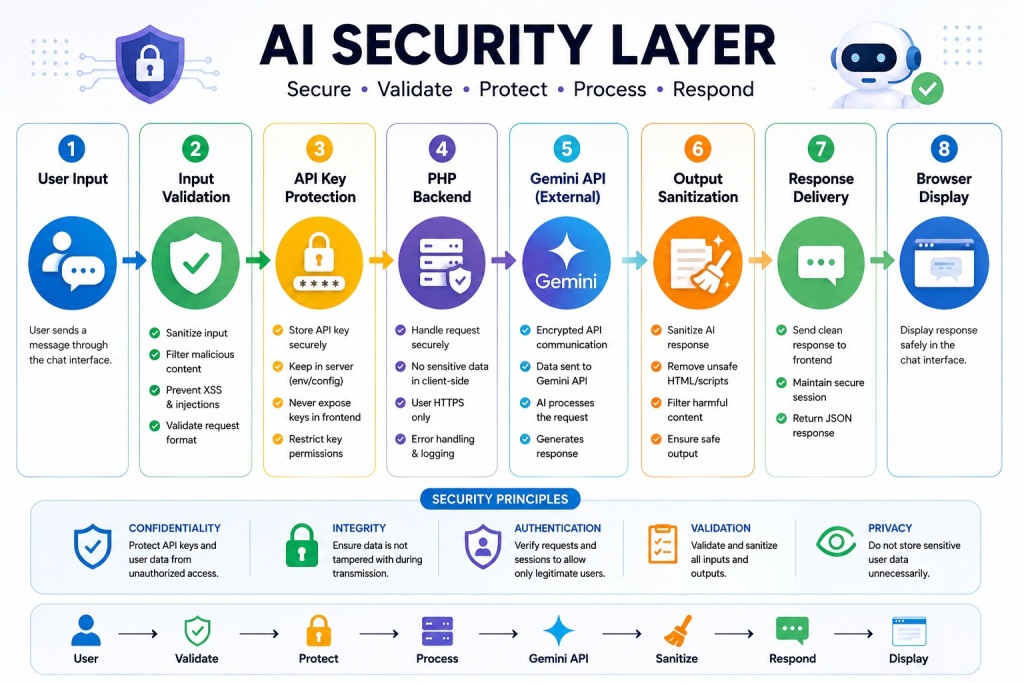
Before deploying any AI chatbot to production, run through every item:
API Key Protection
// ✅ Load from environment variable (most secure)
$apiKey = $_ENV['GEMINI_API_KEY'] ?? getenv('GEMINI_API_KEY');

// ✅ Load from .env file (never commit .env to git)
// Use vlucas/phpdotenv: composer require vlucas/phpdotenv

// ❌ Never hardcode in committed code
$apiKey = 'AIzaSy...'; // This is wrong
.gitignore
# AI Chatbot sensitive files
config.php
.env
logs/
/vendor/
*.log
Input Validation
// Always validate and sanitize before using in API calls
$message = strip_tags(trim($input['message'] ?? ''));
$message = mb_substr($message, 0, MAX_INPUT_LENGTH); // Hard truncation

// Never pass raw user input to eval(), exec(), system()
// Never interpolate directly into SQL (use PDO prepared statements)
Rate Limiting Strategy
| Context | Recommended Limit | Storage |
|---|---|---|
| Development/testing | No limit | N/A |
| Public-facing chatbot (free) | 10–20 requests/minute per IP | PHP temp files or APCu |
| Logged-in users | 30–60 requests/minute per user ID | Database |
| Enterprise/paid users | Configurable per tier | Database + Redis |
Additional Security Headers
header('Strict-Transport-Security: max-age=31536000; includeSubDomains');
header('Content-Security-Policy: default-src \'self\'');
header('Referrer-Policy: strict-origin-when-cross-origin');
header('Permissions-Policy: camera=(), microphone=(), geolocation=()');
Part 10 — Common Errors and Complete Fixes
Error 1: “⚠️ No response from Gemini” / Empty candidates Array
Cause A: Safety filters blocked the response.
$finish_reason = $data['candidates'][0]['finishReason'] ?? '';
// Values: STOP, MAX_TOKENS, SAFETY, RECITATION, OTHER
if ($finish_reason === 'SAFETY') {
    // Message was blocked by safety filters
}
Cause B: Model returned empty content due to an ambiguous or very short prompt.
Fix: Log $data fully when candidates[0] is empty; check promptFeedback in the response.
Error 2: curl_exec() Returns false
$response = curl_exec($ch);
if ($response === false) {
    $error   = curl_error($ch);
    $errno   = curl_errno($ch);
    // CURLE_SSL_CONNECT_ERROR (35) → update CA certificates
    // CURLE_OPERATION_TIMEDOUT (28) → increase CURLOPT_TIMEOUT
    // CURLE_COULDNT_CONNECT (7)    → server has no internet access
}
Error 3: 400 Bad Request from Gemini API
Cause: Malformed contents array — most commonly a role ordering issue. The contents array must strictly alternate: user → model → user → model. Never have two consecutive user or model entries.
// Validate alternating roles before sending
$history    = $_SESSION['chat_history'];
$last_role  = '';
$valid      = true;

foreach ($history as $turn) {
    if ($turn['role'] === $last_role) {
        $valid = false; // Duplicate role — corrupted history
        break;
    }
    $last_role = $turn['role'];
}

if (!$valid) {
    $_SESSION['chat_history'] = []; // Reset corrupted history
}
Error 4: Session Data Lost Between Requests
Cause A: Session not started before header output.
// Must be the FIRST line in PHP — before ANY output including whitespace
<?php
session_start(); // ← Must come first
Cause B: Session cookie blocked (HTTPS + SameSite mismatch).
// Set secure session cookie settings
session_set_cookie_params([
    'lifetime' => 0,
    'path'     => '/',
    'secure'   => true,  // HTTPS only
    'httponly' => true,  // No JS access
    'samesite' => 'Strict',
]);
session_start();
Error 5: CORS Error in Browser Console
Access to fetch at 'chat.php' from origin 'https://yoursite.com'
has been blocked by CORS policy
Fix: Ensure CORS headers match your actual domain:
// In chat.php — must match your exact origin
header('Access-Control-Allow-Origin: https://yoursite.com');

// For development only (never use in production):
// header('Access-Control-Allow-Origin: *');
Error 6: Conversation Context Lost After N Messages
Cause: MAX_HISTORY_TURNS set too low, or session expiry.
Fix for session expiry:
// Extend session lifetime to 2 hours of inactivity
ini_set('session.gc_maxlifetime', 7200);
session_set_cookie_params(['lifetime' => 7200]);
session_start();
Part 11 — Deployment Patterns
Pattern A: Standalone PHP (Any Shared Host)
Upload all files to public_html/ or a subdirectory.
Set config.php permissions to 640 (not readable by others).
Test with: https://yourdomain.com/chatbot/index.html
Pattern B: WordPress Integration
// In a custom plugin (wp-content/plugins/gemini-chat/gemini-chat.php)

// Register AJAX handlers
add_action('wp_ajax_gemini_chat',        'handle_gemini_chat');
add_action('wp_ajax_nopriv_gemini_chat', 'handle_gemini_chat');

function handle_gemini_chat(): void {
    check_ajax_referer('gemini_chat_nonce', 'nonce');

    $message = sanitize_text_field($_POST['message'] ?? '');
    // ... (same logic as chat.php, using WordPress $wpdb for history storage)

    wp_send_json_success(['reply' => $bot_reply]);
}

// In JavaScript, use:
// fetch(ajaxurl, { method: 'POST', body: new URLSearchParams({
//     action: 'gemini_chat',
//     nonce:  geminiChatVars.nonce,
//     message: message
// })})
Pattern C: Laravel Integration
// routes/api.php
Route::post('/chat',  [ChatbotController::class, 'chat'])->middleware('throttle:20,1');
Route::post('/reset', [ChatbotController::class, 'reset'])->middleware('auth');

// app/Http/Controllers/ChatbotController.php
public function chat(Request $request): JsonResponse
{
    $validated = $request->validate([
        'message' => 'required|string|max:2000',
    ]);

    $history = session('chat_history', []);
    // ... (same Gemini API call logic)
    session(['chat_history' => $history]);

    return response()->json(['reply' => $botReply]);
}
Part 12 — Production Deployment Checklist
Before going live, verify every item:
Security
- √ GEMINI_API_KEY stored in environment variable, not source code
- √ config.php in .gitignore and chmod 640 on server
- √ logs/ directory not web-accessible (.htaccess rule in place)
- √ Rate limiting enabled and tested
- √ Input length validation (MAX_INPUT_LENGTH) enforced server-side
- √ CORS origin set to exact production domain
- √ HTTPS enforced (HTTP → HTTPS redirect in .htaccess)
- √ Nonces used if integrated into WordPress
- √ File upload MIME type validated with finfo, not just extension
Performance
- √ Conversation history trimmed to reasonable size (MAX_HISTORY_TURNS)
- √ PHP session configured with appropriate lifetime
- √ CURL timeout set (prevents hanging requests)
- √ Error logging enabled but not exposing stack traces to users
UX
- √ Send button disabled while waiting for response
- √ Input field disabled while waiting
- √ Typing indicator shown during API call
- √ Error messages are friendly (no raw PHP errors visible)
- √ Chat scrolls to bottom after each message
- √ Mobile responsive layout tested
- √ Keyboard shortcut (Enter to send) works
Monitoring
- √ Error log file exists and is writable
- √ Rate limit errors are logged
- √ API errors are logged with context
- √ Server memory and execution time limits checked for long conversations
Solution TWO
Step 1: Backend (chatbot.php)
This PHP script will receive the user’s message via AJAX, call Gemini API, and return the response.
<?php
header("Content-Type: application/json");

// Your Gemini API Key
$apiKey = "YOUR_GEMINI_API_KEY";

// Get user message from AJAX
$input = json_decode(file_get_contents("php://input"), true);
$userMessage = $input['message'] ?? "Hello";

// Prepare request payload
$data = [
    "contents" => [
        [
            "role" => "user",
            "parts" => [
                ["text" => $userMessage]
            ]
        ]
    ]
];

// cURL request
$ch = curl_init("https://generativelanguage.googleapis.com/v1beta/models/gemini-pro:generateContent?key=" . $apiKey);
curl_setopt($ch, CURLOPT_RETURNTRANSFER, true);
curl_setopt($ch, CURLOPT_POSTFIELDS, json_encode($data));
curl_setopt($ch, CURLOPT_HTTPHEADER, [
    "Content-Type: application/json"
]);

$response = curl_exec($ch);
curl_close($ch);

$responseData = json_decode($response, true);

// Extract bot reply
$botReply = $responseData['candidates'][0]['content']['parts'][0]['text'] ?? "⚠️ No response from Gemini";

// Return JSON
echo json_encode(["reply" => $botReply]);
Step 2: Frontend (index.html)
This will be your chatbot UI.
<!DOCTYPE html>
<html lang="en">
<head>
<meta charset="UTF-8">
<title>Gemini Chatbot</title>
<img src="data:image/gif;base64,R0lGODlhAQABAIAAAAAAAP///yH5BAEAAAAALAAAAAABAAEAAAIBRAA7" data-wp-preserve="%3Cstyle%3E%0A%20%20%20%20body%20%7B%20font-family%3A%20Arial%2C%20sans-serif%3B%20background%3A%20%23f4f4f9%3B%20display%3A%20flex%3B%20justify-content%3A%20center%3B%20padding%3A%2030px%3B%20%7D%0A%20%20%20%20.chatbox%20%7B%20width%3A%20400px%3B%20background%3A%20white%3B%20border-radius%3A%2010px%3B%20box-shadow%3A%200%200%2010px%20rgba(0%2C0%2C0%2C.1)%3B%20padding%3A%2020px%3B%20%7D%0A%20%20%20%20.messages%20%7B%20height%3A%20400px%3B%20overflow-y%3A%20auto%3B%20border%3A%201px%20solid%20%23ddd%3B%20padding%3A%2010px%3B%20border-radius%3A%205px%3B%20margin-bottom%3A%2010px%3B%20%7D%0A%20%20%20%20.msg%20%7B%20margin%3A%205px%200%3B%20padding%3A%208px%3B%20border-radius%3A%206px%3B%20%7D%0A%20%20%20%20.user%20%7B%20background%3A%20%23d1e7dd%3B%20text-align%3A%20right%3B%20%7D%0A%20%20%20%20.bot%20%7B%20background%3A%20%23e2e3e5%3B%20text-align%3A%20left%3B%20%7D%0A%20%20%20%20input%20%7B%20width%3A%2080%25%3B%20padding%3A%208px%3B%20%7D%0A%20%20%20%20button%20%7B%20padding%3A%208px%2012px%3B%20%7D%0A%20%20%3C%2Fstyle%3E" data-mce-resize="false" data-mce-placeholder="1" class="mce-object mce-object-style" width="20" height="20" alt="&lt;style&gt;" />
</head>
<body>
<div class="chatbox">
<div class="messages" id="messages"></div>
<input type="text" id="userInput" placeholder="Type a message..." />
<button onclick="sendMessage()">Send</button>
</div>
<img src="data:image/gif;base64,R0lGODlhAQABAIAAAAAAAP///yH5BAEAAAAALAAAAAABAAEAAAIBRAA7" data-wp-preserve="%3Cscript%3E%0A%20%20%20%20async%20function%20sendMessage()%20%7B%0A%20%20%20%20%20%20const%20input%20%3D%20document.getElementById(%22userInput%22)%3B%0A%20%20%20%20%20%20const%20message%20%3D%20input.value.trim()%3B%0A%20%20%20%20%20%20if%20(!message)%20return%3B%0A%0A%20%20%20%20%20%20%2F%2F%20Add%20user%20message%0A%20%20%20%20%20%20addMessage(message%2C%20%22user%22)%3B%0A%20%20%20%20%20%20input.value%20%3D%20%22%22%3B%0A%0A%20%20%20%20%20%20%2F%2F%20Call%20backend%0A%20%20%20%20%20%20const%20response%20%3D%20await%20fetch(%22chatbot.php%22%2C%20%7B%0A%20%20%20%20%20%20%20%20method%3A%20%22POST%22%2C%0A%20%20%20%20%20%20%20%20headers%3A%20%7B%20%22Content-Type%22%3A%20%22application%2Fjson%22%20%7D%2C%0A%20%20%20%20%20%20%20%20body%3A%20JSON.stringify(%7B%20message%20%7D)%0A%20%20%20%20%20%20%7D)%3B%0A%0A%20%20%20%20%20%20const%20data%20%3D%20await%20response.json()%3B%0A%20%20%20%20%20%20addMessage(data.reply%2C%20%22bot%22)%3B%0A%20%20%20%20%7D%0A%0A%20%20%20%20function%20addMessage(text%2C%20type)%20%7B%0A%20%20%20%20%20%20const%20messagesDiv%20%3D%20document.getElementById(%22messages%22)%3B%0A%20%20%20%20%20%20const%20msgDiv%20%3D%20document.createElement(%22div%22)%3B%0A%20%20%20%20%20%20msgDiv.className%20%3D%20%22msg%20%22%20%2B%20type%3B%0A%20%20%20%20%20%20msgDiv.textContent%20%3D%20text%3B%0A%20%20%20%20%20%20messagesDiv.appendChild(msgDiv)%3B%0A%20%20%20%20%20%20messagesDiv.scrollTop%20%3D%20messagesDiv.scrollHeight%3B%0A%20%20%20%20%7D%0A%20%20%3C%2Fscript%3E" data-mce-resize="false" data-mce-placeholder="1" class="mce-object mce-object-script" width="20" height="20" alt="&lt;script&gt;" />
</body>
</html>
How It Works
- User types a message and clicks Send.
- JavaScript sends it via
fetch()→chatbot.php. - PHP calls Gemini API and returns the AI’s response.
- The response is displayed in the chat window.
Add conversation memory so the Gemini chatbot remembers past messages in the same session.
We’ll use PHP $_SESSION to store the chat history and send it each time to the API.
Step 1: Update chatbot.php
<?php
session_start();
header("Content-Type: application/json");

// Your Gemini API Key
$apiKey = "YOUR_GEMINI_API_KEY";

// Get user message
$input = json_decode(file_get_contents("php://input"), true);
$userMessage = $input['message'] ?? "Hello";

// Initialize session chat history if not set
if (!isset($_SESSION['chat_history'])) {
    $_SESSION['chat_history'] = [];
}

// Add user message to history
$_SESSION['chat_history'][] = [
    "role" => "user",
    "parts" => [["text" => $userMessage]]
];

// Prepare request payload (include full history)
$data = [
    "contents" => $_SESSION['chat_history']
];

// cURL request to Gemini API
$ch = curl_init("https://generativelanguage.googleapis.com/v1beta/models/gemini-pro:generateContent?key=" . $apiKey);
curl_setopt($ch, CURLOPT_RETURNTRANSFER, true);
curl_setopt($ch, CURLOPT_POSTFIELDS, json_encode($data));
curl_setopt($ch, CURLOPT_HTTPHEADER, [
    "Content-Type: application/json"
]);

$response = curl_exec($ch);
curl_close($ch);

$responseData = json_decode($response, true);

// Extract bot reply
$botReply = $responseData['candidates'][0]['content']['parts'][0]['text'] ?? "⚠️ No response from Gemini";

// Add bot reply to session history
$_SESSION['chat_history'][] = [
    "role" => "model",
    "parts" => [["text" => $botReply]]
];

// Return JSON
echo json_encode(["reply" => $botReply]);
Step 2: Keep index.html Same
No changes needed in the frontend — it already works. The only difference now is the bot remembers earlier messages in the conversation.
Step 3: Add “Reset Chat” Option (Optional)
In index.html, add a reset button:
<button onclick="resetChat()">Reset</button>
And update the script:
async function resetChat() {
  const response = await fetch("reset.php", { method: "POST" });
  document.getElementById("messages").innerHTML = "";
}
Step 4: Create reset.php
<?php
session_start();
$_SESSION['chat_history'] = [];
echo json_encode(["status" => "reset"]);
Real-World Applications of Gemini Chatbots
- LMS Course Assistant
- Student Support Bot
- HR Helpdesk
- Customer Service Chatbot
- E-commerce Assistant
- FAQ Automation
- Technical Support Bot
- Lead Generation Assistant
- Knowledge Base Search
- AI Website Assistant
What You’ve Built and Where to Take It Next
The chatbot in this guide is not a demo — it’s a production-ready AI communication system. Here’s what separates it from the 1-minute tutorials:
From this guide — 5 PHP files with separation of concerns, hybrid server+client conversation memory, rate limiting, CORS, safety handling, full error taxonomy, a polished dark/light-mode UI with markdown rendering, streaming support, file upload for multimodal input, and deployment patterns for standalone, WordPress, and Laravel.
Where to take it next:
- Database persistence — Store conversations in MySQL with user IDs so history survives sessions and works across devices
- User authentication — Gate the chatbot behind WordPress login, Laravel Auth, or JWT tokens
- Multiple personas — Let users choose between different system prompts (Technical Support, Creative Writer, Code Reviewer)
- Function calling — Use Gemini’s tool-use feature to let the chatbot query your database, check live prices, or trigger actions
- Analytics dashboard — Log message volume, popular topics, and error rates to WordPress admin or a custom dashboard
- Webhook integration — Send conversation summaries to Slack, email, or WhatsApp on session end
The architecture in this guide scales to all of these extensions without a rewrite.
Frequently Asked Questions
What is Google Gemini API?
Can I build an AI chatbot using PHP?
Why use PHP as the chatbot backend?
PHP offers several advantages:
- Easy server-side processing
- Secure API key management
- Database integration
- Session handling
- Wide hosting support
How does the chatbot communicate with Gemini API?
The communication flow is:
User Message

→ JavaScript AJAX Request

→ PHP Backend

→ Gemini API

→ AI Response

→ Chat Interface
Can I create a ChatGPT-like chatbot using Gemini API?
Is Gemini API free to use?
How do I secure my Gemini API key?
Best practices include:
- Store API keys in server-side configuration files
- Never expose keys in JavaScript
- Use environment variables
- Restrict API access where possible
What are common chatbot security best practices?
Recommended security measures include:
- Input validation
- Output sanitization
- API key protection
- Rate limiting
- HTTPS encryption
- Session management
Gemini API vs OpenAI API: Which One Should You Choose?
| Feature | Gemini API | OpenAI API |
|---|---|---|
| Google Ecosystem | ✅ | ❌ |
| Multimodal AI | ✅ | ✅ |
| PHP Integration | ✅ | ✅ |
| Conversational AI | ✅ | ✅ |
| Code Generation | ✅ | ✅ |
| API Availability | ✅ | ✅ |