Most “PHP REST API with classes” tutorials show you three things: a Database class, a BaseController with a send_response() helper, and a handful of methods like get_mahasiswa(), post_mahasiswa($id), put_mahasiswa($id). What they usually skip is the part that actually makes it an API: how an incoming HTTP request gets turned into a call to the right method with the right arguments. Without that piece, you have four well-written functions sitting in a file that nothing calls.
This post picks up exactly there — building the front controller that wires a request to these methods — and tightens a few validation gaps along the way.
What the Class-Based Pattern Gets Right
Before changing anything, it’s worth naming why this structure is a good instinct in the first place:
- A Database class with prepared statements centralizes connection logic and makes SQL injection a non-issue by default, since parameters never get concatenated into query strings.
- A shared send_response() method means every endpoint returns JSON in the same shape with the correct status code, instead of every handler reinventing echo json_encode(…) slightly differently.
- One method per operation (get_mahasiswa, post_mahasiswa, etc.) keeps each handler focused and easy to test in isolation.
The gap is purely the wiring. Let’s build it.
Step 1: A Router That Reads the Request Once
<?php
// router.php — the single entry point every request hits (via .htaccess or Nginx rewrite)

require_once 'Database.php';
require_once 'BaseController.php';
require_once 'StudentController.php';

$method = $_SERVER['REQUEST_METHOD'];

// Expecting URLs like /api/students or /api/students/5
$path = trim(parse_url($_SERVER['REQUEST_URI'], PHP_URL_PATH), '/');
$segments = explode('/', $path);

// Adjust the index below to match your actual URL structure/base path.
$resource = $segments[1] ?? null;
$id = isset($segments[2]) && ctype_digit($segments[2]) ? (int) $segments[2] : 0;

if ($resource !== 'students') {
    http_response_code(404);
    header('Content-Type: application/json');
    echo json_encode(['message' => 'Unknown resource']);
    exit;
}

$controller = new StudentController();

match ($method) {
    'GET'    => $controller->get_mahasiswa($id),
    'POST'   => $controller->post_mahasiswa(),
    'PUT'    => $controller->put_mahasiswa($id),
    'DELETE' => $controller->delete_mahasiswa($id),
    default  => (function () {
        http_response_code(405);
        header('Content-Type: application/json');
        echo json_encode(['message' => 'Method not allowed']);
    })(),
};
For this to actually receive traffic at clean URLs like /api/students/5 rather than /router.php?…, add a rewrite rule. On Apache, an .htaccess alongside router.php:
RewriteEngine On
RewriteCond %{REQUEST_FILENAME} !-f
RewriteRule ^ router.php [QSA,L]
On Nginx:
location /api/ {
    try_files $uri /router.php?$query_string;
}
This is the part almost every “here are the four methods” tutorial leaves as an exercise for the reader — and it’s usually the part beginners get stuck on, because the methods alone don’t explain how a URL becomes a function call.
Step 2: Tightening Validation in the Controller
The original pattern checks isset($data[‘nama’]), which passes even if the client sends “nama”: “”. An empty string is “set” but not useful. A small helper fixes this once, for every field, instead of repeating isset() && trim() !== ” in every method:
<?php
class StudentController extends BaseController
{
    private function validate_required(array $data, array $fields): ?string {
        foreach ($fields as $field) {
            if (!isset($data[$field]) || trim((string) $data[$field]) === '') {
                return "Field \"{$field}\" is required";
            }
        }
        return null;
    }

    public function get_mahasiswa(int $id = 0): void {
        $this->db = new Database();
        $this->db->connect();

        if ($id === 0) {
            $result = $this->db->query("SELECT * FROM mahasiswa");
        } else {
            $result = $this->db->query("SELECT * FROM mahasiswa WHERE id = ?", [$id]);
        }

        $data = [];
        while ($row = $result->fetch_assoc()) {
            $data[] = $row;
        }

        $this->db->close();

        if (empty($data)) {
            $this->send_response(404, ['message' => 'Data not found']);
            return;
        }

        $this->send_response(200, $id === 0 ? $data : $data[0]);
    }

    public function post_mahasiswa(): void {
        $data = json_decode(file_get_contents('php://input'), true) ?? [];

        if ($error = $this->validate_required($data, ['nama', 'npm', 'prodi'])) {
            $this->send_response(400, ['message' => $error]);
            return;
        }

        $this->db = new Database();
        $this->db->connect();
        $this->db->query(
            "INSERT INTO mahasiswa (nama, npm, prodi) VALUES (?, ?, ?)",
            [$data['nama'], $data['npm'], $data['prodi']]
        );
        $newId = $this->db->last_insert_id();
        $this->db->close();

        $this->send_response(201, ['id' => $newId, 'message' => 'Data created successfully']);
    }

    public function put_mahasiswa(int $id): void {
        if ($id === 0) {
            $this->send_response(400, ['message' => 'Student ID is required in the URL']);
            return;
        }

        $data = json_decode(file_get_contents('php://input'), true) ?? [];

        if ($error = $this->validate_required($data, ['nama', 'npm', 'prodi'])) {
            $this->send_response(400, ['message' => $error]);
            return;
        }

        $this->db = new Database();
        $this->db->connect();
        $this->db->query(
            "UPDATE mahasiswa SET nama = ?, npm = ?, prodi = ? WHERE id = ?",
            [$data['nama'], $data['npm'], $data['prodi'], $id]
        );
        $affected = $this->db->affected_rows();
        $this->db->close();

        if ($affected > 0) {
            $this->send_response(200, ['message' => 'Data updated successfully']);
        } else {
            $this->send_response(404, ['message' => 'Data not found or no changes made']);
        }
    }

    public function delete_mahasiswa(int $id): void {
        if ($id === 0) {
            $this->send_response(400, ['message' => 'Student ID is required in the URL']);
            return;
        }

        $this->db = new Database();
        $this->db->connect();
        $this->db->query("DELETE FROM mahasiswa WHERE id = ?", [$id]);
        $affected = $this->db->affected_rows();
        $this->db->close();

        if ($affected > 0) {
            $this->send_response(200, ['message' => 'Data deleted successfully']);
        } else {
            $this->send_response(404, ['message' => 'Data not found']);
        }
    }
}
Two small but real fixes worth calling out:
- GET with no matching ID now returns 404 with a body, rather than the empty-array-means-nothing-happened ambiguity in the original — a client can’t otherwise tell “no students exist yet” apart from “the query failed silently.”
- A single validate_required() helper instead of an isset() chain per method — one place to fix if a validation rule needs to change later (e.g., adding a max-length check).
Step 3: Fixing the Database Class’s Silent Failure Mode
The original Database::connect() calls die(“Connection failed: …”) on error. Two problems with that: it isn’t valid JSON (breaking any client expecting Content-Type: application/json), and it can leak connection details to whoever’s calling the API. Swap it for something that fails safely:
<?php
class Database
{
    private string $host = 'localhost';
    private string $username = 'root';
    private string $password = '';
    private string $database = 'school_db';
    public $conn;

    public function connect(): mysqli {
        $this->conn = @new mysqli($this->host, $this->username, $this->password, $this->database);

        if ($this->conn->connect_error) {
            error_log('DB connection failed: ' . $this->conn->connect_error); // log details privately
            http_response_code(500);
            header('Content-Type: application/json');
            echo json_encode(['message' => 'Internal server error']);
            exit; // stop execution, but with a clean JSON response instead of die()'s raw text
        }

        return $this->conn;
    }

    public function query(string $sql, array $params = []) {
        $stmt = $this->conn->prepare($sql);
        if ($params) {
            $types = '';
            foreach ($params as $p) {
                $types .= is_int($p) ? 'i' : (is_float($p) ? 'd' : 's');
            }
            $stmt->bind_param($types, ...$params);
        }
        $stmt->execute();
        $result = $stmt->get_result();
        $stmt->close();
        return $result;
    }

    public function last_insert_id(): int {
        return (int) $this->conn->insert_id;
    }

    public function affected_rows(): int {
        return $this->conn->affected_rows;
    }

    public function close(): void {
        $this->conn->close();
    }
}
The bind type string is now built per-parameter (i for integers, d for floats, s for everything else) instead of always s. It rarely causes visible bugs since MySQL coerces types loosely, but it’s the technically correct behavior and avoids edge cases with things like large integers or exact numeric comparisons.
Testing the Whole Thing with curl
Once the router is wired up, this is what exercising all four verbs looks like from the command line — worth having on hand for a Postman collection or a README:
# Read all students
curl http://localhost/api/students

# Read one
curl http://localhost/api/students/3

# Create
curl -X POST http://localhost/api/students \
  -H "Content-Type: application/json" \
  -d '{"nama":"Aditi Rao","npm":"2021001","prodi":"Computer Science"}'

# Update
curl -X PUT http://localhost/api/students/3 \
  -H "Content-Type: application/json" \
  -d '{"nama":"Aditi R. Sharma","npm":"2021001","prodi":"Computer Science"}'

# Delete
curl -X DELETE http://localhost/api/students/3
What’s Still Worth Adding Before Production
- Authentication — the router as written accepts requests from anyone; add an API key or JWT check before dispatching to the controller.
- A base path constant — hardcoding $segments[1]/$segments[2] assumes a fixed URL depth; if this API lives behind /api/v1/, extract the base path into a config value rather than a magic index.
- Consistent error logging — the connection-failure fix above logs to error_log(); extend the same pattern to query failures so nothing fails completely silently.
- PATCH support — PUT here expects the full record; if partial updates are common, add a PATCH branch that only updates supplied fields.
A Database class and a set of CRUD methods are necessary but not sufficient — without a router translating GET /students/5 into $controller->get_mahasiswa(5), nothing is actually listening on the network. Add the router, tighten isset() checks so empty strings don’t slip through as valid input, and replace die() with a proper JSON error response, and this class-based pattern is genuinely production-shaped, not just demo-shaped.
This application breaks down the concepts and code examples from the tutorial into an easy-to-explore format. You can navigate through the core concepts, dive into the specific code for each API operation, and review the necessary setup files, all in one place.
Core Concepts
Before diving into the code, it’s important to understand what a REST API is and the components that make it work. This section covers the foundational ideas, including the simple flow of data and the definitions of the standard HTTP methods.
What is a REST API?
A REST (Representational State Transfer) API is an architectural style for designing networked applications. It relies on a stateless, client-server communication protocol, almost always HTTP.
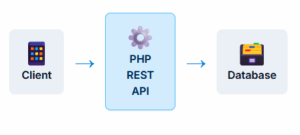
Think of it as a mediator between a client (like a web or mobile app) and a server (where the data lives). The client sends a request, and the API processes it, interacts with the database if needed, and sends a response back to the client, typically in JSON format.
Basic API Flow
HTTP Methods (Verbs)
GET
Used to retrieve or read data from a resource. It’s a safe and idempotent method, meaning it doesn’t change the state of the server.
POST
Used to create a new resource. Submitting a POST request multiple times may result in multiple new resources being created.
PUT
Used to update an existing resource or create it if it doesn’t exist. It’s idempotent; multiple identical requests have the same effect as one.
DELETE
Used to remove a resource. It’s idempotent; deleting a resource multiple times has the same effect as deleting it once.
API Operations: Code Examples
This is the interactive core of the application. Click the buttons below to see the specific PHP code for handling each of the four main API operations. The code demonstrates how to process the request, interact with the database, and send a JSON response.
GET (Read) Operation
The GET method retrieves data. The code checks if an `id` is provided in the URL. If an `id` is present, it fetches a single record. Otherwise, it fetches all records from the `mahasiswa` table.
  function get_mahasiswa($id = 0)
{
    $this->db = new Database();
    $this->db->connect();

    if ($id == 0) {
        $sql = "SELECT * FROM mahasiswa";
        $result = $this->db->query($sql);
    } else {
        $sql = "SELECT * FROM mahasiswa WHERE id = ?";
        $result = $this->db->query($sql, [$id]);
    }

    if ($result->num_rows > 0) {
        $data = array();
        while ($row = $result->fetch_assoc()) {
            $data[] = $row;
        }
        $this->send_response(200, $data);
    } else {
        $this->send_response(404, ['message' => 'Data not found']);
    }

    $this->db->close();
}
POST (Create) Operation
The POST method creates a new record. The code retrieves the JSON data from the request body, parses it, and then inserts the new record into the `mahasiswa` table.
  function post_mahasiswa()
{
    $this->db = new Database();
    $this->db->connect();

    $data = json_decode(file_get_contents('php://input'), true);

    if (isset($data['nama']) && isset($data['npm']) && isset($data['prodi'])) {
        $nama = $data['nama'];
        $npm = $data['npm'];
        $prodi = $data['prodi'];

        $sql = "INSERT INTO mahasiswa (nama, npm, prodi) VALUES (?, ?, ?)";
        $this->db->query($sql, [$nama, $npm, $prodi]);

        $this->send_response(201, ['message' => 'Data created successfully']);
    } else {
        $this->send_response(400, ['message' => 'Invalid input']);
    }

    $this->db->close();
}
PUT (Update) Operation
The PUT method updates an existing record, identified by the `id` in the URL. It reads the JSON data from the request body and updates the corresponding record in the database.
  function put_mahasiswa($id)
{
    $this->db = new Database();
    $this->db->connect();

    $data = json_decode(file_get_contents('php://input'), true);

    if (isset($data['nama']) && isset($data['npm']) && isset($data['prodi'])) {
        $nama = $data['nama'];
        $npm = $data['npm'];
        $prodi = $data['prodi'];

        $sql = "UPDATE mahasiswa SET nama = ?, npm = ?, prodi = ? WHERE id = ?";
        $this->db->query($sql, [$nama, $npm, $prodi, $id]);

        if ($this->db->affected_rows() > 0) {
            $this->send_response(200, ['message' => 'Data updated successfully']);
        } else {
            $this->send_response(404, ['message' => 'Data not found or no changes made']);
        }
    } else {
        $this->send_response(400, ['message' => 'Invalid input']);
    }

    $this->db->close();
}
DELETE (Remove) Operation
The DELETE method removes a record, identified by the `id` in the URL. It executes a DELETE query on the database to remove the specified record.
  function delete_mahasiswa($id)
{
    $this->db = new Database();
    $this->db->connect();

    $sql = "DELETE FROM mahasiswa WHERE id = ?";
    $this->db->query($sql, [$id]);

    if ($this->db->affected_rows() > 0) {
        $this->send_response(200, ['message' => 'Data deleted successfully']);
    } else {
        $this->send_response(404, ['message' => 'Data not found']);
    }

    $this->db->close();
}
Project Setup Files
A solid foundation is key. This API relies on two core files for its operation: a `Database` class to handle connections and queries, and a `BaseController` to manage shared logic like sending standardized JSON responses.
Database.php
This class manages the MySQLi database connection. It includes methods to connect, close, and execute prepared statements, which helps prevent SQL injection.
  <?php
class Database
{
    private $host = 'localhost';
    private $username = 'root';
    private $password = '';
    private $database = 'your_database_name';
    public $conn;

    public function connect()
    {
        $this->conn = new mysqli($this->host, $this->username, $this->password, $this->database);
        if ($this->conn->connect_error) {
            die("Connection failed: " . $this->conn->connect_error);
        }
        return $this->conn;
    }

    public function query($sql, $params = [])
    {
        $stmt = $this->conn->prepare($sql);
        if ($params) {
            $types = str_repeat('s', count($params));
            $stmt->bind_param($types, ...$params);
        }
        $stmt->execute();
        $result = $stmt->get_result();
        $stmt->close();
        return $result;
    }

    public function affected_rows()
    {
        return $this->conn->affected_rows;
    }

    public function close()
    {
        $this->conn->close();
    }
}
?>
BaseController.php
This base controller contains the reusable `send_response` method, ensuring all API responses are consistently formatted as JSON with the correct HTTP status code and headers.
  <?php
class BaseController
{
    protected $db;

    protected function send_response($status_code, $data)
    {
        header('Content-Type: application/json');
        http_response_code($status_code);
        echo json_encode($data);
        exit;
    }
}
?>
Frequently Asked Questions
What is the difference between REST and REST API?
Why should I build a REST API in Core PHP?
What format should a REST API return?
What database is commonly used with PHP REST APIs?
What HTTP status codes should a REST API return?
200 OK
201 Created
204 No Content
400 Bad Request
401 Unauthorized
403 Forbidden
404 Not Found
422 Unprocessable Entity
500 Internal Server Error
Using appropriate status codes helps clients understand the result of each request.