Why “cURL Stopped Working” Is Never One Problem
When a developer says “cURL stopped working,” they almost never mean one thing. cURL requests break for dozens of completely different reasons — SSL certificate validation failures, firewall rule changes, DNS resolution failures, PHP version upgrades, server OS updates, TLS protocol mismatches, timeout configuration, blocked outbound ports, proxy issues, and more.
The original treatment of this problem — “update your CA certificates and check your SSL settings” — solves one specific scenario that happens after a certificate renewal on AWS. But developers hitting this problem in 2025 are dealing with far more varied contexts:
- cURL broke after a composer update or PHP 8.x upgrade
- cURL works on local but fails on the production server
- cURL works for some domains but fails for others
- cURL was working yesterday and nothing changed
- cURL fails silently — no error, empty response
- cURL fails only for HTTPS, not HTTP
- cURL fails inside Docker but not on bare metal
- cURL times out for one endpoint but not others
- cURL fails in WordPress (wp_remote_post) but works in raw PHP
This guide gives you a systematic diagnostic framework — not a list of solutions to try randomly, but a decision tree that gets you from “cURL stopped working” to the exact root cause and the precise fix, every time.
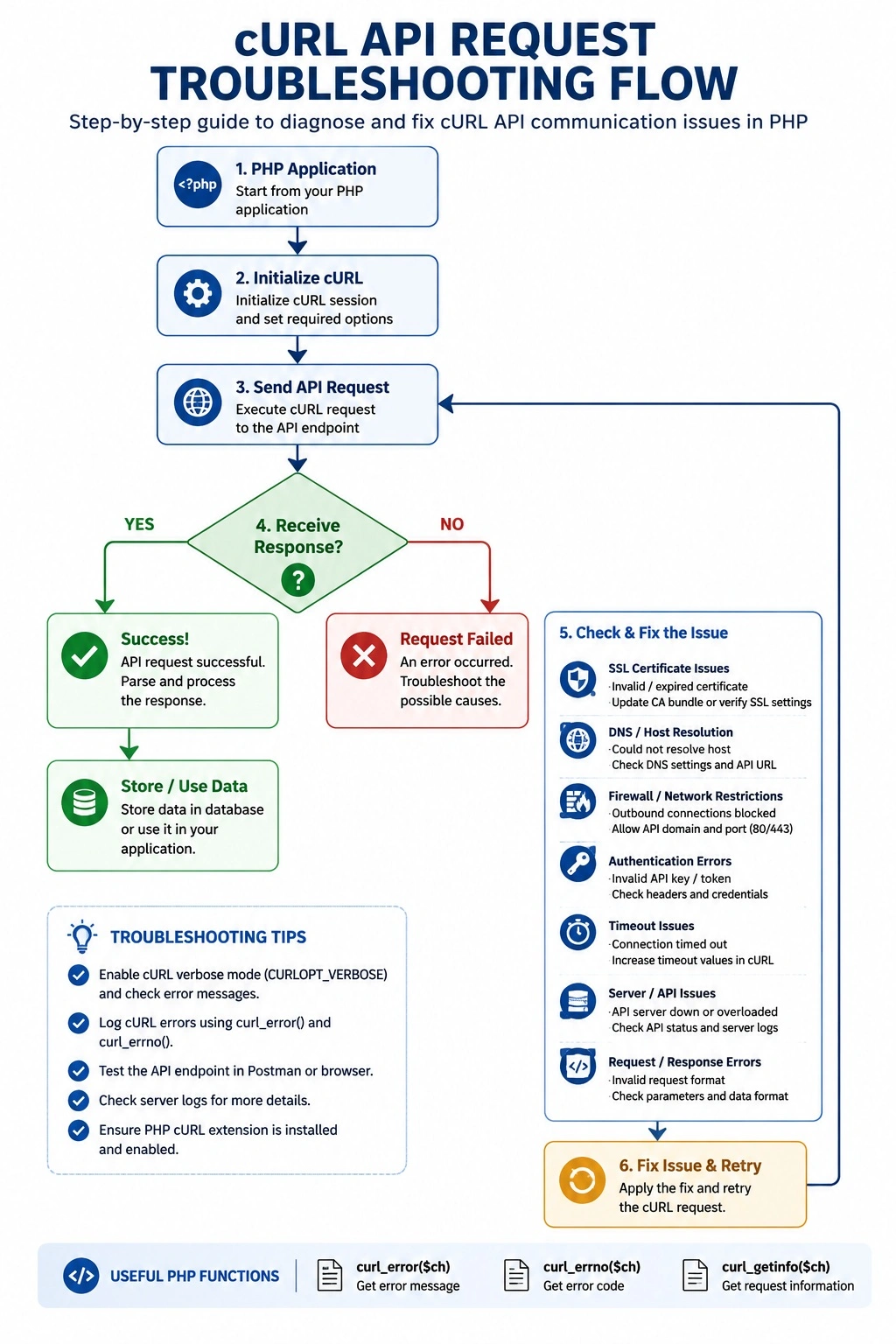
Part 1 — The Anatomy of a cURL Request and Where It Can Break
Understanding where cURL fails requires understanding the pipeline it traverses:
PHP Script
    │
    ▼
PHP cURL Extension (libcurl)
    │
    ├── DNS Resolution         ← Failure: CURLE_COULDNT_RESOLVE_HOST (6)
    │       │
    │       ▼
    ├── TCP Connection         ← Failure: CURLE_COULDNT_CONNECT (7)
    │   (port 80/443)         ← Failure: CURLE_OPERATION_TIMEDOUT (28)
    │       │
    │       ▼
    ├── TLS Handshake          ← Failure: CURLE_SSL_CONNECT_ERROR (35)
    │   ├── Certificate check  ← Failure: CURLE_PEER_FAILED_VERIFICATION (60)
    │   ├── Protocol version   ← Failure: CURLE_SSL_CIPHER (59)
    │   └── CA bundle          ← Failure: CURLE_SSL_CACERT (60)
    │       │
    │       ▼
    ├── HTTP Request Sent      ← Failure: CURLE_SEND_ERROR (55)
    │       │
    │       ▼
    ├── HTTP Response Received ← Failure: CURLE_RECV_ERROR (56)
    │       │
    │       ▼
    └── Response Returned to PHP

External Factors at Every Stage:
    ├── Firewall (iptables/ufw/Security Groups)
    ├── SELinux / AppArmor policies
    ├── Proxy servers (transparent or explicit)
    ├── DNS server configuration
    └── OS-level SSL policy (FIPS mode, crypto policies)
When cURL fails, curl_errno($ch) gives you the error code and curl_error($ch) gives you the human-readable message. Always capture both — every diagnosis in this guide starts there.
Part 2 — The Universal cURL Diagnostic Template
Before doing anything else, wrap every cURL call in this diagnostic template. It tells you the exact error code, message, and response metadata in one pass.
<?php
/**
 * Universal cURL Diagnostic Wrapper
 *
 * Replace your existing cURL call with this function temporarily.
 * It logs everything needed to diagnose any cURL failure.
 *
 * Usage:
 *   $result = curl_diagnose('https://api.example.com/endpoint', [
 *       'method'  => 'POST',
 *       'headers' => ['Content-Type: application/json', 'Authorization: Bearer token'],
 *       'body'    => json_encode(['key' => 'value']),
 *       'timeout' => 30,
 *   ]);
 */
function curl_diagnose(string $url, array $options = []): array {

    $method  = strtoupper($options['method'] ?? 'GET');
    $headers = $options['headers'] ?? [];
    $body    = $options['body']    ?? null;
    $timeout = $options['timeout'] ?? 30;

    $ch = curl_init();

    curl_setopt_array($ch, [
        CURLOPT_URL            => $url,
        CURLOPT_RETURNTRANSFER => true,
        CURLOPT_HEADER         => true,       // Include response headers
        CURLOPT_VERBOSE        => true,       // Enable verbose output
        CURLOPT_SSL_VERIFYPEER => true,       // KEEP THIS TRUE in production
        CURLOPT_SSL_VERIFYHOST => 2,
        CURLOPT_TIMEOUT        => $timeout,
        CURLOPT_CONNECTTIMEOUT => 10,
        CURLOPT_FOLLOWLOCATION => true,
        CURLOPT_MAXREDIRS      => 5,
        CURLOPT_HTTPHEADER     => $headers,
        CURLOPT_ENCODING       => '',         // Accept all encodings
        CURLOPT_USERAGENT      => 'PHP/' . PHP_VERSION . ' cURL/' . curl_version()['version'],
    ]);

    // Capture verbose output (the TLS handshake trace)
    $verbose_log = fopen('php://temp', 'w+');
    curl_setopt($ch, CURLOPT_STDERR, $verbose_log);

    // Method handling
    if ($method === 'POST') {
        curl_setopt($ch, CURLOPT_POST, true);
        if ($body) curl_setopt($ch, CURLOPT_POSTFIELDS, $body);
    } elseif ($method !== 'GET') {
        curl_setopt($ch, CURLOPT_CUSTOMREQUEST, $method);
        if ($body) curl_setopt($ch, CURLOPT_POSTFIELDS, $body);
    }

    $start_time = microtime(true);
    $response   = curl_exec($ch);
    $elapsed_ms = round((microtime(true) - $start_time) * 1000, 2);

    // Collect all diagnostic data
    $errno    = curl_errno($ch);
    $error    = curl_error($ch);
    $info     = curl_getinfo($ch);

    // Read verbose log
    rewind($verbose_log);
    $verbose_output = stream_get_contents($verbose_log);
    fclose($verbose_log);

    curl_close($ch);

    // Separate headers and body
    $response_headers = '';
    $response_body    = '';

    if ($response !== false && isset($info['header_size'])) {
        $response_headers = substr($response, 0, $info['header_size']);
        $response_body    = substr($response, $info['header_size']);
    }

    $diagnostics = [
        // ── Core Result ────────────────────────────────────────────────────
        'success'       => ($errno === 0 && $response !== false),
        'error_code'    => $errno,
        'error_message' => $error,
        'elapsed_ms'    => $elapsed_ms,

        // ── HTTP Info ─────────────────────────────────────────────────────
        'http_code'     => $info['http_code'],
        'redirect_count'=> $info['redirect_count'],
        'final_url'     => $info['url'],

        // ── Connection Info ───────────────────────────────────────────────
        'primary_ip'        => $info['primary_ip'],
        'primary_port'      => $info['primary_port'],
        'connect_time_ms'   => round($info['connect_time'] * 1000, 2),
        'ssl_verify_result' => $info['ssl_verify_result'],
        'ssl_version'       => $info['ssl_version'] ?? 'N/A',

        // ── Timing Breakdown ─────────────────────────────────────────────
        'namelookup_ms'     => round($info['namelookup_time'] * 1000, 2),
        'connect_ms'        => round($info['connect_time'] * 1000, 2),
        'appconnect_ms'     => round($info['appconnect_time'] * 1000, 2),  // TLS done
        'pretransfer_ms'    => round($info['pretransfer_time'] * 1000, 2),
        'starttransfer_ms'  => round($info['starttransfer_time'] * 1000, 2),
        'total_ms'          => round($info['total_time'] * 1000, 2),

        // ── Transfer Stats ────────────────────────────────────────────────
        'size_download'     => $info['size_download'],
        'speed_download'    => $info['speed_download'],

        // ── Certificates ─────────────────────────────────────────────────
        'certinfo'          => $info['certinfo'] ?? [],

        // ── Response Data ─────────────────────────────────────────────────
        'response_headers'  => $response_headers,
        'response_body'     => $response_body,

        // ── Verbose TLS Trace (invaluable for SSL issues) ─────────────────
        'verbose'           => $verbose_output,

        // ── Environment Info ──────────────────────────────────────────────
        'curl_version'      => curl_version(),
        'php_version'       => PHP_VERSION,
    ];

    // Interpret the error for quicker diagnosis
    if ($errno !== 0) {
        $diagnostics['interpretation'] = curl_interpret_error($errno, $error);
    }

    return $diagnostics;
}

/**
 * Interpret a cURL error number into a human-readable diagnosis and action.
 */
function curl_interpret_error(int $errno, string $error): array {
    $interpretations = [
        // ── DNS ────────────────────────────────────────────────────────────
        CURLE_COULDNT_RESOLVE_PROXY => [
            'category' => 'DNS',
            'cause'    => 'Cannot resolve the proxy hostname.',
            'action'   => 'Check CURLOPT_PROXY setting or remove proxy config.',
        ],
        CURLE_COULDNT_RESOLVE_HOST => [
            'category' => 'DNS',
            'cause'    => 'Cannot resolve the target hostname to an IP address.',
            'action'   => 'Run: nslookup {hostname}. Check DNS server, /etc/resolv.conf, network access.',
        ],

        // ── Connection ────────────────────────────────────────────────────
        CURLE_COULDNT_CONNECT => [
            'category' => 'Connection',
            'cause'    => 'TCP connection refused or port not reachable.',
            'action'   => 'Run: curl -v {url} from shell. Check firewall (iptables, Security Groups), target port open, service running.',
        ],
        CURLE_OPERATION_TIMEDOUT => [
            'category' => 'Timeout',
            'cause'    => 'Request exceeded CURLOPT_TIMEOUT or CURLOPT_CONNECTTIMEOUT.',
            'action'   => 'Increase timeout, check network latency, check if target server is overloaded. Run: traceroute {hostname}.',
        ],

        // ── SSL/TLS ───────────────────────────────────────────────────────
        CURLE_SSL_CONNECT_ERROR => [
            'category' => 'SSL/TLS',
            'cause'    => 'TLS handshake failed. Protocol/cipher mismatch.',
            'action'   => 'Run: openssl s_client -connect {host}:443. Check TLS version support. Update libssl/openssl.',
        ],
        CURLE_PEER_FAILED_VERIFICATION => [
            'category' => 'SSL/TLS',
            'cause'    => 'SSL certificate chain cannot be verified against CA bundle.',
            'action'   => 'Update CA certificates. Check CURLOPT_CAINFO path. Verify intermediate certs are in chain.',
        ],
        CURLE_SSL_CIPHER => [
            'category' => 'SSL/TLS',
            'cause'    => 'No shared cipher between client and server.',
            'action'   => 'Server requires ciphers not supported by your OpenSSL. Update OpenSSL or set CURLOPT_SSL_CIPHER_LIST.',
        ],
        CURLE_SSL_CERTPROBLEM => [
            'category' => 'SSL/TLS',
            'cause'    => 'Problem with local SSL certificate (client certificate auth).',
            'action'   => 'Check CURLOPT_SSLCERT and CURLOPT_SSLKEY paths and permissions.',
        ],
        CURLE_SSL_CACERT_BADFILE => [
            'category' => 'SSL/TLS',
            'cause'    => 'CA bundle file cannot be read or is invalid format.',
            'action'   => 'Verify CURLOPT_CAINFO path exists and is readable. Regenerate CA bundle.',
        ],

        // ── HTTP ──────────────────────────────────────────────────────────
        CURLE_HTTP_RETURNED_ERROR => [
            'category' => 'HTTP',
            'cause'    => 'Server returned HTTP 4xx or 5xx (only when CURLOPT_FAILONERROR is set).',
            'action'   => 'Check HTTP status code. Review API credentials and request format.',
        ],
        CURLE_TOO_MANY_REDIRECTS => [
            'category' => 'HTTP',
            'cause'    => 'Exceeded CURLOPT_MAXREDIRS redirect limit.',
            'action'   => 'Increase CURLOPT_MAXREDIRS or fix redirect loop at the target server.',
        ],

        // ── Transfer ─────────────────────────────────────────────────────
        CURLE_SEND_ERROR => [
            'category' => 'Transfer',
            'cause'    => 'Failed to send network data after connection established.',
            'action'   => 'Usually intermittent. Check network stability. May indicate server-side connection reset.',
        ],
        CURLE_RECV_ERROR => [
            'category' => 'Transfer',
            'cause'    => 'Failed to receive network data.',
            'action'   => 'Server closed connection mid-response. Check server logs. Increase CURLOPT_TIMEOUT.',
        ],

        // ── Auth ─────────────────────────────────────────────────────────
        CURLE_LOGIN_DENIED => [
            'category' => 'Authentication',
            'cause'    => 'Remote server denied login (FTP/SSH).',
            'action'   => 'Verify CURLOPT_USERPWD credentials.',
        ],
    ];

    return $interpretations[$errno] ?? [
        'category' => 'Unknown',
        'cause'    => "cURL error #{$errno}: {$error}",
        'action'   => 'Check https://curl.se/libcurl/c/libcurl-errors.html for error code documentation.',
    ];
}
How to Use the Diagnostic Tool
<?php
// Quick diagnosis — run this from a test script on your server
$result = curl_diagnose('https://api.target.com/v1/endpoint', [
    'method'  => 'POST',
    'headers' => ['Content-Type: application/json'],
    'body'    => json_encode(['test' => true]),
    'timeout' => 30,
]);

if (!$result['success']) {
    echo "=== FAILURE DIAGNOSIS ===\n";
    echo "Error Code:    " . $result['error_code'] . "\n";
    echo "Error Message: " . $result['error_message'] . "\n";
    echo "Category:      " . ($result['interpretation']['category'] ?? 'N/A') . "\n";
    echo "Cause:         " . ($result['interpretation']['cause']    ?? 'N/A') . "\n";
    echo "Action:        " . ($result['interpretation']['action']   ?? 'N/A') . "\n\n";
    echo "=== TIMING ===\n";
    echo "DNS Lookup:    " . $result['namelookup_ms']  . "ms\n";
    echo "TCP Connect:   " . $result['connect_ms']     . "ms\n";
    echo "TLS Complete:  " . $result['appconnect_ms']  . "ms\n";
    echo "Total:         " . $result['total_ms']       . "ms\n\n";
    echo "=== VERBOSE OUTPUT ===\n";
    echo $result['verbose'];
} else {
    echo "=== SUCCESS ===\n";
    echo "HTTP Status:   " . $result['http_code']   . "\n";
    echo "Total Time:    " . $result['total_ms']    . "ms\n";
    echo "Response Size: " . $result['size_download'] . " bytes\n";
    echo "IP Connected:  " . $result['primary_ip']  . "\n";
    echo "SSL Version:   " . $result['ssl_version'] . "\n";
}
Part 3 — The Complete cURL Error Code Reference
Every cURL error has a number. Here is the complete reference with causes and fixes for the errors PHP developers encounter most:
Category 1: DNS Errors (Codes 5, 6)
| Code | Constant | Message | Common Cause |
|---|---|---|---|
| 5 | CURLE_COULDNT_RESOLVE_PROXY | Couldn’t resolve proxy | Bad proxy hostname in config |
| 6 | CURLE_COULDNT_RESOLVE_HOST | Couldn’t resolve host | DNS failure, typo in URL, offline |
Diagnosing error 6:
# Can you resolve the hostname from the server?
nslookup api.example.com
dig api.example.com

# Check which DNS server your server uses
cat /etc/resolv.conf

# Test DNS resolution directly
host api.example.com 8.8.8.8

# Is it only failing for external hosts?
nslookup google.com       # External
nslookup internal.db.local # Internal
Fixes for DNS error 6:
# Fix 1: Flush DNS cache
sudo systemctl restart systemd-resolved   # Ubuntu 18.04+
sudo /etc/init.d/nscd restart             # Ubuntu 16.04

# Fix 2: Add a reliable DNS server
echo "nameserver 8.8.8.8" >> /etc/resolv.conf
echo "nameserver 8.8.4.4" >> /etc/resolv.conf

# Fix 3: Add to /etc/hosts if DNS is unreliable
echo "104.21.45.23 api.example.com" >> /etc/hosts

# Fix 4: In Docker — DNS often fails
# Add to docker-compose.yml:
# dns:
#   - 8.8.8.8
#   - 8.8.4.4
In PHP — add fallback to IP:
<?php
// If DNS is flaky, bypass it by connecting to IP directly
$ch = curl_init('https://104.21.45.23/api/endpoint');
curl_setopt($ch, CURLOPT_HTTPHEADER, [
    'Host: api.example.com',  // Tell the server which virtual host you want
    'Content-Type: application/json',
]);
// Note: This bypasses DNS but you must still verify the SSL cert
// Set CURLOPT_RESOLVE for a cleaner approach:
curl_setopt($ch, CURLOPT_RESOLVE, [
    'api.example.com:443:104.21.45.23'  // Format: host:port:ip
]);
Category 2: Connection Errors (Codes 7, 28, 47)
| Code | Constant | Message | Common Cause |
|---|---|---|---|
| 7 | CURLE_COULDNT_CONNECT | Connection refused | Port blocked, service down |
| 28 | CURLE_OPERATION_TIMEDOUT | Timeout | Slow network, server overloaded |
| 47 | CURLE_TOO_MANY_REDIRECTS | Max redirects hit | Redirect loop |
Diagnosing error 7 — Connection refused:
# Can your server reach the target port at all?
telnet api.example.com 443
nc -zv api.example.com 443

# Trace the network path
traceroute api.example.com
mtr api.example.com

# Check if YOUR server's outbound is blocked
curl -v https://api.example.com     # From server shell
curl -v http://api.example.com:80   # Try HTTP
curl -v https://api.example.com:443 # Explicit HTTPS

# Check iptables outbound rules
sudo iptables -L OUTPUT -n -v

# Check AWS/GCP/Azure Security Group
# Look for outbound rules blocking port 443 to 0.0.0.0/0
Error 7 fixes:
# Fix 1: Allow outbound HTTPS in iptables
sudo iptables -I OUTPUT -p tcp --dport 443 -j ACCEPT
sudo iptables -I OUTPUT -p tcp --dport 80  -j ACCEPT
sudo netfilter-persistent save

# Fix 2: Allow in UFW (Ubuntu)
sudo ufw allow out 443/tcp
sudo ufw allow out 80/tcp

# Fix 3: AWS Security Groups
# Go to EC2 → Security Groups → Outbound Rules
# Add: Type=HTTPS, Port=443, Destination=0.0.0.0/0

# Fix 4: Check if Docker container has network access
docker exec -it your_container curl -v https://google.com
# If that works but your endpoint doesn't, it's target-specific
Diagnosing and fixing error 28 — Timeout:
# Measure actual response time from shell
time curl -v https://api.example.com/slow-endpoint

# Run multiple times to check consistency
for i in {1..5}; do time curl -s -o /dev/null https://api.example.com; done
<?php
// Fix: Proper timeout configuration
$ch = curl_init($url);
curl_setopt_array($ch, [
    CURLOPT_RETURNTRANSFER => true,
    CURLOPT_CONNECTTIMEOUT => 10,    // Time to establish connection (seconds)
    CURLOPT_TIMEOUT        => 60,    // Time for entire request (seconds)
    // For long-running but active connections:
    CURLOPT_LOW_SPEED_LIMIT => 1,    // Min bytes/second
    CURLOPT_LOW_SPEED_TIME  => 30,   // Seconds at low speed before timeout
]);

// For very slow APIs — use millisecond precision
curl_setopt($ch, CURLOPT_TIMEOUT_MS,        60000);  // 60 seconds
curl_setopt($ch, CURLOPT_CONNECTTIMEOUT_MS, 10000);  // 10 seconds
Category 3: SSL/TLS Errors (Codes 35, 51, 58, 59, 60, 77, 83)
This is the largest category — SSL errors are the most common cause of cURL breaking after server updates.
| Code | Constant | Message | Common Cause |
|---|---|---|---|
| 35 | CURLE_SSL_CONNECT_ERROR | SSL connect error | TLS handshake failed |
| 51 | CURLE_PEER_FAILED_VERIFICATION | SSL: certificate name mismatch | CN/SAN doesn’t match host |
| 58 | CURLE_SSL_CERTPROBLEM | Local cert problem | Client cert misconfigured |
| 59 | CURLE_SSL_CIPHER | No cipher match | OpenSSL too old for server |
| 60 | CURLE_SSL_CACERT | SSL cert verification failed | CA bundle can’t verify chain |
| 77 | CURLE_SSL_CACERT_BADFILE | CA bundle read error | File missing/unreadable |
| 83 | CURLE_SSL_ISSUER_ERROR | Issuer check failed | Pinned issuer mismatch |
Fixing Error 60 — “SSL certificate problem: unable to get local issuer certificate”
This is the most common SSL cURL error. Here is the complete, multi-environment fix:
# ── Step 1: Confirm the error is actually error 60 ──────────────────────────
php -r "
\$ch = curl_init('https://your-target.com');
curl_setopt(\$ch, CURLOPT_RETURNTRANSFER, true);
curl_exec(\$ch);
echo 'errno: ' . curl_errno(\$ch) . PHP_EOL;
echo 'error: ' . curl_error(\$ch) . PHP_EOL;
curl_close(\$ch);
"

# ── Step 2: Confirm the SSL chain is actually broken ─────────────────────────
openssl s_client -connect your-target.com:443 -servername your-target.com 2>/dev/null | \
    openssl x509 -noout -text | grep -E "(Subject|Issuer|Not After)"

# ── Step 3: Check current CA bundle ──────────────────────────────────────────
php -r "echo curl_version()['ssl_version_number']; print_r(curl_version());"
Fix on Ubuntu/Debian:
sudo apt-get update
sudo apt-get install -y ca-certificates
sudo update-ca-certificates --fresh
# Verify CA bundle updated
ls -la /etc/ssl/certs/ca-certificates.crt
Fix on CentOS/RHEL/AlmaLinux/Rocky Linux:
sudo yum update -y ca-certificates
# OR on newer systems:
sudo dnf update -y ca-certificates
sudo update-ca-trust force-enable
sudo update-ca-trust extract
# Verify
trust list | grep "mozilla"
Fix on Amazon Linux 2:
sudo yum update -y ca-certificates
sudo update-ca-trust
Fix on Alpine Linux (Docker containers):
apk update
apk add ca-certificates
update-ca-certificates
Fix in PHP — explicitly point to CA bundle:
<?php
/**
 * Find the correct CA bundle path for the current environment.
 * Different Linux distributions, PHP versions, and hosting environments
 * store the CA bundle in different locations.
 */
function find_ca_bundle(): string {
    $candidates = [
        // Ubuntu/Debian
        '/etc/ssl/certs/ca-certificates.crt',
        // CentOS/RHEL/Amazon Linux
        '/etc/ssl/certs/ca-bundle.crt',
        '/etc/pki/tls/certs/ca-bundle.crt',
        // Alpine Linux (Docker)
        '/etc/ssl/certs/ca-cert-Amazon_Root_CA_1.pem',
        '/etc/ssl/cert.pem',
        // macOS (Homebrew)
        '/usr/local/etc/openssl/cert.pem',
        '/opt/homebrew/etc/openssl@3/cert.pem',
        // Windows (XAMPP)
        'C:/xampp/php/extras/ssl/cacert.pem',
        // cPanel / shared hosting
        '/etc/pki/ca-trust/extracted/pem/tls-ca-bundle.pem',
        // Plesk
        '/usr/share/ca-certificates/mozilla/DigiCert_Global_Root_CA.crt',
        // What PHP's cURL extension was compiled with
        curl_version()['cainfo'] ?? '',
    ];

    foreach ($candidates as $path) {
        if ($path && file_exists($path) && is_readable($path)) {
            return $path;
        }
    }

    // Last resort: download Mozilla's bundle
    // (use this only as a one-time bootstrap fix)
    return download_mozilla_ca_bundle();
}

function download_mozilla_ca_bundle(): string {
    $path = sys_get_temp_dir() . '/cacert.pem';
    if (!file_exists($path)) {
        $content = file_get_contents('https://curl.se/ca/cacert.pem');
        if ($content) file_put_contents($path, $content);
    }
    return $path;
}

// Usage:
$ch = curl_init('https://api.example.com');
curl_setopt_array($ch, [
    CURLOPT_RETURNTRANSFER => true,
    CURLOPT_SSL_VERIFYPEER => true,  // ALWAYS keep true in production
    CURLOPT_SSL_VERIFYHOST => 2,
    CURLOPT_CAINFO         => find_ca_bundle(),
]);
Fixing Error 35 — TLS Handshake Failed (Protocol/Cipher Mismatch)
This happens when:
- Your server’s OpenSSL is too old and doesn’t support TLS 1.3 required by the target
- The target server dropped TLS 1.0/1.1 support and your server only supports those
- FIPS mode is enabled (blocks many standard ciphers)
# ── Diagnose: What TLS versions does the target accept? ─────────────────────
# Test TLS 1.2
openssl s_client -connect api.example.com:443 -tls1_2 2>&1 | tail -5
# Test TLS 1.3
openssl s_client -connect api.example.com:443 -tls1_3 2>&1 | tail -5

# ── Diagnose: What does your server's OpenSSL support? ───────────────────────
openssl version -a
openssl ciphers -v | head -20

# ── Diagnose: Check if FIPS mode is active ───────────────────────────────────
cat /proc/sys/crypto/fips_enabled   # 1 = FIPS enabled
<?php
// Fix in PHP — Force specific TLS version
$ch = curl_init($url);
curl_setopt_array($ch, [
    CURLOPT_RETURNTRANSFER  => true,
    CURLOPT_SSL_VERIFYPEER  => true,
    CURLOPT_SSL_VERIFYHOST  => 2,
    // Force TLS 1.2 or higher (defined as of PHP 7.0 / libcurl 7.34)
    CURLOPT_SSLVERSION      => CURL_SSLVERSION_TLSv1_2,
    // OR TLS 1.3 specifically:
    // CURLOPT_SSLVERSION   => CURL_SSLVERSION_TLSv1_3,
    // OR let cURL negotiate (usually best):
    // CURLOPT_SSLVERSION   => CURL_SSLVERSION_DEFAULT,

    // Set explicit ciphers if needed (rarely required)
    // CURLOPT_SSL_CIPHER_LIST => 'ECDHE-RSA-AES256-GCM-SHA384:ECDHE-RSA-AES128-GCM-SHA256',
]);
# Fix at OS level — Update OpenSSL
sudo apt-get install -y openssl libssl-dev       # Ubuntu/Debian
sudo yum install -y openssl openssl-devel         # CentOS/RHEL

# Fix: Disable FIPS mode if it's causing issues (requires server restart)
sudo fips-mode-setup --disable
Fixing Error 51 — Certificate Name Mismatch
# Diagnose: What name is the certificate issued to?
openssl s_client -connect api.example.com:443 -servername api.example.com 2>/dev/null | \
    openssl x509 -noout -subject -ext subjectAltName
<?php
// Fix: Explicitly set SNI (Server Name Indication) — critical for shared hosting
$ch = curl_init('https://api.example.com/endpoint');
curl_setopt_array($ch, [
    CURLOPT_RETURNTRANSFER => true,
    CURLOPT_SSL_VERIFYPEER => true,
    CURLOPT_SSL_VERIFYHOST => 2,
    // Force SNI — sends the hostname in TLS ClientHello
    // This is usually automatic but can fail on some server configs
    CURLOPT_URL => 'https://api.example.com/endpoint',  // Must match cert CN/SAN
]);
Category 4: HTTP Errors (Not cURL Errors)
These are not cURL failures — the request succeeded but the server returned an HTTP error code. Many developers confuse this with cURL failure.
<?php
// WRONG — doesn't check for HTTP errors
$response = curl_exec($ch);
if ($response === false) {
    echo "Failed!"; // Only catches cURL errors, misses HTTP 4xx/5xx
}

// CORRECT — check both cURL errors AND HTTP status
$response  = curl_exec($ch);
$http_code = curl_getinfo($ch, CURLINFO_HTTP_CODE);
$errno     = curl_errno($ch);
$error     = curl_error($ch);

if ($errno !== 0) {
    // cURL-level failure (network, SSL, DNS, timeout)
    echo "cURL Error #{$errno}: {$error}";
} elseif ($http_code >= 400) {
    // HTTP-level failure (auth, not found, server error, rate limit)
    echo "HTTP Error {$http_code}";
    echo "Response: " . substr($response, 0, 500);
} else {
    // Success
    $data = json_decode($response, true);
}
Common HTTP errors misread as cURL problems:
| HTTP Code | Common Cause | Debug Action |
|---|---|---|
| 400 | Bad request body / missing required field | Log $response — server returns error details |
| 401 | Wrong/expired API key | Check Authorization header, regenerate token |
| 403 | IP blocked / wrong permissions | Check API dashboard for IP allowlist |
| 404 | Wrong endpoint URL | Verify URL against API docs, check trailing slashes |
| 429 | Rate limit exceeded | Add sleep/retry logic, check rate limit headers |
| 500 | Remote server bug | Log $response, contact API support |
| 502 | Upstream server error | Retry after delay |
| 503 | Server overloaded / maintenance | Retry with exponential backoff |
Part 4 — Environment-Specific Fixes
Docker Containers
Docker containers have three unique cURL failure modes that don`t exist on bare metal:
Failure Mode 1: DNS not resolving external hosts
# docker-compose.yml — add explicit DNS
version: '3.9'
services:
  app:
    image: php:8.2-fpm
    dns:
      - 8.8.8.8
      - 1.1.1.1
    networks:
      - app-net

networks:
  app-net:
    driver: bridge
Failure Mode 2: No CA certificates in minimal images
# Dockerfile — Alpine base (php:8.2-fpm-alpine)
FROM php:8.2-fpm-alpine

# Alpine has no CA certs by default
RUN apk add --no-cache ca-certificates curl

# Enable cURL extension with required deps
RUN apk add --no-cache \
    libcurl \
    curl-dev \
    && docker-php-ext-install curl

# Copy a fresh CA bundle (alternative to apk)
# COPY cacert.pem /etc/ssl/certs/ca-certificates.crt
# Dockerfile — Debian base (php:8.2-fpm)
FROM php:8.2-fpm

RUN apt-get update \
    && apt-get install -y --no-install-recommends \
        ca-certificates \
        libcurl4-openssl-dev \
    && docker-php-ext-install curl \
    && update-ca-certificates \
    && rm -rf /var/lib/apt/lists/*
Failure Mode 3: Container can’t reach services on host machine
<?php
// Access host machine from inside Docker container
// On Linux (Docker host networking):
$host_url = 'http://host.docker.internal:3000/api';  // Works on Docker Desktop
// OR use the gateway IP:
$host_url = 'http://172.17.0.1:3000/api';             // Linux Docker default

$ch = curl_init($host_url);
AWS EC2 Instances
After installing a new SSL certificate:
# ── Complete AWS SSL + cURL fix procedure ────────────────────────────────────

# 1. Update system CA certificates
sudo apt-get update && sudo apt-get install -y ca-certificates   # Ubuntu
sudo update-ca-certificates --fresh

# 2. Restart PHP-FPM to pick up new certs
sudo systemctl restart php8.2-fpm    # Adjust version

# 3. Restart web server
sudo systemctl restart nginx         # OR apache2

# 4. Verify PHP sees the new CA bundle
php -r "var_dump(curl_version()['cainfo']);"

# 5. Test from PHP CLI
php -r "
\$ch = curl_init('https://your-domain.com');
curl_setopt(\$ch, CURLOPT_RETURNTRANSFER, true);
curl_setopt(\$ch, CURLOPT_SSL_VERIFYPEER, true);
\$r = curl_exec(\$ch);
echo curl_errno(\$ch) ? 'ERROR: ' . curl_error(\$ch) : 'SUCCESS: HTTP ' . curl_getinfo(\$ch, CURLINFO_HTTP_CODE);
curl_close(\$ch);
"
AWS Security Group misconfiguration:
# Check outbound rules (cURL makes OUTBOUND connections)
# AWS Console: EC2 → Security Groups → Your SG → Outbound Rules

# Required outbound rules:
# Type: HTTPS    Protocol: TCP    Port: 443    Destination: 0.0.0.0/0
# Type: HTTP     Protocol: TCP    Port: 80     Destination: 0.0.0.0/0
# Type: DNS      Protocol: UDP    Port: 53     Destination: 0.0.0.0/0

# If you use a NAT Gateway, also check the NACL on the subnet
# Network ACLs (NACLs) are stateless — need both inbound AND outbound rules
AWS instance metadata and IMDSv2:
<?php
// If your PHP app uses AWS IMDS (instance metadata) via cURL:
// IMDSv2 requires a PUT request first for the token
$ch = curl_init('http://169.254.169.254/latest/api/token');
curl_setopt_array($ch, [
    CURLOPT_CUSTOMREQUEST => 'PUT',
    CURLOPT_HTTPHEADER    => [
        'X-aws-ec2-metadata-token-ttl-seconds: 21600'
    ],
    CURLOPT_RETURNTRANSFER => true,
    CURLOPT_TIMEOUT        => 5,
]);
$token = curl_exec($ch);
curl_close($ch);

// Now use the token to get metadata
$ch2 = curl_init('http://169.254.169.254/latest/meta-data/instance-id');
curl_setopt_array($ch2, [
    CURLOPT_RETURNTRANSFER => true,
    CURLOPT_HTTPHEADER     => ["X-aws-ec2-metadata-token: {$token}"],
    CURLOPT_TIMEOUT        => 5,
]);
$instance_id = curl_exec($ch2);
curl_close($ch2);
Shared Hosting (cPanel / Plesk)
<?php
/**
 * Shared hosting often restricts outbound connections.
 * Common fixes:
 */

// Fix 1: Use PHP's stream context instead of cURL (often unrestricted)
$context = stream_context_create([
    'http' => [
        'method'  => 'POST',
        'header'  => "Content-Type: application/json\r\nAuthorization: Bearer {$token}\r\n",
        'content' => json_encode($data),
        'timeout' => 30,
    ],
    'ssl' => [
        'verify_peer'       => true,
        'verify_peer_name'  => true,
        'cafile'            => '/etc/ssl/certs/ca-certificates.crt',
    ],
]);

$response = file_get_contents('https://api.example.com/endpoint', false, $context);

// Fix 2: Use WordPress HTTP API (in WordPress context)
$response = wp_remote_post('https://api.example.com/endpoint', [
    'timeout' => 30,
    'headers' => ['Content-Type' => 'application/json'],
    'body'    => json_encode($data),
]);

// Fix 3: Check if specific ports are blocked
// Many shared hosts block ALL outbound except port 80 and 443
// For custom ports (e.g., 8080, 9000), contact your host
WordPress-Specific cURL Issues
WordPress wraps cURL in wp_remote_* functions via the WP HTTP API. Different failure modes apply:
<?php
/**
 * WordPress cURL Debugging
 * wp_remote_post() / wp_remote_get() failures
 */

// ── Debug WP HTTP API calls ───────────────────────────────────────────────
add_filter('http_request_args', function(array $args, string $url): array {
    // Log all HTTP requests WordPress makes
    error_log('[WP HTTP] ' . $args['method'] . ' ' . $url);
    return $args;
}, 10, 2);

add_filter('http_response', function($response, array $args, string $url) {
    if (is_wp_error($response)) {
        error_log('[WP HTTP Error] ' . $url . ': ' . $response->get_error_message());
    } else {
        error_log('[WP HTTP] ' . $url . ' → ' . wp_remote_retrieve_response_code($response));
    }
    return $response;
}, 10, 3);

// ── Check what HTTP transport WordPress is using ──────────────────────────
add_action('init', function(): void {
    $transport = new WP_HTTP();
    // WordPress tries: WP_HTTP_Requests_Response, then streams, then fopen
    error_log('WP HTTP Transports: ' . print_r(WP_Http::_get_first_available_transport([]), true));
});

// ── Force cURL transport in WordPress ─────────────────────────────────────
add_filter('use_curl_transport', '__return_true');

// ── Increase WordPress HTTP timeout ───────────────────────────────────────
add_filter('http_request_timeout', fn() => 60);

// ── Disable SSL verification (TEMP DEBUG ONLY — never in production) ──────
add_filter('https_ssl_verify', '__return_false');  // Only for debugging!
add_filter('https_local_ssl_verify', '__return_false');
Common WordPress-specific cause: Loopback requests fail
<?php
/**
 * WordPress makes "loopback" requests to itself for some features.
 * These can fail if your server can't connect to its own hostname.
 */

// Test the loopback:
$response = wp_remote_get(home_url('/wp-json/'));
if (is_wp_error($response)) {
    error_log('Loopback failed: ' . $response->get_error_message());
    // Fix: Add your own domain to /etc/hosts
    // Or set DISABLE_WP_CRON = true and use real cron
}

// In Site Health (WP 5.1+), check:
// Tools → Site Health → Tests → "Can perform loopback requests"
Part 5 — SELinux and AppArmor Blocking cURL
This is the most overlooked cause of cURL failure on Linux. Security-hardened servers running SELinux (common on CentOS/RHEL) or AppArmor (Ubuntu) can block outbound connections entirely.
# ── Check if SELinux is blocking cURL ────────────────────────────────────────
sestatus                          # Is SELinux enabled?
getenforce                        # Enforcing / Permissive / Disabled

# Check SELinux audit logs for cURL blocks
sudo ausearch -m avc -ts recent | grep curl
sudo grep denied /var/log/audit/audit.log | grep curl

# ── Fix: Allow httpd (Apache/PHP-FPM) to make network connections ─────────
sudo setsebool -P httpd_can_network_connect 1
sudo setsebool -P httpd_can_network_connect_db 1  # For DB connections
sudo setsebool -P httpd_can_sendmail 1             # For SMTP via cURL

# Verify the booleans are set:
getsebool httpd_can_network_connect

# ── Check if AppArmor is blocking cURL ────────────────────────────────────
sudo aa-status                    # List active profiles
sudo journalctl -xe | grep apparmor | tail -20
sudo cat /var/log/syslog | grep apparmor | grep DENIED

# ── Fix AppArmor: Add PHP-FPM to allowed connections ─────────────────────
# Edit profile: /etc/apparmor.d/usr.sbin.php-fpm8.2
sudo nano /etc/apparmor.d/usr.sbin.php-fpm8.2

# Add inside the profile:
# network tcp,
# network udp,

# Reload AppArmor profile:
sudo apparmor_parser -r /etc/apparmor.d/usr.sbin.php-fpm8.2
Part 6 — PHP Configuration That Breaks cURL
Sometimes cURL fails not because of the network but because of PHP settings:
<?php
/**
 * PHP Configuration Checker for cURL
 * Run this as a standalone PHP script on your server
 */
function check_php_curl_config(): void {
    echo "=== PHP cURL Configuration Check ===\n\n";

    // Check if cURL extension is loaded
    echo "cURL loaded: "    . (extension_loaded('curl') ? 'YES' : 'NO — run: apt-get install php-curl') . "\n";
    echo "PHP version: "    . PHP_VERSION . "\n\n";

    if (!extension_loaded('curl')) return;

    $cv = curl_version();
    echo "cURL version:     " . $cv['version']       . "\n";
    echo "SSL version:      " . $cv['ssl_version']    . "\n";
    echo "libz version:     " . $cv['libz_version']   . "\n";
    echo "Protocols:        " . implode(', ', $cv['protocols']) . "\n";
    echo "CA bundle path:   " . ($cv['cainfo'] ?? 'NOT SET') . "\n";
    echo "CA bundle exists: " . (isset($cv['cainfo']) && file_exists($cv['cainfo']) ? 'YES' : 'NO') . "\n\n";

    // Check php.ini settings
    echo "=== PHP.ini Settings ===\n";
    $settings = [
        'curl.cainfo'         => 'Path to CA bundle. Empty = use system default.',
        'openssl.cafile'      => 'Alternative CA bundle for OpenSSL stream wrapper.',
        'allow_url_fopen'     => 'Needed for file_get_contents() HTTP. Not needed for cURL.',
        'disable_functions'   => 'Check if curl_init/exec/close are listed here.',
        'max_execution_time'  => 'PHP max runtime — must be > cURL timeout.',
        'default_socket_timeout' => 'Default socket timeout for stream wrappers.',
    ];

    foreach ($settings as $key => $desc) {
        $val = ini_get($key);
        echo "{$key}: " . ($val ?: '(empty)') . "\n";
        echo "  → {$desc}\n";
    }

    echo "\n=== Disabled Functions Check ===\n";
    $disabled = array_map('trim', explode(',', ini_get('disable_functions')));
    $curl_functions = ['curl_init', 'curl_exec', 'curl_setopt', 'curl_close', 'curl_error', 'curl_errno', 'curl_getinfo'];
    foreach ($curl_functions as $func) {
        $blocked = in_array($func, $disabled, true);
        echo "{$func}: " . ($blocked ? 'BLOCKED — in disable_functions' : 'OK') . "\n";
    }
}

check_php_curl_config();
Common PHP.ini fixes:
; In php.ini or /etc/php/8.2/fpm/conf.d/20-curl.ini

; Point to CA bundle explicitly
curl.cainfo = /etc/ssl/certs/ca-certificates.crt
openssl.cafile = /etc/ssl/certs/ca-certificates.crt

; Increase execution time if cURL times out at PHP level
max_execution_time = 120

; Remove curl_exec from disabled_functions (shared hosting issue)
; disable_functions = (remove curl_* entries)
Part 7 — Building a Production-Grade cURL Wrapper
Once you understand every failure mode, build a cURL wrapper that handles them all — with retries, proper error handling, timeouts, and logging.
<?php
/**
 * Production-Grade PHP cURL HTTP Client
 *
 * Features:
 * - Automatic retry with exponential backoff
 * - Comprehensive error handling for all error categories
 * - Proper SSL configuration
 * - Request/response logging
 * - Connection pooling support
 * - JSON auto-decode
 * - Rate limit awareness (429 handling)
 */
class HttpClient {

    private array  $default_options;
    private ?string $ca_bundle;
    private bool   $debug;
    private array  $request_log = [];

    public function __construct(array $config = []) {
        $this->debug     = $config['debug']    ?? false;
        $this->ca_bundle = $config['ca_bundle'] ?? $this->detect_ca_bundle();

        $this->default_options = [
            CURLOPT_RETURNTRANSFER  => true,
            CURLOPT_HEADER          => true,
            CURLOPT_FOLLOWLOCATION  => true,
            CURLOPT_MAXREDIRS       => 5,
            CURLOPT_SSL_VERIFYPEER  => true,
            CURLOPT_SSL_VERIFYHOST  => 2,
            CURLOPT_CONNECTTIMEOUT  => $config['connect_timeout'] ?? 10,
            CURLOPT_TIMEOUT         => $config['timeout']         ?? 30,
            CURLOPT_ENCODING        => '',
            CURLOPT_USERAGENT       => $config['user_agent'] ?? 'PHP-HttpClient/1.0',
        ];

        if ($this->ca_bundle) {
            $this->default_options[CURLOPT_CAINFO] = $this->ca_bundle;
        }
    }

    /**
     * Make a GET request.
     */
    public function get(string $url, array $headers = [], array $options = []): HttpResponse {
        return $this->request('GET', $url, null, $headers, $options);
    }

    /**
     * Make a POST request.
     */
    public function post(string $url, $body = null, array $headers = [], array $options = []): HttpResponse {
        return $this->request('POST', $url, $body, $headers, $options);
    }

    /**
     * Make a PUT request.
     */
    public function put(string $url, $body = null, array $headers = []): HttpResponse {
        return $this->request('PUT', $url, $body, $headers);
    }

    /**
     * Make a DELETE request.
     */
    public function delete(string $url, array $headers = []): HttpResponse {
        return $this->request('DELETE', $url, null, $headers);
    }

    /**
     * Core request method with retry logic.
     *
     * @param string $method    HTTP method
     * @param string $url       Target URL
     * @param mixed  $body      Request body (string, array, or null)
     * @param array  $headers   HTTP headers ['Key: Value', ...]
     * @param array  $options   Additional cURL options
     * @param int    $attempt   Current attempt number (internal, for retry)
     */
    public function request(
        string $method,
        string $url,
        $body       = null,
        array  $headers = [],
        array  $options = [],
        int    $attempt = 1
    ): HttpResponse {

        $max_retries = $options['max_retries'] ?? 3;
        $ch          = curl_init();

        // Merge options: defaults < instance < per-request
        $curl_opts = $this->default_options;

        // Method
        $curl_opts[CURLOPT_URL]           = $url;
        $curl_opts[CURLOPT_CUSTOMREQUEST] = $method;

        // Body handling
        if ($body !== null) {
            if (is_array($body)) {
                // JSON encode arrays automatically
                $body                          = json_encode($body);
                $headers[]                     = 'Content-Type: application/json';
                $curl_opts[CURLOPT_POSTFIELDS] = $body;
            } else {
                $curl_opts[CURLOPT_POSTFIELDS] = $body;
            }
        } elseif ($method === 'POST') {
            $curl_opts[CURLOPT_POSTFIELDS] = '';
        }

        // Headers
        if (!empty($headers)) {
            $curl_opts[CURLOPT_HTTPHEADER] = $headers;
        }

        // Apply per-request cURL options (allows overriding anything)
        foreach ($options as $key => $value) {
            if (is_int($key)) {
                $curl_opts[$key] = $value;
            }
        }

        curl_setopt_array($ch, $curl_opts);

        $start    = microtime(true);
        $response = curl_exec($ch);
        $elapsed  = round((microtime(true) - $start) * 1000);

        $errno    = curl_errno($ch);
        $error    = curl_error($ch);
        $info     = curl_getinfo($ch);
        curl_close($ch);

        $this->log("{$method} {$url} [{$elapsed}ms]" . ($errno ? " ERROR #{$errno}: {$error}" : " HTTP {$info['http_code']}"));

        // ── cURL-level failure ────────────────────────────────────────────
        if ($errno !== 0) {
            return $this->handle_curl_error($errno, $error, $method, $url, $body, $headers, $options, $attempt, $max_retries);
        }

        // ── Parse response ─────────────────────────────────────────────────
        $header_size     = $info['header_size'];
        $response_body   = substr($response, $header_size);
        $response_headers = $this->parse_headers(substr($response, 0, $header_size));
        $http_code        = $info['http_code'];

        // ── HTTP-level failures with retry logic ──────────────────────────
        if ($http_code === 429 && $attempt <= $max_retries) {
            // Rate limited — honour Retry-After header
            $retry_after = (int)($response_headers['retry-after'] ?? 60);
            $this->log("Rate limited (429). Waiting {$retry_after}s before retry #{$attempt}.");
            sleep($retry_after);
            return $this->request($method, $url, $body, $headers, $options, $attempt + 1);
        }

        if (in_array($http_code, [500, 502, 503, 504], true) && $attempt <= $max_retries) {
            // Server error — exponential backoff
            $delay = min(pow(2, $attempt - 1), 30); // 1s, 2s, 4s, max 30s
            $this->log("Server error ({$http_code}). Retry #{$attempt} in {$delay}s.");
            sleep($delay);
            return $this->request($method, $url, $body, $headers, $options, $attempt + 1);
        }

        return new HttpResponse($http_code, $response_headers, $response_body, $info);
    }

    /**
     * Handle cURL errors with intelligent retry logic.
     */
    private function handle_curl_error(
        int $errno, string $error,
        string $method, string $url, $body, array $headers, array $options,
        int $attempt, int $max_retries
    ): HttpResponse {

        // Retryable errors (transient network issues)
        $retryable = [
            CURLE_OPERATION_TIMEDOUT,  // 28 — timeout
            CURLE_SEND_ERROR,           // 55 — send error
            CURLE_RECV_ERROR,           // 56 — receive error
            CURLE_COULDNT_CONNECT,      // 7 — connection refused (may be transient)
        ];

        if (in_array($errno, $retryable, true) && $attempt <= $max_retries) {
            $delay = min(pow(2, $attempt - 1), 30);
            $this->log("cURL error #{$errno} (retryable). Retry #{$attempt} in {$delay}s.");
            sleep($delay);
            return $this->request($method, $url, $body, $headers, $options, $attempt + 1);
        }

        // Non-retryable — return error response immediately
        return HttpResponse::from_curl_error($errno, $error);
    }

    /**
     * Detect the best available CA bundle path for current environment.
     */
    private function detect_ca_bundle(): ?string {
        // First: use what cURL was compiled with
        $curl_v = curl_version();
        if (!empty($curl_v['cainfo']) && file_exists($curl_v['cainfo'])) {
            return $curl_v['cainfo'];
        }

        // Check common locations
        $paths = [
            '/etc/ssl/certs/ca-certificates.crt',    // Ubuntu/Debian
            '/etc/ssl/certs/ca-bundle.crt',           // CentOS/RHEL
            '/etc/pki/tls/certs/ca-bundle.crt',       // Amazon Linux
            '/etc/ssl/cert.pem',                       // Alpine/macOS
            '/usr/local/etc/openssl/cert.pem',         // macOS Homebrew
        ];

        foreach ($paths as $path) {
            if (file_exists($path) && is_readable($path)) {
                return $path;
            }
        }

        return null;
    }

    private function parse_headers(string $raw): array {
        $headers = [];
        foreach (explode("\r\n", $raw) as $line) {
            if (str_contains($line, ':')) {
                [$key, $value] = explode(':', $line, 2);
                $headers[strtolower(trim($key))] = trim($value);
            }
        }
        return $headers;
    }

    private function log(string $message): void {
        $entry = '[' . date('Y-m-d H:i:s') . '] ' . $message;
        $this->request_log[] = $entry;
        if ($this->debug) error_log('[HttpClient] ' . $message);
    }

    public function get_log(): array { return $this->request_log; }
}

/**
 * HTTP Response value object.
 */
class HttpResponse {

    public readonly int    $status;
    public readonly array  $headers;
    public readonly string $body;
    public readonly array  $info;
    public readonly bool   $ok;
    public readonly ?int   $curl_errno;
    public readonly ?string $curl_error;

    public function __construct(int $status, array $headers, string $body, array $info = []) {
        $this->status     = $status;
        $this->headers    = $headers;
        $this->body       = $body;
        $this->info       = $info;
        $this->ok         = $status >= 200 && $status < 300;
        $this->curl_errno = null;
        $this->curl_error = null;
    }

    public static function from_curl_error(int $errno, string $error): self {
        $instance             = new self(0, [], '');
        // Using reflection or a named constructor to set readonly props
        // In PHP 8.1+ with readonly, use a subclass or constructor params
        return new class($errno, $error) extends HttpResponse {
            public function __construct(
                public readonly int    $curl_errno,
                public readonly string $curl_error
            ) {
                parent::__construct(0, [], '');
            }
            public bool $ok = false;
        };
    }

    public function json(): mixed {
        return json_decode($this->body, true);
    }

    public function header(string $name): ?string {
        return $this->headers[strtolower($name)] ?? null;
    }

    public function is_json(): bool {
        $ct = $this->header('content-type') ?? '';
        return str_contains($ct, 'application/json');
    }
}
Usage:
<?php
$client = new HttpClient([
    'timeout'         => 30,
    'connect_timeout' => 10,
    'debug'           => false,
]);

// JSON POST
$response = $client->post(
    'https://api.example.com/users',
    ['name' => 'John', 'email' => 'john@example.com'],
    ['Authorization: Bearer ' . $api_key]
);

if ($response->ok) {
    $user = $response->json();
    echo "Created user: " . $user['id'];
} elseif ($response->curl_errno) {
    echo "Network error #{$response->curl_errno}: {$response->curl_error}";
} else {
    echo "HTTP {$response->status}: " . $response->body;
}
Part 8 — cURL Multi-Handle for Parallel Requests
When cURL requests stop working at scale, the culprit is often sequential requests — 50 API calls one after another taking 30 seconds total. Use curl_multi_* for parallel execution:
<?php
/**
 * Parallel cURL requests using curl_multi_exec().
 * Sends multiple requests simultaneously — massively reduces total time.
 *
 * Example: 10 API calls × 500ms each = 5 seconds sequential
 *                                      = ~500ms parallel
 */
function curl_multi_request(array $requests, array $default_opts = []): array {

    $multi    = curl_multi_init();
    $channels = [];
    $results  = [];

    // ── Initialize all handles ─────────────────────────────────────────────
    foreach ($requests as $id => $req) {
        $ch = curl_init();

        $opts = array_merge([
            CURLOPT_URL            => $req['url'],
            CURLOPT_RETURNTRANSFER => true,
            CURLOPT_SSL_VERIFYPEER => true,
            CURLOPT_SSL_VERIFYHOST => 2,
            CURLOPT_TIMEOUT        => $req['timeout'] ?? 30,
            CURLOPT_CONNECTTIMEOUT => 10,
        ], $default_opts, $req['curl_opts'] ?? []);

        if (isset($req['method']) && $req['method'] !== 'GET') {
            $opts[CURLOPT_CUSTOMREQUEST] = $req['method'];
        }

        if (isset($req['body'])) {
            $opts[CURLOPT_POSTFIELDS] = is_array($req['body'])
                ? json_encode($req['body'])
                : $req['body'];
        }

        if (isset($req['headers'])) {
            $opts[CURLOPT_HTTPHEADER] = $req['headers'];
        }

        curl_setopt_array($ch, $opts);
        curl_multi_add_handle($multi, $ch);
        $channels[$id] = $ch;
    }

    // ── Execute all requests in parallel ──────────────────────────────────
    $running = null;
    do {
        $status = curl_multi_exec($multi, $running);
        if ($running) {
            // Wait for activity (non-blocking select)
            curl_multi_select($multi, 0.01);
        }
    } while ($running > 0 && $status === CURLM_OK);

    // ── Collect results ────────────────────────────────────────────────────
    foreach ($channels as $id => $ch) {
        $errno = curl_errno($ch);
        $error = curl_error($ch);
        $info  = curl_getinfo($ch);

        $results[$id] = [
            'success'      => $errno === 0,
            'body'         => curl_multi_getcontent($ch),
            'http_code'    => $info['http_code'],
            'errno'        => $errno,
            'error'        => $error,
            'total_ms'     => round($info['total_time'] * 1000),
            'info'         => $info,
        ];

        curl_multi_remove_handle($multi, $ch);
        curl_close($ch);
    }

    curl_multi_close($multi);
    return $results;
}

// ── Usage ──────────────────────────────────────────────────────────────────
$requests = [
    'user_profile' => [
        'url'     => 'https://api.example.com/users/123',
        'headers' => ['Authorization: Bearer ' . $token],
    ],
    'user_orders' => [
        'url'     => 'https://api.example.com/orders?user=123',
        'headers' => ['Authorization: Bearer ' . $token],
    ],
    'inventory' => [
        'url'     => 'https://inventory.internal.com/api/stock',
        'timeout' => 5,  // Shorter timeout for internal service
    ],
];

$results = curl_multi_request($requests);

foreach ($results as $id => $result) {
    if ($result['success'] && $result['http_code'] === 200) {
        $data  = json_decode($result['body'], true);
        echo "{$id}: OK ({$result['total_ms']}ms)\n";
    } else {
        echo "{$id}: FAILED — " . ($result['error'] ?: "HTTP {$result['http_code']}") . "\n";
    }
}
Part 9 — Complete Diagnostic Checklist
When cURL stops working, run through this checklist in order. Each level rules out an entire category of failure:
Level 1: Can the server make ANY outbound connection?
# Test the most basic possible connection
curl -v http://httpbin.org/get
curl -v https://httpbin.org/get
ping google.com
- ✅ Both work → Skip to Level 3
- ❌ HTTP works, HTTPS fails → SSL issue → Level 4
- ❌ Both fail → Network/firewall issue → Level 2
Level 2: Network and Firewall Diagnosis
# Check iptables
sudo iptables -L OUTPUT -n -v | grep -E "(DROP|REJECT)"
sudo ufw status verbose

# Check SELinux
getenforce
sudo ausearch -m avc -ts recent

# Check if specific port is reachable
nc -zv api.example.com 443
telnet api.example.com 443

# Trace the network path
traceroute api.example.com
mtr --report api.example.com
Level 3: DNS Resolution
# Can the server resolve the target hostname?
nslookup api.example.com
dig api.example.com +short
host api.example.com

# What's the DNS server?
cat /etc/resolv.conf
Level 4: SSL/TLS Investigation
# Full TLS handshake trace
openssl s_client -connect api.example.com:443 -servername api.example.com

# Check certificate chain
openssl s_client -connect api.example.com:443 -servername api.example.com 2>/dev/null | \
    openssl x509 -noout -subject -issuer -dates

# Test specific TLS versions
openssl s_client -connect api.example.com:443 -tls1_2
openssl s_client -connect api.example.com:443 -tls1_3

# Verify CA bundle
cat /etc/ssl/certs/ca-certificates.crt | openssl x509 -noout -subject 2>/dev/null | head -5
Level 5: PHP and cURL Configuration
# Check PHP cURL version and SSL support
php -r "print_r(curl_version());"

# Check if cURL extension is loaded
php -m | grep curl

# Test cURL directly from PHP CLI
php -r "
\$ch = curl_init('https://api.example.com');
curl_setopt(\$ch, CURLOPT_RETURNTRANSFER, true);
curl_setopt(\$ch, CURLOPT_VERBOSE, true);
\$r = curl_exec(\$ch);
echo 'Error ' . curl_errno(\$ch) . ': ' . curl_error(\$ch) . PHP_EOL;
echo 'HTTP: ' . curl_getinfo(\$ch, CURLINFO_HTTP_CODE) . PHP_EOL;
curl_close(\$ch);
"
Level 6: Application-Level Debugging
<?php
// Enable full verbose output in your PHP script
$ch = curl_init($url);
$verbose = fopen('php://stderr', 'w+');
curl_setopt($ch, CURLOPT_VERBOSE, true);
curl_setopt($ch, CURLOPT_STDERR, $verbose);
// ... rest of your options
curl_exec($ch);
// Read verbose output
rewind($verbose);
echo stream_get_contents($verbose);
Part 10 — Complete Error Code Quick-Reference Table
| Code | Constant | One-Line Cause | Emergency Fix |
|---|---|---|---|
| 1 | CURLE_UNSUPPORTED_PROTOCOL | Protocol not supported (e.g., ftp://) | Check URL scheme |
| 2 | CURLE_FAILED_INIT | cURL init failed | Check if extension loaded |
| 3 | CURLE_URL_MALFORMAT | Malformed URL | Validate URL with filter_var() |
| 5 | CURLE_COULDNT_RESOLVE_PROXY | Bad proxy hostname | Remove/fix CURLOPT_PROXY |
| 6 | CURLE_COULDNT_RESOLVE_HOST | DNS failure | Check DNS, /etc/resolv.conf |
| 7 | CURLE_COULDNT_CONNECT | Port blocked/closed | Check firewall, Security Groups |
| 9 | CURLE_REMOTE_ACCESS_DENIED | Access denied by server | Check auth credentials |
| 16 | CURLE_HTTP2 | HTTP/2 framing error | Force HTTP/1.1 with CURLOPT_HTTP_VERSION |
| 22 | CURLE_HTTP_RETURNED_ERROR | HTTP 4xx/5xx (failonerror) | Check API credentials |
| 23 | CURLE_WRITE_ERROR | Error writing to file/pipe | Check CURLOPT_FILE target |
| 26 | CURLE_READ_ERROR | Error reading upload file | Check file path + permissions |
| 28 | CURLE_OPERATION_TIMEDOUT | Request timeout | Increase CURLOPT_TIMEOUT |
| 33 | CURLE_RANGE_ERROR | Range request not supported | Remove CURLOPT_RANGE |
| 35 | CURLE_SSL_CONNECT_ERROR | TLS handshake failed | Update OpenSSL, check TLS version |
| 42 | CURLE_ABORTED_BY_CALLBACK | CURLOPT_PROGRESSFUNCTION returned non-zero | Fix progress callback |
| 47 | CURLE_TOO_MANY_REDIRECTS | Too many redirects | Increase CURLOPT_MAXREDIRS or fix loop |
| 51 | CURLE_PEER_FAILED_VERIFICATION | Cert hostname mismatch | Fix SSL cert CN/SAN |
| 52 | CURLE_GOT_NOTHING | Empty response from server | Server closed connection — check server logs |
| 55 | CURLE_SEND_ERROR | Data send failure | Retry — usually transient |
| 56 | CURLE_RECV_ERROR | Data receive failure | Retry — server reset connection |
| 58 | CURLE_SSL_CERTPROBLEM | Local client cert problem | Fix CURLOPT_SSLCERT/CURLOPT_SSLKEY |
| 59 | CURLE_SSL_CIPHER | No cipher match | Update OpenSSL or set cipher list |
| 60 | CURLE_SSL_CACERT | CA cert verification failed | Update CA bundle, set CURLOPT_CAINFO |
| 61 | CURLE_BAD_CONTENT_ENCODING | Unrecognised Content-Encoding | Set CURLOPT_ENCODING = ” |
| 67 | CURLE_LOGIN_DENIED | FTP/SSH login denied | Check credentials |
| 77 | CURLE_SSL_CACERT_BADFILE | CA bundle file unreadable | Fix path/permissions for CURLOPT_CAINFO |
| 83 | CURLE_SSL_ISSUER_ERROR | Pinned issuer mismatch | Update CURLOPT_PINNEDPUBLICKEY |
From Guesswork to Systematic Diagnosis
The original approach — “update your CA certificates” — solves one specific scenario. What this guide gives you is a system for solving any cURL failure, not just the one you’re looking at right now.
The key insight: cURL errors are highly specific and highly informative. Every failure tells you exactly where in the connection pipeline it broke — DNS, TCP, TLS, HTTP, or data transfer. The combination of curl_errno() + curl_error() + curl_getinfo() + CURLOPT_VERBOSE gives you more diagnostic information than almost any other protocol-level debugging tool.
The diagnostic framework from this guide — check the error code, identify the category (DNS/Connection/SSL/HTTP/Transfer), run the appropriate shell diagnostic, apply the targeted fix — will resolve every cURL failure you encounter, regardless of:
- Which PHP version you’re running
- Which Linux distribution or cloud provider you’re on
- Whether you’re in Docker, bare metal, shared hosting, or serverless
- Whether it’s SSL, DNS, firewall, timeout, or configuration
- Whether it happened after an OS update, SSL renewal, PHP upgrade, or “nothing changed”
With the production-grade HttpClient wrapper from Part 7, you also get automatic retry logic, rate limit handling, exponential backoff, and proper error categorisation baked into every HTTP call your application makes — so when cURL issues do occur in production, your application degrades gracefully instead of silently failing.