
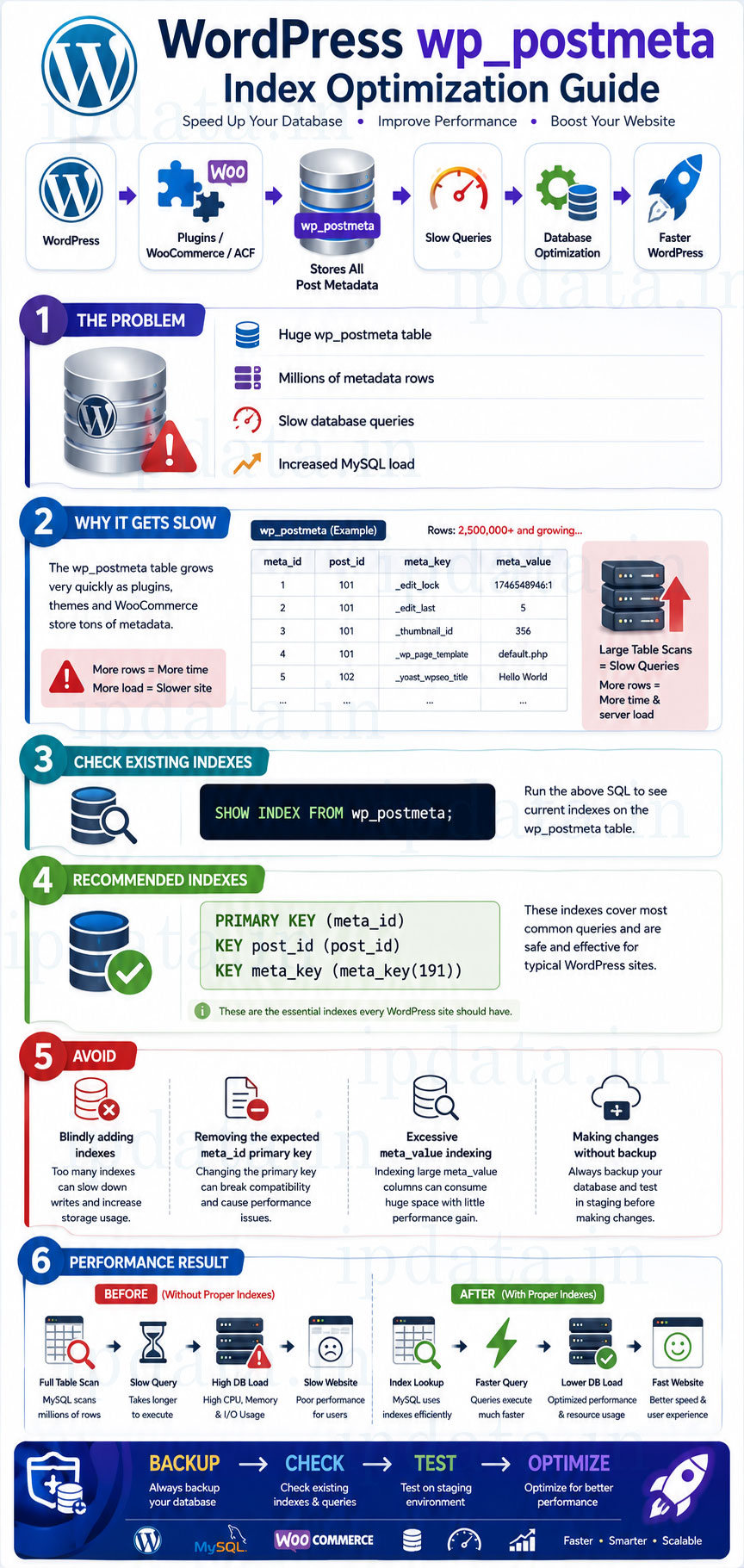
WordPress performance issues often trace back to a single database table — wp_postmeta.
If your site uses plugins like WooCommerce, ACF, Elementor, or custom meta fields, this table can grow extremely fast and become a serious bottleneck.
In this guide, we’ll cover:
- Why wp_postmeta becomes slow
- Why indexes are important
- Comparison of different indexing strategies
- Which index is best and safest
- Real performance benefits
- Recommended SQL commands
What is the wp_postmeta Table?
The wp_postmeta table stores additional data related to posts, including:
- Custom fields
- Featured image IDs
- WooCommerce product data
- ACF and plugin settings
Table Structure (Default)
meta_id   BIGINT AUTO_INCREMENT PRIMARY KEY
post_id   BIGINT
meta_key  VARCHAR(255)
meta_value LONGTEXT
Problem
On active sites, this table can grow to hundreds of thousands or millions of rows, making queries slow if indexes are missing or poorly designed.
Why WordPress Needs Indexes on wp_postmeta
WordPress frequently runs queries like:
SELECT meta_value FROM wp_postmeta WHERE post_id = 123 AND meta_key = '_thumbnail_id';
Or:
SELECT post_id FROM wp_postmeta WHERE meta_key = 'price' AND meta_value = '999';
Without proper indexes:
- MySQL performs full table scans
- CPU usage increases
- Page load time increases
- Admin panel becomes slow
Indexes help MySQL locate data quickly instead of scanning the entire table.
Indexing Options Compared
Let’s analyze three common indexing approaches.
Option 1: Index on (post_id, meta_id)
ALTER TABLE wp_postmeta
ADD INDEX post_id_meta_id (post_id, meta_id);
Why This is Not Effective
- meta_id is already unique
- Composite index provides minimal benefit
- Does not help meta_key or meta_value searches
- WordPress rarely queries using (post_id, meta_id)
Verdict
🚫 Avoid this index — very low performance gain
Option 2: Composite Primary Key (Dangerous)
ALTER TABLE wp_postmeta
ADD PRIMARY KEY (post_id, meta_key, meta_id),
ADD UNIQUE KEY meta_id (meta_id),
ADD KEY meta_key (meta_key, meta_value(32), post_id, meta_id),
ADD KEY meta_value (meta_value(32), meta_id);
Why This is Risky
- WordPress expects meta_id as PRIMARY KEY
-
Changing it may:
- Break plugins
- Cause data conflicts
- Slow down inserts & updates
- Large composite indexes increase disk usage
- High write overhead
Verdict
🚫 Never use this in production WordPress
Option 3: WordPress-Safe & Recommended Indexing (BEST)
ALTER TABLE wp_postmeta
ADD PRIMARY KEY (meta_id),
ADD KEY post_id (post_id),
ADD KEY meta_key (meta_key(191));
Understand What You’re Actually Dealing With
Before touching a single index, spend five minutes understanding the table’s current state. Blind ALTER TABLE commands on a production WordPress database have taken sites offline.
-- How many rows? Size on disk?
SELECT
    table_name,
    table_rows,
    ROUND(data_length / 1024 / 1024, 2)  AS data_mb,
    ROUND(index_length / 1024 / 1024, 2) AS index_mb,
    ROUND((data_length + index_length) / 1024 / 1024, 2) AS total_mb
FROM information_schema.tables
WHERE table_schema = DATABASE()
  AND table_name = 'wp_postmeta';
table_name   | table_rows | data_mb | index_mb | total_mb
wp_postmeta  | 4,812,443  | 1847.22 | 623.41   | 2470.63
That output tells you: 4.8 million rows, 1.8 GB of data. An ALTER TABLE on this without the right approach will lock the table for the duration of the operation — potentially 15–30 minutes on a busy server with no reads or writes possible during that time.
-- What indexes already exist?
SHOW INDEX FROM wp_postmeta;
WordPress core ships with these indexes by default:
Table       | Key_name  | Column_name | Seq_in_index | Cardinality
wp_postmeta | PRIMARY   | meta_id     | 1            | 4812443
wp_postmeta | post_id   | post_id     | 1            | 241000
wp_postmeta | meta_key  | meta_key    | 1            | 3847
If you see these three, WordPress’s default indexes are in place. Many WordPress databases, especially ones that were restored from backup without proper table structure, or that used old migration tools, are missing the meta_key index entirely — which is the most impactful one to add.
-- What are the most common meta_keys? (Tells you where query load is concentrated)
SELECT meta_key, COUNT(*) AS row_count
FROM wp_postmeta
GROUP BY meta_key
ORDER BY row_count DESC
LIMIT 30;
meta_key                      | row_count
_edit_lock                    | 312,441
_edit_last                    | 312,441
_thumbnail_id                 | 287,332
_wp_attachment_metadata       | 201,223
_wc_average_rating            | 89,441   ← if WooCommerce
_price                        | 89,441   ← if WooCommerce
_stock                        | 89,441   ← if WooCommerce
_edit_lock and _edit_last with hundreds of thousands of rows is a classic sign of a site that has been running for years without cleanup — these are set every time a post is opened in the editor and accumulate indefinitely on high-content sites.
The EXPLAIN Statement: Your Most Important Tool
-- Is the index being used for a typical thumbnail query?
EXPLAIN SELECT meta_value
FROM wp_postmeta
WHERE post_id = 1456
  AND meta_key = '_thumbnail_id';
Read the output columns:
id | select_type | table      | type  | possible_keys    | key      | key_len | rows    | Extra
 1 | SIMPLE      | wp_postmeta | ref  | post_id,meta_key | post_id  | 8       | 847     | Using where
What this tells you:
- type: ref — good, using an index. ALL means full table scan (bad).
- key: post_id — MySQL chose the post_id index.
- rows: 847 — MySQL estimates scanning 847 rows after the index lookup. Still a lot if the post has hundreds of meta keys.
- key_len: 8 — only 8 bytes of the index used, consistent with a BIGINT post_id.
For a query filtering on both post_id AND meta_key, a composite index (post_id, meta_key) would be far more selective than individual column indexes. After adding the composite:
id | select_type | table       | type | key             | key_len | rows | Extra
 1 | SIMPLE      | wp_postmeta | ref  | post_id_key_idx | 775     | 1    | Using index condition
rows: 1 — MySQL now scans exactly one row. That’s the difference a well-chosen composite index makes on a 5-million-row table.
The Complete Recommended Index Set
Here is the full set with the reasoning for each:
The Default WordPress Indexes (Verify These Exist First)
-- These should already be present. If not, add them first.
ALTER TABLE wp_postmeta
    ADD PRIMARY KEY (meta_id),
    ADD KEY post_id (post_id),
    ADD KEY meta_key (meta_key(191));
meta_key(191) — the prefix length is not arbitrary. utf8mb4 uses up to 4 bytes per character. MySQL’s default index prefix limit is 767 bytes. 191 × 4 = 764 bytes — safely under the limit. If you use innodb_large_prefix = ON (MySQL 5.7+ and MariaDB 10.2+), you can index up to 3072 bytes, but 191 characters is sufficient for every real meta_key value in practice.
The High-Impact Composite Index (Add This)
-- Composite index for the most common query pattern:
-- WHERE post_id = ? AND meta_key = ?
ALTER TABLE wp_postmeta
    ADD INDEX idx_post_id_meta_key (post_id, meta_key(191));
WordPress’s get_post_meta($post_id, $key) translates to exactly this query pattern. The composite index is roughly 100× more selective than the individual post_id index alone on a large table because MySQL can narrow to a specific post_id + meta_key combination in a single index lookup.
The meta_value Index — Use With Caution
-- For queries that filter on meta_value (price filters, stock status, etc.)
ALTER TABLE wp_postmeta
    ADD INDEX idx_meta_key_value (meta_key(191), meta_value(32));
meta_value is a LONGTEXT column — you cannot index the full column, only a prefix. meta_value(32) indexes the first 32 characters. This works well for:
- Boolean-like values: ‘yes’, ‘no’, ‘instock’, ‘outofstock’
- Short numeric values: prices, IDs, counts
- Short string values: status codes, types, slugs
It does not help for:
- Values longer than 32 characters (the index prefix won’t narrow results sufficiently)
- Numeric range queries like BETWEEN 500 AND 2000 — index prefix on a LONGTEXT column won’t be used for range scans efficiently
- Serialized data (which is unsearchable by index regardless)
-- Check before adding: what's the average meta_value length for your key meta keys?
SELECT
    meta_key,
    AVG(LENGTH(meta_value)) AS avg_len,
    MAX(LENGTH(meta_value)) AS max_len,
    COUNT(*) AS count
FROM wp_postmeta
WHERE meta_key IN ('_price', '_stock_status', '_sku', '_thumbnail_id')
GROUP BY meta_key;
If avg_len for _price is 6 characters, a 32-character prefix captures 100% of the index benefit. If avg_len is 500+ characters (serialized data), the index won’t help much.
The Critical Warning: Online Schema Changes for Live Tables
It says “run during low traffic” — but on a table with millions of rows, even low-traffic ALTER TABLE in standard MySQL has a locking behaviour that needs to be understood:
MySQL 5.6+ and MariaDB 10.0+ support ALGORITHM=INPLACE for adding secondary indexes without a full table lock. But not all ALTER TABLE operations use it automatically.
-- Check whether your intended ALTER will lock the table
-- Using ALGORITHM=INPLACE, LOCK=NONE requests an online operation
-- MySQL will error if it can't do it online, rather than silently locking
ALTER TABLE wp_postmeta
    ADD INDEX idx_post_id_meta_key (post_id, meta_key(191)),
    ALGORITHM=INPLACE,
    LOCK=NONE;
If MySQL can perform this online, it proceeds. If not (e.g., changing the primary key, changing column types), it errors immediately — which is better than silently locking for 20 minutes.
For the absolute safest approach on large production tables, use pt-online-schema-change (Percona Toolkit) or gh-ost (GitHub’s online schema change tool). Both create a shadow table, copy rows in batches, apply ongoing changes as triggers, then swap the tables — with zero downtime:
# pt-online-schema-change (Percona Toolkit)
pt-online-schema-change \
    --alter "ADD INDEX idx_post_id_meta_key (post_id, meta_key(191))" \
    --execute \
    D=wordpress_db,t=wp_postmeta \
    --host=localhost \
    --user=root \
    --password=yourpassword \
    --progress=time,30 \
    --chunk-size=500 \
    --max-lag=2

# gh-ost (GitHub's tool — no triggers, safer for very high write loads)
gh-ost \
    --user="root" \
    --password="yourpassword" \
    --host=localhost \
    --database="wordpress_db" \
    --table="wp_postmeta" \
    --alter="ADD INDEX idx_post_id_meta_key (post_id, meta_key(191))" \
    --execute
Both tools throttle automatically when replication lag exceeds a threshold, making them safe for primary-replica setups (common on AWS RDS read replicas).
How WP_Query Translates to SQL — And Why Indexes Sometimes Don’t Help
Understanding this mapping is essential for diagnosing index effectiveness at the WordPress layer:
// PHP: Basic meta query
$query = new WP_Query([
    'post_type' => 'product',
    'meta_query' => [
        [
            'key'   => '_price',
            'value' => [500, 2000],
            'type'  => 'NUMERIC',
            'compare' => 'BETWEEN',
        ],
    ],
]);
WordPress translates this into approximately:
SELECT wp_posts.ID
FROM wp_posts
INNER JOIN wp_postmeta ON (wp_posts.ID = wp_postmeta.post_id)
WHERE 1=1
  AND wp_posts.post_type = 'product'
  AND wp_posts.post_status = 'publish'
  AND wp_postmeta.meta_key = '_price'
  AND CAST(wp_postmeta.meta_value AS SIGNED) BETWEEN 500 AND 2000
ORDER BY wp_posts.post_date DESC
LIMIT 0, 10;
The CAST(meta_value AS SIGNED) is critical to notice: MySQL cannot use the meta_value index for a CAST expression. The index on meta_value(32) stores character prefixes of the string value. Casting to SIGNED for a numeric comparison bypasses the prefix index entirely. This is a fundamental limitation of storing numbers in a LONGTEXT column — which is exactly what wp_postmeta does.
The practical implication: for numeric range queries on wp_postmeta, indexes on meta_value will help far less than you expect. The correct fix for WooCommerce price filtering at scale is the High-Performance Order Storage (HPOS) migration — which stores numeric data in properly typed columns that can be indexed correctly.
The relation Key and Multiple Conditions
// PHP: Multiple meta conditions
$query = new WP_Query([
    'meta_query' => [
        'relation' => 'AND',
        [
            'key'     => '_stock_status',
            'value'   => 'instock',
            'compare' => '=',
        ],
        [
            'key'     => '_visibility',
            'value'   => 'visible',
            'compare' => '=',
        ],
    ],
]);
WordPress generates a separate INNER JOIN for each meta condition:
SELECT wp_posts.ID
FROM wp_posts
INNER JOIN wp_postmeta AS mt1 ON (wp_posts.ID = mt1.post_id)
INNER JOIN wp_postmeta AS mt2 ON (wp_posts.ID = mt2.post_id)
WHERE mt1.meta_key = '_stock_status' AND mt1.meta_value = 'instock'
  AND mt2.meta_key = '_visibility'  AND mt2.meta_value = 'visible'
Two joins on a 5-million-row table. Each join benefits from idx_meta_key_value, but the compound result still requires MySQL to intersect the result sets. With five or six meta conditions — common in complex WooCommerce product filtering — performance degrades significantly regardless of indexing. This is the architectural limit that drove WooCommerce’s HPOS initiative.
The WooCommerce HPOS Migration:
It recommends WooCommerce-specific indexes on wp_postmeta for _price, _stock_status, and _sku — without mentioning that WooCommerce 8.2+ (released October 2023) migrated order data away from wp_postmeta entirely via High-Performance Order Storage (HPOS).
For WooCommerce Orders specifically, HPOS stores data in dedicated tables:
- wp_wc_orders — order header data
- wp_wc_orders_meta — order meta (separate from wp_postmeta)
- wp_wc_order_addresses — billing and shipping
- wp_wc_order_operational_data — operational flags
Orders are no longer in wp_posts / wp_postmeta when HPOS is enabled. Indexes on wp_postmeta for order-related meta keys (_billing_email, _order_total, _payment_method) become irrelevant.
Product data (price, stock, SKU) is still in wp_postmeta as of WooCommerce 9.x — products haven’t migrated to custom tables yet, though this is being discussed for future versions.
-- Check whether your WooCommerce site has HPOS enabled
SELECT option_value
FROM wp_options
WHERE option_name = 'woocommerce_feature_hpos_enabled';

-- If 'yes': orders are in wp_wc_orders, not wp_posts
-- If 'no' or missing: legacy storage, orders still in wp_posts/wp_postmeta
WooCommerce HPOS Table Indexes (The Ones That Actually Matter Now)
-- Check what indexes WooCommerce created on its custom tables
SHOW INDEX FROM wp_wc_orders;
SHOW INDEX FROM wp_wc_orders_meta;
WooCommerce creates these by default on wp_wc_orders:
- PRIMARY KEY (id) — order ID
- KEY status (status) — filter by order status
- KEY date_created_gmt (date_created_gmt) — date-based queries
- KEY customer_id (customer_id) — orders by customer
If you’re running HPOS and hitting slow queries in WooCommerce order management, look at wp_wc_orders first, not wp_postmeta.
What WooCommerce Indexes on wp_postmeta Still Matter
For product data (still in wp_postmeta on WooCommerce 9.x):
-- Product price range filtering (shop page filters)
ALTER TABLE wp_postmeta
    ADD INDEX idx_wc_price (meta_key(191), meta_value(20));

-- Product SKU lookup
ALTER TABLE wp_postmeta
    ADD INDEX idx_wc_sku (meta_key(191), meta_value(50));

-- Stock status (in-stock / out-of-stock filtering)
-- Note: CAST limitation applies here — index helps for exact equality, not ranges
ALTER TABLE wp_postmeta
    ADD INDEX idx_wc_stock (meta_key(191), post_id);
The Autoload Bloat Problem (wp_options, Not wp_postmeta)
WordPress database performance guide needs to mention this: the single most common cause of WordPress database slowness that developers diagnose as a wp_postmeta problem is actually a wp_options autoload bloat problem.
WordPress loads all rows with autoload = ‘yes’ from wp_options on every single page request, before any query runs. Badly behaved plugins store large serialized data blobs in autoloaded options:
-- Find the biggest autoloaded options (run this on any struggling WordPress site)
SELECT
    option_name,
    LENGTH(option_value) AS value_size_bytes,
    ROUND(LENGTH(option_value) / 1024, 2) AS value_size_kb,
    autoload
FROM wp_options
WHERE autoload = 'yes'
ORDER BY LENGTH(option_value) DESC
LIMIT 20;
option_name                     | value_size_kb | autoload
_transient_wc_products_onsale   | 847.22        | yes   ← WooCommerce transient
_transient_feed_hash_abc123     | 234.11        | yes   ← RSS feed cache
elementor_pro_xxx_settings      | 189.44        | yes   ← Elementor settings
_wc_session_xxx                 | 143.22        | yes   ← User session data
-- Total autoload size (should ideally be under 1MB for performance)
SELECT
    COUNT(*) AS autoloaded_options,
    ROUND(SUM(LENGTH(option_value)) / 1024 / 1024, 2) AS total_autoload_mb
FROM wp_options
WHERE autoload = 'yes';
If the total autoload size exceeds 1–2MB, every WordPress page load is fetching that data from the database before it can do anything else. This is often more impactful than any wp_postmeta index improvement.
-- Fix: Mark WooCommerce transients as non-autoloaded
-- (They're already cached in the transient system; autoloading is redundant)
UPDATE wp_options
SET autoload = 'no'
WHERE option_name LIKE '_transient_%'
   OR option_name LIKE '_site_transient_%';

-- Fix: Remove expired transients entirely
DELETE FROM wp_options
WHERE option_name LIKE '_transient_timeout_%'
  AND option_value < UNIX_TIMESTAMP();

DELETE FROM wp_options
WHERE option_name LIKE '_transient_%'
  AND option_name NOT LIKE '_transient_timeout_%'
  AND REPLACE(option_name, '_transient_', '_transient_timeout_')
      NOT IN (SELECT option_name FROM wp_options);
The Object Cache Layer: The Fix That Beats All Indexes
Object caching deserves its own section because it changes the problem entirely. Every get_post_meta() call hits the database — unless an object cache is in place. WordPress has a built-in object cache that lives in PHP memory for the duration of a single request, but it resets on every new page load. A persistent object cache — Redis or Memcached — keeps the cache across requests:
WITHOUT persistent cache:
Page load → WP_Query → MySQL → wp_postmeta (with good indexes) → 8ms
Page load → WP_Query → MySQL → wp_postmeta (with good indexes) → 8ms
(Every page load hits the database)

WITH persistent cache (Redis):
Page load → get_post_meta() → Redis (cache miss) → MySQL → wp_postmeta → Redis SET → 8ms
Page load → get_post_meta() → Redis (cache HIT) → 0.3ms
(Subsequent page loads skip the database entirely)
For a WooCommerce product page that calls get_post_meta() forty times for various product attributes, a warm Redis cache turns forty database queries into forty sub-millisecond cache lookups.
Installing Redis Object Cache on WordPress
# Install Redis (Ubuntu)
sudo apt-get install redis-server

# Install the PHP Redis extension
sudo apt-get install php8.5-redis

# Verify
redis-cli ping  # PONG
// In wp-config.php — before WordPress loads
define('WP_CACHE', true);
define('WP_REDIS_HOST', '127.0.0.1');
define('WP_REDIS_PORT', 6379);
define('WP_REDIS_DATABASE', 0);
define('WP_REDIS_PREFIX', 'wp_');        // Namespace for multi-site setups
define('WP_REDIS_MAXTTL', 3600);         // 1 hour max TTL for cached objects
Install the Redis Object Cache plugin (free, by Till Klampe) or the Object Cache Pro plugin (paid, better for high-traffic sites). Then check cache performance:
// In WordPress: inspect the cache hit ratio
global $wp_object_cache;
$stats = $wp_object_cache->stats();
// Look for: hits vs misses ratio — should be > 80% hits on a warm cache
On AWS ElastiCache (for EC2/RDS WordPress deployments)
// ElastiCache Redis endpoint
define('WP_REDIS_HOST', 'your-cluster.cache.amazonaws.com');
define('WP_REDIS_PORT', 6379);
define('WP_REDIS_SCHEME', 'tls');  // Enable TLS for ElastiCache in-transit encryption
With ElastiCache, the Redis instance is outside the EC2 instance — latency is typically 0.5–2ms instead of 0.1ms for localhost Redis, but the benefit over a 8–50ms database query is still enormous.
wp_postmeta Bloat: Cleanup Queries
Over months and years, wp_postmeta accumulates orphaned rows — meta for posts that no longer exist, transient-like data from plugins, and draft metadata that was never cleaned up:
-- Find orphaned postmeta (rows where the post no longer exists)
SELECT COUNT(*)
FROM wp_postmeta pm
LEFT JOIN wp_posts p ON pm.post_id = p.ID
WHERE p.ID IS NULL;

-- Delete orphaned postmeta (take a backup first!)
DELETE pm
FROM wp_postmeta pm
LEFT JOIN wp_posts p ON pm.post_id = p.ID
WHERE p.ID IS NULL;

-- Find meta keys that are only used by auto-drafts (usually safe to delete)
SELECT meta_key, COUNT(*) as count
FROM wp_postmeta pm
JOIN wp_posts p ON pm.post_id = p.ID
WHERE p.post_status = 'auto-draft'
GROUP BY meta_key
ORDER BY count DESC;

-- Delete _edit_lock and _edit_last for posts older than 30 days
-- (These accumulate massively on content-heavy sites)
DELETE pm
FROM wp_postmeta pm
JOIN wp_posts p ON pm.post_id = p.ID
WHERE pm.meta_key IN ('_edit_lock', '_edit_last')
  AND p.post_modified < DATE_SUB(NOW(), INTERVAL 30 DAY);

-- After cleanup, reclaim the freed space
OPTIMIZE TABLE wp_postmeta;
-- Note: OPTIMIZE TABLE causes a full table rebuild — use pt-online-schema-change
-- equivalent (pt-online-schema-change --alter "ENGINE=InnoDB") for live sites
AWS RDS Specifics: Beyond my.cnf
Here’s the complete RDS-specific workflow:
Parameter Group Settings (With Values for Common Instance Sizes)
# db.t3.medium (4GB RAM)
innodb_buffer_pool_size        = 2684354560   # 2.5GB (use ~70% of RAM)
innodb_log_file_size           = 536870912    # 512MB
innodb_flush_log_at_trx_commit = 2            # Balance between durability and performance
slow_query_log                 = 1
long_query_time                = 1            # Log queries over 1 second
log_queries_not_using_indexes  = 1
max_allowed_packet             = 67108864     # 64MB (needed for large meta values)

# db.r5.large (16GB RAM)
innodb_buffer_pool_size        = 12884901888  # 12GB
innodb_buffer_pool_instances   = 8            # 1 per GB of buffer pool
Reading Slow Query Logs on RDS
-- RDS stores slow queries in a dedicated table when enabled
SELECT
    start_time,
    user_host,
    query_time,
    lock_time,
    rows_examined,
    sql_text
FROM mysql.slow_log
WHERE query_time > 2          -- Queries over 2 seconds
  AND sql_text LIKE '%wp_postmeta%'
ORDER BY query_time DESC
LIMIT 20;
Performance Insights (RDS — The Proper Tool for This)
If you’re on RDS, Performance Insights gives far more actionable data than slow query logs:
# Enable Performance Insights via CLI
aws rds modify-db-instance \
    --db-instance-identifier your-wordpress-db \
    --enable-performance-insights \
    --performance-insights-retention-period 7 \
    --no-apply-immediately

# Query top SQL statements by load
aws pi get-resource-metrics \
    --service-type RDS \
    --identifier db-XXXXXXXXXXXXX \
    --metric-queries '[{"Metric":"db.load.avg","GroupBy":{"Group":"db.sql","Dimensions":["db.sql.statement"],"Limit":5}}]' \
    --start-time $(date -u -d "1 hour ago" +%Y-%m-%dT%H:%M:%SZ) \
    --end-time $(date -u +%Y-%m-%dT%H:%M:%SZ) \
    --period-in-seconds 60
Performance Insights shows which specific queries are consuming the most database CPU time — sorted by actual load, not just query duration — which is more useful than slow query logs for identifying the highest-impact optimization targets.
The Complete Optimization Checklist
Work through this in order — earlier items have more impact than later ones:
1. Verify and fix default WordPress indexes (5 minutes)
SHOW INDEX FROM wp_postmeta;
-- If PRIMARY, post_id, and meta_key(191) are all present: ✅
-- If any are missing: add them first before anything else
2. Add the composite index (online, safe for live sites)
ALTER TABLE wp_postmeta
    ADD INDEX idx_post_id_meta_key (post_id, meta_key(191)),
    ALGORITHM=INPLACE,
    LOCK=NONE;
-- If this errors: use pt-online-schema-change instead
3. Check and fix autoload bloat in wp_options
SELECT COUNT(*), ROUND(SUM(LENGTH(option_value))/1024/1024, 2) AS mb
FROM wp_options WHERE autoload = 'yes';
-- If > 2MB: investigate and clean (see autoload section above)
4. Install Redis object cache
# Single step that often eliminates the database bottleneck entirely
apt-get install redis-server php8.5-redis
# Configure WP_REDIS_HOST in wp-config.php
# Install Redis Object Cache plugin
5. Delete orphaned and stale meta
-- Delete orphaned meta (see cleanup section above)
-- Then OPTIMIZE TABLE (or pt-osc equivalent)
6. Add WooCommerce product indexes (if applicable and HPOS not yet on products)
ALTER TABLE wp_postmeta
    ADD INDEX idx_wc_price (meta_key(191), meta_value(20)),
    ALGORITHM=INPLACE, LOCK=NONE;
7. Enable RDS Performance Insights and slow query logging
aws rds modify-db-instance --enable-performance-insights ...
8. Evaluate WooCommerce HPOS migration (if on WooCommerce 8.2+)
# In WordPress admin: WooCommerce → Settings → Advanced → Features
# Enable "High-Performance Order Storage"
# Run the migration wizard
Why This Works Best
- Matches WordPress core design
- Safe for all themes & plugins
- Optimizes common queries
Performance Improvements
| Query Type | Result |
|---|---|
| WHERE post_id = ? | Very fast |
| WHERE meta_key = ? | Very fast |
| JOIN wp_posts | Faster |
| Admin post edit | Faster |
Verdict
Best and safest option for most WordPress sites
Bonus: Advanced Index for Large & WooCommerce Sites
For high-traffic or WooCommerce websites:
ALTER TABLE wp_postmeta
ADD INDEX meta_key_value (meta_key(191), meta_value(32));
When to Use This
- Product filters
- Price-based queries
- REST API meta queries
- Heavy ACF usage
⚠️ Note: This adds slight overhead to writes but greatly improves read performance.
Why We Limit Index Length (meta_key(191))
- utf8mb4 uses 4 bytes per character
- MySQL index size limit = 767 bytes
- 191 × 4 = 764 bytes → safe limit
This prevents index creation errors.
Real-World Benefits of Proper Indexing
- Faster page loads<
- Faster admin dashboard
- Lower MySQL CPU usage
- Reduced slow queries
- Better scalability
- Improved SEO indirectly (Core Web Vitals)
Final Recommendation (TL;DR)
Use This (Safe & Effective)
ALTER TABLE wp_postmeta
ADD PRIMARY KEY (meta_id),
ADD KEY post_id (post_id),
ADD KEY meta_key (meta_key(191));
Avoid
- Composite primary keys
- Over-indexing meta_value
- Modifying WordPress core schema incorrectly
Before Running Index Changes (Important!)
- Take a database backup
- Run during low traffic
- Test on staging server
- Check existing indexes using:
SHOW INDEX FROM wp_postmeta;
Common Slow Query Examples (Before Indexing)
Example 1: Featured Image Query
 SELECT meta_value
FROM wp_postmeta
WHERE post_id = 1456
AND meta_key = '_thumbnail_id';
❌ Without index → Full table scan
Example 2: WooCommerce Product Price Filter
SELECT post_id
FROM wp_postmeta
WHERE meta_key = '_price'
AND meta_value BETWEEN 500 AND 2000;
❌ Very slow on large stores
Example 3: ACF / Custom Field Query
 SELECT post_id
FROM wp_postmeta
WHERE meta_key = 'course_type'
AND meta_value = 'paid';
Example 4: REST API Meta Query
 SELECT *
FROM wp_postmeta
WHERE meta_key = '_stock_status'
AND meta_value = 'instock';
Optimized Indexes That Fix These Slow Queries
Core Safe Indexes
 ALTER TABLE wp_postmeta
ADD PRIMARY KEY (meta_id),
ADD KEY post_id (post_id),
ADD KEY meta_key (meta_key(191));
Advanced Index (High Traffic Sites)
 ALTER TABLE wp_postmeta
ADD INDEX meta_key_value (meta_key(191), meta_value(32));
AWS RDS / EC2 MySQL Optimization (WordPress)
Recommended MySQL Settings
For EC2 (my.cnf)
  innodb_buffer_pool_size = 70% of RAM
innodb_log_file_size = 512M
innodb_flush_log_at_trx_commit = 2
query_cache_type = 0
For AWS RDS (Parameter Group)
Set:
- innodb_buffer_pool_size → 70%
- slow_query_log → 1
- long_query_time → 1
- log_queries_not_using_indexes → 1
Enable Slow Query Log (RDS)
CALL mysql.rds_enable_slow_query_log;
Check Slow Queries
 SELECT * FROM mysql.slow_log
ORDER BY query_time DESC
LIMIT 10;
WooCommerce-Specific Index Guide (Highly Recommended)
WooCommerce heavily uses wp_postmeta.
Most Important Indexes
  ALTER TABLE wp_postmeta
ADD INDEX wc_price (meta_key(191), meta_value(20)),
ADD INDEX wc_stock (meta_key(191), post_id),
ADD INDEX wc_sku (meta_key(191), meta_value(50));
Helps Optimize:
| Feature | Improvement |
|---|---|
| Product filters | Faster |
| Price sorting | Faster |
| Stock status | Faster |
| Category pages | Faster |
| REST API | Faster |
The three highest-impact actions for a slow wp_postmeta on a WordPress site — in order of typical impact:
1. Redis object cache — eliminates database round-trips for cached data entirely. For sites with repeated page loads of the same content, this alone commonly reduces database load by 60–80%.
2. The composite (post_id, meta_key) index — makes get_post_meta($id, $key) lookups O(1) instead of scanning hundreds of rows per post. Safely addable online with ALGORITHM=INPLACE, LOCK=NONE.
3. Orphaned meta cleanup and autoload audit — removes the rows that aren’t being used and reduces the amount of data MySQL has to manage, making every subsequent query marginally faster and index maintenance cheaper.
The WooCommerce-specific meta_value indexes help for exact-match queries (_stock_status = ‘instock’) but have limited effect on numeric range queries due to the CAST limitation inherent in storing numbers as LONGTEXT. The proper long-term solution for WooCommerce is HPOS, which stores order data in correctly typed columns that MySQL can index and range-scan correctly.