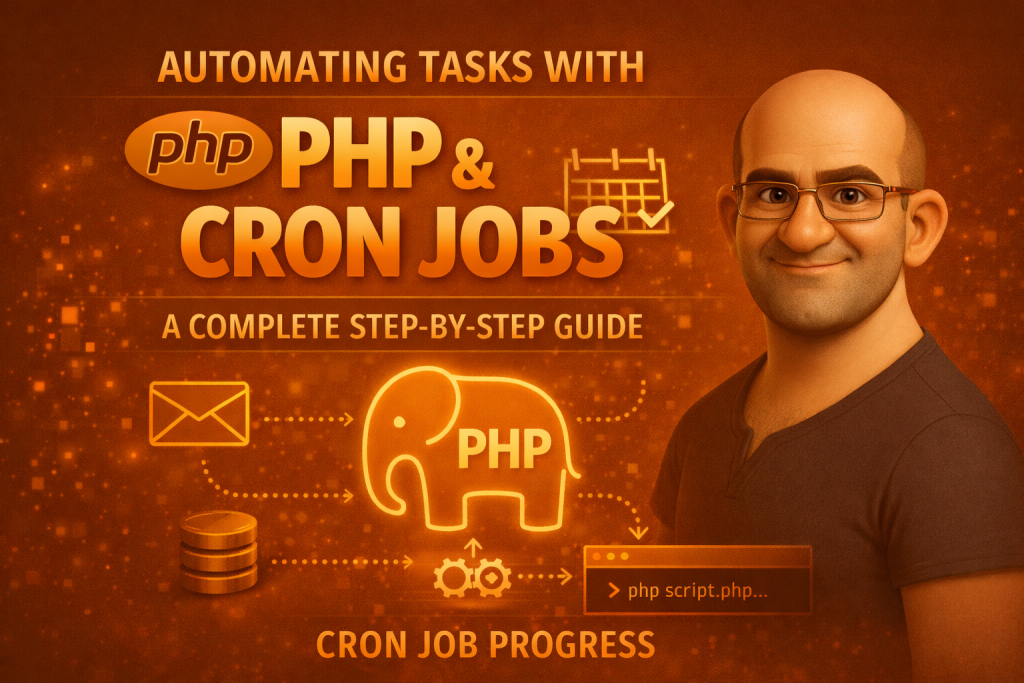
In modern web development, repetitive tasks — like sending emails, cleaning up old files, syncing data, or backing up databases — can take up valuable time and mental space if done manually. Instead of performing them by hand, you can automate these tasks using PHP scripts executed on a schedule via cron jobs — a powerful feature available on Unix-like servers (Linux, macOS, etc.).
This blog will walk you through the what, why, and how of cron jobs with PHP — with clear examples and practical tips you can use right away.
What Is a Cron Job?
A cron job is a scheduled task that runs automatically at a specified time or interval on a server. It’s part of the Unix/Linux cron system — a built-in scheduler that checks a table called the crontab for jobs to run.
Cron is extremely versatile and can run any script or command you want — including PHP files.
Why Use Cron Jobs with PHP?
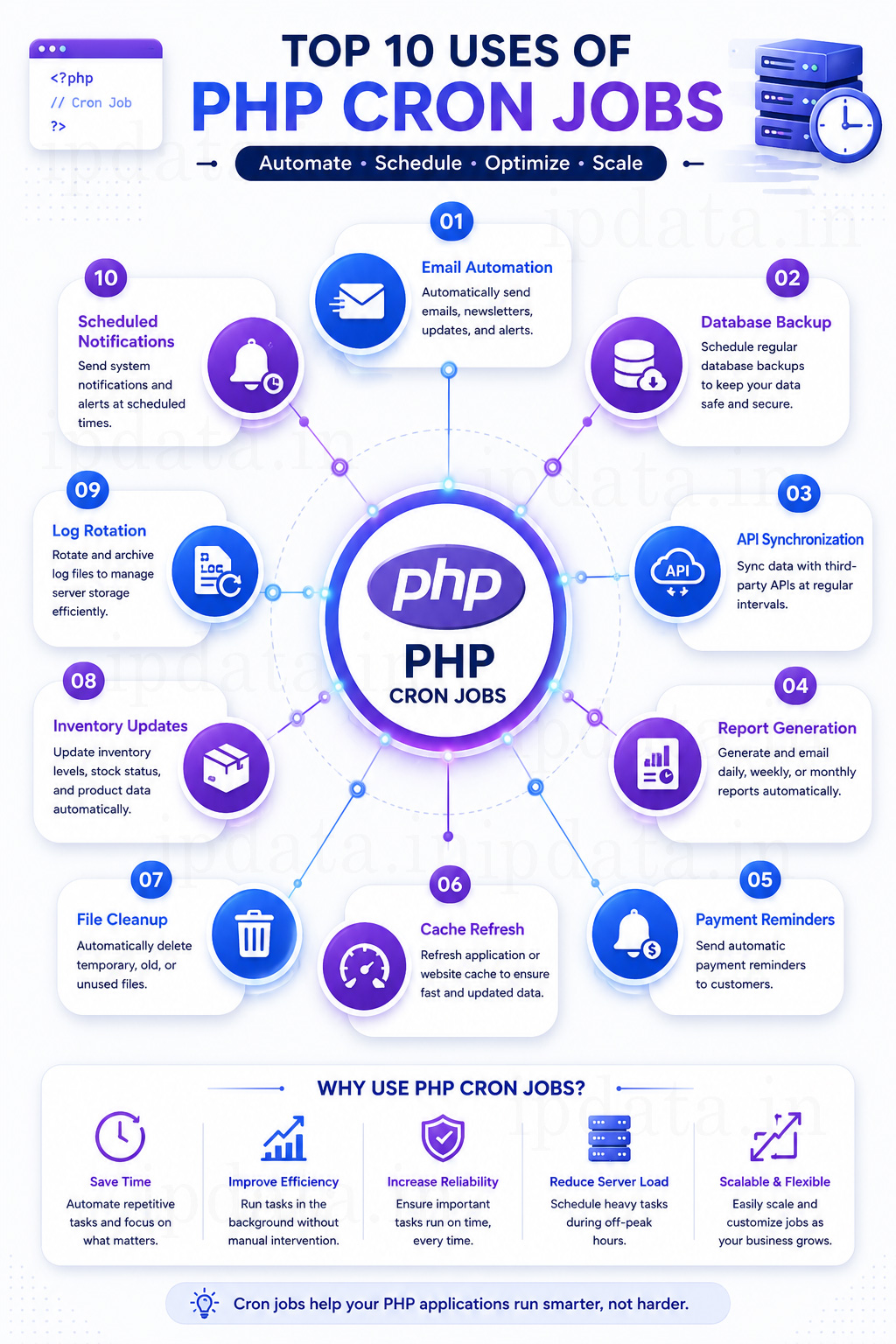
Here are some common automation use cases where PHP + cron shines:
- ✅ Daily email reports
- ✅ Database backups
- ✅ Clearing old session files or logs
- ✅ Syncing data between systems
- ✅ Generating periodic analytics reports
- ✅ Sending scheduled SMS or notifications
Instead of relying on users triggering these tasks manually, cron keeps everything running smoothly in the background.
How Cron Actually Works (Beyond the Syntax Table)
Most guides show the five-field cron syntax and move on. Two things are worth understanding beneath that:
The cron daemon wakes up every minute, checks every entry in every user’s crontab, and runs any command whose schedule matches the current minute. It does not know or care whether a previous instance of that command is still running. If your script takes 90 seconds and runs every minute, you’ll have multiple copies running simultaneously almost immediately. This is the most common production cron bug, and it’s completely invisible unless you’re actively looking for it.
Cron runs in a stripped environment. Your terminal session has PATH, HOME, USER, and dozens of other environment variables set by your shell profile. Cron has almost none of them. A command that works perfectly when you type it in your terminal will fail silently in cron if it depends on a PATH entry that cron doesn’t have, a .env file your shell loaded, or a PHP version set by a version manager like phpenv or asdf.
Both of these problems have clean solutions. Everything below assumes you know them.
How Cron Scheduling Works
Cron uses a special schedule format with five fields, describing when a task should run:
* * * * * command
│ │ │ │ │
│ │ │ │ └─ Day of week (0–7)
│ │ │ └── Month (1–12)
│ │ └─── Day of month (1–31)
│ └──── Hour (0–23)
└───── Minute (0–59)
For example:
0 2 * * * /path/to/php /path/to/script.php
→ Runs a PHP script every day at 2:00 AM.
Cron has built-in shortcuts, too:
| Shortcut | Meaning |
|---|---|
| @hourly | Every hour |
| @daily | Every day |
| @weekly | Every week |
| @monthly | First day of month |
Cron can’t run more often than every minute natively — for sub-minute needs, scripts usually loop internally.
Setting Up a Cron Job for PHP
1. Write Your PHP Automation Script
Create a standalone PHP file (doesn’t rely on sessions or browser input):
<?php
// daily_report.php

require 'config.php'; // optional: database or settings file

function sendDailyReport() {
    $to      = "user@example.com";
    $subject = "Daily Task Report";
    $message = "This email was sent automatically via cron job.";
    $headers = "From: no-reply@example.com";

    mail($to, $subject, $message, $headers);
}

sendDailyReport();
echo "Report sent at " . date('Y-m-d H:i:s') . "\n";
?>
This script can be run from the command line without a browser.
2. Make Sure PHP CLI Is Installed
On most servers, PHP has a command-line interface (CLI). You can check it:
which php
Example output might be:
/usr/bin/php
You’ll use that path in your cron entry.
3. Edit the Crontab File
Open terminal and type:
crontab -e
This opens the cron schedule editor.
4. Add Your Cron Job
To run your PHP script every day at 2 AM:
0 2 * * * /usr/bin/php /var/www/html/daily_report.php >> /var/log/daily_report.log 2>&1
✔ >> /var/log/daily_report.log appends output and errors to a log file — great for debugging.
After saving and exiting, cron installs the new schedule.
Examples of Cron Schedules
| Tasks | Cron Expression |
|---|---|
| Every minute | * * * * * |
| Every 5 minutes | */5 * * * * |
| Every day at midnight | 0 0 * * * |
| Every Monday at 8 AM | 0 8 * * 1 |
| First of every month | 0 0 1 * * |
Best Practices
✔ Logging is essential
Always log output:
0 3 * * * /usr/bin/php /path/to/script.php >> /path/to/logfile.log 2>&1
This makes debugging easier when something doesn’t run.
Don’t let overlapping tasks run
If a job takes longer than the interval you scheduled, you might end up with multiple copies running simultaneously. You can prevent this with lock files, checking process lists, or using semaphore mechanisms.
Performance matters
Optimize code so scripts finish quickly, especially if they’re scheduled frequently (like every 5 or 10 minutes).
Monitor your cron jobs
Instead of assuming everything works, check logs regularly or use monitoring tools to alert you if jobs fail.

Real-World Use Case: Sending Weekly SMS
You could adapt your script to send text messages every Saturday morning. For example:
- Write weekly_sms.php that calls an SMS API.
- Schedule it with cron:
0 8 * * 6 /usr/bin/php /path/to/weekly_sms.php >> /path/to/sms.log 2>&1
This runs at 8:00 AM every Saturday.
weekly_sms.php – PHP Script to Send Weekly SMS via Cron
🔹 Use Case
Send a weekly reminder SMS to users every Saturday at 8:00 AM automatically.
weekly_sms.php (Example Code)
<?php
/**
 * File: weekly_sms.php
 * Purpose: Send weekly SMS notifications using Cron Job
 * Run: Every Saturday at 8 AM
 */

// Set timezone
date_default_timezone_set('Asia/Kolkata');

// Log file
$logFile = __DIR__ . '/weekly_sms.log';

// SMS API credentials (example)
$apiUrl   = "https://api.smsprovider.com/send";
$apiKey  = "YOUR_API_KEY";
$sender  = "WEBSMS";

// Recipient details
$mobileNumbers = [
    "91XXXXXXXXXX",
    "91YYYYYYYYYY"
];

// SMS content
$message = "Hello! This is your weekly reminder. Have a great weekend!";

// Function to write logs
function writeLog($message, $logFile) {
    file_put_contents(
        $logFile,
        "[" . date("Y-m-d H:i:s") . "] " . $message . PHP_EOL,
        FILE_APPEND
    );
}

// Loop through recipients
foreach ($mobileNumbers as $mobile) {

    $postData = [
        "api_key" => $apiKey,
        "to"      => $mobile,
        "sender"  => $sender,
        "message" => $message
    ];

    $ch = curl_init();
    curl_setopt_array($ch, [
        CURLOPT_URL            => $apiUrl,
        CURLOPT_POST           => true,
        CURLOPT_POSTFIELDS     => http_build_query($postData),
        CURLOPT_RETURNTRANSFER => true,
        CURLOPT_TIMEOUT        => 30
    ]);

    $response = curl_exec($ch);
    $error    = curl_error($ch);
    curl_close($ch);

    if ($error) {
        writeLog("SMS Failed for {$mobile}: {$error}", $logFile);
    } else {
        writeLog("SMS Sent Successfully to {$mobile} | Response: {$response}", $logFile);
    }
}

echo "Weekly SMS Cron Executed Successfully\n";
?>
Cron Job Entry for weekly_sms.php
Add this to your crontab:
0 8 * * 6 /usr/bin/php /var/www/html/weekly_sms.php >> /var/log/weekly_sms_cron.log 2>&1
Explanation
| Field | Meaning |
|---|---|
| 0 | Minute |
| 8 | Hour (8 AM) |
| * | Every day |
| * | Every month |
| 6 | Saturday |
Log Output Example (weekly_sms.log)
[2025-01-06 08:00:01] SMS Sent Successfully to 91XXXXXXXXXX | Response: OK
[2025-01-06 08:00:02] SMS Sent Successfully to 91YYYYYYYYYY | Response: OK
Security & Best Practices
✔ Keep API keys in .env or config file
✔ Always enable logging
✔ Use PHP CLI only (/usr/bin/php)
✔ Avoid hard-coding sensitive data
✔ Test script manually before cron:
php weekly_sms.php
The Single Most Important Cron Entry Convention
Before any example: this is the baseline form every PHP cron entry should take.
* * * * * /usr/bin/php8.5 /var/www/app/scripts/task.php >> /var/log/app/task.log 2>&1
Four things are explicit here that beginners often leave implicit:
- Full path to the PHP binary (/usr/bin/php8.5, not php) — cron’s PATH doesn’t include your version manager’s shims.
- Full path to the script (/var/www/app/scripts/, not scripts/task.php) — cron’s working directory is not your project root.
- >> logfile.log — append stdout to a dedicated log file, not the system mail queue.
- 2>&1 — redirect stderr into the same log file, so errors don’t silently disappear.
Find your actual PHP binary path: which php or which php8.5.
Solving the Overlap Problem: Lock Files
A lock file is the simplest reliable way to prevent a cron job from running if a previous instance is still active:
<?php
// scripts/daily_report.php

define('LOCK_FILE', sys_get_temp_dir() . '/daily_report.lock');

// If the lock file exists, check whether the PID in it is actually running.
// (A crash may have left a stale lock file behind.)
if (file_exists(LOCK_FILE)) {
    $pid = (int) file_get_contents(LOCK_FILE);
    if ($pid > 0 && file_exists("/proc/{$pid}")) {
        echo "[" . date('Y-m-d H:i:s') . "] Already running (PID {$pid}). Exiting.\n";
        exit(0);
    }
    // Stale lock — previous run crashed without cleanup. Safe to proceed.
    echo "[" . date('Y-m-d H:i:s') . "] Removing stale lock file.\n";
}

// Write our own PID to the lock file.
file_put_contents(LOCK_FILE, getmypid());

// Register a shutdown function to clean up the lock on any exit path,
// including fatal errors and uncaught exceptions.
register_shutdown_function(function () {
    if (file_exists(LOCK_FILE)) {
        unlink(LOCK_FILE);
    }
});

// ─── Your actual task logic below ────────────────────────────────────────────

echo "[" . date('Y-m-d H:i:s') . "] Starting daily report...\n";

try {
    generateDailyReport();
    echo "[" . date('Y-m-d H:i:s') . "] Done.\n";
} catch (Throwable $e) {
    echo "[" . date('Y-m-d H:i:s') . "] ERROR: " . $e->getMessage() . "\n";
    echo $e->getTraceAsString() . "\n";
    exit(1);
}
The /proc/{$pid} check is the detail that makes this robust. A plain file_exists(LOCK_FILE) check leaves you stranded if the script crashed and left the lock behind. Checking whether the PID is still in /proc/ tells you whether that process actually exists — if it doesn’t, the lock is stale and you can remove it safely.
The Environment Variable Trap — and the Clean Fix
Here’s a cron job that fails silently in a way that’s maddening to debug:
# This FAILS in cron even if it works in your terminal
* * * * * php /var/www/app/scripts/task.php
It fails because:
- php resolves via PATH in your terminal but not in cron’s stripped environment
- $_ENV[‘DB_PASSWORD’] is empty because cron didn’t load your .env file
- Any path that uses ~ or a relative reference resolves differently
The clean fix: load environment variables explicitly inside your script, using a proper .env loader rather than relying on the shell to have loaded them:
<?php
// scripts/bootstrap.php — include this at the top of every cron script

// Option 1: If you're using Composer (recommended for any project of real size)
require __DIR__ . '/../vendor/autoload.php';
$dotenv = Dotenv\Dotenv::createImmutable(__DIR__ . '/..');
$dotenv->load();

// Option 2: Manual parsing for minimal setups without Composer
$envFile = __DIR__ . '/../.env';
if (file_exists($envFile)) {
    foreach (file($envFile, FILE_IGNORE_NEW_LINES | FILE_SKIP_EMPTY_LINES) as $line) {
        if (str_starts_with(trim($line), '#') || !str_contains($line, '=')) continue;
        [$key, $value] = explode('=', $line, 2);
        $_ENV[trim($key)] = trim($value, " \t\n\r\0\x0B\"'");
        putenv(trim($key) . '=' . trim($value, " \t\n\r\0\x0B\"'"));
    }
}
Then in task.php:
<?php
require __DIR__ . '/bootstrap.php';

$dbHost = $_ENV['DB_HOST'] ?? throw new \RuntimeException('DB_HOST not set');
$dbPass = $_ENV['DB_PASSWORD'] ?? throw new \RuntimeException('DB_PASSWORD not set');
Using throw in the null-coalescing expression (PHP 8.0+) means a missing environment variable becomes an immediate, loud failure rather than a confusing downstream error.
Five Production-Grade Script Examples
1. Database Backup with Rotation
Here’s a proper implementation — with compression and automatic deletion of backups older than 30 days:
<?php
// scripts/db_backup.php
require __DIR__ . '/bootstrap.php';

define('LOCK_FILE', sys_get_temp_dir() . '/db_backup.lock');
define('BACKUP_DIR', '/var/backups/mysql/');
define('KEEP_DAYS', 30);

// Lock check (abbreviated — full version in the lock file section above)
if (file_exists(LOCK_FILE) && file_exists("/proc/" . (int)file_get_contents(LOCK_FILE))) {
    exit(0);
}
file_put_contents(LOCK_FILE, getmypid());
register_shutdown_function(fn() => @unlink(LOCK_FILE));

$db   = $_ENV['DB_NAME'];
$user = $_ENV['DB_USER'];
$pass = $_ENV['DB_PASSWORD'];
$host = $_ENV['DB_HOST'] ?? 'localhost';
$date = date('Y-m-d_H-i-s');
$file = BACKUP_DIR . "{$db}_{$date}.sql.gz";

if (!is_dir(BACKUP_DIR)) {
    mkdir(BACKUP_DIR, 0750, true);
}

// Dump and compress in one command — never writes an uncompressed file to disk
$cmd = sprintf(
    'mysqldump --single-transaction --routines --triggers -h %s -u %s -p%s %s | gzip > %s 2>&1',
    escapeshellarg($host),
    escapeshellarg($user),
    escapeshellarg($pass),
    escapeshellarg($db),
    escapeshellarg($file)
);

exec($cmd, $output, $returnCode);

if ($returnCode !== 0) {
    echo "[" . date('Y-m-d H:i:s') . "] BACKUP FAILED (exit code {$returnCode})\n";
    echo implode("\n", $output) . "\n";
    exit(1);
}

echo "[" . date('Y-m-d H:i:s') . "] Backup created: {$file} (" . round(filesize($file) / 1048576, 2) . " MB)\n";

// Delete backups older than KEEP_DAYS days
$cutoff = strtotime('-' . KEEP_DAYS . ' days');
foreach (glob(BACKUP_DIR . '*.sql.gz') as $oldFile) {
    if (filemtime($oldFile) < $cutoff) {
        unlink($oldFile);
        echo "[" . date('Y-m-d H:i:s') . "] Deleted old backup: " . basename($oldFile) . "\n";
    }
}
Crontab entry — 2 AM daily:
0 2 * * * /usr/bin/php8.5 /var/www/app/scripts/db_backup.php >> /var/log/app/db_backup.log 2>&1
Note: –single-transaction is critical for InnoDB tables — it takes a consistent snapshot without locking tables for the duration of the dump.
2. Transactional Email with PHPMailer (Not mail())
PHP’s built-in mail() sends without authentication via whatever MTA is installed locally — flagged as spam or bounced entirely by modern email providers. Use PHPMailer with SMTP authentication:
<?php
// scripts/send_daily_digest.php
require __DIR__ . '/bootstrap.php';
require __DIR__ . '/../vendor/autoload.php';

use PHPMailer\PHPMailer\PHPMailer;
use PHPMailer\PHPMailer\Exception;

function getDigestRecipients(PDO $pdo): array {
    $stmt = $pdo->query("SELECT email, name FROM users WHERE digest_enabled = 1 AND active = 1");
    return $stmt->fetchAll(PDO::FETCH_ASSOC);
}

function buildDigestContent(): string {
    // Your actual digest logic here
    return "Here is today's digest content...";
}

$pdo = new PDO(
    "mysql:host={$_ENV['DB_HOST']};dbname={$_ENV['DB_NAME']};charset=utf8mb4",
    $_ENV['DB_USER'],
    $_ENV['DB_PASSWORD'],
    [PDO::ATTR_ERRMODE => PDO::ERRMODE_EXCEPTION]
);

$recipients = getDigestRecipients($pdo);
$content    = buildDigestContent();
$sent = $failed = 0;

foreach ($recipients as $recipient) {
    $mail = new PHPMailer(true);
    try {
        $mail->isSMTP();
        $mail->Host       = $_ENV['SMTP_HOST'];
        $mail->SMTPAuth   = true;
        $mail->Username   = $_ENV['SMTP_USER'];
        $mail->Password   = $_ENV['SMTP_PASSWORD'];
        $mail->SMTPSecure = PHPMailer::ENCRYPTION_STARTTLS;
        $mail->Port       = 587;
        $mail->CharSet    = 'UTF-8';

        $mail->setFrom($_ENV['MAIL_FROM'], $_ENV['MAIL_FROM_NAME']);
        $mail->addAddress($recipient['email'], $recipient['name']);
        $mail->Subject = 'Your Daily Digest — ' . date('D, j M Y');
        $mail->Body    = $content;

        $mail->send();
        $sent++;
        echo "[" . date('Y-m-d H:i:s') . "] Sent to {$recipient['email']}\n";

        // Rate limiting: pause between sends to avoid hitting ESP rate limits
        usleep(200000); // 200ms
    } catch (Exception $e) {
        $failed++;
        echo "[" . date('Y-m-d H:i:s') . "] Failed {$recipient['email']}: {$mail->ErrorInfo}\n";
    }
}

echo "[" . date('Y-m-d H:i:s') . "] Complete. Sent: {$sent}, Failed: {$failed}\n";
Crontab entry — 8 AM every weekday:
0 8 * * 1-5 /usr/bin/php8.5 /var/www/app/scripts/send_daily_digest.php >> /var/log/app/digest.log 2>&1
3. Cleaning Up Temporary Files and Expired Sessions
<?php
// scripts/cleanup.php
require __DIR__ . '/bootstrap.php';

$tasks = [
    'temp_files' => [
        'path'    => sys_get_temp_dir() . '/app_uploads/',
        'max_age' => 3600,           // 1 hour — incomplete uploads
    ],
    'export_files' => [
        'path'    => '/var/www/app/storage/exports/',
        'max_age' => 86400 * 7,     // 7 days — downloaded exports
    ],
    'log_archives' => [
        'path'    => '/var/log/app/archive/',
        'max_age' => 86400 * 90,    // 90 days — archived logs
    ],
];

foreach ($tasks as $name => $config) {
    if (!is_dir($config['path'])) continue;

    $cutoff = time() - $config['max_age'];
    $deleted = $freed = 0;

    foreach (new RecursiveIteratorIterator(
        new RecursiveDirectoryIterator($config['path'], FilesystemIterator::SKIP_DOTS),
        RecursiveIteratorIterator::CHILD_FIRST
    ) as $file) {
        if ($file->isFile() && $file->getMTime() < $cutoff) {
            $freed += $file->getSize();
            unlink($file->getPathname());
            $deleted++;
        }
    }

    echo sprintf(
        "[%s] %s: deleted %d files, freed %s MB\n",
        date('Y-m-d H:i:s'),
        $name,
        $deleted,
        round($freed / 1048576, 2)
    );
}
Crontab — 3 AM daily:
0 3 * * * /usr/bin/php8.5 /var/www/app/scripts/cleanup.php >> /var/log/app/cleanup.log 2>&1
4. Syncing Data Between Systems
A common real-world task: pulling records from an external API, updating a local database with only the changed records, and tracking sync state to avoid re-processing everything on each run:
<?php
// scripts/sync_products.php
require __DIR__ . '/bootstrap.php';

define('LOCK_FILE', sys_get_temp_dir() . '/sync_products.lock');
define('STATE_FILE', __DIR__ . '/../storage/sync_state.json');

if (file_exists(LOCK_FILE) && file_exists("/proc/" . (int)file_get_contents(LOCK_FILE))) {
    exit(0);
}
file_put_contents(LOCK_FILE, getmypid());
register_shutdown_function(fn() => @unlink(LOCK_FILE));

// Load the last sync cursor (could be a timestamp, page token, etc.)
$state      = file_exists(STATE_FILE) ? json_decode(file_get_contents(STATE_FILE), true) : [];
$lastSyncAt = $state['last_sync_at'] ?? '2000-01-01T00:00:00Z';

$pdo = new PDO(
    "mysql:host={$_ENV['DB_HOST']};dbname={$_ENV['DB_NAME']};charset=utf8mb4",
    $_ENV['DB_USER'],
    $_ENV['DB_PASSWORD'],
    [PDO::ATTR_ERRMODE => PDO::ERRMODE_EXCEPTION]
);

// Fetch only records updated since the last sync
$ch = curl_init($_ENV['EXTERNAL_API_URL'] . '/products?updated_after=' . urlencode($lastSyncAt));
curl_setopt_array($ch, [
    CURLOPT_RETURNTRANSFER => true,
    CURLOPT_HTTPHEADER     => ['Authorization: Bearer ' . $_ENV['EXTERNAL_API_KEY']],
    CURLOPT_TIMEOUT        => 60,
]);

$response = curl_exec($ch);
$httpCode = curl_getinfo($ch, CURLINFO_HTTP_CODE);
$curlErr  = curl_error($ch);
curl_close($ch);

if ($curlErr || $httpCode !== 200) {
    echo "[" . date('Y-m-d H:i:s') . "] API error (HTTP {$httpCode}): {$curlErr}\n";
    exit(1);
}

$products = json_decode($response, true)['data'] ?? [];
$upserted = 0;

$stmt = $pdo->prepare("
    INSERT INTO products (external_id, name, price, stock, updated_at)
    VALUES (:external_id, :name, :price, :stock, :updated_at)
    ON DUPLICATE KEY UPDATE
        name       = VALUES(name),
        price      = VALUES(price),
        stock      = VALUES(stock),
        updated_at = VALUES(updated_at)
");

$pdo->beginTransaction();
try {
    foreach ($products as $product) {
        $stmt->execute([
            ':external_id' => $product['id'],
            ':name'        => $product['name'],
            ':price'       => $product['price'],
            ':stock'       => $product['stock_count'],
            ':updated_at'  => $product['updated_at'],
        ]);
        $upserted++;
    }
    $pdo->commit();
} catch (Throwable $e) {
    $pdo->rollBack();
    echo "[" . date('Y-m-d H:i:s') . "] DB error: " . $e->getMessage() . "\n";
    exit(1);
}

// Save the new cursor for next run
file_put_contents(STATE_FILE, json_encode(['last_sync_at' => date('c')]));
echo "[" . date('Y-m-d H:i:s') . "] Synced {$upserted} products.\n";
Crontab — every 15 minutes:
*/15 * * * * /usr/bin/php8.5 /var/www/app/scripts/sync_products.php >> /var/log/app/sync.log 2>&1
5. Health Check and Failure Alerting
Cron jobs that fail silently are worse than cron jobs that don’t run at all. A self-alerting health check wrapper catches script failures and sends a notification:
<?php
// scripts/run_with_alert.php — a generic wrapper
// Usage: php run_with_alert.php db_backup.php "DB Backup"

require __DIR__ . '/bootstrap.php';
use PHPMailer\PHPMailer\PHPMailer;

$scriptToRun = $argv[1] ?? null;
$scriptName  = $argv[2] ?? $scriptToRun;
$alertEmail  = $_ENV['ALERT_EMAIL'];

if (!$scriptToRun || !file_exists(__DIR__ . '/' . $scriptToRun)) {
    echo "Usage: php run_with_alert.php <script.php> <name>\n";
    exit(1);
}

$startTime = microtime(true);
passthru("/usr/bin/php8.5 " . escapeshellarg(__DIR__ . '/' . $scriptToRun), $exitCode);
$duration = round(microtime(true) - $startTime, 2);

if ($exitCode !== 0) {
    // Script failed — send an alert
    $mail = new PHPMailer(true);
    $mail->isSMTP();
    $mail->Host     = $_ENV['SMTP_HOST'];
    $mail->SMTPAuth = true;
    $mail->Username = $_ENV['SMTP_USER'];
    $mail->Password = $_ENV['SMTP_PASSWORD'];
    $mail->Port     = 587;
    $mail->setFrom($_ENV['MAIL_FROM'], 'Cron Monitor');
    $mail->addAddress($alertEmail);
    $mail->Subject = "⚠️ Cron FAILED: {$scriptName}";
    $mail->Body    = "Script: {$scriptToRun}\n"
                   . "Exit code: {$exitCode}\n"
                   . "Duration: {$duration}s\n"
                   . "Time: " . date('Y-m-d H:i:s') . "\n\n"
                   . "Check logs for details.";
    try {
        $mail->send();
    } catch (\Exception $e) {
        echo "Alert email failed: " . $mail->ErrorInfo . "\n";
    }
}

exit($exitCode);
Crontab using the wrapper:
0 2 * * * /usr/bin/php8.5 /var/www/app/scripts/run_with_alert.php db_backup.php "DB Backup" >> /var/log/app/db_backup.log 2>&1
Now any non-zero exit code from db_backup.php sends you an email immediately.
Managing Cron Jobs on Different Environments
Most PHP projects run in more complex environments:
Shared Hosting (cPanel)
cPanel provides a “Cron Jobs” section under “Advanced.” Add entries using the full path form shown above. The PHP binary path on cPanel servers is typically /usr/local/bin/php or /opt/cpanel/ea-php85/root/usr/bin/php — check with your host or find it via: which php in cPanel’s Terminal.
VPS / Dedicated Server
Standard crontab -e as shown. Run crontab -l to list current jobs, crontab -r to remove all (careful — no confirmation prompt).
Docker Containers
Running cron inside a Docker container is possible but often the wrong choice. Better options:
- Container orchestration scheduling — Kubernetes CronJobs, AWS ECS Scheduled Tasks, or Google Cloud Run Jobs handle scheduling at the infrastructure level, with better visibility, retry policies, and log integration.
- Separate cron container — mount the same codebase into a dedicated container that runs crond in the foreground, separate from your web container.
FROM php:8.5-cli
WORKDIR /app
COPY . .
RUN apt-get update && apt-get install -y cron
COPY docker/crontab /etc/cron.d/app-cron
RUN chmod 0644 /etc/cron.d/app-cron && crontab /etc/cron.d/app-cron
CMD ["cron", "-f"]
Laravel / Symfony Projects
If you’re already using Laravel or Symfony, their built-in scheduling layers are almost always better than raw crontab management for the business logic layer:
Laravel — a single crontab entry runs the scheduler every minute, and all schedule configuration lives in PHP code:
* * * * * /usr/bin/php8.5 /var/www/app/artisan schedule:run >> /var/log/app/scheduler.log 2>&1
// app/Console/Kernel.php
protected function schedule(Schedule $schedule): void {
    $schedule->command('reports:daily')->dailyAt('02:00')->withoutOverlapping();
    $schedule->command('db:backup')->daily()->onFailure(fn() => Notification::send(...));
    $schedule->command('sync:products')->everyFifteenMinutes()->runInBackground();
}
withoutOverlapping() handles the lock file problem automatically. runInBackground() prevents a long-running job from blocking the next scheduled task. onFailure() hooks directly into your notification system. The raw crontab approach requires you to build all of this yourself.
Symfony — uses the Messenger component for queued tasks and the symfony/scheduler bundle (Symfony 6.3+) for recurring schedules, with a similar single-entry crontab pattern.
The Complete Cron Reference Cheat Sheet
┌───────────── Minute       (0–59)
│ ┌───────────── Hour         (0–23)
│ │ ┌───────────── Day of month (1–31)
│ │ │ ┌───────────── Month       (1–12 or Jan–Dec)
│ │ │ │ ┌───────────── Day of week  (0–7, both 0 and 7 = Sunday)
│ │ │ │ │
* * * * * command

Special characters:
  *     Any value
  ,     Value list:    1,3,5  (1st, 3rd, 5th)
  -     Range:         1-5    (1st through 5th)
  /     Step:          */5    (every 5th)

Shortcuts:
  @hourly   → 0 * * * *     (start of every hour)
  @daily    → 0 0 * * *     (midnight every day)
  @weekly   → 0 0 * * 0     (midnight every Sunday)
  @monthly  → 0 0 1 * *     (midnight on the 1st)
  @yearly   → 0 0 1 1 *     (midnight on January 1st)
  @reboot   → on every system startup
Common real-world schedules:
# Every 5 minutes
*/5 * * * *

# Every 15 minutes during business hours (9AM–5PM), weekdays only
*/15 9-17 * * 1-5

# 2:30 AM on the 1st and 15th of every month
30 2 1,15 * *

# Every day at 11:59 PM
59 23 * * *

# Every hour, on the half-hour
30 * * * *

# 6 AM on weekdays only
0 6 * * 1-5

# Every Sunday at midnight, only in December
0 0 * 12 0
Security Checklist Before You Go Live
- Never put credentials in crontab entries. Crontab is often readable by other users. Load them from environment variables or a .env file with restricted permissions (chmod 600 .env).
- Set the correct working directory. Scripts that use relative paths will resolve relative to cron’s working directory, which is usually / or the user’s home — not your project root. Always use __DIR__ or absolute paths.
- Restrict backup directory permissions. chmod 750 /var/backups/mysql/ and chown www-data:www-data /var/backups/mysql/ — backups containing a database dump should not be world-readable.
- Rotate logs. A cron job that runs every minute for a year and never cleans its own log will fill your disk. Use logrotate or build rotation into the script.
- Test scripts manually before scheduling. Run php /var/www/app/scripts/task.php from the terminal as the same user the cron daemon will use (often www-data or root). If it fails there, it will fail in cron.
- Check cron is actually running. systemctl status cron (Debian/Ubuntu) or systemctl status crond (CentOS/RHEL). On shared hosting, verify in your control panel.
When Cron Is the Wrong Tool
Cron is a scheduler, not a job queue. If your task needs any of these, look at proper queue infrastructure instead:
- Sub-minute precision — cron’s minimum resolution is one minute. For anything faster, use a queue worker with a tight polling loop, a message broker (RabbitMQ, Redis Streams), or a real-time event system.
- Retries on failure — cron runs a command and forgets about it. A failed job does not retry. Queue systems (Laravel Horizon, Symfony Messenger, Beanstalkd) have built-in retry with backoff.
- Fan-out / parallel processing — cron runs one instance at a time (with a lock) or unlimited instances simultaneously (without one). A queue can dispatch work to a configurable pool of workers.
- Job state and progress tracking — cron provides no built-in way to check whether a job is running, how far through it is, or what it returned. Queues do.
For long-running or high-frequency tasks, PHP process managers like ReactPHP, Swoole, or RoadRunner are worth considering — they run a persistent PHP process that handles scheduling and concurrency without the overhead of spawning a new PHP process and bootstrapping the entire application on every execution.
The things that actually matter for cron jobs in production: full paths everywhere (PHP binary, script path, log file), explicit environment variable loading inside the script, lock files checked against /proc/ to detect stale locks, structured logging with timestamps on every line, and a failure alerting mechanism so you don’t discover a broken job days later. The cron syntax itself is the easy part — these operational details are where production reliability actually lives.
Automating repetitive tasks with PHP and cron jobs is one of the most valuable tools you’ll use as a backend developer. It saves time, increases reliability, and lets your applications take care of routine work automatically.
By following this guide — writing self-contained PHP scripts, understanding cron syntax, and logging output — you can automate virtually anything on your server:
✔ Emails
✔ Database tasks
✔ Data syncing
✔ Maintenance jobs
…all running on schedule without manual action.
Happy automating!
Frequently Asked Questions
What is Cron in PHP?
How do I run a PHP script automatically using Cron?
[code]* * * * * /usr/bin/php /home/username/public_html/cron/my_script.php [/code]
This runs the script every minute.
What is the purpose of Cron jobs in PHP applications?
Cron jobs automate repetitive tasks such as:
- Sending scheduled emails
- Database cleanup
- Generating reports
- Processing payment reminders
- Running backups
- Syncing data with APIs
- Updating caches
How can I create a Cron job in cPanel?
Log in to your cPanel account.
Open Cron Jobs.
Select the desired schedule.
Enter the PHP command and script path.
Save the Cron job.
How do I prevent a Cron job from running multiple times simultaneously?
Can I schedule Cron jobs on shared hosting?
What are common mistakes when using PHP Cron jobs?
Incorrect PHP executable path.
Wrong file permissions.
Using relative paths instead of absolute paths.
Missing error logging.
Running jobs too frequently.
Not handling execution time or memory limits.
What are some real-world uses of PHP Cron jobs?
Sending automated notifications.
Processing scheduled payments.
Updating inventory.
Generating daily or monthly reports.
Cleaning temporary files.
Syncing CRM or ERP data.
Running scheduled maintenance tasks.
How often should a PHP Cron job run?
Every minute: Queue processing.
Every 5–15 minutes: API synchronization.
Hourly: Data aggregation.
Daily: Reports, backups, and maintenance.
Weekly or monthly: Archiving and cleanup.