PHP is a server-side scripting language, while JavaScript runs on the client-side. This distinction means PHP executes code on the server before sending HTML to the browser, whereas JavaScript runs in the user’s browser after the page loads.
Sometimes, you may want PHP to trigger a JavaScript function in the browser, for example:
- Showing alerts based on form processing
- Redirecting users dynamically
- Updating UI elements after a server-side operation
In this blog, we’ll explore several ways to call JavaScript functions from PHP.
Method 1: Using echo or print
The simplest way is to output JavaScript code inside a <script> tag with PHP:
 <?php
$message = "Hello, user!";

echo "<script>
    function greet(msg) {
        alert(msg);
    }
    greet('$message');
</script>";
?>
Explanation:
- PHP outputs a <script> block to the browser
- The JS function greet() is defined and called immediately
- Works for basic alerts or inline function calls
Method 2: Embedding PHP in Existing JS Function
If your page already has a JavaScript function, you can call it by embedding PHP values:
<script>
function showMessage(msg) {
    console.log(msg);
}

<?php
$phpMessage = "This message comes from PHP!";
echo "showMessage('$phpMessage');";
?>
</script>
Explanation:
- PHP generates JS code dynamically
- Browser executes the JS function with the PHP value
Method 3: Using Inline HTML Event Handlers
PHP can output HTML attributes that trigger JS functions:
<?php
$buttonLabel = "Click Me!";
echo "<button onclick=\"sayHello('Hello from PHP!')\">$buttonLabel</button>";
?>
<script>
function sayHello(msg) {
    alert(msg);
}
</script>
Explanation:
- PHP generates the button HTML
- Clicking the button calls the JS function with PHP-provided data
Method 4: Using AJAX for Dynamic Interaction
For advanced cases, like fetching server data and calling JS based on response, use AJAX:
 <script src="https://code.jquery.com/jquery-3.6.0.min.js"></script>
<script>
function processResponse(data) {
    alert("Server says: " + data.message);
}

$.ajax({
    url: "server.php",
    type: "POST",
    data: { action: "getMessage" },
    dataType: "json",
    success: function(response) {
        processResponse(response);
    }
});
</script>
server.php:
 <?php
if($_POST['action'] == 'getMessage'){
    $response = ["message" => "Hello from PHP via AJAX!"];
    echo json_encode($response);
}
?>
Explanation:
- PHP processes the request on the server
- Sends a JSON response
- JS function processResponse() runs with the server data
While PHP cannot directly call client-side JS because it runs on the server, it can output JS code or send data to JS through AJAX. These methods allow dynamic, interactive web applications while keeping PHP in control of server-side logic.
By combining PHP and JavaScript thoughtfully, developers can create responsive, interactive web experiences efficiently.
The Fundamental Truth About PHP and JavaScript
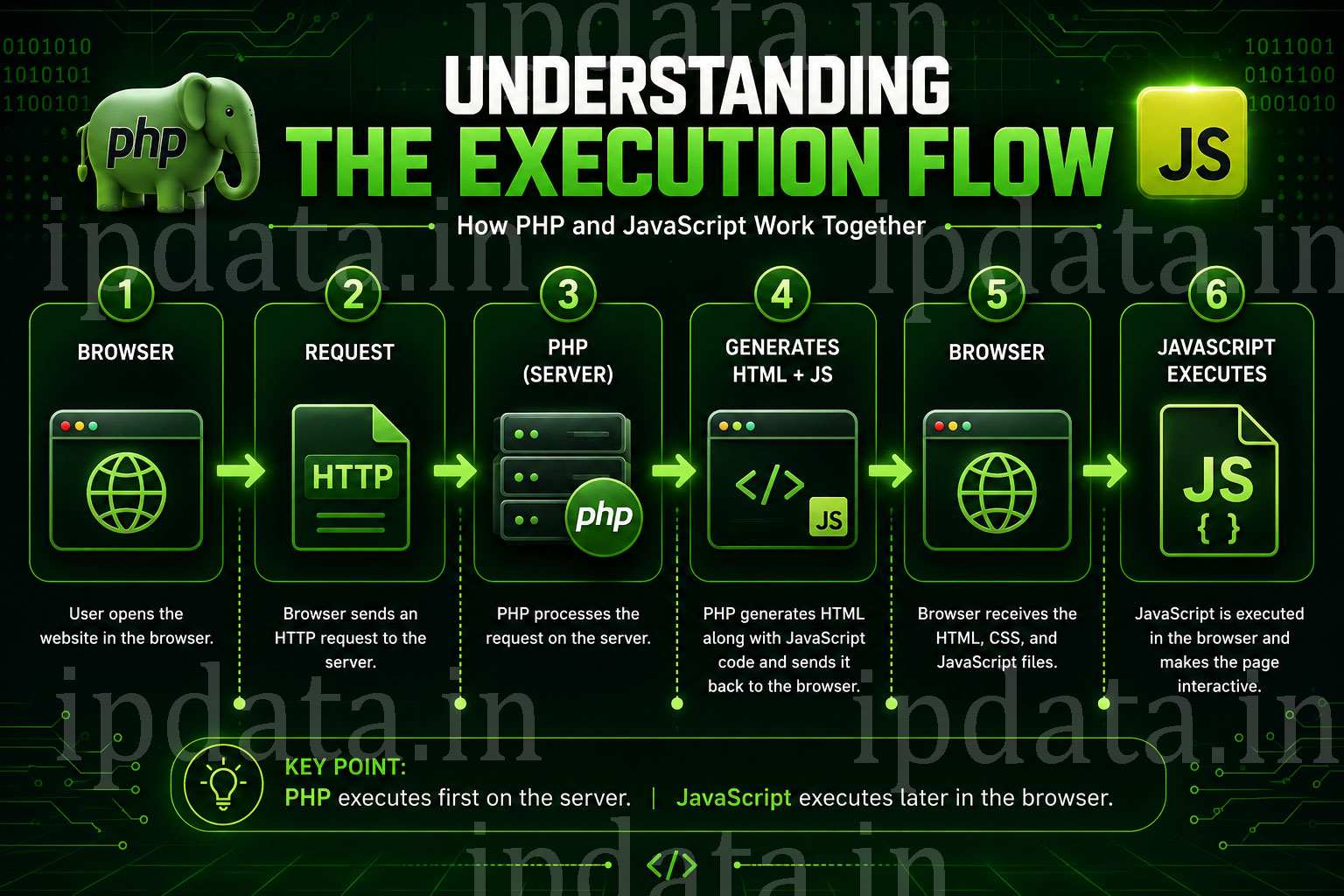
“PHP cannot directly call client-side JavaScript because it runs on the server.” But understanding why is as important as knowing the workarounds — because every method you’ll use is a variation on the same fundamental technique, and understanding the model prevents you from building things that can’t work.
Here’s the execution timeline that governs everything in this guide:
REQUEST TIMELINE
─────────────────────────────────────────────────────────────────────────────
TIME 0:   Browser sends HTTP request to your web server

TIME 1:   PHP executes ON THE SERVER:
          - Queries the database
          - Processes business logic
          - Builds an HTML string (including any <script> tags)
          - PHP process ends — PHP is DONE

TIME 2:   Server sends the HTML string to the browser

TIME 3:   Browser parses HTML, discovers <script> tags,
          LOADS the JavaScript files

TIME 4:   JavaScript executes IN THE BROWSER:
          - Reads the HTML PHP generated
          - Accesses data embedded by PHP in HTML/attributes/variables
          - Makes AJAX calls back to the server for more data

KEY INSIGHT:
PHP and JavaScript never run at the same time in the same place.
PHP runs first, server-side, and FINISHES.
JavaScript runs after, browser-side.
"Calling JS from PHP" always means "PHP embeds data or instructions
that JavaScript reads when it later runs."
─────────────────────────────────────────────────────────────────────────────
This is why the answer to “how do I call a JavaScript function from PHP?” is always “you can’t — but here are seven ways to pass PHP data to JavaScript so JavaScript can call that function itself.”
The Critical Security Warning
First example does this:
<?php
$message = "Hello, user!";
echo "<script>greet('$message');</script>";
If $message contains user-supplied data — a username, a URL parameter, anything from a form — this is a Cross-Site Scripting (XSS) vulnerability. An attacker who controls $message can inject:
'); alert(document.cookie); //
And your page executes their code. This guide fixes that problem in every example.
Part 1 — The Safe Foundation: json_encode() as the Data Bridge
Before covering any method, establish the one rule that prevents 90% of PHP→JavaScript security issues:
Never interpolate PHP variables directly into JavaScript strings. Always use json_encode().
<?php
// ❌ DANGEROUS — Direct interpolation (XSS vulnerability):
$username = $_GET['name'] ?? 'Guest';  // Attacker controls this
echo "<script>greet('$username');</script>";
// Attacker sends: ?name=');alert(document.cookie);//
// Your page now runs: greet('');alert(document.cookie);//

// ✅ SAFE — json_encode() handles ALL escaping correctly:
$username = $_GET['name'] ?? 'Guest';
$safe = json_encode($username, JSON_HEX_TAG | JSON_HEX_APOS | JSON_HEX_QUOT | JSON_HEX_AMP);
echo "<script>greet({$safe});</script>";
// json_encode turns the attacker's string into a safely-quoted JSON string
// Even if name = '); alert(1); //, json_encode produces: "');alert(1);//"
// JavaScript receives it as a string literal — no code execution possible

// ── Why the extra JSON_HEX_* flags? ──────────────────────────────────────────
// JSON_HEX_TAG  → Escapes < and > as \u003C \u003E (prevents </script> injection)
// JSON_HEX_APOS → Escapes ' as \u0027
// JSON_HEX_QUOT → Escapes " as \u0022
// JSON_HEX_AMP  → Escapes & as \u0026
// These prevent the <\/script> tag from closing your script block prematurely

// ── json_encode() handles ALL PHP types correctly: ────────────────────────────
$data = [
    'user_id'    => 42,                                    // → 42 (number)
    'name'       => "Alice O'Brien",                       // → "Alice O\u0027Brien"
    'is_admin'   => true,                                  // → true (boolean)
    'score'      => 98.5,                                  // → 98.5 (float)
    'tags'       => ['php', 'javascript', 'web'],          // → ["php","javascript","web"]
    'settings'   => ['theme' => 'dark', 'lang' => 'en'],  // → {"theme":"dark","lang":"en"}
    'null_value' => null,                                  // → null
];

$flags  = JSON_HEX_TAG | JSON_HEX_APOS | JSON_HEX_QUOT | JSON_HEX_AMP;
$jsData = json_encode($data, $flags);
echo "<script>const userData = {$jsData};</script>";
// JavaScript now has a native object with all correct types
Part 2 — Method 1: Inline Script Tag (The Direct Approach)
Best for: Simple pages, small amounts of data, no build pipeline.
<?php
// page.php — A profile page that passes PHP user data to JavaScript

// Simulate data from database:
$user = [
    'id'       => 42,
    'name'     => 'Alice O\'Brien',
    'email'    => 'alice@example.com',
    'role'     => 'admin',
    'avatar'   => '/uploads/alice.jpg',
    'prefs'    => ['theme' => 'dark', 'notifications' => true],
];

$currentPage = $_SERVER['PHP_SELF'];
$csrfToken   = bin2hex(random_bytes(32));
$_SESSION['csrf_token'] = $csrfToken;

// ── Safe flags (use ALWAYS when embedding PHP in <script>) ────────────────────
$flags = JSON_HEX_TAG | JSON_HEX_APOS | JSON_HEX_QUOT | JSON_HEX_AMP;
?>
<!DOCTYPE html>
<html lang="en">
<head>
    <meta charset="UTF-8">
    <title>Profile</title>
</head>
<body>

    <div id="profile-root"></div>

    <!--
    Pass PHP data to JavaScript using a single initialisation block.
    Best practice: ONE script block per page for PHP-injected data.
    Keep it near the top of <body> so all scripts below can access it.
    -->
    <script>
    // One global config object — avoids multiple scattered echo'd scripts:
    window.APP = {
        user:      <?= json_encode($user, $flags) ?>,
        csrfToken: <?= json_encode($csrfToken, $flags) ?>,
        apiBase:   <?= json_encode('/api/v1', $flags) ?>,
        currentPage: <?= json_encode($currentPage, $flags) ?>,
    };
    </script>

    <!-- Your application scripts — they READ from window.APP: -->
    <script src="/js/app.js"></script>
    <script src="/js/profile.js"></script>

</body>
</html>
// /js/profile.js — Reads PHP-provided data
// Never references PHP directly — only reads window.APP:

(function() {
    'use strict';

    const { user, apiBase, csrfToken } = window.APP;

    // Now call whatever JavaScript functions you need with PHP's data:
    renderProfile(user);
    setupNotifications(user.prefs.notifications);
    initTheme(user.prefs.theme);

    function renderProfile(userData) {
        const root = document.getElementById('profile-root');
        root.innerHTML = `
            <div class="profile">
                <img src="${escapeHtml(userData.avatar)}" alt="Avatar">
                <h1>${escapeHtml(userData.name)}</h1>
                <p>Role: ${escapeHtml(userData.role)}</p>
            </div>
        `;
    }

    // IMPORTANT: Always escape PHP data again when inserting into HTML from JS
    // json_encode makes it safe as a JS value — escaping again makes it safe in HTML:
    function escapeHtml(str) {
        const div = document.createElement('div');
        div.textContent = String(str);
        return div.innerHTML;
    }

    function initTheme(theme) {
        document.body.dataset.theme = theme;
    }

    function setupNotifications(enabled) {
        if (enabled) {
            console.log('Notifications enabled for', user.name);
        }
    }
})();
The Problem with <?php echo Inside Script Tags: Content Security Policy
<?php
// ⚠️ CSP CONFLICT: Inline <script> tags conflict with strict Content-Security-Policy
// A strict CSP looks like:
// Content-Security-Policy: script-src 'self' 'nonce-abc123'

// Without the matching nonce, inline scripts are BLOCKED.
// This is intentional — it's a key XSS defence.

// ── Solution 1: Add a nonce to your inline data script ────────────────────────
$nonce = base64_encode(random_bytes(16));
header("Content-Security-Policy: script-src 'self' 'nonce-{$nonce}'");
?>

<script nonce="<?= htmlspecialchars($nonce, ENT_QUOTES) ?>">
window.APP = <?= json_encode($config, JSON_HEX_TAG | JSON_HEX_APOS | JSON_HEX_QUOT | JSON_HEX_AMP) ?>;
</script>

<!-- All other scripts also need the nonce: -->
<script nonce="<?= htmlspecialchars($nonce, ENT_QUOTES) ?>" src="/js/app.js"></script>

<?php
// ── Solution 2: Use data attributes instead of inline scripts (Part 4) ────────
// This avoids inline scripts entirely — no CSP conflict at all
Part 3 — Method 2: PHP Generates Triggers Based on Conditions
Sometimes you don’t want to pass data — you want PHP’s output to trigger a specific JavaScript behaviour based on server-side logic:
<?php
session_start();

// Scenario: User submitted a form, PHP processed it,
// now needs to trigger client-side behaviour based on result

$result = processFormSubmission($_POST);

$flags = JSON_HEX_TAG | JSON_HEX_APOS | JSON_HEX_QUOT | JSON_HEX_AMP;
?>
<!DOCTYPE html>
<html>
<body>
<?php
// ── PHP decides WHICH function to call based on server logic ──────────────────
if ($result['success']): ?>
    <script>
    document.addEventListener('DOMContentLoaded', function() {
        // PHP decided this: the success path
        showSuccessToast(<?= json_encode($result['message'], $flags) ?>);
        redirectAfterDelay(<?= json_encode($result['redirect_url'], $flags) ?>, 2000);
    });
    </script>
<?php elseif ($result['requires_verification']): ?>
    <script>
    document.addEventListener('DOMContentLoaded', function() {
        showVerificationModal(<?= json_encode([
            'email'       => $result['email'],
            'token'       => $result['token'],
            'expires_in'  => $result['expires_in'],
        ], $flags) ?>);
    });
    </script>
<?php else: ?>
    <script>
    document.addEventListener('DOMContentLoaded', function() {
        showErrorMessage(<?= json_encode($result['errors'], $flags) ?>);
        highlightInvalidFields(<?= json_encode($result['invalid_fields'], $flags) ?>);
    });
    </script>
<?php endif; ?>

<script src="/js/ui-functions.js"></script>
</body>
</html>
<?php
/**
 * A reusable PHP class for queuing JavaScript function calls
 * that are output in a single, organised <script> block.
 * Much cleaner than scattered echo statements.
 */
class JavaScriptQueue {

    private array $calls = [];
    private int   $flags = JSON_HEX_TAG | JSON_HEX_APOS | JSON_HEX_QUOT | JSON_HEX_AMP;

    /**
     * Queue a JavaScript function call.
     *
     * @param string $functionName  JS function name (dot notation for namespaced: 'App.notify')
     * @param mixed  ...$args       Arguments — any PHP value, will be json_encode'd
     */
    public function call(string $functionName, mixed ...$args): static {
        // Validate function name to prevent injection via function name itself:
        if (!preg_match('/^[a-zA-Z_$][a-zA-Z0-9_.]*$/', $functionName)) {
            throw new \InvalidArgumentException("Invalid JavaScript function name: {$functionName}");
        }

        $encodedArgs = array_map(fn($a) => json_encode($a, $this->flags), $args);
        $this->calls[] = "{$functionName}(" . implode(', ', $encodedArgs) . ");";
        return $this;
    }

    /**
     * Queue a JavaScript assignment.
     *
     * @param string $variable  JS variable path (e.g., 'window.APP.user')
     * @param mixed  $value     Value to assign
     */
    public function assign(string $variable, mixed $value): static {
        if (!preg_match('/^[a-zA-Z_$][a-zA-Z0-9_.$\[\]]*$/', $variable)) {
            throw new \InvalidArgumentException("Invalid JavaScript variable: {$variable}");
        }

        $encoded       = json_encode($value, $this->flags);
        $this->calls[] = "{$variable} = {$encoded};";
        return $this;
    }

    /**
     * Output the queued calls as a single <script> block.
     */
    public function render(string $nonce = ''): string {
        if (empty($this->calls)) return '';

        $nonceAttr = $nonce ? ' nonce="' . htmlspecialchars($nonce, ENT_QUOTES) . '"' : '';
        $code      = implode("\n        ", $this->calls);

        return "<script{$nonceAttr}>\n"
             . "    document.addEventListener('DOMContentLoaded', function() {\n"
             . "        {$code}\n"
             . "    });\n"
             . "</script>";
    }
}

// ── Usage ──────────────────────────────────────────────────────────────────────
$js = new JavaScriptQueue();

// Build up a queue of calls based on PHP logic:
$js->assign('window.APP.user', $currentUser);

if ($loginJustSucceeded) {
    $js->call('Toast.success', 'Welcome back, ' . $currentUser['name'] . '!');
    $js->call('Analytics.track', 'user_login', ['user_id' => $currentUser['id']]);
}

if ($hasUnreadMessages) {
    $js->call('Badge.show', 'messages', $unreadCount);
}

if ($maintenanceMode) {
    $js->call('Banner.show', 'maintenance', 'Maintenance window starts in 30 minutes.');
}

// Output everything in one clean block:
echo $js->render($nonce);
Part 4 — Method 3: Data Attributes (The CSP-Safe, Clean Pattern)
Data attributes let PHP embed data in HTML without any inline JavaScript at all. JavaScript reads the attributes when it initialises. No CSP conflict, no scattered script tags:
<?php
$product = getProduct(42);
$flags   = JSON_HEX_TAG | JSON_HEX_APOS | JSON_HEX_QUOT | JSON_HEX_AMP;
?>

<!-- Pass simple values as individual data attributes: -->
<button
    id="add-to-cart"
    data-product-id="<?= htmlspecialchars($product['id'], ENT_QUOTES) ?>"
    data-product-name="<?= htmlspecialchars($product['name'], ENT_QUOTES) ?>"
    data-price="<?= htmlspecialchars((string)$product['price'], ENT_QUOTES) ?>"
    data-in-stock="<?= $product['in_stock'] ? 'true' : 'false' ?>"
>
    Add to Cart
</button>

<!-- Pass complex objects as a single JSON attribute: -->
<div
    id="product-gallery"
    data-config='<?= htmlspecialchars(json_encode([
        'product_id' => $product['id'],
        'images'     => $product['images'],
        'zoom'       => true,
        'autoplay'   => false,
    ], $flags), ENT_QUOTES) ?>'
>
    <!-- Gallery renders here -->
</div>

<!-- For React/Vue/Alpine.js mounting points: -->
<div
    id="checkout-app"
    data-initial-state='<?= htmlspecialchars(json_encode([
        'cart'         => $_SESSION['cart'] ?? [],
        'currency'     => 'GBP',
        'user_country' => $geoData['country'],
        'shipping_options' => getShippingOptions($geoData['country']),
    ], $flags), ENT_QUOTES) ?>'
>
    <!-- React/Vue app mounts here -->
</div>
// JavaScript reads data attributes when it initialises:
document.addEventListener('DOMContentLoaded', function() {

    // ── Reading simple data attributes: ─────────────────────────────────────
    const cartBtn = document.getElementById('add-to-cart');
    if (cartBtn) {
        cartBtn.addEventListener('click', function() {
            addToCart({
                id:      this.dataset.productId,
                name:    this.dataset.productName,
                price:   parseFloat(this.dataset.price),
                inStock: this.dataset.inStock === 'true',
            });
        });
    }

    // ── Reading JSON data attribute: ─────────────────────────────────────────
    const gallery = document.getElementById('product-gallery');
    if (gallery) {
        // JSON.parse() reads the PHP-generated JSON object:
        const config = JSON.parse(gallery.dataset.config);
        initProductGallery(gallery, config);
    }

    // ── Mounting React with PHP-provided initial state: ───────────────────────
    const checkoutRoot = document.getElementById('checkout-app');
    if (checkoutRoot) {
        const initialState = JSON.parse(checkoutRoot.dataset.initialState);
        ReactDOM.createRoot(checkoutRoot).render(
            React.createElement(CheckoutApp, { initialState })
        );
    }
});
Data Attributes in a WordPress Context
<?php
// In a WordPress plugin/theme — using data attributes with wp_enqueue_script:

function enqueue_product_scripts(): void {
    wp_enqueue_script(
        'product-gallery',
        get_template_directory_uri() . '/js/product-gallery.js',
        [],
        '1.0.0',
        ['in_footer' => true, 'strategy' => 'defer']
    );
}
add_action('wp_enqueue_scripts', 'enqueue_product_scripts');

// In the template, pass data via data attribute:
function render_product_gallery(int $product_id): void {
    $product = wc_get_product($product_id);
    $config  = [
        'id'     => $product_id,
        'images' => array_map('wp_get_attachment_url', $product->get_gallery_image_ids()),
        'zoom'   => true,
    ];
    $safe_config = esc_attr(wp_json_encode($config));
    echo "<div id=\"product-gallery\" data-config=\"{$safe_config}\"></div>";
}
Part 5 — Method 4: WordPress wp_localize_script() (The Proper WordPress Way)
<?php
/**
 * wp_localize_script() is the CORRECT way to pass PHP data to JavaScript in WordPress.
 * It outputs a <script> block with a named object, properly enqueued so it appears
 * AFTER the script it's localizing but BEFORE it runs — no race conditions.
 */
function my_plugin_enqueue_scripts(): void {

    // First enqueue your script normally:
    wp_enqueue_script(
        'my-plugin-app',                                    // Handle
        plugins_url('js/app.js', __FILE__),                 // URL
        ['jquery'],                                         // Dependencies
        '1.0.0',
        ['in_footer' => true, 'strategy' => 'defer']       // Args (WP 6.3+)
    );

    // Then localise it with your PHP data:
    wp_localize_script(
        'my-plugin-app',   // Must match the script handle above
        'myPluginData',    // Global JS variable name (window.myPluginData)
        [
            // ── URLs ──────────────────────────────────────────────────────────
            'ajaxUrl'    => admin_url('admin-ajax.php'),
            'restUrl'    => rest_url('my-plugin/v1/'),
            'pluginUrl'  => plugins_url('', __FILE__),

            // ── Nonces (security tokens) ───────────────────────────────────────
            'nonce'      => wp_create_nonce('my-plugin-nonce'),
            'restNonce'  => wp_create_nonce('wp_rest'),

            // ── Current context ────────────────────────────────────────────────
            'user'       => is_user_logged_in() ? [
                'id'          => get_current_user_id(),
                'displayName' => wp_get_current_user()->display_name,
                'isAdmin'     => current_user_can('manage_options'),
                'avatar'      => get_avatar_url(get_current_user_id()),
            ] : null,

            // ── Page-specific data ──────────────────────────────────────────────
            'postId'     => get_the_ID(),
            'isLoggedIn' => is_user_logged_in(),
            'siteUrl'    => get_site_url(),
            'locale'     => get_locale(),

            // ── i18n strings (for use in your JS) ──────────────────────────────
            'strings'    => [
                'loading'      => __('Loading...', 'my-plugin'),
                'error'        => __('An error occurred. Please try again.', 'my-plugin'),
                'confirm_delete' => __('Are you sure you want to delete this?', 'my-plugin'),
                'success'      => __('Operation completed successfully.', 'my-plugin'),
            ],

            // ── Feature flags ────────────────────────────────────────────────────
            'features'   => [
                'darkMode'     => get_option('my_plugin_dark_mode', false),
                'analytics'    => !is_user_logged_in(), // Don't track logged-in users
                'betaFeatures' => current_user_can('manage_options'),
            ],
        ]
    );
}
add_action('wp_enqueue_scripts',    'my_plugin_enqueue_scripts');
add_action('admin_enqueue_scripts', 'my_plugin_enqueue_scripts');
// /js/app.js — Uses wp_localize_script() data
// WordPress outputs this before app.js runs, so myPluginData is always available:

(function($) {
    'use strict';

    const { ajaxUrl, nonce, restUrl, restNonce, user, strings, features } = myPluginData;

    // ── Feature-flag-based initialisation: ───────────────────────────────────
    if (features.darkMode) {
        document.body.classList.add('dark-mode');
    }

    if (features.analytics) {
        initAnalytics();
    }

    // ── Greeting based on PHP's logged-in state: ─────────────────────────────
    if (user) {
        showWelcomeBanner(strings.loading.replace('...', `, ${user.displayName}!`));
    }

    // ── AJAX with nonce: ─────────────────────────────────────────────────────
    function loadUserData() {
        $.post(ajaxUrl, {
            action: 'my_plugin_get_data',
            nonce:  nonce,
        }, function(response) {
            if (response.success) {
                updateUI(response.data);
            } else {
                showError(strings.error);
            }
        }, 'json');
    }

    // ── WP REST API with nonce: ───────────────────────────────────────────────
    async function createPost(data) {
        const response = await fetch(`${restUrl}posts`, {
            method:  'POST',
            headers: {
                'Content-Type': 'application/json',
                'X-WP-Nonce':   restNonce,
            },
            body: JSON.stringify(data),
        });
        if (!response.ok) throw new Error(strings.error);
        return response.json();
    }

})(jQuery);
Part 6 — Method 5: Meta Tags for Page-Level Configuration
Meta tags are a clean alternative to inline scripts for simple values, and they work naturally with CSP since they’re HTML, not JavaScript:
<?php
// In your <head>:
$flags = JSON_HEX_TAG | JSON_HEX_APOS | JSON_HEX_QUOT | JSON_HEX_AMP;
?>
<head>
    <meta charset="UTF-8">

    <!-- Simple values: -->
    <meta name="app:user-id"      content="<?= htmlspecialchars($userId, ENT_QUOTES) ?>">
    <meta name="app:locale"       content="<?= htmlspecialchars($locale, ENT_QUOTES) ?>">
    <meta name="app:environment"  content="<?= htmlspecialchars(APP_ENV, ENT_QUOTES) ?>">
    <meta name="app:csrf-token"   content="<?= htmlspecialchars($csrfToken, ENT_QUOTES) ?>">
    <meta name="app:api-base"     content="<?= htmlspecialchars($apiBase, ENT_QUOTES) ?>">

    <!-- Complex data: store as JSON in content attribute -->
    <meta name="app:config" content="<?= htmlspecialchars(json_encode([
        'features'   => $features,
        'user'       => $userConfig,
        'experiment' => $abTestGroup,
    ], $flags), ENT_QUOTES) ?>">

    <!-- CSRF token in the standard way (used by Axios, fetch interceptors): -->
    <meta name="csrf-token" content="<?= htmlspecialchars($csrfToken, ENT_QUOTES) ?>">
</head>
// JavaScript reads meta tags on initialisation:
// This is how Laravel Mix, Vite, and many frameworks read PHP config:

(function() {
    /**
     * Read a <meta name="app:..."> value by its name.
     */
    function getAppMeta(name) {
        const meta = document.querySelector(`meta[name="${name}"]`);
        return meta ? meta.getAttribute('content') : null;
    }

    /**
     * Read and parse a JSON meta tag.
     */
    function getAppMetaJson(name) {
        const raw = getAppMeta(name);
        if (!raw) return null;
        try {
            return JSON.parse(raw);
        } catch (e) {
            console.warn(`Failed to parse meta[name="${name}"] as JSON:`, e);
            return null;
        }
    }

    // Read simple values:
    const userId      = getAppMeta('app:user-id');
    const locale      = getAppMeta('app:locale');
    const environment = getAppMeta('app:environment');
    const csrfToken   = getAppMeta('app:csrf-token');

    // Read complex config:
    const config      = getAppMetaJson('app:config');

    // Set up Axios with CSRF token from meta:
    if (typeof axios !== 'undefined') {
        axios.defaults.headers.common['X-CSRF-TOKEN'] = csrfToken;
    }

    // Set up fetch with CSRF interceptor:
    const originalFetch = window.fetch;
    window.fetch = function(url, options = {}) {
        options.headers = {
            'X-CSRF-TOKEN': csrfToken,
            ...options.headers,
        };
        return originalFetch(url, options);
    };

    // Use PHP-provided config:
    if (config?.features?.darkMode) {
        document.body.classList.add('dark');
    }

    // Expose as global for other scripts:
    window.__APP_META__ = { userId, locale, environment, csrfToken, config };
})();
Part 7 — Method 6: AJAX with the Fetch API (Modern Replacement for jQuery)
The jQuery $.ajax() pattern. The Fetch API is now universally supported and is the modern standard:
<?php
// api/user-data.php — PHP AJAX endpoint called by JavaScript

header('Content-Type: application/json; charset=UTF-8');

// Always validate the request:
if ($_SERVER['REQUEST_METHOD'] !== 'POST') {
    http_response_code(405);
    echo json_encode(['error' => 'Method not allowed']);
    exit;
}

// Verify CSRF token:
$input     = json_decode(file_get_contents('php://input'), true) ?? [];
$token     = $input['csrf_token'] ?? '';
$sessionToken = $_SESSION['csrf_token'] ?? '';

if (!$token || !hash_equals($sessionToken, $token)) {
    http_response_code(403);
    echo json_encode(['error' => 'Invalid security token']);
    exit;
}

// Process the actual request:
$action = $input['action'] ?? '';

$response = match($action) {
    'get_profile'      => handleGetProfile($input),
    'update_settings'  => handleUpdateSettings($input),
    'search_products'  => handleSearchProducts($input),
    default            => ['error' => 'Unknown action'],
};

http_response_code(isset($response['error']) ? 400 : 200);
echo json_encode($response);
// Modern JavaScript: Fetch API replaces jQuery AJAX
// No jQuery dependency needed.

class PhpApi {

    constructor(baseUrl, csrfToken) {
        this.baseUrl   = baseUrl;
        this.csrfToken = csrfToken;
    }

    /**
     * Make an authenticated POST request to a PHP endpoint.
     */
    async post(endpoint, data = {}) {
        const response = await fetch(`${this.baseUrl}${endpoint}`, {
            method:  'POST',
            headers: {
                'Content-Type': 'application/json',
                'X-CSRF-Token':  this.csrfToken,
            },
            body: JSON.stringify({
                ...data,
                csrf_token: this.csrfToken,
            }),
            credentials: 'same-origin', // Include session cookies
        });

        if (!response.ok) {
            const error = await response.json().catch(() => ({ error: 'Request failed' }));
            throw new Error(error.error || `HTTP ${response.status}`);
        }

        return response.json();
    }

    async get(endpoint, params = {}) {
        const query    = new URLSearchParams(params).toString();
        const url      = `${this.baseUrl}${endpoint}${query ? '?' + query : ''}`;
        const response = await fetch(url, {
            headers: { 'X-CSRF-Token': this.csrfToken },
            credentials: 'same-origin',
        });

        if (!response.ok) throw new Error(`HTTP ${response.status}`);
        return response.json();
    }
}

// ── Usage ──────────────────────────────────────────────────────────────────────
// Get PHP-provided values (from wp_localize_script or meta tags):
const api = new PhpApi(
    window.APP?.apiBase    ?? '/api',
    window.APP?.csrfToken  ?? document.querySelector('meta[name="csrf-token"]')?.content
);

// Call PHP functions and trigger JS based on response:
async function loadUserProfile(userId) {
    try {
        showLoadingSpinner();

        const data = await api.post('/user-data.php', {
            action:  'get_profile',
            user_id: userId,
        });

        // JavaScript functions called based on PHP's response:
        hideLoadingSpinner();
        renderProfileCard(data.profile);
        updatePageTitle(data.profile.name);

        if (data.has_notifications) {
            showNotificationBadge(data.notification_count);
        }

        if (data.requires_password_change) {
            showPasswordChangeModal();
        }

    } catch (error) {
        hideLoadingSpinner();
        showErrorToast(error.message);
        console.error('Profile load failed:', error);
    }
}

// Search products with real-time PHP results:
const searchInput = document.getElementById('search');
let searchTimeout;

searchInput?.addEventListener('input', function() {
    clearTimeout(searchTimeout);
    searchTimeout = setTimeout(async () => {
        const term = this.value.trim();
        if (term.length < 2) return clearSearchResults();

        try {
            const { products, total } = await api.post('/user-data.php', {
                action: 'search_products',
                term:   term,
                limit:  10,
            });

            // Call JS function with PHP's response data:
            renderSearchResults(products);
            updateResultCount(total);
        } catch (e) {
            showSearchError();
        }
    }, 350); // Debounce: wait 350ms after typing stops
});
Part 8 — Method 7: Server-Sent Events (PHP Pushes Updates to JavaScript)
For real-time updates from PHP to JavaScript — dashboard live updates, progress bars, notifications — without WebSockets:
<?php
// sse/progress.php — PHP pushes real-time events to the browser

// Set SSE headers:
header('Content-Type: text/event-stream');
header('Cache-Control: no-cache');
header('Connection: keep-alive');
header('X-Accel-Buffering: no'); // Disable Nginx buffering

// Prevent PHP from timing out during streaming:
set_time_limit(0);
ignore_user_abort(true);

// Flush output buffer:
while (ob_get_level() > 0) ob_end_flush();

$jobId = intval($_GET['job_id'] ?? 0);
if (!$jobId) {
    sendSseEvent('error', ['message' => 'Invalid job ID']);
    exit;
}

/**
 * Send a single Server-Sent Event.
 * The browser's EventSource object receives this and dispatches a JS event.
 */
function sendSseEvent(string $eventType, array $data, ?int $id = null): void {
    if ($id !== null) {
        echo "id: {$id}\n";
    }
    echo "event: {$eventType}\n";
    echo "data: " . json_encode($data) . "\n\n";
    flush();
}

// Stream progress updates until job is complete:
$lastEventId = intval($_SERVER['HTTP_LAST_EVENT_ID'] ?? 0); // Resume from last position

while (connection_aborted() === 0) {
    $job = getJobStatus($jobId); // Your function to check job progress in DB

    if (!$job) {
        sendSseEvent('error', ['message' => 'Job not found'], $lastEventId);
        break;
    }

    $lastEventId++;
    sendSseEvent('progress', [
        'percent'         => $job['percent'],
        'processed_items' => $job['processed'],
        'total_items'     => $job['total'],
        'current_task'    => $job['current_task'],
        'elapsed_seconds' => $job['elapsed'],
    ], $lastEventId);

    if ($job['status'] === 'complete') {
        sendSseEvent('complete', [
            'result_url'   => $job['result_url'],
            'items_created'=> $job['items_created'],
            'duration'     => $job['elapsed'],
        ], $lastEventId);
        break;
    }

    if ($job['status'] === 'failed') {
        sendSseEvent('error', [
            'message'   => $job['error_message'],
            'failed_at' => $job['failed_at'],
        ], $lastEventId);
        break;
    }

    sleep(1); // Poll every second
}
// JavaScript EventSource connects and listens:

class PhpEventStream {

    constructor(url, params = {}) {
        const query   = new URLSearchParams(params).toString();
        this.eventSource = new EventSource(`${url}?${query}`);
        this.handlers    = {};
    }

    on(eventType, handler) {
        this.eventSource.addEventListener(eventType, (e) => {
            try {
                const data = JSON.parse(e.data);
                handler(data, e);
            } catch (err) {
                console.error('SSE parse error:', err, e.data);
            }
        });
        return this;
    }

    onError(handler) {
        this.eventSource.onerror = handler;
        return this;
    }

    close() {
        this.eventSource.close();
    }
}

// ── Usage: Show a real-time progress bar from a PHP background job ─────────────
function startImportJob(jobId) {
    const progressBar   = document.getElementById('progress-bar');
    const progressText  = document.getElementById('progress-text');
    const statusMessage = document.getElementById('status-message');

    const stream = new PhpEventStream('/sse/progress.php', { job_id: jobId });

    // Listen for PHP's 'progress' events and call JS UI functions:
    stream.on('progress', function(data) {
        updateProgressBar(data.percent);          // Call JS function
        updateProgressText(                       // Call JS function
            data.processed_items,
            data.total_items,
            data.current_task
        );
    });

    stream.on('complete', function(data) {
        stream.close();
        showSuccessMessage(`Import complete! ${data.items_created} items created.`);
        downloadResultFile(data.result_url);
    });

    stream.on('error', function(data) {
        stream.close();
        showErrorMessage(data.message);
    });

    stream.onError(function() {
        stream.close();
        showErrorMessage('Connection to server lost. Please refresh and try again.');
    });
}

function updateProgressBar(percent) {
    document.getElementById('progress-bar').style.width = `${percent}%`;
    document.getElementById('progress-bar').setAttribute('aria-valuenow', percent);
}

function updateProgressText(processed, total, task) {
    document.getElementById('progress-text').textContent =
        `${processed} of ${total} • ${task}`;
}
Part 9 — Framework Integration Patterns
React with PHP-Provided Initial State
<?php
// In a Laravel Blade template or plain PHP template:
$flags = JSON_HEX_TAG | JSON_HEX_APOS | JSON_HEX_QUOT | JSON_HEX_AMP;
?>
<div
    id="react-root"
    data-props='<?= htmlspecialchars(json_encode([
        'user'       => $currentUser,
        'products'   => $products,
        'categories' => $categories,
        'pagination' => $pagination,
        'csrf'       => $csrfToken,
    ], $flags), ENT_QUOTES) ?>'
></div>
// React component reads PHP-provided props from data attribute:
import React from 'react';
import { createRoot } from 'react-dom/client';

function App({ user, products, categories, pagination, csrf }) {
    // Use PHP-provided data as initial React state:
    const [items, setItems] = React.useState(products);
    const [page, setPage]   = React.useState(pagination);

    const loadMore = async () => {
        const res  = await fetch('/api/products', {
            method:  'POST',
            headers: { 'Content-Type': 'application/json', 'X-CSRF-Token': csrf },
            body:    JSON.stringify({ page: page.current + 1 }),
        });
        const data = await res.json();
        setItems(prev => [...prev, ...data.products]);
        setPage(data.pagination);
    };

    return (
        <div>
            <h1>Welcome, {user.name}</h1>
            {items.map(product => <ProductCard key={product.id} {...product} />)}
            {page.has_more && <button onClick={loadMore}>Load more</button>}
        </div>
    );
}

// Mount with PHP-provided initial data:
const root = document.getElementById('react-root');
if (root) {
    const props = JSON.parse(root.dataset.props);
    createRoot(root).render(<App {...props} />);
}
Alpine.js with PHP Data (Minimal Framework)
<?php
$flags = JSON_HEX_TAG | JSON_HEX_APOS | JSON_HEX_QUOT | JSON_HEX_AMP;
?>
<!-- Alpine.js x-data can receive PHP values directly: -->
<div
    x-data='<?= htmlspecialchars(json_encode([
        'products'    => $products,
        'cartCount'   => $cartCount,
        'isLoggedIn'  => $isLoggedIn,
        'searchQuery' => '',
    ], $flags), ENT_QUOTES) ?>'
>
    <input type="text" x-model="searchQuery" placeholder="Search...">

    <template x-for="product in products.filter(p => p.name.includes(searchQuery))">
        <div>
            <span x-text="product.name"></span>
            <span x-text="'£' + product.price.toFixed(2)"></span>
            <button @click="cartCount++">Add to Cart</button>
        </div>
    </template>

    <span x-text="cartCount + ' items in cart'"></span>
</div>
Part 10 — Security Checklist: Every Method Audited
INLINE SCRIPT TAG (Method 1, 2):
──────────────────────────────────────────────────────────────────────
□ All PHP variables use json_encode() with JSON_HEX_TAG|JSON_HEX_APOS|JSON_HEX_QUOT|JSON_HEX_AMP
□ Function names are hardcoded in PHP, never from user input
□ Script tag has nonce attribute if CSP is enforced
□ No raw $variable interpolation directly into JS strings
□ Data wrapped in DOMContentLoaded to avoid timing issues

DATA ATTRIBUTES (Method 3, 4):
──────────────────────────────────────────────────────────────────────
□ PHP value passed through htmlspecialchars(ENT_QUOTES) before echoing as attribute
□ Complex objects JSON-encoded THEN htmlspecialchars'd
□ JavaScript reads attributes with dataset.xxx, not innerHTML
□ Nested insertions into HTML from dataset values escape again

META TAGS (Method 5):
──────────────────────────────────────────────────────────────────────
□ All content= values passed through htmlspecialchars(ENT_QUOTES)
□ JavaScript uses JSON.parse() with try/catch for JSON meta values
□ Sensitive values (credentials, tokens) only in session-scoped values

AJAX ENDPOINTS (Method 6):
──────────────────────────────────────────────────────────────────────
□ CSRF token verified on every state-changing request
□ Response always uses json_encode() — never echo with concatenation
□ Content-Type: application/json set before any output
□ HTTP method validated ($_SERVER['REQUEST_METHOD'])
□ Input sanitised on PHP side (never trust JS-sanitised data)
□ Errors return appropriate HTTP status codes (400, 403, 500)

SERVER-SENT EVENTS (Method 7):
──────────────────────────────────────────────────────────────────────
□ SSE endpoint validates that the requesting user owns the job_id
□ Connection close (connection_aborted()) checked in the loop
□ Data always JSON-encoded (not concatenated)
□ PHP max_execution_time and memory_limit set appropriately

ALL METHODS:
──────────────────────────────────────────────────────────────────────
□ No PHP error messages exposed to client (display_errors = Off in production)
□ PHP debug data (var_dump, print_r) removed before deployment
□ Sensitive data (passwords, full API keys, DB credentials) NEVER passed to JS
□ All JSON output validates with JSON_THROW_ON_ERROR to catch encoding failures
Summary: Which Method to Use When
DECISION GUIDE
─────────────────────────────────────────────────────────────────────────────
Scenario                                          Method
─────────────────────────────────────────────────────────────────────────────
Pass config/state to a plain PHP page             Inline script (Part 2) or
                                                  data attributes (Part 4)

Pass data to jQuery/vanilla JS on a WordPress site wp_localize_script (Part 5)

Pass initial state to React/Vue/Alpine.js          data-attributes (Part 4)

Call a JS function after server-side event         JavaScriptQueue class (Part 3)

Fetch server data after page load                  Fetch API (Part 6)

Real-time progress updates from PHP                Server-Sent Events (Part 8)

Share CSRF token with JavaScript                   Meta tag (Part 5) or
                                                   wp_localize_script (Part 5)

Framework with CSP (no inline scripts)             data-attributes + external JS

Large dataset (>50KB of PHP data)                  AJAX on page load (Part 6)
                                                   (don't inline large data)
─────────────────────────────────────────────────────────────────────────────
The Same Pattern, Seven Shapes
Every method in this guide is a variation on one architecture: PHP runs on the server, bakes data into HTML/JSON, and finishes. JavaScript runs in the browser, reads what PHP baked in, and calls its own functions with that data.
This guide covers seven, with the security context that makes each one actually safe to use in production:
- Inline <script> with json_encode() and JSON_HEX_ flags — not raw string interpolation
- The JavaScriptQueue class — not scattered echo “<script>” calls throughout templates
- Data attributes — CSP-safe, framework-friendly, clean separation of concerns
- wp_localize_script() — the only acceptable approach for WordPress
- Meta tags — the Laravel/framework approach for CSP-compatible data sharing
- Fetch API with CSRF tokens — modern replacement for jQuery AJAX
- Server-Sent Events — for real-time PHP-to-JavaScript streaming
The security pattern across all of them is identical: PHP never puts raw user data into JavaScript. PHP encodes with json_encode() and escapes with htmlspecialchars(). JavaScript validates, parses, and then uses the data safely.