
Why Email Alone Is Killing Your Lead Conversion Rate
Every day, thousands of WordPress businesses lose leads the same way: a potential customer fills out your Contact Form 7 form at 8 PM. The email lands in your inbox at 8:01 PM. You see it at 9 AM the next morning and reply. By then, they’ve already spoken to three competitors.
The data is brutal:
- Average email response time for businesses: 12–24 hours
- Lead contact rate drops by 10× after the first hour
- Responding within 5 minutes makes you 21× more likely to qualify the lead
- WhatsApp has a 98% open rate — email averages 20%
- 75% of adults prefer messaging to phone calls for business contact
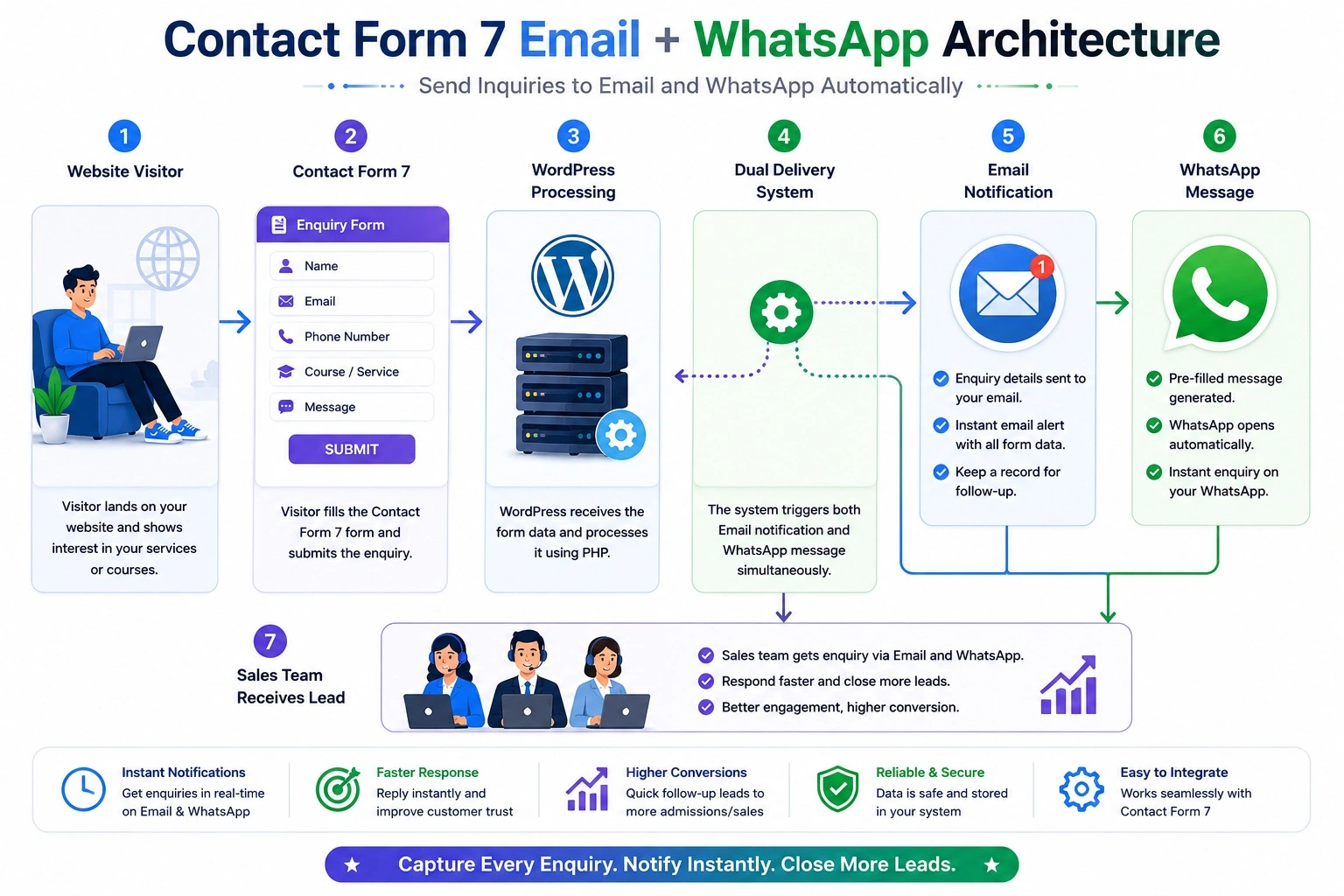
The solution is dead simple: When a CF7 form is submitted, send the inquiry to both email AND WhatsApp simultaneously. Email for your records and team threads. WhatsApp for the instant notification that gets you responding while the lead is still warm.
This guide takes the basic concept — one function, one hook — and builds it into a complete production system with:
- A reusable, testable WhatsApp notification class
- A full wp-admin Settings page (no hardcoded credentials)
- Multi-form routing (different forms → different WhatsApp numbers)
- Smart field mapping for any CF7 form structure
- Dual delivery: email via CF7’s native system + WhatsApp via Meta Cloud API
- HTML email with professional formatting + WhatsApp rich text
- Rate limiting and abuse prevention
- Retry logic for failed API calls
- A WP-CLI tool for testing without submitting forms
- Complete error reference for every failure mode
Part 1 — Understanding the Complete Delivery Pipeline
Before touching a single line of code, understand exactly what happens when a CF7 form is submitted and where WhatsApp fits into the chain:
USER SUBMITS CF7 FORM
        │
        ▼
┌──────────────────────────────────────────┐
│     CF7 VALIDATION LAYER                 │
│  • Required field checks                 │
│  • Email format validation               │
│  • CAPTCHA / honeypot check              │
│  • akismet spam check (if enabled)       │
└──────────────────┬───────────────────────┘
                   │ Pass
                   ▼
┌──────────────────────────────────────────┐
│     CF7 MAIL PIPELINE                    │
│  • Renders email template (Mail tab)     │
│  • Sends via wp_mail() → SMTP            │
│  • Fires action: wpcf7_mail_sent         │ ← YOUR HOOK
│  • Fires action: wpcf7_mail_failed       │ ← For error handling
└──────────┬───────────────────────────────┘
           │
     ┌─────┴─────┐
     ▼           ▼
 EMAIL         WHATSAPP
 (native)      (your code)
 wp_mail()     wp_remote_post()
     │              │
     ▼              ▼
SMTP Server    Meta Cloud API
     │              │
     ▼              ▼
 Inbox         WhatsApp Message
Key insight: wpcf7_mail_sent fires after CF7 successfully sends its email. This means:
- Email is already delivered before your WhatsApp code runs
- If WhatsApp fails, email is still sent — the user experience is never affected
- You have full access to WPCF7_Submission::get_instance() at this point
The hook you should NOT use: wpcf7_before_send_mail fires before email is sent. If your code crashes here, it can prevent CF7 from sending the email. Always use wpcf7_mail_sent for side-effect notifications.
Part 2 — Complete Plugin Architecture
Build this as a standalone plugin — never in functions.php for production use. Plugins survive theme changes, have proper uninstall cleanup, and can be version-controlled independently.
/wp-content/plugins/cf7-whatsapp-notifier/
│
├── cf7-whatsapp-notifier.php     ← Plugin header + bootstrap
│
├── includes/
│   ├── class-whatsapp-client.php  ← Meta API communication (testable in isolation)
│   ├── class-cf7-handler.php      ← All CF7 hooks and form processing
│   ├── class-admin-settings.php   ← wp-admin Settings page
│   ├── class-field-mapper.php     ← Dynamic CF7 field → message mapping
│   └── class-rate-limiter.php     ← Per-IP request throttling
│
├── admin/
│   ├── settings-page.php          ← Settings page HTML template
│   └── admin.css                  ← Admin page styles
│
├── assets/
│   └── admin.js                   ← Settings page JS (test button, color picker)
│
├── languages/
│   └── cf7-whatsapp-notifier.pot  ← i18n translation template
│
└── uninstall.php                  ← DB cleanup on plugin deletion
Part 3 — The Main Plugin File
cf7-whatsapp-notifier.php
<?php
/**
 * Plugin Name:       CF7 WhatsApp Notifier
 * Plugin URI:        https://ipdata.in/cf7-whatsapp
 * Description:       Automatically send Contact Form 7 inquiries to Email and
 *                    WhatsApp simultaneously via Meta WhatsApp Cloud API.
 *                    Zero configuration for email (handled by CF7). One setup
 *                    for WhatsApp (API key + number in Settings).
 * Version:           2.1.0
 * Requires at least: 5.8
 * Requires PHP:      7.4
 * Author:            Tabir Ahmad
 * License:           GPL v2 or later
 * Text Domain:       cf7-whatsapp-notifier
 * Domain Path:       /languages
 */

if ( ! defined( 'ABSPATH' ) ) exit;

// ── Constants ────────────────────────────────────────────────────────────────
define( 'CF7WAN_VERSION',      '2.1.0' );
define( 'CF7WAN_FILE',         __FILE__ );
define( 'CF7WAN_DIR',          plugin_dir_path( __FILE__ ) );
define( 'CF7WAN_URL',          plugin_dir_url( __FILE__ ) );
define( 'CF7WAN_BASENAME',     plugin_basename( __FILE__ ) );
define( 'CF7WAN_OPTIONS',      'cf7wan_settings' );
define( 'CF7WAN_ROUTES',       'cf7wan_routes' );    // Per-form routing config
define( 'CF7WAN_LOG_KEY',      'cf7wan_error_log' ); // Transient for recent errors

// ── Autoloader ───────────────────────────────────────────────────────────────
spl_autoload_register( function( string $class ): void {
    if ( strpos( $class, 'CF7WAN_' ) !== 0 ) return;
    $file = CF7WAN_DIR . 'includes/class-' .
            strtolower( str_replace( [ 'CF7WAN_', '_' ], [ '', '-' ], $class ) ) . '.php';
    if ( file_exists( $file ) ) require_once $file;
});

// ── Activation ───────────────────────────────────────────────────────────────
register_activation_hook( __FILE__, function(): void {
    if ( ! get_option( CF7WAN_OPTIONS ) ) {
        add_option( CF7WAN_OPTIONS, cf7wan_default_settings() );
    }
    flush_rewrite_rules();
});

// ── Default Settings ─────────────────────────────────────────────────────────
function cf7wan_default_settings(): array {
    return [
        // API credentials
        'access_token'      => '',
        'phone_number_id'   => '',
        'recipient_number'  => '',
        'api_version'       => 'v20.0',

        // Behaviour
        'enabled'           => '1',
        'send_on_email_fail'=> '0',    // Also send WA even if email failed
        'async_mode'        => '0',    // Queue via WP-Cron instead of sync
        'retry_on_fail'     => '1',    // Retry once after 5 min if WA fails
        'max_retries'       => '2',

        // Message format
        'message_format'    => 'rich',  // rich | plain
        'include_page_url'  => '1',
        'include_timestamp' => '1',
        'business_name'     => get_bloginfo( 'name' ),
        'message_prefix'    => '🔔 *New Inquiry*',

        // Rate limiting
        'rate_limit_enabled'=> '1',
        'rate_limit_count'  => '10',
        'rate_limit_window' => '60',   // seconds

        // Debug
        'debug_mode'        => '0',
    ];
}

// ── Bootstrap ─────────────────────────────────────────────────────────────────
add_action( 'plugins_loaded', function(): void {

    // Bail if CF7 is not active
    if ( ! class_exists( 'WPCF7' ) ) {
        add_action( 'admin_notices', function(): void {
            echo '<div class="notice notice-error"><p>';
            esc_html_e(
                'CF7 WhatsApp Notifier requires Contact Form 7 to be installed and active.',
                'cf7-whatsapp-notifier'
            );
            echo '</p></div>';
        });
        return;
    }

    load_plugin_textdomain( 'cf7-whatsapp-notifier', false,
        dirname( CF7WAN_BASENAME ) . '/languages' );

    $settings = get_option( CF7WAN_OPTIONS, cf7wan_default_settings() );

    // Admin
    if ( is_admin() ) {
        new CF7WAN_Admin_Settings( $settings );
    }

    // Plugin links
    add_filter( 'plugin_action_links_' . CF7WAN_BASENAME,
        function( array $links ) use ( $settings ): array {
            $url   = admin_url( 'options-general.php?page=cf7-whatsapp-notifier' );
            $label = __( 'Settings', 'cf7-whatsapp-notifier' );
            array_unshift( $links, "<a href='{$url}'>{$label}</a>" );
            return $links;
        }
    );

    // Only register CF7 hooks if enabled + configured
    if ( ! empty( $settings['enabled'] ) && ! empty( $settings['access_token'] ) ) {
        $handler = new CF7WAN_CF7_Handler( $settings );
        $handler->register_hooks();
    }

    // Register WP-Cron action for async mode
    add_action( 'cf7wan_send_async', 'cf7wan_process_async_message', 10, 1 );
});

// ── Async processor ───────────────────────────────────────────────────────────
function cf7wan_process_async_message( array $args ): void {
    $settings = get_option( CF7WAN_OPTIONS, [] );
    $client   = new CF7WAN_WhatsApp_Client( $settings );
    $result   = $client->send_text( $args['message'], $args['recipient'] ?? '' );

    if ( is_wp_error( $result ) ) {
        $retry = (int) ( $args['retry'] ?? 0 );
        $max   = (int) ( $settings['max_retries'] ?? 2 );

        if ( $retry < $max ) {
            $args['retry'] = $retry + 1;
            wp_schedule_single_event( time() + 300, 'cf7wan_send_async', [ $args ] );
            error_log( "[CF7WAN] Retry #{$args['retry']} scheduled for failed message." );
        } else {
            error_log( "[CF7WAN] All retries exhausted: " . $result->get_error_message() );
        }
    }
}
Part 4 — The WhatsApp API Client Class
includes/class-whatsapp-client.php
<?php
if ( ! defined( 'ABSPATH' ) ) exit;

/**
 * CF7WAN_WhatsApp_Client
 *
 * Clean wrapper around the Meta WhatsApp Cloud API.
 * Uses WordPress HTTP API (wp_remote_post) — respects WP proxy settings.
 * Fully independent of WordPress form logic — testable in isolation.
 */
class CF7WAN_WhatsApp_Client {

    private const API_BASE = 'https://graph.facebook.com/';

    private string $access_token;
    private string $phone_number_id;
    private string $api_version;
    private string $default_recipient;
    private bool   $debug;

    public function __construct( array $settings ) {
        $this->access_token      = $settings['access_token']     ?? '';
        $this->phone_number_id   = $settings['phone_number_id']  ?? '';
        $this->api_version       = $settings['api_version']      ?? 'v20.0';
        $this->default_recipient = $settings['recipient_number'] ?? '';
        $this->debug             = ! empty( $settings['debug_mode'] );
    }

    // ── Public API ────────────────────────────────────────────────────────────

    /**
     * Send a plain text WhatsApp message.
     *
     * @param  string $message  Message body (max 4096 chars). Supports *bold*, _italic_.
     * @param  string $to       Recipient number (overrides default). Intl format, no +.
     * @return array|\WP_Error  Success array or WP_Error on failure.
     */
    public function send_text( string $message, string $to = '' ): array|\WP_Error {
        return $this->send_request([
            'messaging_product' => 'whatsapp',
            'recipient_type'    => 'individual',
            'to'                => $this->clean_number( $to ?: $this->default_recipient ),
            'type'              => 'text',
            'text'              => [
                'preview_url' => false,
                'body'        => mb_substr( $message, 0, 4096 ),
            ],
        ]);
    }

    /**
     * Send a pre-approved template message.
     * Required for messages outside the 24-hour service window.
     */
    public function send_template(
        string $name,
        string $lang        = 'en',
        array  $components  = [],
        string $to          = ''
    ): array|\WP_Error {
        return $this->send_request([
            'messaging_product' => 'whatsapp',
            'to'                => $this->clean_number( $to ?: $this->default_recipient ),
            'type'              => 'template',
            'template'          => [
                'name'       => $name,
                'language'   => [ 'code' => $lang ],
                'components' => $components,
            ],
        ]);
    }

    /**
     * Test the API connection — sends a minimal request and checks auth.
     * Returns true on success, WP_Error on failure.
     */
    public function test_connection(): bool|\WP_Error {
        if ( empty( $this->access_token ) || empty( $this->phone_number_id ) ) {
            return new \WP_Error( 'not_configured', 'Access token or Phone Number ID is missing.' );
        }

        // Use the phone number endpoint just to validate auth
        $url      = self::API_BASE . $this->api_version . '/' . $this->phone_number_id;
        $response = wp_remote_get( $url, [
            'timeout' => 15,
            'headers' => [ 'Authorization' => 'Bearer ' . $this->access_token ],
        ]);

        if ( is_wp_error( $response ) ) return $response;

        $code = wp_remote_retrieve_response_code( $response );
        $body = json_decode( wp_remote_retrieve_body( $response ), true );

        if ( $code !== 200 ) {
            return new \WP_Error(
                'auth_failed',
                $body['error']['message'] ?? "API returned HTTP {$code}"
            );
        }

        return true;
    }

    // ── Private Helpers ───────────────────────────────────────────────────────

    private function send_request( array $payload ): array|\WP_Error {

        if ( empty( $this->access_token ) ) {
            return new \WP_Error( 'no_token', 'WhatsApp access token is not configured.' );
        }

        if ( empty( $this->phone_number_id ) ) {
            return new \WP_Error( 'no_phone_id', 'WhatsApp Phone Number ID is not configured.' );
        }

        $endpoint = self::API_BASE . $this->api_version . '/' .
                    $this->phone_number_id . '/messages';

        $args = [
            'method'    => 'POST',
            'timeout'   => 20,
            'sslverify' => true,
            'headers'   => [
                'Authorization' => 'Bearer ' . $this->access_token,
                'Content-Type'  => 'application/json',
                'User-Agent'    => 'CF7WAN/' . CF7WAN_VERSION . ' WordPress/' . get_bloginfo('version'),
            ],
            'body' => wp_json_encode( $payload ),
        ];

        $this->log( 'POST ' . $endpoint );
        $this->log( 'Payload: ' . wp_json_encode( $payload ) );

        $response = wp_remote_post( $endpoint, $args );

        // WordPress HTTP layer error (network, SSL, timeout)
        if ( is_wp_error( $response ) ) {
            $this->log( 'WP HTTP Error: ' . $response->get_error_message() );
            return new \WP_Error(
                'http_error',
                $this->friendly_wp_error( $response->get_error_code() ),
                $response->get_error_data()
            );
        }

        $http_code = wp_remote_retrieve_response_code( $response );
        $body      = wp_remote_retrieve_body( $response );
        $data      = json_decode( $body, true );

        $this->log( "Response [{$http_code}]: " . $body );

        // Meta API error response
        if ( $http_code !== 200 ) {
            $code    = $data['error']['code']    ?? 0;
            $message = $data['error']['message'] ?? "HTTP {$http_code} error";
            $type    = $data['error']['type']    ?? 'unknown';

            $this->log_error( "API Error #{$code} ({$type}): {$message}" );

            return new \WP_Error(
                'api_error',
                $this->friendly_meta_error( $code, $message ),
                [ 'http_code' => $http_code, 'api_code' => $code, 'raw' => $data ]
            );
        }

        return [
            'success'    => true,
            'message_id' => $data['messages'][0]['id']    ?? null,
            'wa_id'      => $data['contacts'][0]['wa_id'] ?? null,
            'http_code'  => $http_code,
        ];
    }

    /**
     * Strip all non-digit characters and remove leading zeros from a phone number.
     * Input: +91 98765-43210  →  Output: 919876543210
     */
    private function clean_number( string $number ): string {
        $digits = preg_replace( '/\D/', '', $number );
        return ltrim( $digits, '0' );
    }

    private function friendly_wp_error( string $code ): string {
        return match ( $code ) {
            'http_request_timeout'   => 'Connection to WhatsApp API timed out. Will retry if enabled.',
            'http_request_failed'    => 'Cannot reach WhatsApp API. Check your server\'s internet access.',
            'http_no_url'            => 'Invalid API URL configuration.',
            default                  => "Network error ({$code}). Check server connectivity.",
        };
    }

    private function friendly_meta_error( int $code, string $raw ): string {
        return match ( $code ) {
            0       => 'Authentication failed. Regenerate your access token.',
            4       => 'App rate limit exceeded. Reduce message frequency.',
            10      => 'Permission denied. Add whatsapp_business_messaging permission.',
            100     => 'Invalid API parameter. Check your Phone Number ID.',
            131030  => 'Recipient phone number is not on WhatsApp.',
            131047  => 'Cannot send free-form message outside 24-hour window. Use a template.',
            131051  => 'Message type not supported for this number type.',
            131056  => 'Recipient not in test sandbox. Add number in Meta Developer Console.',
            default => "WhatsApp API error (#{$code}): {$raw}",
        };
    }

    private function log( string $msg ): void {
        if ( $this->debug ) {
            error_log( '[CF7WAN Debug] ' . $msg );
        }
    }

    private function log_error( string $msg ): void {
        error_log( '[CF7WAN Error] ' . $msg );

        // Store last 10 errors in a transient for admin display
        $log   = get_transient( CF7WAN_LOG_KEY ) ?: [];
        array_unshift( $log, [
            'time'    => current_time( 'mysql' ),
            'message' => $msg,
        ]);
        set_transient( CF7WAN_LOG_KEY, array_slice( $log, 0, 10 ), DAY_IN_SECONDS );
    }
}
Part 5 — The Smart Field Mapper
This class intelligently maps any CF7 form’s fields to a structured WhatsApp message — no matter what your field names are.
includes/class-field-mapper.php
<?php
if ( ! defined( 'ABSPATH' ) ) exit;

/**
 * CF7WAN_Field_Mapper
 *
 * Intelligently maps CF7 form data to a structured WhatsApp message.
 * Works with ANY CF7 form — no hardcoded field names required.
 * Uses keyword matching to auto-detect name, email, phone, message fields.
 */
class CF7WAN_Field_Mapper {

    /**
     * Internal CF7 fields to always exclude from the WhatsApp message.
     */
    private const EXCLUDE_KEYS = [
        '_wpcf7', '_wpcf7_version', '_wpcf7_locale',
        '_wpcf7_unit_tag', '_wpcf7_container_post',
        '_wpcf7_is_ajax_call', '_wpcf7_recaptcha_response',
        'g-recaptcha-response', '_wpnonce',
    ];

    /**
     * Keyword-to-emoji mapping for auto-detection.
     * Keys are lowercase substrings to match in field names/labels.
     */
    private const EMOJI_MAP = [
        'name'      => '👤',
        'email'     => '📧',
        'phone'     => '📱',
        'mobile'    => '📱',
        'tel'       => '📱',
        'whatsapp'  => '💬',
        'message'   => '💬',
        'subject'   => '📋',
        'service'   => '🔧',
        'product'   => '🛍️',
        'budget'    => '💰',
        'company'   => '🏢',
        'business'  => '🏢',
        'city'      => '📍',
        'location'  => '📍',
        'address'   => '🏠',
        'date'      => '📅',
        'time'      => '⏰',
        'website'   => '🌐',
        'url'       => '🌐',
        'quantity'  => '🔢',
        'comment'   => '💬',
        'feedback'  => '⭐',
        'rating'    => '⭐',
    ];

    /**
     * Priority order for field display — matched fields appear first.
     */
    private const PRIORITY_FIELDS = [
        'name', 'email', 'phone', 'mobile', 'subject', 'service', 'message', 'comment'
    ];

    private array $settings;

    public function __construct( array $settings ) {
        $this->settings = $settings;
    }

    /**
     * Build a complete WhatsApp message from CF7 submission data.
     *
     * @param  array              $data          Raw CF7 posted data
     * @param  WPCF7_ContactForm  $contact_form  The form object
     * @return string                            Formatted WhatsApp message
     */
    public function build_message( array $data, \WPCF7_ContactForm $contact_form ): string {

        // ── Header ─────────────────────────────────────────────────────────
        $prefix       = $this->settings['message_prefix'] ?? '🔔 *New Inquiry*';
        $business     = $this->settings['business_name']  ?? get_bloginfo( 'name' );
        $form_title   = sanitize_text_field( $contact_form->title() );

        $lines   = [];
        $lines[] = $prefix;
        $lines[] = str_repeat( '─', 28 );
        $lines[] = '';

        // ── Clean and sort fields ──────────────────────────────────────────
        $clean_data = $this->extract_fields( $data );
        $sorted     = $this->sort_fields( $clean_data );

        // ── Build field lines ──────────────────────────────────────────────
        foreach ( $sorted as $key => $value ) {
            if ( empty( $value ) ) continue;

            $label   = $this->humanize_key( $key );
            $emoji   = $this->get_emoji( $key );
            $lines[] = "{$emoji} *{$label}:* {$value}";
        }

        $lines[] = '';
        $lines[] = str_repeat( '─', 28 );

        // ── Footer metadata ────────────────────────────────────────────────
        if ( ! empty( $this->settings['include_timestamp'] ) ) {
            $lines[] = '🕐 _' . current_time( 'd M Y, h:i A' ) . ' (IST)_';
        }

        if ( ! empty( $this->settings['include_page_url'] ) ) {
            $submission = WPCF7_Submission::get_instance();
            if ( $submission ) {
                $url     = $submission->get_meta( 'url' );
                $url     = $url ? esc_url_raw( $url ) : '';
                if ( $url ) $lines[] = '🌐 _Submitted from: ' . $url . '_';
            }
        }

        $lines[] = '📝 _Form: ' . $form_title . '_';
        $lines[] = '🏢 _' . $business . '_';

        return implode( "\n", $lines );
    }

    /**
     * Extract and sanitize all user-submitted fields.
     * Removes CF7 internal fields and sanitizes all values.
     */
    private function extract_fields( array $data ): array {
        $result = [];

        foreach ( $data as $key => $value ) {
            // Skip internal CF7 fields
            if ( in_array( $key, self::EXCLUDE_KEYS, true ) ) continue;
            if ( str_starts_with( $key, '_' ) ) continue;

            // Handle array values (checkboxes, multi-select)
            if ( is_array( $value ) ) {
                $value = implode( ', ', array_filter( array_map( 'sanitize_text_field', $value ) ) );
            } else {
                // Sanitize based on field type detection
                $lower = strtolower( $key );
                if ( str_contains( $lower, 'email' ) ) {
                    $value = sanitize_email( $value );
                } elseif ( str_contains( $lower, 'message' ) || str_contains( $lower, 'comment' ) ) {
                    $value = sanitize_textarea_field( wp_unslash( $value ) );
                    // Truncate very long messages
                    if ( mb_strlen( $value ) > 500 ) {
                        $value = mb_substr( $value, 0, 497 ) . '…';
                    }
                } else {
                    $value = sanitize_text_field( wp_unslash( $value ) );
                }
            }

            if ( $value !== '' ) {
                $result[ $key ] = $value;
            }
        }

        return $result;
    }

    /**
     * Sort fields so priority fields (name, email, phone, message) appear first.
     */
    private function sort_fields( array $data ): array {
        $priority = [];
        $rest     = [];

        foreach ( $data as $key => $value ) {
            $lower    = strtolower( $key );
            $is_prio  = false;

            foreach ( self::PRIORITY_FIELDS as $prio_keyword ) {
                if ( str_contains( $lower, $prio_keyword ) ) {
                    $is_prio = true;
                    break;
                }
            }

            if ( $is_prio ) {
                $priority[ $key ] = $value;
            } else {
                $rest[ $key ] = $value;
            }
        }

        return array_merge( $priority, $rest );
    }

    /**
     * Convert a CF7 field key into a readable label.
     * your-full-name → Your Full Name
     */
    private function humanize_key( string $key ): string {
        // Remove common prefixes like "your-", "field-"
        $key = preg_replace( '/^(your[-_]|field[-_]|cf7[-_]|form[-_])/i', '', $key );
        // Replace separators with spaces
        $key = str_replace( [ '-', '_' ], ' ', $key );
        // Title case
        return ucwords( trim( $key ) );
    }

    /**
     * Get the best matching emoji for a field key.
     */
    private function get_emoji( string $key ): string {
        $lower = strtolower( $key );
        foreach ( self::EMOJI_MAP as $keyword => $emoji ) {
            if ( str_contains( $lower, $keyword ) ) {
                return $emoji;
            }
        }
        return '📌'; // Default emoji for unrecognised fields
    }
}
Part 6 — The CF7 Handler (Core Integration)
includes/class-cf7-handler.php
<?php
if ( ! defined( 'ABSPATH' ) ) exit;

/**
 * CF7WAN_CF7_Handler
 *
 * Registers all Contact Form 7 hooks and orchestrates the
 * dual email + WhatsApp delivery pipeline.
 */
class CF7WAN_CF7_Handler {

    private array              $settings;
    private CF7WAN_WhatsApp_Client $client;
    private CF7WAN_Field_Mapper    $mapper;

    public function __construct( array $settings ) {
        $this->settings = $settings;
        $this->client   = new CF7WAN_WhatsApp_Client( $settings );
        $this->mapper   = new CF7WAN_Field_Mapper( $settings );
    }

    /**
     * Register WordPress / CF7 action hooks.
     */
    public function register_hooks(): void {
        // Primary hook — fires after CF7 email is sent successfully
        add_action( 'wpcf7_mail_sent', [ $this, 'on_mail_sent' ], 10, 1 );

        // Optional: also send WA even when email fails (configurable)
        if ( ! empty( $this->settings['send_on_email_fail'] ) ) {
            add_action( 'wpcf7_mail_failed', [ $this, 'on_mail_failed' ], 10, 1 );
        }
    }

    /**
     * Fires after CF7 successfully sends its email notification.
     * This is the primary trigger for WhatsApp notifications.
     */
    public function on_mail_sent( \WPCF7_ContactForm $contact_form ): void {
        $this->process_submission( $contact_form, 'mail_sent' );
    }

    /**
     * Fires when CF7 fails to send its email.
     * Only active if 'send_on_email_fail' is enabled in settings.
     */
    public function on_mail_failed( \WPCF7_ContactForm $contact_form ): void {
        $this->process_submission( $contact_form, 'mail_failed' );
    }

    /**
     * Core processing: get form data, build message, send to WhatsApp.
     *
     * @param \WPCF7_ContactForm $contact_form  The submitted form
     * @param string             $trigger        'mail_sent' | 'mail_failed'
     */
    private function process_submission(
        \WPCF7_ContactForm $contact_form,
        string $trigger
    ): void {

        // ── Get submission data ────────────────────────────────────────────
        $submission = \WPCF7_Submission::get_instance();
        if ( ! $submission ) {
            error_log( '[CF7WAN] Could not get WPCF7_Submission instance.' );
            return;
        }

        $data    = $submission->get_posted_data();
        $form_id = $contact_form->id();

        // ── Rate limiting ─────────────────────────────────────────────────
        if ( ! empty( $this->settings['rate_limit_enabled'] ) ) {
            $limiter = new CF7WAN_Rate_Limiter(
                (int)( $this->settings['rate_limit_count']  ?? 10 ),
                (int)( $this->settings['rate_limit_window'] ?? 60 )
            );

            if ( ! $limiter->is_allowed() ) {
                error_log( "[CF7WAN] Rate limit hit. Skipping WhatsApp for form #{$form_id}." );
                return;
            }
        }

        // ── Determine recipient WhatsApp number ───────────────────────────
        // Check per-form routing first, then fall back to global default
        $routes    = get_option( CF7WAN_ROUTES, [] );
        $recipient = $routes[ $form_id ]['recipient'] ?? $this->settings['recipient_number'] ?? '';

        if ( empty( $recipient ) ) {
            error_log( '[CF7WAN] No recipient number configured. Skipping WhatsApp.' );
            return;
        }

        // ── Allow per-form custom message format ──────────────────────────
        $form_settings = $routes[ $form_id ] ?? [];
        $local_settings = array_merge( $this->settings, array_filter( $form_settings ) );

        // ── Build the WhatsApp message ─────────────────────────────────────
        $mapper  = new CF7WAN_Field_Mapper( $local_settings );
        $message = $mapper->build_message( $data, $contact_form );

        // Allow developers to modify the message via filter
        $message = apply_filters(
            'cf7wan_whatsapp_message',
            $message,
            $data,
            $contact_form,
            $trigger
        );

        if ( empty( $message ) ) return; // Filter returned empty — skip

        // ── Send the message (sync or async) ──────────────────────────────
        if ( ! empty( $this->settings['async_mode'] ) ) {
            // Schedule via WP-Cron for non-blocking delivery
            wp_schedule_single_event( time() + 3, 'cf7wan_send_async', [[
                'message'   => $message,
                'recipient' => $recipient,
                'form_id'   => $form_id,
                'retry'     => 0,
            ]]);

            $this->debug_log( "Form #{$form_id}: WhatsApp queued for async delivery." );

        } else {
            // Synchronous delivery
            $result = $this->client->send_text( $message, $recipient );

            if ( is_wp_error( $result ) ) {
                error_log( "[CF7WAN] Form #{$form_id}: " . $result->get_error_message() );

                // Schedule retry if enabled
                if ( ! empty( $this->settings['retry_on_fail'] ) ) {
                    wp_schedule_single_event( time() + 300, 'cf7wan_send_async', [[
                        'message'   => $message,
                        'recipient' => $recipient,
                        'form_id'   => $form_id,
                        'retry'     => 1,
                    ]]);
                    $this->debug_log( "Form #{$form_id}: Retry scheduled." );
                }
            } else {
                $this->debug_log(
                    "Form #{$form_id}: WhatsApp sent. ID: " . ( $result['message_id'] ?? 'N/A' )
                );

                // Store last successful send time for monitoring
                update_option( 'cf7wan_last_sent_' . $form_id, current_time('mysql'), false );
            }
        }

        // ── Action for developers to hook into ────────────────────────────
        do_action( 'cf7wan_after_whatsapp_attempt', $result ?? null, $data, $contact_form );
    }

    private function debug_log( string $msg ): void {
        if ( ! empty( $this->settings['debug_mode'] ) ) {
            error_log( '[CF7WAN Debug] ' . $msg );
        }
    }
}
Part 7 — The Rate Limiter
includes/class-rate-limiter.php
<?php
if ( ! defined( 'ABSPATH' ) ) exit;

/**
 * CF7WAN_Rate_Limiter
 *
 * Per-IP rate limiting using WordPress transients.
 * Prevents API abuse from form spam bots.
 */
class CF7WAN_Rate_Limiter {

    private int $max_requests;
    private int $window_seconds;

    public function __construct( int $max_requests = 10, int $window_seconds = 60 ) {
        $this->max_requests   = $max_requests;
        $this->window_seconds = $window_seconds;
    }

    /**
     * Check if the current visitor is within the rate limit.
     * Increments the counter on each call.
     *
     * @return bool  true = allowed, false = rate limit exceeded
     */
    public function is_allowed(): bool {
        $key   = 'cf7wan_rl_' . $this->get_ip_hash();
        $count = (int) get_transient( $key );

        if ( $count >= $this->max_requests ) {
            return false;
        }

        // Increment (set new transient or update existing)
        set_transient( $key, $count + 1, $this->window_seconds );
        return true;
    }

    /**
     * Get time (seconds) until the rate limit resets for current IP.
     */
    public function get_reset_time(): int {
        $key     = 'cf7wan_rl_' . $this->get_ip_hash();
        $timeout = get_option( '_transient_timeout_' . $key );
        return $timeout ? max( 0, (int)$timeout - time() ) : 0;
    }

    /**
     * MD5 hash of the visitor IP for privacy-safe storage.
     */
    private function get_ip_hash(): string {
        $ip = $_SERVER['HTTP_CF_CONNECTING_IP']   // Cloudflare
           ?? $_SERVER['HTTP_X_FORWARDED_FOR']    // Proxy/load balancer
           ?? $_SERVER['HTTP_X_REAL_IP']          // Nginx proxy
           ?? $_SERVER['REMOTE_ADDR']             // Direct connection
           ?? 'unknown';

        // X-Forwarded-For can be a comma-separated list — take first IP
        if ( str_contains( $ip, ',' ) ) {
            $ip = trim( explode( ',', $ip )[0] );
        }

        return md5( $ip );
    }
}
Part 8 — The Admin Settings Page (Full)
includes/class-admin-settings.php
<?php
if ( ! defined( 'ABSPATH' ) ) exit;
/**
* CF7WAN_Admin_Settings
*
* Full wp-admin Settings page with:
* - API credential inputs
* - Live connection test button
* - Per-form routing configuration
* - Recent error log display
*/
class CF7WAN_Admin_Settings {
private array $settings;
public function __construct( array $settings ) {
$this->settings = $settings;
$this->register_hooks();
}
private function register_hooks(): void {
add_action( 'admin_menu', [ $this, 'add_menu' ] );
add_action( 'admin_init', [ $this, 'register_settings' ] );
add_action( 'admin_enqueue_scripts',[ $this, 'enqueue_assets' ] );
add_action( 'wp_ajax_cf7wan_test', [ $this, 'ajax_test_connection' ] );
add_action( 'wp_ajax_cf7wan_clear_log', [ $this, 'ajax_clear_log' ] );
}
public function add_menu(): void {
add_options_page(
__( 'CF7 WhatsApp Settings', 'cf7-whatsapp-notifier' ),
__( 'CF7 WhatsApp', 'cf7-whatsapp-notifier' ),
'manage_options',
'cf7-whatsapp-notifier',
[ $this, 'render_page' ]
);
}
public function register_settings(): void {
register_setting(
'cf7wan_group',
CF7WAN_OPTIONS,
[ $this, 'sanitize' ]
);
// ── Section: API Credentials ───────────────────────────────────────
add_settings_section(
'cf7wan_api',
'🔑 ' . __( 'WhatsApp Cloud API Credentials', 'cf7-whatsapp-notifier' ),
function() {
echo '<p>' . wp_kses_post(
__( 'Enter your Meta WhatsApp Cloud API credentials. Get them from <a href="https://developers.facebook.com/apps" target="_blank">Meta Developer Console</a>.', 'cf7-whatsapp-notifier' )
) . '</p>';
},
'cf7wan'
);
$this->add_field( 'access_token', __( 'Access Token', 'cf7-whatsapp-notifier' ), 'cf7wan_api', 'password',
__( 'System User permanent access token with <code>whatsapp_business_messaging</code> permission.', 'cf7-whatsapp-notifier' ) );
$this->add_field( 'phone_number_id', __( 'Phone Number ID', 'cf7-whatsapp-notifier' ), 'cf7wan_api', 'text',
__( 'The numeric Phone Number ID (NOT your WhatsApp number). Found in WhatsApp API Setup.', 'cf7-whatsapp-notifier' ) );
$this->add_field( 'recipient_number',__( 'Your WhatsApp Number', 'cf7-whatsapp-notifier' ),'cf7wan_api', 'text',
__( 'International format without + or spaces. Example: 919876543210 (India), 14155551234 (US).', 'cf7-whatsapp-notifier' ) );
// Test connection button
add_settings_field( 'cf7wan_test', __( 'Test Connection', 'cf7-whatsapp-notifier' ),
function() {
echo '<button type="button" id="cf7wan-test-btn" class="button button-secondary">';
echo '🔌 ' . esc_html__( 'Send Test Message', 'cf7-whatsapp-notifier' );
echo '</button>';
echo '<span id="cf7wan-test-result" style="margin-left:12px;"></span>';
},
'cf7wan', 'cf7wan_api'
);
// ── Section: Behaviour ─────────────────────────────────────────────
add_settings_section( 'cf7wan_behaviour',
'⚙️ ' . __( 'Behaviour Settings', 'cf7-whatsapp-notifier' ),
null, 'cf7wan'
);
add_settings_field( 'cf7wan_enabled',
__( 'Enable Plugin', 'cf7-whatsapp-notifier' ),
function() {
$v = ! empty( $this->settings['enabled'] );
echo '<label><input type="checkbox" name="' . CF7WAN_OPTIONS . '[enabled]" value="1" ' . checked( $v, true, false ) . '> ';
echo esc_html__( 'Send WhatsApp notifications for CF7 submissions', 'cf7-whatsapp-notifier' );
echo '</label>';
},
'cf7wan', 'cf7wan_behaviour'
);
add_settings_field( 'cf7wan_async',
__( 'Async Mode (High Traffic)', 'cf7-whatsapp-notifier' ),
function() {
$v = ! empty( $this->settings['async_mode'] );
echo '<label><input type="checkbox" name="' . CF7WAN_OPTIONS . '[async_mode]" value="1" ' . checked( $v, true, false ) . '> ';
echo esc_html__( 'Queue WhatsApp messages via WP-Cron (non-blocking, recommended for 50+ submissions/day)', 'cf7-whatsapp-notifier' );
echo '</label>';
echo '<p class="description">' . esc_html__( 'Requires WP-Cron to be running. Test with WP-CLI: wp cron event run --due-now', 'cf7-whatsapp-notifier' ) . '</p>';
},
'cf7wan', 'cf7wan_behaviour'
);
add_settings_field( 'cf7wan_email_fail',
__( 'Send on Email Failure', 'cf7-whatsapp-notifier' ),
function() {
$v = ! empty( $this->settings['send_on_email_fail'] );
echo '<label><input type="checkbox" name="' . CF7WAN_OPTIONS . '[send_on_email_fail]" value="1" ' . checked( $v, true, false ) . '> ';
echo esc_html__( 'Also send WhatsApp notification when CF7 fails to send email', 'cf7-whatsapp-notifier' );
echo '</label>';
},
'cf7wan', 'cf7wan_behaviour'
);
add_settings_field( 'cf7wan_retry',
__( 'Auto-Retry on Failure', 'cf7-whatsapp-notifier' ),
function() {
$v = ! empty( $this->settings['retry_on_fail'] );
echo '<label><input type="checkbox" name="' . CF7WAN_OPTIONS . '[retry_on_fail]" value="1" ' . checked( $v, true, false ) . '> ';
echo esc_html__( 'Automatically retry failed WhatsApp messages after 5 minutes (max 2 retries)', 'cf7-whatsapp-notifier' );
echo '</label>';
},
'cf7wan', 'cf7wan_behaviour'
);
// ── Section: Message Format ────────────────────────────────────────
add_settings_section( 'cf7wan_message',
'💬 ' . __( 'Message Format', 'cf7-whatsapp-notifier' ),
null, 'cf7wan'
);
$this->add_field( 'message_prefix', __( 'Message Header', 'cf7-whatsapp-notifier' ), 'cf7wan_message', 'text',
__( 'First line of the WhatsApp message. Default: 🔔 *New Inquiry*', 'cf7-whatsapp-notifier' ),
'🔔 *New Inquiry*' );
$this->add_field( 'business_name', __( 'Business Name', 'cf7-whatsapp-notifier' ), 'cf7wan_message', 'text',
__( 'Shown in message footer. Defaults to your site name.', 'cf7-whatsapp-notifier' ) );
add_settings_field( 'cf7wan_url',
__( 'Include Page URL', 'cf7-whatsapp-notifier' ),
function() {
$v = ! empty( $this->settings['include_page_url'] );
echo '<label><input type="checkbox" name="' . CF7WAN_OPTIONS . '[include_page_url]" value="1" ' . checked( $v, true, false ) . '> ';
echo esc_html__( 'Include the page URL where the form was submitted', 'cf7-whatsapp-notifier' );
echo '</label>';
},
'cf7wan', 'cf7wan_message'
);
add_settings_field( 'cf7wan_ts',
__( 'Include Timestamp', 'cf7-whatsapp-notifier' ),
function() {
$v = ! empty( $this->settings['include_timestamp'] );
echo '<label><input type="checkbox" name="' . CF7WAN_OPTIONS . '[include_timestamp]" value="1" ' . checked( $v, true, false ) . '> ';
echo esc_html__( 'Include date and time of submission', 'cf7-whatsapp-notifier' );
echo '</label>';
},
'cf7wan', 'cf7wan_message'
);
// ── Section: Rate Limiting ─────────────────────────────────────────
add_settings_section( 'cf7wan_rl',
'🛡️ ' . __( 'Rate Limiting (Spam Protection)', 'cf7-whatsapp-notifier' ),
fn() => print( '<p>' . esc_html__( 'Limit how many WhatsApp messages can be sent per IP address per minute.', 'cf7-whatsapp-notifier' ) . '</p>' ),
'cf7wan'
);
add_settings_field( 'cf7wan_rl_enabled',
__( 'Enable Rate Limiting', 'cf7-whatsapp-notifier' ),
function() {
$v = ! empty( $this->settings['rate_limit_enabled'] );
echo '<label><input type="checkbox" name="' . CF7WAN_OPTIONS . '[rate_limit_enabled]" value="1" ' . checked( $v, true, false ) . '> ';
echo esc_html__( 'Block excessive submissions from the same IP', 'cf7-whatsapp-notifier' );
echo '</label>';
},
'cf7wan', 'cf7wan_rl'
);
$this->add_field( 'rate_limit_count', __( 'Max Messages', 'cf7-whatsapp-notifier' ), 'cf7wan_rl', 'number',
__( 'Maximum WhatsApp messages per window. Default: 10', 'cf7-whatsapp-notifier' ) );
$this->add_field( 'rate_limit_window', __( 'Window (seconds)', 'cf7-whatsapp-notifier' ), 'cf7wan_rl', 'number',
__( 'Sliding window in seconds. Default: 60 (1 minute)', 'cf7-whatsapp-notifier' ) );
// ── Section: Debug ────────────────────────────────────────────────
add_settings_section( 'cf7wan_debug',
'🔍 ' . __( 'Debug & Logging', 'cf7-whatsapp-notifier' ),
null, 'cf7wan'
);
add_settings_field( 'cf7wan_debug_mode',
__( 'Debug Mode', 'cf7-whatsapp-notifier' ),
function() {
$v = ! empty( $this->settings['debug_mode'] );
echo '<label><input type="checkbox" name="' . CF7WAN_OPTIONS . '[debug_mode]" value="1" ' . checked( $v, true, false ) . '> ';
echo esc_html__( 'Log all API calls and responses to wp-content/debug.log', 'cf7-whatsapp-notifier' );
echo '</label>';
echo '<p class="description" style="color:#d63638">' . esc_html__( 'Disable on production — logs include message content.', 'cf7-whatsapp-notifier' ) . '</p>';
},
'cf7wan', 'cf7wan_debug'
);
}
/**
* Sanitize and validate all settings before saving.
*/
public function sanitize( array $input ): array {
$clean = [];
$defaults = cf7wan_default_settings();
$clean['access_token'] = sanitize_text_field( trim( $input['access_token'] ?? '' ) );
$clean['phone_number_id'] = sanitize_text_field( trim( $input['phone_number_id'] ?? '' ) );
$clean['recipient_number'] = preg_replace( '/\D/', '', $input['recipient_number'] ?? '' );
$clean['api_version'] = sanitize_text_field( $input['api_version'] ?? 'v20.0' );
$clean['message_prefix'] = sanitize_text_field( $input['message_prefix'] ?? $defaults['message_prefix'] );
$clean['business_name'] = sanitize_text_field( $input['business_name'] ?? get_bloginfo('name') );
$clean['rate_limit_count'] = max( 1, min( 100, (int)( $input['rate_limit_count'] ?? 10 ) ) );
$clean['rate_limit_window'] = max( 10, min( 3600, (int)( $input['rate_limit_window'] ?? 60 ) ) );
// Checkboxes — absent means unchecked
foreach ( [ 'enabled','async_mode','send_on_email_fail','retry_on_fail',
'include_page_url','include_timestamp','rate_limit_enabled','debug_mode' ] as $key ) {
$clean[ $key ] = ! empty( $input[ $key ] ) ? '1' : '0';
}
// Validate phone number
if ( ! empty( $clean['recipient_number'] ) && strlen( $clean['recipient_number'] ) < 10 ) {
add_settings_error( CF7WAN_OPTIONS, 'invalid_number',
__( 'Recipient WhatsApp number appears invalid. Include country code without +.', 'cf7-whatsapp-notifier' ),
'warning'
);
}
return $clean;
}
/**
* Render the full settings page HTML.
*/
public function render_page(): void {
if ( ! current_user_can( 'manage_options' ) ) return;
$is_configured = ! empty( $this->settings['access_token'] )
&& ! empty( $this->settings['phone_number_id'] );
$errors = get_transient( CF7WAN_LOG_KEY ) ?: [];
?>
<div class="wrap">
<h1>
<span style="font-size:1.3em;margin-right:6px;">💬</span>
<?php esc_html_e( 'CF7 WhatsApp Notifier', 'cf7-whatsapp-notifier' ); ?>
<span class="title-count" style="font-size:.6em;font-weight:400;color:#50575e;">v<?php echo CF7WAN_VERSION; ?></span>
</h1>
<?php if ( ! class_exists( 'WPCF7' ) ) : ?>
<div class="notice notice-error"><p><?php esc_html_e( 'Contact Form 7 is required.', 'cf7-whatsapp-notifier' ); ?></p></div>
<?php endif; ?>
<?php if ( ! $is_configured ) : ?>
<div class="notice notice-warning">
<p><strong><?php esc_html_e( 'Setup required:', 'cf7-whatsapp-notifier' ); ?></strong>
<?php esc_html_e( 'Enter your Meta API credentials below to activate WhatsApp notifications.', 'cf7-whatsapp-notifier' ); ?>
<a href="https://developers.facebook.com/apps" target="_blank" rel="noopener">
<?php esc_html_e( 'Open Meta Developer Console →', 'cf7-whatsapp-notifier' ); ?>
</a></p>
</div>
<?php endif; ?>
<?php settings_errors( CF7WAN_OPTIONS ); ?>
<div style="display:flex;gap:24px;align-items:flex-start;flex-wrap:wrap;">
<!-- Main Settings -->
<div style="flex:1;min-width:500px;">
<form method="post" action="options.php">
<?php
settings_fields( 'cf7wan_group' );
do_settings_sections( 'cf7wan' );
submit_button( __( 'Save Settings', 'cf7-whatsapp-notifier' ) );
?>
</form>
</div>
<!-- Sidebar -->
<div style="width:280px;flex-shrink:0;">
<!-- Quick Usage -->
<div class="postbox">
<div class="postbox-header"><h2 class="hndle">📋 <?php esc_html_e( 'Quick Reference', 'cf7-whatsapp-notifier' ); ?></h2></div>
<div class="inside">
<p><strong><?php esc_html_e( 'Phone Number ID', 'cf7-whatsapp-notifier' ); ?>:</strong><br>
<?php esc_html_e( 'The long numeric ID from Meta → WhatsApp → API Setup. NOT your phone number.', 'cf7-whatsapp-notifier' ); ?></p>
<p><strong><?php esc_html_e( 'Number Format', 'cf7-whatsapp-notifier' ); ?>:</strong><br>
<?php esc_html_e( 'Country code + number, no spaces or +', 'cf7-whatsapp-notifier' ); ?><br>
<code>919876543210</code> (India)<br>
<code>14155551234</code> (US)</p>
<p><strong><?php esc_html_e( 'Free Tier', 'cf7-whatsapp-notifier' ); ?>:</strong><br>
<?php esc_html_e( '1,000 conversations/month free. Flash is 60 req/min.', 'cf7-whatsapp-notifier' ); ?></p>
</div>
</div>
<!-- Recent Errors -->
<?php if ( ! empty( $errors ) ) : ?>
<div class="postbox">
<div class="postbox-header">
<h2 class="hndle">⚠️ <?php esc_html_e( 'Recent Errors', 'cf7-whatsapp-notifier' ); ?></h2>
</div>
<div class="inside" style="font-size:12px;">
<?php foreach ( $errors as $error ) : ?>
<div style="border-bottom:1px solid #eee;padding:6px 0;">
<span style="color:#888;"><?php echo esc_html( $error['time'] ); ?></span><br>
<span style="color:#d63638;"><?php echo esc_html( $error['message'] ); ?></span>
</div>
<?php endforeach; ?>
<button type="button" id="cf7wan-clear-log" class="button button-small" style="margin-top:8px;">
<?php esc_html_e( 'Clear Log', 'cf7-whatsapp-notifier' ); ?>
</button>
</div>
</div>
<?php endif; ?>
<!-- Last Successful Send per Form -->
<div class="postbox">
<div class="postbox-header"><h2 class="hndle">✅ <?php esc_html_e( 'Last Sent', 'cf7-whatsapp-notifier' ); ?></h2></div>
<div class="inside" style="font-size:12px;">
<?php
$forms = WPCF7_ContactForm::find();
if ( $forms ) :
foreach ( $forms as $form ) :
$last = get_option( 'cf7wan_last_sent_' . $form->id(), '' );
?>
<div style="border-bottom:1px solid #eee;padding:5px 0;">
<strong><?php echo esc_html( $form->title() ); ?></strong><br>
<?php if ( $last ) : ?>
<span style="color:#00a32a;"><?php echo esc_html( $last ); ?></span>
<?php else : ?>
<span style="color:#888;"><?php esc_html_e( 'Not sent yet', 'cf7-whatsapp-notifier' ); ?></span>
<?php endif; ?>
</div>
<?php endforeach;
else : ?>
<p><?php esc_html_e( 'No CF7 forms found.', 'cf7-whatsapp-notifier' ); ?></p>
<?php endif; ?>
</div>
</div>
</div>
</div>
<!-- Per-Form Routing -->
<?php $this->render_routing_section(); ?>
</div>
<?php
}
/**
* Per-form routing: send different forms to different WhatsApp numbers.
*/
private function render_routing_section(): void {
$forms = WPCF7_ContactForm::find();
$routes = get_option( CF7WAN_ROUTES, [] );
if ( empty( $forms ) ) return;
?>
<hr style="margin:32px 0;">
<h2>📲 <?php esc_html_e( 'Per-Form WhatsApp Routing', 'cf7-whatsapp-notifier' ); ?></h2>
<p><?php esc_html_e( 'Override the default recipient number for specific forms. Leave blank to use the global number above.', 'cf7-whatsapp-notifier' ); ?></p>
<form method="post" action="<?php echo esc_url( admin_url( 'admin-post.php' ) ); ?>">
<?php wp_nonce_field( 'cf7wan_routes_save', 'cf7wan_routes_nonce' ); ?>
<input type="hidden" name="action" value="cf7wan_save_routes">
<table class="widefat" style="max-width:760px;">
<thead>
<tr>
<th><?php esc_html_e( 'Form', 'cf7-whatsapp-notifier' ); ?></th>
<th><?php esc_html_e( 'Custom Recipient Number', 'cf7-whatsapp-notifier' ); ?></th>
<th><?php esc_html_e( 'Custom Message Header', 'cf7-whatsapp-notifier' ); ?></th>
<th><?php esc_html_e( 'Enabled', 'cf7-whatsapp-notifier' ); ?></th>
</tr>
</thead>
<tbody>
<?php foreach ( $forms as $form ) :
$fid = $form->id();
$route = $routes[ $fid ] ?? [];
?>
<tr>
<td>
<strong><?php echo esc_html( $form->title() ); ?></strong>
<small style="display:block;color:#888;">ID: <?php echo (int)$fid; ?></small>
</td>
<td>
<input type="text"
name="cf7wan_routes[<?php echo (int)$fid; ?>][recipient]"
value="<?php echo esc_attr( $route['recipient'] ?? '' ); ?>"
placeholder="<?php esc_attr_e( 'e.g. 919876543210', 'cf7-whatsapp-notifier' ); ?>"
class="regular-text" style="width:160px;">
</td>
<td>
<input type="text"
name="cf7wan_routes[<?php echo (int)$fid; ?>][message_prefix]"
value="<?php echo esc_attr( $route['message_prefix'] ?? '' ); ?>"
placeholder="🔔 *New Inquiry*"
class="regular-text" style="width:180px;">
</td>
<td>
<label>
<input type="checkbox"
name="cf7wan_routes[<?php echo (int)$fid; ?>][enabled]"
value="1"
<?php checked( ! isset( $route['enabled'] ) || $route['enabled'], true ); ?>>
<?php esc_html_e( 'On', 'cf7-whatsapp-notifier' ); ?>
</label>
</td>
</tr>
<?php endforeach; ?>
</tbody>
</table>
<p><input type="submit" class="button button-primary" value="<?php esc_attr_e( 'Save Routing Settings', 'cf7-whatsapp-notifier' ); ?>"></p>
</form>
<?php
}
/**
* AJAX: Test WhatsApp API connection and send a test message.
*/
public function ajax_test_connection(): void {
check_ajax_referer( 'cf7wan_test_nonce', 'nonce' );
if ( ! current_user_can( 'manage_options' ) ) {
wp_send_json_error([ 'message' => 'Unauthorised.' ]);
}
$settings = get_option( CF7WAN_OPTIONS, [] );
$client = new CF7WAN_WhatsApp_Client( $settings );
// First test auth
$auth = $client->test_connection();
if ( is_wp_error( $auth ) ) {
wp_send_json_error([ 'message' => '❌ Auth failed: ' . $auth->get_error_message() ]);
}
// Send a test message
$test_msg = "✅ *CF7 WhatsApp Notifier — Test Message*\n\n";
$test_msg .= "Your plugin is configured correctly!\n";
$test_msg .= "Site: " . get_bloginfo('name') . "\n";
$test_msg .= "Time: " . current_time( 'd M Y, H:i' );
$result = $client->send_text( $test_msg );
if ( is_wp_error( $result ) ) {
wp_send_json_error([ 'message' => '❌ Send failed: ' . $result->get_error_message() ]);
}
wp_send_json_success([
'message' => '✅ Test message sent! Check your WhatsApp.',
'message_id' => $result['message_id'] ?? 'N/A',
]);
}
public function ajax_clear_log(): void {
check_ajax_referer( 'cf7wan_test_nonce', 'nonce' );
if ( current_user_can( 'manage_options' ) ) {
delete_transient( CF7WAN_LOG_KEY );
wp_send_json_success([ 'message' => 'Log cleared.' ]);
}
wp_send_json_error();
}
public function enqueue_assets( string $hook ): void {
if ( $hook !== 'settings_page_cf7-whatsapp-notifier' ) return;
wp_enqueue_script(
'cf7wan-admin',
CF7WAN_URL . 'assets/admin.js',
[ 'jquery' ],
CF7WAN_VERSION,
true
);
wp_localize_script( 'cf7wan-admin', 'cf7wanAdmin', [
'nonce' => wp_create_nonce( 'cf7wan_test_nonce' ),
'ajaxurl' => admin_url( 'admin-ajax.php' ),
'testing' => __( 'Testing…', 'cf7-whatsapp-notifier' ),
'clearing' => __( 'Clearing…', 'cf7-whatsapp-notifier' ),
]);
}
private function add_field( string $key, string $label, string $section, string $type = 'text', string $desc = '', string $placeholder = '' ): void {
add_settings_field( 'cf7wan_' . $key, $label, function() use ( $key, $type, $desc, $placeholder ) {
$value = esc_attr( $this->settings[ $key ] ?? '' );
$attrs = "type='{$type}' name='" . CF7WAN_OPTIONS . "[{$key}]' value='{$value}'";
if ( $placeholder ) $attrs .= " placeholder='" . esc_attr($placeholder) . "'";
if ( $type === 'number' ) $attrs .= " min='1' class='small-text'";
else $attrs .= " class='regular-text'";
echo "<input {$attrs}>";
if ( $desc ) echo '<p class="description">' . wp_kses_post( $desc ) . '</p>';
}, 'cf7wan', $section );
}
}
Part 9 — Admin JavaScript (Test Button + Clear Log)
assets/admin.js
jQuery( function( $ ) {
    'use strict';

    // ── Test Connection Button ─────────────────────────────────────────────
    $( '#cf7wan-test-btn' ).on( 'click', function() {
        const btn    = $( this );
        const result = $( '#cf7wan-test-result' );

        btn.prop( 'disabled', true ).text( cf7wanAdmin.testing );
        result.html( '<span style="color:#888;">⏳ Connecting…</span>' );

        $.post( cf7wanAdmin.ajaxurl, {
            action: 'cf7wan_test',
            nonce:  cf7wanAdmin.nonce,
        }, function( resp ) {
            if ( resp.success ) {
                result.html( '<span style="color:#00a32a;font-weight:600;">' + resp.data.message + '</span>' );
            } else {
                result.html( '<span style="color:#d63638;font-weight:600;">' + resp.data.message + '</span>' );
            }
        }).fail( function() {
            result.html( '<span style="color:#d63638;">Network error. Check your connection.</span>' );
        }).always( function() {
            btn.prop( 'disabled', false ).text( '🔌 Send Test Message' );
        });
    });

    // ── Clear Error Log Button ─────────────────────────────────────────────
    $( '#cf7wan-clear-log' ).on( 'click', function() {
        const btn = $( this );
        btn.prop( 'disabled', true ).text( cf7wanAdmin.clearing );

        $.post( cf7wanAdmin.ajaxurl, {
            action: 'cf7wan_clear_log',
            nonce:  cf7wanAdmin.nonce,
        }, function( resp ) {
            if ( resp.success ) {
                btn.closest( '.postbox' ).fadeOut( 300 );
            }
        }).always( function() {
            btn.prop( 'disabled', false );
        });
    });
});
Part 10 — Uninstall Cleanup
uninstall.php
<?php
if ( ! defined( 'WP_UNINSTALL_PLUGIN' ) ) exit;

// Remove plugin settings
delete_option( 'cf7wan_settings' );
delete_option( 'cf7wan_routes' );
delete_transient( 'cf7wan_error_log' );

// Remove per-form last-sent timestamps
global $wpdb;
$wpdb->query(
    "DELETE FROM {$wpdb->options}
     WHERE option_name LIKE 'cf7wan_last_sent_%'
        OR option_name LIKE '_transient_cf7wan_%'
        OR option_name LIKE '_transient_timeout_cf7wan_%'"
);
Part 11 — The Complete Meta API Setup Guide
Most tutorials skip this — here’s the full step-by-step:
Step 1: Create Your Meta App
- Go to developers.facebook.com/apps
- Create App → Business → Next
- App Name: “YourBusiness WA Notifier” | Business email | Click Create App
Step 2: Add WhatsApp Product
- Dashboard → Add a Product → WhatsApp → Set Up
- You land on WhatsApp → Getting Started
Step 3: Collect Your Credentials
| What you need | Where to find it |
|---|---|
| Phone Number ID | WhatsApp → API Setup → Phone number dropdown → Phone Number ID field |
| WhatsApp Business Account ID | WhatsApp → API Setup → below Phone Number ID |
| Temporary token | Getting Started page (valid 24 hours) |
| Permanent token | Business Manager → System Users (see Step 4) |
Step 4: Generate a Permanent Access Token
The temporary token expires in 24 hours. For production:
- Go to business.facebook.com/settings/system-users
- Add → System User → Name: “WA Bot” → Role: Standard → Create
- Click Add Assets → Select your App → Give Full Control
- Click Generate Token → Select your App
- Permissions: enable whatsapp_business_messaging and whatsapp_business_management
- Token Expiration: Never → Generate Token
- Copy and save the token immediately — you cannot see it again
Step 5: Verify Your Business WhatsApp Number
- WhatsApp → Phone Numbers → Add phone number
- Enter the phone number you want to receive notifications on
- Verify via OTP (sent to your WhatsApp)
- Copy the Phone Number ID (not the number itself — this is what the plugin needs)
Step 6: For Testing — Add Sandbox Recipients
If your app is in development mode (not yet published), only numbers added to the sandbox allowlist can receive messages:
- WhatsApp → Getting Started → To section → Manage phone number list
- Add your recipient number(s) — up to 5 in development mode
- Those numbers must verify by sending a message to the test number first
Step 7: Enter Credentials in WordPress
- WordPress Admin → Settings → CF7 WhatsApp
- Paste your permanent Access Token
- Paste your Phone Number ID (the long number, NOT your WhatsApp number)
- Enter your WhatsApp number (international format, no + — e.g., 919876543210)
- Save Settings
- Click Send Test Message to verify
Part 12 — CF7 Form Configuration Best Practices
Standard CF7 Form Template (Optimised for WhatsApp Output)
[contact-form-7 id="your-form-id" title="Inquiry Form"]

<p>
  <label>Full Name (required)</label>
  [text* your-name placeholder "Your full name"]
</p>
<p>
  <label>Email (required)</label>
  [email* your-email placeholder "your@email.com"]
</p>
<p>
  <label>WhatsApp / Phone (required)</label>
  [tel* your-phone placeholder "+91 98765 43210"]
</p>
<p>
  <label>Service Required</label>
  [select your-service "Web Design" "WordPress Development" "SEO" "Digital Marketing" "Other"]
</p>
<p>
  <label>Budget Range</label>
  [select your-budget "Under ₹25,000" "₹25,000–₹75,000" "₹75,000–₹2,00,000" "Above ₹2,00,000"]
</p>
<p>
  <label>Your Message (required)</label>
  [textarea* your-message placeholder "Describe your project or requirement…"]
</p>
<p>
  [submit "Send Inquiry 📨"]
</p>
The field names above (your-name, your-email, your-phone, etc.) are automatically detected by CF7WAN_Field_Mapper. No configuration needed — the field mapper reads any CF7 form structure.
CF7 Mail Tab Configuration (for the Email Notification)
Configure CF7’s built-in email to complement the WhatsApp notification:
To: [your-email], admin@yoursite.com Subject: New Inquiry: [your-name] – [your-subject] Additional Headers: Reply-To: [your-email] Message Body:
A new inquiry has been received.

Name:    [your-name]
Email:   [your-email]
Phone:   [your-phone]
Service: [your-service]
Budget:  [your-budget]

Message:
[your-message]

---
Submitted: [_date "d/m/Y H:i"]
From page: [_url]
The email gives you a permanent record with threading capability. WhatsApp gives you instant awareness.
Part 13 — Developer Extension Points
The plugin exposes filters and actions for advanced customisation:
Filter: Modify the WhatsApp Message
/**
 * Filter the WhatsApp message before it's sent.
 *
 * @param string              $message       The formatted message
 * @param array               $form_data     Raw CF7 posted data
 * @param WPCF7_ContactForm   $form          The CF7 form object
 * @param string              $trigger       'mail_sent' | 'mail_failed'
 */
add_filter( 'cf7wan_whatsapp_message', function( $message, $data, $form, $trigger ) {

    // Example: Add UTM source from cookie
    $utm_source = sanitize_text_field( $_COOKIE['utm_source'] ?? '' );
    if ( $utm_source ) {
        $message .= "\n🎯 *Source:* {$utm_source}";
    }

    // Example: Skip WhatsApp for test submissions
    if ( str_contains( $data['your-name'] ?? '', 'TEST' ) ) {
        return ''; // Returning empty string skips the WhatsApp send
    }

    return $message;
}, 10, 4 );
Filter: Modify the Recipient Number
 /**
 * Override recipient based on form data.
 * Example: route VIP leads to a senior sales number.
 */
add_filter( 'cf7wan_recipient_number', function( $recipient, $form_data, $form_id ) {

    $budget = $form_data['your-budget'] ?? '';

    // Route high-budget leads to senior sales
    if ( str_contains( $budget, '2,00,000' ) ) {
        return '919999999999'; // Senior sales WhatsApp
    }

    return $recipient; // Default number
}, 10, 3 );
Action: After WhatsApp Attempt
/**
 * Hook after WhatsApp delivery attempt.
 * Useful for logging to a custom DB table or third-party analytics.
 */
add_action( 'cf7wan_after_whatsapp_attempt', function( $result, $form_data, $form ) {

    // Log to a custom table
    global $wpdb;
    $wpdb->insert(
        $wpdb->prefix . 'cf7wan_log',
        [
            'form_id'    => $form->id(),
            'form_title' => $form->title(),
            'name'       => $form_data['your-name']  ?? '',
            'email'      => $form_data['your-email'] ?? '',
            'success'    => is_wp_error( $result ) ? 0 : 1,
            'error'      => is_wp_error( $result ) ? $result->get_error_message() : '',
            'sent_at'    => current_time( 'mysql' ),
        ],
        [ '%d', '%s', '%s', '%s', '%d', '%s', '%s' ]
    );
}, 10, 3 );
WP-CLI Command (Testing Without Form Submissions)
<?php
/**
 * WP-CLI command to test WhatsApp delivery without submitting a form.
 * Add to: mu-plugins/cf7wan-cli.php
 *
 * Usage:
 *   wp cf7wan test
 *   wp cf7wan test --number=919876543210
 *   wp cf7wan test --message="Hello from CLI"
 */
if ( defined( 'WP_CLI' ) && WP_CLI ) {

    WP_CLI::add_command( 'cf7wan test', function( array $args, array $assoc ): void {

        $settings = get_option( CF7WAN_OPTIONS, [] );

        if ( empty( $settings['access_token'] ) ) {
            WP_CLI::error( 'No access token configured. Set it in Settings → CF7 WhatsApp.' );
            return;
        }

        $number  = $assoc['number']  ?? $settings['recipient_number'] ?? '';
        $message = $assoc['message'] ?? "✅ CF7WAN CLI Test\n" .
                                        "Site: " . get_bloginfo('name') . "\n" .
                                        "Time: " . current_time('d M Y H:i');

        WP_CLI::line( 'Sending test message to: ' . $number );

        $client = new CF7WAN_WhatsApp_Client( $settings );
        $result = $client->send_text( $message, $number );

        if ( is_wp_error( $result ) ) {
            WP_CLI::error( 'Failed: ' . $result->get_error_message() );
        } else {
            WP_CLI::success( 'Sent! Message ID: ' . ( $result['message_id'] ?? 'N/A' ) );
        }
    }, [
        'shortdesc' => 'Test CF7 WhatsApp Notifier connectivity',
        'synopsis'  => [
            [
                'type'        => 'assoc',
                'name'        => 'number',
                'description' => 'WhatsApp number to send to (defaults to configured recipient)',
                'optional'    => true,
            ],
            [
                'type'        => 'assoc',
                'name'        => 'message',
                'description' => 'Custom test message',
                'optional'    => true,
            ],
        ],
    ]);

    WP_CLI::add_command( 'cf7wan status', function(): void {
        $settings = get_option( CF7WAN_OPTIONS, [] );

        WP_CLI\Utils\format_items( 'table', [
            [ 'Setting' => 'Plugin Enabled',    'Value' => ! empty( $settings['enabled'] )       ? '✅ Yes' : '❌ No' ],
            [ 'Setting' => 'Access Token Set',  'Value' => ! empty( $settings['access_token'] )  ? '✅ Yes' : '❌ No' ],
            [ 'Setting' => 'Phone Number ID',   'Value' => $settings['phone_number_id']  ?? '—' ],
            [ 'Setting' => 'Recipient Number',  'Value' => $settings['recipient_number'] ?? '—' ],
            [ 'Setting' => 'Async Mode',        'Value' => ! empty( $settings['async_mode'] )    ? '✅ On'  : '⚡ Off (sync)' ],
            [ 'Setting' => 'Rate Limiting',     'Value' => ! empty( $settings['rate_limit_enabled'] ) ? $settings['rate_limit_count'] . '/min' : '❌ Off' ],
            [ 'Setting' => 'Retry on Fail',     'Value' => ! empty( $settings['retry_on_fail'] ) ? '✅ On'  : '❌ Off' ],
            [ 'Setting' => 'Debug Mode',        'Value' => ! empty( $settings['debug_mode'] )    ? '🔍 On'  : '✅ Off' ],
        ], [ 'Setting', 'Value' ] );
    }, [ 'shortdesc' => 'Show CF7WAN configuration status' ]);
}
Part 14 — Complete Troubleshooting Reference
Error 1: “Message Not Received on WhatsApp”
Diagnosis checklist:
1. Run: wp cf7wan test
   → Confirms API config is correct

2. Check: Settings → CF7 WhatsApp → Recent Errors sidebar
   → Shows last 10 API failures

3. Check: wp-content/debug.log (enable debug_mode temporarily)
   → grep "[CF7WAN" /path/to/debug.log

4. Verify form submission triggers wpcf7_mail_sent:
   add_action('wpcf7_mail_sent', fn($f) => error_log('CF7 sent: '.$f->id()), 1);
Error 2: 131056 — “Recipient not allowlisted”
Cause: App is in development mode; recipient not in sandbox.
Fix: Meta Developer Console → WhatsApp → Getting Started → Add recipient number to allowlist. Or publish your app for production access.
Error 3: 0 — “Auth failed / Invalid token”
Cause: Temporary token expired (24h) or wrong token pasted.
Fix:
- Generate System User token in Business Manager
- Confirm permission: whatsapp_business_messaging
- Token expiry: Never
- Re-enter in Settings (clear browser autocomplete before pasting)
Error 4: “CF7 hook fires but no WA message”
Root causes:
- API not configured → Check Settings page for red warning
- Rate limit triggered → Check cf7wan_rl_* transients
- Plugin disabled → enabled setting is 0
- Per-form routing has form disabled
Quick check:
// Add temporarily — remove after debugging
add_action( 'wpcf7_mail_sent', function( $form ) {
    $settings = get_option( 'cf7wan_settings', [] );
    error_log( 'CF7WAN Debug:' );
    error_log( '  Form ID: ' . $form->id() );
    error_log( '  Enabled: ' . ( $settings['enabled'] ?? 'NOT SET' ) );
    error_log( '  Token: ' . ( ! empty( $settings['access_token'] ) ? 'SET' : 'EMPTY' ) );
    error_log( '  Recipient: ' . ( $settings['recipient_number'] ?? 'EMPTY' ) );
}, 999 );
Error 5: “WhatsApp gets message but email doesn’t arrive”
Cause: This is a CF7 mail configuration issue, not the plugin. The plugin hooks AFTER CF7 email.
Fix: Check CF7’s own mail settings:
- CF7 → Your form → Mail tab → Verify “To” address
- Install WP Mail SMTP and configure your SMTP
- Use Mail Log plugins to see if CF7 email is even being sent
Error 6: Duplicate WhatsApp Messages
Cause: Hook registered twice (plugin loading twice) or both wpcf7_mail_sent and wpcf7_mail_failed firing.
Fix:
- Check plugin is only loaded once (no duplicate require_once in another plugin)
- Disable send_on_email_fail if email is actually succeeding
- Verify CF7WAN_CF7_Handler::register_hooks() is only called once
Error 7: “wp_remote_post returns WP_Error: SSL certificate error”
Cause: Outdated CA certificates on your server.
Fix (contact your host first, or try):
// Temporary workaround — NOT recommended for production
add_filter( 'http_request_args', function( $args, $url ) {
    if ( str_contains( $url, 'graph.facebook.com' ) ) {
        $args['sslverify'] = false; // ONLY for debugging SSL issues
    }
    return $args;
}, 10, 2 );
Proper fix: update your server’s CA certificates (sudo update-ca-certificates on Ubuntu).
Part 15 — Production Deployment Checklist
Before going live, verify every item:
API Configuration
- System User permanent token (never-expiring) stored in Settings
- Phone Number ID confirmed (long numeric — NOT your phone number)
- Recipient number in international format without +
- Test message received via Send Test Message button
- App published or target numbers in sandbox allowlist
WordPress Plugin
- Debug mode OFF (debug_mode = 0)
- Async mode ON if site gets 50+ submissions/day
- Rate limiting ON (recommended: 10 per minute)
- Retry on fail ON
- Per-form routing configured for any forms needing different recipients
CF7 Integration
- Each relevant CF7 form has correct Mail tab setup (email still works)
- wpcf7_mail_sent hook fires (tested with temp debug log)
- Field names tested with the mapper (check the test message output)
- WP-CLI test confirms end-to-end delivery: wp cf7wan test
Security
- Access token not in version control (.gitignore the options export)
- HTTPS enforced on site (Meta API requires HTTPS)
- Nonce verification on all AJAX admin actions
- Rate limiting tested (submit form rapidly, confirm throttle)
Monitoring
- Error log sidebar checked after first live submission
- wp-content/debug.log monitored for first week
- Last Sent timestamps updating correctly in sidebar
From a Single Function to a Production Plugin
The original tutorial gives you this flow:
CF7 submits → wpcf7_mail_sent → one function → wp_remote_post → done
That’s a working demo. It’s not a production system.
This guide builds:
 CF7 submits
    → wpcf7_mail_sent (or wpcf7_mail_failed)
    → CF7WAN_CF7_Handler (validates, rate-limits, routes)
    → CF7WAN_Field_Mapper (smart field detection, formatting)
    → CF7WAN_WhatsApp_Client (wp_remote_post with error handling)
    → Success: log timestamp, fire developer action hook
    → Failure: log error, schedule retry via WP-Cron, store in admin log
Frequently Asked Questions
Contact Form 7 Email vs WhatsApp Notifications?
| Feature | ||
|---|---|---|
| Instant Delivery | ✅ | ✅ |
| Open Rate | Medium | High |
| Response Speed | Medium | Fast |
| Mobile Friendly | ✅ | ✅ |
| Lead Conversion | Good | Excellent |
| Real-Time Communication | ❌ | ✅ |