
Why WhatsApp Beats Email for Business Enquiries in 2025
You’ve set up a contact form on your WordPress website. A potential customer fills it in at 11 PM. Your email client delivers it to an inbox you check once a day. By morning, that lead has already contacted your competitor.
This is the real cost of email-only enquiry handling. WhatsApp changes the equation completely:
- 98% open rate vs 20% for email
- Average response time of 90 seconds vs hours for email
- 2.8 billion active users — your customers are already there
- Rich message formatting — name, phone, service, message all structured and readable instantly
- Works on any device — phone, tablet, desktop WhatsApp Web
For Indian businesses especially, WhatsApp is the default communication channel. A doctor, lawyer, real estate agent, or e-commerce seller who receives enquiries on WhatsApp the moment they arrive converts dramatically more leads than one who waits for email.
This guide covers every implementation method — from the 5-minute simple redirect to a full production-grade WhatsApp Cloud API integration with Contact Form 7, Gravity Forms, WooCommerce, and custom forms. By the end, you’ll have a complete, secure, error-handled WhatsApp notification system running on your WordPress site.
The Architecture: Three Methods Compared
Before writing a single line of code, choose the right method for your situation:
METHOD 1: WhatsApp Redirect (wa.me link)
────────────────────────────────────────
Form Submit → Open WhatsApp → User presses Send
✔ Free, zero setup, works immediately
✔ No API account needed
✗ Requires user to manually press "Send" in WhatsApp
✗ Business owner doesn't get it if user closes the tab
✗ Not suitable for B2B or automated workflows

METHOD 2: Meta WhatsApp Cloud API (Direct)
──────────────────────────────────────────
Form Submit → PHP → Meta API → WhatsApp delivered
✔ Fully automatic — no user action needed
✔ Free up to 1,000 conversations/month
✔ Official, scalable, reliable
✗ Requires Meta Business account verification
✗ Setup takes 30–60 minutes
✗ Requires a WhatsApp Business number (not personal)

METHOD 3: Third-Party Gateway (Twilio / Gupshup / 2Factor)
────────────────────────────────────────────────────────────
Form Submit → PHP → Gateway API → WhatsApp delivered
✔ Simpler setup than Meta API
✔ Great for Indian businesses (Gupshup has India servers)
✔ Often allows personal WhatsApp numbers
✗ Per-message fees apply
✗ Adds external dependency
Recommendation by use case:
| Use Case | Best Method |
|---|---|
| Personal site, portfolio, freelancer | Method 1 (redirect) |
| Small business, less than 30 enquiries/day | Method 2 (Meta Cloud API) |
| High-volume, e-commerce, SaaS | Method 2 + queue |
| India-specific, needs Hindi support | Method 3 (Gupshup) |
| Already using Twilio for SMS | Method 3 (Twilio) |
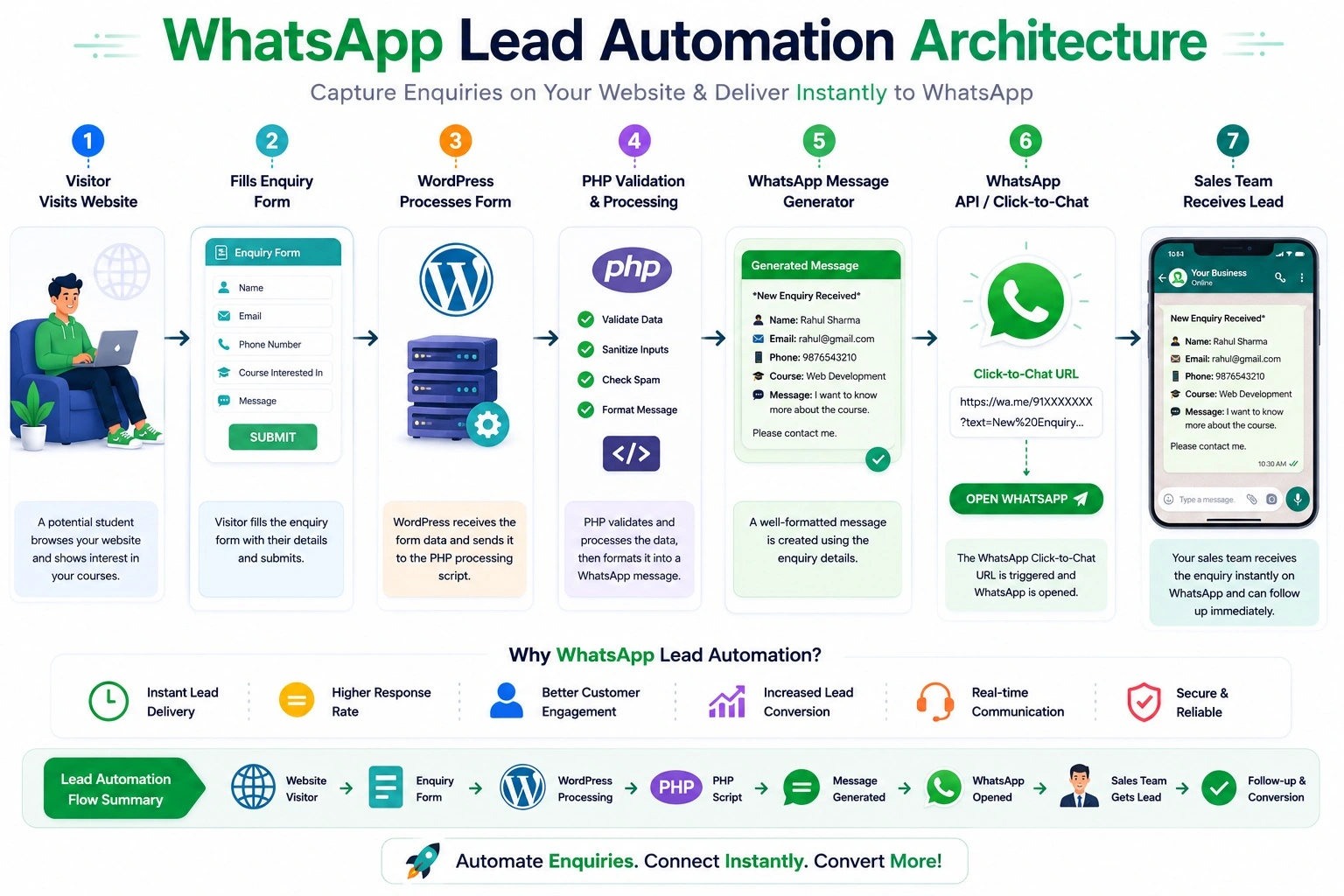
Part 1 — Method 1: WhatsApp Redirect (Simple, Free, Zero API)
This method opens WhatsApp with the form data pre-filled. The user — or business owner — sees the WhatsApp chat opened with the enquiry ready to send.
How wa.me Links Work
https://wa.me/{phone_number}?text={url_encoded_message}
- {phone_number} — international format with country code, NO +, NO spaces. Example: 919876543210 (India), 14155551234 (US)
- {text} — URL-encoded message content
- Opens WhatsApp Web on desktop, WhatsApp app on mobile
Basic Implementation with Contact Form 7
<?php
/**
 * Method 1: Open WhatsApp with enquiry pre-filled after CF7 submission.
 * Add to: functions.php or a custom plugin.
 *
 * LIMITATION: The enquiry is from your VISITOR's WhatsApp to your number.
 * Your visitor must press "Send" in their WhatsApp.
 * For automatic server-to-your-WhatsApp, use Method 2.
 */
add_action( 'wpcf7_mail_sent', 'cfwp_redirect_to_whatsapp' );

function cfwp_redirect_to_whatsapp( WPCF7_ContactForm $contact_form ): void {

    // Only trigger for specific forms (by form ID)
    // Find your form ID in CF7 admin — remove this check to apply to all forms
    $target_form_ids = [ 123, 456 ]; // Replace with your actual form IDs
    if ( ! in_array( $contact_form->id(), $target_form_ids, true ) ) {
        return;
    }

    $submission = WPCF7_Submission::get_instance();
    if ( ! $submission ) return;

    $data = $submission->get_posted_data();

    // Sanitize all field values
    $name    = sanitize_text_field( $data['your-name']    ?? '' );
    $email   = sanitize_email(      $data['your-email']   ?? '' );
    $phone   = sanitize_text_field( $data['your-phone']   ?? 'Not provided' );
    $subject = sanitize_text_field( $data['your-subject'] ?? 'General Enquiry' );
    $message = sanitize_textarea_field( $data['your-message'] ?? '' );

    // Your WhatsApp Business number (international format, no + or spaces)
    $business_whatsapp = '919876543210'; // ← Replace with your number

    // Build the message (keep under 1600 chars for WhatsApp compatibility)
    $wa_message = sprintf(
        "📩 *New Website Enquiry*\n\n" .
        "👤 *Name:* %s\n" .
        "📧 *Email:* %s\n" .
        "📱 *Phone:* %s\n" .
        "📋 *Subject:* %s\n\n" .
        "💬 *Message:*\n%s\n\n" .
        "🌐 *From:* %s",
        $name,
        $email,
        $phone,
        $subject,
        $message,
        get_bloginfo('name')
    );

    $wa_url = 'https://wa.me/' . $business_whatsapp .
              '?text=' . rawurlencode( $wa_message );

    // Output JavaScript to open WhatsApp
    // Note: This opens from the VISITOR's WhatsApp to your number
    echo '<script>
        setTimeout(function() {
            window.open(' . wp_json_encode( $wa_url ) . ', "_blank", "noopener,noreferrer");
        }, 800);
    </script>';
}
Improved Version: Use wpcf7_ajax_json_echo for Cleaner Integration
The echo ‘<script>’ approach is fragile. A cleaner pattern stores the URL in a transient and fetches it client-side:
<?php
/**
 * Cleaner WhatsApp redirect using CF7's JSON response filter.
 * Passes the WhatsApp URL to JavaScript via CF7's AJAX response.
 */
add_filter( 'wpcf7_ajax_json_echo', 'cfwp_add_whatsapp_url_to_response', 10, 2 );

function cfwp_add_whatsapp_url_to_response( array $response, array $result ): array {

    // Only add WhatsApp URL on successful submission
    if ( $result['status'] !== 'mail_sent' ) {
        return $response;
    }

    $submission = WPCF7_Submission::get_instance();
    if ( ! $submission ) return $response;

    $data = $submission->get_posted_data();

    $name    = sanitize_text_field( $data['your-name']    ?? '' );
    $email   = sanitize_email(      $data['your-email']   ?? '' );
    $message = sanitize_textarea_field( $data['your-message'] ?? '' );

    $wa_message = "📩 *New Enquiry from " . get_bloginfo('name') . "*\n\n" .
                  "👤 Name: $name\n" .
                  "📧 Email: $email\n\n" .
                  "💬 Message:\n$message";

    $response['whatsapp_url'] = 'https://wa.me/919876543210?text=' . rawurlencode( $wa_message );

    return $response;
}
Then in your theme or a custom JS file, listen for CF7’s form submission event:
// In your theme's main.js or a custom enqueued script
document.addEventListener( 'DOMContentLoaded', function() {
    document.querySelectorAll( '.wpcf7' ).forEach( function( form ) {
        form.addEventListener( 'wpcf7mailsent', function( event ) {
            const response = event.detail;
            if ( response && response.whatsapp_url ) {
                // Small delay to let the success message show first
                setTimeout( function() {
                    window.open( response.whatsapp_url, '_blank', 'noopener,noreferrer' );
                }, 1200 );
            }
        });
    });
});
Part 2 — Method 2: Meta WhatsApp Cloud API (Fully Automatic)
This is the production-grade implementation. When a form is submitted, your PHP server makes a background API call to Meta’s WhatsApp Cloud API and the message appears in your WhatsApp Business inbox — automatically, without any user interaction, even while your visitor is still on your “Thank You” page.
Step-by-Step Meta API Setup
Step 1: Create a Meta Developer Account
- Go to developers.facebook.com
- Click My Apps → Create App
- Select Business as the app type
- Fill in the app name (e.g., “YourSite Enquiries”) and business email
- Click Create App
Step 2: Add WhatsApp to Your App
- In your app dashboard, find Add a Product
- Click Set Up on WhatsApp
- You’ll land on the WhatsApp → Getting Started page
Step 3: Get Your Credentials
From the Getting Started page, note down:
Phone Number ID:    (e.g., 123456789012345)
WhatsApp Business Account ID: (e.g., 987654321098765)
Temporary Access Token: (valid for 24 hours for testing)
For production, you need a Permanent System User Token:
- Go to business.facebook.com
- Settings → System Users → Add
- Create a System User with Standard access
- Generate a token with whatsapp_business_messaging permission
- Set token expiry to Never
Step 4: Verify a WhatsApp Business Number
For testing, Meta provides a free test number. For production:
- Go to WhatsApp → Phone Numbers → Add phone number
- Enter your WhatsApp Business number
- Verify via OTP sent to that number
- Note: This number must be a WhatsApp Business number, not a personal one
Step 5: Add a Recipient for Testing
Under Getting Started, add up to 5 recipient phone numbers for the free sandbox:
- Click Add phone number under “To”
- These numbers receive your test messages without needing to opt-in
- For production, you’ll need users who have opted in to receive messages
The Core WhatsApp API Class
Build a reusable class that handles all API communication:
<?php
/**
 * WhatsApp Cloud API Integration Class
 *
 * Handles: text messages, template messages, rich formatted messages,
 * error handling, logging, and retry logic.
 *
 * Add to: a custom plugin or mu-plugins/whatsapp-api.php
 */

if ( ! defined( 'ABSPATH' ) ) exit;

class WP_WhatsApp_API {

    private const API_VERSION = 'v20.0';
    private const API_BASE    = 'https://graph.facebook.com/';

    private string $access_token;
    private string $phone_number_id;
    private string $default_recipient;
    private bool   $debug;

    /**
     * @param string $access_token      Meta System User Token
     * @param string $phone_number_id   WhatsApp Phone Number ID
     * @param string $default_recipient Your WhatsApp number (intl format, no +)
     * @param bool   $debug             Log API calls to WP error log
     */
    public function __construct(
        string $access_token,
        string $phone_number_id,
        string $default_recipient,
        bool   $debug = false
    ) {
        $this->access_token      = $access_token;
        $this->phone_number_id   = $phone_number_id;
        $this->default_recipient = $default_recipient;
        $this->debug             = $debug;
    }

    /**
     * Send a plain text message.
     *
     * @param  string $message    Message text (max 4096 chars)
     * @param  string $to         Recipient number (overrides default)
     * @return array|\WP_Error
     */
    public function send_text( string $message, string $to = '' ): array|\WP_Error {

        $recipient = $to ?: $this->default_recipient;

        $payload = [
            'messaging_product' => 'whatsapp',
            'recipient_type'    => 'individual',
            'to'                => $this->sanitize_number( $recipient ),
            'type'              => 'text',
            'text'              => [
                'preview_url' => false,
                'body'        => mb_substr( $message, 0, 4096 ),
            ],
        ];

        return $this->send_request( $payload );
    }

    /**
     * Send a pre-approved template message.
     * Required for messages sent more than 24 hours after last user interaction.
     *
     * @param  string $template_name   Name of approved template (e.g., 'enquiry_notification')
     * @param  string $language_code   e.g., 'en_US', 'en', 'hi'
     * @param  array  $components      Template variable components
     * @param  string $to              Recipient number
     * @return array|\WP_Error
     */
    public function send_template(
        string $template_name,
        string $language_code = 'en',
        array  $components    = [],
        string $to            = ''
    ): array|\WP_Error {

        $recipient = $to ?: $this->default_recipient;

        $payload = [
            'messaging_product' => 'whatsapp',
            'to'                => $this->sanitize_number( $recipient ),
            'type'              => 'template',
            'template'          => [
                'name'       => $template_name,
                'language'   => [ 'code' => $language_code ],
                'components' => $components,
            ],
        ];

        return $this->send_request( $payload );
    }

    /**
     * Send a rich enquiry notification (formatted with bold, emoji sections).
     * Wraps send_text() with a pre-built enquiry format.
     *
     * @param  array  $enquiry_data  Keys: name, email, phone, subject, message, source
     * @param  string $to
     * @return array|\WP_Error
     */
    public function send_enquiry_notification( array $enquiry_data, string $to = '' ): array|\WP_Error {

        $name    = $enquiry_data['name']    ?? 'Not provided';
        $email   = $enquiry_data['email']   ?? 'Not provided';
        $phone   = $enquiry_data['phone']   ?? 'Not provided';
        $subject = $enquiry_data['subject'] ?? 'General Enquiry';
        $message = $enquiry_data['message'] ?? '';
        $source  = $enquiry_data['source']  ?? get_bloginfo( 'name' );
        $page    = $enquiry_data['page']    ?? '';
        $time    = current_time( 'd M Y, H:i' ) . ' IST';

        // WhatsApp supports *bold*, _italic_, ~strikethrough~, ```code```
        $wa_message = "🔔 *New Website Enquiry*\n";
        $wa_message .= str_repeat( '─', 28 ) . "\n\n";
        $wa_message .= "👤 *Name:* " . $name . "\n";
        $wa_message .= "📧 *Email:* " . $email . "\n";
        $wa_message .= "📱 *Phone:* " . $phone . "\n";
        $wa_message .= "📋 *Subject:* " . $subject . "\n";

        if ( $page ) {
            $wa_message .= "🌐 *Page:* " . $page . "\n";
        }

        $wa_message .= "🕐 *Time:* " . $time . "\n\n";
        $wa_message .= "💬 *Message:*\n";
        $wa_message .= $message . "\n\n";
        $wa_message .= str_repeat( '─', 28 ) . "\n";
        $wa_message .= "📍 _Sent from " . $source . "_";

        return $this->send_text( $wa_message, $to );
    }

    /**
     * Core API request handler using WordPress HTTP API.
     */
    private function send_request( array $payload ): array|\WP_Error {

        $endpoint = self::API_BASE . self::API_VERSION . '/' .
                    $this->phone_number_id . '/messages';

        $args = [
            'method'  => 'POST',
            'timeout' => 20,
            'headers' => [
                'Authorization' => 'Bearer ' . $this->access_token,
                'Content-Type'  => 'application/json',
            ],
            'body'       => wp_json_encode( $payload ),
            'sslverify'  => true,
            'user-agent' => 'WordPress/' . get_bloginfo('version') . '; ' . home_url(),
        ];

        if ( $this->debug ) {
            error_log( '[WP WhatsApp API] Request to: ' . $endpoint );
            error_log( '[WP WhatsApp API] Payload: ' . wp_json_encode( $payload ) );
        }

        $response = wp_remote_post( $endpoint, $args );

        // Handle WordPress HTTP errors
        if ( is_wp_error( $response ) ) {
            $this->log_error( 'HTTP Error: ' . $response->get_error_message() );
            return $response;
        }

        $http_code = wp_remote_retrieve_response_code( $response );
        $body      = wp_remote_retrieve_body( $response );
        $data      = json_decode( $body, true );

        if ( $this->debug ) {
            error_log( '[WP WhatsApp API] Response (' . $http_code . '): ' . $body );
        }

        // Handle Meta API errors
        if ( $http_code !== 200 ) {
            $error_msg  = $data['error']['message']     ?? 'Unknown API error';
            $error_code = $data['error']['code']        ?? 0;
            $error_type = $data['error']['type']        ?? 'unknown';

            $this->log_error( "API Error [{$http_code}] #{$error_code} ({$error_type}): {$error_msg}" );

            return new \WP_Error(
                'whatsapp_api_error',
                $this->friendly_error( $error_code, $error_msg ),
                [
                    'http_code' => $http_code,
                    'api_code'  => $error_code,
                    'raw'       => $data,
                ]
            );
        }

        return [
            'success'    => true,
            'message_id' => $data['messages'][0]['id']     ?? null,
            'wa_id'      => $data['contacts'][0]['wa_id']  ?? null,
            'http_code'  => $http_code,
        ];
    }

    /**
     * Sanitize a phone number to international format without spaces or symbols.
     */
    private function sanitize_number( string $number ): string {
        // Remove all non-digits
        $clean = preg_replace( '/\D/', '', $number );
        // Remove leading zeros
        $clean = ltrim( $clean, '0' );
        return $clean;
    }

    /**
     * Convert Meta API error codes to friendly messages.
     */
    private function friendly_error( int $code, string $raw ): string {
        return match ( $code ) {
            0       => 'Authentication failed. Check your access token.',
            4       => 'API call limit reached. Try again later.',
            10      => 'Permission denied. Enable whatsapp_business_messaging permission.',
            100     => 'Invalid parameter in API request.',
            131030  => 'Phone number not registered on WhatsApp.',
            131047  => 'Re-engagement message rejected. Only send messages within 24h of user interaction.',
            131051  => 'Message type not allowed for this number.',
            131056  => 'Recipient number not in sandbox allowlist. Add it in Meta Developer Console.',
            default => "WhatsApp API error (code {$code}): {$raw}",
        };
    }

    private function log_error( string $message ): void {
        error_log( '[WP WhatsApp API] ERROR: ' . $message );
    }
}
Store API Credentials Securely
Never hardcode API credentials. Store them using WordPress Options with a settings page:
<?php
/**
 * WhatsApp Settings — register in wp-admin
 * Add to: a custom plugin's admin setup
 */
add_action( 'admin_init', 'cfwp_register_settings' );

function cfwp_register_settings(): void {
    register_setting( 'cfwp_settings_group', 'cfwp_settings', 'cfwp_sanitize_settings' );

    add_settings_section( 'cfwp_api_section', 'WhatsApp Cloud API Settings',
        fn() => print( '<p>Enter your Meta WhatsApp Cloud API credentials.</p>' ),
        'cfwp-settings'
    );

    $fields = [
        'access_token'      => 'Access Token (System User)',
        'phone_number_id'   => 'Phone Number ID',
        'recipient_number'  => 'Your WhatsApp Number (intl format)',
        'waba_id'           => 'WhatsApp Business Account ID',
    ];

    foreach ( $fields as $key => $label ) {
        add_settings_field( $key, $label, function() use ( $key ) {
            $options = get_option( 'cfwp_settings', [] );
            $val     = esc_attr( $options[ $key ] ?? '' );
            $type    = str_contains( $key, 'token' ) ? 'password' : 'text';
            echo "<input type='{$type}' name='cfwp_settings[{$key}]'
                  value='{$val}' class='regular-text'>";
        }, 'cfwp-settings', 'cfwp_api_section' );
    }
}

function cfwp_sanitize_settings( array $input ): array {
    return [
        'access_token'    => sanitize_text_field( $input['access_token']    ?? '' ),
        'phone_number_id' => sanitize_text_field( $input['phone_number_id'] ?? '' ),
        'recipient_number'=> preg_replace( '/\D/', '', $input['recipient_number'] ?? '' ),
        'waba_id'         => sanitize_text_field( $input['waba_id']         ?? '' ),
    ];
}

/**
 * Helper: get a configured WP_WhatsApp_API instance from saved settings.
 */
function cfwp_get_api(): ?WP_WhatsApp_API {
    $options = get_option( 'cfwp_settings', [] );

    if ( empty( $options['access_token'] ) || empty( $options['phone_number_id'] ) ) {
        return null;
    }

    return new WP_WhatsApp_API(
        $options['access_token'],
        $options['phone_number_id'],
        $options['recipient_number'] ?? '',
        defined( 'WP_DEBUG' ) && WP_DEBUG
    );
}
Part 3 — Contact Form 7 Integration (Complete)
Hook into Every CF7 Form Submission
<?php
/**
 * Send CF7 submissions to WhatsApp automatically.
 * Hooks into the `wpcf7_mail_sent` action — fires after email is sent.
 *
 * Add to: functions.php or a custom plugin.
 */
add_action( 'wpcf7_mail_sent', 'cfwp_send_cf7_to_whatsapp' );

function cfwp_send_cf7_to_whatsapp( WPCF7_ContactForm $contact_form ): void {

    $api = cfwp_get_api();
    if ( ! $api ) {
        error_log( '[CF7 WhatsApp] API not configured. Check settings.' );
        return;
    }

    $submission = WPCF7_Submission::get_instance();
    if ( ! $submission ) return;

    $data = $submission->get_posted_data();

    // Build enquiry data from CF7 field names
    // Adjust keys to match your actual CF7 field names
    $enquiry = [
        'name'    => sanitize_text_field( $data['your-name']    ?? $data['name']    ?? 'Not provided' ),
        'email'   => sanitize_email(      $data['your-email']   ?? $data['email']   ?? '' ),
        'phone'   => sanitize_text_field( $data['your-phone']   ?? $data['phone']   ?? $data['tel-123'] ?? 'Not provided' ),
        'subject' => sanitize_text_field( $data['your-subject'] ?? $data['subject'] ?? 'Enquiry from ' . $contact_form->title() ),
        'message' => sanitize_textarea_field( $data['your-message'] ?? $data['message'] ?? '' ),
        'source'  => get_bloginfo( 'name' ),
        'page'    => $submission->get_meta( 'url' ) ?? '',
    ];

    // Include any extra fields dynamically
    $extra_fields = array_diff_key( $data, array_flip([
        '_wpcf7', '_wpcf7_version', '_wpcf7_locale', '_wpcf7_unit_tag',
        '_wpcf7_container_post', 'your-name', 'your-email', 'your-phone',
        'your-subject', 'your-message', '_wpcf7_is_ajax_call',
    ]));

    if ( ! empty( $extra_fields ) ) {
        $extra_text = '';
        foreach ( $extra_fields as $key => $value ) {
            if ( is_string( $value ) && $value !== '' ) {
                $label       = ucwords( str_replace( [ '-', '_' ], ' ', $key ) );
                $extra_text .= "📌 *{$label}:* " . sanitize_text_field( $value ) . "\n";
            }
        }
        if ( $extra_text ) {
            $enquiry['message'] .= "\n\n" . trim( $extra_text );
        }
    }

    $result = $api->send_enquiry_notification( $enquiry );

    if ( is_wp_error( $result ) ) {
        error_log( '[CF7 WhatsApp] Failed to send: ' . $result->get_error_message() );
        // Do NOT stop the form — email still went through
    }
}
Send to Different WhatsApp Numbers Based on Form
<?php
/**
 * Route different CF7 forms to different WhatsApp numbers.
 * Example: Sales form → sales team, Support form → support team
 */
add_action( 'wpcf7_mail_sent', 'cfwp_route_to_team_whatsapp' );

function cfwp_route_to_team_whatsapp( WPCF7_ContactForm $contact_form ): void {

    // Map form IDs to WhatsApp numbers (international format, no +)
    $routing = [
        15  => '919876543210', // Sales form → Sales manager
        22  => '919123456789', // Support form → Support team
        31  => '919000000000', // Partnership form → CEO
    ];

    $form_id = $contact_form->id();

    // Skip if this form is not in our routing map
    if ( ! array_key_exists( $form_id, $routing ) ) return;

    $api = cfwp_get_api();
    if ( ! $api ) return;

    $submission = WPCF7_Submission::get_instance();
    if ( ! $submission ) return;

    $data = $submission->get_posted_data();

    $enquiry = [
        'name'    => sanitize_text_field( $data['your-name']    ?? '' ),
        'email'   => sanitize_email(      $data['your-email']   ?? '' ),
        'phone'   => sanitize_text_field( $data['your-phone']   ?? '' ),
        'message' => sanitize_textarea_field( $data['your-message'] ?? '' ),
        'subject' => 'Form: ' . $contact_form->title(),
        'source'  => get_bloginfo( 'name' ),
    ];

    // Send to the routed number
    $api->send_enquiry_notification( $enquiry, $routing[ $form_id ] );
}
Part 4 — Gravity Forms Integration
If you use Gravity Forms instead of CF7, hook into its gform_after_submission action:
<?php
/**
 * Send Gravity Forms submission to WhatsApp automatically.
 * Requires: Gravity Forms plugin + WP_WhatsApp_API class above.
 */
add_action( 'gform_after_submission', 'cfwp_send_gravity_to_whatsapp', 10, 2 );

function cfwp_send_gravity_to_whatsapp( array $entry, array $form ): void {

    $api = cfwp_get_api();
    if ( ! $api ) return;

    // Build a dynamic message from all form fields
    $wa_message = "🔔 *New " . sanitize_text_field( $form['title'] ) . " Submission*\n";
    $wa_message .= str_repeat( '─', 30 ) . "\n\n";

    // Map common field labels to emojis
    $emoji_map = [
        'name'    => '👤',
        'email'   => '📧',
        'phone'   => '📱',
        'mobile'  => '📱',
        'subject' => '📋',
        'message' => '💬',
        'company' => '🏢',
        'city'    => '📍',
        'budget'  => '💰',
        'service' => '🔧',
    ];

    foreach ( $form['fields'] as $field ) {
        // Skip admin-only, hidden, and HTML fields
        if ( $field->visibility === 'administrative' ) continue;
        if ( in_array( $field->type, [ 'html', 'section', 'page', 'captcha' ], true ) ) continue;

        $label = sanitize_text_field( $field->label );
        $value = rgar( $entry, (string) $field->id );

        if ( empty( $value ) ) continue;

        // Auto-sanitize by type
        $value = match ( $field->type ) {
            'email'  => sanitize_email( $value ),
            'number' => number_format( (float) $value, 2 ),
            default  => sanitize_text_field( $value ),
        };

        // Get emoji or default star
        $key   = strtolower( str_replace( ' ', '', $label ) );
        $emoji = '⭐';
        foreach ( $emoji_map as $keyword => $e ) {
            if ( str_contains( $key, $keyword ) ) {
                $emoji = $e;
                break;
            }
        }

        $wa_message .= "{$emoji} *{$label}:* {$value}\n";
    }

    $wa_message .= "\n🕐 *Submitted:* " . current_time( 'd M Y, H:i' ) . " IST\n";
    $wa_message .= "🌐 *Form:* " . sanitize_text_field( $form['title'] );

    $result = $api->send_text( $wa_message );

    if ( is_wp_error( $result ) ) {
        error_log( '[Gravity WhatsApp] Send failed: ' . $result->get_error_message() );
    }
}
Part 5 — WooCommerce Order Notifications to WhatsApp
This sends a WhatsApp notification to you (the store owner) for every new order, payment received, or order status change.
<?php
/**
 * WooCommerce → WhatsApp Order Notifications
 *
 * Triggers:
 *   - New order placed (any payment method)
 *   - Payment confirmed (for online payments)
 *   - Order status changes (optional)
 */

// ── New Order Notification ────────────────────────────────────────────────────
add_action( 'woocommerce_new_order', 'cfwp_whatsapp_new_order', 10, 1 );

function cfwp_whatsapp_new_order( int $order_id ): void {
    $api = cfwp_get_api();
    if ( ! $api ) return;

    $order = wc_get_order( $order_id );
    if ( ! $order ) return;

    // Format order items list
    $items_text = '';
    foreach ( $order->get_items() as $item ) {
        $items_text .= "  • " . $item->get_name() .
                       " × " . $item->get_quantity() .
                       " = " . wc_price( $item->get_total() ) . "\n";
    }
    // Strip HTML from wc_price()
    $items_text = wp_strip_all_tags( $items_text );

    $customer_name  = $order->get_billing_first_name() . ' ' . $order->get_billing_last_name();
    $customer_phone = $order->get_billing_phone();
    $customer_email = $order->get_billing_email();
    $customer_city  = $order->get_billing_city();
    $total          = wp_strip_all_tags( wc_price( $order->get_total() ) );
    $payment_method = $order->get_payment_method_title();
    $order_url      = admin_url( 'post.php?post=' . $order_id . '&action=edit' );

    $wa_message  = "🛒 *New Order #" . $order->get_order_number() . "*\n";
    $wa_message .= str_repeat( '─', 30 ) . "\n\n";
    $wa_message .= "👤 *Customer:* {$customer_name}\n";
    $wa_message .= "📧 *Email:* {$customer_email}\n";
    $wa_message .= "📱 *Phone:* {$customer_phone}\n";
    $wa_message .= "📍 *City:* {$customer_city}\n\n";
    $wa_message .= "🛍️ *Items Ordered:*\n{$items_text}\n";
    $wa_message .= "💰 *Order Total:* {$total}\n";
    $wa_message .= "💳 *Payment:* {$payment_method}\n";
    $wa_message .= "📦 *Status:* " . wc_get_order_status_name( $order->get_status() ) . "\n\n";
    $wa_message .= "🕐 " . current_time( 'd M Y, H:i' ) . " IST\n";
    $wa_message .= "🔗 View order: " . $order_url;

    $api->send_text( $wa_message );
}

// ── Payment Confirmed Notification ───────────────────────────────────────────
add_action( 'woocommerce_payment_complete', 'cfwp_whatsapp_payment_confirmed', 10, 1 );

function cfwp_whatsapp_payment_confirmed( int $order_id ): void {
    $api = cfwp_get_api();
    if ( ! $api ) return;

    $order = wc_get_order( $order_id );
    if ( ! $order ) return;

    $customer_name = $order->get_billing_first_name() . ' ' . $order->get_billing_last_name();
    $total         = wp_strip_all_tags( wc_price( $order->get_total() ) );

    $wa_message  = "✅ *Payment Confirmed!*\n\n";
    $wa_message .= "📦 Order #" . $order->get_order_number() . "\n";
    $wa_message .= "👤 " . $customer_name . "\n";
    $wa_message .= "💰 " . $total . "\n";
    $wa_message .= "🕐 " . current_time( 'd M Y, H:i' ) . " IST";

    $api->send_text( $wa_message );
}

// ── Order Status Change Notification ─────────────────────────────────────────
add_action( 'woocommerce_order_status_changed', 'cfwp_whatsapp_order_status', 10, 4 );

function cfwp_whatsapp_order_status(
    int    $order_id,
    string $old_status,
    string $new_status,
    object $order
): void {
    // Only notify for these status changes
    $notify_on = [ 'cancelled', 'refunded', 'failed', 'on-hold' ];

    if ( ! in_array( $new_status, $notify_on, true ) ) return;

    $api = cfwp_get_api();
    if ( ! $api ) return;

    $emoji_map = [
        'cancelled' => '❌',
        'refunded'  => '💸',
        'failed'    => '⚠️',
        'on-hold'   => '⏸️',
    ];

    $emoji         = $emoji_map[ $new_status ] ?? '🔄';
    $customer_name = $order->get_billing_first_name() . ' ' . $order->get_billing_last_name();
    $new_label     = wc_get_order_status_name( $new_status );
    $old_label     = wc_get_order_status_name( $old_status );

    $wa_message  = "{$emoji} *Order Status Update*\n\n";
    $wa_message .= "📦 Order #" . $order->get_order_number() . "\n";
    $wa_message .= "👤 " . $customer_name . "\n";
    $wa_message .= "🔄 *{$old_label}* → *{$new_label}*\n";
    $wa_message .= "🕐 " . current_time( 'd M Y, H:i' ) . " IST";

    $api->send_text( $wa_message );
}
Part 6 — Custom HTML Form Integration
For sites not using CF7 or Gravity Forms, here’s a complete custom form-to-WhatsApp implementation:
The HTML Form
<!-- Custom enquiry form — place anywhere in your WordPress template -->
<div class="custom-enquiry-form">
    <h2>Send Us Your Enquiry</h2>
    <form id="enquiry-form" method="POST"
          action="<?php echo esc_url( admin_url('admin-ajax.php') ); ?>">
        <?php wp_nonce_field( 'cfwp_enquiry_nonce', 'cfwp_nonce' ); ?>
        <input type="hidden" name="action" value="cfwp_submit_enquiry">
        <input type="hidden" name="page_url" value="<?php echo esc_url( get_permalink() ); ?>">

        <div class="form-group">
            <label for="enq-name">Full Name *</label>
            <input type="text" id="enq-name" name="enq_name"
                   required placeholder="Your full name">
        </div>
        <div class="form-group">
            <label for="enq-email">Email Address *</label>
            <input type="email" id="enq-email" name="enq_email"
                   required placeholder="your@email.com">
        </div>
        <div class="form-group">
            <label for="enq-phone">Phone / WhatsApp *</label>
            <input type="tel" id="enq-phone" name="enq_phone"
                   required placeholder="+91 98765 43210">
        </div>
        <div class="form-group">
            <label for="enq-service">Service Interested In</label>
            <select id="enq-service" name="enq_service">
                <option value="">Select a service</option>
                <option value="Web Design">Web Design</option>
                <option value="WordPress Development">WordPress Development</option>
                <option value="SEO Services">SEO Services</option>
                <option value="Digital Marketing">Digital Marketing</option>
                <option value="Other">Other</option>
            </select>
        </div>
        <div class="form-group">
            <label for="enq-budget">Budget Range</label>
            <select id="enq-budget" name="enq_budget">
                <option value="">Prefer not to say</option>
                <option value="Under ₹25,000">Under ₹25,000</option>
                <option value="₹25,000 – ₹75,000">₹25,000 – ₹75,000</option>
                <option value="₹75,000 – ₹2,00,000">₹75,000 – ₹2,00,000</option>
                <option value="Above ₹2,00,000">Above ₹2,00,000</option>
            </select>
        </div>
        <div class="form-group">
            <label for="enq-message">Your Message *</label>
            <textarea id="enq-message" name="enq_message"
                      required rows="4"
                      placeholder="Tell us about your project…"></textarea>
        </div>

        <div id="form-status" style="display:none;"></div>

        <button type="submit" id="enq-submit">
            Send Enquiry 📨
        </button>
    </form>
</div>

<script>
document.getElementById('enquiry-form').addEventListener('submit', async function(e) {
    e.preventDefault();

    const btn       = document.getElementById('enq-submit');
    const statusEl  = document.getElementById('form-status');
    const formData  = new FormData(this);

    btn.disabled    = true;
    btn.textContent = 'Sending…';
    statusEl.style.display = 'none';

    try {
        const resp = await fetch(this.action, {
            method: 'POST',
            body:   formData,
        });

        const data = await resp.json();

        statusEl.style.display = 'block';

        if (data.success) {
            statusEl.style.background = '#d1fae5';
            statusEl.style.color      = '#065f46';
            statusEl.style.padding    = '12px 16px';
            statusEl.style.borderRadius = '8px';
            statusEl.textContent = '✅ ' + data.data.message;
            this.reset();
        } else {
            statusEl.style.background = '#fee2e2';
            statusEl.style.color      = '#991b1b';
            statusEl.style.padding    = '12px 16px';
            statusEl.style.borderRadius = '8px';
            statusEl.textContent = '⚠️ ' + (data.data?.message || 'Something went wrong. Please try again.');
        }

    } catch (err) {
        statusEl.style.display = 'block';
        statusEl.textContent   = '⚠️ Network error. Please try again.';
        console.error(err);
    }

    btn.disabled    = false;
    btn.textContent = 'Send Enquiry 📨';
});
</script>
The AJAX Handler
<?php
/**
 * Handle custom form AJAX submission.
 * Sends to email AND WhatsApp simultaneously.
 */
add_action( 'wp_ajax_cfwp_submit_enquiry',        'cfwp_handle_custom_enquiry' );
add_action( 'wp_ajax_nopriv_cfwp_submit_enquiry', 'cfwp_handle_custom_enquiry' );

function cfwp_handle_custom_enquiry(): void {

    // ── Security checks ────────────────────────────────────────────────────
    if ( ! check_ajax_referer( 'cfwp_enquiry_nonce', 'cfwp_nonce', false ) ) {
        wp_send_json_error([ 'message' => 'Security check failed. Please refresh and try again.' ], 403 );
    }

    // ── Rate limiting (5 submissions per IP per hour) ───────────────────────
    $ip      = md5( $_SERVER['REMOTE_ADDR'] ?? '' );
    $rl_key  = 'cfwp_rl_' . $ip;
    $rl_count = (int) get_transient( $rl_key );

    if ( $rl_count >= 5 ) {
        wp_send_json_error([ 'message' => 'Too many submissions. Please wait before trying again.' ], 429 );
    }

    set_transient( $rl_key, $rl_count + 1, HOUR_IN_SECONDS );

    // ── Input validation ───────────────────────────────────────────────────
    $name    = sanitize_text_field( wp_unslash( $_POST['enq_name']    ?? '' ) );
    $email   = sanitize_email(                  $_POST['enq_email']   ?? '' );
    $phone   = sanitize_text_field( wp_unslash( $_POST['enq_phone']   ?? '' ) );
    $service = sanitize_text_field( wp_unslash( $_POST['enq_service'] ?? '' ) );
    $budget  = sanitize_text_field( wp_unslash( $_POST['enq_budget']  ?? '' ) );
    $message = sanitize_textarea_field( wp_unslash( $_POST['enq_message'] ?? '' ) );
    $page    = esc_url_raw( $_POST['page_url'] ?? '' );

    // Required field validation
    $errors = [];
    if ( empty( $name ) )    $errors[] = 'Name is required.';
    if ( ! is_email($email)) $errors[] = 'Valid email is required.';
    if ( empty( $phone ) )   $errors[] = 'Phone number is required.';
    if ( empty( $message ) ) $errors[] = 'Message is required.';
    if ( mb_strlen( $message ) > 2000 ) $errors[] = 'Message too long (max 2000 characters).';

    if ( ! empty( $errors ) ) {
        wp_send_json_error([ 'message' => implode( ' ', $errors ) ], 400 );
    }

    $enquiry = [
        'name'    => $name,
        'email'   => $email,
        'phone'   => $phone,
        'subject' => 'Service: ' . ( $service ?: 'General Enquiry' ) .
                     ( $budget ? ' | Budget: ' . $budget : '' ),
        'message' => $message,
        'source'  => get_bloginfo( 'name' ),
        'page'    => $page,
    ];

    // ── Send email notification ────────────────────────────────────────────
    $admin_email = get_option( 'admin_email' );
    $email_body  = "Name: {$name}\nEmail: {$email}\nPhone: {$phone}\n" .
                   "Service: {$service}\nBudget: {$budget}\n\n" .
                   "Message:\n{$message}\n\nPage: {$page}";

    wp_mail(
        $admin_email,
        'New Enquiry from ' . get_bloginfo('name') . ': ' . $name,
        $email_body
    );

    // ── Send WhatsApp notification ─────────────────────────────────────────
    $api = cfwp_get_api();

    if ( $api ) {
        $result = $api->send_enquiry_notification( $enquiry );

        if ( is_wp_error( $result ) ) {
            error_log( '[Custom Form WhatsApp] ' . $result->get_error_message() );
            // Email still went — don't fail the user-facing response
        }
    }

    wp_send_json_success([
        'message' => 'Thank you! Your enquiry has been sent. We\'ll get back to you shortly.',
    ]);
}
Part 7 — Method 3: Third-Party Gateways (Twilio, Gupshup)
Twilio WhatsApp API
Twilio offers a WhatsApp sandbox for testing and full production access. Great if you already use Twilio for SMS.
<?php
/**
 * Send WhatsApp message via Twilio API.
 * Requires: Twilio account, WhatsApp-enabled sender number.
 * Free sandbox available at: console.twilio.com/develop/sms/try-it-out/whatsapp-learn
 */
function cfwp_send_via_twilio(
    string $message,
    string $to,              // Format: whatsapp:+919876543210
    string $from            = ''  // Your Twilio WhatsApp number
): bool {
    $twilio_sid   = get_option( 'cfwp_twilio_sid',   '' );
    $twilio_token = get_option( 'cfwp_twilio_token', '' );
    $twilio_from  = $from ?: get_option( 'cfwp_twilio_from', '' );

    if ( ! $twilio_sid || ! $twilio_token ) return false;

    // Ensure number is in WhatsApp format
    if ( ! str_starts_with( $to, 'whatsapp:' ) ) {
        $to = 'whatsapp:+' . preg_replace( '/\D/', '', $to );
    }

    $endpoint = 'https://api.twilio.com/2010-04-01/Accounts/' . $twilio_sid . '/Messages.json';

    $response = wp_remote_post( $endpoint, [
        'method'  => 'POST',
        'timeout' => 20,
        'headers' => [
            'Authorization' => 'Basic ' . base64_encode( $twilio_sid . ':' . $twilio_token ),
        ],
        'body' => [
            'From' => 'whatsapp:' . $twilio_from,
            'To'   => $to,
            'Body' => $message,
        ],
    ]);

    if ( is_wp_error( $response ) ) {
        error_log( '[Twilio WhatsApp] ' . $response->get_error_message() );
        return false;
    }

    $http_code = wp_remote_retrieve_response_code( $response );

    if ( $http_code !== 201 ) {
        $body = json_decode( wp_remote_retrieve_body( $response ), true );
        error_log( '[Twilio WhatsApp] Error: ' . ( $body['message'] ?? 'Unknown' ) );
        return false;
    }

    return true;
}
Gupshup API (Popular for Indian Businesses)
<?php
/**
 * Send WhatsApp message via Gupshup API.
 * Gupshup is widely used in India — supports Hindi and other regional languages.
 * Register at: gupshup.io
 */
function cfwp_send_via_gupshup(
    string $message,
    string $to_number   // Indian format: 919876543210
): bool {
    $api_key  = get_option( 'cfwp_gupshup_apikey', '' );
    $app_name = get_option( 'cfwp_gupshup_app',    '' );
    $from     = get_option( 'cfwp_gupshup_from',   '' ); // Your Gupshup WhatsApp number

    if ( ! $api_key || ! $app_name ) return false;

    $response = wp_remote_post( 'https://api.gupshup.io/wa/api/v1/msg', [
        'method'  => 'POST',
        'timeout' => 20,
        'headers' => [
            'apikey'       => $api_key,
            'Content-Type' => 'application/x-www-form-urlencoded',
        ],
        'body' => http_build_query([
            'channel'  => 'whatsapp',
            'source'   => $from,
            'destination'  => $to_number,
            'src.name' => $app_name,
            'message'  => wp_json_encode([
                'type' => 'text',
                'text' => $message,
            ]),
        ]),
    ]);

    if ( is_wp_error( $response ) ) {
        error_log( '[Gupshup WhatsApp] ' . $response->get_error_message() );
        return false;
    }

    $http_code = wp_remote_retrieve_response_code( $response );
    return $http_code === 202;
}
Part 8 — WhatsApp Message Templates (For 24-Hour Rule)
WhatsApp has a critical policy: you can only send free-form text messages within 24 hours of a user initiating contact with your business. After that window, you must use a pre-approved Message Template.
For enquiry notifications (server sending to yourself), this is rarely an issue — your own WhatsApp number is always “in conversation” with itself. But if you want to send confirmation messages to customers, templates are required.
Register a Template via Meta Business Manager
Templates must be approved by Meta. Here’s a sample template for enquiry confirmation:
Template Name: enquiry_confirmation
Category:      UTILITY
Language:      English (en)

Body Text:
Hello {{1}}, thank you for your enquiry to {{2}}!
We've received your message and our team will get back to you within {{3}} business hours.
Your enquiry reference: #{{4}}

Variables:
{{1}} = Customer's first name
{{2}} = Business name
{{3}} = Response time (e.g., "4")
{{4}} = Unique enquiry ID
Sending a Template Message in PHP
<?php
/**
 * Send an approved WhatsApp template to a customer as confirmation.
 * Customer must have opted-in to receive WhatsApp messages from you.
 */
add_action( 'wpcf7_mail_sent', 'cfwp_send_template_confirmation_to_customer' );

function cfwp_send_template_confirmation_to_customer( WPCF7_ContactForm $form ): void {

    $submission = WPCF7_Submission::get_instance();
    if ( ! $submission ) return;

    $data = $submission->get_posted_data();

    $customer_phone = sanitize_text_field( $data['your-phone'] ?? '' );
    $customer_name  = sanitize_text_field( $data['your-name']  ?? '' );

    // Only attempt if customer provided a phone number
    if ( empty( $customer_phone ) ) return;

    $api = cfwp_get_api();
    if ( ! $api ) return;

    // Unique enquiry reference
    $enquiry_ref = 'ENQ-' . strtoupper( substr( md5( uniqid() ), 0, 8 ) );

    $result = $api->send_template(
        'enquiry_confirmation',  // Template name (must be approved by Meta)
        'en',
        [
            [
                'type'       => 'body',
                'parameters' => [
                    [ 'type' => 'text', 'text' => $customer_name ],
                    [ 'type' => 'text', 'text' => get_bloginfo('name') ],
                    [ 'type' => 'text', 'text' => '4' ],
                    [ 'type' => 'text', 'text' => $enquiry_ref ],
                ],
            ],
        ],
        $customer_phone
    );

    if ( is_wp_error( $result ) ) {
        error_log( '[CF7 Template WhatsApp] ' . $result->get_error_message() );
    }
}
Part 9 — Async Processing with WP-Cron (For High-Traffic Sites)
On high-traffic sites, making a synchronous API call during form submission adds latency to the user’s experience. Queue the WhatsApp message in the background:
<?php
/**
 * Queue WhatsApp messages via WP-Cron for async delivery.
 * The form response returns immediately; WhatsApp message sends in background.
 */

// Register custom action
add_action( 'cfwp_send_queued_whatsapp', 'cfwp_process_queued_message', 10, 1 );

function cfwp_process_queued_message( array $args ): void {
    $api = cfwp_get_api();
    if ( ! $api ) return;

    $message   = $args['message']   ?? '';
    $recipient = $args['recipient'] ?? '';

    if ( empty( $message ) ) return;

    $result = $api->send_text( $message, $recipient );

    if ( is_wp_error( $result ) ) {
        // Retry once after 5 minutes if failed
        $retry_count = (int)( $args['retry'] ?? 0 );
        if ( $retry_count < 2 ) {
            $args['retry'] = $retry_count + 1;
            wp_schedule_single_event( time() + 300, 'cfwp_send_queued_whatsapp', [ $args ] );
            error_log( '[WA Queue] Retry #' . $args['retry'] . ' scheduled.' );
        } else {
            error_log( '[WA Queue] Failed after 2 retries: ' . $result->get_error_message() );
        }
    }
}

/**
 * Queue a message for async delivery.
 */
function cfwp_queue_whatsapp_message( string $message, string $recipient = '' ): void {
    wp_schedule_single_event( time() + 5, 'cfwp_send_queued_whatsapp', [[
        'message'   => $message,
        'recipient' => $recipient,
        'retry'     => 0,
        'queued_at' => current_time( 'mysql' ),
    ]]);
}

// In your CF7 hook, queue instead of sending directly:
add_action( 'wpcf7_mail_sent', 'cfwp_queue_cf7_whatsapp' );

function cfwp_queue_cf7_whatsapp( WPCF7_ContactForm $form ): void {
    $submission = WPCF7_Submission::get_instance();
    if ( ! $submission ) return;

    $data = $submission->get_posted_data();

    $name    = sanitize_text_field( $data['your-name']    ?? '' );
    $email   = sanitize_email(      $data['your-email']   ?? '' );
    $phone   = sanitize_text_field( $data['your-phone']   ?? '' );
    $message = sanitize_textarea_field( $data['your-message'] ?? '' );

    $wa_message  = "🔔 *New Enquiry (Queued)*\n\n";
    $wa_message .= "👤 *Name:* {$name}\n";
    $wa_message .= "📧 *Email:* {$email}\n";
    $wa_message .= "📱 *Phone:* {$phone}\n\n";
    $wa_message .= "💬 *Message:*\n{$message}";

    cfwp_queue_whatsapp_message( $wa_message );
}
Part 10 — Security Hardening Checklist
WhatsApp API integrations are a frequent target for abuse. Harden every entry point:
Credential Security
// ✅ Store in WordPress options (encrypted by host if using Vault)
$token = get_option( 'cfwp_access_token' );

// ✅ Load from environment variable (.env or server config)
$token = $_ENV['WHATSAPP_ACCESS_TOKEN'] ?? getenv( 'WHATSAPP_ACCESS_TOKEN' );

// ❌ Never hardcode
$token = 'EAABcDE...'; // Wrong — commit this once and it's public forever
Nonce Verification on All AJAX Handlers
// Every AJAX handler must verify a nonce
if ( ! check_ajax_referer( 'cfwp_enquiry_nonce', 'cfwp_nonce', false ) ) {
    wp_send_json_error([ 'message' => 'Security check failed.' ], 403 );
}
Rate Limiting (Per IP + Per Session)
// Combine IP + session for harder-to-spoof limiting
$rate_key = 'cfwp_rl_' . md5( ( $_SERVER['REMOTE_ADDR'] ?? '' ) . session_id() );
$count    = (int) get_transient( $rate_key );

if ( $count >= 5 ) {
    wp_send_json_error([ 'message' => 'Submission limit reached. Try again in an hour.' ], 429 );
}

set_transient( $rate_key, $count + 1, HOUR_IN_SECONDS );
Input Validation Before API Call
// Never pass raw user input to the API
$message = sanitize_textarea_field( wp_unslash( $_POST['message'] ) );
$message = mb_substr( $message, 0, 4000 ); // WhatsApp message limit

// Validate phone numbers before using as recipient
$phone = preg_replace( '/\D/', '', $phone );
if ( strlen( $phone ) < 10 || strlen( $phone ) > 15 ) {
    // Invalid — skip WhatsApp send
}
Webhook Security (If Implementing WhatsApp Webhooks)
/**
 * Verify Meta webhook signature.
 * Meta signs all webhook payloads with your App Secret.
 */
function cfwp_verify_webhook_signature(): bool {
    $app_secret   = get_option( 'cfwp_app_secret', '' );
    $hub_signature = $_SERVER['HTTP_X_HUB_SIGNATURE_256'] ?? '';

    if ( empty( $hub_signature ) || empty( $app_secret ) ) return false;

    $payload   = file_get_contents( 'php://input' );
    $expected  = 'sha256=' . hash_hmac( 'sha256', $payload, $app_secret );

    return hash_equals( $expected, $hub_signature );
}
Part 11 — Common Errors and Complete Fixes
Error 1: 131056 — Recipient not in sandbox allowlist
Cause: You’re using the test (sandbox) phone number, but the recipient is not in the approved list.
Fix: In Meta Developer Console → WhatsApp → Getting Started → Add phone number under “To”. Add up to 5 numbers. For production, use your verified business number.
Error 2: 131047 — Re-engagement message rejected
Cause: You’re trying to send a free-form message to a customer more than 24 hours after their last interaction.
Fix: Use a pre-approved message template (send_template()) for outbound messages to customers after the 24-hour window.
Error 3: 100 — Invalid Parameter (phone_number_id)
Cause: Wrong phone_number_id. This is not the same as your phone number — it’s a long numeric ID from the Meta Developer Console.
Fix: Double-check your Phone Number ID in Meta Developers → WhatsApp → API Setup. It looks like 123456789012345, not your actual phone number.
Error 4: 0 — AuthException / Invalid OAuth token
Cause: Access token expired (temporary tokens last 24 hours) or wrong token.
Fix: Generate a System User Access Token in Business Manager with No Expiration and whatsapp_business_messaging permission.
Error 5: WhatsApp Message Sent But Not Received
Checklist:
- Verify the recipient number is a real WhatsApp account
- Check number format: no +, no spaces, country code included (919876543210)
- Check if your number is in the sandbox allowlist (for test apps)
- Verify your Meta App is not in development mode for production recipients
- Check WhatsApp block lists — the recipient may have blocked business messages
Error 6: CF7 Hook Fires But Nothing Sent
Cause A: WPCF7_Submission::get_instance() returns null if called outside the CF7 submission context.
Cause B: Form ID check excludes your form.
Fix:
// Temporarily log the form ID to confirm
add_action( 'wpcf7_mail_sent', function( $form ) {
    error_log( 'CF7 form submitted. ID: ' . $form->id() );
});
Error 7: wp_remote_post Returns WP_Error on Some Hosts
Cause: Some shared hosts block outbound HTTPS to certain IP ranges (especially Meta’s servers).
Fix: Test with:
$test = wp_remote_get( 'https://graph.facebook.com/v20.0/' );
if ( is_wp_error( $test ) ) {
    error_log( 'Meta API not reachable: ' . $test->get_error_message() );
}
If blocked, contact your host to whitelist graph.facebook.com. Alternatively, use a VPS or switch hosts.
Part 12 — Full Plugin Structure (Production Ready)
Here’s the complete plugin architecture for shipping this as a standalone WordPress plugin:
/wp-content/plugins/cf7-whatsapp-pro/
│
├── cf7-whatsapp-pro.php           ← Plugin header + bootstrap
├── includes/
│   ├── class-whatsapp-api.php     ← WP_WhatsApp_API class
│   ├── class-admin-settings.php   ← Settings page (Settings API)
│   ├── class-cf7-integration.php  ← Contact Form 7 hooks
│   ├── class-gravity-integration.php ← Gravity Forms hooks
│   ├── class-woo-integration.php  ← WooCommerce hooks
│   └── class-ajax-handler.php     ← Custom form AJAX
├── assets/
│   ├── css/admin.css
│   └── js/admin.js
├── templates/
│   └── enquiry-form.php           ← Custom form template
└── uninstall.php                  ← Clean DB on delete
<?php
/**
 * Plugin Name:  CF7 WhatsApp Pro
 * Description:  Automatically send Contact Form 7, Gravity Forms, and WooCommerce
 *               enquiries to WhatsApp via Meta Cloud API.
 * Version:      1.0.0
 * Requires PHP: 7.4
 * Author:       Your Name
 * License:      GPL v2
 */

if ( ! defined( 'ABSPATH' ) ) exit;

define( 'CFWP_VERSION',     '1.0.0' );
define( 'CFWP_PLUGIN_DIR',  plugin_dir_path( __FILE__ ) );
define( 'CFWP_OPTIONS_KEY', 'cfwp_settings' );

// Autoload classes
spl_autoload_register( function( $class ) {
    if ( strpos( $class, 'CFWP_' ) !== 0 ) return;
    $file = CFWP_PLUGIN_DIR . 'includes/class-' .
            strtolower( str_replace( [ 'CFWP_', '_' ], [ '', '-' ], $class ) ) . '.php';
    if ( file_exists( $file ) ) require_once $file;
});

// Activate defaults
register_activation_hook( __FILE__, function() {
    add_option( CFWP_OPTIONS_KEY, [
        'access_token'    => '',
        'phone_number_id' => '',
        'recipient'       => '',
        'enable_cf7'      => '1',
        'enable_woo'      => '0',
        'async_mode'      => '0',
        'debug_mode'      => '0',
    ]);
});

// Boot
add_action( 'plugins_loaded', function() {
    $options = get_option( CFWP_OPTIONS_KEY, [] );

    // Admin
    if ( is_admin() ) {
        new CFWP_Admin_Settings( $options );
    }

    // Integrations (only if API is configured)
    if ( ! empty( $options['access_token'] ) ) {

        if ( ! empty( $options['enable_cf7'] ) && class_exists( 'WPCF7' ) ) {
            new CFWP_CF7_Integration( $options );
        }

        if ( ! empty( $options['enable_woo'] ) && class_exists( 'WooCommerce' ) ) {
            new CFWP_Woo_Integration( $options );
        }

        // Always register AJAX handler for custom forms
        new CFWP_Ajax_Handler( $options );
    }
});
Part 13 — Testing Your Integration End-to-End
Test Checklist
Step 1: Test the API connection directly
// Add to functions.php temporarily
add_action( 'init', function() {
    if ( ! current_user_can('manage_options') || ! isset( $_GET['test_wa'] ) ) return;

    $api = cfwp_get_api();
    if ( ! $api ) {
        wp_die( 'API not configured.' );
    }

    $result = $api->send_text(
        "✅ Test message from " . get_bloginfo('name') . " at " . current_time('H:i:s')
    );

    if ( is_wp_error( $result ) ) {
        wp_die( 'API Error: ' . $result->get_error_message() );
    }

    wp_die( 'Message sent! ID: ' . $result['message_id'] );
});

// Visit: https://yoursite.com/?test_wa=1 when logged in as admin
// REMOVE this code after testing!
Step 2: Test CF7 hook fires
// Temporary debug hook
add_action( 'wpcf7_mail_sent', function( $form ) {
    error_log( 'CF7 hook fired for form ID: ' . $form->id() );
}, 1 ); // Priority 1 = runs before your actual handler
Step 3: Check wp-content/debug.log
Enable WP_DEBUG in wp-config.php:
define( 'WP_DEBUG',         true );
define( 'WP_DEBUG_LOG',     true );
define( 'WP_DEBUG_DISPLAY', false ); // Don't show errors to visitors
Then tail the log: tail -f wp-content/debug.log | grep WhatsApp
Production Deployment Checklist
Before going live:
API Configuration
- System User Token created (never-expiring)
- whatsapp_business_messaging permission granted
- Production WhatsApp Business number verified
- Credentials stored in WordPress options (not hardcoded)
- Phone Number ID confirmed (numeric, not the phone number itself)
WordPress Configuration
- Debug mode disabled (cfwp_debug = 0 in options)
- Nonces implemented on all AJAX endpoints
- Rate limiting active and tested
- Input sanitization on all form fields
Testing
- Direct API test message received on target WhatsApp
- CF7 submission triggers WhatsApp notification
- WooCommerce order triggers notification
- Error handling verified (invalid token returns friendly message)
- Rate limit triggers correctly after threshold
Performance
- Async mode enabled on high-traffic sites (WP-Cron queue)
- API timeout set to 20 seconds (not default 5)
- Retry logic active for failed messages
Transforming Enquiries Into Instant Conversations
The shift from email-only to WhatsApp-first enquiry handling is one of the most impactful changes any business website can make. Response time drops from hours to minutes. Conversion rates climb. Leads stop going cold.
This guide gives you the entire production ecosystem:
- A reusable WP_WhatsApp_API class with error handling, logging, and all message types
- Contact Form 7, Gravity Forms, and WooCommerce integrations — each hook-based and non-destructive
- A custom HTML form with AJAX submission, rate limiting, and dual email+WhatsApp delivery
- WhatsApp Message Templates for reaching customers beyond the 24-hour window
- Async queue via WP-Cron for high-traffic sites
- Security layer — nonces, rate limiting, input sanitization, credential protection
- Twilio and Gupshup alternatives for developers who prefer third-party gateways
- A complete error reference for every Meta API failure code
The architecture scales from a simple freelancer portfolio sending 5 enquiries a day to a WooCommerce store handling 500 orders per day — with the same codebase, just different hooks enabled.
Frequently Asked Questions
WhatsApp Form Integration vs Traditional Contact Forms
| Feature | WhatsApp Enquiry | Contact Form |
|---|---|---|
| Instant Communication | ✅ | ❌ |
| Higher Response Rate | ✅ | ❌ |
| Mobile Friendly | ✅ | ✅ |
| Real-Time Conversation | ✅ | ❌ |
| Lead Conversion | Higher | Moderate |
| Customer Engagement | Excellent | Basic |