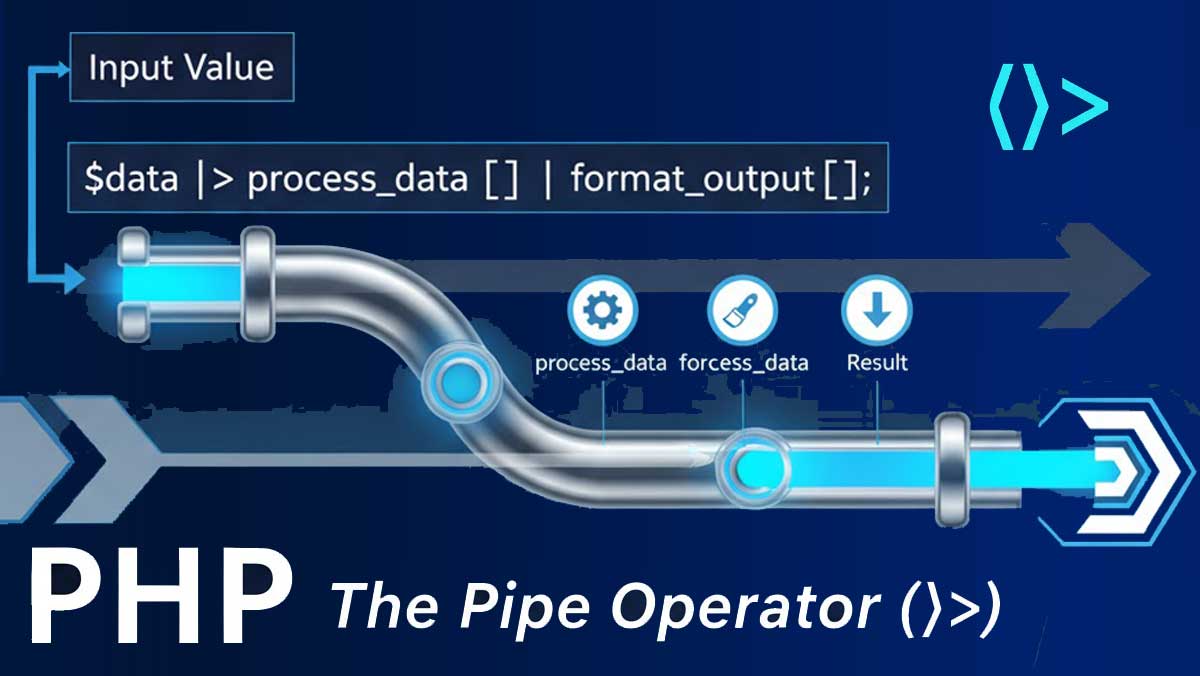
PHP 8.5 introduces one of the most awaited and modern syntax features — the Pipe Operator (|>).
This new operator simplifies function chaining, data transformation, and makes code more readable and declarative, much like what developers already enjoy in languages such as JavaScript, Elixir, and Hack.
Before anything else: if you’ve read another article about PHP 8.5’s pipe operator that shows code like this —
// ❌ This is NOT how PHP 8.5's pipe operator works
$result = $input
    |> htmlspecialchars($$)
    |> trim($$)
    |> strtoupper($$);
— that article is describing a rejected 2016 RFC, not the feature that actually shipped. The $$ placeholder syntax (nicknamed T_BLING by its author) was Sara Golemon’s proposal, ported from Facebook’s Hack/HHVM. It never passed a PHP vote. The pipe operator that landed in PHP 8.5 works differently, and the difference matters both for writing correct code and for understanding why the design is actually better.
This guide covers the real implementation, end to end.
The History in 60 Seconds (It Explains the Design)
The story for PHP pipes begins with Hack/HHVM, Facebook’s PHP fork. In 2016, Sara Golemon proposed porting Hack’s pipes to PHP, where the right side of a pipe was an expression and used a magic $$ token to inject the left-side result. While powerful, it was also non-standard, unlike any other language.
That RFC failed. A second attempt in the years following also didn’t reach a vote. In 2025, Larry Garfield took a third swing — this time with a simpler, cleaner implementation with hand-holding from the PHP Foundation dev team — and got it through. Third time’s the charm.
The key design decision: instead of a $$ placeholder inside arbitrary expressions, the right side of |> must be a callable. The left-side value is passed as the callable’s first argument. That’s it. Simple, composable, and consistent with how PHP’s callable system already works everywhere else.
The Actual Syntax
The |> operator accepts a single-parameter callable on the right and passes the left-side value to it, evaluating to the callable’s result. The callable on the right may be any valid PHP callable: a Closure, a first-class callable, an object that implements __invoke(), etc.
// The two simplest equivalent forms:
$result = "Hello World" |> strlen(...);
$result = strlen("Hello World");

// The (...) is PHP's first-class callable syntax — it turns the
// function name into a Closure object. This is what makes it a callable.
The (…) part next to the function name makes it a first-class callable.</cite> This syntax was added in PHP 8.1 specifically to make functions usable as values — the pipe operator builds directly on top of it.
Reading the Syntax: Before and After
Let’s start with the example, but written correctly:
$input = "   <b>Hello PHP!</b>   ";

// ❌ (incorrect — $$ syntax was never implemented)
$output = $input
    |> strip_tags($$)
    |> trim($$)
    |> strtoupper($$);

// ✅ What PHP 8.5 actually shipped
$output = $input
    |> strip_tags(...)
    |> trim(...)
    |> strtoupper(...);

echo $output; // HELLO PHP!
And what this replaces in PHP 8.4 and below:
// PHP 8.4: nested calls — reads inside-out, not execution-order
$output = strtoupper(trim(strip_tags($input)));

// PHP 8.4: intermediate variables — correct order, verbose
$stripped = strip_tags($input);
$trimmed  = trim($stripped);
$output   = strtoupper($trimmed);
The pipe version reads in exactly the order operations execute: strip tags, then trim, then uppercase. No inside-out mental gymnastics, no throwaway variable names to invent.
Every Callable Type the Pipe Operator Accepts
Because the right side is just a callable, every callable form PHP supports works here:
// 1. First-class callable (the most common pattern)
$result = " hello world " |> trim(...) |> ucwords(...);
// "Hello World"
// 2. Arrow function (for callables that need extra arguments)
$result = [3, 1, 4, 1, 5, 9, 2, 6]
|> fn($arr) => array_filter($arr, fn($n) => $n > 3)
|> fn($arr) => array_values($arr)
|> fn($arr) => array_sum($arr);
// 24
// 3. Named function string (classic PHP callable form)
$result = "hello" |> 'strtoupper';
// "HELLO"
// 4. Static method
class TextUtils {
public static function slugify(string $text): string {
return strtolower(str_replace(' ', '-', trim($text)));
}
}
$slug = " My Blog Post " |> [TextUtils::class, 'slugify'];
// "my-blog-post"
// 5. Instance method via __invoke
class Sanitizer {
public function __invoke(string $input): string {
return strip_tags(htmlspecialchars($input));
}
}
$clean = "<script>alert('xss')</script>" |> new Sanitizer();
// "<script>alert('xss')</script>"
// 6. Closure
$double = fn(int $n) => $n * 2;
$result = 5 |> $double;
// 10
You may use the pipe operator with various callables from different sources, like built-in functions and custom helpers. This removes the hassle of typing the same intermediary variable again and again.
The Critical Limitation: First Argument Only
This is the most important thing to understand about the current design, and the reason arrow functions appear so often in pipe chains.
The pipe operator always passes the left-side value as the first argument. If the function you need puts the “data” argument somewhere other than first position, you need to wrap it:
// array_map's signature: array_map(callable $callback, array $array)
// The array is the SECOND argument — pipe can't call it directly.

// ❌ This won't work as expected
$result = [1, 2, 3] |> array_map(...); // array_map needs a callback too

// ✅ Wrap it in an arrow function
$result = [1, 2, 3]
    |> fn($arr) => array_map(fn($n) => $n * 2, $arr)
    |> fn($arr) => array_filter($arr, fn($n) => $n > 4);
// [6] (only 6 passes the filter)

// ✅ Or flip the argument order with a helper
$double = fn($arr) => array_map(fn($n) => $n * 2, $arr);
$result = [1, 2, 3] |> $double;
This is a deliberate design trade-off. The RFC authors chose simplicity and consistency over the full expressiveness of the $$ placeholder approach, partly because the $$ version made code harder to statically analyze. A future Partial Function Application RFC (currently targeting PHP 8.6) will address multi-argument cases directly — but for now, arrow functions fill the gap cleanly.
What Is the Pipe Operator?
The pipe operator (|>) allows you to pass the result of one expression directly as an argument to another function — without nesting multiple function calls.
In simpler terms:
“Take the result on the left side, and pass it as the first argument to the function on the right side.”
Traditional PHP (before 8.5)
$result = strtoupper(trim(htmlspecialchars($input)));
This works fine, but it’s harder to read when functions get deeply nested.
PHP 8.5 With Pipe Operator
    $result = $input
    |> htmlspecialchars($$)
    |> trim($$)
    |> strtoupper($$);
Explanation:
- $input is piped into htmlspecialchars()
- Then the result is piped into trim()
- Finally, that result is piped into strtoupper()
The $$ acts as a placeholder variable for the piped value.
Much cleaner and easier to read!
Basic Syntax
$variable |> function_name($$);
- Left side: The value or expression to be passed.
- Right side: The function to receive that value.
- $$: A special placeholder that represents the left-side result.
Detailed Example
Let’s take a simple example of processing user input before saving it:
Example Without Pipe Operator
$userInput = "   <b>Hello PHP!</b>   ";

$output = strtoupper(trim(strip_tags($userInput)));

echo $output; // HELLO PHP!
>Example Using Pipe Operator (|>)
    $userInput = "   <b>Hello PHP!</b>   ";

$output = $userInput
    |> strip_tags($$)
    |> trim($$)
    |> strtoupper($$);

echo $output; // HELLO PHP!
Benefits:
- Readability improves significantly.
- No deeply nested parentheses.
- Easier to debug or comment out individual transformation steps.
Real-World Use Case
Use Case 1: Data Sanitization Pipeline
    $cleanData = $rawInput
    |> trim($$)
    |> stripslashes($$)
    |> htmlspecialchars($$)
    |> strtolower($$);
This pipeline clearly shows the step-by-step transformation of user input.
Use Case 2: Complex Array Transformations
   $numbers = [1, 2, 3, 4, 5];

$result = $numbers
    |> array_map(fn($n) => $n * 2, $$)
    |> array_filter($$, fn($n) => $n > 5)
    |> array_sum($$);

echo $result; // 18 (i.e., (6 + 8 + 10) = 24)
Pipe operators make it easy to process data sequentially — like a “pipeline” of transformations.
Use Case 3: Working with Objects
class Product {
    public function priceWithTax($price) {
        return $price * 1.18;
    }
}

$product = new Product();

$finalPrice = 100
    |> $product->priceWithTax($$)
    |> number_format($$, 2);

echo "₹" . $finalPrice; // ₹118.00
This approach makes the data flow explicit and readable.
Why It’s Important
| Benefit | Description |
|---|---|
| Improves Readability | Removes nested parentheses and clarifies data flow |
| Encourages Functional Style | Promotes clean and declarative programming |
| Simplifies Chaining | Perfect for transforming values step-by-step |
| Easier Debugging | Comment out or log any stage in the pipeline easily |
Things to Remember
- The $$ placeholder must appear on the right side.
- It can’t replace multiple arguments — it’s for a single input value.
- Works only with PHP 8.5 or later.
- Not yet supported in older PHP versions (8.4 or below).
Experimental Example (Advanced)
Here’s how the pipe operator can even simplify custom pipeline functions:
   function double($x) { return $x * 2; }
function addFive($x) { return $x + 5; }
function square($x) { return $x * $x; }

$result = 10
    |> double($$)
    |> addFive($$)
    |> square($$);

echo $result; // ((10 * 2) + 5)^2 = 625
You can see the logical flow clearly — no nesting, no confusion.
Real-World Scenarios
Sanitizing and Validating User Input
function validate_email(string $email): string|false {
    return filter_var($email, FILTER_VALIDATE_EMAIL);
}

$result = $_POST['email'] ?? ''
    |> trim(...)
    |> strtolower(...)
    |> validate_email(...);

if ($result === false) {
    http_response_code(400);
    echo json_encode(['error' => 'Invalid email address']);
    exit;
}

// $result is now a clean, validated, lowercase email address
Compare that to the pre-pipe version — same logic, more noise:
$email = trim($_POST['email'] ?? '');
$email = strtolower($email);
$valid = filter_var($email, FILTER_VALIDATE_EMAIL);
if ($valid === false) { ... }
The pipe version makes the intent clearer: this is a pipeline, and if any step produces a falsy result, we bail out.
Processing API Response Data
function decode_json(string $json): array {
    return json_decode($json, true) ?? [];
}

function extract_active(array $users): array {
    return array_filter($users, fn($u) => $u['active'] === true);
}

function sort_by_name(array $users): array {
    usort($users, fn($a, $b) => strcmp($a['name'], $b['name']));
    return $users;
}

function pluck_names(array $users): array {
    return array_column($users, 'name');
}

// The pipeline reads exactly like the English description:
// "Take the raw JSON, decode it, keep only active users,
//  sort them by name, then extract just their names."
$activeNames = $rawJson
    |> decode_json(...)
    |> extract_active(...)
    |> sort_by_name(...)
    |> pluck_names(...);

// ["Alice", "Charlie", "Eve"] — or whatever the data contains
Each step is a named, single-responsibility function. This makes the pipeline trivially unit-testable: test decode_json(), extract_active(), and sort_by_name() in isolation, and the pipeline composition is correct by construction.
function to_title_case(string $s): string {
    return ucwords(strtolower($s));
}

function truncate(string $s, int $max = 60): string {
    return strlen($s) > $max ? substr($s, 0, $max - 3) . '...' : $s;
}

$displayTitle = $rawTitle
    |> trim(...)
    |> to_title_case(...)
    |> fn($s) => truncate($s, 50);
Building a Logging Pipeline
function add_timestamp(array $entry): array {
    return array_merge($entry, ['timestamp' => date('c')]);
}

function add_request_id(array $entry): array {
    static $id = null;
    $id ??= bin2hex(random_bytes(8));
    return array_merge($entry, ['request_id' => $id]);
}

function to_json_line(array $entry): string {
    return json_encode($entry) . PHP_EOL;
}

function write_to_log(string $line): string {
    file_put_contents('/var/log/app.log', $line, FILE_APPEND);
    return $line; // pass through so the chain can continue
}

$logEntry = ['level' => 'error', 'message' => 'DB connection failed', 'context' => []]
    |> add_timestamp(...)
    |> add_request_id(...)
    |> to_json_line(...)
    |> write_to_log(...);
Important Edge Cases to Know
void Functions in a Chain
PHP functions with void return types can be used in a chain, but the return value is coerced to null. A void function is typically used as the last callable of the chain, and not in the middle because the rest of the chain will only get null from that point forward.
function log_value(mixed $v): void {
    error_log(print_r($v, true));
    // returns void — coerced to null in a pipe
}

// ✅ Fine as the last step
$result = $data |> process(...) |> log_value(...);
// $result is null here, which is probably what you want

// ❌ Problematic as an intermediate step
$result = $data |> log_value(...) |> process(...);
// process() receives null — almost certainly a bug
By-Reference Parameters Are Forbidden
Because the intermediate values of a pipe are not stored in a typical variable, using functions that expect a parameter to be passed by reference is not allowed.
// ❌ sort() modifies its argument by reference — not allowed in a pipe
$result = [3, 1, 2] |> sort(...); // Error

// ✅ Use a wrapper that returns the sorted copy instead
$result = [3, 1, 2] |> fn($arr) => (usort($arr, fn($a, $b) => $a - $b) && false) ?: $arr;

// Or more readably:
function array_sort(array $arr): array {
    sort($arr);
    return $arr;
}
$result = [3, 1, 2] |> array_sort(...); // [1, 2, 3] ✅
Operator Precedence
The pipe operator has low precedence — lower than arithmetic, string, and comparison operators — so the left side is fully evaluated before piping:
$result = 10 + 5 |> fn($n) => $n * 2; // (10 + 5) |> ..., so 30
$result = 10 + (5 |> fn($n) => $n * 2); // 10 + 10, so 20 — needs explicit parens
When in doubt, use parentheses to make the intended grouping explicit.
How PHP’s Pipe Operator Compares to Other Languages
| Language | Pipe Syntax | Right Side |
|---|---|---|
| PHP 8.5 | $v |> fn(…) | Any callable; value passed as first arg |
| Elixir | val |> func() | Function call; value passed as first arg |
| F# | val |> func | Function reference; same semantics |
| JavaScript (TC39 proposal) | val |> func(%) | Placeholder % marks injection point |
| Hack (2016) | val |> func($$) | Placeholder $$ — the rejected PHP proposal |
PHP’s implementation most closely resembles Elixir and F#: clean, no placeholder, first argument only. This is intentional. It’s more restrictive than the $$ approach but far simpler to reason about, and partial function application (coming in 8.6) will handle the multi-argument cases the current design can’t.
Combining the Pipe Operator with Other PHP 8.5 Features
The pipe operator becomes even more powerful when combined with other PHP 8.5 additions:
// Pipe + clone with (for immutable object transformations)
final readonly class Price {
    public function __construct(
        public float $amount,
        public string $currency,
    ) {}
}

function apply_discount(Price $p, float $pct): Price {
    return clone($p, ['amount' => round($p->amount * (1 - $pct), 2)]);
}

function apply_tax(Price $p, float $rate): Price {
    return clone($p, ['amount' => round($p->amount * (1 + $rate), 2)]);
}

$finalPrice = new Price(100.00, 'USD')
    |> fn($p) => apply_discount($p, 0.10)  // -10%  → 90.00
    |> fn($p) => apply_tax($p, 0.18);      // +18%  → 106.20

echo $finalPrice->amount; // 106.2
What’s Coming Next: Partial Function Application in PHP 8.6
The one genuine limitation of the current pipe operator — that it only passes the value as the first argument — is addressed by the Partial Function Application (PFA) RFC, currently targeted for PHP 8.6. With PFA, you’ll be able to do:
// PHP 8.6 (proposed) — PFA fills in arguments with ?
$result = [1, 2, 3, 4, 5]
    |> array_map(fn($n) => $n * 2, ?)   // ? = the piped array
    |> array_filter(?, fn($n) => $n > 4) // ? = the piped array
    |> array_sum(?);
// 18
This removes the need for wrapper arrow functions in multi-argument cases and makes the pipe operator significantly more expressive. The current PHP 8.5 design was deliberately kept minimal to ship without waiting for PFA — and the two features were designed to compose cleanly when PFA eventually lands.
Should You Start Using It Now?
Yes, with one practical consideration: minimum PHP version. If your codebase or package supports PHP 8.4 and below, you can’t use |> without a version check. But for new projects, or any codebase already pinned to PHP 8.5+, there’s no reason to wait.
The pipe operator shines most in two specific contexts:
- Data transformation pipelines where a value moves through a clear sequence of steps.
- Composition of small, single-responsibility functions that you’d otherwise nest or chain through temporaries.
It’s not a replacement for method chaining on objects (which remains simpler when you’re working within a single class’s API), and it’s not necessary for simple two-step transformations where the nested form is still readable.
The new Pipe Operator (|>) in PHP 8.5 is a huge leap toward cleaner, more readable, and functional programming.
It helps developers write elegant pipelines of data transformation without complex nesting.
If you often find yourself writing chained transformations, the pipe operator will make your PHP code more expressive and modern — aligning PHP with the syntax styles of other high-level languages.