What is SQL Injection?
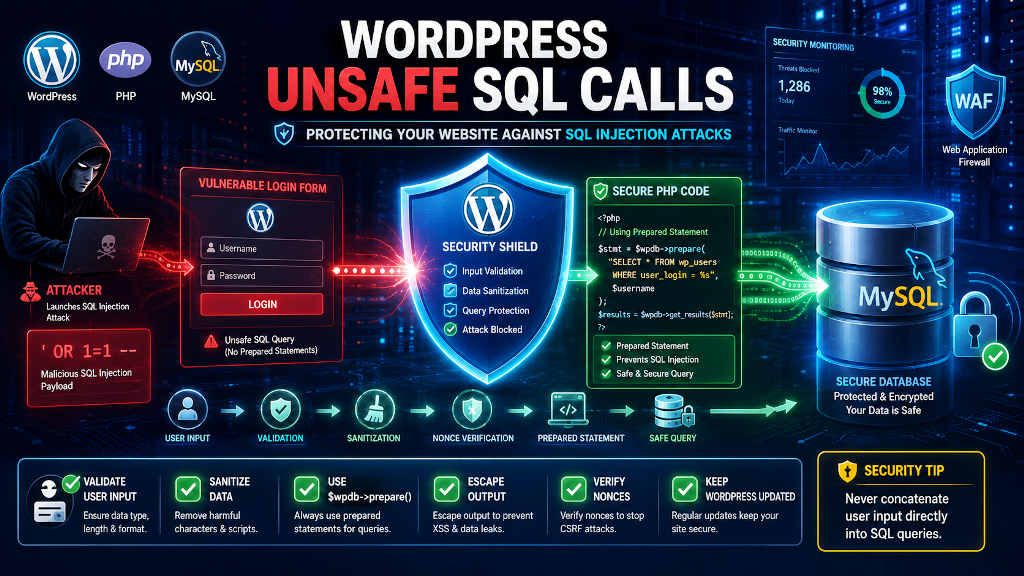
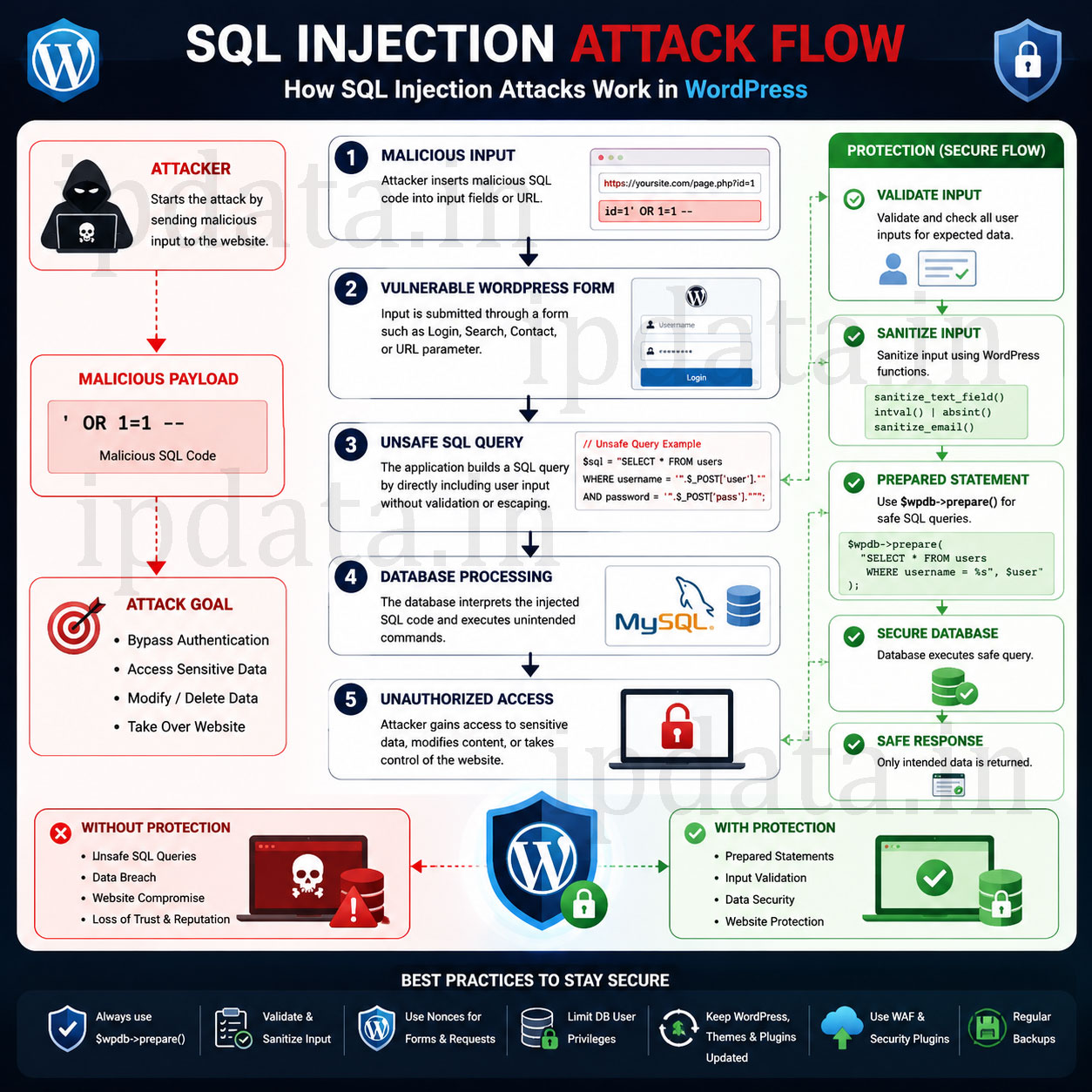
SQL (Structured Query Language) is the language WordPress uses to manage its MySQL database. An SQL injection (SQLi) attack happens when an attacker inserts malicious SQL code into a query by manipulating input fields or URL parameters. For example, a login form that builds a query like SELECT * FROM users WHERE username=’input’ AND password=’input’ could be subverted if an attacker submits admin’ — as the username. This changes the query to SELECT * FROM users WHERE username=’admin’ — ‘ AND password=’…’, effectively bypassing the password check. In essence, unsafe SQL calls that directly include user input allow attackers to retrieve, modify, or delete sensitive data in the database. SQLi is powerful because it exploits server-side code: a successful injection can give an attacker privileges equivalent to a database administrator, enabling data theft, corruption, or the creation of hidden backdoors.
SQL Injection in WordPress:
WordPress’s core uses the $wpdb class, which supports prepared statements and safe methods ($wpdb->insert, $wpdb->update, etc.) to mitigate SQLi by default. This means standard WordPress queries automatically escape input and separate data from SQL logic. However, vulnerabilities often arise in plugins, themes, or custom code that build queries unsafely. In 2022, for instance, a critical WordPress core flaw (CVE-2022-21661) was discovered: improper sanitization in WP_Query could allow SQL injections via certain plugin parameters. This was fixed in WP 5.8.3, and site owners were urged to enable auto-updates to receive the patch. The takeaway is that third-party code is the usual weak link: as Patchstack explains, a vulnerable plugin can “easily allow attackers to execute malicious SQL queries” and defeat WordPress’s built-in protections. Common entry points for SQLi include any user input – comment fields, contact or search forms, AJAX endpoints, etc. Attackers may use various techniques (logical operators, UNION queries, blind techniques) to alter query logic or extract hidden data.
Why WordPress SQL Injection Is Different From Textbook Examples
SQL injection is the #1 most exploited vulnerability class in web applications, and WordPress sites are not exempt. In 2024, SQL injection accounted for 30% of all critical WordPress plugin vulnerabilities. The CVE-2022-21661 flaw in WordPress core itself affected every version before 5.8.3 — millions of sites simultaneously vulnerable.
The original article covers the theory and lists preventions. This guide goes to practitioner depth: working, runnable attack demonstrations alongside their fixes, every $wpdb->prepare() placeholder explained, the five injection types that prepared statements alone cannot stop, a complete plugin audit methodology, and a production-ready detection system that emails you the moment an injection attempt hits your site.
Reading this guide does not require prior security expertise. It requires knowing PHP and WordPress development — because that’s exactly where these vulnerabilities live.
Part 1 — What SQL Injection Actually Does (Attack Demonstrations)
Never put these in production. These examples demonstrate exactly how attacks work so developers recognise vulnerable patterns when they write or audit code.
Attack Type 1: Authentication Bypass
<?php
// ❌ VULNERABLE: A custom login check in a plugin
// Located in: /wp-content/plugins/custom-auth/auth.php

function custom_check_login(string $username, string $password): bool {
    global $wpdb;

    // NEVER DO THIS — raw string concatenation:
    $user = $wpdb->get_row(
        "SELECT * FROM {$wpdb->users}
         WHERE user_login = '{$username}'
         AND user_pass = '{$password}'"
    );

    return $user !== null;
}

// ── The attack ────────────────────────────────────────────────────────────────
// Attacker submits as username:
$malicious_username = "admin' -- ";
// Password can be anything — the -- comments it out

// The resulting query becomes:
// SELECT * FROM wp_users
// WHERE user_login = 'admin' --  ' AND user_pass = 'anything'
//                            ↑
//                            Everything after this is a SQL comment
//                            → Password check is completely removed
//                            → Attacker logs in as any user whose name they know

// ✅ FIXED: Use $wpdb->prepare()
function custom_check_login_safe(string $username, string $password): bool {
    global $wpdb;

    $user = $wpdb->get_row(
        $wpdb->prepare(
            "SELECT user_login, user_pass FROM {$wpdb->users}
             WHERE user_login = %s",
            $username
        )
    );

    // Verify password separately using WordPress's own function:
    if (!$user) return false;
    return wp_check_password($password, $user->user_pass);
}
Attack Type 2: UNION-Based Data Extraction
<?php
// ❌ VULNERABLE: Product search endpoint in a custom plugin
function search_products(): void {
    global $wpdb;

    $search = $_GET['q'] ?? '';

    // Raw concatenation — classic mistake:
    $results = $wpdb->get_results(
        "SELECT id, title, price FROM {$wpdb->prefix}products
         WHERE title LIKE '%{$search}%'"
    );

    wp_send_json($results);
}

// ── The UNION attack ──────────────────────────────────────────────────────────
// Attacker sends this as ?q= value (URL encoded):
$payload = "' UNION SELECT user_login, user_pass, user_email FROM wp_users -- ";

// The resulting query:
// SELECT id, title, price FROM wp_products WHERE title LIKE '%'
// UNION SELECT user_login, user_pass, user_email FROM wp_users -- %'
//
// Result: The API returns EVERY WordPress username, password hash, and email
// Attacker then runs the hashes through hashcat to crack MD5/bcrypt
// They now own every account on the site.

// ── What the attacker gets back (example JSON response): ──────────────────────
// [
//   {"id":"admin", "title":"$P$BZ2QSBGCf/tcFLIFc2XGGtc0Y8.","price":"admin@yoursite.com"},
//   {"id":"editor","title":"$P$BGxB.r1XhbJSMhSUMrDY9OIe1VfNV0","price":"editor@yoursite.com"}
// ]

// ✅ FIXED:
function search_products_safe(): void {
    global $wpdb;

    // Verify nonce first (see Part 6):
    check_ajax_referer('product_search_nonce', 'nonce');

    $search = sanitize_text_field($_GET['q'] ?? '');

    if (empty($search) || strlen($search) < 2) {
        wp_send_json([]);
        return;
    }

    $results = $wpdb->get_results(
        $wpdb->prepare(
            "SELECT id, title, price FROM {$wpdb->prefix}products
             WHERE title LIKE %s
             LIMIT 20",
            '%' . $wpdb->esc_like($search) . '%'
        )
    );

    // Return ONLY the fields the client needs (never SELECT *):
    $safe_results = array_map(fn($r) => [
        'id'    => absint($r->id),
        'title' => esc_html($r->title),
        'price' => floatval($r->price),
    ], $results ?: []);

    wp_send_json($safe_results);
}
Attack Type 3: Blind SQL Injection (Time-Based)
<?php
// Blind SQLi — no error messages, no data returned directly.
// Attacker infers information from timing differences.

// ❌ VULNERABLE: A filter that checks if a post ID is valid
function is_post_visible(string $post_id): bool {
    global $wpdb;

    // Concatenating $post_id without validation:
    $count = $wpdb->get_var(
        "SELECT COUNT(*) FROM {$wpdb->posts}
         WHERE ID = {$post_id} AND post_status = 'publish'"
    );

    return $count > 0;
}

// ── The timing attack payload ─────────────────────────────────────────────────
// Attacker calls: is_post_visible("1 AND SLEEP(5)")
// Resulting query: SELECT COUNT(*) FROM wp_posts
//                  WHERE ID = 1 AND SLEEP(5) AND post_status = 'publish'
//
// If the request takes 5 seconds longer than normal → the SLEEP executed
// → The injection point is confirmed
//
// Next payload: 1 AND IF(SUBSTRING(user_pass,1,1)='$', SLEEP(5), 0)
// FROM wp_users WHERE user_login='admin'
// → If response is slow: first char of admin hash is '$' (bcrypt prefix)
// → If fast: it's not '$'
// → Repeat for each character to extract the full hash character by character
// Tools like sqlmap automate this entire process

// ✅ FIXED: Validate that post_id is actually an integer FIRST:
function is_post_visible_safe(mixed $post_id): bool {
    global $wpdb;

    // Always cast to integer before using in queries:
    $id = absint($post_id);

    if ($id <= 0) return false;

    // Now safe to use %d placeholder:
    $count = $wpdb->get_var(
        $wpdb->prepare(
            "SELECT COUNT(*) FROM {$wpdb->posts}
             WHERE ID = %d AND post_status = 'publish'",
            $id
        )
    );

    return (int)$count > 0;
}
Attack Type 4: Second-Order Injection (The Sneaky One)
<?php
// Second-order (stored) injection: data is safely stored first,
// then UNSAFELY used in a later query — making it invisible to basic audits.

// ❌ VULNERABLE PATTERN:

// Step 1: User registration — this looks safe (it uses prepare):
function register_user_safe_storage(string $username, string $email): void {
    global $wpdb;

    // Safely stored with prepare():
    $wpdb->prepare(
        "INSERT INTO {$wpdb->prefix}custom_users (username, email)
         VALUES (%s, %s)",
        $username,
        $email
    );
}

// Attacker registers with username: admin' --

// Step 2: Later, an admin updates the user — THIS IS WHERE THE INJECTION FIRES:
function update_user_email_by_name(string $new_email): void {
    global $wpdb;

    // Retrieves the current logged-in user's username:
    $current_user = wp_get_current_user();
    $username     = $current_user->user_login; // = "admin' --"

    // This looks "safe" because $new_email comes from a validated form...
    // BUT $username came from the database and is TRUSTED WITHOUT RE-ESCAPING:
    $wpdb->query(
        "UPDATE {$wpdb->prefix}custom_users
         SET email = '{$new_email}'
         WHERE username = '{$username}'"
        //                  ↑ Injection! "admin' --" is stored, now executed as SQL
    );
    // Resulting query: UPDATE ... SET email='...' WHERE username='admin' --'
    // The WHERE clause is commented out → updates ALL users' emails
}

// ✅ THE RULE: ALL values used in SQL must be prepared — even values from YOUR OWN DATABASE.
// Database values are controlled by users (past or present). Treat them as untrusted.
function update_user_email_by_name_safe(string $new_email): void {
    global $wpdb;

    $current_user = wp_get_current_user();

    // Even though $username came from the database, STILL use prepare():
    $wpdb->query(
        $wpdb->prepare(
            "UPDATE {$wpdb->prefix}custom_users
             SET email = %s
             WHERE username = %s",
            sanitize_email($new_email),
            $current_user->user_login  // Prepared — safe regardless of content
        )
    );
}
Part 2 — The Complete $wpdb->prepare() Reference
The original article shows one example with %d. Here is every placeholder type with examples, edge cases, and common mistakes:
  <?php
global $wpdb;

// ══════════════════════════════════════════════════════════════════════════════
// PLACEHOLDER TYPES
// ══════════════════════════════════════════════════════════════════════════════

// %d — Integer (decimal)
// Use for: IDs, counts, booleans (0/1), timestamps stored as integers
$wpdb->prepare("SELECT * FROM {$wpdb->posts} WHERE ID = %d", $post_id);
$wpdb->prepare("SELECT * FROM {$wpdb->users} WHERE is_active = %d", 1);
// IMPORTANT: %d truncates to integer — "5.7" becomes 5, "abc" becomes 0

// %s — String
// Use for: Text, email, status values, slugs, any non-numeric value
$wpdb->prepare("SELECT * FROM {$wpdb->users} WHERE user_email = %s", $email);
$wpdb->prepare("SELECT * FROM {$wpdb->posts} WHERE post_status = %s", 'publish');
// IMPORTANT: Adds surrounding quotes automatically — do NOT add quotes yourself:
// ❌ WRONG:  $wpdb->prepare("... WHERE status = '%s'", $status) → double-quoted!
// ✅ RIGHT:  $wpdb->prepare("... WHERE status = %s", $status)

// %f — Float (decimal number)
// Use for: Prices, coordinates, percentages
$wpdb->prepare(
    "SELECT * FROM {$wpdb->prefix}products WHERE price BETWEEN %f AND %f",
    9.99,
    49.99
);

// %i — Identifier (column/table name) — Added in WordPress 6.2
// Use for: Dynamic column names, table names — NOT values
// This is crucial — column names CANNOT use %s or %d
$column = 'post_title';
$wpdb->prepare("SELECT %i FROM {$wpdb->posts} WHERE ID = %d", $column, $post_id);
// IMPORTANT: %i is for identifiers only, added in WP 6.2+
// Before WP 6.2, you must whitelist column/table names manually (see Part 3)

// ── Multiple placeholders ─────────────────────────────────────────────────────
$wpdb->prepare(
    "SELECT * FROM {$wpdb->posts}
     WHERE post_author = %d
       AND post_status = %s
       AND post_type = %s
       AND post_date > %s",
    $author_id,
    'publish',
    'post',
    $date_string
);

// ── Placeholders in IN() clause ───────────────────────────────────────────────
// The most common mistake: you cannot use a single %s for an array
// ❌ WRONG:
$ids = [1, 2, 3, 4, 5];
$wpdb->prepare("SELECT * FROM {$wpdb->posts} WHERE ID IN (%s)", implode(',', $ids));
// This produces: WHERE ID IN ('1,2,3,4,5') — ONE string, not multiple values

// ✅ CORRECT: Build dynamic placeholders
function get_posts_by_ids(array $ids): array {
    global $wpdb;

    if (empty($ids)) return [];

    // Ensure all values are integers:
    $ids = array_map('absint', $ids);
    $ids = array_filter($ids); // Remove zeros

    if (empty($ids)) return [];

    // Build one %d placeholder per ID:
    $placeholders = implode(', ', array_fill(0, count($ids), '%d'));

    return $wpdb->get_results(
        $wpdb->prepare(
            "SELECT ID, post_title, post_status FROM {$wpdb->posts}
             WHERE ID IN ({$placeholders})
               AND post_status = %s",
            ...[...$ids, 'publish']  // Spread: all IDs + status string
        )
    ) ?: [];
}

// ── LIKE clause — requires $wpdb->esc_like() BEFORE prepare() ─────────────────
function search_posts(string $term): array {
    global $wpdb;

    // WRONG approach (% and _ have special meaning in LIKE):
    // $wpdb->prepare("... WHERE title LIKE %s", '%' . $term . '%');
    // If $term contains % or _ they become wildcards, breaking the search

    // CORRECT: esc_like() escapes wildcards, THEN prepare() escapes the string:
    $escaped_term = $wpdb->esc_like($term);

    return $wpdb->get_results(
        $wpdb->prepare(
            "SELECT ID, post_title FROM {$wpdb->posts}
             WHERE post_title LIKE %s
               AND post_status = %s
             LIMIT %d",
            '%' . $escaped_term . '%',
            'publish',
            20
        )
    ) ?: [];
}

// ── INSERT with $wpdb->insert() — no prepare() needed ────────────────────────
// WordPress's insert(), update(), delete() methods handle escaping automatically:
$wpdb->insert(
    "{$wpdb->prefix}my_table",
    [
        'user_id'    => absint($user_id),   // Integer → sanitize before insert
        'email'      => sanitize_email($email),
        'message'    => sanitize_textarea_field($message),
        'created_at' => current_time('mysql'),
    ],
    ['%d', '%s', '%s', '%s']  // Format string for each value (optional but recommended)
);

// ── UPDATE with $wpdb->update() ───────────────────────────────────────────────
$wpdb->update(
    "{$wpdb->prefix}my_table",
    ['message' => sanitize_textarea_field($new_message), 'updated_at' => current_time('mysql')],
    ['id'      => absint($record_id)],
    ['%s', '%s'],  // New value formats
    ['%d']         // WHERE clause formats
);

// ── DELETE with $wpdb->delete() ───────────────────────────────────────────────
$wpdb->delete(
    "{$wpdb->prefix}my_table",
    ['user_id' => absint($user_id), 'status' => 'pending'],
    ['%d', '%s']
);

// ── Verify prepare() output before debugging ─────────────────────────────────
// In development, inspect the generated SQL:
$sql = $wpdb->prepare("SELECT * FROM {$wpdb->users} WHERE user_email = %s", $email);
error_log("Generated SQL: {$sql}"); // Safe: prepared SQL has placeholders replaced, no injection
Part 3 — The Five Injection Vectors That Prepared Statements Cannot Stop
This is the most important section — the original article doesn’t cover any of these:
Vector 1: ORDER BY Injection (Cannot Use Prepare)
<?php
// ORDER BY column names are SQL identifiers, not values.
// $wpdb->prepare() and %s placeholders ADD QUOTES around values.
// Quoted column names are invalid SQL.
// Therefore: prepare() CANNOT safely handle dynamic ORDER BY.

// ❌ WRONG ASSUMPTION — This does NOT work correctly:
$column = $_GET['sort'] ?? 'post_date';
$order  = $_GET['dir']  ?? 'DESC';

$wpdb->prepare(
    "SELECT * FROM {$wpdb->posts} WHERE post_status = 'publish'
     ORDER BY %s %s",
    $column,
    $order
);
// Generates: ORDER BY 'post_date' 'DESC'
// This is INVALID SQL — MySQL expects a column name, not a string literal
// So WordPress "fixed" this by NOT quoting %s in ORDER BY... making it VULNERABLE again

// The ONLY safe approach for ORDER BY: WHITELIST
// ✅ CORRECT: Explicit allowlist of permitted columns and directions
function get_sorted_posts(string $sort_column, string $sort_dir, int $page = 1): array {
    global $wpdb;

    // ── WHITELIST — only these column names are allowed ────────────────────
    $allowed_columns = [
        'post_date'     => 'post_date',
        'post_title'    => 'post_title',
        'comment_count' => 'comment_count',
        'view_count'    => 'view_count', // Custom meta-denormalized column
    ];

    // ── WHITELIST — only ASC or DESC ───────────────────────────────────────
    $allowed_dirs = ['ASC', 'DESC'];

    // Validate against whitelist:
    $safe_column = $allowed_columns[$sort_column] ?? 'post_date';  // Default if invalid
    $safe_dir    = in_array(strtoupper($sort_dir), $allowed_dirs, true)
                   ? strtoupper($sort_dir) : 'DESC';

    // NOW safe to interpolate (these values come from our whitelist, not user input):
    $sql = "SELECT ID, post_title, post_date
            FROM {$wpdb->posts}
            WHERE post_status = %s
              AND post_type = %s
            ORDER BY {$safe_column} {$safe_dir}
            LIMIT %d OFFSET %d";

    return $wpdb->get_results(
        $wpdb->prepare($sql, 'publish', 'post', 15, ($page - 1) * 15)
    ) ?: [];
}

// Usage:
$posts = get_sorted_posts(
    $_GET['sort'] ?? 'post_date',  // Unsafe input — sanitized by whitelist
    $_GET['dir']  ?? 'DESC',       // Unsafe input — sanitized by whitelist
    absint($_GET['page'] ?? 1)
);
Vector 2: LIMIT/OFFSET Injection
<?php
// LIMIT and OFFSET accept only integers.
// The fix is absint() or explicit integer casting — prepare() with %d also works.

// ❌ VULNERABLE:
$limit  = $_GET['per_page'] ?? '10';
$offset = $_GET['offset']   ?? '0';

$wpdb->query(
    "SELECT * FROM {$wpdb->posts} WHERE post_status = 'publish'
     LIMIT {$limit} OFFSET {$offset}"
);

// Attack payload: per_page=10 UNION SELECT user_login,user_pass,3 FROM wp_users--
// Resulting query: LIMIT 10 UNION SELECT user_login,user_pass,3 FROM wp_users--

// ✅ FIXED: Either cast strictly:
$limit  = max(1, min(100, absint($_GET['per_page'] ?? 10)));  // Clamp 1–100
$offset = max(0, absint($_GET['offset'] ?? 0));

// OR use %d with prepare():
$wpdb->prepare(
    "SELECT * FROM {$wpdb->posts} WHERE post_status = 'publish' LIMIT %d OFFSET %d",
    $limit,
    $offset
);
Vector 3: Table Name Injection
<?php
// Table names are identifiers like column names.
// Never accept table names from user input without a strict whitelist.

// ❌ VULNERABLE: Plugin that lets users "export" from any table
function export_table(string $table_name): array {
    global $wpdb;
    return $wpdb->get_results("SELECT * FROM {$table_name}");
    // Attack: table_name = "wp_users WHERE 1=1 UNION SELECT..."
}

// ✅ FIXED: Whitelist allowed tables:
function export_table_safe(string $table_key): array {
    global $wpdb;

    $allowed_tables = [
        'products'   => "{$wpdb->prefix}products",
        'orders'     => "{$wpdb->prefix}orders",
        'reviews'    => "{$wpdb->prefix}reviews",
    ];

    if (!array_key_exists($table_key, $allowed_tables)) {
        wp_die('Invalid table selection', 'Error', ['response' => 400]);
    }

    $safe_table = $allowed_tables[$table_key];

    // %i for identifiers is available in WordPress 6.2+:
    return $wpdb->get_results(
        $wpdb->prepare("SELECT id, name, created_at FROM %i", $safe_table)
    ) ?: [];
}
Vector 4: meta_query and tax_query Injection
<?php
// WP_Query's meta_query and tax_query build SQL internally.
// If you pass user input directly into 'compare' operators or 'key' values, injection is possible.

// ❌ VULNERABLE: Passing user-controlled operator into meta_query
function get_products_by_price(): void {
    $compare = $_GET['compare'] ?? '=';  // User controls the SQL operator

    $query = new WP_Query([
        'post_type'  => 'product',
        'meta_query' => [[
            'key'     => '_price',
            'value'   => absint($_GET['price'] ?? 0),
            'compare' => $compare,  // Attacker submits 'compare=LIKE' or worse
            'type'    => 'NUMERIC',
        ]],
    ]);
}

// ✅ FIXED: Whitelist the compare operator:
function get_products_by_price_safe(): void {
    $allowed_compare = ['=', '!=', '>', '>=', '<', '<=', 'BETWEEN', 'NOT BETWEEN'];
    $compare         = in_array($_GET['compare'] ?? '=', $allowed_compare, true)
                       ? $_GET['compare'] : '=';

    $query = new WP_Query([
        'post_type'  => 'product',
        'meta_query' => [[
            'key'     => '_price',
            'value'   => absint($_GET['price'] ?? 0),
            'compare' => $compare,
            'type'    => 'NUMERIC',
        ]],
    ]);
}

// ❌ VULNERABLE: User-controlled meta_key in meta_query
function search_by_meta(): void {
    $meta_key = $_GET['field'] ?? '_price';  // User controls which meta field

    $query = new WP_Query([
        'meta_query' => [[
            'key'   => $meta_key,   // Attacker could inject via meta key
            'value' => '1',
        ]],
    ]);
}

// ✅ FIXED: Whitelist meta keys:
function search_by_meta_safe(): void {
    $allowed_meta_keys = ['_price', '_stock_status', '_sku', '_featured'];
    $meta_key = in_array($_GET['field'] ?? '', $allowed_meta_keys, true)
                ? $_GET['field'] : '_price';

    $query = new WP_Query([
        'meta_query' => [['key' => $meta_key, 'value' => sanitize_text_field($_GET['value'] ?? '')]],
    ]);
}
Vector 5: REST API Endpoint Injection
<?php
// WordPress REST API endpoints are publicly accessible — prime injection targets.
// Many developers sanitize POST form data but forget REST API parameters.

// ❌ VULNERABLE REST API endpoint:
add_action('rest_api_init', function() {
    register_rest_route('myapi/v1', '/search', [
        'methods'  => 'GET',
        'callback' => function(WP_REST_Request $request) {
            global $wpdb;

            $term = $request->get_param('q');  // No validation!

            $results = $wpdb->get_results(
                "SELECT ID, post_title FROM {$wpdb->posts}
                 WHERE post_title LIKE '%{$term}%'"
            );

            return new WP_REST_Response($results);
        },
        // Missing: permission_callback
    ]);
});

// ✅ FIXED REST API endpoint:
add_action('rest_api_init', function() {
    register_rest_route('myapi/v1', '/search', [
        'methods'             => 'GET',
        'callback'            => 'safe_search_callback',
        'permission_callback' => '__return_true',  // Public but validated

        // Use args schema for built-in validation:
        'args' => [
            'q' => [
                'required'          => true,
                'type'              => 'string',
                'minLength'         => 2,
                'maxLength'         => 100,
                'sanitize_callback' => 'sanitize_text_field',
                'validate_callback' => function($value) {
                    return is_string($value) && strlen(trim($value)) >= 2;
                },
            ],
            'per_page' => [
                'type'    => 'integer',
                'default' => 10,
                'minimum' => 1,
                'maximum' => 100,
            ],
        ],
    ]);
});

function safe_search_callback(WP_REST_Request $request): WP_REST_Response {
    global $wpdb;

    $term    = $request->get_param('q');       // Already sanitized by args schema
    $perPage = (int) $request->get_param('per_page');

    $results = $wpdb->get_results(
        $wpdb->prepare(
            "SELECT ID, post_title, post_excerpt FROM {$wpdb->posts}
             WHERE post_status = %s
               AND post_type = %s
               AND post_title LIKE %s
             LIMIT %d",
            'publish',
            'post',
            '%' . $wpdb->esc_like($term) . '%',
            $perPage
        )
    ) ?: [];

    return new WP_REST_Response(
        array_map(fn($p) => [
            'id'      => absint($p->ID),
            'title'   => esc_html($p->post_title),
            'excerpt' => wp_strip_all_tags($p->post_excerpt),
            'url'     => get_permalink($p->ID),
        ], $results)
    );
}
Part 4 — The Complete Safe Pattern Library
Every database operation type you’ll write in a WordPress plugin, done correctly:
<?php
declare(strict_types=1);

/**
 * Safe WordPress Database Operations Reference
 * Copy-paste patterns for every CRUD scenario.
 */
class SafeWpDatabase {

    // ── 1. Get single value ────────────────────────────────────────────────────
    public static function getUserEmail(int $userId): ?string {
        global $wpdb;
        return $wpdb->get_var(
            $wpdb->prepare(
                "SELECT user_email FROM {$wpdb->users} WHERE ID = %d",
                absint($userId)
            )
        );
    }

    // ── 2. Get single row ──────────────────────────────────────────────────────
    public static function getPost(int $postId): ?object {
        global $wpdb;
        return $wpdb->get_row(
            $wpdb->prepare(
                "SELECT ID, post_title, post_content, post_status, post_author
                 FROM {$wpdb->posts}
                 WHERE ID = %d AND post_status = %s",
                absint($postId),
                'publish'
            )
        );
    }

    // ── 3. Get multiple rows ───────────────────────────────────────────────────
    public static function getPostsByAuthor(int $authorId, int $limit = 10): array {
        global $wpdb;
        return $wpdb->get_results(
            $wpdb->prepare(
                "SELECT ID, post_title, post_date
                 FROM {$wpdb->posts}
                 WHERE post_author = %d
                   AND post_status = %s
                   AND post_type = %s
                 ORDER BY post_date DESC
                 LIMIT %d",
                absint($authorId),
                'publish',
                'post',
                absint($limit)
            )
        ) ?: [];
    }

    // ── 4. Get column as array ─────────────────────────────────────────────────
    public static function getPublishedPostIds(): array {
        global $wpdb;
        return $wpdb->get_col(
            $wpdb->prepare(
                "SELECT ID FROM {$wpdb->posts}
                 WHERE post_status = %s AND post_type = %s
                 ORDER BY post_date DESC",
                'publish',
                'post'
            )
        ) ?: [];
    }

    // ── 5. Full-text search ────────────────────────────────────────────────────
    public static function searchPosts(string $query, int $limit = 20): array {
        global $wpdb;

        if (strlen(trim($query)) < 2) return [];

        $escaped = $wpdb->esc_like(sanitize_text_field($query));

        return $wpdb->get_results(
            $wpdb->prepare(
                "SELECT ID, post_title, post_excerpt
                 FROM {$wpdb->posts}
                 WHERE post_status = %s
                   AND post_type = %s
                   AND (post_title LIKE %s OR post_content LIKE %s)
                 ORDER BY
                     CASE WHEN post_title LIKE %s THEN 0 ELSE 1 END,
                     post_date DESC
                 LIMIT %d",
                'publish',
                'post',
                '%' . $escaped . '%',
                '%' . $escaped . '%',
                '%' . $escaped . '%', // For ORDER BY CASE
                absint($limit)
            )
        ) ?: [];
    }

    // ── 6. Insert with return ID ───────────────────────────────────────────────
    public static function createSubscriber(string $email, string $name): int|false {
        global $wpdb;

        $email = sanitize_email($email);
        if (!is_email($email)) return false;

        $result = $wpdb->insert(
            "{$wpdb->prefix}subscribers",
            [
                'email'        => $email,
                'name'         => sanitize_text_field($name),
                'status'       => 'pending',
                'token'        => bin2hex(random_bytes(16)),
                'created_at'   => current_time('mysql'),
            ],
            ['%s', '%s', '%s', '%s', '%s']
        );

        return $result !== false ? (int) $wpdb->insert_id : false;
    }

    // ── 7. Conditional update ──────────────────────────────────────────────────
    public static function updateSubscriberStatus(string $token, string $status): bool {
        global $wpdb;

        $allowed_statuses = ['active', 'pending', 'unsubscribed'];
        if (!in_array($status, $allowed_statuses, true)) return false;

        $rows = $wpdb->update(
            "{$wpdb->prefix}subscribers",
            ['status' => $status, 'updated_at' => current_time('mysql')],
            ['token'  => sanitize_text_field($token)],
            ['%s', '%s'],
            ['%s']
        );

        return $rows > 0;
    }

    // ── 8. Safe delete ─────────────────────────────────────────────────────────
    public static function deleteOldPending(int $daysOld = 7): int {
        global $wpdb;

        $rows = $wpdb->query(
            $wpdb->prepare(
                "DELETE FROM {$wpdb->prefix}subscribers
                 WHERE status = %s
                   AND created_at < DATE_SUB(NOW(), INTERVAL %d DAY)",
                'pending',
                absint($daysOld)
            )
        );

        return (int) $rows;
    }

    // ── 9. Pagination with total count ─────────────────────────────────────────
    public static function getPaginatedPosts(int $page = 1, int $perPage = 10): array {
        global $wpdb;

        $page    = max(1, absint($page));
        $perPage = max(1, min(100, absint($perPage)));
        $offset  = ($page - 1) * $perPage;

        $total = (int) $wpdb->get_var(
            $wpdb->prepare(
                "SELECT COUNT(*) FROM {$wpdb->posts}
                 WHERE post_status = %s AND post_type = %s",
                'publish', 'post'
            )
        );

        $posts = $wpdb->get_results(
            $wpdb->prepare(
                "SELECT ID, post_title, post_date, post_author
                 FROM {$wpdb->posts}
                 WHERE post_status = %s AND post_type = %s
                 ORDER BY post_date DESC
                 LIMIT %d OFFSET %d",
                'publish', 'post', $perPage, $offset
            )
        ) ?: [];

        return [
            'posts'       => $posts,
            'total'       => $total,
            'page'        => $page,
            'per_page'    => $perPage,
            'total_pages' => (int) ceil($total / $perPage),
        ];
    }

    // ── 10. Complex JOIN with multiple conditions ──────────────────────────────
    public static function getOrdersWithProducts(int $userId): array {
        global $wpdb;

        return $wpdb->get_results(
            $wpdb->prepare(
                "SELECT
                    o.id AS order_id,
                    o.status AS order_status,
                    o.total,
                    o.created_at AS ordered_at,
                    p.post_title AS product_name,
                    oi.quantity,
                    oi.price AS item_price
                 FROM {$wpdb->prefix}orders o
                 INNER JOIN {$wpdb->prefix}order_items oi ON oi.order_id = o.id
                 INNER JOIN {$wpdb->posts} p ON p.ID = oi.product_id
                 WHERE o.user_id = %d
                   AND o.status IN ('completed', 'processing')
                   AND p.post_status = %s
                 ORDER BY o.created_at DESC
                 LIMIT %d",
                absint($userId),
                'publish',
                50
            )
        ) ?: [];
    }
}
Part 5 — AJAX Handler Security (Nonces + Capability Checks)
SQL injection via AJAX is the most common attack vector in plugins. Every AJAX handler needs three security layers:
<?php
/**
 * Secure AJAX Handler Pattern
 * Three required security layers:
 * 1. Nonce verification (CSRF protection)
 * 2. Capability check (authorization)
 * 3. Input validation + prepared statements (SQLi protection)
 */

// ── Registration (in plugin init or functions.php) ────────────────────────────
add_action('wp_ajax_delete_user_record',        'handle_delete_user_record');
add_action('wp_ajax_nopriv_search_products',    'handle_search_products'); // Unauthenticated

// ── Nonce creation (in template/enqueue) ─────────────────────────────────────
function enqueue_admin_scripts(): void {
    wp_enqueue_script('my-plugin-admin', plugin_dir_url(__FILE__) . 'admin.js', ['jquery']);

    wp_localize_script('my-plugin-admin', 'myPluginVars', [
        'ajaxurl'            => admin_url('admin-ajax.php'),
        'delete_nonce'       => wp_create_nonce('delete_user_record'),
        'search_nonce'       => wp_create_nonce('search_products'),
        // Nonces are per-user, per-action — cannot be predicted by attackers
    ]);
}
add_action('admin_enqueue_scripts', 'enqueue_admin_scripts');

// ── AJAX handler: Admin action (authenticated + capability) ───────────────────
function handle_delete_user_record(): void {
    // LAYER 1: Verify nonce (CSRF protection)
    // This ensures the request came FROM your site, not a forged form elsewhere
    check_ajax_referer('delete_user_record', 'nonce');

    // LAYER 2: Check capability (authorization)
    // Never let low-privilege users perform admin actions
    if (!current_user_can('manage_options')) {
        wp_send_json_error(['message' => 'Insufficient permissions.'], 403);
        return;
    }

    // LAYER 3: Validate and sanitize ALL inputs
    $record_id = absint($_POST['record_id'] ?? 0);

    if ($record_id <= 0) {
        wp_send_json_error(['message' => 'Invalid record ID.'], 400);
        return;
    }

    // LAYER 4: Prepared statement for the actual DB operation
    global $wpdb;
    $deleted = $wpdb->delete(
        "{$wpdb->prefix}custom_records",
        ['id' => $record_id],
        ['%d']
    );

    if ($deleted === false) {
        wp_send_json_error(['message' => 'Database error.'], 500);
        return;
    }

    wp_send_json_success(['message' => "Record #{$record_id} deleted.", 'rows' => $deleted]);
}

// ── AJAX handler: Public action (unauthenticated) ─────────────────────────────
function handle_search_products(): void {
    // LAYER 1: Verify nonce (even for public endpoints — prevents bot flooding)
    check_ajax_referer('search_products', 'nonce');

    // No capability check for public search, but rate-limit:
    $ip = $_SERVER['HTTP_CF_CONNECTING_IP'] ?? $_SERVER['REMOTE_ADDR'] ?? '';
    $rate_key = 'search_rate_' . md5($ip);
    $rate_count = (int) get_transient($rate_key);

    if ($rate_count >= 30) { // 30 searches per minute per IP
        wp_send_json_error(['message' => 'Too many requests.'], 429);
        return;
    }
    set_transient($rate_key, $rate_count + 1, 60);

    // LAYER 3: Validate inputs
    $term     = sanitize_text_field($_POST['term'] ?? '');
    $category = absint($_POST['category_id'] ?? 0);

    if (strlen($term) < 2) {
        wp_send_json_error(['message' => 'Search term too short.'], 400);
        return;
    }

    // LAYER 4: Safe query
    global $wpdb;
    $escaped = $wpdb->esc_like($term);

    $sql = $wpdb->prepare(
        "SELECT p.ID, p.post_title, pm.meta_value AS price
         FROM {$wpdb->posts} p
         JOIN {$wpdb->postmeta} pm ON pm.post_id = p.ID AND pm.meta_key = %s
         WHERE p.post_type = %s
           AND p.post_status = %s
           AND p.post_title LIKE %s"
        . ($category > 0 ? " AND p.ID IN (SELECT object_id FROM {$wpdb->term_relationships} WHERE term_taxonomy_id = %d)" : '')
        . " LIMIT %d",
        '_price',
        'product',
        'publish',
        '%' . $escaped . '%',
        ...($category > 0 ? [$category] : []),
        10
    );

    $results = $wpdb->get_results($sql) ?: [];

    wp_send_json_success(array_map(fn($p) => [
        'id'    => absint($p->ID),
        'title' => esc_html($p->post_title),
        'price' => floatval($p->price),
        'url'   => get_permalink($p->ID),
    ], $results));
}
Part 6 — SQL Injection Detection and Alerting System
A production-ready Must-Use plugin that detects and logs injection attempts in real time:
<?php
/**
 * Plugin Name: WordPress SQLi Attack Detector
 * Description: Detects SQL injection attempts and alerts admins in real time.
 * Version:     2.0.0
 *
 * Install as: /wp-content/mu-plugins/sqli-detector.php
 * (Must-Use plugins run on every request — no activation needed)
 */

if (!defined('ABSPATH')) exit;

class WordPressSQLiDetector {

    // ── Detection patterns ─────────────────────────────────────────────────────
    private const PATTERNS = [
        // Classic injection characters:
        '/(\%27)|(\')|(\-\-)|(\%23)|(#)/i',

        // Boolean-based injection:
        '/\b(or|and)\b\s+[\d\w]+\s*=\s*[\d\w]+/i',
        '/\b(or|and)\b\s+1\s*=\s*1/i',
        '/\b(or|and)\b\s+["\'].*?["\']=["\'].*?["\']/i',

        // UNION-based:
        '/\bUNION\b\s+(ALL\s+)?\bSELECT\b/i',

        // Subqueries:
        '/\bSELECT\b.+\bFROM\b/i',

        // Time-based blind injection:
        '/\bSLEEP\s*\(\s*\d+\s*\)/i',
        '/\bBENCHMARK\s*\(\s*\d+/i',
        '/\bWAITFOR\s+DELAY\b/i',

        // Stacked queries:
        '/;\s*(DROP|INSERT|UPDATE|DELETE|CREATE|ALTER|EXEC|EXECUTE)\b/i',

        // Common keywords in suspicious context:
        '/\b(DROP|TRUNCATE)\s+TABLE\b/i',
        '/\b(LOAD_FILE|INTO\s+OUTFILE|INTO\s+DUMPFILE)\b/i',

        // Information schema probing:
        '/information_schema\s*\./i',
        '/\bSYSCOLUMNS\b|\bSYSOBJECTS\b/i',

        // Database function probing:
        '/\b(DATABASE|VERSION|USER)\s*\(\s*\)/i',
        '/\bCHAR\s*\(\s*\d+/i',    // CHAR(65) style encoding
        '/0x[0-9a-f]{4,}/i',        // Hex encoding

        // String manipulation:
        '/\bCONCAT\s*\(/i',
        '/\bGROUP_CONCAT\s*\(/i',
    ];

    // Request parameters to monitor:
    private const MONITORED_SOURCES = ['GET', 'POST', 'COOKIE', 'REQUEST', 'SERVER'];

    // Parameters to skip (legitimate values that might look suspicious):
    private const SKIP_KEYS = [
        'nonce', '_wpnonce', 'security',        // WP nonces contain random chars
        'user_pass', 'pass1', 'pass2',          // Passwords
        'post_password', 'redirect_to',         // WP internal
    ];

    public static function init(): void {
        add_action('init', [self::class, 'scan'], 1); // Priority 1 = run early
    }

    public static function scan(): void {
        $suspicious_params = [];

        foreach (self::MONITORED_SOURCES as $source) {
            $data = match($source) {
                'GET'    => $_GET ?? [],
                'POST'   => $_POST ?? [],
                'COOKIE' => $_COOKIE ?? [],
                default  => [],
            };

            foreach ($data as $key => $value) {
                if (in_array($key, self::SKIP_KEYS, true)) continue;

                $detected = self::checkValue($value, $key);
                if ($detected) {
                    $suspicious_params[] = [
                        'source'  => $source,
                        'key'     => $key,
                        'pattern' => $detected,
                        'value'   => mb_substr((string)$value, 0, 200),
                    ];
                }
            }
        }

        if (!empty($suspicious_params)) {
            self::handleDetection($suspicious_params);
        }
    }

    /**
     * Check a value (and recursively nested values) against patterns.
     */
    private static function checkValue(mixed $value, string $key = ''): ?string {
        if (is_array($value)) {
            foreach ($value as $subkey => $subval) {
                $result = self::checkValue($subval, $key . '[' . $subkey . ']');
                if ($result) return $result;
            }
            return null;
        }

        $str = (string) $value;
        if (strlen($str) < 3) return null; // Too short to be meaningful

        $decoded = urldecode($str); // Check URL-decoded version too

        foreach (self::PATTERNS as $pattern) {
            if (preg_match($pattern, $decoded)) {
                return $pattern;
            }
        }

        return null;
    }

    /**
     * Handle a detected injection attempt:
     * 1. Log to database with full request context
     * 2. Email admin
     * 3. Optionally block the request
     */
    private static function handleDetection(array $suspects): void {
        global $wpdb;

        $ip      = self::getClientIp();
        $request = [
            'url'    => (isset($_SERVER['HTTPS']) ? 'https' : 'http') . '://' . ($_SERVER['HTTP_HOST'] ?? '') . ($_SERVER['REQUEST_URI'] ?? ''),
            'method' => $_SERVER['REQUEST_METHOD'] ?? 'UNKNOWN',
            'ua'     => mb_substr($_SERVER['HTTP_USER_AGENT'] ?? 'Unknown', 0, 250),
            'ref'    => mb_substr($_SERVER['HTTP_REFERER'] ?? '', 0, 250),
        ];

        // ── Log to database ────────────────────────────────────────────────────
        $table = $wpdb->prefix . 'sqli_attack_log';

        // Create log table if it doesn't exist:
        if ($wpdb->get_var("SHOW TABLES LIKE '{$table}'") !== $table) {
            $wpdb->query("CREATE TABLE IF NOT EXISTS {$table} (
                id          INT UNSIGNED NOT NULL AUTO_INCREMENT,
                ip_address  VARCHAR(45) NOT NULL,
                method      VARCHAR(10) NOT NULL,
                url         TEXT NOT NULL,
                user_agent  VARCHAR(255),
                referrer    VARCHAR(255),
                payload     TEXT,
                user_id     INT UNSIGNED DEFAULT 0,
                blocked     TINYINT(1) DEFAULT 0,
                detected_at DATETIME NOT NULL DEFAULT CURRENT_TIMESTAMP,
                PRIMARY KEY (id),
                KEY idx_ip (ip_address),
                KEY idx_detected (detected_at)
            ) ENGINE=InnoDB DEFAULT CHARSET=utf8mb4");
        }

        $wpdb->insert($table, [
            'ip_address' => $ip,
            'method'     => $request['method'],
            'url'        => mb_substr($request['url'], 0, 2048),
            'user_agent' => $request['ua'],
            'referrer'   => $request['ref'],
            'payload'    => wp_json_encode($suspects),
            'user_id'    => get_current_user_id(),
            'blocked'    => 0,
            'detected_at'=> current_time('mysql'),
        ], ['%s', '%s', '%s', '%s', '%s', '%s', '%d', '%d', '%s']);

        // ── Rate-limited email alert ───────────────────────────────────────────
        $alert_key = 'sqli_alert_' . md5($ip);
        if (!get_transient($alert_key)) {
            set_transient($alert_key, 1, 300); // One alert per IP per 5 minutes

            $payload_summary = array_map(fn($s) =>
                "Source: {$s['source']} | Key: {$s['key']} | Value: {$s['value']}",
                $suspects
            );

            $message = "⚠️ SQL Injection Attempt Detected\n\n"
                . "Site: " . get_bloginfo('url') . "\n"
                . "Time: " . current_time('Y-m-d H:i:s') . "\n"
                . "IP: {$ip}\n"
                . "URL: {$request['url']}\n"
                . "Method: {$request['method']}\n"
                . "User Agent: {$request['ua']}\n\n"
                . "Suspicious Inputs:\n"
                . implode("\n", $payload_summary) . "\n\n"
                . "View all attacks: " . admin_url('tools.php?page=sqli-log') . "\n\n"
                . "To block this IP permanently, add it to your firewall or .htaccess:\n"
                . "Deny from {$ip}";

            wp_mail(
                get_option('admin_email'),
                '[SECURITY ALERT] SQL Injection Attempt — ' . get_bloginfo('name'),
                $message
            );
        }

        // ── Optional: Block the request ────────────────────────────────────────
        // Uncomment to block requests that match injection patterns:
        // Only enable after testing — can cause false positives with legitimate content
        /*
        http_response_code(403);
        wp_die(
            '<h1>403 Forbidden</h1><p>Your request has been blocked.</p>',
            'Security Block',
            ['response' => 403]
        );
        */

        // Instead, log silently and let the request continue
        // (the prepare() calls will safely handle any injection attempts)
    }

    private static function getClientIp(): string {
        foreach (['HTTP_CF_CONNECTING_IP', 'HTTP_X_FORWARDED_FOR', 'REMOTE_ADDR'] as $key) {
            if (!empty($_SERVER[$key])) {
                $ip = trim(explode(',', $_SERVER[$key])[0]);
                if (filter_var($ip, FILTER_VALIDATE_IP)) return $ip;
            }
        }
        return 'unknown';
    }
}

// ── Admin dashboard for attack log ────────────────────────────────────────────
add_action('admin_menu', function() {
    add_management_page(
        'SQL Injection Log',
        'SQLi Attack Log',
        'manage_options',
        'sqli-log',
        'render_sqli_log_page'
    );
});

function render_sqli_log_page(): void {
    if (!current_user_can('manage_options')) wp_die('Unauthorized');

    global $wpdb;
    $table = $wpdb->prefix . 'sqli_attack_log';

    if ($wpdb->get_var("SHOW TABLES LIKE '{$table}'") !== $table) {
        echo '<div class="wrap"><p>No attacks logged yet (table not created).</p></div>';
        return;
    }

    $attacks = $wpdb->get_results(
        "SELECT * FROM {$table} ORDER BY detected_at DESC LIMIT 100"
    );
    ?>
    <div class="wrap">
        <h1>SQL Injection Attack Log</h1>
        <p>Showing most recent 100 attacks.</p>
        <table class="wp-list-table widefat striped">
            <thead>
                <tr>
                    <th>Time</th>
                    <th>IP Address</th>
                    <th>Method</th>
                    <th>URL</th>
                    <th>Payload Summary</th>
                    <th>User</th>
                </tr>
            </thead>
            <tbody>
            <?php foreach ($attacks as $attack): ?>
                <tr>
                    <td><?php echo esc_html($attack->detected_at); ?></td>
                    <td><code><?php echo esc_html($attack->ip_address); ?></code></td>
                    <td><?php echo esc_html($attack->method); ?></td>
                    <td style="max-width:200px;overflow:hidden;text-overflow:ellipsis">
                        <small><?php echo esc_html($attack->url); ?></small>
                    </td>
                    <td>
                        <details>
                            <summary>View payload</summary>
                            <pre style="max-width:300px;overflow:auto;font-size:11px">
                                <?php echo esc_html($attack->payload); ?>
                            </pre>
                        </details>
                    </td>
                    <td>
                        <?php
                        if ($attack->user_id) {
                            $u = get_user_by('id', $attack->user_id);
                            echo esc_html($u ? $u->user_login : "#{$attack->user_id}");
                        } else {
                            echo 'Guest';
                        }
                        ?>
                    </td>
                </tr>
            <?php endforeach; ?>
            </tbody>
        </table>
    </div>
    <?php
}

// ── Initialize ─────────────────────────────────────────────────────────────────
WordPressSQLiDetector::init();
Part 7 — Plugin Security Audit Methodology
How to audit any WordPress plugin or theme for SQL injection vulnerabilities:
#!/bin/bash
# WordPress Plugin SQL Injection Audit Script
# Run from your plugin's root directory

PLUGIN_DIR="${1:-.}"
REPORT_FILE="/tmp/sqli_audit_$(date +%Y%m%d_%H%M%S).txt"

echo "=== WordPress SQL Injection Audit ===" | tee "$REPORT_FILE"
echo "Target: $PLUGIN_DIR" | tee -a "$REPORT_FILE"
echo "Date: $(date)" | tee -a "$REPORT_FILE"
echo "" | tee -a "$REPORT_FILE"

# ── Check 1: Raw query() calls that might concatenate user input ──────────────
echo "=== CRITICAL: Raw wpdb->query() with string concatenation ===" | tee -a "$REPORT_FILE"
grep -rn --include="*.php" '\$wpdb->query\s*(\s*"' "$PLUGIN_DIR" | \
    grep -v "prepare\|%d\|%s\|%f" | \
    tee -a "$REPORT_FILE"

# ── Check 2: get_results without prepare ──────────────────────────────────────
echo -e "\n=== CRITICAL: get_results() without prepare() ===" | tee -a "$REPORT_FILE"
grep -rn --include="*.php" '\$wpdb->get_results\s*(\s*"' "$PLUGIN_DIR" | \
    grep -v "prepare" | \
    tee -a "$REPORT_FILE"

# ── Check 3: get_var without prepare ──────────────────────────────────────────
echo -e "\n=== HIGH: get_var() without prepare() ===" | tee -a "$REPORT_FILE"
grep -rn --include="*.php" '\$wpdb->get_var\s*(\s*"' "$PLUGIN_DIR" | \
    grep -v "prepare" | \
    tee -a "$REPORT_FILE"

# ── Check 4: get_row without prepare ──────────────────────────────────────────
echo -e "\n=== HIGH: get_row() without prepare() ===" | tee -a "$REPORT_FILE"
grep -rn --include="*.php" '\$wpdb->get_row\s*(\s*"' "$PLUGIN_DIR" | \
    grep -v "prepare" | \
    tee -a "$REPORT_FILE"

# ── Check 5: Direct $_GET/$_POST/$_REQUEST in queries ─────────────────────────
echo -e "\n=== CRITICAL: $_GET/$_POST directly in SQL ===" | tee -a "$REPORT_FILE"
grep -rn --include="*.php" '\$_GET\|\$_POST\|\$_REQUEST\|\$_COOKIE' "$PLUGIN_DIR" | \
    grep -E "query|get_results|get_var|get_row|prepare" | \
    tee -a "$REPORT_FILE"

# ── Check 6: ORDER BY without whitelist ───────────────────────────────────────
echo -e "\n=== MEDIUM: Dynamic ORDER BY (check for whitelist) ===" | tee -a "$REPORT_FILE"
grep -rn --include="*.php" 'ORDER BY.*\$' "$PLUGIN_DIR" | \
    tee -a "$REPORT_FILE"

# ── Check 7: LIKE without esc_like ────────────────────────────────────────────
echo -e "\n=== MEDIUM: LIKE clause without esc_like() ===" | tee -a "$REPORT_FILE"
grep -rn --include="*.php" "LIKE.*%s\|LIKE.*%" "$PLUGIN_DIR" | \
    grep -v "esc_like" | \
    tee -a "$REPORT_FILE"

# ── Check 8: Missing nonce verification in AJAX handlers ──────────────────────
echo -e "\n=== HIGH: AJAX handlers without nonce check ===" | tee -a "$REPORT_FILE"
grep -rn --include="*.php" 'wp_ajax_' "$PLUGIN_DIR" | \
    tee -a "$REPORT_FILE"
echo "(Manually verify each wp_ajax_ handler has check_ajax_referer or verify_nonce)"

# ── Check 9: Missing capability checks ────────────────────────────────────────
echo -e "\n=== HIGH: AJAX handlers without capability check ===" | tee -a "$REPORT_FILE"
grep -B5 -A10 'wp_ajax_' "$PLUGIN_DIR/**/*.php" 2>/dev/null | \
    grep -L "current_user_can\|check_admin_referer" | \
    head -20 | \
    tee -a "$REPORT_FILE"

# ── Summary ───────────────────────────────────────────────────────────────────
echo -e "\n=== AUDIT COMPLETE ===" | tee -a "$REPORT_FILE"
echo "Full report saved to: $REPORT_FILE"
echo ""
echo "Next steps:"
echo "1. Fix all CRITICAL findings first (direct concatenation)"
echo "2. Fix all HIGH findings (missing prepare/nonce/capability)"
echo "3. Review MEDIUM findings manually (whitelist verification)"
echo "4. Run WPScan: wp vuln list --api-token=YOUR_TOKEN"
<?php
/**
 * PHP-based audit helper to check if prepare() is used correctly.
 * Run: php audit-prepare.php /path/to/plugin
 */

$dir   = $argv[1] ?? '.';
$files = new RecursiveIteratorIterator(new RecursiveDirectoryIterator($dir));
$issues = [];

foreach ($files as $file) {
    if ($file->getExtension() !== 'php') continue;

    $lines   = file($file->getPathname());
    $content = implode('', $lines);

    // Check: prepare() used but %s has manual quotes around it
    if (preg_match_all('/prepare\s*\(\s*"[^"]*\'%s\'[^"]*"/i', $content, $matches)) {
        $issues[] = [
            'file'    => $file->getPathname(),
            'type'    => 'WRONG',
            'message' => 'Do not add quotes around %s in prepare() — it adds them automatically',
            'snippet' => $matches[0][0],
        ];
    }

    // Check: prepare() called but result not used in a query
    if (preg_match_all('/\$prepared\s*=\s*\$wpdb->prepare\(/', $content) &&
        !preg_match('/\$wpdb->(query|get_results|get_row|get_var|get_col)\s*\(\s*\$prepared/', $content)) {
        // Potentially prepared but result discarded
        $issues[] = [
            'file'    => $file->getPathname(),
            'type'    => 'WARNING',
            'message' => 'prepare() result may not be used in a subsequent query',
            'snippet' => '',
        ];
    }
}

if (empty($issues)) {
    echo "✅ No obvious prepare() misuse found\n";
} else {
    foreach ($issues as $issue) {
        echo "[{$issue['type']}] {$issue['file']}\n";
        echo "  → {$issue['message']}\n";
        if ($issue['snippet']) echo "  → {$issue['snippet']}\n";
        echo "\n";
    }
}
Part 8 — Production Security Configuration
<?php
/**
 * Add to wp-config.php or a must-use plugin for comprehensive security hardening.
 */

// ── Limit database user permissions ───────────────────────────────────────────
// Your MySQL user should ONLY have these permissions:
// GRANT SELECT, INSERT, UPDATE, DELETE ON your_database.* TO 'wp_user'@'localhost';
// NEVER GRANT: DROP, ALTER, CREATE, GRANT, FILE, EXECUTE, SUPER

// ── Use MySQL strict mode ─────────────────────────────────────────────────────
// Forces MySQL to reject invalid data rather than silently coercing it.
// Add to my.cnf / MySQL config:
// [mysqld]
// sql_mode = STRICT_ALL_TABLES,NO_ENGINE_SUBSTITUTION

// ── Enable WordPress database error logging ───────────────────────────────────
// In wp-config.php:
define('SAVEQUERIES', WP_DEBUG); // Only log queries in debug mode

// ── Error hiding (never expose DB errors in production) ──────────────────────
// In wp-config.php:
define('WP_DEBUG_DISPLAY', false);

// ── WordPress MU-Plugin: Suppress wpdb errors on production ──────────────────
add_action('init', function() {
    if (!WP_DEBUG) {
        global $wpdb;
        $wpdb->show_errors(false);  // Don't output DB errors to HTML
        $wpdb->suppress_errors();   // Suppress all wpdb errors
    }
});

// ── Custom error handler that logs without exposing ───────────────────────────
add_filter('wpdb_sql_error_message', function(string $message, string $query, string $error): string {
    // Log full details privately:
    error_log("[DB Error] {$error} | Query: " . substr($query, 0, 200));

    // Return generic message to output:
    return 'A database error occurred. Please try again.';
}, 10, 3);

// ── Disable display of PHP errors (belt and suspenders) ───────────────────────
add_action('init', function() {
    if (!WP_DEBUG) {
        @ini_set('display_errors', '0');
        @ini_set('display_startup_errors', '0');
    }
});
# Nginx WAF rules for SQL injection
# Add to your WordPress server block

# Block common SQL injection patterns in URL parameters:
set $sqli_attack 0;

# UNION SELECT in query string:
if ($query_string ~* "union.*select") { set $sqli_attack 1; }
if ($query_string ~* "union.*all.*select") { set $sqli_attack 1; }

# SLEEP or BENCHMARK (blind injection):
if ($query_string ~* "(sleep|benchmark|waitfor).*\(") { set $sqli_attack 1; }

# Information schema probing:
if ($query_string ~* "information_schema") { set $sqli_attack 1; }

# Stacked queries:
if ($query_string ~* ";\s*(drop|insert|update|delete|create)\s") { set $sqli_attack 1; }

# System tables:
if ($query_string ~* "(sys\.objects|sys\.columns|syscolumns)") { set $sqli_attack 1; }

if ($sqli_attack = 1) {
    return 403;
}
Part 9 — Complete Secure Plugin Development Checklist
Print this, put it on your wall, check every box before releasing a plugin:
EVERY QUERY
──────────────────────────────────────────────────────────────────────
□ Never concatenate user input into SQL strings directly
□ Use $wpdb->prepare() for all dynamic values
□ Use $wpdb->insert(), update(), delete() for basic CRUD (auto-escaping)
□ Use absint() or intval() for numeric inputs before %d
□ Use sanitize_text_field() for string inputs before %s
□ Whitelist all ORDER BY column names from a defined array
□ Whitelist all table names from a defined array
□ Use $wpdb->esc_like() before LIKE placeholders
□ Do NOT add manual quotes around %s in prepare()
□ Do NOT trust database values — re-prepare even data from wp_options/meta

EVERY AJAX HANDLER
──────────────────────────────────────────────────────────────────────
□ Call check_ajax_referer() or wp_verify_nonce() as FIRST line
□ Call current_user_can() for any admin/privileged action
□ Validate all $_POST, $_GET, $_REQUEST, $_COOKIE values
□ Return wp_send_json_error() with 4xx status code on validation failure
□ Limit response to needed fields only (never SELECT *)
□ Apply rate limiting for public-facing AJAX endpoints

EVERY REST API ENDPOINT
──────────────────────────────────────────────────────────────────────
□ Define 'args' with type, sanitize_callback, validate_callback
□ Implement permission_callback (never omit this — it defaults to false in WP 5.5+)
□ Validate 'compare' operators against an allowlist
□ Validate 'meta_key' values against an allowlist
□ Limit per_page parameter with minimum/maximum constraints

EVERY PLUGIN RELEASE
──────────────────────────────────────────────────────────────────────
□ Run grep audit (see Part 7) before every release
□ Test with intentional malicious inputs in a staging environment
□ Run WPScan against the plugin: wpscan --url https://yoursite.com
□ Submit to Patchstack plugin scanner
□ Check for WP_DEBUG = false in production
□ Ensure DB user has minimal permissions (no DROP/ALTER/CREATE)
□ Review error display settings (WP_DEBUG_DISPLAY = false)
The Three Things That Prevent 99% of WordPress SQL Injections
The original article covers the “what.” This guide covers the “how, where, and why” — the attack mechanics, the five injection types that resist prepared statements, the audit methodology, and the detection system.
But if you take away only three things:
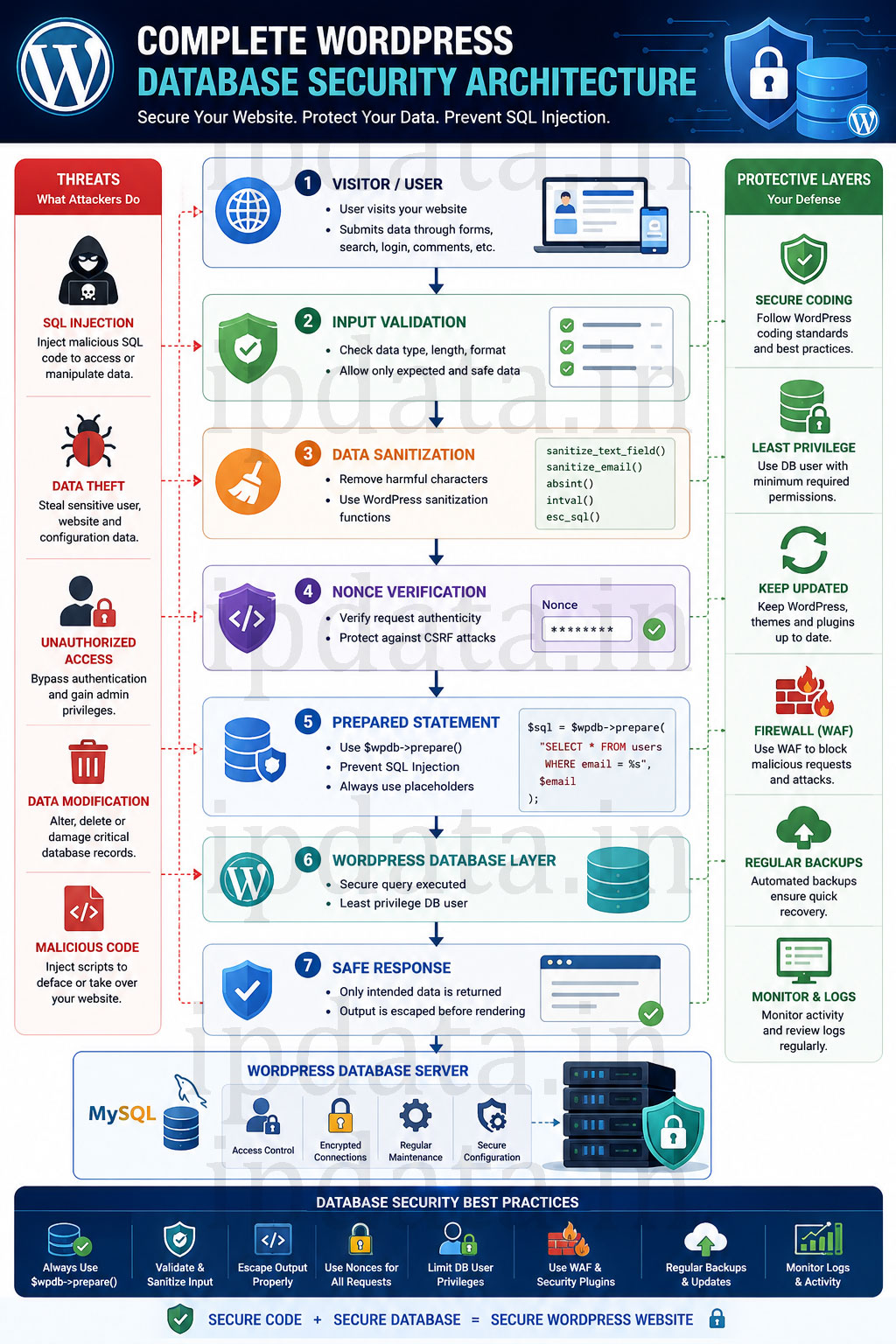
1. Every dynamic value in SQL must go through $wpdb->prepare() — without exception, including values that come from your own database (second-order injection), values that look like safe integers, and values that are “already sanitized.” Sanitization is for display. Preparation is for SQL.
2. Column and table names cannot be prepared — they must be whitelisted. This single gap causes more security reviews to fail than any other pattern. ORDER BY, LIMIT, column selection, and table references must use an explicit whitelist. There is no substitute.
3. Every AJAX endpoint must verify a nonce AND check capability before touching the database. A perfectly prepared SQL query with no nonce verification is still vulnerable — an attacker can craft a form on a different site that triggers the query. The nonce + capability check closes that vector completely.
SQL injection has been the number one web vulnerability for 20 consecutive years. It’s not because it’s technically complex — it’s because developers skip these three things under deadline pressure and return policy debt. This guide gives you the patterns to make the secure approach the easy default.
Signs of an SQL Injection Attack: Detecting a SQLi attack can be tricky since some payloads produce no visible errors (blind SQLi). However, some common indicators include:
- Database errors or logs: Strange SQL error messages displayed on pages or logged in the server logs may indicate an injection attempt.
- Unexpected site changes: If new admin users appear, content is altered, or sensitive data (emails, account info) leaks onto the site, this could mean the database was manipulated.
- Performance issues: A sudden slowdown or frequent crashes might result from malicious queries overloading the database. Attackers sometimes run heavy UNION or large-result queries, consuming server resources.
- Security scan alerts: Tools like WPScan or Wordfence will flag injection patterns. For blind SQLi, scanners use techniques like sending ‘ AND 1=1 vs ‘ AND 1=2 payloads and comparing responses. A difference in results reveals a blind SQL injection vulnerability.
Protecting Your WordPress Site: Safeguarding against SQLi requires a multi-layered approach:
- Keep WordPress Updated: Run the latest WordPress core, themes, and plugins. Security patches fix known SQLi flaws – as seen with CVE-2022-21661, which was patched in WP 5.8.3. Unfortunately, nearly half of WordPress sites lag behind on updates. Enable automatic updates or regularly check for releases to ensure your site isn’t vulnerable to old exploits
- Validate and Sanitize Input: Rigorously check all user-supplied data. Enforce strict formats (e.g. numeric IDs must be numbers of expected length) and sanitize inputs with WordPress functions (like sanitize_text_field(), sanitize_email()) before use. Never embed raw input into SQL. For example, do not allow unchecked values in ORDER BY or LIMIT clauses, since even sanitized fields can be manipulated if used unsafely. WPScan stresses that “All input… should be validated for correct content”.
- Use Prepared Statements / Parameterized Queries:
Wherever you need custom SQL, use $wpdb->prepare() or similar methods. Prepared statements separate data from code, so the database treats input as values, not executable code. For example:
$stmt = $wpdb->prepare("SELECT * FROM {$wpdb->prefix}posts WHERE id = %d", $post_id); $wpdb->query($stmt); - This ensures $post_id is safely escaped. Patchstack emphasizes that $wpdb->prepare() will “prevent SQL injection by separating SQL logic from user-supplied data”.
- Install a Web Application Firewall (WAF): A WAF filters incoming requests and can block malicious SQL patterns. WPScan advises adding a firewall to catch SQLi payloads before they reach the application layer. Similarly, security experts recommend using a WAF or security plugin firewall (like Sucuri, Cloudflare WAF, or plugin-based WAFs) to automatically drop requests containing SQL injection signatures.
- Use Security Plugins and Vulnerability Scanners: Add tools like Jetpack Security, Wordfence, or the WPScan plugin to monitor your site. These plugins scan file integrity and known vulnerabilities, alerting you to unsafe code or outdated components. For example, Jetpack can block certain exploits in real time, and WPScan’s vulnerability database lets you check if any active plugins/themes have reported SQLi issues.
- Least Privilege Principle: Run your WordPress database user with minimal permissions. It should have access only to its own database, and ideally only SELECT/INSERT/UPDATE/DELETE as needed – avoid giving it DROP or ALTER rights. WPScan notes that “Limiting user privileges ensures that only those who need access will have it”, which limits the damage if an injection does occur.
- Strong Passwords and Access Control: Use strong, unique passwords for all admin and database accounts. A password leak can compound an SQLi breach. WPScan underlines that “using strong passwords for all users with access rights” is a key preventive measure.
- Regular Backups: Maintain frequent backups of your database and files. In case an SQLi attack corrupts or deletes data, a clean backup is your insurance policy.
- Monitor Logs and Alerts: Keep an eye on your server and WP logs for suspicious database errors or repeated 404 requests. Consider setting up alerting for repeated scan attempts or unusual traffic that could indicate probing.
By combining updates, strict input handling, and security tools, you can greatly reduce the risk of SQL injection. As WPScan concludes, “SQL injection attacks are a major threat… but they don’t have to be something you fear if you take preventive measures” (like keeping software updated and using strong passwords).
Secure Development Practices: If you develop or install third-party code, follow secure coding guidelines:
- Escape Output: Always escape data when outputting to HTML or attributes. Use WordPress functions like esc_html(), esc_attr(), and esc_url() to neutralize any residual malicious characters. This doesn’t directly prevent SQLi, but it prevents other injection attacks and protects data integrity in templates.
- Validate and Sanitize Early: As mentioned, validate data types (e.g., is_numeric(), filter_var() for email) and sanitize (e.g., sanitize_text_field(), sanitize_email()) before use. Do this as soon as you retrieve user input.
- Remove Escape Characters: WordPress automatically adds slashes to some input. Use wp_unslash() on input data to strip slashes and avoid malicious escape characters in queries. For example, wp_unslash( $_POST[‘field’] ) cleans up the raw value.
- Use Nonces and CAPTCHAs: Protect forms (especially admin-ajax calls or front-end forms) with nonces (wp_nonce_field() and check_admin_referer()) to ensure submissions come from your site. For public forms (like login or contact), adding a CAPTCHA can block automated bots from submitting malicious payloads.
- Audit and Review Code: Before deploying a plugin or theme, review its database queries. Tools like the WordPress Plugin Check can help flag unsafe patterns. Ensure any custom SQL only uses safe methods and restricts output.
Conclusion: SQL injection remains one of the most serious risks to WordPress sites, but it is also one of the most preventable with proper safeguards. By validating all inputs, using prepared queries, and keeping WordPress and its extensions up-to-date, site owners can block almost all SQLi attempts. As WPScan notes, taking simple precautions (updates, strong passwords, security plugins, least-privilege access) means you “don’t have to fear” SQL injection. In practice, this means selecting reputable plugins and themes, applying patches promptly, and using security tools (WPScan, Patchstack, firewalls) to detect and block threats. With these best practices in place, your WordPress database will be much harder for attackers to penetrate via unsafe SQL calls.
Sources:
Authoritative WordPress security guides and vulnerability analyses were used for this blog, including WPScan’s article on SQLi protectionwpscan.comwpscan.com, Patchstack’s comprehensive SQLi guidepatchstack.compatchstack.com, and vulnerability advisories (e.g. CVE-2022-21661nvd.nist.gov) to inform best practices.
Frequently Asked Questions
What is SQL Injection in WordPress?
What causes unsafe SQL calls in WordPress?
How can SQL Injection affect my WordPress website?
A successful SQL Injection attack can:
- Steal sensitive user data
- Modify or delete database records
- Create unauthorized administrator accounts
- Inject malicious code
- Deface your website
- Take complete control of your WordPress installation
How do I prevent SQL Injection in WordPress?
To reduce the risk of SQL Injection:
- Use prepared statements with $wpdb->prepare()
- Validate and sanitize user input
- Escape output where appropriate
- Keep WordPress, themes, and plugins updated
- Use the principle of least privilege for database users
- Install a reputable security plugin or web application firewall (WAF)
What is $wpdb->prepare()?
Is using sanitize_text_field() enough to stop SQL Injection?
Which WordPress functions help prevent SQL Injection?
Common functions include:
- $wpdb->prepare()
- sanitize_text_field()
- sanitize_email()
- absint()
- intval()
- esc_sql() (for specific use cases)
- Nonce verification functions such as wp_verify_nonce() for request validation
Can plugins introduce SQL Injection vulnerabilities?
Can WordPress themes be vulnerable to SQL Injection?
Does WordPress Core protect against SQL Injection?
What is the difference between SQL Injection and Cross-Site Scripting (XSS)?
- SQL Injection (SQLi): Targets the database by injecting malicious SQL commands.
- Cross-Site Scripting (XSS): Injects malicious scripts into web pages to target users' browsers.