Why a Custom Shopify AI Chatbot Beats Every App in the Store
There are dozens of Shopify chatbot apps. Gorgias, Tidio, Freshdesk, Richpanel — they all work out of the box, charge $50–$500/month per store, and give you a user interface that 50,000 other Shopify stores are also using. None of them know your specific return policy edge cases, your supplier-specific lead times, or the nuanced difference between your “Premium” and “Professional” product lines.
A custom AI chatbot built specifically for your store does. It’s trained on your exact product catalog, your actual FAQ document, and your business rules. It has access to real-time order status through the Shopify Admin API. It can check inventory before recommending a product. It remembers what a customer asked three messages ago.
The original guide gives you the skeleton: a widget, a Node.js proxy, and a 25-line PHP file. This guide builds the complete, production-grade system:
- Multi-turn conversation memory with server-side session management
- RAG (Retrieval-Augmented Generation) so the AI answers from your actual product data
- Intent classification that routes questions to the right handler before hitting the LLM
- Order status with secure verification — actually safe for production
- Streaming responses for perceived instant replies
- Complete PHP production backend — not 25 lines, but a full class architecture
- Response caching — don’t pay for OpenAI tokens on repeated FAQ questions
- Analytics pipeline — know which questions convert and which frustrate
- GDPR-compliant data handling
- Deployment checklist for production
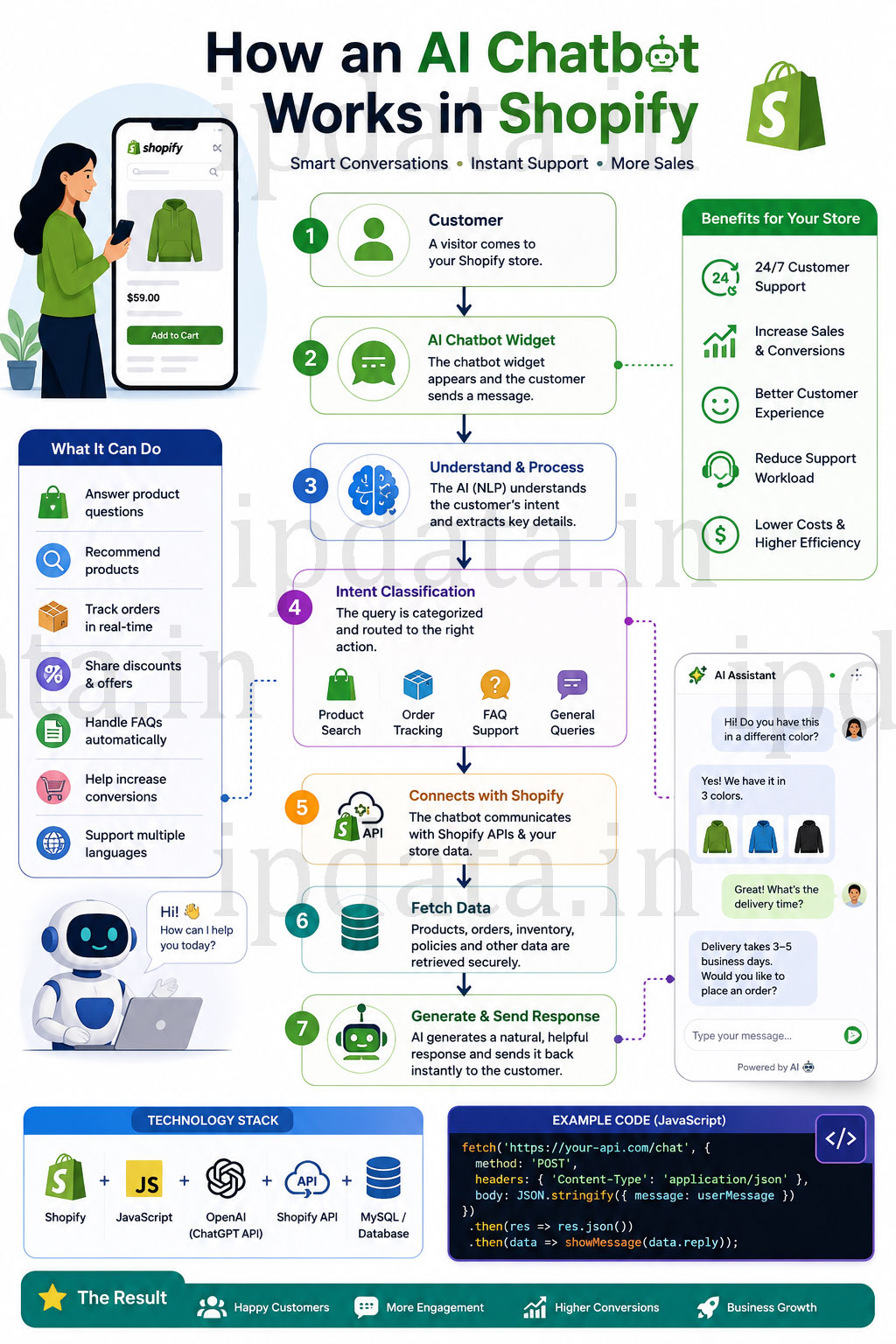
Part 1 — Architecture: The Full System
COMPLETE SHOPIFY AI CHATBOT ARCHITECTURE
─────────────────────────────────────────────────────────────────────────────
CUSTOMER BROWSER (Shopify Storefront)
    │
    │   Theme Liquid: injects session token, customer data, product context
    │
    ▼
CHAT WIDGET (Vanilla JS — injected via theme.liquid)
    │  - Floating chat bubble UI
    │  - Session management (localStorage)
    │  - Streaming response display (SSE)
    │  - Context collection (current product, cart, customer)
    │
    │  POST /api/chat  (your domain, not Shopify's)
    ▼
YOUR PHP BACKEND (VPS / Cloud / Shared Hosting)
    │
    ├── Rate Limiter          → IP + session-based request throttling
    ├── Input Validator       → Sanitize + length-check message
    ├── Session Manager       → Load/save conversation history (Redis/DB)
    ├── Intent Classifier     → What does the user want?
    │                           product_question | order_status | faq |
    │                           recommendation | complaint | escalate
    │
    ├── Context Enricher      → Based on intent:
    │   ├── Product Lookup    → Shopify Storefront API (public, no auth needed)
    │   ├── Order Lookup      → Shopify Admin API (private, after verification)
    │   ├── FAQ Retrieval     → Vector similarity search (RAG)
    │   └── Cart Context      → From widget-supplied cart data
    │
    ├── Prompt Builder        → Assemble system + context + history + message
    ├── Cache Checker         → Is this an exact FAQ hit? Return cached response.
    ├── OpenAI Client         → GPT-4o-mini (or your model) with streaming
    │
    ├── Response Cache        → Store LLM response for repeated questions
    ├── Analytics Logger      → Log intent, response, conversion signals
    │
    │  Server-Sent Events (SSE) stream back to widget
    ▼
CUSTOMER SEES RESPONSE (streaming, token by token)
─────────────────────────────────────────────────────────────────────────────

SUPPORTING SERVICES:
    Redis      → Session storage, rate limiting, response cache
    MySQL/SQLite → Conversation logs, analytics, customer verification tokens
    Shopify Admin API → Order lookup (private, server-side only)
    Shopify Storefront API → Product search (public, no secret needed)
    OpenAI API → LLM inference
─────────────────────────────────────────────────────────────────────────────
Part 2 — The Complete PHP Backend
Project Structure
shopify-ai-chatbot/
├── public/
│   └── api/
│       ├── chat.php           ← Main chat endpoint (SSE streaming)
│       ├── session.php        ← Session init endpoint
│       └── verify-order.php   ← Order verification step 1
│
├── src/
│   ├── ChatSession.php        ← Conversation history manager
│   ├── IntentClassifier.php   ← Categorise user intent
│   ├── ShopifyClient.php      ← Admin + Storefront API wrapper
│   ├── OpenAIClient.php       ← OpenAI API with streaming
│   ├── PromptBuilder.php      ← System prompt + context assembly
│   ├── ResponseCache.php      ← Redis-based response cache
│   ├── RateLimiter.php        ← Per-IP and per-session throttling
│   ├── Analytics.php          ← Conversation analytics logger
│   └── Config.php             ← Centralised configuration
│
├── data/
│   └── faq.json               ← Your store FAQ data
│
├── .env                       ← Secrets (never commit this)
├── composer.json
└── widget/
    ├── chatbot.js             ← Frontend widget
    └── chatbot.css            ← Widget styles
Config.php — Centralised Configuration
<?php
declare(strict_types=1);

namespace ShopifyAI;

/**
 * Central configuration loader.
 * Reads from environment variables (set in .env or server config).
 */
class Config {

    private static array $cache = [];

    public static function get(string $key, mixed $default = null): mixed {
        if (!array_key_exists($key, self::$cache)) {
            self::$cache[$key] = $_ENV[$key] ?? getenv($key) ?: $default;
        }
        return self::$cache[$key];
    }

    // ── API Keys (never hardcode these) ────────────────────────────────────
    public static function openAiKey(): string {
        return self::get('OPENAI_API_KEY') ?: throw new \RuntimeException('OPENAI_API_KEY not set');
    }

    public static function shopifyAdminToken(): string {
        return self::get('SHOPIFY_ADMIN_TOKEN') ?: throw new \RuntimeException('SHOPIFY_ADMIN_TOKEN not set');
    }

    public static function shopifyStorefrontToken(): string {
        return self::get('SHOPIFY_STOREFRONT_TOKEN', '');
    }

    public static function shopifyDomain(): string {
        return self::get('SHOPIFY_DOMAIN') ?: throw new \RuntimeException('SHOPIFY_DOMAIN not set');
    }

    public static function shopifyWebhookSecret(): string {
        return self::get('SHOPIFY_WEBHOOK_SECRET', '');
    }

    // ── Redis ──────────────────────────────────────────────────────────────
    public static function redisHost(): string { return self::get('REDIS_HOST', '127.0.0.1'); }
    public static function redisPort(): int    { return (int) self::get('REDIS_PORT', 6379); }
    public static function redisPass(): string { return self::get('REDIS_PASSWORD', ''); }

    // ── Chatbot behaviour ──────────────────────────────────────────────────
    public static function storeName(): string   { return self::get('STORE_NAME', 'Our Store'); }
    public static function openAiModel(): string { return self::get('OPENAI_MODEL', 'gpt-4o-mini'); }
    public static function maxTokens(): int      { return (int) self::get('MAX_TOKENS', 400); }
    public static function maxHistory(): int     { return (int) self::get('MAX_HISTORY_TURNS', 8); }
    public static function sessionTtl(): int     { return (int) self::get('SESSION_TTL', 3600); }  // 1 hour
    public static function cacheTtl(): int       { return (int) self::get('CACHE_TTL', 86400); }   // 24 hours
}
ChatSession.php — Multi-Turn Conversation Memory
<?php
declare(strict_types=1);

namespace ShopifyAI;

/**
 * Manages multi-turn conversation history.
 * Stores messages in Redis with automatic expiry.
 * Each session has a unique ID tied to the browser session.
 */
class ChatSession {

    private \Redis $redis;
    private string $sessionId;
    private string $redisKey;

    public function __construct(string $sessionId) {
        $this->sessionId = preg_replace('/[^a-zA-Z0-9_-]/', '', $sessionId);

        if (strlen($this->sessionId) < 10) {
            throw new \InvalidArgumentException('Invalid session ID');
        }

        $this->redisKey = "chatbot:session:{$this->sessionId}";
        $this->redis    = $this->connect();
    }

    private function connect(): \Redis {
        $redis = new \Redis();
        $redis->connect(Config::redisHost(), Config::redisPort());

        if (Config::redisPass()) {
            $redis->auth(Config::redisPass());
        }

        $redis->setOption(\Redis::OPT_SERIALIZER, \Redis::SERIALIZER_JSON);
        return $redis;
    }

    /**
     * Get conversation history in OpenAI message format.
     * Returns at most MAX_HISTORY_TURNS pairs (user + assistant).
     */
    public function getHistory(): array {
        $data = $this->redis->get($this->redisKey);

        if ($data === false) {
            return [];
        }

        $messages = is_array($data) ? $data : [];

        // Limit to most recent N turns to control token usage:
        $maxMessages = Config::maxHistory() * 2; // Each turn = user + assistant message
        if (count($messages) > $maxMessages) {
            $messages = array_slice($messages, -$maxMessages);
        }

        return $messages;
    }

    /**
     * Append a user message and assistant response to history.
     */
    public function addTurn(string $userMessage, string $assistantReply): void {
        $history = $this->getHistory();

        $history[] = ['role' => 'user',      'content' => $userMessage];
        $history[] = ['role' => 'assistant', 'content' => $assistantReply];

        // Store with TTL (session expires after inactivity):
        $this->redis->setex($this->redisKey, Config::sessionTtl(), $history);
    }

    /**
     * Store customer verification status in session.
     * Used after order verification flow.
     */
    public function setVerified(string $email): void {
        $metaKey = "chatbot:meta:{$this->sessionId}";
        $this->redis->setex($metaKey, Config::sessionTtl(), [
            'verified'   => true,
            'email'      => $email,
            'verified_at'=> time(),
        ]);
    }

    /**
     * Get verification status and email if previously verified.
     */
    public function getVerification(): ?array {
        $metaKey = "chatbot:meta:{$this->sessionId}";
        $data    = $this->redis->get($metaKey);
        return is_array($data) && ($data['verified'] ?? false) ? $data : null;
    }

    /**
     * Clear all conversation history (on user request or after session end).
     */
    public function clear(): void {
        $this->redis->del($this->redisKey);
        $this->redis->del("chatbot:meta:{$this->sessionId}");
    }

    public function getSessionId(): string {
        return $this->sessionId;
    }
}
IntentClassifier.php — Route Before You LLM
<?php
declare(strict_types=1);

namespace ShopifyAI;

/**
 * Classifies user message intent using lightweight pattern matching.
 * This runs BEFORE calling the LLM, so it's instant and free.
 *
 * Intents:
 *   order_status     → Track my order, where is my package
 *   product_search   → Find me a product, do you have X
 *   product_question → Is this waterproof? What size is this?
 *   returns          → Return, refund, exchange policy
 *   shipping         → Shipping time, delivery, tracking
 *   discount         → Promo code, coupon, sale
 *   complaint        → Broken, damaged, wrong item
 *   escalate         → Talk to human, speak to agent
 *   greeting         → Hi, hello, hey
 *   general          → Everything else
 */
class IntentClassifier {

    private const PATTERNS = [
        'order_status' => [
            '/where.{0,20}(order|package|parcel)/i',
            '/order.{0,20}(status|track|shipped|deliver)/i',
            '/track(ing)?.{0,20}(order|package)/i',
            '/\border\s*(number|#|no)?\s*#?\d{4,}/i',  // "order #1234"
            '/when.{0,20}(arriv|deliver|ship)/i',
            '/hasn.t.{0,20}(arriv|deliver|come)/i',
        ],

        'product_search' => [
            '/do you (have|sell|carry|stock)/i',
            '/looking for.{0,30}(product|item)/i',
            '/find.{0,20}(me|a|some).{0,20}(product|item)/i',
            '/recommend.{0,20}(product|something)/i',
            '/what.{0,20}(product|item).{0,20}(do you have)/i',
            '/show me/i',
            '/best (product|item) for/i',
        ],

        'product_question' => [
            '/is (this|it).{0,30}(water(proof|resistant)|durable|safe|vegan)/i',
            '/what (size|colour|color|material|weight|dimension)/i',
            '/(fit|fitting|sizing) guide/i',
            '/does it come in/i',
            '/how (long|big|small|heavy)/i',
            '/compatible with/i',
            '/difference between/i',
        ],

        'returns' => [
            '/return(s|ed|ing)?/i',
            '/refund/i',
            '/exchange/i',
            '/money back/i',
            '/cancel.{0,20}order/i',
        ],

        'shipping' => [
            '/shipping.{0,30}(time|cost|price|free|fast)/i',
            '/(deliver|arrival).{0,20}(time|when|date)/i',
            '/how long.{0,20}(ship|deliver|take|arrive)/i',
            '/express.{0,20}ship/i',
            '/international.{0,20}ship/i',
        ],

        'discount' => [
            '/(promo|discount|coupon|voucher) code/i',
            '/any.{0,20}(sale|deal|offer)/i',
            '/first.{0,20}order.{0,20}(discount|off)/i',
            '/student.{0,20}discount/i',
        ],

        'complaint' => [
            '/(broken|damaged|wrong|missing|defect)/i',
            '/(poor|bad|terrible).{0,20}(quality|condition)/i',
            '/not.{0,20}(working|functional)/i',
            '/arrived.{0,20}(broken|damaged|wrong)/i',
        ],

        'escalate' => [
            '/talk to.{0,20}(human|person|agent|someone|rep)/i',
            '/speak (to|with).{0,20}(human|agent)/i',
            '/real person/i',
            '/live (chat|support|agent)/i',
            '/phone number/i',
            '/email.{0,20}support/i',
        ],

        'greeting' => [
            '/^(hi|hello|hey|howdy|hiya|yo|sup|good (morning|afternoon|evening|day))[\s!.]*$/i',
        ],
    ];

    /**
     * Classify the intent of a user message.
     *
     * @return array ['intent' => string, 'confidence' => float, 'extracted' => array]
     */
    public function classify(string $message): array {
        $message = trim($message);

        // Check each intent's patterns:
        foreach (self::PATTERNS as $intent => $patterns) {
            foreach ($patterns as $pattern) {
                if (preg_match($pattern, $message, $matches)) {
                    return [
                        'intent'     => $intent,
                        'confidence' => 0.9,
                        'extracted'  => $this->extractEntities($message, $intent),
                    ];
                }
            }
        }

        // Default fallback:
        return [
            'intent'     => 'general',
            'confidence' => 0.5,
            'extracted'  => [],
        ];
    }

    /**
     * Extract specific entities from message based on intent.
     */
    private function extractEntities(string $message, string $intent): array {
        $entities = [];

        // Extract order number from order_status queries:
        if ($intent === 'order_status') {
            if (preg_match('/\b(\d{4,})\b/', $message, $m)) {
                $entities['order_number'] = $m[1];
            }
        }

        // Extract product keywords from search:
        if (in_array($intent, ['product_search', 'product_question'], true)) {
            // Remove common stop words and extract potential product terms:
            $keywords = preg_replace('/\b(do you have|looking for|find me|show me|is this|what|how)\b/i', '', $message);
            $entities['keywords'] = trim($keywords);
        }

        return $entities;
    }
}
ShopifyClient.php — Shopify API Integration
<?php
declare(strict_types=1);

namespace ShopifyAI;

/**
 * Shopify API client.
 *
 * Admin API  → private, server-side only, requires access token
 * Storefront API → semi-public, safe for product search (no PII)
 */
class ShopifyClient {

    private const API_VERSION = '2025-01';

    // ── Admin API (private — never expose token to client) ────────────────────

    /**
     * Look up an order by order number.
     * MUST only be called after customer identity is verified.
     *
     * @param  string $orderNumber The order number (e.g., "1001")
     * @param  string $email       Verified customer email (for cross-reference)
     * @return array|null          Safe order data (no full PII)
     */
    public function getOrderStatus(string $orderNumber, string $verifiedEmail): ?array {
        $domain  = Config::shopifyDomain();
        $token   = Config::shopifyAdminToken();

        $url = "https://{$domain}/admin/api/" . self::API_VERSION .
               "/orders.json?name=%23" . urlencode($orderNumber) .
               "&status=any&fields=id,name,email,financial_status,fulfillment_status,fulfillments,line_items,created_at,shipping_address";

        $response = $this->adminRequest('GET', $url);

        if (!$response || empty($response['orders'])) {
            return null;
        }

        $order = $response['orders'][0];

        // Security: verify the email matches what we found
        // (even if order number matches, confirm it's this customer's order)
        if (strtolower($order['email'] ?? '') !== strtolower($verifiedEmail)) {
            return null; // Email doesn't match — deny access
        }

        // Return only safe, non-sensitive order data:
        return [
            'order_number'       => $order['name'],
            'status'             => $order['financial_status'],
            'fulfillment_status' => $order['fulfillment_status'] ?? 'unfulfilled',
            'created_at'         => $order['created_at'],
            'items'              => array_map(fn($i) => [
                'name'     => $i['name'],
                'quantity' => $i['quantity'],
            ], $order['line_items'] ?? []),
            'tracking_numbers'   => $this->extractTrackingNumbers($order),
            'shipping_city'      => $order['shipping_address']['city'] ?? null,
            // NO: full address, phone, payment method details
        ];
    }

    private function extractTrackingNumbers(array $order): array {
        $numbers = [];
        foreach ($order['fulfillments'] ?? [] as $fulfillment) {
            foreach ($fulfillment['tracking_numbers'] ?? [] as $tracking) {
                $numbers[] = $tracking;
            }
        }
        return $numbers;
    }

    /**
     * Search products by keyword using Admin API.
     * Returns a concise product list safe for including in AI context.
     */
    public function searchProducts(string $query, int $limit = 5): array {
        $domain = Config::shopifyDomain();
        $url    = "https://{$domain}/admin/api/" . self::API_VERSION .
                  "/products.json?title=" . urlencode($query) .
                  "&status=active&limit={$limit}&fields=id,title,handle,body_html,variants,images";

        $response = $this->adminRequest('GET', $url);

        if (!$response || empty($response['products'])) {
            return [];
        }

        return array_map(function(array $product) {
            $variants  = $product['variants'] ?? [];
            $minPrice  = min(array_column($variants, 'price'));
            $maxPrice  = max(array_column($variants, 'price'));
            $priceStr  = $minPrice === $maxPrice ? "£{$minPrice}" : "£{$minPrice} – £{$maxPrice}";

            return [
                'title'       => $product['title'],
                'url'         => "/products/{$product['handle']}",
                'price'       => $priceStr,
                'description' => mb_substr(strip_tags($product['body_html'] ?? ''), 0, 200),
                'in_stock'    => !empty(array_filter($variants, fn($v) => ($v['inventory_quantity'] ?? 0) > 0)),
                'image'       => $product['images'][0]['src'] ?? null,
            ];
        }, $response['products']);
    }

    // ── Storefront API (public — safe for client-side, but we use server-side) ─

    /**
     * GraphQL product search via Storefront API.
     * Better for customer-facing queries — respects product visibility rules.
     */
    public function storefrontSearch(string $query, int $limit = 5): array {
        $domain = Config::shopifyDomain();
        $token  = Config::shopifyStorefrontToken();

        if (!$token) {
            // Fall back to Admin API if no Storefront token configured:
            return $this->searchProducts($query, $limit);
        }

        $graphql = '
        query SearchProducts($query: String!, $first: Int!) {
            products(query: $query, first: $first) {
                edges {
                    node {
                        id
                        title
                        handle
                        description
                        priceRange {
                            minVariantPrice { amount currencyCode }
                            maxVariantPrice { amount currencyCode }
                        }
                        availableForSale
                        featuredImage { url altText }
                    }
                }
            }
        }';

        $url = "https://{$domain}/api/" . self::API_VERSION . "/graphql.json";

        $ch = curl_init($url);
        curl_setopt_array($ch, [
            CURLOPT_RETURNTRANSFER => true,
            CURLOPT_POST           => true,
            CURLOPT_HTTPHEADER     => [
                "X-Shopify-Storefront-Access-Token: {$token}",
                'Content-Type: application/json',
            ],
            CURLOPT_POSTFIELDS     => json_encode([
                'query'     => $graphql,
                'variables' => ['query' => $query, 'first' => $limit],
            ]),
            CURLOPT_TIMEOUT => 8,
        ]);

        $body   = curl_exec($ch);
        $errno  = curl_errno($ch);
        curl_close($ch);

        if ($errno || !$body) return [];

        $data     = json_decode($body, true);
        $products = $data['data']['products']['edges'] ?? [];

        return array_map(function(array $edge) {
            $node     = $edge['node'];
            $minPrice = $node['priceRange']['minVariantPrice']['amount'];
            $maxPrice = $node['priceRange']['maxVariantPrice']['amount'];
            $currency = $node['priceRange']['minVariantPrice']['currencyCode'];

            return [
                'title'       => $node['title'],
                'url'         => "/products/{$node['handle']}",
                'price'       => $minPrice === $maxPrice
                                 ? "{$currency} {$minPrice}"
                                 : "{$currency} {$minPrice} – {$maxPrice}",
                'description' => mb_substr($node['description'], 0, 200),
                'in_stock'    => $node['availableForSale'],
                'image'       => $node['featuredImage']['url'] ?? null,
            ];
        }, $products);
    }

    // ── Private helper ─────────────────────────────────────────────────────────

    private function adminRequest(string $method, string $url): ?array {
        $token = Config::shopifyAdminToken();

        $ch = curl_init($url);
        curl_setopt_array($ch, [
            CURLOPT_RETURNTRANSFER => true,
            CURLOPT_CUSTOMREQUEST  => $method,
            CURLOPT_HTTPHEADER     => [
                "X-Shopify-Access-Token: {$token}",
                'Content-Type: application/json',
            ],
            CURLOPT_TIMEOUT => 10,
            CURLOPT_SSL_VERIFYPEER => true,
        ]);

        $body  = curl_exec($ch);
        $code  = curl_getinfo($ch, CURLINFO_HTTP_CODE);
        $errno = curl_errno($ch);
        curl_close($ch);

        if ($errno || $code >= 400 || !$body) {
            error_log("[ShopifyClient] Admin API error. Code: {$code}, errno: {$errno}, URL: {$url}");
            return null;
        }

        return json_decode($body, true);
    }
}
PromptBuilder.php — The Heart of Quality Responses
<?php
declare(strict_types=1);

namespace ShopifyAI;

/**
 * Assembles the complete prompt sent to the LLM.
 * Good prompts = good responses. This is where quality lives.
 */
class PromptBuilder {

    private string $storeName;
    private string $storeUrl;
    private array  $faqData;

    public function __construct() {
        $this->storeName = Config::storeName();
        $this->storeUrl  = 'https://' . Config::shopifyDomain();
        $this->faqData   = $this->loadFaq();
    }

    /**
     * Build the system prompt — the AI's personality and rules.
     */
    public function buildSystemPrompt(array $context = []): string {
        $faqSummary = $this->buildFaqContext($context['intent'] ?? 'general');

        return <<<PROMPT
You are a friendly, helpful shopping assistant for {$this->storeName}. Your purpose is to help customers with product questions, orders, and store information.

## Your Personality
- Warm, concise, and knowledgeable about the store
- Never make up product details — only mention products you have information about
- Always offer to connect with human support for complex issues
- Keep responses to 2–4 sentences unless more detail is genuinely needed

## Store Information
Store: {$this->storeName}
Website: {$this->storeUrl}
Support email: support@{parse_url($this->storeUrl, PHP_URL_HOST)}

## Store Policies
{$faqSummary}

## Rules
1. NEVER ask for passwords, full credit card numbers, or government IDs
2. For order details, only share information after the customer has verified their identity
3. When recommending products, include the product URL in this format: {$this->storeUrl}/products/[handle]
4. If you don't know something, say so honestly and offer to connect them with support
5. For complaints about damaged/wrong items, always acknowledge the inconvenience and escalate to human support
6. Keep response under 150 words unless customer explicitly asks for detail

## Escalation Phrase
When a customer needs human help, end with:
"Would you like me to connect you with our support team? Reply 'yes' and I'll provide the contact details."
PROMPT;
    }

    /**
     * Build context string from enriched data to inject into user turn.
     */
    public function buildContextBlock(array $enrichments): string {
        $blocks = [];

        if (!empty($enrichments['products'])) {
            $productLines = array_map(function(array $p) {
                $stock  = $p['in_stock'] ? 'In stock' : 'Out of stock';
                $url    = $this->storeUrl . $p['url'];
                return "- {$p['title']} | {$p['price']} | {$stock} | {$url}";
            }, $enrichments['products']);

            $blocks[] = "RELEVANT PRODUCTS:\n" . implode("\n", $productLines);
        }

        if (!empty($enrichments['order'])) {
            $order = $enrichments['order'];
            $items = implode(', ', array_map(
                fn($i) => "{$i['name']} (qty: {$i['quantity']})",
                $order['items']
            ));
            $tracking = implode(', ', $order['tracking_numbers']);

            $blocks[] = "ORDER INFORMATION (verified customer):
Order: {$order['order_number']}
Status: {$order['financial_status']} / Fulfillment: {$order['fulfillment_status']}
Items: {$items}
Tracking: " . ($tracking ?: 'Not yet available');
        }

        if (!empty($enrichments['faq_answer'])) {
            $blocks[] = "FAQ ANSWER:\n" . $enrichments['faq_answer'];
        }

        return empty($blocks) ? '' : "\n\n[CONTEXT FOR AI - DO NOT QUOTE DIRECTLY]:\n" . implode("\n\n", $blocks);
    }

    private function loadFaq(): array {
        $faqFile = __DIR__ . '/../data/faq.json';
        if (!file_exists($faqFile)) return [];

        $content = file_get_contents($faqFile);
        return json_decode($content, true) ?? [];
    }

    private function buildFaqContext(string $intent): string {
        // Load relevant FAQ sections based on intent
        $relevant = [];

        foreach ($this->faqData as $section) {
            if (isset($section['intents']) &&
                in_array($intent, $section['intents'], true)) {
                $relevant[] = $section['summary'];
            }
        }

        if (empty($relevant)) {
            // Default: always include returns and shipping
            foreach ($this->faqData as $section) {
                if (isset($section['always_include']) && $section['always_include']) {
                    $relevant[] = $section['summary'];
                }
            }
        }

        return implode("\n", $relevant);
    }
}
OpenAIClient.php — Streaming Responses
<?php
declare(strict_types=1);

namespace ShopifyAI;

/**
 * OpenAI API client with streaming support.
 * Streams tokens back to the client via Server-Sent Events (SSE)
 * for a perceived instant, real-time response.
 */
class OpenAIClient {

    private const API_URL = 'https://api.openai.com/v1/chat/completions';

    /**
     * Send a chat completion request with streaming.
     * Outputs SSE events directly to the response stream.
     *
     * @param array $messages  Complete messages array (system + history + user)
     * @param callable $onToken Called with each token as it streams
     * @return string           The complete response (assembled from tokens)
     */
    public function streamCompletion(array $messages, callable $onToken): string {

        $payload = [
            'model'       => Config::openAiModel(),
            'messages'    => $messages,
            'max_tokens'  => Config::maxTokens(),
            'temperature' => 0.2,   // Low temperature = more consistent, factual
            'stream'      => true,  // Enable streaming
        ];

        $ch = curl_init(self::API_URL);
        curl_setopt_array($ch, [
            CURLOPT_POST           => true,
            CURLOPT_HTTPHEADER     => [
                'Authorization: Bearer ' . Config::openAiKey(),
                'Content-Type: application/json',
            ],
            CURLOPT_POSTFIELDS     => json_encode($payload),
            CURLOPT_RETURNTRANSFER => false,  // Don't buffer — stream directly
            CURLOPT_TIMEOUT        => 60,
            CURLOPT_SSL_VERIFYPEER => true,

            // Process each line of the SSE stream:
            CURLOPT_WRITEFUNCTION  => function($ch, $data) use ($onToken, &$fullResponse) {
                $lines = explode("\n", $data);
                foreach ($lines as $line) {
                    $line = trim($line);
                    if (str_starts_with($line, 'data: ')) {
                        $json = substr($line, 6);
                        if ($json === '[DONE]') continue;

                        $decoded = json_decode($json, true);
                        $token   = $decoded['choices'][0]['delta']['content'] ?? '';

                        if ($token !== '') {
                            $fullResponse .= $token;
                            $onToken($token);
                        }
                    }
                }
                return strlen($data);
            },
        ]);

        $fullResponse = '';
        $errno = curl_errno($ch);
        curl_exec($ch);
        $httpCode = curl_getinfo($ch, CURLINFO_HTTP_CODE);
        curl_close($ch);

        if ($errno || $httpCode >= 400) {
            throw new \RuntimeException("OpenAI API error. HTTP {$httpCode}");
        }

        return $fullResponse;
    }

    /**
     * Non-streaming completion (for background tasks, caching).
     */
    public function complete(array $messages): string {
        $payload = [
            'model'       => Config::openAiModel(),
            'messages'    => $messages,
            'max_tokens'  => Config::maxTokens(),
            'temperature' => 0.2,
            'stream'      => false,
        ];

        $ch = curl_init(self::API_URL);
        curl_setopt_array($ch, [
            CURLOPT_POST           => true,
            CURLOPT_RETURNTRANSFER => true,
            CURLOPT_HTTPHEADER     => [
                'Authorization: Bearer ' . Config::openAiKey(),
                'Content-Type: application/json',
            ],
            CURLOPT_POSTFIELDS     => json_encode($payload),
            CURLOPT_TIMEOUT        => 30,
        ]);

        $body  = curl_exec($ch);
        $errno = curl_errno($ch);
        $code  = curl_getinfo($ch, CURLINFO_HTTP_CODE);
        curl_close($ch);

        if ($errno || $code >= 400) {
            throw new \RuntimeException("OpenAI API error. HTTP {$code}");
        }

        $data = json_decode($body, true);
        return $data['choices'][0]['message']['content'] ?? '';
    }
}
RateLimiter.php — Production Rate Limiting
<?php
declare(strict_types=1);

namespace ShopifyAI;

class RateLimiter {

    private \Redis $redis;

    public function __construct() {
        $this->redis = new \Redis();
        $this->redis->connect(Config::redisHost(), Config::redisPort());
        if (Config::redisPass()) $this->redis->auth(Config::redisPass());
    }

    /**
     * Check rate limits for a request.
     * Uses a sliding window algorithm.
     *
     * @param  string $ip        Visitor IP address
     * @param  string $sessionId Chat session ID
     * @return array  ['allowed' => bool, 'retry_after' => int]
     */
    public function check(string $ip, string $sessionId): array {
        $now = time();

        // Per-IP: 30 requests per minute
        $ipKey   = "rl:ip:{$ip}";
        $ipCount = (int) $this->redis->get($ipKey);

        if ($ipCount >= 30) {
            $ttl = $this->redis->ttl($ipKey);
            return ['allowed' => false, 'retry_after' => max(1, $ttl)];
        }

        // Per-session: 20 requests per minute (stricter)
        $sessionKey   = "rl:session:{$sessionId}";
        $sessionCount = (int) $this->redis->get($sessionKey);

        if ($sessionCount >= 20) {
            $ttl = $this->redis->ttl($sessionKey);
            return ['allowed' => false, 'retry_after' => max(1, $ttl)];
        }

        // Increment counters:
        $pipe = $this->redis->multi();
        $pipe->incr($ipKey);
        $pipe->expire($ipKey, 60);
        $pipe->incr($sessionKey);
        $pipe->expire($sessionKey, 60);
        $pipe->exec();

        return ['allowed' => true, 'retry_after' => 0];
    }
}
ResponseCache.php — Stop Paying for Repeated FAQ Answers
<?php
declare(strict_types=1);

namespace ShopifyAI;

class ResponseCache {

    private \Redis $redis;

    public function __construct() {
        $this->redis = new \Redis();
        $this->redis->connect(Config::redisHost(), Config::redisPort());
        if (Config::redisPass()) $this->redis->auth(Config::redisPass());
    }

    /**
     * Get a cached response for a normalised message.
     * Only caches FAQ/shipping/returns type questions.
     */
    public function get(string $message, string $intent): ?string {
        // Don't cache personal queries:
        if (in_array($intent, ['order_status', 'complaint', 'escalate'], true)) {
            return null;
        }

        $key    = 'cache:response:' . md5(strtolower(trim($message)));
        $cached = $this->redis->get($key);

        return $cached !== false ? $cached : null;
    }

    /**
     * Store a response in cache with TTL.
     */
    public function set(string $message, string $intent, string $response): void {
        if (in_array($intent, ['order_status', 'complaint', 'escalate'], true)) {
            return; // Never cache personal queries
        }

        $key = 'cache:response:' . md5(strtolower(trim($message)));
        $this->redis->setex($key, Config::cacheTtl(), $response);
    }
}
Part 3 — The Main Chat Endpoint (Streaming)
<?php
// public/api/chat.php — The main endpoint

declare(strict_types=1);

require_once __DIR__ . '/../../vendor/autoload.php';

use ShopifyAI\Config;
use ShopifyAI\ChatSession;
use ShopifyAI\IntentClassifier;
use ShopifyAI\ShopifyClient;
use ShopifyAI\PromptBuilder;
use ShopifyAI\OpenAIClient;
use ShopifyAI\RateLimiter;
use ShopifyAI\ResponseCache;

// Load environment:
if (file_exists(__DIR__ . '/../../.env')) {
    $lines = file(__DIR__ . '/../../.env', FILE_IGNORE_NEW_LINES | FILE_SKIP_EMPTY_LINES);
    foreach ($lines as $line) {
        if (str_starts_with($line, '#')) continue;
        if (str_contains($line, '=')) {
            [$key, $val] = explode('=', $line, 2);
            $_ENV[trim($key)] = trim($val, " \t\n\r\0\x0B\"'");
        }
    }
}

// ── CORS headers (allow your Shopify store domain) ─────────────────────────
$allowedOrigins = [
    'https://' . Config::shopifyDomain(),
    'https://' . str_replace('.myshopify.com', '.com', Config::shopifyDomain()),
];
$origin = $_SERVER['HTTP_ORIGIN'] ?? '';

if (in_array($origin, $allowedOrigins, true)) {
    header("Access-Control-Allow-Origin: {$origin}");
    header('Access-Control-Allow-Credentials: true');
}
header('Access-Control-Allow-Methods: POST, OPTIONS');
header('Access-Control-Allow-Headers: Content-Type, X-Session-ID');

if ($_SERVER['REQUEST_METHOD'] === 'OPTIONS') {
    http_response_code(204);
    exit;
}

// ── Validate request ───────────────────────────────────────────────────────
if ($_SERVER['REQUEST_METHOD'] !== 'POST') {
    http_response_code(405);
    exit;
}

$input = json_decode(file_get_contents('php://input'), true);

$message   = trim($input['message']  ?? '');
$sessionId = trim($input['session_id'] ?? '');
$context   = $input['context'] ?? [];

if (empty($message)) {
    http_response_code(400);
    echo json_encode(['error' => 'Message is required']);
    exit;
}

if (strlen($message) > 1000) {
    http_response_code(400);
    echo json_encode(['error' => 'Message too long (max 1000 characters)']);
    exit;
}

if (empty($sessionId) || strlen($sessionId) < 16) {
    http_response_code(400);
    echo json_encode(['error' => 'Valid session ID required']);
    exit;
}

// ── Rate limiting ──────────────────────────────────────────────────────────
$ip          = $_SERVER['HTTP_CF_CONNECTING_IP'] ?? $_SERVER['REMOTE_ADDR'] ?? 'unknown';
$rateLimiter = new RateLimiter();
$rateCheck   = $rateLimiter->check($ip, $sessionId);

if (!$rateCheck['allowed']) {
    http_response_code(429);
    header("Retry-After: {$rateCheck['retry_after']}");
    echo json_encode(['error' => 'Too many requests. Please wait a moment.']);
    exit;
}

// ── Initialize components ──────────────────────────────────────────────────
try {
    $session    = new ChatSession($sessionId);
    $classifier = new IntentClassifier();
    $shopify    = new ShopifyClient();
    $prompter   = new PromptBuilder();
    $openai     = new OpenAIClient();
    $cache      = new ResponseCache();

} catch (\Throwable $e) {
    error_log('[ChatEndpoint] Init error: ' . $e->getMessage());
    http_response_code(500);
    echo json_encode(['error' => 'Service temporarily unavailable']);
    exit;
}

// ── Classify intent ────────────────────────────────────────────────────────
$classification = $classifier->classify($message);
$intent         = $classification['intent'];
$extracted      = $classification['extracted'];

// ── Check response cache (skip for personal queries) ──────────────────────
$cachedResponse = $cache->get($message, $intent);

if ($cachedResponse !== null) {
    // Return cached response immediately:
    header('Content-Type: application/json');
    echo json_encode([
        'reply'   => $cachedResponse,
        'intent'  => $intent,
        'cached'  => true,
    ]);
    exit;
}

// ── Enrich context based on intent ────────────────────────────────────────
$enrichments = [];

if ($intent === 'order_status') {
    // Check if customer is verified in this session:
    $verification = $session->getVerification();

    if ($verification && !empty($extracted['order_number'])) {
        // Verified — fetch order data:
        $order = $shopify->getOrderStatus($extracted['order_number'], $verification['email']);
        if ($order) {
            $enrichments['order'] = $order;
        } else {
            $message = $message . ' [NOTE: Order not found or email mismatch]';
        }
    } else {
        // Not verified yet — modify intent to trigger verification flow:
        $intent = 'order_verification_needed';
    }
}

if (in_array($intent, ['product_search', 'product_question'], true)) {
    $keywords = $extracted['keywords'] ?? $message;
    $products = $shopify->storefrontSearch($keywords, 3);
    if ($products) {
        $enrichments['products'] = $products;
    }
}

// Also include product context from page the customer is viewing:
if (!empty($context['product_handle'])) {
    $pageProducts = $shopify->storefrontSearch($context['product_handle'], 1);
    if ($pageProducts) {
        $enrichments['current_product'] = $pageProducts[0];
    }
}

// ── Build prompt ───────────────────────────────────────────────────────────
$systemPrompt   = $prompter->buildSystemPrompt(['intent' => $intent]);
$contextBlock   = $prompter->buildContextBlock($enrichments);
$history        = $session->getHistory();

// Verification flow — override message:
if ($intent === 'order_verification_needed') {
    $verificationMessage = "Please verify your identity before I can share order details. "
        . "Could you please provide the email address associated with your order?";

    // Respond immediately without hitting the LLM:
    header('Content-Type: application/json');
    echo json_encode([
        'reply'           => $verificationMessage,
        'intent'          => 'order_verification_needed',
        'requires_action' => 'email_verification',
    ]);

    // Don't add to history yet — verification isn't complete
    exit;
}

// Assemble messages array:
$messages = [
    ['role' => 'system', 'content' => $systemPrompt],
    ...$history,
    ['role' => 'user', 'content' => $message . $contextBlock],
];

// ── Stream response ────────────────────────────────────────────────────────
// Set up SSE headers for streaming:
header('Content-Type: text/event-stream');
header('Cache-Control: no-cache');
header('X-Accel-Buffering: no'); // Disable Nginx buffering

// Flush output buffer for streaming:
while (ob_get_level() > 0) ob_end_flush();

$fullResponse = '';

try {
    $fullResponse = $openai->streamCompletion($messages, function(string $token): void {
        // Send each token as an SSE event:
        echo "data: " . json_encode(['token' => $token]) . "\n\n";
        flush();
    });

    // Signal end of stream:
    echo "data: " . json_encode(['done' => true]) . "\n\n";
    flush();

} catch (\Throwable $e) {
    error_log('[ChatEndpoint] OpenAI error: ' . $e->getMessage());
    echo "data: " . json_encode(['error' => 'AI service temporarily unavailable']) . "\n\n";
    flush();
    exit;
}

// ── Post-response: save to session and cache ──────────────────────────────

// Save to conversation history (async-ish — runs after streaming completes):
try {
    $session->addTurn($message, $fullResponse);
    $cache->set($message, $intent, $fullResponse);

} catch (\Throwable $e) {
    error_log('[ChatEndpoint] Session/cache save error: ' . $e->getMessage());
    // Non-fatal — don't affect the user experience
}
Part 4 — The Shopify Theme Integration (Widget)
// widget/chatbot.js — Drop into theme.liquid before </body>
// Or install via Shopify Custom Pixel / ScriptTag API

(function() {
    'use strict';

    // ── Configuration (rendered via Liquid) ──────────────────────────────────
    const CHAT_API  = 'https://your-chatbot-server.com/api/chat';
    const STORE_NAME = '{{ shop.name }}';

    // ── Session management ───────────────────────────────────────────────────
    function getOrCreateSessionId() {
        const key     = 'shopify_ai_chat_session';
        let sessionId = sessionStorage.getItem(key);

        if (!sessionId) {
            // Generate cryptographically random session ID:
            const array = new Uint8Array(24);
            crypto.getRandomValues(array);
            sessionId = Array.from(array, b => b.toString(16).padStart(2, '0')).join('');
            sessionStorage.setItem(key, sessionId);
        }

        return sessionId;
    }

    // ── Context collection (public data only) ────────────────────────────────
    function buildPageContext() {
        return {
            // Liquid-rendered values (safe to expose client-side):
            product_handle: '{{ product.handle | default: "" }}',
            collection:     '{{ collection.handle | default: "" }}',
            page_type:      '{{ request.page_type }}',
            cart_count:     {{ cart.item_count }},
            // Do NOT include: customer email, order details, payment info
        };
    }

    // ── Create UI ────────────────────────────────────────────────────────────
    const style = document.createElement('style');
    style.textContent = `
        #ai-chat-btn {
            position: fixed; bottom: 24px; right: 24px;
            width: 56px; height: 56px; border-radius: 50%;
            background: #1a1a2e; color: #fff; border: none;
            cursor: pointer; font-size: 24px; z-index: 9998;
            box-shadow: 0 4px 16px rgba(0,0,0,0.2);
            transition: transform 0.2s, box-shadow 0.2s;
            display: flex; align-items: center; justify-content: center;
        }
        #ai-chat-btn:hover { transform: scale(1.08); box-shadow: 0 6px 20px rgba(0,0,0,0.3); }

        #ai-chat-panel {
            position: fixed; bottom: 90px; right: 24px;
            width: 340px; max-height: 75vh;
            background: #fff; border-radius: 16px;
            box-shadow: 0 8px 40px rgba(0,0,0,0.15);
            z-index: 9999; display: flex; flex-direction: column;
            overflow: hidden; font-family: -apple-system,'Segoe UI',sans-serif;
            transform: scale(0.95); opacity: 0;
            transition: transform 0.2s, opacity 0.2s;
            pointer-events: none;
        }
        #ai-chat-panel.open { transform: scale(1); opacity: 1; pointer-events: all; }

        .ai-chat-header {
            padding: 14px 18px; background: #1a1a2e; color: #fff;
            display: flex; align-items: center; justify-content: space-between;
        }
        .ai-chat-header h3 { margin: 0; font-size: 0.95rem; font-weight: 600; }
        .ai-chat-header button {
            background: none; border: none; color: rgba(255,255,255,0.7);
            cursor: pointer; font-size: 1.2rem; padding: 0 4px;
        }

        .ai-chat-messages {
            flex: 1; overflow-y: auto; padding: 16px;
            display: flex; flex-direction: column; gap: 10px;
            min-height: 200px;
        }

        .ai-msg {
            max-width: 82%; padding: 10px 14px; border-radius: 12px;
            font-size: 0.875rem; line-height: 1.5; word-break: break-word;
        }
        .ai-msg.bot {
            background: #f0f4ff; color: #1a1a2e; align-self: flex-start;
            border-bottom-left-radius: 4px;
        }
        .ai-msg.user {
            background: #1a1a2e; color: #fff; align-self: flex-end;
            border-bottom-right-radius: 4px;
        }
        .ai-msg.error { background: #fef2f2; color: #dc2626; }

        .ai-msg a { color: #2563eb; text-decoration: underline; }

        .ai-typing {
            display: flex; gap: 4px; padding: 10px 14px;
            background: #f0f4ff; border-radius: 12px; align-self: flex-start;
        }
        .ai-typing span {
            width: 6px; height: 6px; background: #94a3b8; border-radius: 50%;
            animation: typing-bounce 1.2s infinite;
        }
        .ai-typing span:nth-child(2) { animation-delay: 0.2s; }
        .ai-typing span:nth-child(3) { animation-delay: 0.4s; }
        @keyframes typing-bounce {
            0%, 60%, 100% { transform: translateY(0); }
            30% { transform: translateY(-6px); }
        }

        .ai-chat-quick-replies {
            display: flex; flex-wrap: wrap; gap: 6px; padding: 6px 16px 0;
        }
        .ai-quick-reply {
            background: #f0f4ff; border: 1px solid #c7d2fe;
            color: #1a1a2e; border-radius: 20px; padding: 5px 12px;
            font-size: 0.78rem; cursor: pointer; font-family: inherit;
            transition: background 0.15s;
        }
        .ai-quick-reply:hover { background: #e0e7ff; }

        .ai-chat-input-row {
            display: flex; padding: 12px; gap: 8px;
            border-top: 1px solid #f1f5f9;
        }
        .ai-chat-input-row input {
            flex: 1; padding: 9px 14px; border: 1.5px solid #e2e8f0;
            border-radius: 24px; font-size: 0.875rem; outline: none;
            font-family: inherit; transition: border-color 0.2s;
        }
        .ai-chat-input-row input:focus { border-color: #1a1a2e; }
        .ai-chat-input-row button {
            background: #1a1a2e; color: #fff; border: none;
            border-radius: 50%; width: 36px; height: 36px; cursor: pointer;
            display: flex; align-items: center; justify-content: center;
            transition: background 0.15s;
        }
        .ai-chat-input-row button:hover { background: #2d2d4e; }
        .ai-chat-input-row button:disabled { background: #94a3b8; cursor: not-allowed; }

        .ai-chat-footer {
            padding: 6px 16px 10px; font-size: 0.7rem; color: #94a3b8; text-align: center;
        }

        .ai-unread-badge {
            position: absolute; top: 0; right: 0;
            background: #ef4444; color: #fff; border-radius: 50%;
            width: 18px; height: 18px; font-size: 11px;
            display: flex; align-items: center; justify-content: center;
            display: none;
        }

        @media (max-width: 400px) {
            #ai-chat-panel { right: 8px; left: 8px; width: auto; }
        }
    `;
    document.head.appendChild(style);

    // ── Build HTML ────────────────────────────────────────────────────────────
    const btn = document.createElement('button');
    btn.id = 'ai-chat-btn';
    btn.setAttribute('aria-label', 'Open chat assistant');
    btn.innerHTML = '<span>💬</span><span class="ai-unread-badge" id="ai-unread">1</span>';

    const panel = document.createElement('div');
    panel.id = 'ai-chat-panel';
    panel.setAttribute('role', 'dialog');
    panel.setAttribute('aria-label', `${STORE_NAME} AI Assistant`);
    panel.innerHTML = `
        <div class="ai-chat-header">
            <div>
                <h3>🛍️ ${STORE_NAME} Assistant</h3>
            </div>
            <button id="ai-close-btn" aria-label="Close chat">✕</button>
        </div>
        <div class="ai-chat-messages" id="ai-chat-messages" aria-live="polite"></div>
        <div class="ai-chat-quick-replies" id="ai-quick-replies"></div>
        <div class="ai-chat-input-row">
            <input type="text" id="ai-input"
                   placeholder="Ask about products, orders, returns..."
                   maxlength="500"
                   autocomplete="off">
            <button id="ai-send-btn" aria-label="Send message">
                <svg width="16" height="16" viewBox="0 0 24 24" fill="none" stroke="currentColor" stroke-width="2.5">
                    <line x1="22" y1="2" x2="11" y2="13"/>
                    <polygon points="22 2 15 22 11 13 2 9 22 2"/>
                </svg>
            </button>
        </div>
        <div class="ai-chat-footer">Powered by AI · <a href="/policies/privacy-policy" style="color:#94a3b8">Privacy</a></div>
    `;

    document.body.appendChild(btn);
    document.body.appendChild(panel);

    // ── Elements ─────────────────────────────────────────────────────────────
    const messagesEl  = document.getElementById('ai-chat-messages');
    const inputEl     = document.getElementById('ai-input');
    const sendBtn     = document.getElementById('ai-send-btn');
    const closeBtn    = document.getElementById('ai-close-btn');
    const quickRepliesEl = document.getElementById('ai-quick-replies');
    const unreadBadge    = document.getElementById('ai-unread');

    let isOpen      = false;
    let isSending   = false;
    const sessionId = getOrCreateSessionId();

    // ── Panel toggle ──────────────────────────────────────────────────────────
    btn.addEventListener('click', () => {
        isOpen = !isOpen;
        panel.classList.toggle('open', isOpen);
        btn.setAttribute('aria-expanded', String(isOpen));
        unreadBadge.style.display = 'none';

        if (isOpen && messagesEl.children.length === 0) {
            // Show initial greeting:
            addBotMessage("👋 Hi there! I'm your AI shopping assistant. I can help with product questions, order status, returns, and more. What can I help you with?");
            showQuickReplies(['Track my order', 'Return policy', 'Find a product', 'Contact support']);
        }

        if (isOpen) inputEl.focus();
    });

    closeBtn.addEventListener('click', () => {
        isOpen = false;
        panel.classList.remove('open');
        btn.setAttribute('aria-expanded', 'false');
    });

    // ── UI Helpers ────────────────────────────────────────────────────────────
    function addUserMessage(text) {
        const el = document.createElement('div');
        el.className = 'ai-msg user';
        el.textContent = text;
        messagesEl.appendChild(el);
        scrollToBottom();
        return el;
    }

    function addBotMessage(text, isStreaming = false) {
        const el = document.createElement('div');
        el.className = 'ai-msg bot';
        if (text) el.innerHTML = formatMessage(text);
        messagesEl.appendChild(el);
        scrollToBottom();
        return el;
    }

    function showTypingIndicator() {
        const el = document.createElement('div');
        el.className = 'ai-typing';
        el.id = 'ai-typing';
        el.innerHTML = '<span></span><span></span><span></span>';
        messagesEl.appendChild(el);
        scrollToBottom();
    }

    function removeTypingIndicator() {
        document.getElementById('ai-typing')?.remove();
    }

    function showQuickReplies(options) {
        quickRepliesEl.innerHTML = options.map(opt =>
            `<button class="ai-quick-reply">${opt}</button>`
        ).join('');

        quickRepliesEl.querySelectorAll('.ai-quick-reply').forEach(btn => {
            btn.addEventListener('click', () => {
                quickRepliesEl.innerHTML = '';
                sendMessage(btn.textContent);
            });
        });
    }

    function formatMessage(text) {
        // Convert URLs to clickable links:
        text = text.replace(/(https?:\/\/[^\s]+)/g, '<a href="$1" target="_blank" rel="noopener">$1</a>');
        // Convert /products/handle to links:
        text = text.replace(/\/products\/([a-z0-9-]+)/g, (match) =>
            `<a href="${match}">${match}</a>`
        );
        // Convert **bold**:
        text = text.replace(/\*\*(.+?)\*\*/g, '<strong>$1</strong>');
        // Convert newlines:
        return text.replace(/\n/g, '<br>');
    }

    function scrollToBottom() {
        messagesEl.scrollTop = messagesEl.scrollHeight;
    }

    // ── Send message (with SSE streaming) ────────────────────────────────────
    async function sendMessage(text) {
        const message = text.trim();
        if (!message || isSending) return;

        isSending = true;
        sendBtn.disabled = true;
        quickRepliesEl.innerHTML = '';

        addUserMessage(message);
        showTypingIndicator();

        try {
            const response = await fetch(CHAT_API, {
                method: 'POST',
                headers: { 'Content-Type': 'application/json' },
                body: JSON.stringify({
                    message,
                    session_id: sessionId,
                    context:    buildPageContext(),
                }),
            });

            removeTypingIndicator();

            if (!response.ok) {
                if (response.status === 429) {
                    addBotMessage("I'm receiving too many messages right now. Please wait a moment before trying again.");
                } else {
                    throw new Error(`HTTP ${response.status}`);
                }
                return;
            }

            const contentType = response.headers.get('Content-Type') || '';

            if (contentType.includes('text/event-stream')) {
                // SSE streaming — display tokens as they arrive:
                const botMsg  = addBotMessage('', true);
                const reader  = response.body.getReader();
                const decoder = new TextDecoder();
                let   buffer  = '';

                while (true) {
                    const { done, value } = await reader.read();
                    if (done) break;

                    buffer += decoder.decode(value, { stream: true });
                    const lines = buffer.split('\n');
                    buffer = lines.pop(); // Keep incomplete line in buffer

                    for (const line of lines) {
                        if (!line.startsWith('data: ')) continue;
                        const json = line.slice(6);

                        try {
                            const data = JSON.parse(json);
                            if (data.token) {
                                botMsg.innerHTML = formatMessage(
                                    (botMsg.textContent || '') + data.token
                                );
                                scrollToBottom();
                            }
                            if (data.done) break;
                            if (data.error) {
                                botMsg.className = 'ai-msg error';
                                botMsg.textContent = data.error;
                            }
                        } catch { /* Skip malformed SSE lines */ }
                    }
                }

            } else {
                // JSON response (cached or special flows):
                const data = await response.json();

                if (data.requires_action === 'email_verification') {
                    addBotMessage(data.reply);
                    // Track that we're waiting for email:
                    sessionStorage.setItem('chatbot_awaiting_verification', '1');
                    return;
                }

                addBotMessage(data.reply || 'Sorry, I could not generate a response.');
            }

        } catch (err) {
            removeTypingIndicator();
            console.error('[Chatbot]', err);
            addBotMessage("Sorry, I'm having trouble connecting right now. Please try again in a moment.", false);
            const errEl = messagesEl.lastElementChild;
            if (errEl) errEl.className = 'ai-msg error';
        } finally {
            isSending   = false;
            sendBtn.disabled = false;
            inputEl.focus();
        }
    }

    // ── Input events ──────────────────────────────────────────────────────────
    sendBtn.addEventListener('click', () => sendMessage(inputEl.value));
    inputEl.addEventListener('keydown', (e) => {
        if (e.key === 'Enter' && !e.shiftKey) {
            e.preventDefault();
            sendMessage(inputEl.value);
            inputEl.value = '';
        }
    });

    // Show unread badge if not yet opened:
    setTimeout(() => {
        if (!isOpen) unreadBadge.style.display = 'flex';
    }, 8000);

})();
Part 5 — Your FAQ Data File
// data/faq.json
[
    {
        "id": "returns",
        "intents": ["returns"],
        "always_include": false,
        "summary": "Return Policy: We offer a 30-day no-questions-asked return policy. Items must be unused and in original packaging. To start a return, customers can visit /pages/returns or email support. Refunds are processed within 5-7 business days."
    },
    {
        "id": "shipping",
        "intents": ["shipping"],
        "always_include": true,
        "summary": "Shipping: Standard shipping takes 3-5 business days (free over £50). Express shipping 1-2 days available at £8.99. International shipping available to 40+ countries, 7-14 days. All orders are dispatched within 24 hours on working days."
    },
    {
        "id": "discount",
        "intents": ["discount"],
        "always_include": false,
        "summary": "Discounts: Use code WELCOME10 for 10% off first order. Students get 15% off with valid ID at our student page. Newsletter subscribers get early access to sales. We run seasonal sales in January and July."
    },
    {
        "id": "contact",
        "intents": ["escalate", "complaint"],
        "always_include": false,
        "summary": "Contact Support: Email support@ourstore.com (response within 2 hours Mon-Fri). Live chat available 9am-6pm GMT. Phone: +44 20 1234 5678. For urgent issues including damaged items, response is prioritised."
    }
]
Part 6 — Shopify Theme.liquid Integration
{%- comment -%}
  Add this to your theme.liquid just before </body>
  This renders Liquid variables that the chatbot JS can access safely.
{%- endcomment -%}

{% if settings.chatbot_enabled %}

  {%- comment -%} Pass public page context to chatbot — NO PII {%- endcomment -%}
  <script>
    window._shopify_chat = {
      product_handle: {{ product.handle | default: nil | json }},
      collection:     {{ collection.handle | default: nil | json }},
      page_type:      {{ request.page_type | json }},
      cart_count:     {{ cart.item_count }},
      currency:       {{ shop.currency | json }},
      locale:         {{ request.locale.iso_code | json }},
    };
    {% comment %}
      DO NOT include: customer.email, customer.id, order details,
      payment info, or any PII in window._shopify_chat
    {% endcomment %}
  </script>

  {%- comment -%} Load chatbot widget — defer so it doesn't block page render {%- endcomment -%}
  <script defer src="{{ 'chatbot.js' | asset_url }}"></script>

{% endif %}
Part 7 — Shopify Webhook Verification (PHP)
<?php
// public/api/webhooks.php
// Receives Shopify webhooks and triggers chatbot-relevant updates

declare(strict_types=1);

// Get raw body BEFORE any parsing:
$rawBody = file_get_contents('php://input');
$hmac    = $_SERVER['HTTP_X_SHOPIFY_HMAC_SHA256'] ?? '';
$topic   = $_SERVER['HTTP_X_SHOPIFY_TOPIC'] ?? '';
$secret  = getenv('SHOPIFY_WEBHOOK_SECRET');

// ── Verify HMAC signature ────────────────────────────────────────────────────
if (!$secret) {
    http_response_code(500);
    error_log('SHOPIFY_WEBHOOK_SECRET not set');
    exit;
}

$expectedHmac = base64_encode(hash_hmac('sha256', $rawBody, $secret, true));

if (!hash_equals($expectedHmac, $hmac)) {
    http_response_code(401);
    error_log("Webhook HMAC mismatch. Topic: {$topic}");
    exit;
}

// ── Process webhook ──────────────────────────────────────────────────────────
$payload = json_decode($rawBody, true);

// Respond immediately to Shopify (5 second timeout):
http_response_code(200);
echo 'OK';

// Process webhook asynchronously (or via queue):
switch ($topic) {
    case 'products/update':
    case 'products/create':
        // Invalidate product search cache when products change:
        $redis = new Redis();
        $redis->connect('127.0.0.1');
        $redis->del($redis->keys('cache:response:*'));
        error_log("[Webhook] Product updated — cache cleared");
        break;

    case 'orders/cancelled':
    case 'orders/fulfilled':
        // Order status changed — no cache to clear (order queries aren't cached)
        // But could trigger proactive notification to customer via chat
        error_log("[Webhook] Order {$topic}: " . ($payload['name'] ?? 'unknown'));
        break;

    case 'shop/update':
        // Store settings changed — could affect chatbot responses
        error_log("[Webhook] Shop settings updated");
        break;
}
Part 8 — Production .env Configuration
# .env — NEVER commit this file to version control
# Add .env to .gitignore

# ── OpenAI ────────────────────────────────────────────────────────────────
OPENAI_API_KEY=sk-proj-xxxxxxxxxxxxxxxxxxxx
OPENAI_MODEL=gpt-4o-mini
MAX_TOKENS=400

# ── Shopify ───────────────────────────────────────────────────────────────
SHOPIFY_DOMAIN=your-store.myshopify.com
SHOPIFY_ADMIN_TOKEN=shpat_xxxxxxxxxxxxxxxxxxxx
SHOPIFY_STOREFRONT_TOKEN=xxxxxxxxxxxxxxxxxx  # Optional: Storefront API access token
SHOPIFY_WEBHOOK_SECRET=xxxxxxxxxxxxxxxxxxxx  # From Shopify webhook settings

# ── Store info (used in prompts) ──────────────────────────────────────────
STORE_NAME=Your Store Name

# ── Redis ─────────────────────────────────────────────────────────────────
REDIS_HOST=127.0.0.1
REDIS_PORT=6379
REDIS_PASSWORD=

# ── Chatbot behaviour ─────────────────────────────────────────────────────
MAX_HISTORY_TURNS=8   # Number of conversation turns to remember
SESSION_TTL=3600      # Session expires after 1 hour of inactivity
CACHE_TTL=86400       # Cache FAQ responses for 24 hours
Part 9 — Cost Management and Optimization
COST BREAKDOWN (approximate, July 2025 pricing):
─────────────────────────────────────────────────────────────────────────────
Model          Input         Output       Typical chat turn    1,000 turns/day
─────────────────────────────────────────────────────────────────────────────
gpt-4o-mini    $0.15/1M tok  $0.60/1M tok   ~600 tokens → $0.0004   ~$0.40/day
gpt-4o         $5.00/1M tok  $15.00/1M tok  ~600 tokens → $0.0120   ~$12.00/day
gpt-4-turbo    $10.00/1M tok $30.00/1M tok  ~600 tokens → $0.0240   ~$24.00/day
─────────────────────────────────────────────────────────────────────────────
Recommendation: Start with gpt-4o-mini. It handles 90%+ of eCommerce
chatbot conversations perfectly. Switch to gpt-4o only for complex
product comparison or technical product questions.

CACHING IMPACT:
- Typical FAQ question hit rate on caching: 30-50% of all messages
- At 50% cache hit rate: cut cost in half → $0.20/day for 1,000 turns
- ROI: A chatbot converting 1% more visitors ($100 average order) on a
  store doing 500 daily visitors = $500/day revenue boost for $0.20/day cost
─────────────────────────────────────────────────────────────────────────────
Part 10 — Pre-Launch Checklist
SECURITY
─────────────────────────────────────────────────────────────────────────────
□ OpenAI API key NOT in any client-side code or theme files
□ Shopify Admin Token NOT in any client-side code
□ .env file added to .gitignore and not pushed to any repo
□ CORS headers restrict to your specific Shopify domain only
□ Rate limiting active on the /api/chat endpoint
□ Input length validation (max 1000 chars)
□ Session ID validation (reject short/malformed IDs)
□ Order lookup requires email verification before returning data
□ Webhook HMAC signature verification active
□ HTTPS enforced on your chatbot server (valid SSL certificate)

PRIVACY (GDPR/CCPA)
─────────────────────────────────────────────────────────────────────────────
□ Privacy notice shown in chat widget footer
□ No customer PII passed client-side in window._shopify_chat
□ Conversation logs encrypted at rest (if storing)
□ Data retention policy documented (delete after X days)
□ Cookie/session storage notice in privacy policy
□ GDPR data deletion flow exists if customer requests it

FUNCTIONALITY
─────────────────────────────────────────────────────────────────────────────
□ Widget tested on mobile (iOS Safari, Android Chrome)
□ SSE streaming tested across major browsers
□ Fallback for JSON response (when not streaming) works
□ Quick reply buttons trigger correctly
□ Order verification flow tested end-to-end
□ Product search returns relevant results
□ Human escalation message displayed correctly
□ Chat closes on mobile esc/back gesture
□ Keyboard navigation works (Enter to send, Tab through UI)

PERFORMANCE
─────────────────────────────────────────────────────────────────────────────
□ Widget JS deferred (doesn't block page render)
□ Widget JS < 50KB minified
□ Response cache working (test with same FAQ question twice)
□ Redis connection persistent (not reconnecting every request)
□ OpenAI timeout set (max 60 seconds)
□ Server can handle 50+ concurrent SSE connections

MONITORING
─────────────────────────────────────────────────────────────────────────────
□ Error logging to file/service (Papertrail, Logtail, etc.)
□ Rate limit hits logged and alerted
□ OpenAI API errors logged with context
□ Shopify API 429 errors handled gracefully
□ Daily cost monitoring alert set in OpenAI dashboard
□ Weekly review of top unanswered questions
From Demo to Production
The original guide’s architecture is correct — browser widget → server proxy → OpenAI. But a production Shopify chatbot that actually improves conversion rates needs everything built on top of that foundation:
Multi-turn memory because customers say “and what about that last product?” and the chatbot needs to know what they’re referring to.
Intent classification because sending every message through the LLM is wasteful and slow — most questions can be routed to specific handlers instantly.
Order verification because giving any customer’s order data to anyone who types an order number is a GDPR violation and a customer service disaster.
Streaming because a 3-second blank wait before a full response appears feels broken, even if the total response time is identical to a 3-second stream.
Response caching because “What’s your return policy?” deserves the same answer 10,000 times and costs almost nothing to cache.
The PHP class architecture because a single 200-line chat.php file with no separation of concerns becomes unmaintainable the moment you add a second feature.
Build it properly once, and you have a 24/7 sales assistant that knows your products, respects your customers’ privacy, stays on-topic, and costs less per month than a single hour of human customer support.
Overview / TL;DR
This post shows how to add an AI chatbot to Shopify that can:
- Answer FAQs and product questions
- Suggest products (personalized recommendations)
- Look up order status (via secure server + Shopify Admin API)
- Escalate to human support
You’ll get:
- Frontend widget (vanilla JavaScript) to embed in the storefront.
- Secure backend (Node/Express) that proxies requests to OpenAI and the Shopify Admin API.
- Webhook & signature verification tips and example code.
- Security, privacy, and deployment notes.
1. Architecture (high level)
- Shopify storefront (client) — small JS widget embedded in theme. Collects user messages and sends to your backend.
- Your backend (server) — verifies requests, reads store data via Shopify Admin API (if needed), forwards messages to OpenAI (or other LLM), returns responses.
- Optional: Database — store conversation logs, user context, order lookups.
- Human fallback — bot provides option to contact human team.
Security rules:
- Never call OpenAI or Shopify Admin API directly from browser—always use your server to keep secrets safe.
- Verify incoming webhooks (Shopify HMAC).
- Rate-limit and sanitize inputs.
2. Storefront widget (vanilla JS)
Drop this into your theme (e.g., theme.liquid before </body>). It creates a chat bubble and talks to /api/chat.
<style>
  /* minimal styles */
  #ai-chatbot {
    position: fixed;
    right: 20px;
    bottom: 24px;
    width: 320px;
    max-height: 70vh;
    box-shadow: 0 8px 30px rgba(0,0,0,0.15);
    border-radius: 12px;
    overflow: hidden;
    font-family: Arial, sans-serif;
    z-index: 9999;
  }
  #ai-chatbot .header { padding:10px; background:#0b6ef6; color:white; }
  #ai-chatbot .messages { padding:12px; height:340px; overflow:auto; background:#fff; }
  #ai-chatbot .input { display:flex; padding:8px; background:#f7f7f7; }
  #ai-chatbot input { flex:1; padding:8px; border-radius:6px; border:1px solid #ddd; }
  #ai-chatbot button { margin-left:8px; padding:8px 12px; border-radius:6px; border:none; background:#0b6ef6; color:white; }
  .msg { margin-bottom:8px; }
  .msg.bot { color:#111; background:#f0f4ff; padding:8px; border-radius:8px; display:inline-block; }
  .msg.user { color:#fff; background:#0b6ef6; padding:8px; border-radius:8px; display:inline-block; float:right; }
</style>

<div id="ai-chatbot" aria-live="polite" role="dialog" aria-label="Shop assistant">
  <div class="header">Shop Assistant</div>
  <div class="messages" id="chatMessages"></div>
  <div class="input">
    <input id="chatInput" placeholder="Ask about a product, order, or size..." />
    <button id="chatSend">Send</button>
  </div>
</div>

<script>
(function(){
  const messagesEl = document.getElementById('chatMessages');
  const inputEl = document.getElementById('chatInput');
  const btn = document.getElementById('chatSend');

  function appendMsg(text, klass='bot'){
    const div = document.createElement('div');
    div.className = 'msg ' + klass;
    div.innerText = text;
    messagesEl.appendChild(div);
    messagesEl.scrollTop = messagesEl.scrollHeight;
  }

  // Optional: attach visitor context (cart, product handle) sent to backend
  function buildContext() {
    // Example: include current product handle if present (Shopify Liquid variable)
    // You can render shop/product variables into window._shopify_chat_context in theme.
    return window._shopify_chat_context || {};
  }

  async function sendMessage(message) {
    appendMsg(message, 'user');
    appendMsg('Thinking...', 'bot');
    try {
      const resp = await fetch('/api/chat', {
        method: 'POST',
        headers: { 'Content-Type': 'application/json' },
        body: JSON.stringify({
          message,
          context: buildContext()
        })
      });
      const data = await resp.json();
      // remove last "Thinking..." message
      const last = messagesEl.querySelector('.msg.bot:last-child');
      if (last && last.innerText === 'Thinking...') last.remove();
      appendMsg(data.reply || 'Sorry, I could not answer that right now.', 'bot');
    } catch (err) {
      console.error(err);
      appendMsg('Error communicating with server.', 'bot');
    }
  }

  btn.addEventListener('click', () => {
    const text = inputEl.value.trim();
    if (!text) return;
    sendMessage(text);
    inputEl.value = '';
  });

  inputEl.addEventListener('keydown', (e) => {
    if (e.key === 'Enter') btn.click();
  });

})();
</script>
Notes
- The widget calls /api/chat on your server. Implement that endpoint next.
- Optionally pre-fill window._shopify_chat_context via Liquid in theme (customer email, product handle, cart totals) — but be cautious about exposing PII.
3. Server: Node/Express backend (proxy to OpenAI + Shopify)
This is a minimal example showing:
- Accept messages from the widget
- Optionally fetch product or order info from Shopify Admin API
- Call OpenAI Chat API (or other LLM) securely
- Return a reply
Install dependencies:
npm init -y
npm i express node-fetch dotenv body-parser crypto
(You’ll need openai SDK or use fetch to OpenAI; this example uses fetch with an API key in env.)
// server.js
require('dotenv').config();
const express = require('express');
const fetch = require('node-fetch');
const bodyParser = require('body-parser');
const crypto = require('crypto');

const app = express();
app.use(bodyParser.json());

// Load environment variables
const OPENAI_API_KEY = process.env.OPENAI_API_KEY; // your OpenAI key
const SHOPIFY_ADMIN_TOKEN = process.env.SHOPIFY_ADMIN_TOKEN; // if needed
const SHOPIFY_STORE = process.env.SHOPIFY_STORE; // example: myshop.myshopify.com

// Basic rate-limit & simple abuse protection (illustrative)
const rateMap = new Map();
function rateCheck(ip) {
  const now = Date.now();
  const entry = rateMap.get(ip) || { ts: now, count: 0 };
  if (now - entry.ts > 60*1000) { entry.ts = now; entry.count = 0; }
  entry.count++;
  rateMap.set(ip, entry);
  return entry.count < 40; // e.g., 40 req/min allowed
}

// Endpoint for chat widget
app.post('/api/chat', async (req, res) => {
  try {
    const ip = req.ip || req.connection.remoteAddress;
    if (!rateCheck(ip)) return res.status(429).json({ error: 'Too many requests' });

    const { message, context } = req.body;
    if (!message || typeof message !== 'string') {
      return res.status(400).json({ error: 'Invalid message' });
    }

    // OPTIONAL: enrich prompt with Shopify data (product info / order) based on context
    let shopContext = '';
    if (context && context.product_handle) {
      // fetch product info from Shopify Admin API
      const prodResp = await fetch(`https://${SHOPIFY_STORE}/admin/api/2024-07/products.json?handle=${encodeURIComponent(context.product_handle)}`, {
        headers: { 'X-Shopify-Access-Token': SHOPIFY_ADMIN_TOKEN, 'Content-Type': 'application/json' }
      });
      if (prodResp.ok) {
        const prodJson = await prodResp.json();
        // add short product summary to prompt
        if (prodJson.products && prodJson.products.length > 0) {
          const p = prodJson.products[0];
          shopContext = `Product: ${p.title}. Short description: ${p.body_html.replace(/<[^>]+>/g,'').slice(0,200)}. `;
        }
      }
    }

    // Build messages for OpenAI ChatCompletion
    const system = `You are a helpful shopping assistant for ${SHOPIFY_STORE}. Use context from Shopify when provided. Keep responses concise, show product links when relevant.`;
    const messages = [
      { role: 'system', content: system },
      { role: 'user', content: shopContext + '\nUser: ' + message }
    ];

    // Call OpenAI (Chat Completions)
    const openaiResp = await fetch('https://api.openai.com/v1/chat/completions', {
      method: 'POST',
      headers: { 'Authorization': `Bearer ${OPENAI_API_KEY}`, 'Content-Type': 'application/json' },
      body: JSON.stringify({
        model: 'gpt-4o-mini', // replace with your model
        messages,
        max_tokens: 350,
        temperature: 0.2
      })
    });

    if (!openaiResp.ok) {
      const errText = await openaiResp.text();
      console.error('OpenAI error', errText);
      return res.status(500).json({ error: 'AI service error' });
    }

    const result = await openaiResp.json();
    const reply = result.choices?.[0]?.message?.content?.trim() || 'Sorry, I could not generate a response.';

    // Optionally store conversation in DB here

    return res.json({ reply });
  } catch (err) {
    console.error(err);
    res.status(500).json({ error: 'Server error' });
  }
});

// Example webhook endpoint to verify Shopify webhooks (for order lookup or updates)
app.post('/webhooks/shopify', express.raw({ type: '*/*' }), (req, res) => {
  const hmac = req.get('X-Shopify-Hmac-Sha256') || '';
  const secret = process.env.SHOPIFY_WEBHOOK_SECRET || '';
  const hash = crypto.createHmac('sha256', secret).update(req.body).digest('base64');
  if (!crypto.timingSafeEqual(Buffer.from(hash), Buffer.from(hmac))) {
    console.warn('Invalid Shopify webhook signature');
    return res.status(401).send('Invalid signature');
  }
  const payload = JSON.parse(req.body.toString('utf8'));
  // handle webhook...
  res.status(200).send('OK');
});

const port = process.env.PORT || 3000;
app.listen(port, () => console.log(`Server listening on ${port}`));
Important env vars
OPENAI_API_KEY=sk-...
SHOPIFY_ADMIN_TOKEN=shpat_...
SHOPIFY_STORE=your-store.myshopify.com
SHOPIFY_WEBHOOK_SECRET=...
Notes
- Use the proper Shopify Admin API version & set scopes for read_products, read_orders as needed.
- Replace gpt-4o-mini with whichever model you use and adapt request shape for your environment / SDK.
4. Example: Add order lookup command in chatbot
When a customer asks “Where’s my order?”, the bot should verify the user before revealing order status.
Flow:
- User types “Where is my order #1001?”
- Widget sends message + (optional) customer_email from Liquid if customer is logged in.
-
Server parses message; if it detects an order lookup intent, it:
- Confirms with user: “Please confirm your email ending with @example.com or provide order number”
- Calls Shopify Admin API: GET /admin/api/2024-07/orders/{order_id}.json (or search by emai
- Returns safe order status details (no full PII).
Pseudo-code snippet (intent detection + order lookup)
// in /api/chat, after receiving message:
if (message.match(/where.*order|track.*order|order status/i)) {
  // if context contains customer email and order number, proceed
  // else ask for a confirming detail (last 4 digits of phone or email domain)
  // fetch order via Shopify Admin API (only after confirmation)
}
5. Optional: PHP backend example (lighter)
If you prefer PHP, here’s a minimal example to forward chat to OpenAI:
<?php
// endpoint: /api/chat.php
require 'vendor/autoload.php'; // if using composer
$openaiKey = getenv('OPENAI_API_KEY');

$input = json_decode(file_get_contents('php://input'), true);
$message = $input['message'] ?? '';

if (!$message) {
  http_response_code(400);
  echo json_encode(['error'=>'No message']);
  exit;
}

$system = "You are a succinct shopping assistant for mystore.";

$payload = [
  'model' => 'gpt-4o-mini',
  'messages' => [
    ['role'=>'system','content'=>$system],
    ['role'=>'user','content'=>$message]
  ],
  'max_tokens' => 300,
];

$ch = curl_init('https://api.openai.com/v1/chat/completions');
curl_setopt($ch, CURLOPT_HTTPHEADER, [
  "Authorization: Bearer $openaiKey",
  "Content-Type: application/json"
]);
curl_setopt($ch, CURLOPT_RETURNTRANSFER, true);
curl_setopt($ch, CURLOPT_POSTFIELDS, json_encode($payload));
$resp = curl_exec($ch);
curl_close($ch);

$data = json_decode($resp, true);
$reply = $data['choices'][0]['message']['content'] ?? 'Sorry.';
echo json_encode(['reply' => $reply]);
?>
6. Best practices & deployment tips
Data privacy
- Store minimal PII. If storing, encrypt at rest.
- Add a visible privacy note in the chat: “This chat stores conversation for support purposes.”
- Comply with GDPR/CCPA if you operate in relevant regions.
Authentication
- Use OAuth or app access tokens for Shopify Admin API.
- Verify Shopify webhooks via HMAC signature (example included).
- Rate-limit requests to OpenAI and Shopify.
Performance
- Cache common responses (FAQ) on the server to reduce LLM calls.
- Use a smaller, cheaper model for basic Q&A and upgrade only when necessary.
User experience
- Provide suggested quick replies (e.g., “Track order”, “Return policy”, “Product size chart”).
- Show product thumbnails and direct “Add to cart” buttons when making suggestions (requires your server to supply product URL/handle).
7. Example prompt engineering (short, safe)
Use controlled prompts so the chatbot stays on-topic:
System prompt:
"You are a helpful shopping assistant for {store_name}. Keep answers short (1-3 sentences). When user asks about products, try to include product title and a short link. If the user asks for order details, ask for verification (email domain or last 4 digits of phone) before fetching order data. Never request full credit card, passwords, or other full PII."
8. Monitoring & analytics
- Log chat interactions (anonymized) to measure top intents.
- Track conversions that originated from chatbot suggestions (UTM).
- Monitor OpenAI errors and implement fallbacks.
9. Example FAQs to seed the bot (useful for fine-tuning or prompt context)
- Return policy
- Shipping times
- Size guide
- How to apply discount codes
- Store hours and contact info
Seed these into the system message or a retrieval system to improve accuracy and reduce LLM calls.
10. Final checklist before launch
- Use server-side proxy: no secrets in client code
- Implement Shopify webhook signature verification
- Limit LLM usage and add caching
- Provide human fall-back option
- Add privacy notice & logging policy
- Test flows: FAQ, product recommendation, order lookup
Frequently Asked Questions
What is an AI chatbot for Shopify?
Why should I add an AI chatbot to my Shopify store?
An AI chatbot can:
- Provide instant customer support
- Increase sales through personalized recommendations
- Reduce support workload
- Improve customer satisfaction
- Answer FAQs automatically
- Assist customers throughout the buying journey