Welcome to this interactive guide based on the article “REST API using PHP.” This application breaks down the concepts and code examples from the tutorial into an easy-to-explore format. You can navigate through the core concepts, dive into the specific code for each API operation, and review the necessary setup files, all in one place.
Core Concepts
Before diving into the code, it’s important to understand what a REST API is and the components that make it work. This section covers the foundational ideas, including the simple flow of data and the definitions of the standard HTTP methods.
What is a REST API?
A REST (Representational State Transfer) API is an architectural style for designing networked applications. It relies on a stateless, client-server communication protocol, almost always HTTP.
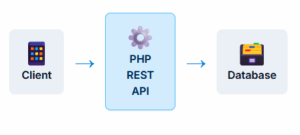
Think of it as a mediator between a client (like a web or mobile app) and a server (where the data lives). The client sends a request, and the API processes it, interacts with the database if needed, and sends a response back to the client, typically in JSON format.
Basic API Flow
HTTP Methods (Verbs)
GET
Used to retrieve or read data from a resource. It’s a safe and idempotent method, meaning it doesn’t change the state of the server.
POST
Used to create a new resource. Submitting a POST request multiple times may result in multiple new resources being created.
PUT
Used to update an existing resource or create it if it doesn’t exist. It’s idempotent; multiple identical requests have the same effect as one.
DELETE
Used to remove a resource. It’s idempotent; deleting a resource multiple times has the same effect as deleting it once.
API Operations: Code Examples
This is the interactive core of the application. Click the buttons below to see the specific PHP code for handling each of the four main API operations. The code demonstrates how to process the request, interact with the database, and send a JSON response.
GET (Read) Operation
The GET method retrieves data. The code checks if an `id` is provided in the URL. If an `id` is present, it fetches a single record. Otherwise, it fetches all records from the `mahasiswa` table.
  function get_mahasiswa($id = 0)
{
    $this->db = new Database();
    $this->db->connect();

    if ($id == 0) {
        $sql = "SELECT * FROM mahasiswa";
        $result = $this->db->query($sql);
    } else {
        $sql = "SELECT * FROM mahasiswa WHERE id = ?";
        $result = $this->db->query($sql, [$id]);
    }

    if ($result->num_rows > 0) {
        $data = array();
        while ($row = $result->fetch_assoc()) {
            $data[] = $row;
        }
        $this->send_response(200, $data);
    } else {
        $this->send_response(404, ['message' => 'Data not found']);
    }

    $this->db->close();
}
POST (Create) Operation
The POST method creates a new record. The code retrieves the JSON data from the request body, parses it, and then inserts the new record into the `mahasiswa` table.
  function post_mahasiswa()
{
    $this->db = new Database();
    $this->db->connect();

    $data = json_decode(file_get_contents('php://input'), true);

    if (isset($data['nama']) && isset($data['npm']) && isset($data['prodi'])) {
        $nama = $data['nama'];
        $npm = $data['npm'];
        $prodi = $data['prodi'];

        $sql = "INSERT INTO mahasiswa (nama, npm, prodi) VALUES (?, ?, ?)";
        $this->db->query($sql, [$nama, $npm, $prodi]);

        $this->send_response(201, ['message' => 'Data created successfully']);
    } else {
        $this->send_response(400, ['message' => 'Invalid input']);
    }

    $this->db->close();
}
PUT (Update) Operation
The PUT method updates an existing record, identified by the `id` in the URL. It reads the JSON data from the request body and updates the corresponding record in the database.
  function put_mahasiswa($id)
{
    $this->db = new Database();
    $this->db->connect();

    $data = json_decode(file_get_contents('php://input'), true);

    if (isset($data['nama']) && isset($data['npm']) && isset($data['prodi'])) {
        $nama = $data['nama'];
        $npm = $data['npm'];
        $prodi = $data['prodi'];

        $sql = "UPDATE mahasiswa SET nama = ?, npm = ?, prodi = ? WHERE id = ?";
        $this->db->query($sql, [$nama, $npm, $prodi, $id]);

        if ($this->db->affected_rows() > 0) {
            $this->send_response(200, ['message' => 'Data updated successfully']);
        } else {
            $this->send_response(404, ['message' => 'Data not found or no changes made']);
        }
    } else {
        $this->send_response(400, ['message' => 'Invalid input']);
    }

    $this->db->close();
}
DELETE (Remove) Operation
The DELETE method removes a record, identified by the `id` in the URL. It executes a DELETE query on the database to remove the specified record.
  function delete_mahasiswa($id)
{
    $this->db = new Database();
    $this->db->connect();

    $sql = "DELETE FROM mahasiswa WHERE id = ?";
    $this->db->query($sql, [$id]);

    if ($this->db->affected_rows() > 0) {
        $this->send_response(200, ['message' => 'Data deleted successfully']);
    } else {
        $this->send_response(404, ['message' => 'Data not found']);
    }

    $this->db->close();
}
Project Setup Files
A solid foundation is key. This API relies on two core files for its operation: a `Database` class to handle connections and queries, and a `BaseController` to manage shared logic like sending standardized JSON responses.
Database.php
This class manages the MySQLi database connection. It includes methods to connect, close, and execute prepared statements, which helps prevent SQL injection.
  <?php
class Database
{
    private $host = 'localhost';
    private $username = 'root';
    private $password = '';
    private $database = 'your_database_name';
    public $conn;

    public function connect()
    {
        $this->conn = new mysqli($this->host, $this->username, $this->password, $this->database);
        if ($this->conn->connect_error) {
            die("Connection failed: " . $this->conn->connect_error);
        }
        return $this->conn;
    }

    public function query($sql, $params = [])
    {
        $stmt = $this->conn->prepare($sql);
        if ($params) {
            $types = str_repeat('s', count($params));
            $stmt->bind_param($types, ...$params);
        }
        $stmt->execute();
        $result = $stmt->get_result();
        $stmt->close();
        return $result;
    }

    public function affected_rows()
    {
        return $this->conn->affected_rows;
    }

    public function close()
    {
        $this->conn->close();
    }
}
?>
BaseController.php
This base controller contains the reusable `send_response` method, ensuring all API responses are consistently formatted as JSON with the correct HTTP status code and headers.
  <?php
class BaseController
{
    protected $db;

    protected function send_response($status_code, $data)
    {
        header('Content-Type: application/json');
        http_response_code($status_code);
        echo json_encode($data);
        exit;
    }
}
?>