
Why Your FAQ Strategy Determines Whether Google Features You
FAQ content is one of the highest-leverage SEO investments a website can make. When implemented correctly, a single FAQ page can:
- Appear in Google’s “People Also Ask” boxes (featured at position zero)
- Show FAQ rich snippets directly in search results — expandable Q&A visible before clicking
- Rank for hundreds of long-tail question keywords from a single URL
- Power AI Overview answers in Google’s Search Generative Experience
- Reduce customer support volume by up to 40% by surfacing answers pre-sale
But here’s what most WordPress FAQ tutorials get wrong: they show you how to display questions and answers on a page. That is not an SEO FAQ system. A real SEO FAQ system requires:
- Custom Post Types so each FAQ is a proper WordPress entity with its own URL
- Custom Taxonomies to group questions into categories Google can understand
- FAQPage schema markup (JSON-LD) injected into <head> — not just HTML structure
- Accordion UI with proper ARIA accessibility attributes
- Admin meta boxes for answer fields, sort order, and schema toggle controls
- Shortcode with multiple display modes and filtering options
- Gutenberg block for the block editor
- Breadcrumb schema and Article schema integration
- A content strategy built around how people actually ask questions
This guide gives you a complete, production-deployable FAQ plugin and the content strategy to make it rank.
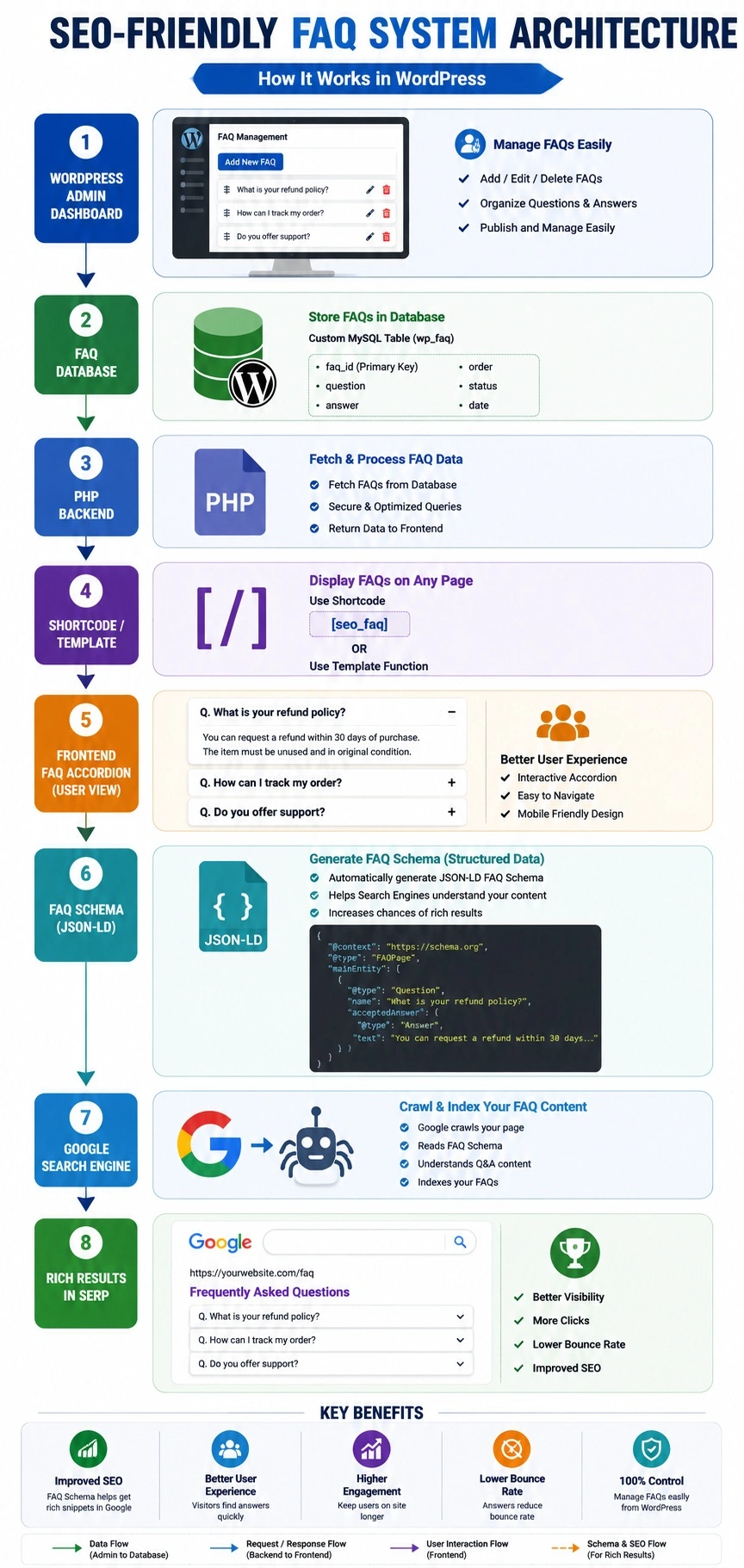
Part 1 — Architecture: How the System Works
ADMIN SIDE                           FRONTEND SIDE
────────────────────────────────     ──────────────────────────────────────
WordPress Admin                      Page / Post / Archive
  │                                      │
  ├── FAQ Post Type (CPT)                ├── [faq] shortcode
  │     ├── Title = Question            │       │
  │     ├── Editor = Answer             │       ├── WP_Query → FAQ posts
  │     ├── Meta Box:                   │       ├── Accordion HTML output
  │     │     ├── Short Answer          │       └── Inline CSS + JS
  │     │     ├── Sort Order            │
  │     │     ├── Show in Schema?       ├── Single FAQ page (/faq/slug/)
  │     │     └── Canonical URL         │       └── Individual Q&A page
  │     └── FAQ Category (taxonomy)     │
  │                                     └── wp_head → FAQPage JSON-LD schema
  └── Settings Page                              ├── Pulls active FAQs
        ├── Global schema toggle                 ├── Filters by page
        ├── Max FAQs in schema                   └── Outputs to <head>
        └── Schema per-page filter
File structure for the plugin:
/wp-content/plugins/wp-faq-pro/
│
├── wp-faq-pro.php                    ← Plugin bootstrap + constants
├── includes/
│   ├── class-faq-post-type.php       ← CPT + taxonomy registration
│   ├── class-faq-meta-boxes.php      ← Admin meta boxes
│   ├── class-faq-schema.php          ← FAQPage JSON-LD output
│   ├── class-faq-shortcode.php       ← [faq] shortcode
│   ├── class-faq-block.php           ← Gutenberg block
│   ├── class-faq-settings.php        ← Admin settings page
│   └── class-faq-rest-api.php        ← REST API endpoint
├── assets/
│   ├── css/
│   │   ├── faq-frontend.css          ← Accordion styles
│   │   └── faq-admin.css             ← Meta box styles
│   └── js/
│       ├── faq-frontend.js           ← Accordion behavior
│       └── faq-admin.js              ← Sort order drag-drop
├── templates/
│   ├── faq-accordion.php             ← Default accordion template
│   ├── faq-list.php                  ← Simple list template
│   └── single-faq.php                ← Single FAQ template
└── uninstall.php                     ← Clean DB on deletion
Part 2 — Plugin Bootstrap and Constants
wp-faq-pro.php
<?php
/**
 * Plugin Name:       WP FAQ Pro
 * Plugin URI:        https://ipdata.in/wp-faq-pro
 * Description:       A production-grade, SEO-optimised FAQ system for WordPress.
 *                    Includes Custom Post Type, Taxonomies, FAQPage schema markup,
 *                    accordion shortcode, Gutenberg block, and REST API endpoint.
 * Version:           3.0.0
 * Requires at least: 6.0
 * Requires PHP:      8.0
 * Author:            Tabir Ahmad
 * License:           GPL v2 or later
 * Text Domain:       wp-faq-pro
 */

if ( ! defined( 'ABSPATH' ) ) exit;

// ── Constants ─────────────────────────────────────────────────────────────────
define( 'WPFAQ_VERSION',   '3.0.0' );
define( 'WPFAQ_FILE',      __FILE__ );
define( 'WPFAQ_DIR',       plugin_dir_path( __FILE__ ) );
define( 'WPFAQ_URL',       plugin_dir_url( __FILE__ ) );
define( 'WPFAQ_BASE',      plugin_basename( __FILE__ ) );
define( 'WPFAQ_OPTIONS',   'wpfaq_settings' );
define( 'WPFAQ_CPT',       'faq' );
define( 'WPFAQ_TAX',       'faq_category' );
define( 'WPFAQ_META_ANS',  '_wpfaq_short_answer' );
define( 'WPFAQ_META_ORD',  '_wpfaq_sort_order' );
define( 'WPFAQ_META_SCH',  '_wpfaq_include_schema' );

// ── Autoloader ─────────────────────────────────────────────────────────────────
spl_autoload_register( function( string $class ): void {
    if ( strpos( $class, 'WPFAQ_' ) !== 0 ) return;
    $file = WPFAQ_DIR . 'includes/class-' .
            strtolower( str_replace( [ 'WPFAQ_', '_' ], [ '', '-' ], $class ) ) . '.php';
    if ( file_exists( $file ) ) require_once $file;
} );

// ── Default settings ───────────────────────────────────────────────────────────
function wpfaq_defaults(): array {
    return [
        'schema_enabled'     => '1',
        'schema_max_items'   => '10',
        'schema_on_pages'    => 'all',   // all | faq_only | specific
        'specific_pages'     => '',      // comma-sep page IDs
        'accordion_default'  => 'closed',
        'animate_speed'      => '300',
        'show_category_tabs' => '1',
        'single_faq_template'=> '1',
        'breadcrumb_schema'  => '1',
    ];
}

// ── Activation ─────────────────────────────────────────────────────────────────
register_activation_hook( __FILE__, function(): void {
    if ( ! get_option( WPFAQ_OPTIONS ) ) {
        add_option( WPFAQ_OPTIONS, wpfaq_defaults() );
    }
    flush_rewrite_rules();
} );

// ── Bootstrap ──────────────────────────────────────────────────────────────────
add_action( 'plugins_loaded', function(): void {
    load_plugin_textdomain( 'wp-faq-pro', false, dirname( WPFAQ_BASE ) . '/languages' );

    $settings = get_option( WPFAQ_OPTIONS, wpfaq_defaults() );

    // Always register CPT + taxonomy
    ( new WPFAQ_Post_Type() )->register();

    // Admin components
    if ( is_admin() ) {
        ( new WPFAQ_Meta_Boxes() )->register();
        ( new WPFAQ_Settings( $settings ) )->register();
    }

    // Frontend components
    ( new WPFAQ_Shortcode( $settings ) )->register();
    ( new WPFAQ_Schema( $settings ) )->register();
    ( new WPFAQ_Rest_Api() )->register();

    // Plugin action links
    add_filter( 'plugin_action_links_' . WPFAQ_BASE,
        fn( array $links ): array => array_merge(
            [ '<a href="' . admin_url( 'options-general.php?page=wp-faq-pro' ) . '">' .
              __( 'Settings', 'wp-faq-pro' ) . '</a>' ],
            $links
        )
    );
} );
Part 3 — Custom Post Type and Taxonomy (Production-Grade)
includes/class-faq-post-type.php
<?php
if ( ! defined( 'ABSPATH' ) ) exit;

class WPFAQ_Post_Type {

    public function register(): void {
        add_action( 'init', [ $this, 'register_post_type' ] );
        add_action( 'init', [ $this, 'register_taxonomy' ] );
        add_filter( 'post_updated_messages', [ $this, 'updated_messages' ] );
        add_filter( 'manage_faq_posts_columns',         [ $this, 'add_admin_columns' ] );
        add_action( 'manage_faq_posts_custom_column',   [ $this, 'render_admin_columns' ], 10, 2 );
        add_filter( 'manage_edit-faq_sortable_columns', [ $this, 'sortable_columns' ] );
        add_action( 'pre_get_posts',                    [ $this, 'sort_admin_by_order' ] );
    }

    public function register_post_type(): void {
        $labels = [
            'name'                  => _x( 'FAQs', 'post type general name', 'wp-faq-pro' ),
            'singular_name'         => _x( 'FAQ', 'post type singular name', 'wp-faq-pro' ),
            'menu_name'             => __( 'FAQs', 'wp-faq-pro' ),
            'name_admin_bar'        => __( 'FAQ', 'wp-faq-pro' ),
            'add_new'               => __( 'Add New', 'wp-faq-pro' ),
            'add_new_item'          => __( 'Add New FAQ', 'wp-faq-pro' ),
            'new_item'              => __( 'New FAQ', 'wp-faq-pro' ),
            'edit_item'             => __( 'Edit FAQ', 'wp-faq-pro' ),
            'view_item'             => __( 'View FAQ', 'wp-faq-pro' ),
            'all_items'             => __( 'All FAQs', 'wp-faq-pro' ),
            'search_items'          => __( 'Search FAQs', 'wp-faq-pro' ),
            'parent_item_colon'     => __( 'Parent FAQ:', 'wp-faq-pro' ),
            'not_found'             => __( 'No FAQs found.', 'wp-faq-pro' ),
            'not_found_in_trash'    => __( 'No FAQs found in Trash.', 'wp-faq-pro' ),
            'featured_image'        => __( 'FAQ Image', 'wp-faq-pro' ),
            'archives'              => __( 'FAQ Archives', 'wp-faq-pro' ),
            'insert_into_item'      => __( 'Insert into FAQ', 'wp-faq-pro' ),
            'uploaded_to_this_item' => __( 'Uploaded to this FAQ', 'wp-faq-pro' ),
        ];

        $args = [
            'labels'              => $labels,
            'description'         => __( 'Frequently Asked Questions', 'wp-faq-pro' ),
            'public'              => true,
            'publicly_queryable'  => true,
            'show_ui'             => true,
            'show_in_menu'        => true,
            'show_in_nav_menus'   => true,
            'show_in_rest'        => true,   // Enables Gutenberg editor
            'query_var'           => true,
            'rewrite'             => [ 'slug' => 'faq', 'with_front' => false ],
            'capability_type'     => 'post',
            'has_archive'         => 'faqs',  // /faqs/ archive URL
            'hierarchical'        => false,
            'menu_position'       => 25,
            'menu_icon'           => 'dashicons-editor-help',
            'supports'            => [ 'title', 'editor', 'revisions', 'excerpt', 'custom-fields' ],
            'delete_with_user'    => false,
        ];

        register_post_type( WPFAQ_CPT, $args );
    }

    public function register_taxonomy(): void {
        $labels = [
            'name'                       => _x( 'FAQ Categories', 'taxonomy general name', 'wp-faq-pro' ),
            'singular_name'              => _x( 'FAQ Category', 'taxonomy singular name', 'wp-faq-pro' ),
            'search_items'               => __( 'Search FAQ Categories', 'wp-faq-pro' ),
            'popular_items'              => __( 'Popular FAQ Categories', 'wp-faq-pro' ),
            'all_items'                  => __( 'All Categories', 'wp-faq-pro' ),
            'parent_item'                => __( 'Parent Category', 'wp-faq-pro' ),
            'parent_item_colon'          => __( 'Parent Category:', 'wp-faq-pro' ),
            'edit_item'                  => __( 'Edit Category', 'wp-faq-pro' ),
            'view_item'                  => __( 'View Category', 'wp-faq-pro' ),
            'update_item'                => __( 'Update Category', 'wp-faq-pro' ),
            'add_new_item'               => __( 'Add New Category', 'wp-faq-pro' ),
            'new_item_name'              => __( 'New Category Name', 'wp-faq-pro' ),
            'separate_items_with_commas' => __( 'Separate categories with commas', 'wp-faq-pro' ),
            'add_or_remove_items'        => __( 'Add or remove categories', 'wp-faq-pro' ),
            'choose_from_most_used'      => __( 'Choose from the most used categories', 'wp-faq-pro' ),
            'not_found'                  => __( 'No categories found.', 'wp-faq-pro' ),
            'back_to_items'              => __( '← Go to FAQ Categories', 'wp-faq-pro' ),
        ];

        $args = [
            'labels'            => $labels,
            'hierarchical'      => true,  // Like categories, not tags
            'public'            => true,
            'publicly_queryable'=> true,
            'show_ui'           => true,
            'show_in_menu'      => true,
            'show_in_nav_menus' => true,
            'show_in_rest'      => true,
            'show_tagcloud'     => false,
            'show_admin_column' => true,
            'rewrite'           => [ 'slug' => 'faq-category', 'hierarchical' => true ],
            'query_var'         => true,
        ];

        register_taxonomy( WPFAQ_TAX, [ WPFAQ_CPT ], $args );
    }

    public function add_admin_columns( array $columns ): array {
        $new = [];
        foreach ( $columns as $key => $label ) {
            $new[ $key ] = $label;
            if ( $key === 'title' ) {
                $new['faq_category'] = __( 'Category', 'wp-faq-pro' );
                $new['faq_order']    = __( 'Order', 'wp-faq-pro' );
                $new['faq_schema']   = __( 'In Schema', 'wp-faq-pro' );
            }
        }
        return $new;
    }

    public function render_admin_columns( string $column, int $post_id ): void {
        switch ( $column ) {
            case 'faq_category':
                $terms = get_the_terms( $post_id, WPFAQ_TAX );
                if ( $terms && ! is_wp_error( $terms ) ) {
                    $links = array_map( fn( $t ) =>
                        '<a href="' . get_term_link( $t ) . '">' . esc_html( $t->name ) . '</a>',
                        $terms
                    );
                    echo implode( ', ', $links );
                } else {
                    echo '—';
                }
                break;

            case 'faq_order':
                echo (int) get_post_meta( $post_id, WPFAQ_META_ORD, true ) ?: '—';
                break;

            case 'faq_schema':
                $in_schema = get_post_meta( $post_id, WPFAQ_META_SCH, true );
                echo $in_schema === '0'
                    ? '<span style="color:#d63638;">✖ No</span>'
                    : '<span style="color:#00a32a;">✔ Yes</span>';
                break;
        }
    }

    public function sortable_columns( array $columns ): array {
        $columns['faq_order'] = 'menu_order';
        return $columns;
    }

    public function sort_admin_by_order( \WP_Query $query ): void {
        if ( ! is_admin() || ! $query->is_main_query() ) return;
        if ( $query->get( 'post_type' ) !== WPFAQ_CPT ) return;

        if ( $query->get( 'orderby' ) === 'menu_order' ) {
            $query->set( 'meta_key', WPFAQ_META_ORD );
            $query->set( 'orderby',  'meta_value_num' );
        }
    }

    public function updated_messages( array $messages ): array {
        $messages[ WPFAQ_CPT ] = [
            0  => '',
            1  => __( 'FAQ updated.', 'wp-faq-pro' ),
            2  => __( 'Custom field updated.', 'wp-faq-pro' ),
            3  => __( 'Custom field deleted.', 'wp-faq-pro' ),
            4  => __( 'FAQ updated.', 'wp-faq-pro' ),
            6  => __( 'FAQ published.', 'wp-faq-pro' ),
            7  => __( 'FAQ saved.', 'wp-faq-pro' ),
            8  => __( 'FAQ submitted.', 'wp-faq-pro' ),
            9  => __( 'FAQ scheduled.', 'wp-faq-pro' ),
            10 => __( 'FAQ draft updated.', 'wp-faq-pro' ),
        ];
        return $messages;
    }
}
Part 4 — Admin Meta Boxes (Full Answer + Schema Controls)
includes/class-faq-meta-boxes.php
<?php
if ( ! defined( 'ABSPATH' ) ) exit;

class WPFAQ_Meta_Boxes {

    public function register(): void {
        add_action( 'add_meta_boxes', [ $this, 'add_boxes' ] );
        add_action( 'save_post_faq',  [ $this, 'save' ], 10, 2 );
    }

    public function add_boxes(): void {
        add_meta_box(
            'wpfaq_details',
            __( 'FAQ Details & SEO Options', 'wp-faq-pro' ),
            [ $this, 'render' ],
            WPFAQ_CPT,
            'normal',
            'high'
        );
    }

    public function render( \WP_Post $post ): void {
        wp_nonce_field( 'wpfaq_save_meta', 'wpfaq_nonce' );

        $short_answer = get_post_meta( $post->ID, WPFAQ_META_ANS, true );
        $sort_order   = get_post_meta( $post->ID, WPFAQ_META_ORD, true );
        $in_schema    = get_post_meta( $post->ID, WPFAQ_META_SCH, true );

        // Default: include in schema
        if ( $in_schema === '' ) $in_schema = '1';
        ?>
        <style>
            .wpfaq-meta-grid { display: grid; grid-template-columns: 1fr 1fr; gap: 16px; margin-top: 8px; }
            .wpfaq-meta-field label { font-weight: 600; display: block; margin-bottom: 4px; font-size: 13px; }
            .wpfaq-meta-field input[type=number], .wpfaq-meta-field textarea { width: 100%; }
            .wpfaq-meta-field textarea { height: 80px; font-size: 13px; }
            .wpfaq-schema-notice { background: #f0f6fc; border-left: 4px solid #0073aa; padding: 10px 14px; margin-top: 16px; border-radius: 2px; font-size: 12px; }
        </style>

        <div class="wpfaq-meta-grid">
            <!-- Short Answer (for Schema) -->
            <div class="wpfaq-meta-field" style="grid-column: 1 / -1;">
                <label for="wpfaq_short_answer">
                    <?php esc_html_e( 'Short Answer (for Schema & Excerpt)', 'wp-faq-pro' ); ?>
                    <span style="color:#d63638;"> *</span>
                </label>
                <textarea
                    id="wpfaq_short_answer"
                    name="wpfaq_short_answer"
                    placeholder="<?php esc_attr_e( 'Concise answer for Google rich snippets (50–300 characters). This appears in search results.', 'wp-faq-pro' ); ?>"
                ><?php echo esc_textarea( $short_answer ); ?></textarea>
                <p style="color:#666;font-size:11px;margin-top:4px;">
                    <?php printf(
                        esc_html__( 'Characters: %s / 300 recommended for schema.', 'wp-faq-pro' ),
                        '<span id="wpfaq-char-count">' . mb_strlen( $short_answer ) . '</span>'
                    ); ?>
                </p>
            </div>

            <!-- Sort Order -->
            <div class="wpfaq-meta-field">
                <label for="wpfaq_sort_order">
                    <?php esc_html_e( 'Sort Order (Lower = First)', 'wp-faq-pro' ); ?>
                </label>
                <input
                    type="number"
                    id="wpfaq_sort_order"
                    name="wpfaq_sort_order"
                    value="<?php echo (int) $sort_order ?: 10; ?>"
                    min="0"
                    max="9999"
                    step="1"
                >
                <p style="color:#666;font-size:11px;margin-top:4px;">
                    <?php esc_html_e( 'Controls display order within the same category.', 'wp-faq-pro' ); ?>
                </p>
            </div>

            <!-- Include in Schema -->
            <div class="wpfaq-meta-field">
                <label><?php esc_html_e( 'Include in FAQPage Schema?', 'wp-faq-pro' ); ?></label>
                <label style="display:flex;align-items:center;gap:8px;margin-top:8px;font-weight:400;">
                    <input
                        type="checkbox"
                        name="wpfaq_include_schema"
                        value="1"
                        <?php checked( $in_schema, '1' ); ?>
                        style="margin:0;"
                    >
                    <?php esc_html_e( 'Yes — include in structured data output', 'wp-faq-pro' ); ?>
                </label>
                <p style="color:#666;font-size:11px;margin-top:4px;">
                    <?php esc_html_e( 'Uncheck for FAQs not suitable for rich snippets (e.g., very long answers).', 'wp-faq-pro' ); ?>
                </p>
            </div>
        </div>

        <div class="wpfaq-schema-notice">
            <strong>💡 <?php esc_html_e( 'SEO Tip:', 'wp-faq-pro' ); ?></strong>
            <?php esc_html_e( 'Google recommends keeping FAQ answers factual and concise. Use the short answer for schema (appears in search results) and the main editor for the full detailed answer shown on the page.', 'wp-faq-pro' ); ?>
        </div>

        <script>
            (function() {
                var ta = document.getElementById('wpfaq_short_answer');
                var count = document.getElementById('wpfaq-char-count');
                if (ta && count) {
                    ta.addEventListener('input', function() {
                        count.textContent = this.value.length;
                        count.style.color = this.value.length > 300 ? '#d63638' : '';
                    });
                }
            })();
        </script>
        <?php
    }

    public function save( int $post_id, \WP_Post $post ): void {
        // Security checks
        if ( ! isset( $_POST['wpfaq_nonce'] ) ||
             ! wp_verify_nonce( $_POST['wpfaq_nonce'], 'wpfaq_save_meta' ) ) return;

        if ( defined( 'DOING_AUTOSAVE' ) && DOING_AUTOSAVE ) return;

        if ( ! current_user_can( 'edit_post', $post_id ) ) return;

        // Save short answer
        $short_answer = sanitize_textarea_field( wp_unslash( $_POST['wpfaq_short_answer'] ?? '' ) );
        update_post_meta( $post_id, WPFAQ_META_ANS, $short_answer );

        // Also update post excerpt to match (for theme compatibility)
        if ( $short_answer && empty( $post->post_excerpt ) ) {
            wp_update_post( [
                'ID'           => $post_id,
                'post_excerpt' => mb_substr( wp_strip_all_tags( $short_answer ), 0, 250 ),
            ] );
        }

        // Save sort order
        $order = max( 0, (int)( $_POST['wpfaq_sort_order'] ?? 10 ) );
        update_post_meta( $post_id, WPFAQ_META_ORD, $order );

        // Save schema toggle
        $in_schema = ! empty( $_POST['wpfaq_include_schema'] ) ? '1' : '0';
        update_post_meta( $post_id, WPFAQ_META_SCH, $in_schema );
    }
}
Part 5 — FAQPage Schema Markup (The SEO Core)
This is the most important part — the JSON-LD structured data that makes Google show your FAQs as rich results.
includes/class-faq-schema.php
<?php
if ( ! defined( 'ABSPATH' ) ) exit;

/**
 * WPFAQ_Schema
 *
 * Injects FAQPage JSON-LD structured data into <head>.
 * Follows Google's FAQPage guidelines:
 * https://developers.google.com/search/docs/appearance/structured-data/faqpage
 *
 * Rules:
 * - Maximum 3-10 Q&A pairs recommended (Google may ignore beyond 10)
 * - Answers must be factual and not promotional
 * - Must be visible on the page (not hidden in modal/tab by default)
 * - Cannot be user-generated content (reviews, comments)
 */
class WPFAQ_Schema {

    private array $settings;

    public function __construct( array $settings ) {
        $this->settings = $settings;
    }

    public function register(): void {
        if ( empty( $this->settings['schema_enabled'] ) ) return;

        add_action( 'wp_head', [ $this, 'output_faqpage_schema' ], 5 );
        add_action( 'wp_head', [ $this, 'output_breadcrumb_schema' ], 6 );
    }

    /**
     * Output FAQPage structured data.
     * Runs on every page that has FAQs embedded via shortcode.
     */
    public function output_faqpage_schema(): void {

        $faqs = $this->get_schema_faqs();

        if ( empty( $faqs ) ) return;

        $schema = [
            '@context'   => 'https://schema.org',
            '@type'      => 'FAQPage',
            'mainEntity' => array_map( function( \WP_Post $faq ): array {

                $question     = wp_strip_all_tags( get_the_title( $faq ) );
                $short_answer = get_post_meta( $faq->ID, WPFAQ_META_ANS, true );
                $full_answer  = $short_answer ?: wp_strip_all_tags( get_the_content( null, false, $faq ) );

                // Schema answer must be plain text, no HTML, max recommended ~250 chars
                $answer_text = wp_strip_all_tags( $full_answer );

                return [
                    '@type'          => 'Question',
                    'name'           => $question,
                    'acceptedAnswer' => [
                        '@type' => 'Answer',
                        'text'  => $answer_text,
                    ],
                ];
            }, $faqs ),
        ];

        printf(
            '<script type="application/ld+json">%s</script>' . "\n",
            wp_json_encode( $schema, JSON_UNESCAPED_UNICODE | JSON_UNESCAPED_SLASHES | JSON_PRETTY_PRINT )
        );
    }

    /**
     * Output BreadcrumbList schema for FAQ category archive pages.
     */
    public function output_breadcrumb_schema(): void {
        if ( empty( $this->settings['breadcrumb_schema'] ) ) return;

        if ( ! is_tax( WPFAQ_TAX ) && ! is_post_type_archive( WPFAQ_CPT ) ) return;

        $items = [
            [
                '@type'    => 'ListItem',
                'position' => 1,
                'name'     => get_bloginfo( 'name' ),
                'item'     => home_url( '/' ),
            ],
            [
                '@type'    => 'ListItem',
                'position' => 2,
                'name'     => __( 'FAQs', 'wp-faq-pro' ),
                'item'     => get_post_type_archive_link( WPFAQ_CPT ),
            ],
        ];

        // Add category level if on taxonomy archive
        if ( is_tax( WPFAQ_TAX ) ) {
            $term = get_queried_object();
            $items[] = [
                '@type'    => 'ListItem',
                'position' => 3,
                'name'     => $term->name ?? '',
                'item'     => get_term_link( $term ),
            ];
        }

        $schema = [
            '@context'        => 'https://schema.org',
            '@type'           => 'BreadcrumbList',
            'itemListElement' => $items,
        ];

        printf(
            '<script type="application/ld+json">%s</script>' . "\n",
            wp_json_encode( $schema, JSON_UNESCAPED_UNICODE | JSON_UNESCAPED_SLASHES )
        );
    }

    /**
     * Get FAQ posts eligible for schema output on the current page.
     *
     * Logic:
     * 1. On a single FAQ page → output just that FAQ
     * 2. On a page with [faq] shortcode → output FAQs matching shortcode filters
     * 3. On FAQ archive/category → output those FAQs
     * 4. Global setting: output FAQs from a specific category everywhere
     */
    private function get_schema_faqs(): array {

        $max = (int)( $this->settings['schema_max_items'] ?? 10 );

        // Single FAQ page — just this one
        if ( is_singular( WPFAQ_CPT ) ) {
            $post = get_post();
            $in_schema = get_post_meta( $post->ID, WPFAQ_META_SCH, true );
            if ( $in_schema === '0' ) return [];
            return $post ? [ $post ] : [];
        }

        // FAQ archive or category archive
        if ( is_post_type_archive( WPFAQ_CPT ) || is_tax( WPFAQ_TAX ) ) {
            return $this->query_faqs( [], $max );
        }

        // Check if current page/post contains [faq] shortcode
        $post = get_post();
        if ( $post && has_shortcode( $post->post_content, 'faq' ) ) {
            // Extract shortcode attributes to match what's displayed
            $regex   = get_shortcode_regex( [ 'faq' ] );
            $matches = [];
            preg_match_all( '/' . $regex . '/s', $post->post_content, $matches );

            $all_faqs = [];
            if ( ! empty( $matches[3] ) ) {
                foreach ( $matches[3] as $attr_string ) {
                    $atts = shortcode_parse_atts( $attr_string );
                    $category = sanitize_text_field( $atts['category'] ?? '' );
                    $faqs     = $this->query_faqs(
                        $category ? [ 'slug' => $category ] : [],
                        $max
                    );
                    $all_faqs = array_merge( $all_faqs, $faqs );
                }
                // Deduplicate and limit
                $seen = [];
                $unique = [];
                foreach ( $all_faqs as $faq ) {
                    if ( ! isset( $seen[ $faq->ID ] ) ) {
                        $seen[ $faq->ID ] = true;
                        $unique[] = $faq;
                    }
                }
                return array_slice( $unique, 0, $max );
            }

            // Shortcode present but no specific category — get all FAQs
            return $this->query_faqs( [], $max );
        }

        return [];
    }

    /**
     * Query FAQ posts for schema output.
     *
     * @param array  $tax_query_args  Optional taxonomy filter
     * @param int    $max             Maximum number to return
     */
    private function query_faqs( array $tax_query_args, int $max ): array {
        $args = [
            'post_type'      => WPFAQ_CPT,
            'post_status'    => 'publish',
            'posts_per_page' => $max,
            'meta_key'       => WPFAQ_META_ORD,
            'orderby'        => 'meta_value_num',
            'order'          => 'ASC',
            'meta_query'     => [
                'relation' => 'OR',
                [
                    'key'     => WPFAQ_META_SCH,
                    'value'   => '1',
                    'compare' => '=',
                ],
                [
                    'key'     => WPFAQ_META_SCH,
                    'compare' => 'NOT EXISTS',
                ],
            ],
        ];

        if ( ! empty( $tax_query_args ) ) {
            $args['tax_query'] = [[
                'taxonomy' => WPFAQ_TAX,
                'field'    => 'slug',
                'terms'    => $tax_query_args['slug'] ?? '',
            ]];
        }

        $query = new \WP_Query( $args );
        return $query->posts;
    }
}
Part 6 — The Advanced Shortcode System
includes/class-faq-shortcode.php
<?php
if ( ! defined( 'ABSPATH' ) ) exit;

class WPFAQ_Shortcode {

    private array $settings;

    public function __construct( array $settings ) {
        $this->settings = $settings;
    }

    public function register(): void {
        add_shortcode( 'faq', [ $this, 'render' ] );
        add_action( 'wp_enqueue_scripts', [ $this, 'maybe_enqueue_assets' ] );
    }

    /**
     * Render the [faq] shortcode.
     *
     * Attributes:
     *   category      = "slug"           Filter by FAQ category slug
     *   category_id   = "5"              Filter by category term ID
     *   ids           = "1,2,3"          Show specific FAQ IDs only
     *   exclude       = "4,5"            Exclude specific FAQ IDs
     *   limit         = "10"             Max FAQs to show (-1 for all)
     *   order         = "ASC|DESC"       Sort direction
     *   orderby       = "order|title|date" Sort field
     *   layout        = "accordion|list|grid|tabs" Display layout
     *   theme         = "default|minimal|bordered|card" Visual theme
     *   show_icon     = "true|false"     Show expand icon
     *   open_first    = "true|false"     Open first item by default
     *   show_category = "true|false"     Show category label
     *   show_count    = "true|false"     Show question count
     *   title         = "My FAQs"        Section heading
     *   title_tag     = "h2"             HTML tag for heading
     *   class         = "custom-class"   Additional CSS class
     *   search        = "true|false"     Show search box
     */
    public function render( array $atts ): string {

        $atts = shortcode_atts( [
            'category'     => '',
            'category_id'  => '',
            'ids'          => '',
            'exclude'      => '',
            'limit'        => '-1',
            'order'        => 'ASC',
            'orderby'      => 'order',
            'layout'       => 'accordion',
            'theme'        => 'default',
            'show_icon'    => 'true',
            'open_first'   => $this->settings['accordion_default'] === 'open' ? 'true' : 'false',
            'show_category'=> 'false',
            'show_count'   => 'false',
            'title'        => '',
            'title_tag'    => 'h2',
            'class'        => '',
            'search'       => 'false',
        ], $atts, 'faq' );

        // ── Build WP_Query args ───────────────────────────────────────────
        $query_args = [
            'post_type'      => WPFAQ_CPT,
            'post_status'    => 'publish',
            'posts_per_page' => (int) $atts['limit'],
            'order'          => sanitize_text_field( $atts['order'] ),
        ];

        // Orderby mapping
        $query_args['orderby'] = match ( $atts['orderby'] ) {
            'title'   => 'title',
            'date'    => 'date',
            'rand'    => 'rand',
            default   => 'meta_value_num',
        };

        if ( $query_args['orderby'] === 'meta_value_num' ) {
            $query_args['meta_key'] = WPFAQ_META_ORD;
        }

        // Category filter
        if ( ! empty( $atts['category'] ) ) {
            $query_args['tax_query'] = [[
                'taxonomy' => WPFAQ_TAX,
                'field'    => 'slug',
                'terms'    => array_map( 'trim', explode( ',', sanitize_text_field( $atts['category'] ) ) ),
            ]];
        } elseif ( ! empty( $atts['category_id'] ) ) {
            $query_args['tax_query'] = [[
                'taxonomy' => WPFAQ_TAX,
                'field'    => 'term_id',
                'terms'    => array_map( 'absint', explode( ',', $atts['category_id'] ) ),
            ]];
        }

        // Specific IDs filter
        if ( ! empty( $atts['ids'] ) ) {
            $query_args['post__in']  = array_map( 'absint', explode( ',', $atts['ids'] ) );
            $query_args['orderby']   = 'post__in'; // Maintain provided order
        }

        // Exclude IDs
        if ( ! empty( $atts['exclude'] ) ) {
            $query_args['post__not_in'] = array_map( 'absint', explode( ',', $atts['exclude'] ) );
        }

        $query = new \WP_Query( $query_args );

        if ( ! $query->have_posts() ) {
            return '<p class="wpfaq-no-results">' .
                   esc_html__( 'No FAQs found.', 'wp-faq-pro' ) . '</p>';
        }

        // ── Build output ──────────────────────────────────────────────────
        $wrapper_id    = 'wpfaq-' . wp_unique_id();
        $wrapper_class = implode( ' ', array_filter( [
            'wpfaq-wrapper',
            'wpfaq-layout-' . sanitize_html_class( $atts['layout'] ),
            'wpfaq-theme-'  . sanitize_html_class( $atts['theme'] ),
            sanitize_html_class( $atts['class'] ),
        ] ) );

        $count = $query->found_posts;
        ob_start();
        ?>
        <div id="<?php echo esc_attr( $wrapper_id ); ?>"
             class="<?php echo esc_attr( $wrapper_class ); ?>"
             data-animate="<?php echo (int)( $this->settings['animate_speed'] ?? 300 ); ?>"
             data-open-first="<?php echo $atts['open_first'] === 'true' ? '1' : '0'; ?>">

            <?php if ( $atts['title'] ) : ?>
            <<?php echo esc_html( $atts['title_tag'] ); ?> class="wpfaq-section-title">
                <?php echo esc_html( $atts['title'] ); ?>
                <?php if ( $atts['show_count'] === 'true' ) : ?>
                    <span class="wpfaq-count">(<?php echo (int)$count; ?>)</span>
                <?php endif; ?>
            </<?php echo esc_html( $atts['title_tag'] ); ?>>
            <?php endif; ?>

            <?php if ( $atts['search'] === 'true' ) : ?>
            <div class="wpfaq-search-box">
                <input
                    type="search"
                    class="wpfaq-search-input"
                    placeholder="<?php esc_attr_e( 'Search FAQs…', 'wp-faq-pro' ); ?>"
                    aria-label="<?php esc_attr_e( 'Search FAQs', 'wp-faq-pro' ); ?>"
                >
            </div>
            <?php endif; ?>

            <div class="wpfaq-items" role="list">
                <?php
                $item_index = 0;
                while ( $query->have_posts() ) :
                    $query->the_post();
                    $item_index++;
                    $is_open    = ( $atts['open_first'] === 'true' && $item_index === 1 );
                    $item_id    = 'wpfaq-item-' . get_the_ID();
                    $answer_id  = 'wpfaq-answer-' . get_the_ID();
                    $categories = get_the_terms( get_the_ID(), WPFAQ_TAX );
                    ?>
                    <div
                        class="wpfaq-item<?php echo $is_open ? ' wpfaq-open' : ''; ?>"
                        id="<?php echo esc_attr( $item_id ); ?>"
                        itemscope itemtype="https://schema.org/Question"
                        role="listitem"
                    >
                        <button
                            class="wpfaq-question"
                            aria-expanded="<?php echo $is_open ? 'true' : 'false'; ?>"
                            aria-controls="<?php echo esc_attr( $answer_id ); ?>"
                            itemprop="name"
                        >
                            <?php if ( $atts['show_category'] === 'true' && ! is_wp_error( $categories ) && $categories ) : ?>
                                <span class="wpfaq-category-label">
                                    <?php echo esc_html( $categories[0]->name ); ?>
                                </span>
                            <?php endif; ?>

                            <span class="wpfaq-question-text"><?php the_title(); ?></span>

                            <?php if ( $atts['show_icon'] !== 'false' ) : ?>
                            <span class="wpfaq-icon" aria-hidden="true">
                                <svg viewBox="0 0 24 24" width="18" height="18" fill="none" stroke="currentColor" stroke-width="2.5">
                                    <polyline points="6 9 12 15 18 9"/>
                                </svg>
                            </span>
                            <?php endif; ?>
                        </button>

                        <div
                            class="wpfaq-answer"
                            id="<?php echo esc_attr( $answer_id ); ?>"
                            role="region"
                            aria-labelledby="<?php echo esc_attr( $item_id ); ?>"
                            hidden="<?php echo ! $is_open ? 'hidden' : ''; ?>"
                            itemscope itemtype="https://schema.org/Answer"
                        >
                            <div class="wpfaq-answer-inner" itemprop="text">
                                <?php the_content(); ?>
                            </div>
                            <a href="<?php the_permalink(); ?>"
                               class="wpfaq-permalink"
                               title="<?php esc_attr_e( 'Permalink', 'wp-faq-pro' ); ?>">
                                #
                            </a>
                        </div>
                    </div>
                    <?php
                endwhile;
                wp_reset_postdata();
                ?>
            </div>
        </div>
        <?php

        return ob_get_clean();
    }

    public function maybe_enqueue_assets(): void {
        global $post;

        if ( ! $post ) return;

        if ( has_shortcode( $post->post_content, 'faq' ) ||
             is_singular( WPFAQ_CPT ) ||
             is_post_type_archive( WPFAQ_CPT ) ||
             is_tax( WPFAQ_TAX ) ) {

            wp_enqueue_style(
                'wpfaq-frontend',
                WPFAQ_URL . 'assets/css/faq-frontend.css',
                [],
                WPFAQ_VERSION
            );

            wp_enqueue_script(
                'wpfaq-frontend',
                WPFAQ_URL . 'assets/js/faq-frontend.js',
                [],
                WPFAQ_VERSION,
                true
            );
        }
    }
}
Part 7 — Accordion CSS (Complete Styled System)
assets/css/faq-frontend.css
/* ── WP FAQ Pro — Frontend Styles ─────────────────────────────────────── */

:root {
    --wpfaq-accent:       #2563eb;
    --wpfaq-accent-light: #eff6ff;
    --wpfaq-text:         #111827;
    --wpfaq-text-2:       #6b7280;
    --wpfaq-border:       #e5e7eb;
    --wpfaq-bg:           #ffffff;
    --wpfaq-bg-open:      #f9fafb;
    --wpfaq-radius:       10px;
    --wpfaq-shadow:       0 1px 3px rgba(0,0,0,0.08);
    --wpfaq-font:         inherit;
    --wpfaq-animate:      300ms;
}

/* ── Wrapper ──────────────────────────────────────────────────────────── */
.wpfaq-wrapper {
    font-family: var(--wpfaq-font);
    max-width: 100%;
    margin: 24px 0;
}

.wpfaq-section-title {
    font-size: 1.4rem;
    font-weight: 700;
    color: var(--wpfaq-text);
    margin-bottom: 16px;
}

.wpfaq-count {
    font-size: .8em;
    font-weight: 400;
    color: var(--wpfaq-text-2);
    margin-left: 6px;
}

/* ── Search Box ───────────────────────────────────────────────────────── */
.wpfaq-search-box {
    margin-bottom: 16px;
}

.wpfaq-search-input {
    width: 100%;
    padding: 10px 16px;
    border: 1px solid var(--wpfaq-border);
    border-radius: 8px;
    font-size: .95rem;
    outline: none;
    transition: border-color .2s;
}

.wpfaq-search-input:focus {
    border-color: var(--wpfaq-accent);
    box-shadow: 0 0 0 3px rgba(37,99,235,0.1);
}

/* ── Accordion Items ──────────────────────────────────────────────────── */
.wpfaq-items {
    display: flex;
    flex-direction: column;
    gap: 8px;
}

.wpfaq-item {
    background: var(--wpfaq-bg);
    border: 1px solid var(--wpfaq-border);
    border-radius: var(--wpfaq-radius);
    overflow: hidden;
    box-shadow: var(--wpfaq-shadow);
    transition: box-shadow .2s;
}

.wpfaq-item:hover {
    box-shadow: 0 2px 8px rgba(0,0,0,0.12);
}

.wpfaq-item.wpfaq-open {
    border-color: var(--wpfaq-accent);
    box-shadow: 0 0 0 1px var(--wpfaq-accent), 0 2px 8px rgba(37,99,235,0.08);
}

/* ── Question Button ──────────────────────────────────────────────────── */
.wpfaq-question {
    display: flex;
    align-items: center;
    justify-content: space-between;
    gap: 12px;
    width: 100%;
    padding: 16px 20px;
    background: none;
    border: none;
    cursor: pointer;
    text-align: left;
    font-size: 1rem;
    font-weight: 600;
    color: var(--wpfaq-text);
    font-family: var(--wpfaq-font);
    transition: background .2s, color .2s;
}

.wpfaq-question:hover {
    background: var(--wpfaq-accent-light);
    color: var(--wpfaq-accent);
}

.wpfaq-item.wpfaq-open .wpfaq-question {
    background: var(--wpfaq-accent-light);
    color: var(--wpfaq-accent);
    border-bottom: 1px solid var(--wpfaq-border);
}

.wpfaq-question:focus-visible {
    outline: 3px solid var(--wpfaq-accent);
    outline-offset: -3px;
    border-radius: 2px;
}

.wpfaq-question-text { flex: 1; line-height: 1.4; }

.wpfaq-category-label {
    display: inline-block;
    background: var(--wpfaq-accent);
    color: #fff;
    padding: 2px 8px;
    border-radius: 20px;
    font-size: .72rem;
    font-weight: 600;
    text-transform: uppercase;
    letter-spacing: .04em;
    margin-right: 8px;
    flex-shrink: 0;
}

/* ── Expand Icon ──────────────────────────────────────────────────────── */
.wpfaq-icon {
    flex-shrink: 0;
    color: var(--wpfaq-text-2);
    transition: transform var(--wpfaq-animate) ease, color .2s;
    display: flex;
    align-items: center;
}

.wpfaq-item.wpfaq-open .wpfaq-icon {
    transform: rotate(180deg);
    color: var(--wpfaq-accent);
}

/* ── Answer Panel ─────────────────────────────────────────────────────── */
.wpfaq-answer {
    overflow: hidden;
    max-height: 0;
    transition: max-height var(--wpfaq-animate) ease;
}

.wpfaq-answer:not([hidden]) {
    max-height: 2000px; /* Large enough for any answer */
}

.wpfaq-answer[hidden] {
    display: block !important; /* Override hidden so we can animate */
    max-height: 0;
    visibility: hidden;
}

.wpfaq-answer-inner {
    padding: 16px 20px 20px;
    color: var(--wpfaq-text);
    font-size: .95rem;
    line-height: 1.7;
    background: var(--wpfaq-bg-open);
}

.wpfaq-answer-inner p:last-child { margin-bottom: 0; }

.wpfaq-answer-inner a {
    color: var(--wpfaq-accent);
    text-decoration: underline;
}

.wpfaq-answer-inner code {
    background: #f3f4f6;
    padding: 2px 5px;
    border-radius: 3px;
    font-size: .88em;
}

.wpfaq-answer-inner pre {
    background: #111827;
    color: #f9fafb;
    padding: 14px;
    border-radius: 6px;
    overflow-x: auto;
    font-size: .87rem;
}

/* ── Permalink ────────────────────────────────────────────────────────── */
.wpfaq-permalink {
    display: inline-block;
    padding: 0 20px 14px;
    font-size: .8rem;
    color: var(--wpfaq-text-2);
    text-decoration: none;
    opacity: .5;
    transition: opacity .2s;
    background: var(--wpfaq-bg-open);
}

.wpfaq-permalink:hover { opacity: 1; }

/* ── Themes: Minimal ─────────────────────────────────────────────────── */
.wpfaq-theme-minimal .wpfaq-item {
    border: none;
    border-bottom: 1px solid var(--wpfaq-border);
    border-radius: 0;
    box-shadow: none;
}

.wpfaq-theme-minimal .wpfaq-question {
    padding: 14px 4px;
}

.wpfaq-theme-minimal .wpfaq-item.wpfaq-open {
    border-color: var(--wpfaq-border);
    box-shadow: none;
}

/* ── Theme: Card ────────────────────────────────────────────────────────*/
.wpfaq-theme-card .wpfaq-items { gap: 16px; }
.wpfaq-theme-card .wpfaq-item  { box-shadow: 0 4px 16px rgba(0,0,0,0.08); }

/* ── Search Filter (hidden items) ───────────────────────────────────────*/
.wpfaq-item.wpfaq-hidden {
    display: none !important;
}

/* ── No results ──────────────────────────────────────────────────────── */
.wpfaq-no-results {
    color: var(--wpfaq-text-2);
    font-style: italic;
    padding: 16px 0;
}

/* ── Responsive ──────────────────────────────────────────────────────── */
@media (max-width: 640px) {
    .wpfaq-question { padding: 14px 16px; font-size: .9rem; }
    .wpfaq-answer-inner { padding: 14px 16px; }
}

/* ── Print Styles ────────────────────────────────────────────────────── */
@media print {
    .wpfaq-answer { max-height: none !important; }
    .wpfaq-answer[hidden] { visibility: visible !important; }
    .wpfaq-icon, .wpfaq-permalink { display: none; }
}
Part 8 — Accordion JavaScript (Accessible & Animated)
assets/js/faq-frontend.js
/**
 * WP FAQ Pro — Frontend JavaScript
 * Accessible accordion with keyboard navigation, animations, search filter.
 * Zero jQuery dependency. WCAG 2.1 AA compliant.
 */
( function() {
    'use strict';

    document.addEventListener( 'DOMContentLoaded', init );

    function init() {
        document.querySelectorAll( '.wpfaq-wrapper' ).forEach( initWrapper );
    }

    function initWrapper( wrapper ) {
        const items       = wrapper.querySelectorAll( '.wpfaq-item' );
        const questions   = wrapper.querySelectorAll( '.wpfaq-question' );
        const animateMs   = parseInt( wrapper.dataset.animate || '300', 10 );
        const openFirst   = wrapper.dataset.openFirst === '1';
        const searchInput = wrapper.querySelector( '.wpfaq-search-input' );

        // ── Initialize open states ──────────────────────────────────────
        items.forEach( ( item, index ) => {
            const btn    = item.querySelector( '.wpfaq-question' );
            const answer = item.querySelector( '.wpfaq-answer' );
            const isOpen = item.classList.contains( 'wpfaq-open' );

            if ( isOpen ) {
                openItem( item, btn, answer, false ); // Open without animation on load
            } else if ( openFirst && index === 0 ) {
                openItem( item, btn, answer, false );
            } else {
                closeItem( item, btn, answer, false );
            }
        } );

        // ── Click handler ───────────────────────────────────────────────
        questions.forEach( btn => {
            btn.addEventListener( 'click', () => {
                const item   = btn.closest( '.wpfaq-item' );
                const answer = item.querySelector( '.wpfaq-answer' );
                const isOpen = item.classList.contains( 'wpfaq-open' );

                if ( isOpen ) {
                    closeItem( item, btn, answer, true );
                } else {
                    openItem( item, btn, answer, true );
                }
            } );
        } );

        // ── Keyboard navigation ─────────────────────────────────────────
        // Arrow keys move between questions, Home/End jump to first/last
        questions.forEach( ( btn, index ) => {
            btn.addEventListener( 'keydown', e => {
                let targetIndex = null;

                switch ( e.key ) {
                    case 'ArrowDown': targetIndex = index + 1; break;
                    case 'ArrowUp':   targetIndex = index - 1; break;
                    case 'Home':      targetIndex = 0;                      e.preventDefault(); break;
                    case 'End':       targetIndex = questions.length - 1;   e.preventDefault(); break;
                }

                if ( targetIndex !== null && targetIndex >= 0 && targetIndex < questions.length ) {
                    e.preventDefault();
                    questions[ targetIndex ].focus();
                }
            } );
        } );

        // ── URL hash support (deep linking) ────────────────────────────
        if ( window.location.hash ) {
            const target = wrapper.querySelector( window.location.hash );
            if ( target && target.classList.contains( 'wpfaq-item' ) ) {
                const btn    = target.querySelector( '.wpfaq-question' );
                const answer = target.querySelector( '.wpfaq-answer' );
                openItem( target, btn, answer, false );
                setTimeout( () => target.scrollIntoView( { behavior: 'smooth', block: 'start' } ), 100 );
            }
        }

        // ── Search filter ───────────────────────────────────────────────
        if ( searchInput ) {
            let debounceTimer;
            searchInput.addEventListener( 'input', function() {
                clearTimeout( debounceTimer );
                debounceTimer = setTimeout( () => filterFAQs( items, this.value.trim() ), 200 );
            } );
        }

        // ── Open item from external anchor ──────────────────────────────
        window.addEventListener( 'hashchange', () => {
            const target = wrapper.querySelector( window.location.hash );
            if ( target ) {
                const btn    = target.querySelector( '.wpfaq-question' );
                const answer = target.querySelector( '.wpfaq-answer' );
                openItem( target, btn, answer, true );
            }
        } );
    }

    // ── Open an accordion item ──────────────────────────────────────────
    function openItem( item, btn, answer, animate ) {
        item.classList.add( 'wpfaq-open' );
        btn.setAttribute( 'aria-expanded', 'true' );
        answer.removeAttribute( 'hidden' );
        answer.style.visibility = 'visible';

        if ( animate ) {
            answer.style.maxHeight = answer.scrollHeight + 'px';
        } else {
            answer.style.maxHeight = answer.scrollHeight + 'px';
        }
    }

    // ── Close an accordion item ─────────────────────────────────────────
    function closeItem( item, btn, answer, animate ) {
        item.classList.remove( 'wpfaq-open' );
        btn.setAttribute( 'aria-expanded', 'false' );

        if ( animate ) {
            answer.style.maxHeight = '0px';
            answer.style.visibility = 'hidden';
            // Don't add hidden attr until transition completes
            answer.addEventListener( 'transitionend', function once() {
                answer.setAttribute( 'hidden', '' );
                answer.removeEventListener( 'transitionend', once );
            } );
        } else {
            answer.setAttribute( 'hidden', '' );
            answer.style.maxHeight = '0px';
            answer.style.visibility = 'hidden';
        }
    }

    // ── Search/filter FAQs ──────────────────────────────────────────────
    function filterFAQs( items, query ) {
        const normalized = query.toLowerCase();

        items.forEach( item => {
            const question = item.querySelector( '.wpfaq-question-text' );
            const answer   = item.querySelector( '.wpfaq-answer-inner' );
            const text     = ( ( question?.textContent || '' ) + ' ' + ( answer?.textContent || '' ) ).toLowerCase();

            if ( normalized === '' || text.includes( normalized ) ) {
                item.classList.remove( 'wpfaq-hidden' );

                // Highlight matching text
                if ( normalized && question ) {
                    question.innerHTML = highlight( question.textContent, query );
                } else if ( question ) {
                    question.textContent = question.textContent; // Reset
                }
            } else {
                item.classList.add( 'wpfaq-hidden' );
            }
        } );
    }

    // ── Highlight matched text ──────────────────────────────────────────
    function highlight( text, query ) {
        if ( ! query ) return escHtml( text );
        const escaped = query.replace( /[.*+?^${}()|[\]\\]/g, '\\$&' );
        const regex   = new RegExp( `(${ escaped })`, 'gi' );
        return escHtml( text ).replace( regex, '<mark class="wpfaq-highlight">$1</mark>' );
    }

    function escHtml( str ) {
        const div = document.createElement( 'div' );
        div.textContent = str;
        return div.innerHTML;
    }

} )();
Part 9 — REST API Endpoint
This enables headless WordPress, mobile apps, and JavaScript frameworks to consume FAQs via API.
includes/class-faq-rest-api.php
<?php
if ( ! defined( 'ABSPATH' ) ) exit;

class WPFAQ_Rest_Api {

    public function register(): void {
        add_action( 'rest_api_init', [ $this, 'register_routes' ] );
    }

    public function register_routes(): void {
        $namespace = 'wp-faq-pro/v1';

        // GET /wp-json/wp-faq-pro/v1/faqs
        register_rest_route( $namespace, '/faqs', [
            'methods'             => \WP_REST_Server::READABLE,
            'callback'            => [ $this, 'get_faqs' ],
            'permission_callback' => '__return_true',
            'args'                => [
                'category' => [
                    'type'              => 'string',
                    'sanitize_callback' => 'sanitize_text_field',
                ],
                'limit' => [
                    'type'              => 'integer',
                    'default'           => 20,
                    'sanitize_callback' => 'absint',
                    'validate_callback' => fn($v) => $v > 0 && $v <= 100,
                ],
                'page' => [
                    'type'              => 'integer',
                    'default'           => 1,
                    'sanitize_callback' => 'absint',
                ],
                'search' => [
                    'type'              => 'string',
                    'sanitize_callback' => 'sanitize_text_field',
                ],
            ],
        ] );

        // GET /wp-json/wp-faq-pro/v1/faqs/{id}
        register_rest_route( $namespace, '/faqs/(?P<id>\d+)', [
            'methods'             => \WP_REST_Server::READABLE,
            'callback'            => [ $this, 'get_faq' ],
            'permission_callback' => '__return_true',
            'args'                => [
                'id' => [
                    'type'              => 'integer',
                    'sanitize_callback' => 'absint',
                ],
            ],
        ] );

        // GET /wp-json/wp-faq-pro/v1/categories
        register_rest_route( $namespace, '/categories', [
            'methods'             => \WP_REST_Server::READABLE,
            'callback'            => [ $this, 'get_categories' ],
            'permission_callback' => '__return_true',
        ] );
    }

    public function get_faqs( \WP_REST_Request $request ): \WP_REST_Response {
        $args = [
            'post_type'      => WPFAQ_CPT,
            'post_status'    => 'publish',
            'posts_per_page' => $request->get_param( 'limit' ),
            'paged'          => $request->get_param( 'page' ),
            'meta_key'       => WPFAQ_META_ORD,
            'orderby'        => 'meta_value_num',
            'order'          => 'ASC',
        ];

        $category = $request->get_param( 'category' );
        if ( $category ) {
            $args['tax_query'] = [[
                'taxonomy' => WPFAQ_TAX,
                'field'    => 'slug',
                'terms'    => $category,
            ]];
        }

        $search = $request->get_param( 'search' );
        if ( $search ) {
            $args['s'] = $search;
        }

        $query = new \WP_Query( $args );

        $faqs = array_map( function( \WP_Post $post ) {
            $categories = get_the_terms( $post->ID, WPFAQ_TAX );
            return [
                'id'           => $post->ID,
                'question'     => get_the_title( $post ),
                'answer'       => wp_strip_all_tags( get_post_field( 'post_content', $post->ID ) ),
                'short_answer' => get_post_meta( $post->ID, WPFAQ_META_ANS, true ),
                'sort_order'   => (int) get_post_meta( $post->ID, WPFAQ_META_ORD, true ),
                'categories'   => $categories ? array_map( fn($t) => [
                    'id'   => $t->term_id,
                    'name' => $t->name,
                    'slug' => $t->slug,
                ], $categories ) : [],
                'url'          => get_permalink( $post->ID ),
                'modified'     => get_the_modified_date( 'c', $post ),
            ];
        }, $query->posts );

        $response = new \WP_REST_Response( [
            'faqs'  => $faqs,
            'total' => (int) $query->found_posts,
            'pages' => (int) $query->max_num_pages,
            'page'  => (int) $request->get_param( 'page' ),
        ] );

        $response->header( 'X-WP-Total',      $query->found_posts );
        $response->header( 'X-WP-TotalPages', $query->max_num_pages );

        return $response;
    }

    public function get_faq( \WP_REST_Request $request ): \WP_REST_Response|\WP_Error {
        $post = get_post( $request->get_param( 'id' ) );

        if ( ! $post || $post->post_type !== WPFAQ_CPT || $post->post_status !== 'publish' ) {
            return new \WP_Error( 'not_found', 'FAQ not found', [ 'status' => 404 ] );
        }

        return new \WP_REST_Response( [
            'id'           => $post->ID,
            'question'     => get_the_title( $post ),
            'answer'       => apply_filters( 'the_content', $post->post_content ),
            'short_answer' => get_post_meta( $post->ID, WPFAQ_META_ANS, true ),
            'url'          => get_permalink( $post->ID ),
            'categories'   => get_the_terms( $post->ID, WPFAQ_TAX ) ?: [],
        ] );
    }

    public function get_categories( \WP_REST_Request $request ): \WP_REST_Response {
        $terms = get_terms( [
            'taxonomy'   => WPFAQ_TAX,
            'hide_empty' => true,
        ] );

        if ( is_wp_error( $terms ) ) {
            return new \WP_REST_Response( [], 200 );
        }

        $categories = array_map( fn( $t ) => [
            'id'    => $t->term_id,
            'name'  => $t->name,
            'slug'  => $t->slug,
            'count' => $t->count,
            'url'   => get_term_link( $t ),
        ], $terms );

        return new \WP_REST_Response( $categories );
    }
}
Part 10 — Complete Schema Examples and Google’s Requirements
Valid FAQPage Schema (What Google Wants)
{
  "@context": "https://schema.org",
  "@type": "FAQPage",
  "mainEntity": [
    {
      "@type": "Question",
      "name": "How long does shipping take?",
      "acceptedAnswer": {
        "@type": "Answer",
        "text": "Standard shipping takes 3–5 business days. Express shipping delivers within 1–2 business days. Free standard shipping is available on orders above ₹999."
      }
    },
    {
      "@type": "Question",
      "name": "What is your return policy?",
      "acceptedAnswer": {
        "@type": "Answer",
        "text": "We offer a 30-day return policy on all items. Products must be unused, in original packaging, and returned with the original receipt. Refunds are processed within 5–7 business days."
      }
    }
  ]
}
Google’s Official FAQPage Guidelines (2025)
| Rule | Requirement | What Breaks It |
|---|---|---|
| Visibility | FAQ content must be visible on page | Hidden in modal by default |
| Factual content | Must be objective answers | Promotional language in answers |
| No UGC | Cannot be user-submitted | Reviews, comments, forum answers |
| Answer length | No strict limit but concise is better | 10,000-word essay answers |
| Quantity | Google surfaces 2–6 in SERPs typically | More than 10 rarely helps |
| Mobile friendliness | Page must be mobile-optimised | Desktop-only accordion |
| Page eligibility | Must not be demoted/penalised page | Pages with spam signals |
| Accuracy | Answers must match what’s on page | Fabricated schema data |
Schema Validator Tools
Before publishing, validate your schema:
# Google Rich Results Test:
# https://search.google.com/test/rich-results

# Schema.org Validator:
# https://validator.schema.org/

# Test your page URL or paste the JSON-LD directly
Part 11 — SEO Content Strategy for FAQs
Beyond the technical implementation, the content strategy determines whether your FAQs actually rank.
Finding the Right Questions to Answer
Research Sources (in priority order):
─────────────────────────────────────────────────────────────
1. Google "People Also Ask" boxes
   → Search your main keyword and expand the PAA boxes
   → Each expanded answer reveals MORE questions (infinite loop)

2. Google Search Console
   → Filter queries with "?" or "how", "what", "why", "when"
   → Sort by impressions — these are questions users already ask about you

3. Your own support tickets and email
   → What did customers ask last month?
   → These are real questions with real commercial intent

4. Competitor FAQ pages
   → What are they ranking for?
   → site:competitor.com faq OR site:competitor.com/faq

5. Answer The Public / AlsoAsked.com
   → Visualise question clusters around your keywords

6. Reddit / Quora
   → Search your product/service — what do people struggle to find?

7. Amazon reviews (for product businesses)
   → The "Questions" section has goldmine FAQ content
Question Writing Formula
The title of every FAQ post (the question) must follow this structure:
GOOD (specific, question-formatted, keyword-first):
✅ "How do I reset my password on [ProductName]?"
✅ "What payment methods do you accept?"
✅ "Is [ProductName] compatible with WordPress 6.5?"
✅ "How long does the free trial last?"

BAD (vague, not question-formatted, SEO-stuffed):
❌ "Password Reset Information"
❌ "Payment Methods Available"
❌ "WordPress Compatibility Details Product Software FAQ"
❌ "Trial Period Duration Information Page"
Answer Writing Formula
SCHEMA (Short Answer — 50–200 characters):
"We accept Visa, Mastercard, UPI, and net banking. PayPal is not currently supported."

FULL ANSWER (in the WordPress editor):
1. Direct answer in the first sentence (mirrors the schema)
2. Expand with specifics (list the options, exceptions, conditions)
3. Include 1–2 internal links (to pricing page, support page, etc.)
4. Add a CTA where appropriate ("If you need help, contact us →")
5. Keep under 400 words unless the question requires depth

EXAMPLE:
────────────────────────────────────────────────
We accept Visa, Mastercard, UPI, and net banking.

**Accepted payment methods:**
- Visa and Mastercard (credit and debit)
- UPI (GPay, PhonePe, Paytm, BHIM)
- Net banking (all major Indian banks)
- EMI (via Bajaj Finserv on orders above ₹3,000)

**Not currently accepted:** PayPal, American Express, cryptocurrency.

All transactions are secured by 256-bit SSL encryption. If your payment fails, [contact our billing team →](#) for assistance.
────────────────────────────────────────────────
FAQ URL Structure Strategy
Option A: Category-Based (recommended for large FAQ sets)
/faq/                           → FAQ archive page
/faq-category/payments/         → All payment FAQs
/faq-category/shipping/         → All shipping FAQs
/faq/how-do-i-reset-password/   → Individual FAQ

Option B: Flat (simpler, for small FAQ sets)
/faqs/how-do-i-reset-password/
/faqs/what-payment-methods-accepted/

Option C: Support-style (if it's a help center)
/help/account/reset-password/
/help/billing/accepted-payments/
Internal Linking Strategy for FAQs
FAQs are internal linking goldmines. Every answer should link to:
// Example: In the FAQ about "return policy"
// Link to: /returns/ page
// Link to: /contact/ page
// Link to: Related FAQ: "How long do refunds take?"

// In the main service/product page, embed the FAQ:
[faq category="product-name" limit="5" title="Frequently Asked Questions"]

// In blog posts, reference relevant FAQs:
// "See our FAQ on <a href='/faq/how-to-reset-password/'>resetting your password</a>"
Part 12 — Plugin Settings Page
includes/class-faq-settings.php (condensed for readability):
<?php
if ( ! defined( 'ABSPATH' ) ) exit;
class WPFAQ_Settings {
private array $settings;
public function __construct( array $settings ) {
$this->settings = $settings;
}
public function register(): void {
add_action( 'admin_menu', [ $this, 'add_menu' ] );
add_action( 'admin_init', [ $this, 'register_settings' ] );
}
public function add_menu(): void {
add_submenu_page(
'edit.php?post_type=' . WPFAQ_CPT,
__( 'FAQ Settings', 'wp-faq-pro' ),
__( 'Settings', 'wp-faq-pro' ),
'manage_options',
'wp-faq-pro',
[ $this, 'render' ]
);
}
public function register_settings(): void {
register_setting( 'wpfaq_group', WPFAQ_OPTIONS, [ $this, 'sanitize' ] );
// Section: Schema
add_settings_section( 'wpfaq_schema', '🔍 Schema & SEO', null, 'wp-faq-pro' );
add_settings_field( 'schema_enabled', 'Enable FAQPage Schema', function() {
$v = ! empty( $this->settings['schema_enabled'] );
echo '<label><input type="checkbox" name="' . WPFAQ_OPTIONS . '[schema_enabled]" value="1" ' . checked($v,true,false) . '> ';
echo 'Output FAQPage JSON-LD structured data in <head></label>';
echo '<p class="description">Enables FAQ rich snippets in Google search results.</p>';
}, 'wp-faq-pro', 'wpfaq_schema' );
add_settings_field( 'schema_max_items', 'Max FAQs in Schema', function() {
$v = esc_attr( $this->settings['schema_max_items'] ?? 10 );
echo '<input type="number" name="' . WPFAQ_OPTIONS . '[schema_max_items]" value="' . $v . '" min="1" max="20" class="small-text">';
echo '<p class="description">Google typically surfaces 2–6 FAQs. Recommended: 5–10.</p>';
}, 'wp-faq-pro', 'wpfaq_schema' );
// Section: Display
add_settings_section( 'wpfaq_display', '🎨 Display Settings', null, 'wp-faq-pro' );
add_settings_field( 'accordion_default', 'Default Accordion State', function() {
$v = $this->settings['accordion_default'] ?? 'closed';
foreach ( ['closed' => 'All Closed', 'open' => 'First Open'] as $key => $label ) {
echo '<label style="margin-right:16px;"><input type="radio" name="' . WPFAQ_OPTIONS . '[accordion_default]" value="' . $key . '" ' . checked($v,$key,false) . '> ' . $label . '</label>';
}
}, 'wp-faq-pro', 'wpfaq_display' );
add_settings_field( 'show_category_tabs', 'Category Tabs', function() {
$v = ! empty( $this->settings['show_category_tabs'] );
echo '<label><input type="checkbox" name="' . WPFAQ_OPTIONS . '[show_category_tabs]" value="1" ' . checked($v,true,false) . '> ';
echo 'Show category filter tabs above FAQ list (when multiple categories used)</label>';
}, 'wp-faq-pro', 'wpfaq_display' );
}
public function sanitize( array $input ): array {
return [
'schema_enabled' => ! empty( $input['schema_enabled'] ) ? '1' : '0',
'schema_max_items' => max( 1, min( 20, (int)( $input['schema_max_items'] ?? 10 ) ) ),
'schema_on_pages' => sanitize_text_field( $input['schema_on_pages'] ?? 'all' ),
'specific_pages' => sanitize_text_field( $input['specific_pages'] ?? '' ),
'accordion_default' => in_array( $input['accordion_default'] ?? '', ['closed','open'] ) ? $input['accordion_default'] : 'closed',
'animate_speed' => max( 0, min( 1000, (int)( $input['animate_speed'] ?? 300 ) ) ),
'show_category_tabs' => ! empty( $input['show_category_tabs'] ) ? '1' : '0',
'single_faq_template'=> ! empty( $input['single_faq_template']) ? '1' : '0',
'breadcrumb_schema' => ! empty( $input['breadcrumb_schema'] ) ? '1' : '0',
];
}
public function render(): void { ?>
<div class="wrap">
<h1>⚙️ <?php esc_html_e( 'WP FAQ Pro Settings', 'wp-faq-pro' ); ?></h1>
<?php settings_errors( WPFAQ_OPTIONS ); ?>
<form method="post" action="options.php">
<?php settings_fields( 'wpfaq_group' ); ?>
<?php do_settings_sections( 'wp-faq-pro' ); ?>
<?php submit_button(); ?>
</form>
</div>
<?php }
}
Part 13 — Shortcode Usage Reference
━━━━━━━━━━━━━━━━━━━━━━━━━━━━━━━━━━━━━━━━━━━━━━━━━━━━━
BASIC USAGE
━━━━━━━━━━━━━━━━━━━━━━━━━━━━━━━━━━━━━━━━━━━━━━━━━━━━━

All FAQs:
[faq]

Specific category:
[faq category="shipping"]

Multiple categories:
[faq category="shipping,returns"]

Specific IDs only:
[faq ids="12,15,19,23"]

━━━━━━━━━━━━━━━━━━━━━━━━━━━━━━━━━━━━━━━━━━━━━━━━━━━━━
LAYOUT OPTIONS
━━━━━━━━━━━━━━━━━━━━━━━━━━━━━━━━━━━━━━━━━━━━━━━━━━━━━

Accordion (default):
[faq layout="accordion"]

Simple list (no accordion):
[faq layout="list"]

━━━━━━━━━━━━━━━━━━━━━━━━━━━━━━━━━━━━━━━━━━━━━━━━━━━━━
VISUAL THEMES
━━━━━━━━━━━━━━━━━━━━━━━━━━━━━━━━━━━━━━━━━━━━━━━━━━━━━

[faq theme="default"]    Blue accents, bordered, shadow
[faq theme="minimal"]    Clean, borderless, underline only
[faq theme="card"]       Elevated card with stronger shadow

━━━━━━━━━━━━━━━━━━━━━━━━━━━━━━━━━━━━━━━━━━━━━━━━━━━━━
WITH SECTION HEADER AND SEARCH
━━━━━━━━━━━━━━━━━━━━━━━━━━━━━━━━━━━━━━━━━━━━━━━━━━━━━

[faq
  category="general"
  title="Common Questions"
  title_tag="h2"
  show_count="true"
  search="true"
  limit="15"
]

━━━━━━━━━━━━━━━━━━━━━━━━━━━━━━━━━━━━━━━━━━━━━━━━━━━━━
PRODUCT PAGE EMBED (No title, first open)
━━━━━━━━━━━━━━━━━━━━━━━━━━━━━━━━━━━━━━━━━━━━━━━━━━━━━

[faq
  category="product-x"
  open_first="true"
  show_icon="true"
  theme="minimal"
  limit="5"
]

━━━━━━━━━━━━━━━━━━━━━━━━━━━━━━━━━━━━━━━━━━━━━━━━━━━━━
PHP (IN TEMPLATES)
━━━━━━━━━━━━━━━━━━━━━━━━━━━━━━━━━━━━━━━━━━━━━━━━━━━━━

<?php echo do_shortcode('[faq category="checkout" limit="5"]'); ?>
Part 14 — Validation and Testing Checklist
Before going live, run through every item:
Schema Validation
- Run URL through Google Rich Results Test
- Run URL through Schema.org Validator
- Confirm JSON-LD appears in <head> (View Source → search for FAQPage)
- Verify acceptedAnswer.text contains plain text (no HTML tags)
- Confirm all questions in schema are visible on the page
Accessibility
- Tab through accordion with keyboard only — all items reachable
- Arrow keys navigate between questions
- aria-expanded toggles correctly on open/close
- aria-controls points to correct answer panel ID
- role=”region” on answer panels
- Screen reader announces question and expansion state
- Colour contrast ratio: question text ≥ 4.5:1 against background
Performance
- CSS/JS only loads on pages with [faq] shortcode (check Network tab)
- No jQuery dependency (confirmed with wpfaq-frontend.js)
- Accordion animation is CSS-driven (not JS timeout)
- Images in answers are lazy-loaded
SEO
- Every FAQ post has a short answer in meta box
- Short answers are under 300 characters
- Category slugs are descriptive (not /faq-category/1/)
- FAQ archive URL is accessible (/faqs/)
- Internal links in answers go to relevant pages
- FAQ titles are phrased as questions with question marks
Functionality
- [faq] shows all FAQs
- [faq category=”slug”] filters correctly
- [faq limit=”5″] limits correctly
- Open/close animation works smoothly
- Search box (if enabled) filters in real-time
- URL hash opening works (/page/#wpfaq-item-123)
- Single FAQ page renders correctly
- REST API endpoint responds: /wp-json/wp-faq-pro/v1/faqs
Part 15 — Comparing Plugin vs Custom Code Approach
If building from scratch feels like too much for your use case, here’s an honest comparison:
| Factor | This Custom Plugin | Yoast FAQ Block | RankMath FAQ | Paid FAQ Plugin |
|---|---|---|---|---|
| Cost | Free (your time) | Free (with Yoast) | Free (with RankMath) | $49–$149/year |
| Schema control | Full control | Limited | Limited | Moderate |
| CPT (individual URLs) | ✅ Yes | ❌ No | ❌ No | Some do |
| Custom taxonomies | ✅ Yes | ❌ No | ❌ No | Some do |
| REST API | ✅ Yes | ❌ No | ❌ No | Rare |
| Multi-theme accordion | ✅ Yes | ❌ No | ❌ No | Yes |
| Search box | ✅ Yes | ❌ No | ❌ No | Yes |
| Schema position | <head> | Inline | Inline | <head> |
| Dependency | None | Yoast plugin | RankMath plugin | Plugin |
| Customisability | Unlimited | None | None | Limited |
When to use an existing plugin:
- You need it working in 5 minutes, not 5 hours
- Your FAQ set has fewer than 20 questions
- You don’t need individual FAQ URLs or taxonomy archives
- You’re already on Yoast or RankMath and the built-in FAQ block is sufficient
When to build this system:
- You have 50+ FAQs that need to be organised and searchable
- You need individual SEO-optimised URLs per question
- You want complete control over the schema output
- You’re building a help center or knowledge base
- You need REST API access for a headless or mobile app
From Static FAQs to a Living SEO Asset
This guide builds a complete content system that turns your FAQ page into one of the most durable SEO assets on your site.
The difference between a FAQ page that ranks and one that doesn’t is almost always in the implementation details covered here:
The FAQPage JSON-LD schema — injected cleanly into <head>, dynamically populated from your CPT posts, with short answers from dedicated meta fields — is what gets you into the “People Also Ask” boxes and FAQ rich snippets in Google.
The CPT with individual URLs means each question can rank on its own. A question like “How do I cancel my subscription?” as /faq/how-to-cancel-subscription/ can capture long-tail traffic that a static FAQ section buried on a page never will.
The accordion with proper ARIA attributes isn’t just a UX nicety — Google explicitly requires that FAQ content be visible on the page. Proper aria-expanded and hidden attribute management ensures the content is accessible to both users and search engines while remaining collapsible in the UI.
The content strategy — mining Google’s PAA boxes, Google Search Console query data, and real support tickets — ensures you’re answering questions people actually ask, not questions you think they ask.
Build this once and maintain it as your business grows. A well-organised FAQ system with 100+ answers, properly categorised, with schema markup and individual URLs, is the kind of content foundation that compounds in search rankings for years.